
Choosing the right AI coding tool in 2026 means picking between reasoning models, agentic IDEs, and terminal-based agents. This guide ranks the best options by use case, language, and budget.
Quick answer: There’s no single best AI coding tool for 2026. Cursor suits AI-first editing, GitHub Copilot fits GitHub-centric teams, Claude Code excels at terminal-based agentic work, and Qodo focuses on code review. For models, GPT-5.6 Sol, Claude Sonnet 5, Opus 5, and Gemini 3.7 Flash each balance reasoning, speed, cost, and ecosystem fit.
Today, answering that question is far more challenging than it used to be. Three years ago, “AI coding assistant” basically meant GitHub Copilot autocompleting your for-loops. Today, you’re choosing between reasoning models that plan entire features, agentic IDEs that edit a dozen files without asking, and terminal-based agents that run your test suite on their own. Pick the wrong one and you’re not just wasting a subscription — you’re losing hours to a tool that doesn’t fit how you actually build software.
This guide cuts through the noise. We’ve broken down the best ai tools for developers in 2026 — models and editors both — by use case, programming language, budget, and real-world developer sentiment (not just vendor marketing pages). Whether you’re a solo indie hacker hunting for the best free ai coding assistant, or a team lead trying to figure out if Cursor is really worth $20/month over Copilot, you’ll find a straight answer here, backed by pricing tables and what actual developers say on Reddit .
How We Compare AI Coding Tools
We compare tools across coding quality, agentic capabilities, editor integration, model flexibility, pricing, free access, and developer workflow fit. Pricing and availability can change, so plan details should be verified against the provider’s current documentation.
AI Models vs AI Coding Tools: What Best AI Tools for Developers Really Means
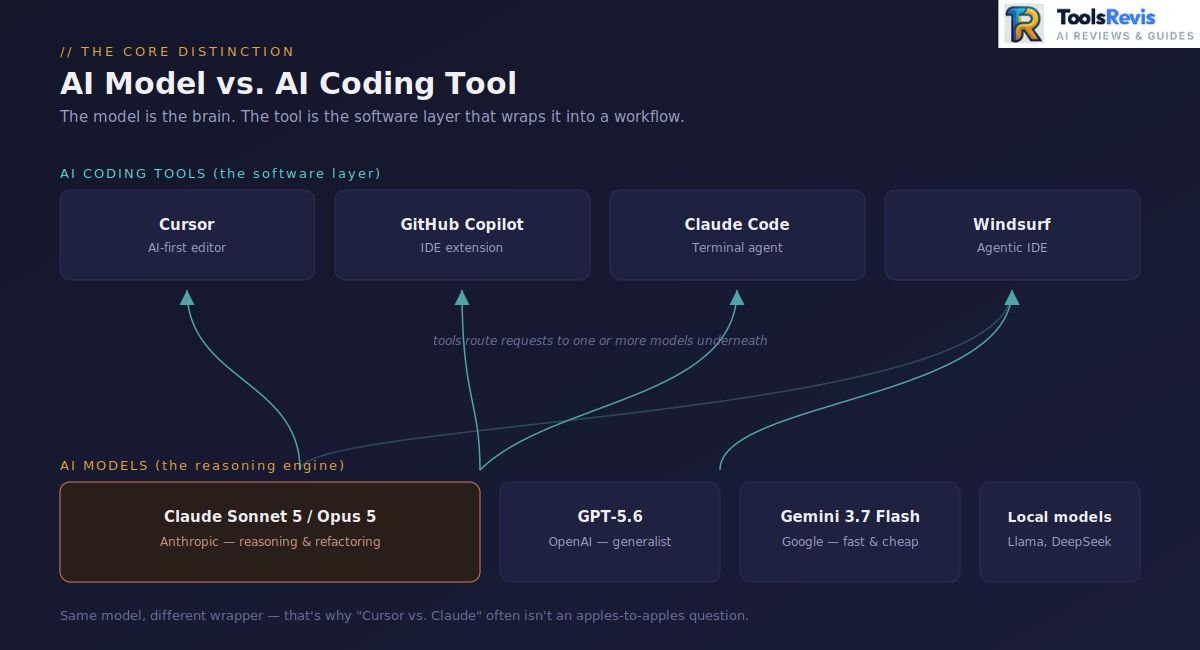
An AI model is the underlying “brain” (like Claude or GPT-5.6) that reasons and generates code, while an AI coding tool is the software layer (like Cursor or Copilot) that wraps that model into a usable developer workflow.
Before we rank anything, let’s clear up a confusion that trips up even experienced developers: an AI model and an AI coding tool are not the same thing — though most blog posts throw the terms around interchangeably.
So what is an AI coding assistant, exactly? It’s the software layer that wraps one or more AI models into a usable developer workflow — reading your files, understanding your project context, suggesting completions, and in more advanced cases, autonomously editing code, running terminal commands, and fixing its own mistakes.
Here’s why this distinction actually matters for your decision:
- Many tools run on the same models. Cursor, Windsurf, and even parts of GitHub Copilot all route requests to Claude, GPT, or Gemini under the hood. So when people ask “is Cursor better than Claude?“In many cases, that comparison isn’t entirely accurate because Cursor can use Claude as its underlying AI model, meaning the two aren’t always separate technologies.
To make this practical, here’s the rough breakdown of how these ai code models map onto the tools built around them:
| Model family | Provider | Common coding environments |
|---|---|---|
| Claude Sonnet / Opus | Anthropic | Claude Code, Cursor and other AI coding tools |
| GPT-5.6 | OpenAI | Codex, ChatGPT and supported coding tools |
| Gemini | Gemini Code Assist and Google developer tooling | |
| Open-source models | Various | Cline, Continue, Ollama and local setups |
As you continue through this guide, remember the difference between AI models and AI coding tools. Knowing this distinction helps you choose not only the right AI engine for your coding tasks but also the best platform to make the most of its capabilities.
Best AI Models for Coding (2026)
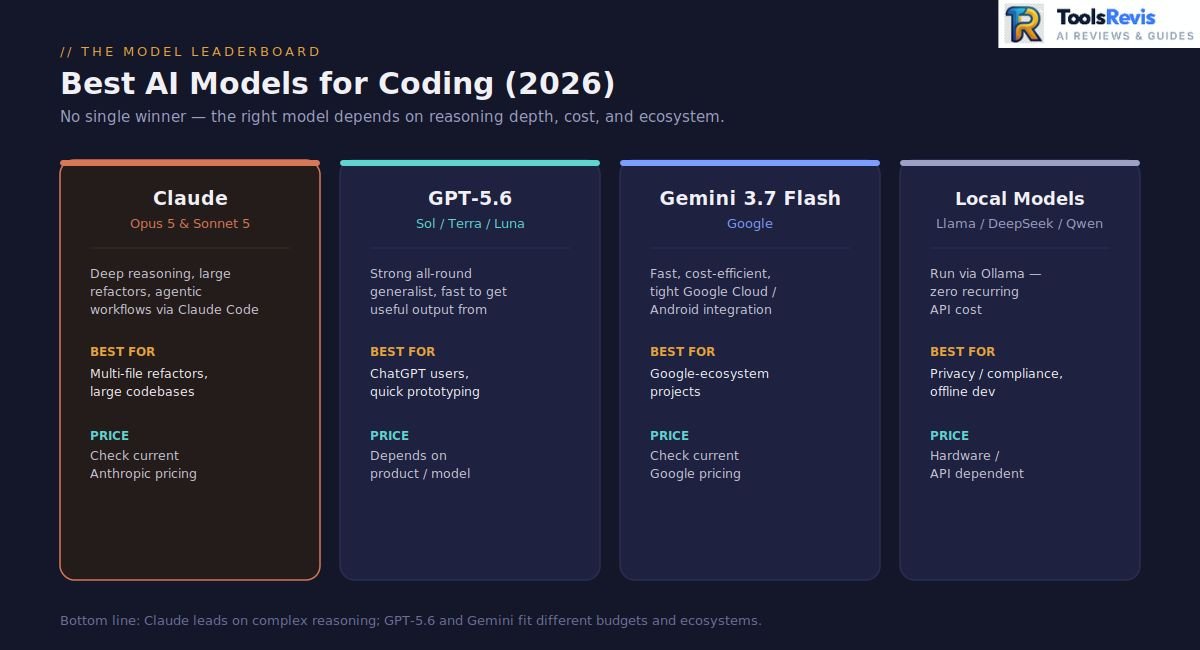
The best AI models for coding in 2026 are Claude Opus 5 and Sonnet 5 for reasoning-heavy work, GPT-5.6 for general-purpose coding, and Gemini 3.7 Flash for Google-ecosystem projects.
Choosing the best model for coding is one of the highest-intent searches in the AI space. The AI model you choose has a major impact on how effectively it understands your codebase, identifies bugs, and produces reliable code that continues to perform well as your project grows.
So, which is the best AI model for coding right now? There isn’t a single universal answer — but there is a clear leaderboard depending on what you value most: raw reasoning depth, cost-efficiency, or ecosystem fit. Let’s break down the top contenders.
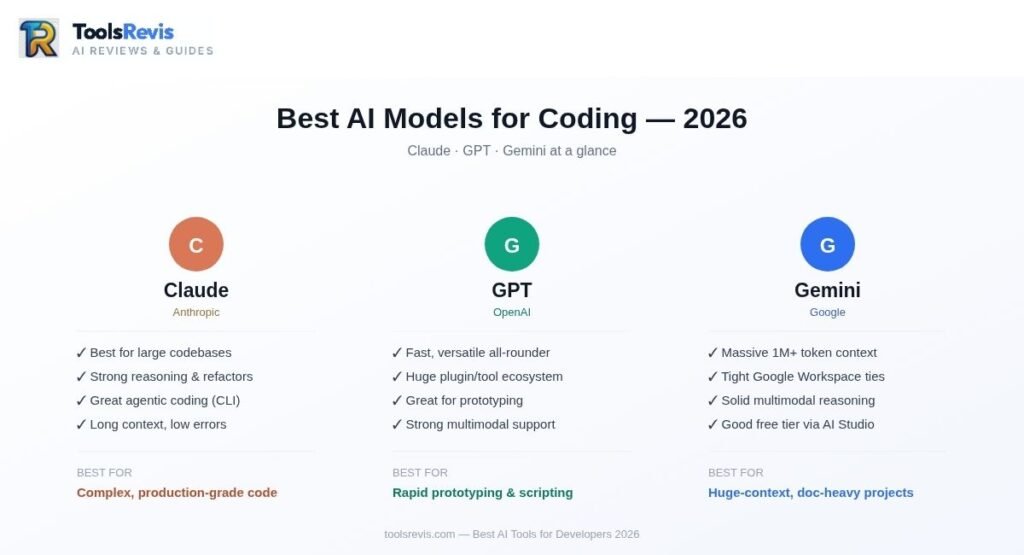
Claude Opus 5 & Sonnet 5: Top Picks for Advanced Reasoning and Large-Scale Refactoring
Claude’s Opus and Sonnet models are strong choices for complex coding, large-scale refactoring, and agentic software-engineering workflows. Benchmark results can vary by model version, benchmark methodology, and evaluation setup.
If you ask developer communities what AI model is best for coding in 2026, Claude’s Opus and Sonnet lines come up more than anything else — and it’s not just brand loyalty. Claude’s latest models remain strong candidates for complex coding, refactoring, and agentic software engineering, but benchmark results vary by model version, benchmark methodology, and evaluation setup.
Claude Sonnet 5 (Anthropic’s mid-tier workhorse) trades a bit of that top-end reasoning power for speed and cost-efficiency, making it the practical daily-driver choice for most developers, while Opus 5 is reserved for the genuinely hard architectural problems.
Best for: Multi-file refactors, understanding large codebases, agentic terminal workflows (via Claude Code), and anyone who wants the fewest “wait, that’s not what I asked for” moments.
GPT-5.6 — Best All-Rounder for ChatGPT Users
GPT-5.6 is a strong general-purpose coding family from OpenAI, with Sol positioned for demanding reasoning and coding tasks and lower-cost variants available for everyday workloads.
Searching for the best GPT for code? GPT-5.6 is OpenAI’s current model family for advanced coding and general-purpose work, with Sol positioned as the flagship model and Terra and Luna providing lower-cost options. GPT-5.6 Sol is designed for coding, agentic work, research, and other demanding tasks. It’s a strong generalist — competent across nearly every language, well-integrated into the broader ChatGPT ecosystem, and a comfortable choice if your team already lives inside OpenAI’s tools for writing, research, and coding alike.
Ask any Reddit thread “best chat GPT model for coding” and you’ll find GPT-5.6 recommended consistently for its balance — not always the single sharpest reasoner on the hardest refactor tasks, but rarely the wrong choice either, and often the fastest to get useful output from with minimal prompt engineering.
Best for: Teams already using ChatGPT/OpenAI tools, general-purpose coding across many languages, quick prototyping.
Gemini 3.7 Flash — Best for the Google Ecosystem
Gemini 3.7 Flash is Google’s fast, cost-efficient workhorse model for coding and agentic workflows, while Gemini 3.1 Pro remains Google’s stronger option for the hardest math and reasoning tasks. Gemini 3.7 Flash (including the Flash variant now powering Google Antigravity) is the natural pick if your stack already leans on Google Cloud, Firebase, or Android development. It doesn’t dominate the “current best AI model for coding” conversations the way Claude or GPT does, but it holds its own on speed and cost, and its tight integration with Google’s developer tools gives it a practical edge for specific workflows — especially multi-agent, browser-testing-heavy projects.
Best for: Google Cloud/Android developers, teams wanting native Google tool integration, cost-conscious high-volume usage.
Top Local and Open-Source AI Models for Coding
The best local AI models for coding are Llama-based models, DeepSeek-Coder, and Qwen2.5-Coder — all run through tools like Ollama for zero recurring API cost.
Not everyone wants — or is allowed — to send proprietary code to a cloud API. This is where the best local AI models for coding come in: options like Llama-based coding models, DeepSeek-Coder, and Qwen2.5-Coder, run through tools like Ollama.
They won’t out-reason Opus 5 on a gnarly distributed-systems bug, but for privacy-sensitive teams, compliance-restricted environments, or developers who simply refuse to pay per-token forever, they’re a legitimately solid option — and the gap between local and cloud models keeps narrowing every few months.
Best for: Privacy/compliance-restricted teams, offline development, zero recurring API cost (hardware cost only).
Quick Comparison: Best AI Models for Coding (2026)
| Model | Best For | Pricing |
|---|---|---|
| Claude Sonnet 5 | Daily coding & agentic work | Check current Anthropic pricing |
| Claude Opus 5 | Complex reasoning & refactoring | Check current Anthropic pricing |
| GPT-5.6 | General-purpose coding | Depends on product/model |
| Gemini 3.7 Flash | Fast agentic coding | Check current Google pricing |
| Local models | Privacy & offline work | Hardware/API dependent |
Bottom line: For complex reasoning and large-scale coding tasks, Claude remains one of the strongest options, while GPT-5.6 and other frontier models can be better fits depending on task, cost, and workflow.
Best AI Tools for Developers: Top Coding Assistants (2026)
The top AI coding tools in 2026 include Cursor, GitHub Copilot, Claude Code, Windsurf, and Qodo, with each tool designed for different developer workflows.
Now that we’ve covered the models powering the intelligence, let’s talk about the tools developers actually open every morning. If you’ve searched “top AI coding assistants 2026” or “best AI IDE for coding,” you’ve probably noticed the market has consolidated around a handful of serious contenders — each optimized for a different way of working.
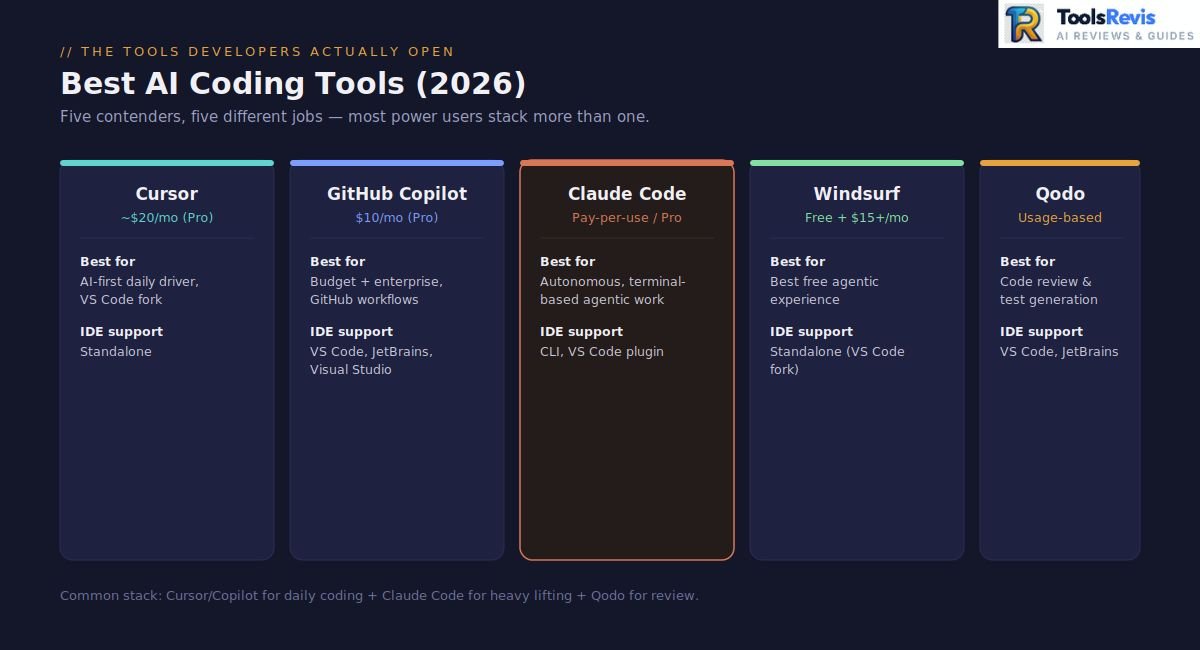
Cursor — Best Overall AI Code Editor
Cursor is a VS Code fork with AI built directly into the core editing experience, best for developers who want one polished, AI-first IDE as their daily driver.
Cursor is one of the most-discussed names across every top AI code editors conversation right now. Built as a VS Code fork with AI woven directly into the core experience rather than bolted on as an extension, Cursor is designed around an AI-first editing workflow, with codebase context, multi-file editing, and agentic features built directly into the editor.
At roughly $20/month for Pro, it’s not the cheapest option, but it’s become the default recommendation whenever someone asks which tool deserves to be their primary editor rather than a side assistant.
Best for: Developers who want one polished, AI-first IDE as their daily driver.

Fig: Cursor’s Composer and Agent planning a new feature inside the editor.
Devin — Autonomous Software Engineering
Devin is focused on more autonomous software-engineering workflows, where the agent can plan and execute larger tasks with less manual intervention. Because product features and pricing can change quickly,
check the official documentation before publishing specific limits or plan details.
Best for: Well-scoped, delegatable engineering tasks.
GitHub Copilot — Best Budget & Enterprise Pick
GitHub Copilot is one of the most widely adopted AI coding tools, especially among developers already using GitHub and Microsoft’s development ecosystem, largely because of two things: it’s cheap to start ($10/month for Pro, with a genuinely usable free tier), and it slots directly into existing GitHub/Microsoft workflows without any friction.
The trade-off developers keep flagging: Copilot’s premium request system means using top-tier models like Claude Opus inside Copilot chat can burn through your monthly allowance fast — advanced models often consume multiple premium requests per single use. It’s a reliable enterprise choice, just not the most powerful agent on the market.
Best for: Teams already on GitHub Enterprise, budget-conscious individual developers, low-friction onboarding.

Fig: GitHub Copilot generating and testing a new service in VS Code.
Claude Code — Best for Terminal & Agentic Workflows
Claude Code is a terminal-based coding agent that reads your codebase, plans changes, edits multiple files, and runs tests autonomously — best for developers who prefer CLI workflows.
If you live in the terminal and want an AI that doesn’t just suggest code but actually does the work — reading your codebase, planning changes, editing multiple files, running your test suite, and iterating until it’s done — Claude Code is the tool built for exactly that. Its expansive context window also allows it to analyze and edit massive files or entire codebases without dropping earlier details from memory.
It’s less of an “editor” and more of a coding agent that happens to live in your command line.
Best for: Autonomous multi-file refactors, developers who prefer CLI workflows over a GUI, complex architectural changes.

Fig: Claude Code reading the codebase and editing files for a dark mode feature.
Qodo — Code Review & Testing
Qodo is an AI tool focused on code review and test generation rather than general-purpose coding, best used alongside a main editor like Cursor or Windsurf.
Qodo has carved out a niche around code-quality-focused AI — think automated code review and test generation more than raw autocomplete. Since this is one of the more search-heavy comparison areas, let’s settle the common questions directly:
Best for: Teams prioritizing automated code review and test generation over general coding assistance.
Warp — The Terminal Reimagined
Warp is a modern, AI-integrated terminal (not a full IDE), built for developers who want natural-language-to-shell-command translation and collaborative terminal blocks.
Best for: Terminal-heavy developers who want AI baked into their shell, not just their editor.
Quick Comparison: Best AI Coding Tools (2026)
| Tool | Approx. Price | Best For | IDE Support |
| Cursor | Pro $20/mo, Pro+ $60/mo, Ultra $200/m | All-around AI-first IDE | Standalone (VS Code fork) |
| GitHub Copilot | $10/mo (Pro) | Budget + enterprise safety | VS Code, JetBrains, Visual Studio |
| Claude Code | Pay-per-use / Pro plans | Autonomous terminal agent workflows | CLI, VS Code plugin |
| Windsurf | Free tier + $15+/mo Pro | Best free agentic experience | Standalone (VS Code fork) |
| Qodo | Usage-based tiers | Code review & test generation | VS Code, JetBrains |
| Warp | Free + paid tiers | AI-powered terminal | Terminal (not IDE) |
The honest takeaway: most experienced developers don’t pick just one. The most common pattern among power users is stacking tools — Cursor or Copilot as the daily editor, Claude Code for the heavy autonomous lifting, and a code-review layer like Qodo running quietly in the background.
Best Free & Open-Source AI Coding Tools
The best free AI coding tools in 2026 are Windsurf’s free tier, GitHub Copilot Free, Gemini CLI, and open-source options like Cline and Aider.
Not every developer wants — or can afford — a $20/month subscription just to try out AI-assisted coding. The good news: 2026’s free ai coding assistants landscape is genuinely strong, not just a watered-down trial funnel designed to push you toward a paywall.
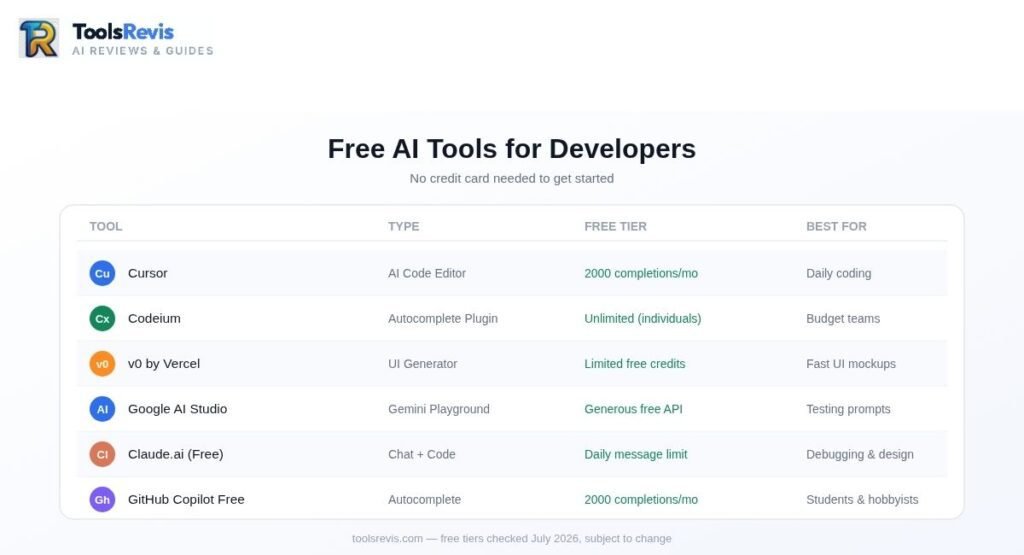
Here’s a real list of free AI assistants worth knowing about, organized by how they actually work:
Free Tiers on Paid Tools
Several of the tools we’ve already covered offer free tiers that are legitimately usable for daily development, not just a taste:
- Windsurf: Unlimited tab completions plus a meaningful number of free premium model requests each month — one of the most generous free offerings in the market.
- GitHub Copilot Free: A usable free tier for students, hobbyists, and light daily use.
- Gemini CLI: A free tier suited to terminal-based usage.
Free plans and quotas vary by provider and can change over time, so check the current plan before relying on a specific monthly or daily limit.
Fully Free & Open-Source AI Coding Tools
If you’re specifically hunting for open source ai coding tools rather than free tiers of proprietary products, these are the names that come up again and again:
- Cline: A fully open-source VS Code extension offering full agentic capabilities — multi-file editing, terminal command execution, MCP server integration. The catch: you bring your own API key, so you pay the model provider directly rather than a subscription fee. API costs vary depending on the model, context size, and amount of agentic usage, so users should monitor their token consumption rather than assume a fixed monthly cost.
- Aider: Git-native and CLI-based, popular among developers who want AI changes tracked cleanly through diffs and commits. Like Cline, it’s model-agnostic and works with your own API keys.
- Continue.dev + Ollama: For genuinely zero recurring cost, pairing Continue.dev with locally-run Ollama models (Llama, DeepSeek-Coder, Qwen2.5-Coder) eliminates API costs entirely — your only expense is the hardware to run the models.
The software itself may be free or open source, but cloud-model usage can still generate API costs. Local models can remove recurring API charges but require suitable hardware.
Best Coding AI Open Source — What You’re Trading Off
It’s worth being honest about the trade-offs before you commit to a fully free ai coding agents setup:
- No built-in model optimization or bulk pricing discounts — you pay raw API rates.
- No vendor support; you’re troubleshooting through GitHub issues and community Discord servers.
- No polished usage dashboards, so tracking your own costs requires external monitoring.
That said, for developers who want full control over model choice, absolute cost transparency, or simply refuse to be locked into a single vendor’s ecosystem, this remains one of the most future-proof ways to work.
Top Free Coding Tools 2026 — Quick Reference
| Tool | Type | Cost Structure | Best For |
| Windsurf | Free tier | Free (limited premium requests) | Best overall free agentic experience |
| GitHub Copilot Free | Free tier | Free (usable monthly quota) | Students, light daily use |
| Gemini CLI | Free tier | Free (usable daily quota) | Terminal-based free usage |
| Cline | Open source | Free tool + your own API cost | Full agentic control, BYO model |
| Aider | Open source | Free tool + your own API cost | Git-native, diff-based workflows |
| Continue.dev + Ollama | Open source | Fully free (local hardware only) | Zero recurring cost, privacy-first |
Bottom line: you no longer need to spend a cent to get real agentic AI coding help in 2026 — you just need to decide whether you’d rather trade a monthly subscription for a bit more setup effort and your own API key.
Best AI Coding Tools for Students and Beginners
Free Resources to Learn Coding with AI
Free resources offer beginners an approachable way to practice programming without upfront financial commitments. These platforms combine inline code suggestions with interactive learning environments so you can build projects while learning core concepts. Free options—such as the free tier of GitHub Copilot for personal accounts, the open-source Gemini CLI terminal tool, and browser-based coding workspaces like Replit—give you access to top-tier AI capabilities right out of the box. They reduce initial setup friction, allowing you to focus on logic and practice rather than environment configuration.
Best for: Absolute beginners who want to explore coding without spending money.
Best AI Tools for Computer Science Students
AI coding assistants designed for students serve as interactive tutors that help navigate coursework and complex computer science topics. These tools help break down multi-step homework problems, explain intricate algorithms, and isolate tricky bugs in assignment code. By translating dense compiler errors into clear plain language, they help you understand why a solution works instead of just giving away the final code.
Best for: Computer science students seeking step-by-step guidance on assignments and conceptual debugging.
Best AI Tools for Developers by Programming Language
The best AI tool depends on your language: Claude and GPT-5.6 lead for Python, Cursor and Copilot for JavaScript/TypeScript, and Claude Opus 5 for Rust.
AI coding tools aren’t one-size-fits-all — a model that excels at Python might stumble on Rust’s borrow checker, and a tool built for JavaScript’s async patterns won’t necessarily shine in enterprise C#. If you’ve searched “best AI for coding Python” or “best C# coding AI,” you already know the generic “best overall” lists rarely answer your real question. Here’s a language-by-language breakdown.
| Language | Recommended AI | Why |
| Python | Claude (Opus/Sonnet), GPT-5.6 | Both excel at Python thanks to massive training data volume; Claude edges ahead on complex data pipelines and ML scripting, GPT-5.6 is strong for quick scripting and general-purpose tasks. Cursor + Claude is the most-recommended combo for best Python AI coding tools searches. |
| JavaScript / TypeScript | Cursor, GitHub Copilot | As a JavaScript AI helper, Copilot’s massive training exposure to JS/TS repos makes it fast and reliable for everyday web dev; Cursor’s multi-file context handling shines on larger React/Node codebases. |
| Rust | Claude Opus 5 | Strong reasoning models can be particularly useful for ownership, lifetime, and borrow-checker problems, but output should still be compiled and tested. |
| C# | GitHub Copilot, Claude Code | Copilot’s tight Visual Studio integration makes it the practical default for best C# coding AI in enterprise .NET environments; Claude Code is strong for larger architectural refactors. |
| Java | GitHub Copilot, Claude | Copilot’s IDE integration (IntelliJ/Eclipse) makes it practical for enterprise Java development; Claude helps with larger architectural reasoning in legacy codebases. |
| SQL | GPT-5.6, Claude | For the best AI tool for SQL coding, both handle query optimization and schema design well; GPT-5.6 tends to explain query logic more conversationally, useful for less experienced database users. |
A Quick Note on Language-Specific Accuracy
Regardless of which model or tool you pick, one pattern holds true across every language: the less common the language or framework, the more you should verify output manually. Popular languages like Python and JavaScript benefit from massive training data volume, meaning fewer hallucinated functions or outdated syntax. Niche languages (Lua, MATLAB, older COBOL/Fortran codebases) see noticeably higher error rates — treat AI output here as a strong first draft, not a final answer.
Bottom line: don’t just pick the “best AI overall” — match the tool to your primary language. A Python developer and a Rust developer asking “which AI is best for coding” should often land on different answers.
Best AI-Powered IDEs by Platform
Best AI Coding Tools for Mac
Mac developers often seek lightweight, high-performance editors tailored to macOS workflows and Apple ecosystem development. Cursor stands out as an exceptionally smooth AI-native editor for macOS, offering fast multi-file edits and deep codebase indexing that integrates effortlessly with Mac keyboard shortcuts. Alternatively, Zed provides a blazingly fast, Rust-based editing experience on Mac with native AI capabilities for developers who prioritize sheer performance alongside smart autocomplete.
Best for: macOS developers looking for fluid, high-speed editors optimized for Apple silicon and intuitive hotkey workflows.
Best AI Coding Tools for Linux
Linux environments require development tools that are highly configurable, resource-efficient, and easy to run across various distributions. VS Code equipped with extensions like GitHub Copilot or open-source AI plugins works seamlessly on Linux, providing stable autocomplete and terminal integration without heavy overhead. For those who prefer ultra-fast, lightweight native applications, Zed offers native Linux builds with built-in AI assistant features that handle large codebases smoothly.
Best for: Linux power users and open-source developers who need flexible, lightweight AI integration.
Best AI-Powered IDE for JavaScript/Web Development
Web developers rely heavily on tools that can instantly understand frontend frameworks, modern JavaScript/TypeScript syntax, and complex DOM structures. Cursor acts as a powerful web development companion by analyzing full JavaScript project structures to assist with component refactoring, API integration, and multi-file updates. Additionally, VS Code paired with GitHub Copilot remains an industry standard for web engineers, offering reliable code completions and real-time guidance across full-stack JavaScript applications.
Best for: Full-stack and frontend engineers building modern JavaScript, TypeScript, and web framework applications.
Best AI Tools for C++ Development
Systems programming in C++ demands AI tools capable of processing strict syntax rules, manual memory management patterns, and massive enterprise codebases. JetBrains AI integrates directly into C++ environments like CLion to offer deep, language-aware refactoring, automated documentation generation, and intelligent context explanations tailored to complex systems. For developers who prefer a more modular setup, VS Code enhanced with GitHub Copilot provides responsive inline code generation and debugging support across intricate C++ projects.
Best for: Systems engineers, game developers, and C++ programmers navigating complex, low-level architecture.
Best AI Code Generator for Java
AI-powered Java generation leverages deep type systems and strict class structures to draft boilerplate and complex business logic. GitHub Copilot offers seamless integration across major Java environments—including IntelliJ IDEA and Eclipse—delivering real-time inline suggestions and context-aware auto-completion. Meanwhile, Claude models excel at architectural reasoning, helping engineers unravel legacy monoliths, map enterprise dependencies, and execute large-scale refactoring.
Best for: Java developers modernizing legacy codebases or seeking fast autocomplete inside IntelliJ and Eclipse.
Best AI Tools by Use Case
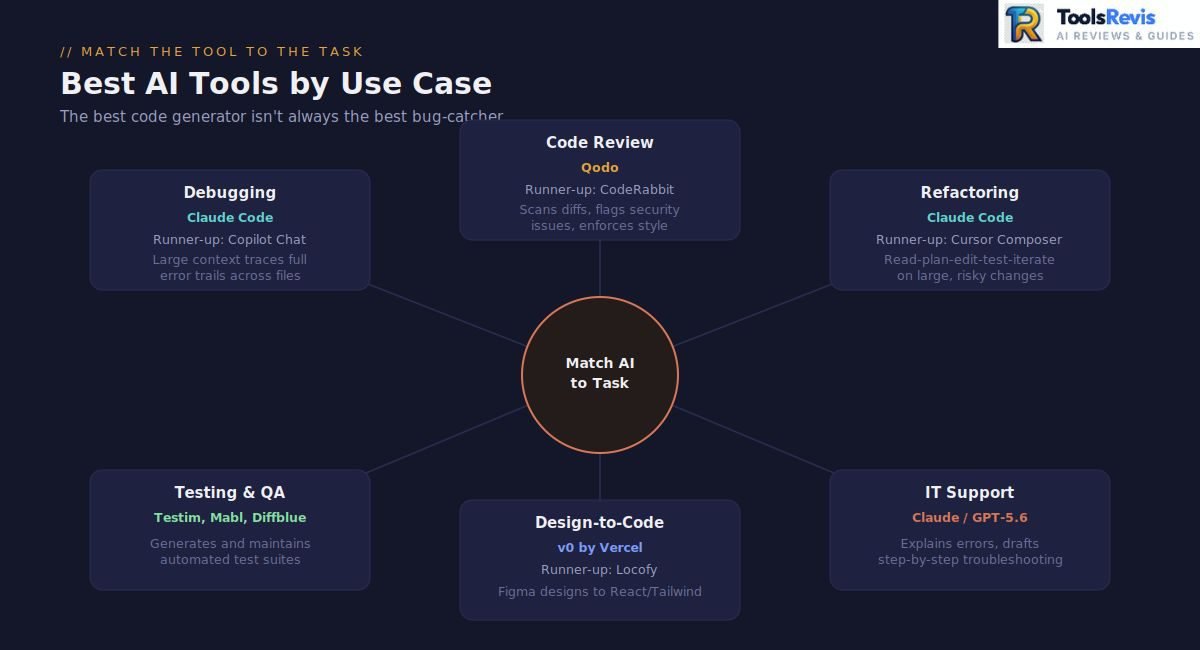
The best AI tool also depends on the task: Claude Code leads for debugging and refactoring, Qodo for code review, and v0 by Vercel for design-to-code
. Beyond language, the task you’re using AI for matters just as much. An AI that’s brilliant at generating new code from scratch isn’t necessarily the one you want catching a subtle production bug. Let’s break down the best ai tools for developers by specific use case.
Best AI Tools for Developers Debugging in 2026
The best AI for debugging is Claude Code, thanks to its large context window that can trace an entire error trail from failing test to root cause.
When it comes to the best AI for debugging, the winning trait isn’t creativity — it’s the ability to trace logic across multiple files and hold the entire error context in mind at once.
Best debugging AI: Claude Code (for full-project debugging), GitHub Copilot Chat (for quick, in-editor debugging on smaller snippets).
Code Review
The best AI for code review is Qodo, purpose-built to scan diffs, flag vulnerabilities, and enforce style consistency.
Automated code review is the process of using AI-powered tools to automatically analyze source code for bugs, security vulnerabilities, and style violations before human inspection.
Standardized Consistency: Enforces uniform coding guidelines and architectural standards across your entire repository without bias.
Proactive Bug Detection: Catches subtle logic flaws, edge-case errors, and security risks that human reviewers frequently overlook.
Accelerated Delivery Cycles: Drastically shortens pull request merge times by providing instant feedback, freeing senior engineers for higher-level architectural decisions.
For best AI for code review, the priorities shift again — you want consistency, an eye for security issues, and the discipline to flag things a tired human reviewer might miss at 6 PM on a Friday.
Best for code review: Qodo, CodeRabbit, GitHub Copilot’s built-in code review feature for lighter, in-workflow reviews.
Refactoring
The best AI for refactoring is Claude Code, which follows a read-plan-edit-test-iterate workflow that mirrors how a careful senior engineer approaches risky changes.
Searches for top-rated AI-driven code refactoring tools and recommendations for AI code refactoring have grown steadily as developers move past “write me a function” prompts and start trusting AI with much bigger, riskier changes — restructuring entire modules, migrating frameworks, or untangling years of technical debt.
Best for refactoring: Claude Code (large-scale, multi-file), Cursor’s Composer mode (medium-scale, IDE-based).
Prefer something lighter and free? Our Code Optimizer tool lets you paste any snippet and get instant performance and readability suggestions — no subscription needed.
Testing & QA Automation
AI-powered testing tools focus on automating test creation, test maintenance, and QA workflows rather than general-purpose coding.
Tools like Testim, Mabl, and Diffblue use AI to generate and maintain automated test suites, reducing the manual effort of writing and updating tests as an application changes. These tools are typically used alongside a main coding assistant rather than as a replacement — the coding tool writes the feature, and the testing tool helps validate it stays working over time.
Best for: Teams wanting automated test coverage and QA workflows alongside their main coding tool.
Design-to-Code (Figma-to-Code Tools)
The best design-to-code tools are v0 by Vercel and Locofy, which convert Figma designs or screenshots directly into working React/Tailwind components.
This is one of the more specialized — and rapidly growing — corners of the AI coding world. If you’ve asked “what is the best design-to-code tool” or “what is the most effective design-to-code tool,” you’re looking at a different category entirely from general coding assistants: tools built specifically to convert Figma designs or screenshots directly into working frontend code.
Best for design-to-code: v0 by Vercel, Locofy, with Cursor for post-generation refinement.
IT Support & Troubleshooting
The best AI for IT support is Claude or GPT-5.6, both strong at explaining error messages and drafting step-by-step troubleshooting documentation.
A slightly different audience searches for the best AI for IT support — often internal teams troubleshooting tech issues for customers or employees rather than writing application code.
Best for IT support/troubleshooting: Claude or GPT-5.6 (via chat) for diagnosis and explanation, paired with your existing ITSM platform’s AI features for ticket handling.
Quick Reference: Best AI Tools by Task
| Use Case | Top Recommendation | Runner-Up |
|---|---|---|
| Debugging | Claude Code | GitHub Copilot Chat |
| Code Review | Qodo | CodeRabbit |
| Refactoring | Claude Code | Cursor Composer |
| Testing & QA | Testim, Mabl, Diffblue | — |
| Design-to-Code | v0 by Vercel | Locofy |
| IT Support/Troubleshooting | Claude / GPT-5.6 | ITSM-integrated AI |
Bottom line: the sharpest developers in 2026 aren’t loyal to one tool — they match the assistant to the task, using one AI for writing, another for reviewing, and a specialized tool for anything design-related.
What Reddit Developers Actually Recommend
Reddit developers consistently recommend a combo stack — Cursor or Copilot for daily coding, Claude Code for heavy lifting — rather than relying on a single AI tool.
Vendor pages will tell you their tool is revolutionary.
Here’s what the community consensus actually looks like once you filter out the noise:

Fig: A widely-discussed Reddit thread questioning the hype around AI coding tools.
A Common Multi-Tool Workflow
Across r/programming, r/webdev, and r/ChatGPTCoding, one pattern shows up again and again: developers rarely rely on a single AI tool. A typical recommended stack looks like this:
- Cursor or Copilot for daily coding, multi-file editing, and quick agent-mode tasks — the main workspace.
- Claude Code running alongside for the heavier lifting: complex debugging, large refactors, and documentation.
- A lightweight prototyping tool (Bolt, Lovable, or similar) kept separate from the main dev workflow, used purely for rapid demos and client mockups.
- ChatGPT or Claude chat for brainstorming, rubber-duck debugging, and writing commit messages — not actual code generation.
The “Best ChatGPT Model for Coding” Debate
When developers specifically discuss the best ChatGPT model for coding, the sentiment is consistently pragmatic rather than loyal: GPT models are praised for being fast and reliable for everyday tasks, but power users on r/programming and r/ChatGPTCoding frequently note that Claude’s reasoning models pull ahead on genuinely difficult, multi-step problems — the kind that require holding an entire codebase’s logic in mind rather than answering one isolated question.
The Honest Complaints Nobody Puts in Marketing Copy
A few recurring frustrations show up so often across developer subreddits that they’re worth calling out directly, because they’ll save you real time and money:
- “It worked in the demo, then broke at scale.” This is the single most common complaint about AI-generated applications — code that handles a handful of concurrent users perfectly, then falls over once real traffic hits.
- Pricing changes cause genuine backlash. When GitHub Copilot’s pricing shifted, discussion threads on r/programming generated within hours — a clear signal that unexpected billing changes erode trust fast, regardless of how good the underlying tool is.
- Skepticism about productivity claims is rising. A growing number of threads challenge the assumption that AI tools automatically make developers faster, with some developers reporting no noticeable productivity drop after dropping certain tools entirely — a reminder that perceived value and actual measured value don’t always match.
- Privacy and code-training concerns are a dealbreaker for many teams. Developers frequently ask whether a tool trains on their code or stores telemetry before adopting it — and entire companies block cloud-based assistants outright over IP and compliance concerns.
What This Means for Your Tool Choice
The community consensus by mid-2026 is refreshingly simple: there is no single universal “best” AI coding tool — only the best tool for your specific workflow, codebase size, and risk tolerance. Developers who evaluate tools based on where they actually need leverage — speed inside the editor, reliability on large codebases, or autonomy for bigger tasks — consistently end up happier than those chasing whichever tool trends highest on a benchmark leaderboard that week.
Bottom line: if a comparison article promises one single “best” tool with no caveats, that’s usually the first sign it wasn’t written by anyone who’s actually shipped production code with these tools.
These are community observations, not controlled benchmark results.
AI Tools for Agile Development Teams
Coding is only one part of software delivery. Tools such as Linear, Jira and ClickUp can help teams manage requirements, issues and sprint workflows alongside AI coding assistants.
- Linear: fast, keyboard-driven issue tracking with AI-assisted triage
- Jira + Atlassian Intelligence: enterprise-standard project tracking with AI summaries
- ClickUp AI: all-in-one workspace with AI task breakdowns and standups
Why This Category Has Become More Important Than Ever
As AI coding agents get faster at producing code, the actual bottleneck in software delivery shifts upstream — to planning, scoping, and coordination. Teams that pair a strong coding assistant with an AI-augmented project management tool tend to see the biggest overall velocity gains, precisely because neither half of the workflow is left as a manual, error-prone bottleneck while the other is automated.
Note: this is a deep enough topic to deserve its own dedicated guide — if you’re specifically evaluating agile AI project management tools, look out for our full comparison covering Linear, Jira, ClickUp, and Kiro in detail.
Bottom line: the best coding AI in the world won’t fix a project that’s poorly scoped or badly tracked — pairing your coding tool with the right AI-assisted PM tool closes that gap.
AI Coding Tools for Large Codebases and Enterprise Teams
Handling Large Files and Large Codebases
Large codebase navigation relies on expansive context windows and semantic indexing to maintain accuracy across interconnected repositories. Advanced AI platforms manage thousands of files by retaining structural dependencies without losing track of logic across complex architectures. Tools like Cursor excel at full-repository indexing and multi-file edits, while agentic CLI environments like Claude Code leverage massive context windows and subagents to inspect deep project trees, run terminal commands, and refactor code across entire codebases.
Best for: Senior engineers and enterprise developers working on large-scale applications with deep file dependencies.
Regulatory Compliance and Code Assistants for Large Teams
Enterprise deployment of AI coding assistants demands strict adherence to data security, privacy controls, and internal governance frameworks. Large organizations must ensure that proprietary source code is never used to train public foundation models and that telemetry data remains completely isolated. Enterprise-grade tools typically offer centralized admin dashboards, local context storage, strict zero-data-retention policies, and customizable access permissions to help development teams comply with global privacy regulations and corporate safety standards.
Best for: Security officers, IT administrators, and enterprise organizations prioritizing data protection and IP security.
Developer Productivity and Team Coding Metrics
Developer productivity tracking is an emerging tool category focused on measuring the practical impact of AI adoption across software engineering workflows. Rather than tracking raw throughput like lines of code written, modern productivity platforms analyze qualitative metrics such as cycle times, pull request review speeds, and code churn rates to evaluate how AI tools assist team performance. By tracking how developers collaborate with AI assistants during planning and implementation phases, these platforms offer engineering leaders actionable data to optimize developer workflows and measure return on investment.
Best for: Engineering managers and tech leads looking to assess team performance and optimize AI tool integration.
Pricing Breakdown & Hidden Costs
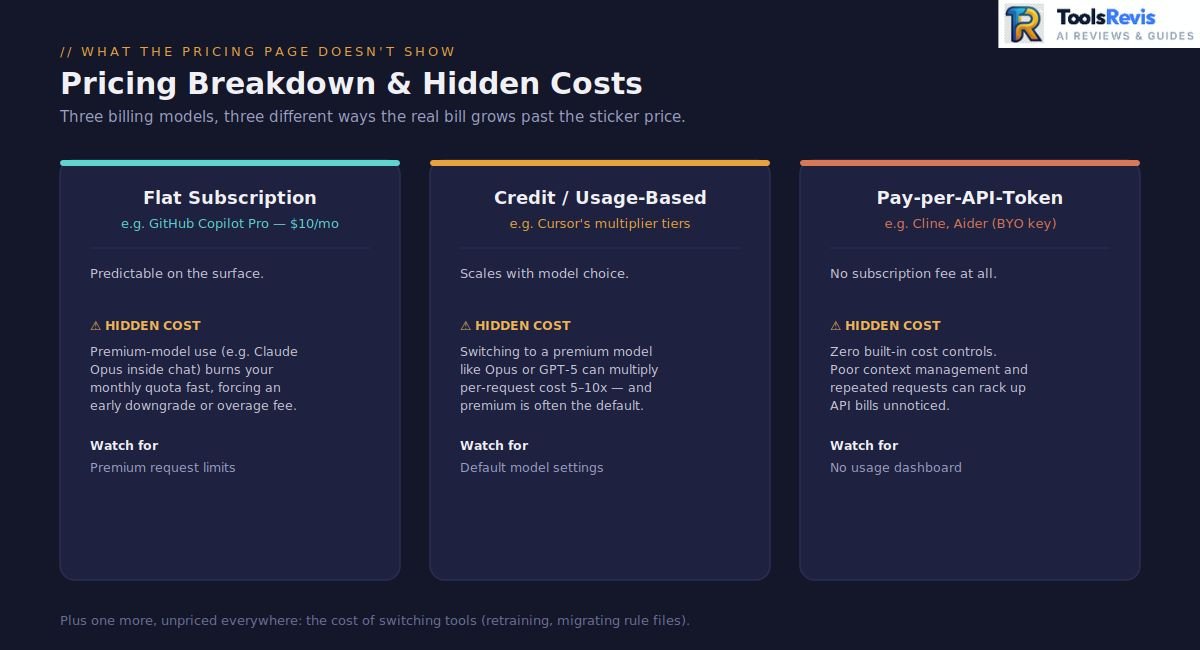
AI coding tool pricing typically hides extra costs through three models: flat subscriptions with premium-request limits, credit-based billing with model multipliers, and pay-per-API-token with no built-in cost controls.
Here’s something almost every comparison article glosses over: the sticker price on a pricing page rarely tells you what you’ll actually pay. Searches for AI coding assistant pricing changes have spiked to roughly 1,000 monthly searches — a clear signal that developers have been burned before and are now researching pricing before committing, not after.
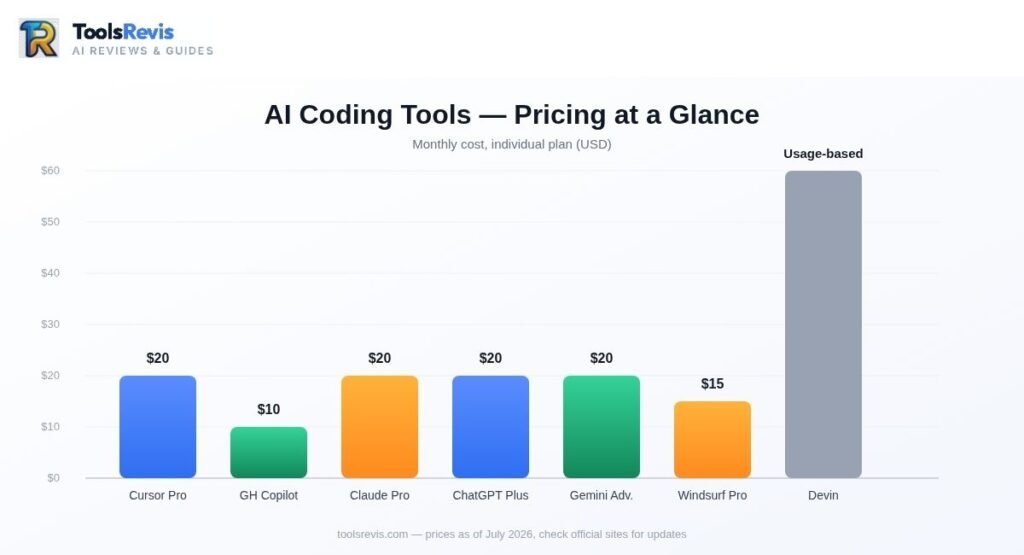
Let’s break down what’s really going on.
Subscription Price vs. Real Cost
Most AI coding tools now use one of three pricing models, and each hides a different kind of surprise:
- Flat subscription (e.g., GitHub Copilot Pro at $10/month): Predictable on the surface, but premium-model usage (like accessing Claude Opus inside Copilot chat) often consumes — meaning heavy users blow through their monthly limit fast and either downgrade their model choice or pay overage fees.
- Credit/usage-based billing (e.g., Cursor’s multiplier tiers): Switching from a mid-tier model to a premium model like Claude Opus or GPT-5 can multiply your per-request cost by 5–10x. Most tools default to premium models out of the box, so developers who don’t manually adjust settings end up paying far more than they expected.
- Pay-per-API-token (e.g., Cline, Aider): No subscription fee, but zero built-in cost controls either. Without external monitoring, it’s easy to rack up unexpected API costs without noticing — especially with poor context management driving repeated, wasteful requests.
The Hidden Add-On Costs Nobody Budgets For
Beyond the core subscription, a few recurring add-on costs show up across nearly every major tool:
- Cursor Bugbot: Uses usage-based billing for automated PR reviews.
- Copilot Premium Requests: After you use up your monthly quota, each additional premium request is billed separately, which can quickly increase costs for developers who rely heavily on AI-powered workflows.
A safe rule of thumb echoed across pricing comparisons: once real-world usage, overages, and add-ons are factored in.
The Cost Nobody Prices In: Switching Tools
There’s one expense that literally no pricing page mentions: the cost of switching tools. Migrating from one AI coding assistant to another means workflow disruption, team retraining, and reconfiguring project-specific rule files (.cursorrules to CLAUDE.md to .github/copilot-instructions.md, for example) — which is exactly why it’s worth getting your tool choice right the first time, rather than chasing every new release.
Qodo AI Pricing — A Quick Note
Since it’s a frequent search on its own, Qodo AI pricing is generally structured as usage-based tiers layered on top of whatever main coding tool you’re already using — positioning it as an add-on cost for code review and test generation, not a subscription replacement for a full coding assistant.
Quick Pricing Sanity-Check Table
| Cost Type | What to Watch For | Typical Impact |
| Premium request multipliers | Using top-tier models eats allowance 3x faster | Forces early upgrade or model downgrade |
| Credit/usage billing | Default settings push premium models | if unmanaged |
| Add-ons | Bugbot, SSO, extra seats | Additional recurring cost |
| Switching costs | Retraining, config migration | Learning curve and setup time |
| Real-world buffer | Overages, add-ons combined | list price |
Bottom line: the cheapest-looking plan on paper is rarely the cheapest tool in practice. Before committing, map out your actual usage pattern — not just the advertised monthly price — and you’ll avoid the pricing shock that fuels half the frustrated threads on r/programming.
Conclusion: Which AI Tool Should You Actually Pick?
There is no single best AI coding tool for every developer in 2026. Cursor is a strong choice for an AI-first IDE, Claude Code for terminal-based agentic work, GitHub Copilot for familiar editor and GitHub workflows, and GPT-5.6 or Claude for model-level coding tasks.
The best setup depends on your workflow, language, budget, and how much autonomy you want the AI to have.
Final Recommendation Table
| If you’re looking for… | Go with |
| Best overall AI-first code editor | Cursor |
| Best budget/enterprise-safe option | GitHub Copilot |
| Best for autonomous, terminal-based work | Claude Code |
| Best free tier | Windsurf |
| Best AI model for reasoning-heavy coding | Claude Opus 5 |
| Best AI model for general-purpose/ChatGPT users | GPT-5.6 |
| Best for code review & test generation | Qodo |
| Best fully free/open-source setup | Cline + Aider + local models |
| Best for Python | Claude or GPT-5.6 |
| Best for design-to-code | v0 by Vercel |
| Best for agile project management | Linear, Jira + AI, or ClickUp AI |
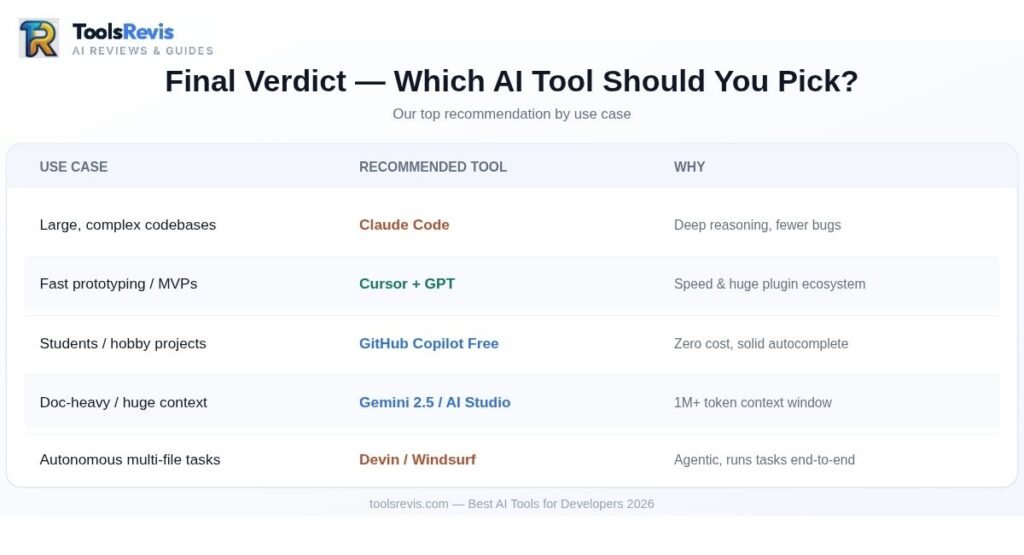
Whichever you choose, treat this list as your starting point, not your final answer — the fastest-moving part of this market is exactly where your own hands-on testing will matter more than any comparison article, including this one.
Read Next
- Cursor AI vs Kimi K3 — A detailed comparison of Cursor’s AI-first editor against the rising open-source Kimi K3 model, covering coding accuracy, pricing, and which one fits your workflow better.
- Windsurf vs Cursor: AI Coding Comparison — A side-by-side look at two of the most popular agentic IDEs, breaking down free tiers, editor experience, and which one wins for daily development.
- Claude Sonnet 5 vs GPT-5.6 Sol — A head-to-head of the two leading coding models, comparing reasoning depth, speed, and cost to help you pick the right engine for your projects.
Frequently Asked Questions
Here are the most common questions developers ask about choosing an AI coding tool in 2026.
1. Which AI tool is better for developers?
- Cursor: Best if you want a complete, AI-first code editor (IDE).
- Claude Code: Best for developers who prefer terminal/command-line workflows.
- GitHub Copilot: Best budget-friendly choice for teams already using GitHub.
2. What are the top 5 AI tools for coding?
The top 5 are Cursor, GitHub Copilot, Claude Code, Windsurf, and Qodo (specifically for code reviews).
3. Is Claude or ChatGPT better for coding?
- Claude: Better for complex logic, multi-step reasoning, and large code refactoring.
- ChatGPT: Better as a fast, reliable all-rounder for everyday, standard coding tasks.
4. Which is the best AI model for coding?
Claude Opus 5 leads for heavy reasoning tasks, while GPT-5.6 and Gemini 3.7 Flash are the top alternatives depending on budget and ecosystem.
5. What is the best AI code editor?
- Cursor: The best standalone AI-powered code editor overall.
- GitHub Copilot: The best choice to add AI features directly inside your existing editor (like VS Code).
6. Is there a free AI coding assistant?
Yes, Windsurf, GitHub Copilot Free, and Gemini CLI have free tiers, while open-source tools like Cline and Aider are free (you just pay for your own API keys).
7. Best AI for Python coding?
Both Claude and GPT-5.6 are excellent, but Claude has a slight advantage for complex data pipelines and Machine Learning scripts.
8. Cursor AI code editor alternative?
Windsurf: Best if you want a similar agentic IDE experience.
GitHub Copilot: Best if you want to keep using your current code editor instead of switching.
9. GitHub Copilot vs JetBrains AI — which is better?
GitHub Copilot is better if you switch between multiple editors like VS Code and Visual Studio. JetBrains AI is better if you work exclusively in JetBrains IDEs (IntelliJ, PyCharm, WebStorm), thanks to its deeper native integration.

I’m Umair Ahmad, founder of ToolsRevis. I personally test every AI tool we cover — signing up, running real workflows, checking pricing tiers, and comparing outputs — before writing a single word. My goal: cut through AI marketing hype with honest, hands-on verdicts.
Let’s achieve more together!