
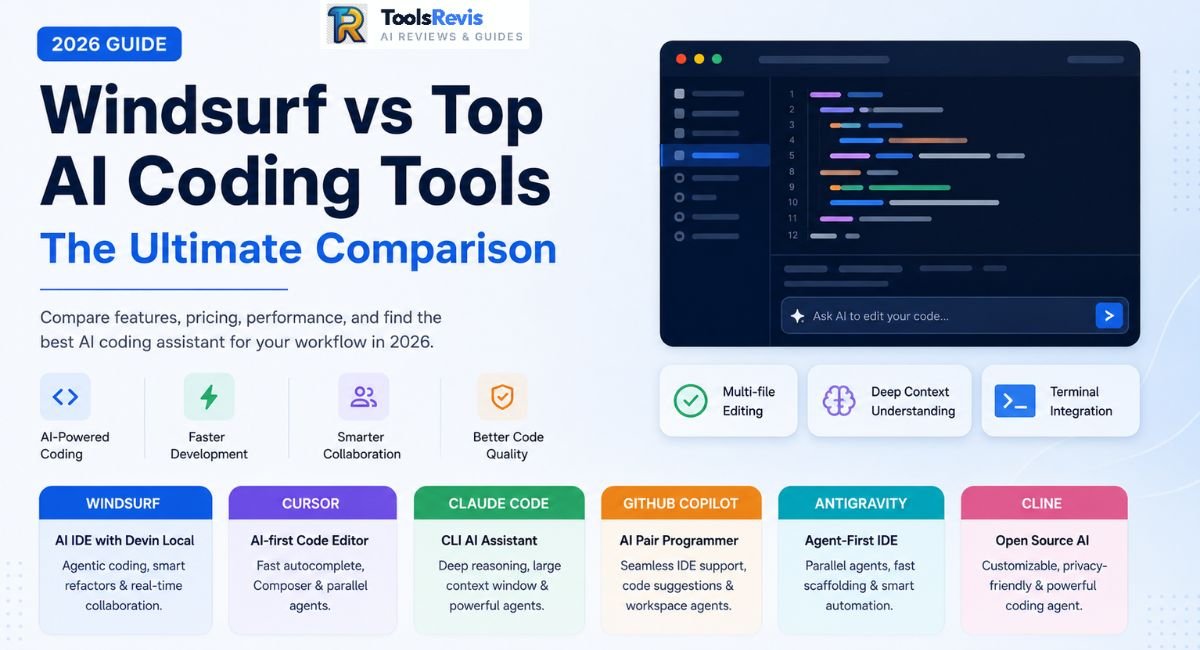
Pick the wrong AI coding tool in 2026 and you’re not just wasting money, you’re rebuilding your workflow every time a company gets acquired or a pricing model quietly changes underneath you.
Quick Answer
Cursor is the best all-around AI IDE for teams that want control and a mature ecosystem, but its credit system means real-world costs regularly exceed the $20 sticker price. Claude Code wins for large-scale refactors and terminal-first workflows thanks to its 1M-token context, at the cost of aggressive token burn. GitHub Copilot is the safest enterprise default. Google Antigravity is fastest for greenfield scaffolding. Windsurf — rebranded Devin Desktop in June 2026 — is the pick if you want agent orchestration baked in.
Introduction
Current roundups of 2026 AI coding platforms are quickly becoming obsolete. Codeium became Windsurf, Windsurf got fought over by OpenAI and Google, and Cognition folded it into a new identity — Devin Desktop — in June 2026. Cursor’s credit-pool billing (since June 2025) turns a “$20/month” plan into a variable bill once you manually pick Opus or GPT-4. Copilot swapped Premium Requests for token-metered “AI Credits” on June 1, 2026. Just a few resource-intensive queries can completely exhaust Claude Code’s 5-hour limit. And Antigravity — barely a year old — is already forcing its way into every serious comparison on scaffolding speed alone.
This guide breaks all of them down on what actually matters: real agent capability, real autocomplete latency, and what you’ll actually pay once credit systems and token meters are factored in — not just the sticker price.
While this comparison focuses on how Windsurf stacks up against Cursor, Claude Code, and Copilot, if you want a granular look at Cascade’s credit tiers, model multipliers, and plan limits, check out our in-depth Windsurf AI review.
Tool Snapshot: Side-by-Side Comparison
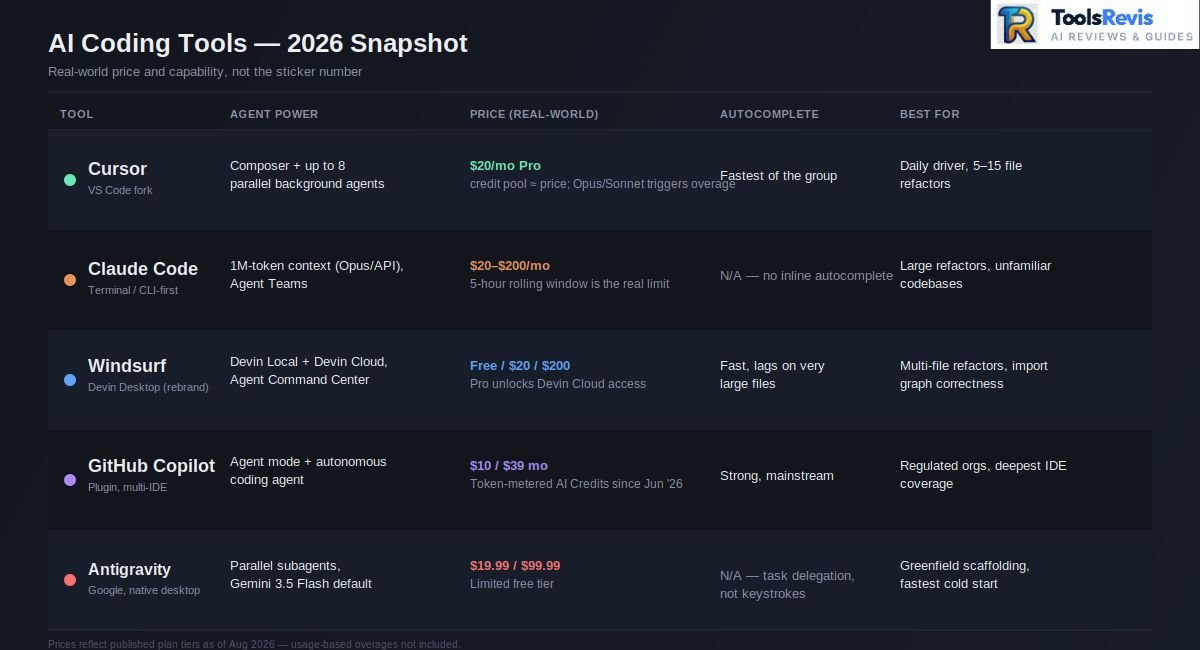
| Tool | Interface | Agent Power | Price (Real-World) | Autocomplete Speed | Large Refactoring Ability |
| Cursor | VS Code fork, most mature ecosystem | Strong — Composer + up to 8 parallel background agents | $20/mo Pro (credit pool ≈ price; heavy Opus/Sonnet use triggers overages) | Fastest of the group — near-instant Tab completions | Very strong with human-in-the-loop guidance; struggles on unsupervised “big bang” refactors |
| Windsurf (now Devin Desktop) | Standalone IDE (VS Code-based), rebranded June 2026 | Devin Local agent (replaced Cascade, retired July 1, 2026) + Devin Cloud, Agent Command Center (Kanban view) | Free tier; Pro $20/mo, Max $200/mo — Pro also unlocks Devin Cloud access | Fast, occasionally lags on very large files | Best correctness on multi-file refactors — maps import graphs before editing |
| Claude Code | Terminal/CLI-first, no GUI | Very strong reasoning, up to 1M token context (Opus/API), Agent Teams | $20/mo Pro, $100–$200/mo Max tiers; 5-hour rolling token window is the real constraint | N/A — not an inline autocomplete tool | Excellent for large, unfamiliar codebases and framework migrations; can exhaust a usage window mid-task |
| Codeium | Discontinued brand — merged into Windsurf in 2024–25, now Devin Desktop | — | — | — | Legacy brand; do not budget for it as a standalone product in 2026 |
| GitHub Copilot | Deepest IDE coverage — VS Code, JetBrains, Neovim, Visual Studio | Solid agent mode + autonomous coding agent, but trails Cursor/Antigravity on complex delegation | $10/mo Pro, $39/mo Pro+ (token-metered AI Credits since June 2026, replacing Premium Requests) | Strong, mainstream-language completions are reliable | Good for incremental changes; less suited to greenfield agent-led rebuilds |
| Google Antigravity | Native agent-first desktop app (not a VS Code fork), plus CLI/SDK | Very strong — parallel subagents, Gemini 3.5 Flash default, Claude Opus available; SWE-bench scores reported in the mid-to-high 70s%, varies by benchmark version | Limited free tier; meaningful usage requires Google AI Pro at $19.99/mo, Ultra at $99.99/mo | N/A in traditional sense — optimized for delegated tasks, not keystroke-level suggestions | Excellent for scaffolding greenfield projects fast; needs cleanup on directory structure and can hallucinate on unsupervised big refactors |
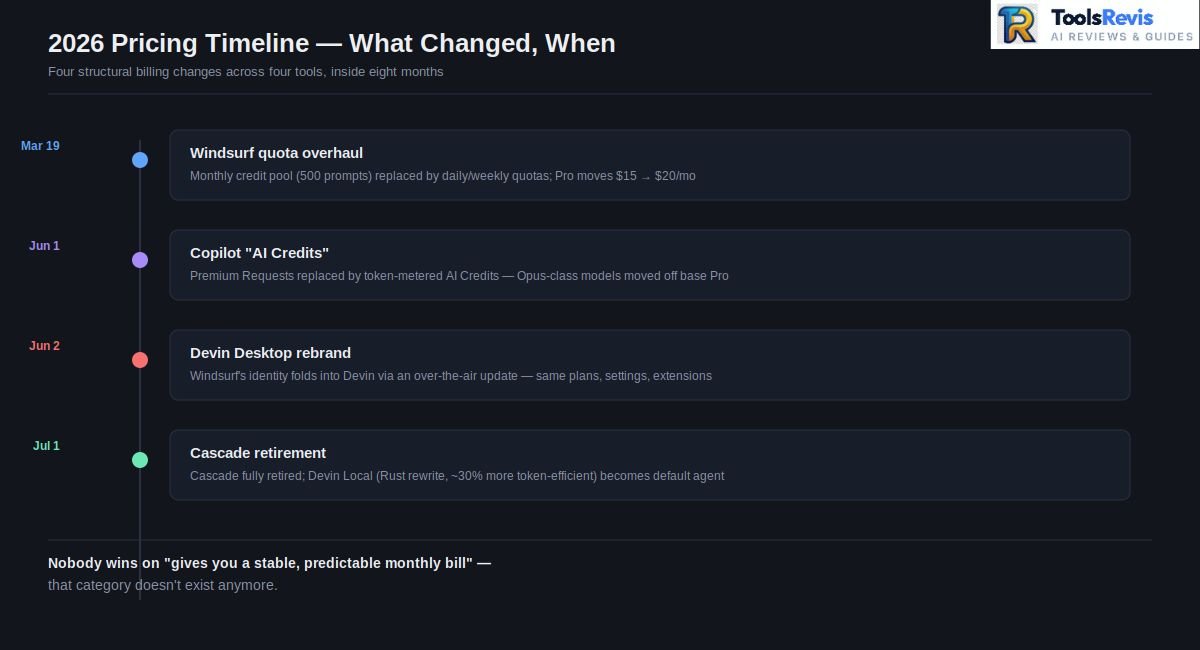
The one line to remember: Cursor and Copilot win on polish and ecosystem maturity, Claude Code and Antigravity win on raw reasoning power for big, messy tasks, and Windsurf/Devin Desktop wins on correctness when a refactor touches many files at once. Nobody wins on “gives you a stable, predictable monthly bill” — that category doesn’t exist anymore.
If you want to see where these tools rank among the broader engineering ecosystem, check out our list of the best AI tools for developers.
Google Antigravity vs Windsurf vs Cursor — Speed Benchmark
Antigravity scaffolds new projects fastest, Cursor has the fastest keystroke-level autocomplete, and Windsurf is the slowest to start but the most careful about not breaking imports — here’s the full 2026 speed breakdown.
Every “AI IDE speed test” published before Antigravity 2.0 launched at Google I/O 2026 is now measuring a different product. Antigravity 2.0 turned the original preview into a full agent platform with a standalone desktop app, CLI, SDK, and managed agents — and that changed the shape of every benchmark that followed.
Speed Results
Across multiple independent benchmark runs in 2026, a consistent pattern shows up:
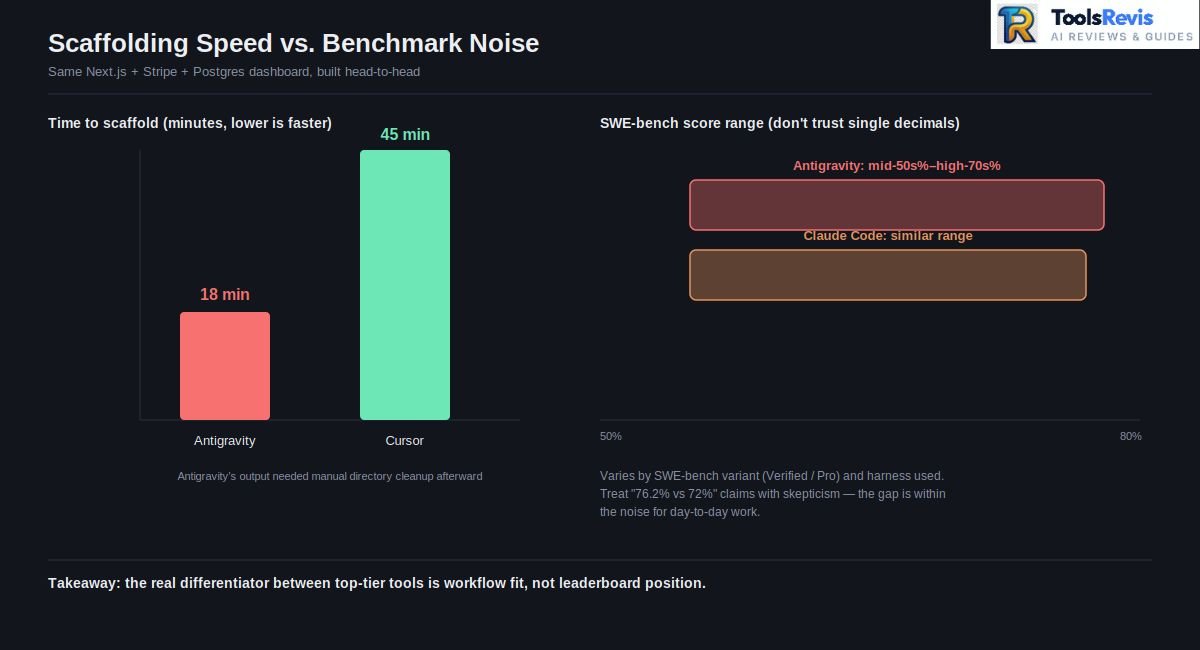
- Antigravity scaffolds fastest. In one head-to-head build of an identical Next.js + Stripe + PostgreSQL dashboard, Antigravity finished in roughly 18 minutes against Cursor’s 45 minutes — though the output needed manual directory cleanup afterward.
- Cursor is the fastest at the keystroke level. Its Tab autocomplete remains the snappiest of the three, a byproduct of years of latency optimization that neither Windsurf nor Antigravity has fully matched yet.
- Windsurf (Devin Desktop) is the slowest to start but the most conservative. Devin Local (successor to Cascade) tends to map the full import graph before touching a single file, which costs time upfront but avoids the circular-import errors that showed up in Cursor’s unsupervised refactors during the same tests.
- On parallel multi-module work, Antigravity pulled ahead of Windsurf by running agents across separate modules simultaneously rather than sequentially.
Broader benchmark data reinforces the pattern at the model level, though the exact numbers vary meaningfully depending on which SWE-bench variant and harness a given source uses — figures for Antigravity’s underlying model stack range from the mid-50s% to the high-70s% depending on whether you’re looking at SWE-bench Verified, SWE-bench Pro, or a vendor’s own benchmark run. Claude Code’s scores land in a similar range. Treat any single-decimal-point comparison between these tools (“76.2% vs 72%”) with skepticism — the practical takeaway practitioners agree on is that the gap between top-tier tools is within the noise for day-to-day work, and the real differentiator is workflow fit, not a benchmark leaderboard position.
Greenfield Tasks vs In-IDE Surgical Edits
This is the split that actually determines which tool you should reach for on a given Tuesday.
Greenfield / scaffolding work — new services, new dashboards, net-new features with no existing code to respect — is where Antigravity’s delegate-and-verify model shines. Give it a high-level prompt, let it plan, execute, and produce verifiable artifacts (test results, screenshots, browser recordings), and it will often beat a human-guided Cursor session on raw wall-clock time. The tradeoff is that it optimizes for “correct end state,” not “code that matches your team’s existing patterns” — expect to clean up structure afterward.
In-IDE surgical edits — a targeted fix inside a 2,000-line legacy file, a bug that only reproduces under specific state, a refactor that must preserve exact behavior — is where Cursor’s Composer and Windsurf’s Devin Local both outperform a fully delegated agent. Multiple teams running Antigravity against this kind of task report it attempting a “big bang” rewrite that hallucinates imports and fails outright, where an iterative, human-in-the-loop tool succeeds by making smaller, reviewable changes.
The practical takeaway that’s showing up across engineering teams experimenting with a mixed toolchain: use Antigravity to scaffold, switch to Cursor or Windsurf for the precision work, and use whichever tool has the better review surface for QA. Treating any one of these as your only tool in 2026 is leaving capability on the table.
Windsurf vs GitHub Copilot
Windsurf is a full standalone IDE built around an autonomous agent, while GitHub Copilot is a lightweight plugin that augments the editor you already use — that single architectural difference explains almost every other gap between them.
One important update before this section: Windsurf became Devin Desktop on June 2, 2026, and its signature Cascade agent was fully retired on July 1, 2026 — replaced by Devin Local, a ground-up Rust rewrite that Cognition claims is roughly 30% more token-efficient, with native subagent support Cascade never had. Plans, pricing, extensions, and settings all carried over unchanged through both transitions. Everything below reflects the current Devin Local–powered product; where “Cascade” appears, treat it as shorthand for the same behavior now running under its successor. To see how seats and enterprise tiers break down, see our detailed guide on GitHub Copilot pricing.
Windsurf vs Copilot — Core Comparison
These two tools solve different problems. Windsurf is a standalone IDE built to make the agent the primary driver of your workflow — Devin Local (Cascade’s successor) plans, edits across files, and runs terminal commands as one coherent operation. Copilot is a plugin that lives inside the editor you already use — VS Code, JetBrains, Neovim, Visual Studio — and augments it rather than replacing it.
That architectural difference is the whole story. Windsurf owns the editing surface, so Devin Local can see everything: cursor position, clipboard history, terminal output, the works. Copilot is a guest in someone else’s house — it has to work through extension APIs to get the same visibility, which is why its agent mode has historically trailed Windsurf and Cursor on complex, multi-step delegation even as its raw completion quality stayed competitive. For a detailed deep dive into Copilot’s workspace agent and feature set, check out our in-depth GitHub Copilot review.
Windsurf vs GitHub Copilot — Feature Breakdown
| Feature | Windsurf | GitHub Copilot |
| Editor model | Native standalone IDE (VS Code-based) | Plugin across VS Code, JetBrains, Neovim, Visual Studio |
| Core agent | Devin Local (Rust rewrite, replaced Cascade July 2026) — full-codebase awareness, multi-file edits, terminal execution | Agent mode + autonomous coding agent, improving but plugin-constrained |
| Memory | Persistent “Memories” that learn coding patterns over session history | Repo-level context via chat and code review, no equivalent long-term memory layer |
| Free tier | Historically unlimited Tab completions and inline edits on the free plan | 2,000 completions/month on the free tier |
| Enterprise readiness | Improving, but Copilot has the longer enterprise track record | SOC 2, GitHub-native compliance tooling, deep enterprise deployment history |
| Pricing model (2026) | Moved from a 500 prompt-credit pool to daily/weekly usage quotas in March 2026; Pro at $20/month | Token-metered AI Credits since June 1, 2026; Pro $10/month, Pro+ $39/month, Max $100/month for heavy agentic use |
3-Way — Cursor vs Windsurf vs Copilot
Put all three side by side and the split gets clearer:
- Cursor — broadest model flexibility (route tasks to Claude, GPT, or Gemini per-task), fastest Tab completions, most mature power-user ecosystem. Best for teams that want control over which model handles which job.
- Windsurf — the deepest single-agent coherence. Devin Local tends to keep a multi-file change internally consistent rather than fixing one file and quietly breaking three others — a real advantage on refactors.
- Copilot — the safest default for large, regulated organizations. Nothing else on this list matches its IDE coverage or its compliance and audit tooling, even if its agent capability still lags the other two on genuinely complex delegation.
Cursor vs GitHub Copilot
Cursor is an AI-native editor rebuilt from the ground up around the model; Copilot is AI bolted onto the editor you already trust — and that’s really the whole decision in one sentence.
Cursor forked VS Code and rebuilt the editing pipeline so the AI is aware of cursor position, linter state, and project structure at all times — the whole surface belongs to it. Copilot works through extension hooks inside an editor it doesn’t control, which is more constrained but also means zero migration cost: your team keeps its existing VS Code, JetBrains, or Visual Studio setup exactly as-is.
The practical tradeoff: Cursor is the sharper instrument for developers who are willing to adopt a new default editor and lean hard into agentic workflows. Copilot is the lower-friction choice for larger teams where “everyone switches their IDE” isn’t a realistic ask — and at $10/month against Cursor’s $20/month (before either tool’s usage metering kicks in), it’s also the cheaper entry point. Curious how Cursor stacks up against newer models? See our Cursor AI vs Kimi K3 comparison.
Real Developer Autocomplete Comparison — Cursor “Tab” vs Windsurf vs Copilot
Benchmarks measure models. Developers live with latency. And the sentiment that shows up consistently across threads on r/ChatGPTCoding and r/vibecoding is remarkably stable across 2026:
- Cursor’s Tab is the one developers describe as “invisible.” The completions arrive fast enough, and match intent closely enough, that people report no longer consciously waiting for suggestions — it just feels like typing faster. This is the most frequently cited reason developers give for staying on Cursor even when they’re unhappy about the credit system.
- Windsurf’s Supercomplete/Tab is close behind on speed but developers report more frequent lag on very large files — the same tradeoff that shows up in formal benchmarks, where Devin Local’s thoroughness costs it some raw latency.
- Copilot’s completions get criticized less for speed and more for context drift — accurate on isolated functions, but threads regularly describe it losing the thread on larger, cross-file suggestions compared to Cursor and Windsurf, a gap attributed to its plugin architecture rather than model quality.
The recurring theme across both subreddits: nobody disputes that Copilot’s underlying completions are competent. The complaints are almost always about how much surrounding context it can see, not about the quality of any single suggestion — which tracks with the architectural difference covered above.
Windsurf vs Claude Code
Windsurf is the better choice for staying inside an editor and watching every change happen as a visual diff; Claude Code is the better choice for large, unfamiliar codebases that need deep reasoning more than a GUI review loop.
Windsurf vs Claude Code — Head to Head
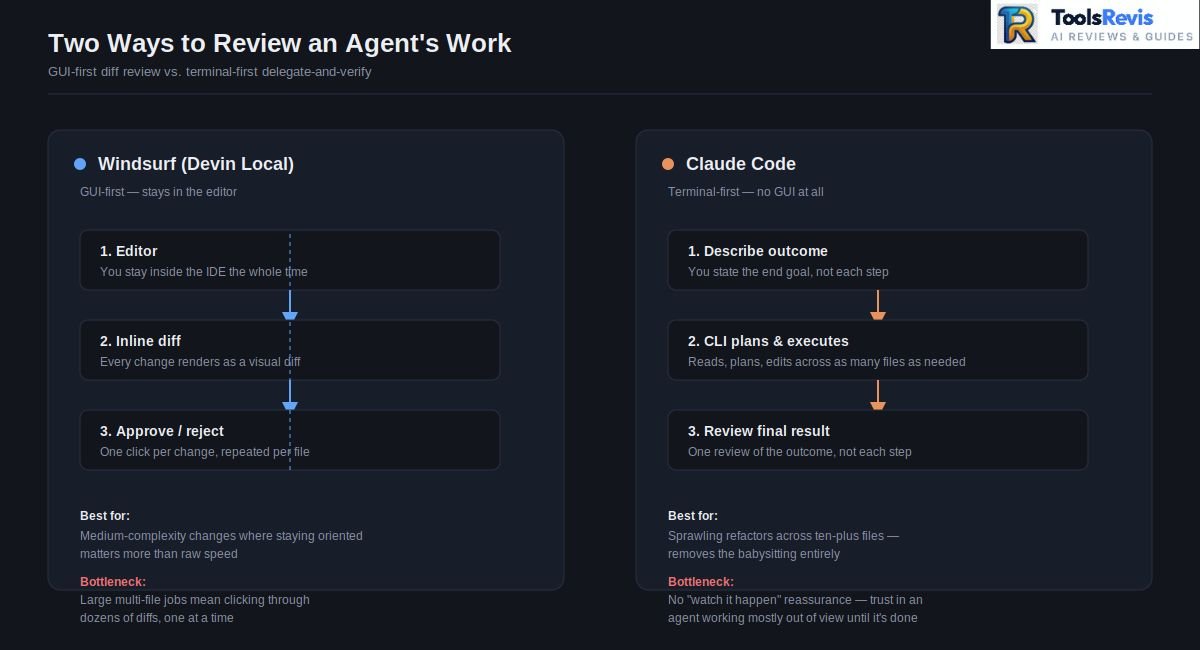
These two aren’t really direct competitors — they’re built for different points in your workflow. Windsurf is a GUI-first IDE: you stay in an editor, watch Devin Local’s diffs render inline, and approve or reject changes visually. Claude Code is terminal-first: no GUI at all, just a CLI agent that reads, plans, and executes directly in your shell.
That distinction drives everything else. Windsurf optimizes for staying in flow — you never leave the editor, and the agent’s reasoning is always visible as a diff you can inspect before accepting. Claude Code optimizes for raw reasoning depth — up to 1M tokens of context on Opus via the API, versus Windsurf’s more constrained context handling — which makes it the stronger choice for genuinely large, unfamiliar codebases, framework migrations, and refactors that touch dozens of files at once.
Windsurf’s Devin Local is faster to get useful output from on a normal-sized task; Claude Code is the tool you reach for when the task is too big for a GUI-driven review loop to keep up with anyway.
Does Windsurf Support Claude Models?
Yes, but with a real caveat worth knowing before you standardize a team on it: Anthropic has, at points, restricted Windsurf’s direct, first-party access to new Claude models — most notably around the Claude 4 launch, when Windsurf didn’t get day-one access the way Cursor and Copilot did. The timing wasn’t coincidental; it happened while Windsurf was in the middle of acquisition talks that eventually involved OpenAI, and Anthropic was explicit that it didn’t want to subsidize compute for a company that might end up owned by a direct competitor.
The workaround has been BYOK (Bring Your Own Key): you plug your own Anthropic API key into Windsurf’s settings and access Claude models that way, at standard API rates rather than through Windsurf’s bundled pricing. It works, but it adds a cost and setup step that Cursor and Copilot users simply don’t have to think about. If Claude access specifically is a hard requirement for your team, factor this in before committing. To see how Sonnet handles high-level reasoning and refactoring tasks, read our complete Claude Sonnet 5 review.
3-Way — Claude Code vs Cursor vs Windsurf
The cleanest mental model that’s emerged from teams running all three in production:
- Cursor is the best all-around editor — daily driver for autocomplete, inline edits, and focused multi-file refactoring across 5–15 files.
- Claude Code is the best engineer — hand it architecture changes, large-scale refactors, and cross-cutting debugging that spans ten-plus files, and its sub-agent architecture (one agent renames the API surface, another updates tests, a third updates docs) handles what a GUI-driven tool struggles to keep coherent.
- Windsurf is the best value — Devin Local covers the vast majority of what Cursor does, at a comparable price point, with strong narrative coherence on medium-sized multi-file changes.
The pattern showing up repeatedly among experienced teams isn’t “pick one” — it’s Cursor for the 80% of daily coding, Claude Code for the 5% of genuinely hard multi-file work, Windsurf as the budget-conscious middle layer for teams that don’t need all three.
Why Some Developers Are Switching From Windsurf to Claude Code
The switch isn’t usually about capability — it’s about architecture and flow state. Windsurf’s GUI model means every agent action produces a diff you review visually, which is genuinely good for staying oriented on medium-complexity changes. But on large, multi-file operations, that same GUI becomes a bottleneck: you’re clicking through dozens of individual diffs, breaking your concentration every few seconds to approve or reject a change.
Claude Code inverts that. You describe the outcome, the agent plans and executes across as many files as the task requires, and you review the result — not each individual step. Developers making this switch consistently describe it less as “Claude Code is smarter” and more as “I stopped having to babysit the process.” For quick, contained edits, that’s a worse experience — a GUI diff viewer is genuinely faster for a two-file change. But for the kind of sprawling refactor where you’d otherwise be alt-tabbing between twenty file diffs, a CLI agent that just finishes the job removes the interruption entirely.
The tradeoff, honestly stated: you lose the visual “watch it happen” reassurance that makes Windsurf feel safe for less experienced developers, and you trade it for trust in an agent working mostly out of view until it’s done.
Can You Run Claude Code Inside Windsurf?
Yes — Claude Code’s CLI runs in any terminal, and Windsurf’s integrated terminal is no exception. Open Windsurf’s built-in terminal panel and run claude exactly as you would in a standalone shell; the CLI doesn’t care which editor is hosting the terminal window.
There’s also a tighter integration available: the official Claude Code extension installs into VS Code forks — including Windsurf and Cursor — through the standard Extensions view or the Open VSX registry, giving you a dedicated chat panel, keyboard shortcut launch (Cmd/Ctrl+Esc), and inline diff viewing without leaving the editor. If the extension route ever fails to appear in Windsurf’s marketplace, falling back to claude in the integrated terminal always works, since the CLI itself has no editor dependency.
Practically, this means you don’t have to choose exclusively between the two. A common setup: stay in Windsurf for day-to-day GUI-driven editing, and drop into its integrated terminal to run Claude Code for the specific tasks — big refactors, unfamiliar codebases — where a CLI agent outperforms a diff-review loop.
Windsurf vs Codeium
Codeium and Windsurf are the same company at two different points in time, not two competing products — Codeium was the free autocomplete plugin; Windsurf is the full agentic IDE it became after its 2025 rebrand.
Codeium started as a free, plugin-based autocomplete tool — install it into VS Code, JetBrains, or Neovim like any other extension, and it quietly suggests completions in the background. In late 2024, the company rebranded to Windsurf and shifted its entire strategy from “autocomplete plugin” to “full agentic IDE” — a standalone VS Code fork built around Cascade.
The practical distinction that still matters even though the Codeium brand is gone:
| Codeium (legacy model) | Windsurf (current model) | |
| Form factor | Lightweight extension inside your existing editor | Standalone IDE you switch to entirely |
| Core capability | Inline autocomplete, minimal agent behavior | Devin Local (successor to Cascade, retired July 2026): multi-file agentic editing, terminal execution, persistent Memories |
| Migration cost | Zero — installs like any extension | Real — you’re adopting a new editor |
| Where it fits today | Nowhere; the extension model was discontinued as the company’s focus shifted | Everywhere the company invests now, including the June 2026 Devin Desktop rebrand |
Actionable advice: if you find a guide, extension listing, or internal wiki page still referencing “Codeium” as something you should install, treat it as stale documentation, not a live option. Point your team to Windsurf (or its Devin Desktop successor) directly, since the old extension isn’t receiving updates and represents a completely different, less capable product tier than what’s shipping today.
Windsurf vs Roo Code & Qodo
Roo Code is now fully archived and end-of-life, Qodo is an enterprise governance layer rather than a daily-driver coding agent, and Windsurf remains the closest full-IDE alternative to what Roo Code was trying to build before its shutdown.
These three occupy different layers of the stack, and — as of mid-2026 — one of them technically doesn’t exist as an actively developed product anymore.
Roo Code was a free, open-source Cline fork for VS Code, known for role-based custom modes (Architect, Code, Debug, Test) and multi-agent workflows. It built a loyal following and crossed 3 million installs. Then, in April 2026, the Roo Code team announced they no longer believe IDE-based coding is the future, shut down the extension, Cloud service, and Router on May 15, 2026, and archived the GitHub repository. They redirected the entire company toward Roomote, a Slack-first cloud agent with no public release as of this writing.
If you’re currently running Roo Code, treat it as end-of-life today — the extension still technically runs, but it receives no updates, no bug fixes, and will drift as provider APIs change underneath it. The team’s own recommended migration path is Cline (the project Roo originally forked from) or Kilo Code, an actively maintained Roo fork that reads your existing .roomodes and .roo/rules/ config automatically.
Qodo (formerly Codium AI, unrelated to Codeium/Windsurf despite the similar name) plays a different role entirely — it’s positioned as an enterprise governance layer rather than a daily-driver coding agent. Qodo focuses on code quality, policy alignment, and consistency checks across IDE, pull request, and CI pipeline stages, rather than competing directly with Devin Local or Composer on raw agentic coding.
How this maps to Windsurf:
- Windsurf is a full IDE replacement with a proprietary agent (Devin Local, successor to Cascade) — the closest comparison point to what Roo Code was trying to be before its pivot.
- Roo Code (archived) was a free, BYOK alternative that lived inside your existing editor — genuinely cheaper for teams willing to bring their own API keys, but no longer a safe adoption choice.
- Qodo isn’t really competing with either — it’s a quality-and-governance layer teams often run alongside Windsurf or Cursor, not instead of them.
Actionable advice: if cost was the reason you were evaluating Roo Code against Windsurf, redirect that evaluation to Cline or Kilo Code instead — both remain actively maintained, free, and open-source, and Kilo specifically migrates existing Roo configs with a one-line mv .roo .kilocode command.
Windsurf vs Cline
Windsurf is the predictable, subscription-based option with a fixed monthly fee; Cline is the free, bring-your-own-key extension that rewards disciplined model choice with meaningfully lower total cost.
This is the comparison that actually matters for cost-conscious teams: subscription IDE vs. free, bring-your-own-key extension.
Windsurf bundles model access into its subscription — you pay $20/month for Pro and Devin Local handles model selection and billing internally, with proprietary SWE models consuming zero credits and third-party models like Claude or GPT metered against your quota. Cline is the opposite model entirely: it’s a free, open-source VS Code extension with no subscription fee at all — you install it, plug in your own API key for Anthropic, OpenAI, or any OpenRouter-supported provider, and pay only for the tokens you actually consume.
Where each wins:
- Windsurf wins on predictability and polish. A fixed monthly fee, a purpose-built IDE, persistent Memories, and Codemaps for navigating large repos — all without needing to think about API billing.
- Cline wins on cost transparency and model freedom. You see exactly what you’re paying per token, you can switch providers instantly, and heavy users report meaningfully lower total cost than a Windsurf subscription if they’re disciplined about model choice (routing routine tasks to a cheaper model and reserving frontier models for hard problems).
- Cline wins on governance for regulated teams, too — Cline Teams adds SSO, role-based access control, and audit trails, explicitly built for environments where every automated change needs to be traceable.
The tradeoff that’s easy to miss: Cline’s step-by-step, explicit-approval workflow is more verbose than Devin Local’s — you’re reviewing more individual actions rather than one consolidated diff. Teams that value governance and auditability treat this as a feature. Teams optimizing for raw speed often find it slower in practice.
Actionable advice: if your team’s monthly Windsurf or Cursor bill regularly exceeds $40–50 per developer once overages are factored in, run a two-week Cline trial with a cheap default model (GLM or a lower-tier Claude model) and a frontier model reserved for genuinely hard tasks. Several teams have reported cutting their AI-coding spend by more than half this way, at the cost of a less polished, more manual review workflow.
Windsurf’s Extension & Marketplace Limitations
Windsurf can’t use the official Microsoft VS Code Marketplace because Microsoft’s terms block non-Microsoft forks — so closed-source extensions like Pylance are missing, and Open VSX is the only supported alternative.
This is the part of the Windsurf experience that catches developers off guard after they’ve already committed to the switch, and it comes down to one legal fact: Microsoft’s Terms of Service prohibit non-Microsoft products from using the official VS Code Marketplace or redistributing .vsix files from it. Because Windsurf is a VS Code fork and not VS Code itself, it’s locked out of Microsoft’s marketplace by design — the same restriction that affects VSCodium, Gitpod, and every other VS Code derivative.
What this means in practice:
- Windsurf runs on Open VSX, the vendor-neutral, Eclipse Foundation–maintained alternative marketplace. It’s improving steadily but is genuinely smaller than Microsoft’s catalog.
- Pylance is the extension developers hit this wall on most often. Microsoft has explicitly declined to publish it to Open VSX since it isn’t open-source, which means it’s unavailable in Windsurf through normal install channels. Windsurf’s own documentation now recommends Windsurf Pyright as the closest substitute — a fast, Pylance-like language server with strong type-checking, but not a drop-in replacement for developers with muscle memory built around Pylance-specific behavior.
- The manual .vsix workaround exists but is fragile. You can download an extension’s .vsix file directly from its GitHub releases (when the publisher makes one available) and install it via “Extensions: Install from VSIX” in the command palette. This works for extensions whose publishers ship standalone releases, but it’s a manual process you have to repeat on every update — there’s no auto-update path the way there is for Open VSX-native extensions.
- Auth failures are a known friction point. Some extensions that do technically install via .vsix still fail at runtime because they try to authenticate against Microsoft-specific services or check licensing against the official Marketplace, which Windsurf can’t satisfy. When an extension “installs but doesn’t work,” this is usually why.
Actionable advice before you migrate a team to Windsurf:
- Audit your team’s current VS Code extension list against the Open VSX registry before switching, not after — search each extension by publisher ID.
- Budget time for at least one or two “missing extension” workarounds per developer, Pylance being the most common.
- For Python-heavy teams specifically, standardize on Windsurf Pyright from day one rather than fighting to get Pylance working, since the .vsix workaround for it has historically been unreliable and breaks on version bumps.
- If your team depends on a closed-source, Microsoft-published extension with no GitHub release artifact at all, there may be no workaround — confirm this before committing to the migration, not during it.
Windsurf’s Ownership Changes & What They Mean for Users
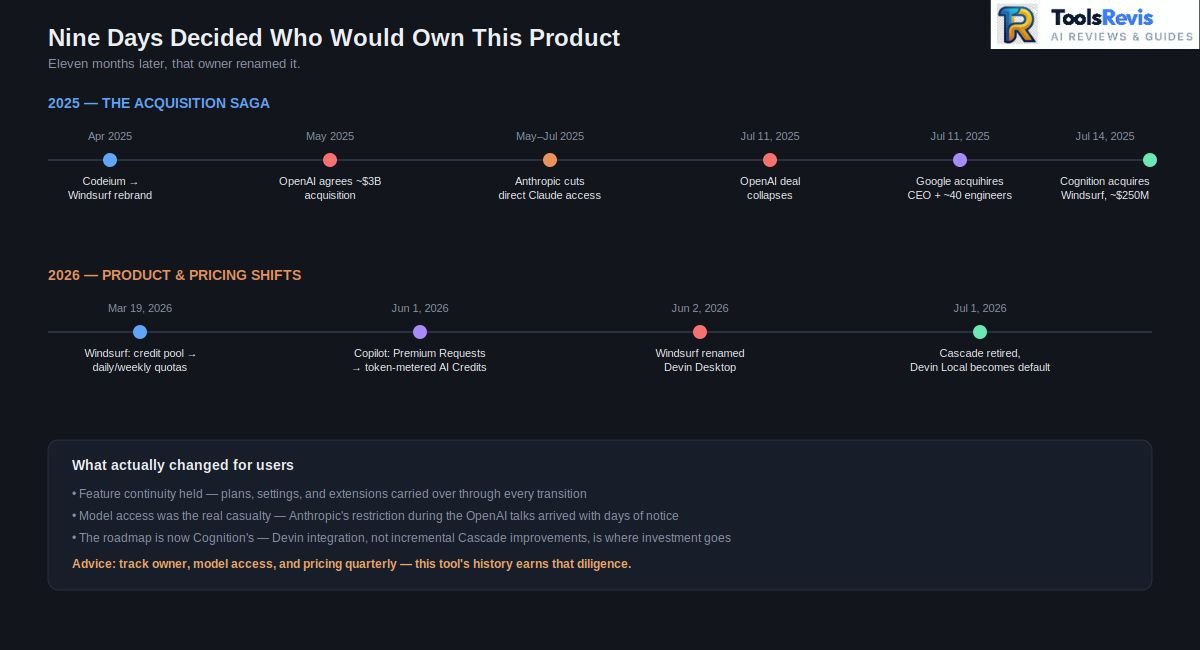
Windsurf has changed hands three times in under two years — an OpenAI acquisition that collapsed, a Google talent deal signed the same day, and a Cognition acquisition three days later that ultimately renamed the product Devin Desktop.
Windsurf has changed hands (or at least changed direction) enough times in under two years that “who owns Windsurf” has become a legitimate technical due-diligence question, not just corporate trivia.
The timeline, compressed:
- Codeium era (through late 2024): An independently operated company, originally pivoted from GPU virtualization tooling into AI code assistance.
- Rebrand to Windsurf (April 2025): Full company and product rebrand, shifting focus to the agentic IDE model.
- OpenAI acquisition attempt (~May – July 11, 2025): OpenAI reportedly agreed to acquire Windsurf for roughly $3 billion in an all-cash deal in May 2025 — set to be OpenAI’s largest acquisition ever. The deal collapsed on July 11, 2025, when the exclusivity period expired, reportedly over Microsoft’s contractual IP rights regarding OpenAI’s acquisitions.
- Anthropic access restrictions (during the OpenAI exclusivity period, May–July 2025): While the OpenAI deal was live, Anthropic significantly cut Windsurf’s direct access to Claude models, forcing a BYOK workaround — a direct, technical consequence of the acquisition uncertainty, not a routine business decision.
- Google talent acquisition (July 11, 2025 — same day the OpenAI deal collapsed): Google hired Windsurf’s CEO, co-founder, and roughly 40 senior engineers in a $2.4 billion licensing deal — an “acquihire” that pulled out key talent without buying the company outright. That team went on to build Google Antigravity.
- Cognition acquisition (July 14, 2025 — three days later): Cognition AI — the company behind the autonomous agent Devin — acquired what remained of Windsurf for a reported ~$250 million: the IP, product, brand, roughly 210 employees, and $82 million in ARR at the time of the deal.
- Codemaps and DeepWiki integration (late 2025–early 2026): Under Cognition, Windsurf shipped Codemaps — AI-annotated, structured maps of a codebase powered by Cognition’s own SWE-1.5 model alongside Claude Sonnet 4.5 — building on Cognition’s existing DeepWiki documentation product. This was the first clear signal of Cognition’s product direction for the platform.
- Rebrand to Devin Desktop (June 2, 2026): Windsurf’s identity folded entirely into the Devin brand via a routine over-the-air update — same editor, same extensions, same settings, new name.
- Cascade retired, Devin Local becomes default (June 2 – July 1, 2026): Cascade, the agent Windsurf built its entire reputation on, was fully retired on July 1, 2026, replaced by Devin Local — a Rust rewrite claimed to be ~30% more token-efficient with native subagent support. Any automation or CI pipeline that explicitly invoked Cascade needed to be repointed before the cutoff.
What this actually means for users making a decision today:
- Feature continuity has been real, not just marketing language. Each transition — Codeium to Windsurf, Windsurf to Devin Desktop — has preserved existing plans, settings, and extensions rather than forcing a rebuild. That’s a genuinely good signal for stability going forward.
- Model access has been the real casualty of ownership churn, not the product itself. The Anthropic access restriction during the OpenAI talks is the clearest example: your product experience can degrade because of a deal you have no visibility into, with only days of notice.
- The roadmap is now Cognition’s roadmap, which means Devin integration, not incremental Cascade improvements, is where investment is heading. If your team specifically valued Cascade as a standalone product — now retired — rather than valuing Devin Local as a component of a broader agent platform, that’s worth factoring into a long-term commitment.
Actionable advice: if you’re standardizing a team or company on this tool, don’t assume the pricing, model access, or feature set you see today will hold for a full budget year. Build a one-page internal doc tracking the current owner, current model-access status, and current pricing model, and revisit it quarterly — this tool’s history justifies that level of diligence more than almost anything else in this comparison.
Windsurf Pricing & Credit System — What Changed in 2026
Windsurf replaced its monthly credit pool with daily and weekly usage quotas on March 19, 2026, moving Pro from $15 to $20/month in the same overhaul — here’s exactly what that means for your bill.
Windsurf’s pricing has gone through more structural change in 2026 than any other tool in this guide, and understanding the current system is the difference between a predictable bill and a nasty surprise.
What broke under the old system: Through early 2026, Pro ($15/month) included a monthly pool of 500 prompt credits. Heavy users burned through the pool by week two, then had to buy add-on credits at $10 per 250 or get throttled for the rest of the month. Developers on r/windsurf called this the “end-of-month drought,” and it was consistently the single most-cited complaint about the platform.
What changed on March 19, 2026: Windsurf replaced the monthly credit pool with daily and weekly usage quotas that refresh automatically. Pro also moved from $15 to $20/month in the same overhaul. The stated goal was to prevent “sprint and drought” behavior — instead of a big pool you could blow through in a weekend, you now get a steady daily allocation, and hitting your daily cap means waiting for tomorrow’s refresh or paying overages at raw API rates rather than buying a credit pack.
A small footnote for existing subscribers: Windsurf grandfathered anyone already on Pro or Teams before March 19, 2026 at their old $15/month price — but their plans still migrated onto the new quota mechanics, not the old credit pool. If you’re on an older Windsurf plan and the numbers here look off, check whether you’re still on a legacy price before assuming something’s broken.
The model multiplier system is the part most guides gloss over, and it’s the actual lever that controls your bill:
| Model tier | Typical credit cost per prompt |
| Proprietary SWE models (SWE-1, SWE-1.5, SWE-1-mini) | 0 credits — free on every plan |
| Lightweight/mid-tier third-party models | ~1–2 credits |
| Claude Sonnet-class models | ~2 credits |
| Claude Opus-class / hardest-tier models | ~6 credits or more |
Every internal action Devin Local takes within a single prompt — file reads, searches, multi-file edits — is free; you’re only charged for the initiating message. But the “Continue” button, when it needs another turn to finish a long task, counts as a fresh prompt and a fresh charge, which is the single most common way developers unintentionally burn through quota faster than expected.
Actionable advice for controlling cost:
- Default to SWE-1.5 or another zero-credit model for routine work, and manually escalate to Claude Sonnet or Opus only when a task genuinely needs it — this is the single biggest lever available.
- Write complete, unambiguous prompts the first time. Every “Continue” click is a new billable prompt, so vague initial instructions that require follow-up correction cost more than one clear instruction up front.
- Set a monthly spend cap on Automatic Credit Refills (default is $50 for Pro, $160 for Teams) rather than leaving it uncapped, since the daily-quota system still allows overage billing at raw API rates once you opt into refills.
- Track your team’s actual model mix for one full billing cycle before committing to Max ($200/month). If your overages on Pro are consistently above roughly $30/month, Max pays for itself; if not, Pro with occasional metered overage is cheaper.
Windsurf vs Augment Code & Cheaper Alternatives (Zed + GLM)
Augment Code is built for massive multi-repo enterprises; for individual developers on a budget, pairing Zed with Z.AI’s GLM Coding Plan delivers most of the capability at a fraction of Windsurf’s or Cursor’s price.
Augment Code targets a different problem than Windsurf solves for most teams: massive, multi-repository enterprise codebases. Its Context Engine indexes upward of 400,000 files across repositories and is built specifically for organizations managing 50 or more interconnected services — a scale Windsurf’s own documentation doesn’t claim to have proven performance data for. Augment’s pricing starts around $20/month for individuals but scales to $60 and $200 per developer for team tiers, positioning it as a premium option for exactly the kind of cross-service architectural work that a single-repo-focused IDE struggles with.
The practical split: if your engineering org spans dozens of interdependent services and “understanding how a change in Service A breaks Service C” is a recurring pain point, Augment’s Context Engine is purpose-built for that in a way Windsurf currently isn’t. If you’re working in a normal-sized codebase — even a large monolith — Windsurf’s Devin Local covers the same ground for meaningfully less money.
For teams optimizing for cost above all else, the Zed + GLM setup deserves a serious look. Zed is a free, high-performance native code editor with an Agent Panel that supports pluggable model providers through the ACP (Agent Client Protocol) registry. Pair it with Z.AI’s GLM Coding Plan — currently priced around $18/month for GLM-5.1, a model that developers running head-to-head evals report reaching roughly 94–95% of Claude Opus 4.6’s coding-eval performance at a fraction of the cost — and you get a genuinely capable agentic coding setup for less than one-fifth of what Windsurf Max or Claude Code Max charges.
A common hybrid configuration developers are running in 2026:
- GitHub Copilot or GLM for fast inline completions — cheap, always-on, low-stakes.
- GLM-5.1 as the default agent model for routine chat and refactoring — inexpensive and “good enough” for most day-to-day work.
- Claude or GPT-5-class models configured but not default — manually invoked only when a task’s difficulty actually justifies the higher per-token cost.
Actionable advice: before assuming you need a $20–200/month IDE subscription, price out one week of your actual workload on Zed with GLM as the default model and a frontier model reserved for hard escalations. For teams without hard compliance requirements pushing them toward Augment or Tabnine, this setup routinely comes in at a fraction of Windsurf or Cursor’s real-world monthly cost — the tradeoff is a rougher UX polish and a smaller extension ecosystem than a purpose-built AI IDE.
Is Windsurf a VS Code Fork? & Windsurf vs Tabnine
Yes — Windsurf is a VS Code fork, just like Cursor, which is why it inherits VS Code’s keybindings and layout but also its Marketplace restrictions.
It’s built on the open-source core of Visual Studio Code, which is why it inherits VS Code’s keybindings, general layout, and (with the Open VSX caveats covered above) much of its extension ecosystem. This matters practically in two ways: migration friction is low if you’re coming from VS Code, since the muscle memory largely transfers, and it’s also why Windsurf is subject to the same Microsoft Marketplace restrictions as every other non-Microsoft VS Code derivative.
Windsurf vs Tabnine is a genuinely different kind of comparison than Windsurf vs Cursor, because Tabnine has deliberately repositioned itself away from competing on raw agentic capability:
| Windsurf | Tabnine | |
| Form factor | Standalone IDE (VS Code fork) | Plugin across VS Code, JetBrains, Neovim, Eclipse — no editor switch required |
| Core strength | Agentic multi-file editing via Devin Local | Privacy-first autocomplete with enterprise deployment flexibility |
| Deployment options | Cloud, with limited on-prem programs whose current status needs direct verification with sales | Cloud, VPC, or fully self-hosted/air-gapped — the differentiator |
| Pricing (2026) | Pro $20/month, Teams $40/user/month | No individual plan anymore — team/enterprise only, roughly $39–59/user/month |
| Best fit | Teams wanting agentic capability inside a dedicated editor | Regulated industries (defense, healthcare, finance) where code cannot leave the network under any circumstances |
Tabnine dropped its free individual tier in 2025 and now competes almost entirely on compliance, not capability — its agentic and multi-file editing features trail both Windsurf and Cursor, but it remains one of the only mainstream options offering a genuine air-gapped, fully self-hosted deployment.
Actionable advice: if your organization’s blocker is capability, Windsurf wins outright. If your organization’s blocker is a hard requirement that code never leaves your network — a real constraint in defense, healthcare, and regulated finance — Tabnine is likely your only mainstream option regardless of how its raw completion quality compares, and that’s a compliance decision, not a product-quality one.
Not sure which AI coding tool fits you?
Skip the 5,000-word comparison. Answer 2 quick questions about your use case and budget — get matched instantly with real AI coding tools. No sign-up, nothing saved.
🔍 Find Tool in 30 Seconds →Free to use · No email required · Powered by ToolsRevis AI Tool Finder
Final Verdict — Which Tool Should You Choose?
There’s no single best AI coding tool in 2026 — the right pick depends on matching the tool to the specific job, not choosing one tool to do everything.
Any comparison article that claims otherwise is selling something. What the 2026 landscape actually rewards is matching the tool to the specific job:
- Choose Cursor if you want the most mature, broadly capable AI IDE with model flexibility (Claude, GPT, Gemini per-task) and you’re willing to actively manage credit consumption to avoid mid-month overages. Cons: credit-pool billing makes real monthly cost unpredictable; requires migrating off your current editor.
- Choose Claude Code if your hardest problems are large, multi-file refactors and architecture changes on unfamiliar codebases — and you’re disciplined about managing its 5-hour usage window (keep CLAUDE.md lean, use /compact and /clear regularly). Cons: no GUI or autocomplete; the 5-hour window can vanish in a handful of heavy prompts; Anthropic-only, no model flexibility.
- Choose GitHub Copilot if your organization needs the broadest IDE compatibility and the deepest enterprise compliance track record, and you’re comfortable with agent capability that trails Cursor and Windsurf on genuinely complex delegation. Cons: weakest agentic/multi-file delegation of the group; token-metered AI Credits since June 2026 make heavy chat/agent use less predictable than the flat price suggests.
- Choose Windsurf (Devin Desktop) if you want the strongest single-agent coherence on multi-file changes and you’re comfortable with a product whose ownership and roadmap have changed hands multiple times in under two years. Cons: most ownership churn of any tool here; Open VSX extension gaps (Pylance, others); Anthropic model access has been restricted before with little notice.
- Choose Google Antigravity if greenfield scaffolding speed is your priority and you’re willing to accept rougher output on unsupervised, complex refactors. Cons: no longer free beyond a limited tier — meaningful usage requires Google AI Pro at $19.99/mo; still struggles and can hallucinate on unsupervised “big bang” refactors; not yet enterprise-compliance-ready.
- Choose Cline or Kilo Code if cost transparency and model freedom matter more than IDE polish, and your team is comfortable with a more manual, step-by-step review workflow. Cons: no bundled compute — every retry is a real API charge; more manual approval clicks than a GUI-diff tool; you own your own model routing decisions.
- Choose Tabnine if — and only if — your compliance requirements mean code genuinely cannot leave your network under any circumstances. Cons: weakest agentic/multi-file capability of any tool in this guide; no individual plan anymore, team/enterprise pricing only; you’re paying a premium for compliance, not capability.
The pattern showing up across experienced teams in 2026 isn’t single-tool loyalty — it’s a stack. A common, genuinely effective combination: Cursor or Windsurf for 80% of daily coding, Claude Code for the 5% of tasks that are too large or too architecturally complex for a GUI-driven review loop, and a cheap model (GLM via Zed, or a zero-credit Windsurf model) as the default for routine, low-stakes work. Optimize your budget and your workflow around that split rather than searching for one tool to do everything well.
Frequently Asked Questions
Is Windsurf still called Windsurf?
No. Cognition renamed it Devin Desktop on June 2, 2026. Same editor, plans, and extensions — new name.
Is Codeium the same as Windsurf?
Yes. Codeium was the original name before the April 2025 rebrand to Windsurf. It no longer exists as a separate product.
Is Claude Code better than Cursor?
Depends on the task. Claude Code wins on large multi-file refactors; Cursor wins on daily coding speed and autocomplete. Most teams use both.
Does GitHub Copilot support Claude models?
Yes, but tier-restricted. Since the June 2026 pricing change, Opus-class models are no longer available on base Pro at all — Pro+ ($39/mo) or Max ($100/mo) is required. Confirm current access on your specific plan.
What Languages Does Cursor Support?
All major ones. Cursor works with any language VS Code supports — JavaScript/TypeScript, Python, Go, Rust, Java, C++, Ruby, PHP, and more — since it’s built on the same core.
How Much Does Windsurf Cost?
Free tier available. Pro is $20/month (daily/weekly usage quotas), Teams is $40/user/month, and Max is $200/month for heavy users. Enterprise is custom.
Why Can’t I Find Certain Extensions in Windsurf?
Windsurf uses Open VSX, not the official Microsoft Marketplace, due to Microsoft’s licensing terms. Closed-source extensions like Pylance often aren’t available — use Windsurf Pyright instead, or install manually via .vsix where possible.
Did Windsurf Get Sold? Who Owns It Now?
Yes. Cognition AI (makers of Devin) acquired Windsurf in July 2025. In June 2026, Cognition renamed the product to Devin Desktop.

I’m Umair Ahmad, founder of ToolsRevis. I personally test every AI tool we cover — signing up, running real workflows, checking pricing tiers, and comparing outputs — before writing a single word. My goal: cut through AI marketing hype with honest, hands-on verdicts.
Let’s achieve more together!