
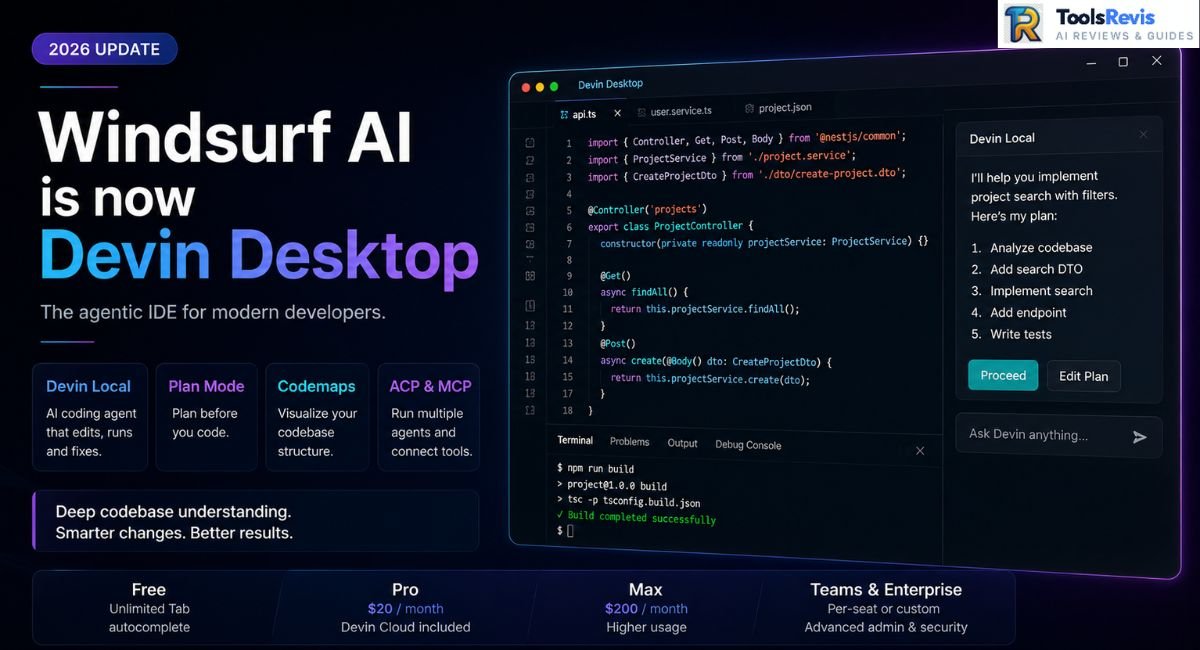
Codeium became Windsurf. OpenAI reportedly agreed to buy it for around $3 billion — then the deal collapsed. Google struck a separate deal to hire away its founders. Cognition, the company behind the autonomous coding agent Devin, then acquired what remained of the company — and on June 2, 2026, began rolling out a rebrand of the editor to Devin Desktop.
In 2026, Windsurf still holds up as a capable agent-driven code editor, offering a no-cost entry tier alongside a $20-per-month Pro subscription. What sets it apart: thorough repo-level context, a structured Plan-then-Execute agent flow, and Codemaps for navigating unfamiliar code — with Devin Cloud now folded into the Pro plan at no extra charge. The trade-offs worth knowing upfront: usage caps that bite sooner than before, a product identity still settling after back-to-back rebrands, and the mental adjustment of the tool answering to a new name.
Best for: Independent developers and small teams who want serious multi-file, agent-assisted coding without paying Cursor’s top-tier rates.
If you searched “Windsurf AI” hoping for a simple answer on whether it’s worth installing, here’s the complication upfront: the product is in the middle of a rebrand. Starting June 2, 2026, Cognition began shipping existing installs an update that renames the editor Devin Desktop, and Cascade — the original agent — was kept available only as a legacy option through July 1, 2026. If you’re reading a “Windsurf” review dated before mid-2026 (including older versions of this one), some of what it describes may already be out of date.
That’s the reason this review exists in an updated form, not a reason to skip it. Below: what the local agent does under real use, what Plan Mode changes about agentic coding, whether Codemaps lives up to its pitch, and where pricing, quotas, and the student discount actually stand as of this writing — with sourcing noted wherever the product’s own documentation lagged behind its announcements.
If you want to explore where this fits in the broader landscape, see our guide to the best AI tools for developers .
What Is Windsurf AI? (And Why It’s Now Transitioning to the Devin Desktop Name)
Windsurf isn’t a new tool wearing a new name for marketing’s sake — it’s had a genuinely eventful two years, and that history matters for anyone deciding whether to build a workflow around it.
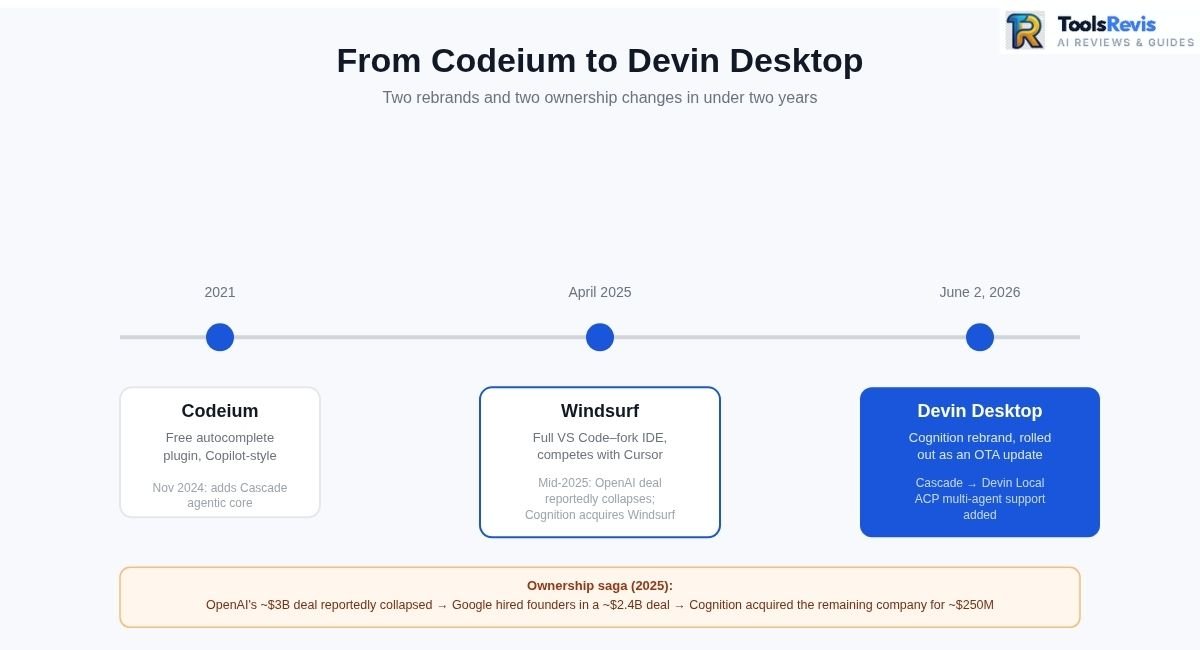
The Codeium → Windsurf rebrand. The product started life in 2021 as Codeium, a free alternative to GitHub Copilot built for autocomplete-style code suggestions. In November 2024, the team shipped something bigger: a standalone, VS Code–based editor built around an agentic AI core called Cascade, capable of multi-file edits and terminal commands rather than just inline suggestions. By April 2025, the company had rebranded fully to Windsurf — a signal that this was no longer a completion plugin but a full IDE competing directly with Cursor.
The acquisition saga. Mid-2025 turned into one of the stranger sequences in the AI-tools space. OpenAI reportedly reached an agreement to acquire Windsurf for around $3 billion — reporting at the time (The Verge, Cybernews, and others) described it as OpenAI’s largest planned acquisition — but the deal reportedly collapsed after Microsoft, citing its existing IP rights tied to OpenAI’s investment agreement, declined to grant Windsurf a carve-out.
Google then stepped in with a separate, non-exclusive licensing and hiring deal reported at roughly $2.4 billion — bringing on Windsurf’s CEO Varun Mohan, co-founder Douglas Chen, and a number of R&D staff, without acquiring the company itself. Days later, Cognition AI acquired what remained — the brand, the IP, and roughly 210 employees — for a price reported at approximately $250 million.
The Devin Desktop transition. Unlike the earlier ownership changes, this part is underway rather than speculative. On June 2, 2026, Cognition started pushing an over-the-air update to existing users, changing the editor’s name to Devin Desktop. According to Cognition’s own announcement, no migration wizard or reinstall was required, and accounts, plans, extensions, and keybindings were intended to carry over automatically — worth confirming in your own install if you rely on specific settings. Cognition’s framing of the change: Windsurf was an editor with AI added to it; Devin Desktop is positioned as an agent manager built into a full IDE.
The most consequential technical change bundled into that update was the replacement of Cascade with Devin Local, which Cognition describes as a full rewrite rather than an incremental update. Since Cascade was officially retired after July 1, 2026, it is no longer supported as a legacy option. If your current scripts, CI pipelines, or automated workflows still rely on Cascade, you should immediately migrate them to Devin Local and test the changes within your local environment. Alongside the rename, Cognition shipped support for the open Agent Client Protocol (ACP), which is reported to let Devin Desktop host other agents — Codex, Claude Agent, Gemini CLI — inside the same editor window, not just its own.
What this means if you’re evaluating it today: this review uses “Windsurf” to describe the product’s history and feature set, but new downloads may already install as Devin Desktop. For existing users, the transition changes more than the branding: the editor is being repositioned around Devin Local, with new agent-hosting capabilities (ACP) layered onto the familiar Windsurf editing environment.
Built on VS Code, not from scratch. Like Cursor, this editor is a fork of Visual Studio Code — familiar keybindings, extension compatibility, and a UI that doesn’t demand relearning your editor from zero. The difference from a plain VS Code + Copilot setup is architectural: the agent is woven into the editing loop itself, not bolted on as a sidebar chat.
Codebase indexing. One of the product’s more consequential engineering investments is its Indexing Engine, which pre-scans a repository to build a structural map rather than naively chunking files — so the agent (and Codemaps) can pull relevant context from a large codebase without blowing through the context window on irrelevant code. Third-party comparisons note real limits here too: local indexing has been reported to cap out on very large repositories (tens of thousands of files), with remote/cloud indexing available for bigger projects. For teams working in genuinely large repos, this indexing layer is arguably more load-bearing than any individual chat feature.
Key Features Breakdown
The feature set has expanded fast since the Cognition acquisition. The features below are the ones that actually change day-to-day work — not the ones that just look good on a pricing page.
Devin Local (Formerly Cascade) — The AI Agent Core
Devin Local is the editor’s flagship agent, and it’s the feature the whole product is built around. It’s positioned as the direct successor to Cascade. Unlike a chat sidebar that suggests code you copy and paste, it operates directly inside your project: reads relevant files, proposes and applies multi-file edits, runs terminal commands when needed, and iterates on its own output based on errors or your feedback.
What sets it apart from a basic autocomplete tool:
- Full-codebase awareness — powered by the editor’s indexing engine, not limited to open tabs or manually pasted context
- Multi-file editing — a single request can touch a component, its tests, and a shared utility file in one pass
- Terminal execution — it can run builds, install packages, or execute scripts as part of completing a task
- Model choice — Pro-tier users can route requests to Cognition’s in-house model line or to third-party frontier models, including Claude-class models, for tasks that benefit from stronger reasoning
- ACP compatibility — since the rebrand rollout, other agents (Codex, Claude Agent, Gemini CLI) are reported to run inside the same editor window alongside Devin Local
Reality check: In practical use, the agent is particularly well suited to scoped, well-defined tasks — implement this endpoint, refactor this component, fix this failing test. It’s less reliable when a request is vague or spans unrelated parts of a large system without guidance. That gap is exactly what the next feature was built to close.
Plan Mode
Plan Mode (shipped under the name Planning Mode in earlier releases) addresses the single biggest complaint about agentic coding tools: you ask for a change, the agent edits a dozen files, and you’re left reviewing a diff you didn’t fully anticipate.
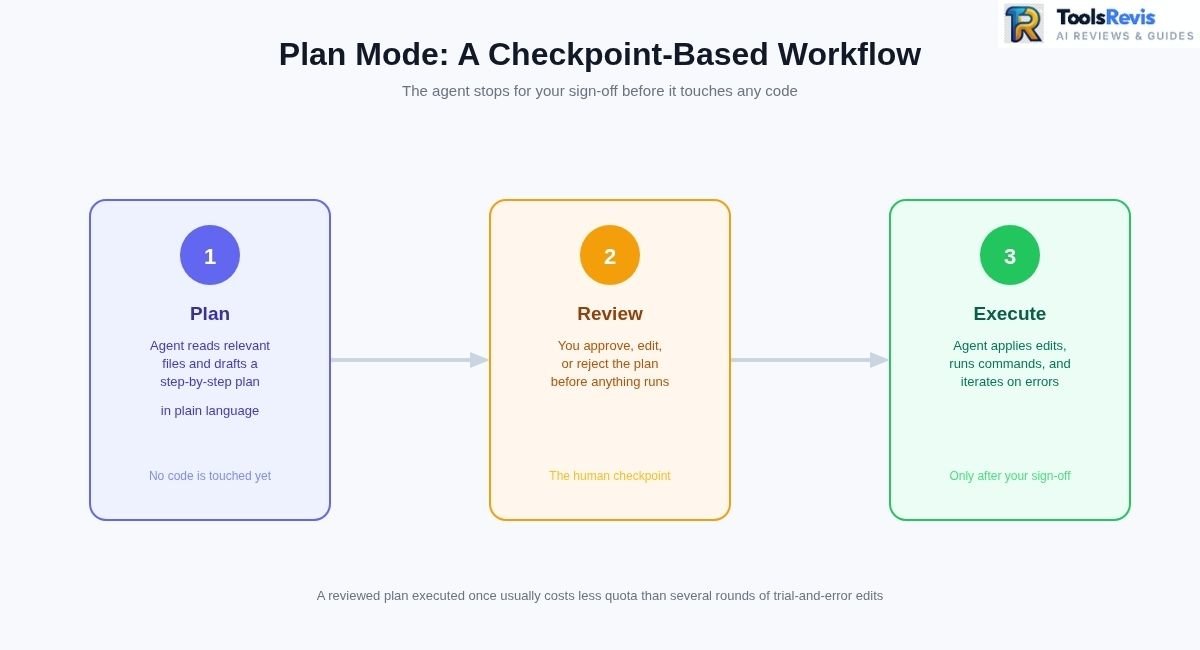
With Plan Mode enabled, the agent doesn’t jump straight to editing. Instead, it:
- Reads the relevant parts of your codebase
- Drafts a step-by-step implementation plan in plain language
- Waits for you to approve, edit, or reject the plan before touching any code
- Executes only after you’ve signed off
In practice, Plan Mode turns agentic coding from a black box into a checkpoint-based workflow. For any task touching more than a file or two, reviewing the plan before execution takes a few extra seconds and can save the longer process of unwinding an edit that solved the wrong problem.
Codemaps — Codebase Understanding
Codemaps generates an AI-annotated visual map of a codebase or subsystem — grouped sections, dependency relationships, and line-level links back into the actual source. This is a real, shipped feature (Cognition announced it in late 2025, built on its own models alongside Claude), and it’s a genuine differentiator: Codemaps remains one of Windsurf’s more distinctive codebase-visualization features.
Where Codemaps earns its keep:
- Onboarding — a new team member can open a Codemap of the auth system and get a working mental model in minutes instead of days
- Legacy code audits — inheriting an old monolith becomes less intimidating when you can see which modules are core, which are dead weight, and which changed recently
- Refactor planning — mapping the “blast radius” of a change before you touch anything reduces the odds of breaking something three layers removed from your edit
- Agent context — Codemaps can be @-mentioned directly inside agent conversations, so a session inherits the same structural understanding you’re looking at
Agent Client Protocol (ACP) & MCP Support
The headline technical addition tied to the rebrand is ACP (Agent Client Protocol), an open standard that’s reported to turn Devin Desktop into a host for multiple coding agents rather than just its own — running Codex, Claude Agent, Gemini CLI, or others inside the same editor window and switching between them mid-session.
Separately, the editor also supports the Model Context Protocol (MCP), the open standard that lets an agent connect to external tools, data sources, and services through a consistent interface rather than one-off custom integrations. In practical terms, MCP means the local agent isn’t limited to what’s inside your editor — through configured MCP servers, it can query external databases or internal APIs, pull context from project management tools, and interact with services you’ve explicitly permitted.
Custom Rules — .windsurfrules & Memories
The last piece of the context system is about consistency: making sure the agent’s suggestions actually match how your team writes code, not just what’s generically “correct.” The .windsurfrules filename has, as of this writing, carried over through the rebrand unchanged.
- .windsurfrules — a project-level configuration file where you define standing instructions: preferred package manager, naming conventions, architectural patterns to follow or avoid, testing requirements, and anything else the agent should treat as non-negotiable on every request in that workspace
- Memories — the agent’s longer-running context layer, which builds up an understanding of your codebase’s patterns and conventions over time, reducing how much you need to re-explain in each new session
Developers who invest time in a thorough .windsurfrules file often report fewer “technically correct but stylistically wrong” suggestions — which, over hundreds of agent requests a week, can save real time.
Windsurf AI Pricing, Quotas & Free Tier
Pricing has moved more in the past year than most tools move in five, so treat any number you see on a third-party blog — including older sections of this one — with a healthy dose of “verify on the official pricing page first.” Here’s where things stand as of August 2026, based primarily on Windsurf/Devin’s current official pricing page and blog announcement, supplemented with independent reporting where historical changes are involved.
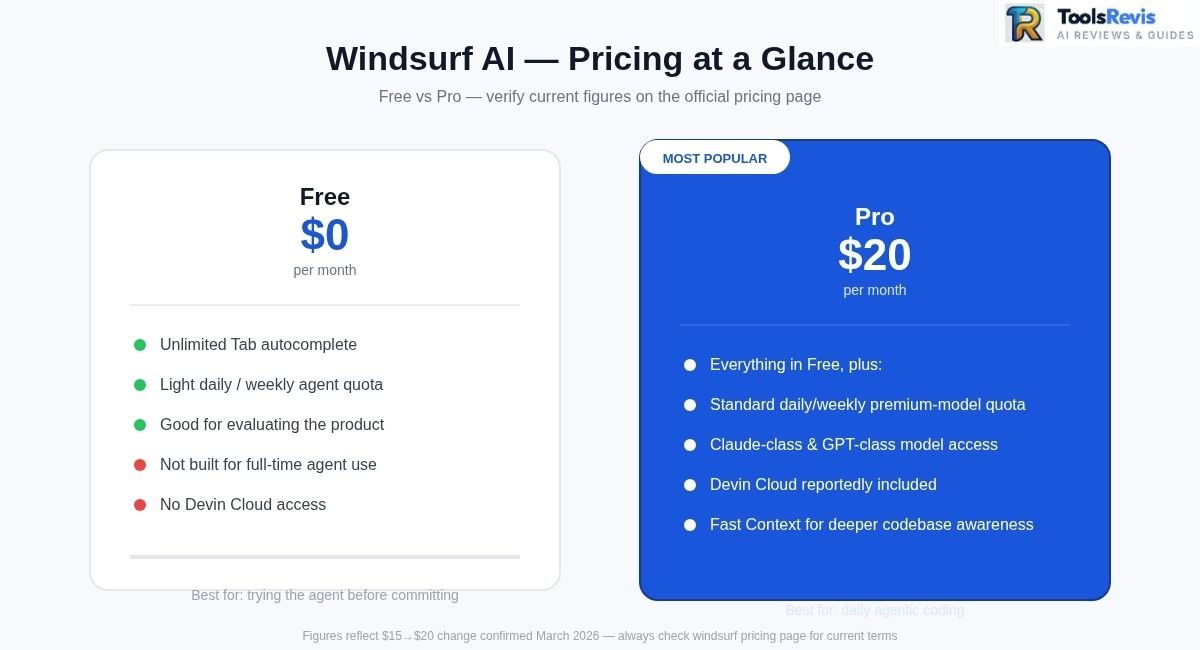
- Free — $0/month. Unlimited Tab autocomplete, plus a light daily/weekly quota for agent actions. Enough to evaluate the product or handle occasional AI-assisted edits, but not built to carry a full workday of agentic coding.
- Pro — $20/month. Officially confirmed as the current price, up from a prior $15/month before the March 2026 change. This tier unlocks increased daily/weekly quotas across frontier models — including Claude-class, GPT-class, and Gemini-class models — plus Cognition’s in-house model line. Devin Cloud access (Cognition’s cloud-hosted autonomous agent) is confirmed as included on this tier, a change from its previous enterprise-only positioning.
- Max — $200/month. A higher-usage individual tier aimed at developers running sustained, heavy agent sessions who would otherwise pay more in Pro overage at API pricing.
- Teams and Enterprise sit above that, priced per-seat or custom, with centralized billing, admin dashboards, and compliance options layered on top of individual quotas. Confirm current per-seat figures directly on the official pricing page before budgeting around them, since these have shifted more than once this year.
How the Quota System Works
This is the part most pricing pages gloss over, and it’s the part that determines whether a plan actually fits your workflow.
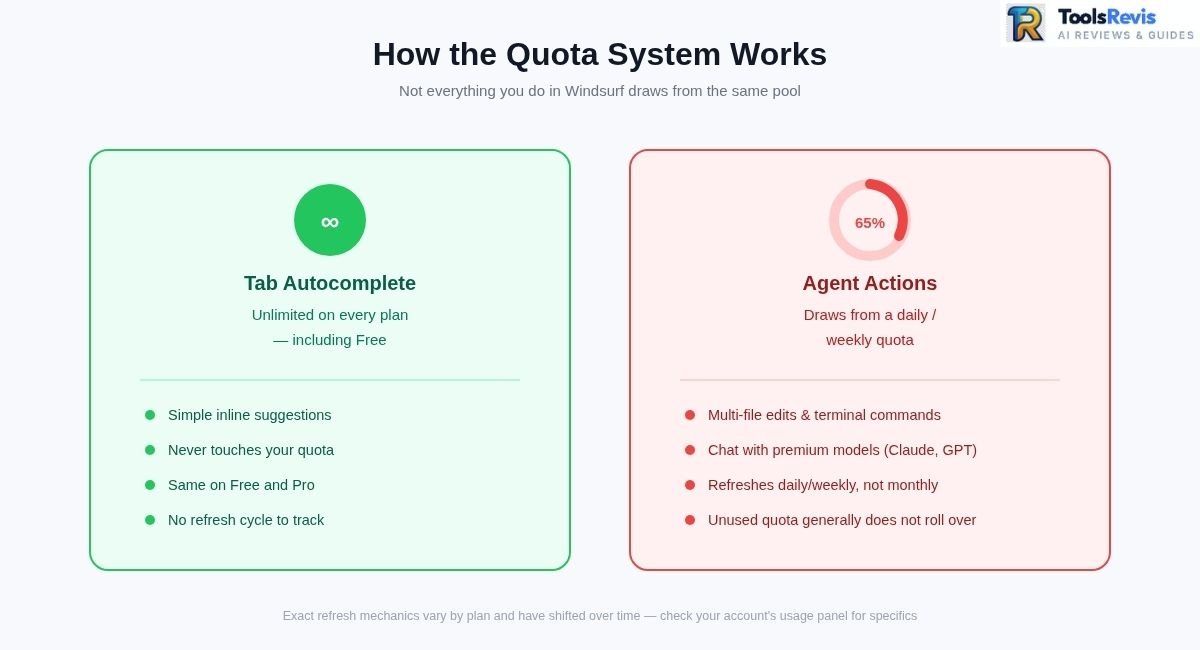
- Tab autocomplete is unlimited on every plan, including Free. Simple inline suggestions don’t touch your quota.
- Agent actions and premium-model chat consume quota. Multi-file edits, terminal commands, and chat with a premium model draw from a usage allowance.
- Quotas are reported to refresh daily and weekly, not monthly — a change from the older credit-pool system, where a fixed monthly bundle could be burned through in one long sprint.
- Usage is generally measured in tokens or interactions rather than flat “messages.” The exact unit and refresh mechanics have been described differently across sources (some describe percentage-based displays, others fixed daily interaction counts), so check your own account’s usage panel for the specifics that apply to your plan.
- Unused quota is widely reported not to roll over between refresh windows.
The practical effect most reviewers agree on: more predictable spending, less predictable capacity. You’re less likely to get a surprise bill, but bursty workflows — heads-down for a weekend, quiet for a week — tend to feel the cap more than steady, moderate daily use does.
Windsurf for Students — Discount Program
Windsurf has offered discounted Pro access for students who can verify their student status, positioning it as a lower-cost entry point for anyone learning to code. The exact discount amount and eligibility process can change, so students should check the current official education offer before assuming a specific percentage — third-party figures circulating online for this discount aren’t consistently sourced. The free tier is still the right place to start regardless — it costs nothing to confirm the agent fits how you work before chasing down a discount.
Two Major Changes in 2026 — Read Before You Compare Prices Anywhere Else
- March 19, 2026: Per Cognition’s own pricing announcement, the product overhauled its pricing structure that day, retiring the old monthly credit system in favor of daily/weekly quotas and raising Pro from $15 to $20/month — putting it at price parity with Cursor.
- June 2, 2026: Per Cognition’s “Windsurf Is Now Devin Desktop” announcement, the company began the rebrand from Windsurf to Devin Desktop that day, replaced Cascade with Devin Local (with Cascade reported retired as of July 1, 2026), and folded Devin Cloud access into the $20 Pro tier.
If you’re reading older reviews, YouTube walkthroughs, or forum threads referencing “500 credits,” a “$15 Pro plan,” or standalone “Windsurf” branding with no mention of Devin, that information predates one or both of these changes. Always cross-check current tier limits and product naming on the official site before committing to an annual plan.
What Are Real Developers Saying on Reddit?
Developer discussion about Windsurf in 2026 centers mainly on pricing and quota limits, codebase understanding, and agent reliability.
A note on sources: the community sentiment below is synthesized from recurring discussion patterns across r/windsurf, r/Codeium, and r/ChatGPTCoding — paraphrased rather than quoted directly, since individual threads shift, get deleted, or age out fast in this space. Much of this discussion predates the June 2026 Devin Desktop transition, but the underlying sentiment about pricing, features, and workflow appears to carry over to the same product under its new name. Treat this as a snapshot of prevailing sentiment, not a scientific survey.
The Pricing Backlash
The March 2026 credit-to-quota switch is, unsurprisingly, one of the more contentious topics in these communities. The recurring complaint isn’t the $20 price tag in isolation — it’s the combination of a higher headline price with a usage system some describe as less forgiving. Developers who previously stockpiled credits for occasional heavy sessions report hitting daily caps mid-task, particularly in large codebases where a single agent request pulls in a lot of context.
A recurring theme in these threads is developers describing a partial or full move to Claude Code or Cursor, usually citing more predictable throughput or simple price parity. It’s worth noting this isn’t unique to this product — most major AI coding tools have weathered their own pricing-model backlash over the past year — but the timing, in the middle of the ownership and rebrand transition, made the change feel to some like one more sign of a product in flux.
Why Many Developers Still Value It
Set the pricing threads aside, and the sentiment shifts. A recurring, well-upvoted thread pattern centers on the tool’s context management — specifically how .windsurfrules and Memories combine to keep agent output consistent with a team’s actual conventions instead of generic “AI-flavored” code. Developers who’ve invested time writing a thorough rules file describe a noticeably lower correction rate on generated code compared to tools without an equivalent persistent-context system.
The other consistent praise point is the agent’s multi-file reasoning — the sense that it’s operating with an accurate model of the codebase rather than pattern-matching file by file. For developers coming from tools that require manually pasting context into every prompt, this is frequently described as a significant quality-of-life jump.
Building Full Projects — Real Experiences
A recurring genre of post, especially from developers with limited prior coding background, describes shipping a working MVP largely through agent-driven iteration. These accounts tend to share a few common threads:
- Frequent, small git commits rather than one giant commit at the end, so a bad agent edit can be rolled back without losing hours of unrelated work
- Fresh chat sessions for new features, rather than one sprawling conversation that accumulates stale context over time
- Manual review before merging, even when generated code looks correct on the surface
Experienced developers echo the same practices but frame them differently — less “how do I get the agent to build this” and more “how do I keep the agent’s output reviewable.”
Common Technical Complaints
A handful of recurring technical gripes show up often enough to be worth flagging:
- Disk write inconsistencies — occasional reports of an edit that doesn’t fully save or sync to disk, requiring a manual re-save or restart to confirm the change landed
- Overthinking on simple tasks — some users note certain models spend visibly more time reasoning than a simple task warrants, burning quota on deliberation rather than output
- Switching to a lower reasoning mode — a common workaround; several developers report that dropping from a high-effort reasoning setting to a medium one speeds up simple requests without a noticeable quality drop, while saving quota for tasks that need the extra depth
None of these are dealbreakers on their own, but together they suggest a product that’s mature and capable, while still carrying the rough edges you’d expect from something that’s changed hands and changed names more than once in under two years.
Windsurf vs Competitors
Numbers move fast in this category, so here’s the side-by-side as of this writing — verify pricing directly with each vendor before budgeting around it.
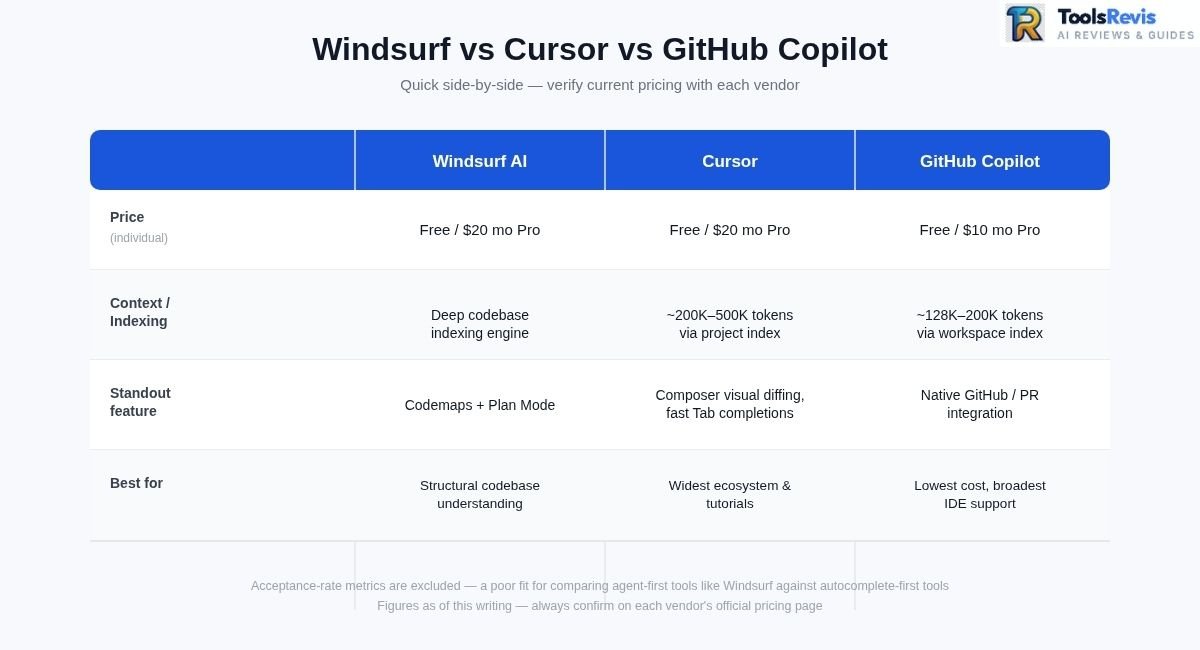
| Tool | Price | Context / Codebase Handling | Best For | Model Access |
| Windsurf AI (transitioning to Devin Desktop) | Free / $20 mo Pro (Devin Cloud included) | Indexing engine builds a structural map of the repo (not a fixed published token figure) | Teams wanting structural codebase understanding and disciplined agent workflows | In-house model line, Claude & GPT available; ACP reported to host Codex, Claude Agent, Gemini CLI |
| Cursor | Free / $20 mo Pro | Roughly 200K–500K tokens via project indexing | Broadest ecosystem, fastest autocomplete-first workflow | Model picker (Claude, GPT, Gemini) |
| GitHub Copilot | Free / $10 mo Pro | Roughly 128K–200K tokens via workspace indexing | Teams already standardized on GitHub, lowest switching cost | Multi-model selector |
| Claude Code | Included with Claude Pro ($20/mo) / higher on Max plans | Up to 1M-token context on supported models/workflows | Large, complex, multi-file operations; terminal-native workflows | Claude Sonnet 5 / Claude Opus 4.8 for heavy tasks, as of August 2026 — verify current model lineup before relying on this |
We dropped the “acceptance rate” metric some competitor pages lead with — it’s a reasonable measure for autocomplete-first tools like Cursor’s Tab, where every keystroke either accepts or rejects a suggestion, but it’s a poor fit for agent-first tools like this one and Claude Code, where the unit of work is a completed multi-file task rather than a single line. Treat any cross-tool acceptance-rate comparison you see elsewhere with some skepticism.
Windsurf vs Cursor
This is the comparison that matters most, since both tools occupy nearly identical territory: VS Code forks, agentic multi-file editing, and — as of the March 2026 price change — identical $20/month Pro pricing. The distinction now comes down to philosophy rather than sticker price. This product’s lineage leans on deep, indexed codebase awareness and features like Codemaps and Plan Mode that prioritize understanding before action, plus (post-rebrand) the reported ability to host other agents via ACP. Cursor leans on a broader feature surface — visual multi-file diffing, fast Tab completions with a published acceptance rate, and background agents — plus a larger, more mature community built on a longer market presence.
If deep context and structural codebase understanding are your priority, this tool holds its own. If you want the most battle-tested ecosystem with the widest tutorial and plugin coverage, Cursor currently has the edge.
For a deeper dive into Cursor’s feature set, see our full Cursor AI review .
Windsurf vs Claude Code
These two aren’t really direct competitors — they’re different shapes of tool. This product is a full IDE: a visual editor with an agent built into the editing loop. Claude Code is a terminal-native agent with no GUI of its own, built around Anthropic’s Claude models and a context window that’s larger than either this tool or Cursor.
For large, complex, multi-file operations — the kind where holding an entire architecture in context matters — Claude Code’s larger context window is a genuine structural advantage. For developers who want a visual diff, inline review, and an editor that feels like a traditional IDE rather than a command-line session, this product is the more comfortable daily driver. It’s increasingly common for developers to run both, and post-rebrand ACP support is reported to let you run Claude Agent inside the editor itself rather than switching windows.
To understand how current models handle multi-file context, see our Claude Sonnet 5 review .
Windsurf vs Codeium / GitHub Copilot
Windsurf and Codeium aren’t really two products to compare anymore — Codeium is the name this product outgrew, first to Windsurf and now, in part, to Devin Desktop. The rebrand marked a category shift, from a free autocomplete plugin to a full agentic IDE, so anyone still searching “Windsurf vs Codeium” is really asking how far the product has moved from its origins. The honest answer: quite far. Autocomplete is now table stakes; the agent, Plan Mode, and Codemaps are the actual product.
Against GitHub Copilot, the comparison is more conventional. Copilot wins on accessibility — cheaper at $10/month, works inside almost any IDE (VS Code, JetBrains, Neovim, Visual Studio), and has the deepest native GitHub integration for issues, PRs, and CI/CD. This product wins on agentic depth — Copilot’s agent mode exists but is often reported to require more manual file management, while multi-file reasoning is closer to this product’s core identity than an add-on feature. Teams already standardized on GitHub often keep Copilot for its low switching cost and layer in an agentic assistant for heavier tasks.
For a flat-rate comparison, see our GitHub Copilot pricing breakdown .
Common Issues & Troubleshooting
The most common Windsurf problems involve startup failures, quota limits, account synchronization, and agent behavior.
“Windsurf failed to start”
This error is most common on macOS and is usually a security false positive rather than a real installation problem:
- Go to System Settings → Privacy & Security and look for a blocked-app notice for the editor, then click Allow or Open Anyway.
- Confirm it’s installed in your /Applications folder and that you’re launching it from there, not from a Downloads folder or external drive.
- Double-check your processor type — Intel Macs need the Intel build, Apple Silicon (M1/M2/M3) needs the Apple Silicon build. Installing the wrong one is a common silent cause of startup failures.
- If none of that resolves it, redownload the installer directly from the official download page and reinstall.
Daily quota workarounds
If you’re consistently hitting your agent quota before the refresh, a few adjustments help without requiring an upgrade:
- Switch to a lower reasoning mode for straightforward tasks — this alone can meaningfully reduce token burn on requests that don’t need deep reasoning.
- Use Plan Mode deliberately rather than firing off exploratory prompts — a reviewed plan executed once tends to consume less quota than several rounds of trial-and-error edits.
- Scope requests to specific files or folders instead of open-ended, whole-repo prompts.
- Reserve premium third-party models (Claude, GPT-series) for tasks that specifically benefit from them, and default to the in-house model for routine work.
- Log out and back in if you’ve upgraded plans and the app still shows Free-tier limits — this is generally described as a known sync delay rather than a billing error, but confirm with support if it persists.
Who Should Use Windsurf AI?
This isn’t the right fit for everyone.
It’s a strong fit if you’re:
- A solo developer or small team wanting agentic, multi-file editing without Cursor’s larger price tag at scale
- Working in a large or legacy codebase where Codemaps’ structural understanding genuinely saves onboarding and refactor-planning time
- A student or budget-conscious developer who wants a real free tier plus a discount path, rather than a time-limited trial
- Someone who values reviewing an agent’s plan before it touches code — Plan Mode is one of the more disciplined agentic workflows available today
- Interested in running multiple agents (Claude Agent, Codex, Gemini) inside one editor via ACP, rather than switching tools
It’s a weaker fit if you’re:
- Deeply invested in JetBrains, Neovim, or another non-VS-Code-based editor as your daily driver (Copilot has broader IDE reach)
- Working on tasks that genuinely need a very large context window across many files simultaneously — Claude Code is the stronger tool there
- Uncomfortable with platform uncertainty — multiple ownership changes and a rebrand in under two years mean the product’s identity isn’t fully settled
- Running a bursty, unpredictable workflow where the old credit-banking system suited you better than daily/weekly quotas do
Final Verdict — Is Windsurf AI Worth It in 2026?
This tool earned its reputation through a genuinely capable agent, not just marketing. The local agent’s codebase awareness, Plan Mode’s approve-before-execute discipline, and Codemaps’ structural navigation are real, differentiated features. That’s worth acknowledging clearly, especially given how much turbulence this product has weathered in under two years: multiple ownership and corporate-structure changes, followed by a major rebrand.
At the same time, it’s worth naming the risk plainly: you’re adopting a tool that has been through multiple ownership and corporate-structure changes and a major rebrand in under two years (an attempted OpenAI acquisition that reportedly fell through, a Google licensing-and-hiring deal, and Cognition’s eventual acquisition of the remaining company), whose pricing model also changed substantially this year, and whose long-term roadmap now answers to Cognition’s vision for autonomous agents — not necessarily to what day-to-day IDE users want next.
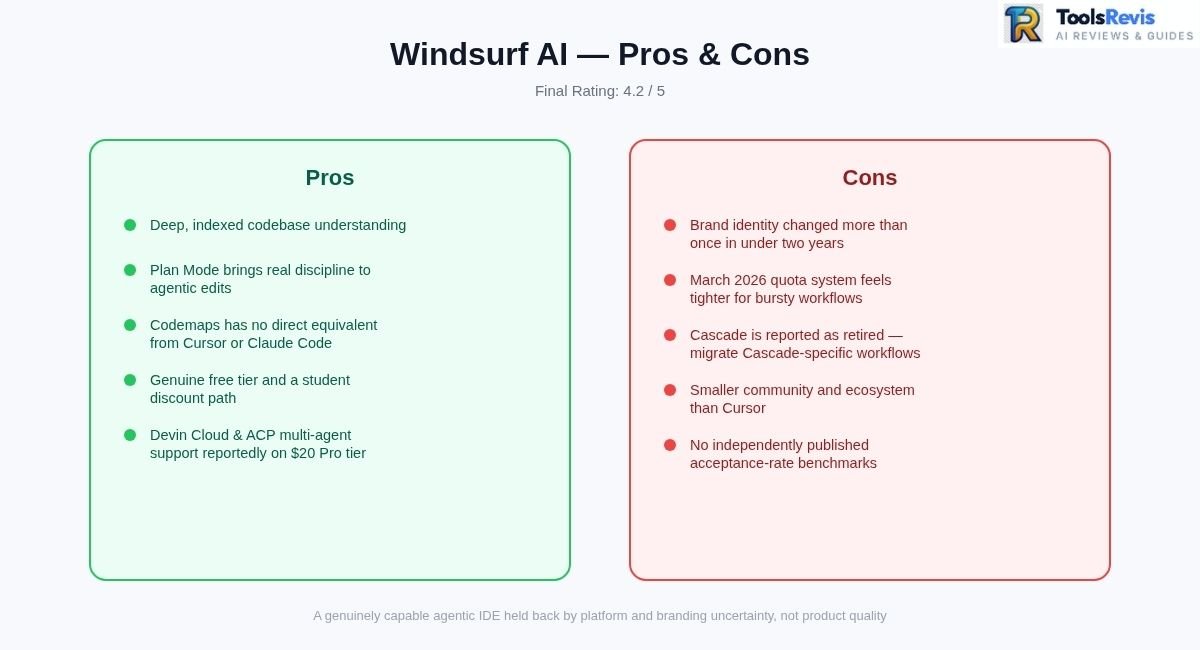
Pros
- Deep, indexed codebase understanding
- Plan Mode brings real discipline to agentic edits
- Codemaps remains one of Windsurf’s more distinctive codebase-visualization features.
- Genuine free tier and a student discount path
- Devin Cloud access and ACP-based multi-agent support are now part of the post-rebrand product experience.
Cons
- Brand identity has changed more than once in under two years (Codeium → Windsurf → Devin Desktop)
- March 2026 quota system feels tighter for bursty workflows
- Cascade is reported as retired — anyone with Cascade-specific workflows should verify and migrate
- Smaller community and ecosystem than Cursor
- No independently published acceptance-rate benchmarks to verify performance claims
Final Rating: 4.2/5 — a genuinely capable agentic IDE held back half a point by platform and branding uncertainty rather than by product quality.
Read Next on ToolsRevis
- Cursor AI Review 2026: Features, Composer & Real Performance — how Cursor’s Composer agent and multi-file diffing perform in real-world development.
- Top 10 Best AI Tools for Developers & Software Engineers — a curated guide to the highest-rated AI code editors, autocomplete plugins, and terminal assistants.
- GitHub Copilot Review: Is It Still Worth It in 2026? — Copilot’s latest features, IDE integrations, and flat-rate pricing compared to modern agentic editors.
Frequently Asked Questions (FAQs)
1. Is Windsurf AI free?
Yes. The Free tier costs $0 and includes unlimited Tab autocomplete plus a light daily/weekly quota for agent actions. It’s enough to evaluate the product but not to sustain full-time agentic coding — most active users move to Pro ($20/month) once they’re using the agent daily.
2. Is Windsurf becoming Devin Desktop?
Yes. Starting June 2, 2026, Cognition began rolling out a rebrand of Windsurf to Devin Desktop as a standard update to existing users. Accounts, plans, extensions, and settings were designed to carry over automatically during the transition — worth confirming in your own install — with no reinstall or migration wizard required.
3. Does it support Claude models?
Yes. Pro-tier users can route agent requests to Claude-class models alongside Cognition’s in-house models and other third-party options, and — since the ACP rollout — are reported to be able to run Claude Agent directly inside the editor. Third-party frontier models typically consume quota faster than the in-house model.
4. Is Windsurf/Devin Desktop replacing developer jobs?
Not in the way that framing suggests. Community discussion consistently lands on a role shift rather than a replacement: less time hand-writing every line, more time reviewing agent output, refining rules files, and directing multi-step tasks.
5. Windsurf vs Cursor — which is cheaper?
As of the March 2026 pricing change, they’re priced identically at $20/month for individual Pro plans. At the free tier, both offer a usable but limited entry point; the deciding factor now is workflow fit, not sticker price.
6. What happened to Cascade?
Cascade, the original agent, was reported to be replaced by Devin Local as part of the June 2026 rebrand, with Cascade kept available as a legacy option only through July 1, 2026. Confirm the current status in your own install if you have workflows that depend on it.
7. How do I claim the student discount?
Sign up or verify your existing account through the official student/education page using your verified student status. Because the offer and its exact discount percentage have shifted during the product’s ownership and branding transition, confirm the current terms directly on the official site before assuming a specific discount rate applies.

I’m Umair Ahmad, founder of ToolsRevis. I personally test every AI tool we cover — signing up, running real workflows, checking pricing tiers, and comparing outputs — before writing a single word. My goal: cut through AI marketing hype with honest, hands-on verdicts.
Let’s achieve more together!