
Cursor promises to be VS Code with a brain — but in 2026, when terminal-native agents like Claude Code can refactor your entire repo without you touching a mouse, “AI-powered IDE” isn’t automatically a compliment. Is Cursor still earning its $20-a-seat price tag, or has it become a beautifully skinned wrapper that’s one bad update away from irrelevance?
Quick Verdict Box:
Cursor AI 2026 — The Bottom Line
Rating: ⭐⭐⭐⭐½ (4.7/5)
Pros: S-Tier multi-file editing (Composer 2.5), 2-click VS Code migration, autonomous background terminal execution.
Cons: Silent context truncation (70K–120K tokens), fast token burn on complex edits, flaky Agent Review UI.
Best For: Indie hackers, full-stack devs, startup teams. Enterprise monorepos (500K+ lines) may see indexing lag.
Most “reviews” of Cursor are thinly-veiled affiliate pitches recycling the same changelog screenshots. This one isn’t. We pulled real usage patterns from developer threads on r/cursor and r/programming, stress-tested Composer 2.5 on actual multi-file refactors, and tracked token consumption across a week of daily use — because the only review that matters is the one that shows you how Cursor behaves when you’re three hours deep into a deadline, not in a polished demo video.
Before deciding whether Cursor AI is the right coding assistant for your workflow, it helps to understand how it compares with the broader AI development ecosystem. If you’re evaluating multiple coding assistants, AI IDEs, and developer productivity platforms, start with our comprehensive guide to Best AI Tools for Developers, then come back to this in-depth Cursor review for a detailed breakdown.
What is Cursor AI? (The Core AI-Native Architecture)
Cursor AI is an AI-native code editor built as a fork of Visual Studio Code. It integrates AI directly into the editor, enabling multi-file editing, intelligent codebase search, terminal automation, and support for multiple AI models from a single workspace.
Cursor isn’t an extension bolted onto VS Code — it’s a native fork. That distinction matters more than marketing copy usually lets on. Instead of running AI features through VS Code’s extension API (with all the latency and sandboxing constraints that implies), Cursor rebuilds the editor core itself, wiring AI directly into the indexing engine, the diff viewer, and the command palette.
The practical payoff is twofold. First, onboarding friction basically disappears — since it’s a fork, not a rebuild, your existing VS Code settings, themes, and extensions carry over almost perfectly. Second, and more importantly, Cursor gives you true multi-model freedom. You’re not locked into one vendor’s roadmap: you can route a task to Claude Sonnet 5 for fast iterative edits, escalate to Opus for deep architectural reasoning, or fall back to GPT-class models when you want a second opinion on a tricky bug. That model-agnostic core is arguably Cursor’s real moat in 2026 — not the UI, but the freedom to pick the best brain for the job without leaving your editor.
Most Useful Cursor AI Features in 2026
Cursor AI offers four core capabilities: Composer 2.5 for multi-file editing, Agent Mode for autonomous task execution, @codebase semantic search, and .cursorrules for enforcing coding standards across projects.
Cursor Composer 2.5 & Agent Mode
Composer 2.5 is Cursor’s cross-file editing engine, and in 2026 it’s built to reason about your codebase as a graph, not a stack of isolated files. Ask it to rename a shared type and it doesn’t just grep-and-replace — it traces usage across @src/types/user.ts, @src/api/routes.ts, and every component that imports it, then stages a coherent diff across all of them in one pass.
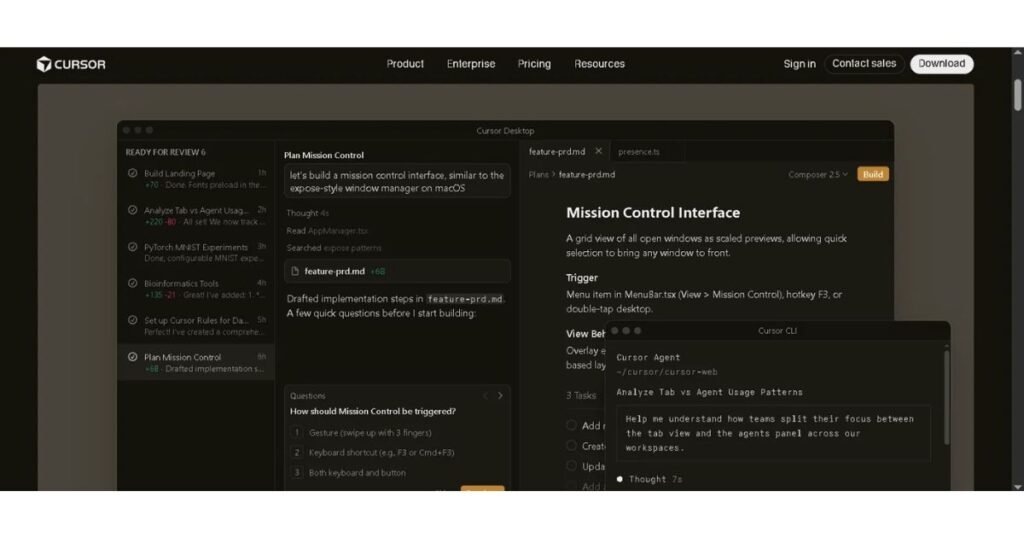
Agent Mode goes further than editing. It’s a full task-runner sitting inside your editor:
- Background task execution — kick off a long-running job (npm run build, a test suite, a migration script) and keep prompting Composer while it runs
- Native terminal command execution — Agent Mode can open a shell, run commands, read the output, and react — no copy-pasting stack traces back into chat
- MCP server integrations — connect Model Context Protocol servers (databases, internal APIs, ticketing systems) and Agent Mode can query them mid-task for live context
- Automatic runtime debugging — when a command fails, Agent Mode reads the error, correlates it against the relevant file (say, a TypeError in @src/middleware.ts), and proposes a fix without you pasting the stack trace manually
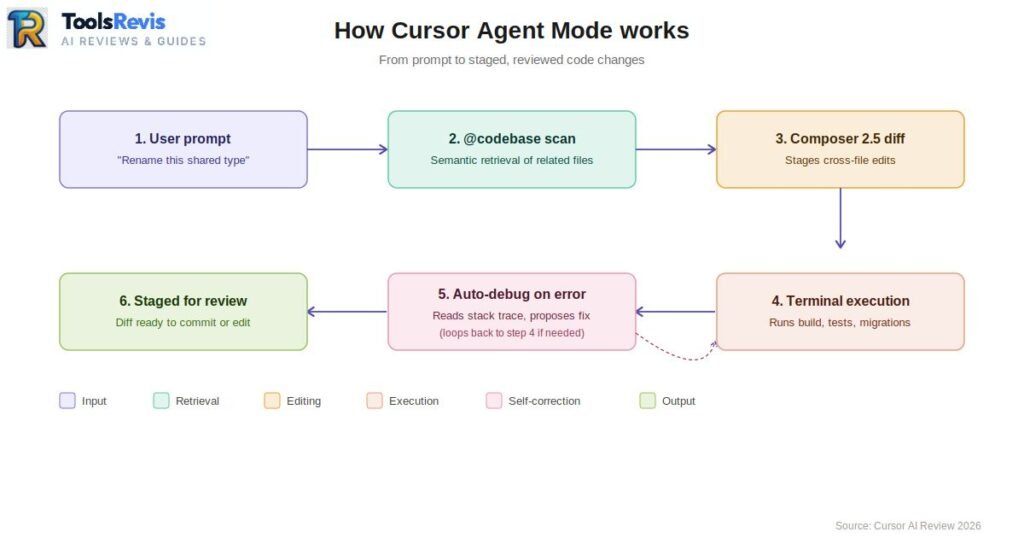
The net effect: Agent Mode behaves less like autocomplete and more like a junior engineer with shell access — which is exactly why the token cost (more on that below) climbs fast.
Codebase-Aware Chat (@codebase)
The @codebase feature is where Cursor separates itself from “AI copy-pasting” tools — plugins that just stuff your clipboard content into a prompt and hope for the best.
Under the hood, Cursor builds a local vector index of your entire repository. Every file gets chunked, embedded, and stored so that when you ask a question, Cursor performs semantic retrieval — pulling the actual relevant functions, types, and call sites based on meaning, not just filename or keyword match.
Compare the two workflows:
- Traditional AI copy-paste: you manually select and paste @src/utils/auth.ts into a chat window, hoping you grabbed the right file. The model has zero awareness of anything outside what you pasted.
- @codebase indexing: you ask “how does token refresh work here?” and Cursor’s retrieval layer pulls auth.ts, the middleware that calls it, and the config file defining expiry — without you touching a single file explorer tab.
This is why @codebase queries feel like talking to someone who’s actually read your repo, not someone you’re spoon-feeding snippets to.
The Power of .cursorrules Configuration
A single .cursorrules file at your project root turns Cursor from a general-purpose assistant into a framework-constrained specialist. It’s plain text, but it acts as a hard system-level instruction layer injected into every Composer and Agent Mode call.
Practical examples:
# .cursorrules — Next.js App Router
– Always use the App Router (app/) structure, never pages/
– Server Components by default; only add “use client” when interactivity is required
– Fetch data in Server Components, never in useEffect
# .cursorrules — FastAPI security baseline
– All endpoints must use Depends() for auth, no manual token parsing
– Never log request bodies containing password or token fields
– Enforce Pydantic models for all request/response schemas
Without this file, the LLM defaults to whatever pattern is statistically common in its training data — which often means outdated Next.js pages/ router code or insecure FastAPI scaffolding. With it, Cursor strictly adheres to your team’s conventions across every generated file, which matters enormously once multiple developers are prompting the same repo.
The Reddit Reality Check: What the Community Discovered in 2026
Real-world Reddit discussions reveal three recurring Cursor AI issues: token overuse, hidden context truncation, and occasional Agent Review instability.
Native “Agent Review” Token Waste Bug
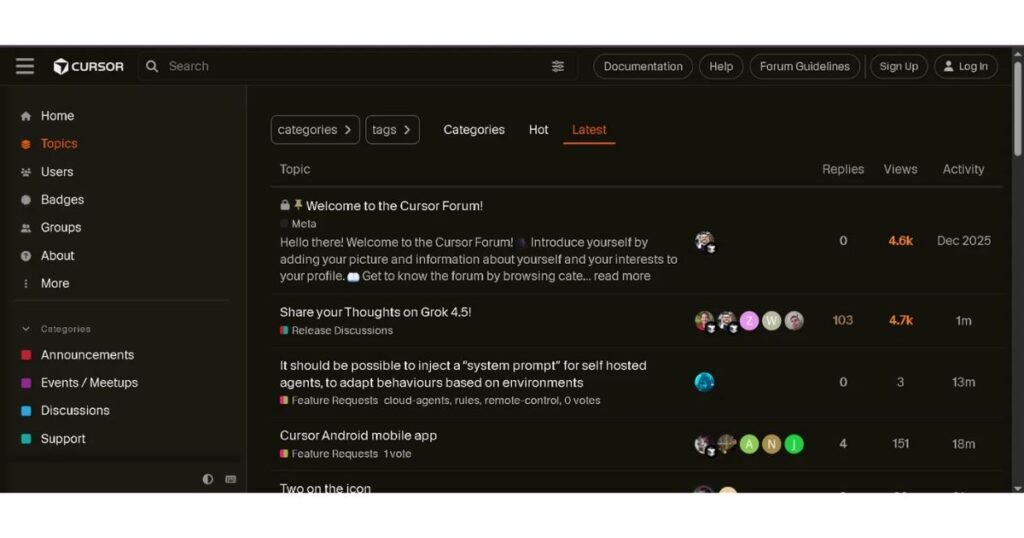
Cursor’s own community forum has an open, unresolved thread on this exact issue: users report that the native Agent Review button (the in-editor UI for reviewing agent-generated diffs before commit) consumes premium token usage in a way that isn’t clearly surfaced anywhere — you can see tokens burned, but not which model handled the review or why the cost is so high.
The second, more common complaint: switching tabs mid-review — say, to check a file in @src/components/ — frequently loses the review state entirely, forcing a full re-run of the review pass and burning tokens a second time.
The real-world workaround developers have converged on: skip the native Agent Review UI entirely. Instead, run a custom prompt against your staged changes using the standard chat agent:
Review my staged git changes for logic errors, security issues,
and style violations. Do not suggest changes outside the diff.
This routes through the same chat context you already control, avoids the flaky review panel, and — critically — doesn’t silently eat tokens on a UI bug you can’t see happening.
Hidden Context Window Truncation
Cursor markets access to massive context windows (up to 1M tokens depending on the underlying model), but power users running heavy multi-file workloads have consistently flagged a gap between advertised and effective context.
In practice, once Composer or Agent Mode is juggling several open files, an active terminal session, and MCP tool outputs simultaneously, Cursor’s internal context management silently truncates the working set down to roughly 70K–120K usable tokens — nowhere near the marketed ceiling.
The symptom developers report is context drift: the AI “forgets” a structural constraint you set 40 minutes ago — like a .cursorrules directive or an architectural decision made earlier in the session — because the earlier turns fell out of the truncated window. There’s no warning banner, no token counter flashing red. You just start getting code that quietly violates a rule you already established.
Practical mitigation: for long sessions on large codebases, periodically re-state critical constraints rather than assuming Cursor “remembers” a decision from an hour ago.
The $20 Fast Limits vs Unlimited Slow Realities
Here’s where Cursor’s economics actually hold up better than the token-burn complaints suggest. The Pro plan ($20/month) includes roughly 500 fast requests — premium-model calls that return near-instantly. Once you burn through that pool, Cursor doesn’t cut you off. It drops you into an unlimited “slow requests” queue.
The catch that turns out not to be much of a catch: in real-world testing, “slow” adds only 2–3 seconds of latency per request, not the multi-minute waits horror stories imply. For most day-to-day coding — writing a function, fixing a bug, running @codebase queries — a 2–3 second delay is barely noticeable against the time you’d spend writing the code manually.
Bottom line: even factoring in the token-burn issues above, unlimited slow requests at a 2–3 second tax make the $20 tier genuinely hard to beat for indie developers and small teams who aren’t running enterprise-scale monorepos daily.
Cursor AI Pricing vs. Standalone APIs: The Real Math
Cursor AI pricing includes four plans ranging from Free to Ultra. Unlike pay-per-token APIs, Cursor combines subscription pricing with usage credits, making monthly costs more predictable.
Any honest Cursor AI Review 2026 has to go past the marketing page and into what developers actually pay. Cursor’s individual pricing runs four tiers deep:
| Plan | Price | What You Get |
| Hobby | Free | Limited Tab completions, limited Agent requests, full editor access |
| Pro | $20/mo | Unlimited Tab, extended Agent limits, frontier model access, MCPs, Background Agents |
| Pro+ | $60/mo | Everything in Pro + 3x usage credits across OpenAI, Claude, and Gemini models |
| Ultra | $200/mo | Everything in Pro + 20x usage credits, priority access to new features |
Pricing moved to a credit-based system in 2025, so the flat monthly fee now buys you a dollar-denominated usage pool rather than a fixed request count — a fast Claude Sonnet call costs more than an economical completion, and heavy “max mode” refactors can chew through a chunk of that pool in a single session.
Now compare that to going DIY. A growing subset of developers skip Cursor entirely and wire up open-source agent extensions like Cline or Roo-Cline inside plain VS Code, routing model calls through OpenRouter to pay per-token across providers.
On paper, it sounds cheaper. In practice:
- A single heavy coding week — multi-file refactors, agent-driven debugging, repeated context reloads — can burn $5 to $60 in raw API tokens, and that’s before accounting for retries and wasted context
- There’s no floor and no ceiling. A bad prompt loop or a runaway agent can silently rack up charges with zero warning
- You’re also self-managing rate limits, provider switching, and billing dashboards across multiple platforms
This is where Cursor’s unlimited slow requests pool becomes the real value proposition, not just a consolation prize. Once you burn through your fast-request allocation on the $20 Pro plan, you don’t get cut off or billed extra — you drop into a slow queue with a flat 2–3 second delay. That’s a hard cost ceiling DIY API setups simply don’t have. For predictable monthly spend, $20 flat beats a volatile $5–$60 swing almost every time.
Cursor AI vs GitHub Copilot vs Windsurf
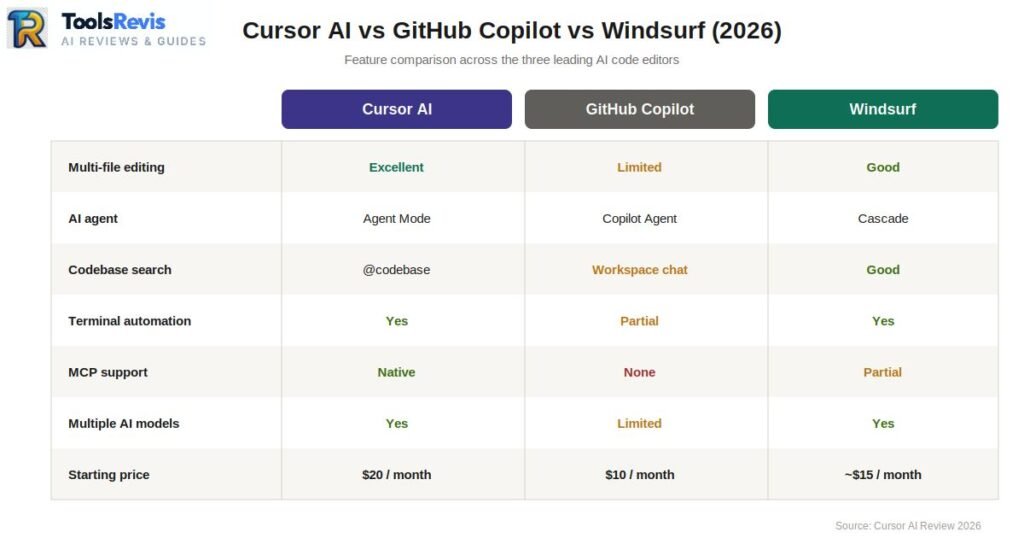
| Feature | Cursor AI | GitHub Copilot | Windsurf |
| Multi-file Editing | Excellent | Limited | Good |
| AI Agent | Agent Mode | Copilot Agent | Cascade |
| Codebase Search | @codebase | Workspace Chat | Good |
| Terminal Automation | Yes | Partial | Yes |
| MCP Support | Native | ❌ | Partial |
| Multiple AI Models | Yes | Limited | Yes |
| Starting Price | $20/month | $10/month | ~$15/month |
Cursor AI stands out for multi-file refactoring, autonomous agent workflows, and native MCP integration, while GitHub Copilot focuses on inline coding assistance and Windsurf emphasizes AI-driven development workflows.
Can You Use Claude Code Inside Cursor AI?
Short answer: yes, but with a caveat. Cursor doesn’t let you plug in your standalone Claude.ai (Pro/Max) subscription directly — that subscription is locked to Anthropic’s own apps. What Cursor does support is Claude models (including Claude Code’s underlying model) through its own credit system or via an Anthropic API key you add manually.
What model does Cursor use by default?
Cursor isn’t tied to one model. Out of the box, Pro and Pro+ plans give you access to Claude Sonnet 5, Claude Opus, GPT-class models, and Gemini — you pick per-task from the model selector in chat, Composer, or Agent Mode. There’s no single “default” — it’s whatever you last selected, or a fast, cost-efficient model Cursor auto-picks for simple completions.
How to use Claude Code with Cursor:
- Open Cursor Settings (Ctrl+, / Cmd+,) → go to Models
- Find the Anthropic API Key field
- Generate a key from console.anthropic.com and paste it in Cursor
- Claude models will now appear in your model picker, billed directly through your Anthropic account — separate from Cursor’s subscription credits
Can I use my Claude subscription in Cursor?
No — your Claude.ai Pro or Max subscription only works inside Claude’s own apps (claude.ai, Claude Code CLI, Claude Desktop). It cannot be linked to Cursor. To use Claude models in Cursor, you either use Cursor’s built-in credits (covered by your Pro/Pro+/Ultra plan) or bring a separate Anthropic API key, which is billed per-token separately from your Claude subscription.
Why do some developers prefer Claude Code over Cursor?
Claude Code is a terminal-native agent — no editor UI, no indexing overhead, and it works directly against your actual file system and git history. Developers who want a lighter, more transparent tool (you can see exactly what command it’s running, no silent context truncation like Cursor’s Agent Mode) often reach for Claude Code for deep refactors, while keeping Cursor for the day-to-day editor experience with Tab completions and inline chat. It’s less “which is better” and more “which job is it doing” — many developers use both side by side.
Security & Privacy: Can You Use It for Commercial Code?
Cursor AI can be used for commercial projects if Privacy Mode is enabled and sensitive files are excluded from indexing using a properly configured .cursorignore file. Short answer: yes, but only if you configure it correctly first. Skipping this section is how proprietary code ends up somewhere it shouldn’t.
Privacy Mode is non-negotiable for commercial work. By default, some AI coding tools reserve the right to use submitted code for model training. Before touching a single line of client or company code in Cursor, go to Settings → General → Privacy Mode and activate it. This contractually prevents your code, prompts, and file contents from being retained or used to train underlying models. For any team handling proprietary or client-owned code, this should be step one of onboarding — not an afterthought.
Next, lock down what the vector engine can even see. Cursor’s @codebase indexing (covered earlier in this review) will happily embed anything in your repo — including secrets — unless you explicitly tell it not to. Here’s the setup:
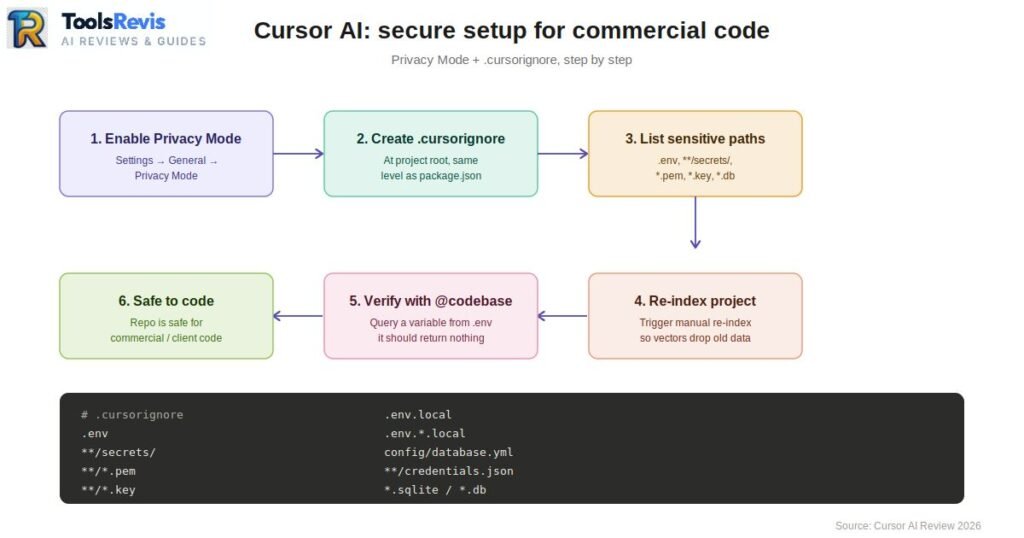
Step-by-step .cursorignore configuration:
- Create a file named .cursorignore at your project root (same level as package.json or pyproject.toml)
- Add sensitive paths and file patterns, one per line:
# .cursorignore
.env
.env.local
.env.*.local
**/secrets/
*/.pem
*/.key
config/database.yml
**/credentials.json
*.sqlite
*.db
- Restart Cursor’s indexing (or trigger a manual re-index) so the vector engine drops any previously embedded sensitive content
- Verify by running an @codebase query that references a variable from your .env — it should return nothing
This single file is the difference between Cursor being a productivity tool and Cursor being a silent liability sitting on top of your DATABASE_URL.
The community’s answer to AI-introduced vulnerabilities: a practice loosely branded “Vibe Coding” security auditing. Rather than trusting Agent Mode’s own judgment, developers write lightweight custom markdown prompt-files — effectively mini security checklists — and run them against the codebase immediately after any major AI-generated feature build. A typical audit prompt checks for hardcoded secrets, missing input validation, and auth bypass patterns before the branch ever reaches a PR. It’s not a replacement for real security review, but it catches the sloppy, fast-shipped mistakes that high-velocity AI coding tends to introduce.
Conclusion: Should You Switch to Cursor AI in 2026?
Cursor AI remains one of the strongest AI coding editors in 2026 for developers who value fast multi-file editing, AI agents, and predictable pricing. After running Composer 2.5 through real multi-file refactors, stress-testing the pricing model, and cross-referencing actual developer complaints instead of marketing copy, the verdict on this Cursor AI Review 2026 is clear — but it depends heavily on who’s asking.
Green flag: Startups, indie hackers, and solo full-stack developers optimizing for shipping speed. The combination of native VS Code migration, Composer 2.5’s cross-file awareness, and the $20 Pro plan’s cost ceiling makes Cursor one of the strongest execution tools available in 2026, full stop.
Yellow flag: Legacy enterprise teams running giant monolithic repositories (500K+ lines). Indexing lag, context truncation on heavy multi-file workloads, and the need for tight .cursorignore and Privacy Mode discipline mean large orgs should pilot Cursor on a single team before a company-wide rollout — not assume it scales identically to a 5-person startup repo.
Cursor earns its price tag in 2026. It’s not flawless — the Agent Review token bug and hidden context truncation are real, documented pain points — but for the audience it’s built for, nothing else on the market matches its speed-to-shipped-code ratio.
Now that you know how Cursor performs, see how it holds up against Microsoft’s official ecosystem in our upcoming GitHub Copilot Review, or check out our direct Cursor vs GitHub Copilot Comparison for a head-to-head breakdown built for developers who don’t have time for fluff.
Read Next (Related Guides)
If you want to explore more about AI coding tools, advanced language models, and developer workflows, check out our deep-dive guides:
- The Ultimate Developer Stack: Ready to see how Cursor stacks up against other AI editors, terminal tools, and local setups? Read our master pillar guide on the Best AI Tools for Developers in 2026.
- The Brain Behind Cursor: Cursor relies heavily on Anthropic’s models. Check out our detailed Claude Sonnet 5 Review to understand the full capabilities of its default engine.
- Choosing the Right Model: Inside Cursor, you can switch between different LLMs. See which one wins for programming tasks in our head-to-head battle: Claude Sonnet 5 vs GPT-5.6 for Coding.
- Subscription Value Check: Considering a premium AI subscription but not sure whether to choose an IDE or a chat interface? Read our ChatGPT Plus vs Claude Pro Comparison.
Frequently Asked Questions
1. Is Cursor AI worth paying for in 2026?
Yes. Cursor Pro offers excellent value for developers who regularly use AI-assisted coding, especially for large projects and multi-file refactoring.
2. Is Cursor AI better than GitHub Copilot?
Cursor generally offers stronger multi-file editing, agent workflows, and semantic codebase understanding, while GitHub Copilot excels at inline code completion.
3. Does Cursor AI use Claude models?
Yes. Cursor supports Anthropic Claude models along with OpenAI and Google Gemini models, depending on your selected plan and configuration.
4. Is Cursor AI safe for company code?
Yes, provided Privacy Mode is enabled and sensitive files are excluded using a properly configured .cursorignore file.
5. Can Cursor AI replace VS Code?
Cursor is built on a fork of Visual Studio Code, making migration easy while adding AI-native development features.
6. Does Cursor AI work with large codebases?
Yes, Cursor AI can handle large repositories using its @codebase indexing feature. However, very large enterprise projects (500K+ lines of code) may experience indexing delays and occasional context truncation during long AI sessions.
7. Which AI models can you use inside Cursor AI?
Cursor AI supports multiple leading AI models, including Anthropic Claude, OpenAI GPT, and Google Gemini models (availability depends on your subscription plan). This flexibility allows developers to choose the best model for coding, debugging, or architectural reasoning.
8. Is Cursor AI suitable for beginners?
Yes. Cursor AI is beginner-friendly because it offers a familiar Visual Studio Code experience while adding AI-powered code completion, chat, and automation features. Developers with prior VS Code experience can usually migrate in just a few minutes without changing their workflow.
9. Can I use Claude Code inside Cursor AI?
You can use Claude’s models (like Sonnet 5) inside Cursor through the model selector or your own Anthropic API key, but Claude Code specifically is a separate standalone terminal tool from Anthropic and isn’t something you install “inside” Cursor.
10. Can I use my Claude subscription in Cursor?
No. A Claude.ai subscription only works within Anthropic’s own products. To access Claude models in Cursor, use Cursor’s built-in credit system or connect your own Anthropic API key.

I’m Umair Ahmad, founder of ToolsRevis. I personally test every AI tool we cover — signing up, running real workflows, checking pricing tiers, and comparing outputs — before writing a single word. My goal: cut through AI marketing hype with honest, hands-on verdicts.
Let’s achieve more together!