
If you’re choosing your next AI coding tool based on hype alone, you’re already behind — because the real question in 2026 isn’t “which AI is smarter,” it’s “which one actually fits into how you build software.”
Cursor is a full AI-powered code editor with codebase indexing and multi-file editing, while Kimi K3 is a frontier open-weight model you can plug into it. Pick Cursor for a complete development workflow, and add Kimi K3 when you need genuinely cheaper, frontend-focused coding power.
By mid-2026, the AI coding ecosystem has split into two core layers: the interface layer (comprising IDEs and agentic environments like Cursor, Cline, and Devin Desktop) and the intelligence layer (the foundational LLMs including Claude, GPT, and advanced Chinese open-weight models). Recognizing this distinction is now essential. A prime example is Moonshot AI’s release of Kimi K3 on July 16, 2026—a 2.8-trillion-parameter Mixture-of-Experts (MoE) system powered by Kimi Delta Attention, complete with native visual processing and a 1-million-token context capacity.
Initial benchmark results appeared ambitious at launch: while Moonshot asserted that K3 outperformed Claude Fable 5 across multiple internal testing suites, third-party evaluations presented a more nuanced picture. Independent tests showed K3 lagging behind Fable 5 on metrics like FrontierSWE and GDPval-AA Elo, as well as behind GPT-5.6 Sol (the frontier OpenAI model at the time) on DeepSWE—highlighting the ongoing gap between proprietary vendor benchmarks and actual real-world software engineering capabilities, and a reminder that model names and rankings in this space shift within months.
This release has prompted a surge in “Cursor AI vs Kimi K3” searches, yet most comparisons are misframing the question. Rather than directly pitting them against each other, check out our in-depth Cursor AI Review to understand its default capabilities first.
On June 16, 2026, SpaceX announced an agreement to acquire Anysphere, the company behind Cursor, in a $60 billion all-stock transaction. The SEC Form 8-K stated that the deal was expected to close in Q3 2026. The acquisition has raised questions about Cursor’s model-agnostic future, with developers on Cursor’s community forum discussing whether non-xAI models, including Kimi K3, will continue to be supported.
Cursor AI vs Kimi K3: Key Differences Explained
While Cursor AI serves as an AI-driven code editor, Kimi K3 is the underlying large language model engineered to execute complex coding queries via APIs and AI assistants. Put simply: one acts as the workspace, while the other functions as the brain operating inside it.
Cursor AI is an end-user application. Built as a customized fork of VS Code, it delivers a fully featured development environment—complete with a native user interface, integrated terminal, file tree, multi-file editing capabilities, real-time tab completions, and automated agent features. This is where software engineers spend their day writing, inspecting, and deploying software. Importantly, Cursor operates on a model-agnostic approach, allowing developers to switch between backends like Claude, GPT, Gemini, or open-weight releases as project demands change.
By contrast, Kimi K3 is strictly an intelligence model. It does not ship with a built-in file tree, code workspace, or a conventional IDE interface. Instead, it serves as the raw reasoning engine that parses your codebase, interprets prompts, and produces code solutions. You can interface with Kimi K3 through Kimi.com, its enterprise counterpart Kimi Work, the CLI tool Kimi Code, or directly via API—yet none of these entry points form a full-fledged IDE like Cursor.
Pitting the two against each other is much like comparing a car to its engine—they serve entirely different purposes within the system. The real question is how effectively Kimi K3 functions as a select model within environments like Cursor compared to default LLMs, and whether Moonshot’s command-line setup (Kimi Code) offers a genuine alternative to a dedicated AI editor. We’ll examine both perspectives below.
Cursor’s model-agnostic positioning is now under discussion following SpaceX/xAI ownership, as xAI has its own Grok models and developers are discussing whether non-xAI models such as Kimi K3 will remain supported.
What Developers Are Actually Saying
Cost and value discussions: In r/kimi, users have discussed K3 subscription limits, usage, and how its pricing compares with alternatives when evaluating overall value. Reddit r/kimi discussion
Cursor K3 support request: In a July 17, 2026 forum thread requesting K3 support, Cursor team member Colin confirmed that the team was looking at adding Kimi K3. Cursor forum thread
Current image support: Cursor staff later confirmed that the K3 deployment inside Cursor is currently text-only, with attached images processed through a helper model rather than sent natively. Cursor forum confirmation
What is Kimi K3? Moonshot AI’s New Flagship
Launched in July 2026, Kimi K3 represents Moonshot AI’s top-tier foundation model. Rather than serving as a full-fledged IDE, it is purpose-built to handle complex programming, logical reasoning, expansive context windows, and multimodal workflows.
Here’s what’s under the hood:
- Scale: Operating on roughly 2.8 trillion parameters via a Mixture-of-Experts architecture, it stands as the first open model to reach this scale—nearly tripling the size of its previous generation.
- Architecture: It utilizes a sparse Mixture-of-Experts (MoE) design featuring 896 experts, activating 16 per token. The model is powered by Kimi Delta Attention (KDA)—a hybrid linear-attention approach that uses residual connections to handle ultra-long sequences efficiently, avoiding the severe computational drag typical of standard quadratic attention at this scale.
- Context Window: Features an expansive context capacity of up to 1 million tokens, alongside native vision support for seamless multimodal processing.
- Availability: Accessible immediately from launch across the Kimi.com web platform, the enterprise-focused Kimi Work, the command-line agent Kimi Code, and the developer API.
- Pricing: Rates are set at $3.00 per million input tokens and $15.00 per million output tokens. This represents a noticeable price jump over the K2 generation, moving K3 out of the budget open-weight tier and closer to premium flagship pricing.
- Open weights: Full model weights are scheduled to be released by July 27, 2026 under Moonshot’s own Kimi K3 License, which would make it the largest open-weight model publicly available.
In short, K3 trades the “cheap and fast” positioning of earlier Kimi releases for a genuine shot at frontier-tier intelligence — and that shift shows up clearly in the benchmarks.
Kimi K3 Benchmark Performance — How Good Is It Really?
Kimi K3 ranks among the strongest frontier AI models for coding, especially in frontend development where it currently leads several public benchmark leaderboards.
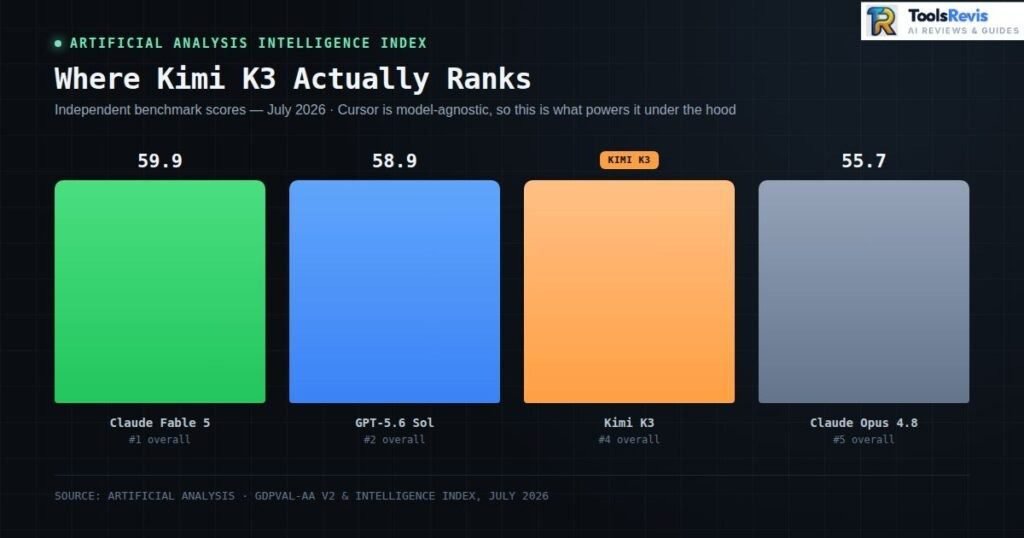
Overall intelligence: As of September 2026, Kimi K3 (max) scores 44 on the Artificial Analysis Intelligence Index, trailing Claude Fable 5.1 (53), GPT-6 Astra (53), Claude Opus 5 (51), Muse Spark 1.3 (48), and GLM-5.3 (45), while tying with Grok 4.6 (44). The leaderboard has been refreshed multiple times since K3’s July 2026 launch, and newer frontier models from other labs have since overtaken its initial ranking — a reminder that benchmark standings shift fast in this market.
On cost-efficiency, K3 (max) costs roughly $1.86 per Intelligence Index task — notably cheaper than Claude Opus 5 ($5.86) or Claude Fable 5.1 ($7.63), though pricier than several smaller models like GPT-5.6 Luna ($0.18) or DeepSeek V4.1 Flash ($0.27). For readers who want to compare live benchmark scores across frontier AI models, the Artificial Analysis AI Model Rankings provide an independently maintained leaderboard covering coding, reasoning, long-context performance, and overall intelligence.
On agentic and long-horizon tasks specifically, K3 shows a dramatic generational leap: it reaches an Elo rating of 1668 on GDPval-AA v2, a marked improvement over K2.6’s 1190, surpassing GLM-5.2 (1514), GPT-5.5 (1494), and Claude Opus 4.8 (1600), while still lagging behind Claude Fable 5 (1760).
Where it really stands out is frontend and web development. According to community benchmark trackers, Kimi K3 tops LMArena’s Frontend Code Arena at 1,679 points, a 17-place jump over Kimi K2.6 — while landing a more modest #9 on the general Text Arena. That gap is telling: K3 isn’t necessarily the smartest all-purpose model on the market, but for UI-heavy work — generating React components, debugging CSS layout issues, scaffolding responsive interfaces — it’s currently rated the single best-performing model tracked on that leaderboard.
For UI engineers, this has a direct practical implication: model choice inside Cursor (or any IDE that supports custom model backends) shouldn’t be one-size-fits-all. If your workload is dominated by frontend and web development, routing those tasks to Kimi K3 could outperform your default model choice — even one from a lab with a higher overall Intelligence Index score. General reasoning benchmarks don’t always predict task-specific performance, and K3’s WebDev Arena result is a clear example of that gap.
One caveat worth flagging before you switch everything over: K3 is also roughly triple Kimi K2.6’s price, and independent testing found it has a higher hallucination rate alongside its accuracy gains — a tradeoff we’ll unpack further when we get into real-world cost-per-task comparisons against Cursor’s default models.
How K3 Ranks Against Claude Fable 5 and GPT-5.6 Sol
When Kimi K3 launched in July 2026, Artificial Analysis gave it an Intelligence Index score of 57, placing it third overall — behind only Claude Fable 5 and GPT-5.6 Sol. That ranking no longer holds. As of September 2026, the refreshed leaderboard has K3 (max) at a score of 44, now trailing Claude Fable 5.1, GPT-6 Astra, Claude Opus 5, Muse Spark 1.3, and GLM-5.3, while tying with Grok 4.6. The takeaway: benchmark rankings on fast-moving leaderboards like this one are a snapshot, not a permanent standing — check the live leaderboard before making a purchasing decision based on any single number in this article.
If you’re comparing multiple frontier coding models instead of just IDEs, our Claude Sonnet 5 vs GPT-5.6 Sol comparison explains where today’s leading LLMs outperform each other in coding, reasoning, and long-context tasks.
The Pricing Breakdown: Official API Costs
Kimi K3 API pricing starts at $3 per million input tokens and $15 per million output tokens, with discounted cached-input pricing for repeated context:
| Token Type | Price (per 1M tokens) |
|---|---|
| Input tokens (standard) | $3.00 |
| Output tokens | $15.00 |
| Cached input tokens | $0.30 |
The cached-input rate is worth paying attention to. At $0.30 per million tokens — a roughly 90% discount off the standard input rate — heavy repeat-context workflows (large codebases re-read across multiple turns, long agentic sessions, repeated system prompts) can bring the effective cost down substantially.
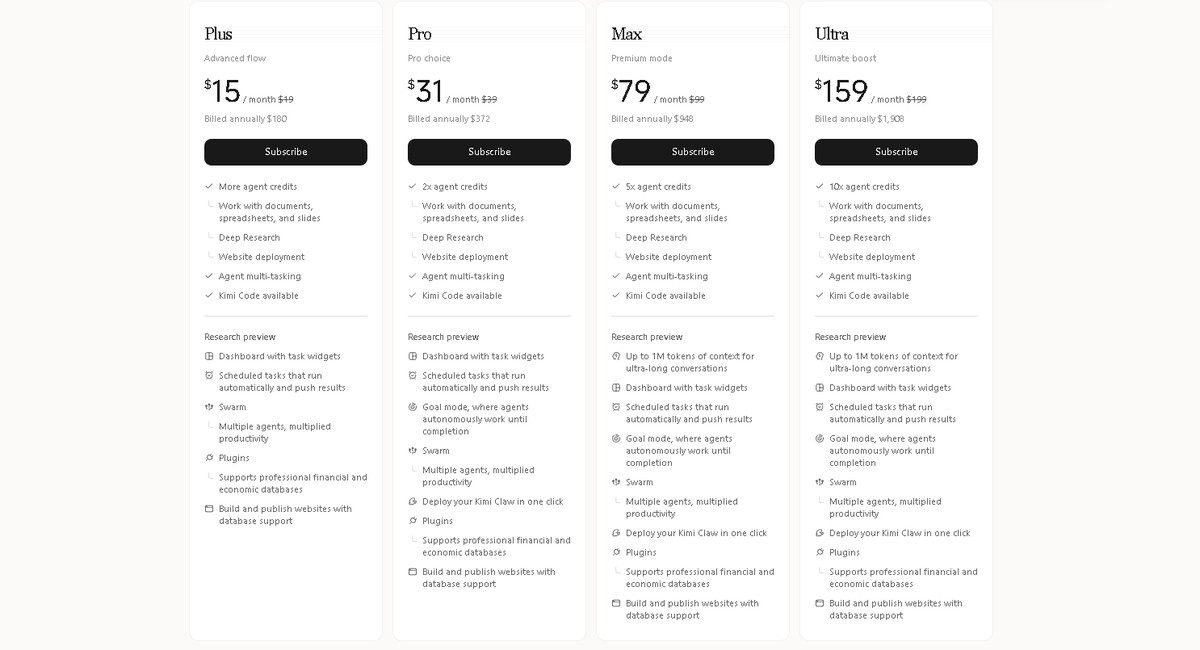
Note: this is API pricing — what you pay if you connect K3 to Cursor or another tool. If you just want to chat with Kimi K3 directly on Kimi.com (not through an API), Moonshot offers separate consumer subscription tiers: Plus ($15/mo), Pro ($31/mo), Max ($79/mo), and Ultra ($159/mo), each billed monthly with a discount for annual billing. These consumer plans are unrelated to the per-token API costs above and aren’t what you’d use for a Cursor integration.
Why the Cursor AI vs Kimi K3 Price Shift Signals a New Era
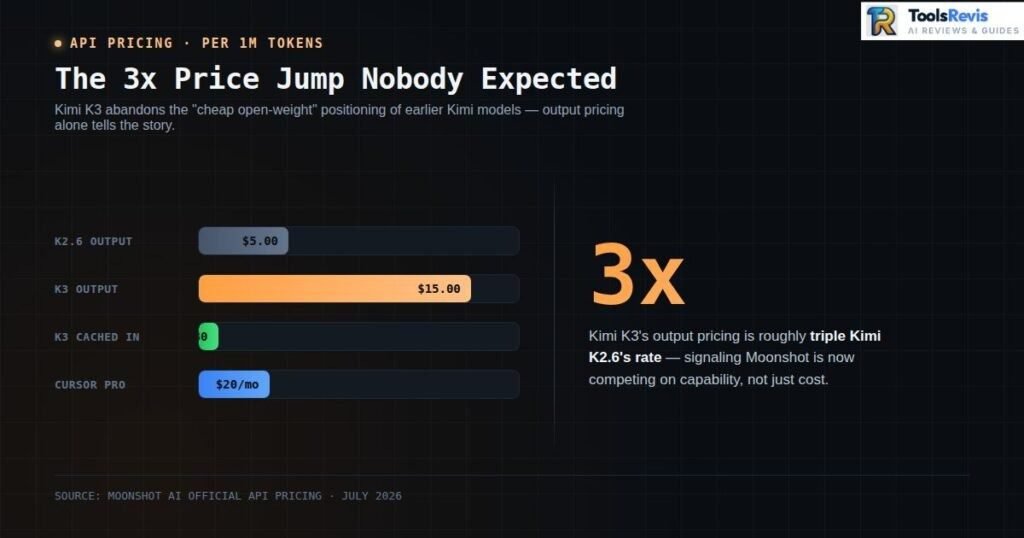
Here’s the number that matters most in this pricing table: K3’s output pricing is roughly triple what Kimi K2.6 charged. That’s not a rounding adjustment — it’s a deliberate repositioning.
For most of the past year, Moonshot’s Kimi models built their reputation on being the “cheap, capable” alternative to closed frontier labs — strong performance at a fraction of the cost. K3 breaks that pattern. With output pricing now sitting close to premium frontier territory rather than the budget tier, Moonshot is signaling that it’s no longer competing primarily on price — it’s competing on capability, and asking the market to pay accordingly.
This matters directly for the Cursor AI vs Kimi K3 conversation. If you were planning to use K3 inside Cursor purely as a cost-saving swap for your default model, that calculus has changed. K3 is still competitively priced against top-tier closed models, but it’s no longer the “cheap open alternative” it might have been under the K2 series. The decision now hinges on task-specific performance — like its WebDev Arena results — rather than pure cost arbitrage.
Is Kimi K3 Open Source?
If you’re asking “is Kimi K3 open source” — yes, it is, as of late July 2026, though with a couple of licensing conditions worth knowing before you build on it.
Here’s how it played out: Kimi K3 launched on July 16, 2026 as a closed-API release only, accessible through Kimi.com, Kimi Work, Kimi Code, and the developer API. Moonshot then followed through on its open-weight promise, publishing the full model weights on Hugging Face around July 26–27, 2026 — making K3 the largest open-weight model publicly available, ahead of existing open contenders like GLM-5.2 and DeepSeek V4 Pro.
The weights ship under a bespoke Kimi K3 License — not MIT, not Apache, and not a “modified MIT” like some earlier Kimi releases. For most developers, that distinction barely matters day to day: you can use, modify, fine-tune, and self-host K3, including in commercial products, without any special agreement. Two specific conditions kick in only at scale:
- Model-as-a-Service operators with group revenue above $20 million in any 12-month period need to sign a separate agreement with Moonshot before commercial use.
- Products above 100 million monthly active users or $20 million in monthly revenue are required to display “Kimi K3” in their user interface.
Outside of those two thresholds, the license doesn’t get in the way of typical development or self-hosting. If your project is anywhere near those revenue or user numbers, it’s worth reading the full license text on Hugging Face before you ship.
How to Use Kimi K3 Inside Cursor or VS Code
Kimi K3 in Cursor: Text-Only Deployment: Cursor’s current Kimi K3 deployment is text-only and does not receive images natively. Attached images are converted into text descriptions by a helper model before being sent to K3, which can cause inaccuracies with screenshots, UI text, or error dialogs. For image-heavy tasks, use Claude, GPT, or Grok instead.
You can use Kimi K3 inside Cursor by connecting either OpenRouter or Moonshot AI’s official API as a custom model endpoint:
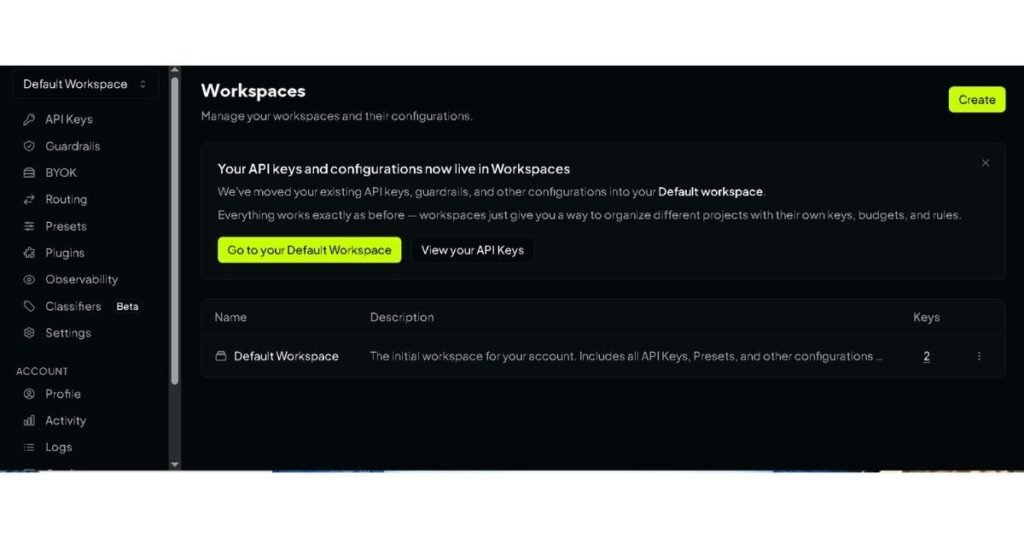
Option A: Via OpenRouter (fastest, recommended for most users)
- Create an account at OpenRouter and add credits.
- Generate an API key from your OpenRouter dashboard.
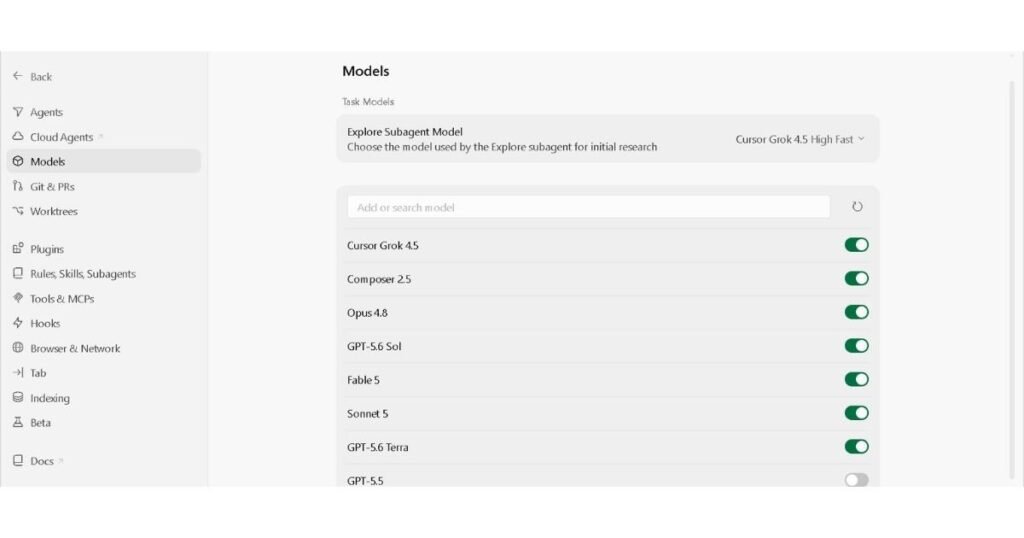
3.In Cursor, go to Settings → Cursor Settings → Models.
4. Under the custom model API section, set the Base URL to https://openrouter.ai/api/v1 and paste in your OpenRouter API key.
5. Click Add Custom Model, and enter the model slug exactly as: moonshotai/kimi-k3 (double-check the prefix — moonshot/kimi-k3 without the “ai” is a common typo that returns a 404 error).
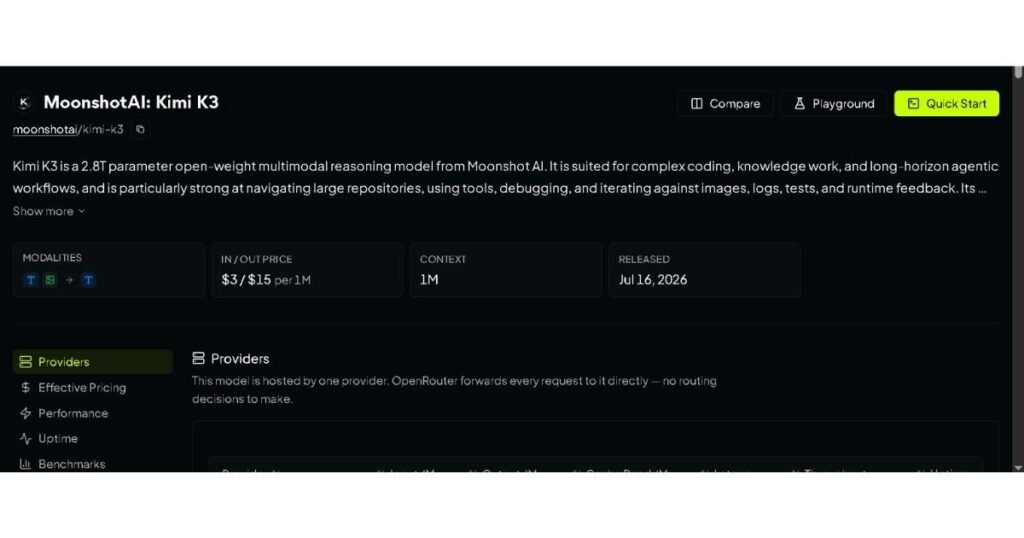
6. Toggle the model on, then select it from the model dropdown in Cursor’s chat or Composer pane.
Option B: Direct via Moonshot’s API
- Sign up for a Moonshot AI developer account and generate an API key.
- In Cursor’s Models settings, set the Base URL to Moonshot’s API endpoint and add your key.
- Add kimi-k3 as a custom model and enable it.
- This route unlocks Moonshot’s native $0.30/1M cached-input pricing, which OpenRouter does not currently match — worth considering if you’re running high-repetition coding sessions.
A quick note before you dive in: because this isn’t a native Cursor integration, agentic features like full Composer multi-file orchestration may behave differently than with Cursor’s default models — worth testing on a low-stakes task first. For VS Code users running extensions like Continue or Cline, the same OpenRouter base URL and model slug (moonshotai/kimi-k3) apply, since most of these tools use the same OpenAI-compatible request format.
Head-to-Head Comparison: Cursor AI vs Kimi K3
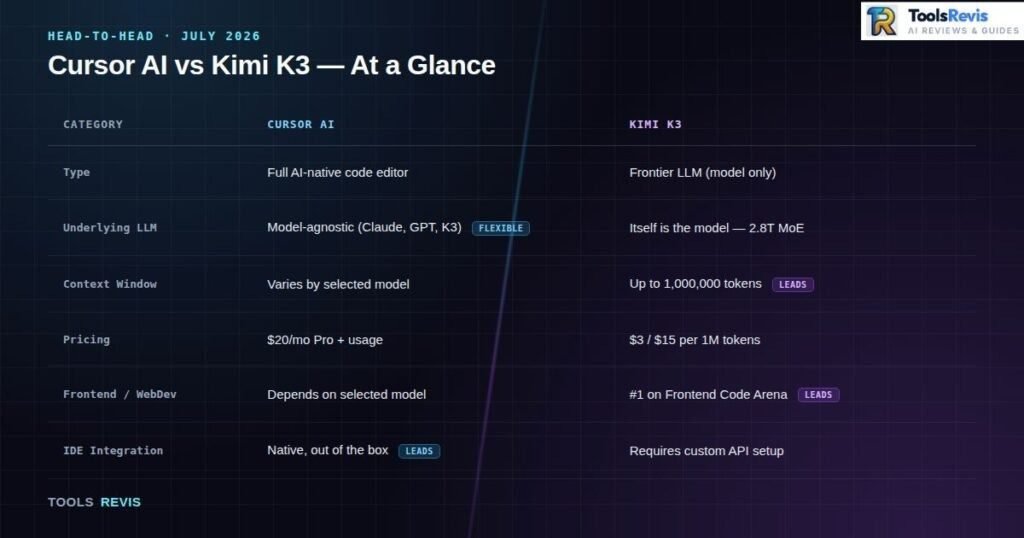
| Category | Cursor AI | Kimi K3 |
|---|---|---|
| Type | Full AI-native code editor (VS Code fork) | Frontier LLM (model only, no native UI) |
| Underlying LLM | Model-agnostic — supports Claude, GPT, Gemini, and custom models like K3 | Itself is the model — 2.8T parameter MoE |
| Context Window | Varies by selected model | Up to 1,000,000 tokens |
| Pricing | Subscription-based (Pro tier) + premium request usage | $3.00/1M input · $15.00/1M output · $0.30/1M cached input |
| Frontend/WebDev Rank | Depends entirely on the model selected in Composer | #1 on LMArena’s Frontend Code Arena (1,679 score) |
| IDE Integration | Native — full Composer, indexing, agent mode out of the box | Not native; requires custom API setup via OpenRouter or Moonshot’s direct API |
| Ownership | Cursor (SpaceX/xAI subsidiary, deal pending Q3 2026 close) | Kimi K3 (Moonshot AI, Beijing — independent) |
The table makes the underlying point from Section 1 concrete: these tools solve different problems. Cursor is where you work. Kimi K3 is one option for what powers that work — and right now, a particularly strong one for frontend-heavy tasks.
Decision Checklist: Cursor or Kimi K3?
Still deciding? Here’s the quick version.
You need a full IDE with indexing and multi-file editing → Choose Cursor
You’re doing frontend-heavy work and want to cut costs → Add Kimi K3 inside Cursor
Your workflow depends on screenshots or UI images → Avoid K3 for now (text-only in Cursor)
You need massive context for large codebases → Choose K3 for its long context window
You want long-term platform stability → Watch acquisition-related model support changes before committing
Final Verdict: Standalone IDE vs Frontier Open Model
In the Cursor AI vs Kimi K3 debate, Cursor is the better choice if you need a complete AI development environment, while Kimi K3 is the better choice if you want a powerful coding model that can be integrated into different tools. There’s no single winner here, because there was never really a single race. Cursor AI remains the strongest all-around AI IDE for teams that need a complete, integrated development environment — codebase indexing, multi-file Composer editing, and a polished UI that just works.
Kimi K3, on the other hand, isn’t trying to be an IDE at all; it’s a genuinely frontier-capable model, particularly dominant in frontend and web development benchmarks, available at a price point that undercuts the very top closed models while trailing them only slightly in raw intelligence.
The smartest move in mid-2026 isn’t choosing one over the other — it’s using Kimi K3 as a model option inside Cursor for UI-heavy work, while leaning on Cursor’s native model roster for broader, general-purpose engineering tasks. Model-agnostic tooling is the whole point of where this ecosystem is heading.
Still evaluating your development stack? Explore our curated list of the Best AI Tools for Developers to compare AI IDEs, coding assistants, code generators, and productivity tools in one place.
Want to see exactly how much a task like this would cost across different models before you commit? Try our Advanced Code Optimizer tool to estimate token usage and pricing across Cursor’s supported models.
Advanced code optimizerFrequently Asked Questions
1. Is Cursor better than Kimi K3?
They are not direct replacements. Cursor is an AI-powered code editor and development environment, while Kimi K3 is an AI model that can be used inside coding tools and other applications. Cursor is the broader development workflow; Kimi K3 is the model you can use for coding and reasoning tasks.
2. Is Kimi K3 open source?
Kimi K3 is an open-weight model. Moonshot released its model weights after the July 16, 2026 launch, under the Kimi K3 License rather than a standard MIT or Apache license. The license allows broad use, but large-scale commercial deployments have additional requirements.
3. How large is Kimi K3’s context window?
Kimi K3 has a 1,048,576-token context window, or approximately 1 million tokens. This makes it suitable for working with large codebases, long documents, and extended coding sessions. The exact usable context can depend on the platform or deployment where you access the model.
4. What is Kimi K3’s current Artificial Analysis score?
Artificial Analysis currently lists Kimi K3 at 44 on its Intelligence Index. This is a live benchmark measurement and can change as Artificial Analysis updates its evaluations and model data. The 57 score reported shortly after K3’s launch was a historical measurement, not the current score.
5. Can I use Kimi K3 in Cursor?
Yes. Kimi K3 is available as a model in Cursor. Cursor users can select Kimi K3 from the model options, although the exact availability, usage limits, billing behavior, and deployment details can change as Cursor updates its model catalog.
6. Does Kimi K3 support vision?
The Kimi K3 model itself supports image input. However, the way K3 is served can affect multimodal functionality. In Cursor, community reports and a Cursor staff response have indicated that the current K3 deployment can be text-only, with images processed through a separate captioning path. Therefore, do not assume that K3 has the same native image experience inside Cursor as it does through Moonshot’s own API.
7. How much does Kimi K3 cost?
Moonshot’s official Kimi API lists Kimi K3 at $3 per million uncached input tokens, $0.30 per million cached input tokens, and $15 per million output tokens. Pricing can differ on third-party platforms, so check the provider you are actually using before calculating your expected cost.
8. What are developers saying about Kimi K3?
Community discussions include positive feedback about Kimi K3’s coding capabilities, along with reports of issues involving cost, context-window behavior, and multimodal use in specific platforms. These are user reports rather than controlled benchmark results, so they should be treated as anecdotal evidence rather than a definitive measure of K3’s quality.
9. Does Kimi K3 have tool-calling problems?
Kimi K3 supports tool calling, but tool-calling behavior can vary by provider, deployment, routing configuration, and application. Some community reports have described issues with particular Cursor or provider configurations. These reports should not be generalized into a claim that Kimi K3 consistently performs worse at tool calling.
10. Is Kimi K3 cheaper than Cursor?
They use different pricing models, so there is no simple one-to-one price comparison. Cursor is primarily a subscription-based development environment, while Kimi K3’s API is token-based. Your actual cost depends on how much you use Cursor and how many input, cached, and output tokens K3 consumes.
11. What are the alternatives to Cursor and Kimi K3?
Developers can also consider tools and models such as Claude Code, GitHub Copilot, Windsurf, OpenAI Codex, and other AI coding assistants. The right alternative depends on whether you need an AI IDE, terminal-based coding agent, standalone model, or broader development workflow.
12. Did Cursor officially add Kimi K3?
Yes. Kimi K3 became available as a selectable model in Cursor after its July 2026 release. Cursor’s model availability can change over time, so the current model picker should be checked if you are following this guide later.
13. Was Kimi K3 ranked #1 in a coding benchmark?
Kimi K3 achieved several strong benchmark results around its launch, including a 1,679 score in the LMArena Frontend Code Arena reported at the time. That was a historical result and should not be presented as its current ranking. Benchmark leaderboards change as new models and evaluation results are added.
14. Why do older articles show a Kimi K3 score of 57?
The 57 Artificial Analysis Intelligence Index score was reported shortly after Kimi K3 launched in July 2026. Artificial Analysis currently lists Kimi K3 at 44, so older articles may show a different score because they were based on an earlier version of the benchmark. Always check the benchmark’s current result and date before comparing models.

I’m Umair Ahmad, founder of ToolsRevis. I personally test every AI tool we cover — signing up, running real workflows, checking pricing tiers, and comparing outputs — before writing a single word. My goal: cut through AI marketing hype with honest, hands-on verdicts.
Let’s achieve more together!