
Type a sentence, get a deployed app. That’s the pitch Replit has been selling since Agent 3 launched — and for a lot of people, it actually delivers. But there’s a gap between “it built my app” and “it built my app correctly,” and that gap is where this review lives.
Quick Verdict: Replit AI (2026)
Rating: 4.2 / 5
Best for: Non-coders, solopreneurs, and PMs prototyping full-stack apps fast — not professional dev teams shipping production-grade codebases.
Pros
- Goes from prompt to deployed full-stack app (with a database) in under an hour
- No local installation is required, as the entire system operates directly inside your web browser.
- Multi-model orchestration (Claude, GPT, Gemini) picks the right model for the job
- Built-in auth, Postgres, and 160+ integrations without writing connector code
Cons
- Effort-based credit pricing is unpredictable and easy to overspend
- Struggles with ambiguous, abstract specs (data modeling, business logic nuance)
- Not a real substitute for Cursor or Claude Code once a project reaches production complexity
Honest disclaimer: We tested Replit Agent 3 on real project specs, not sandboxed demos. Some of what follows will sound like a sales pitch because Replit’s speed is genuinely impressive — but we’re also flagging where it broke, billed unexpectedly, or made a decision you’d never accept from a human developer.
Quick Summary & Key Verdict
If you’re a non-technical founder who needs a working prototype by Friday, Replit is probably the fastest legitimate path there. If you’re an engineering team shipping a product with real users, real data, and real compliance requirements, Replit is a great first draft tool — not your production stack.
The short version: Replit Agent 3 is fast, surprisingly capable at scaffolding, and dangerously easy to misuse if you’re not watching the credit meter or double-checking what it built. It’s not “just AI hype” — but it’s also not magic. Treat it like a very fast, very literal junior developer who needs code review.
Understanding Replit AI: How It Works and What It Offers
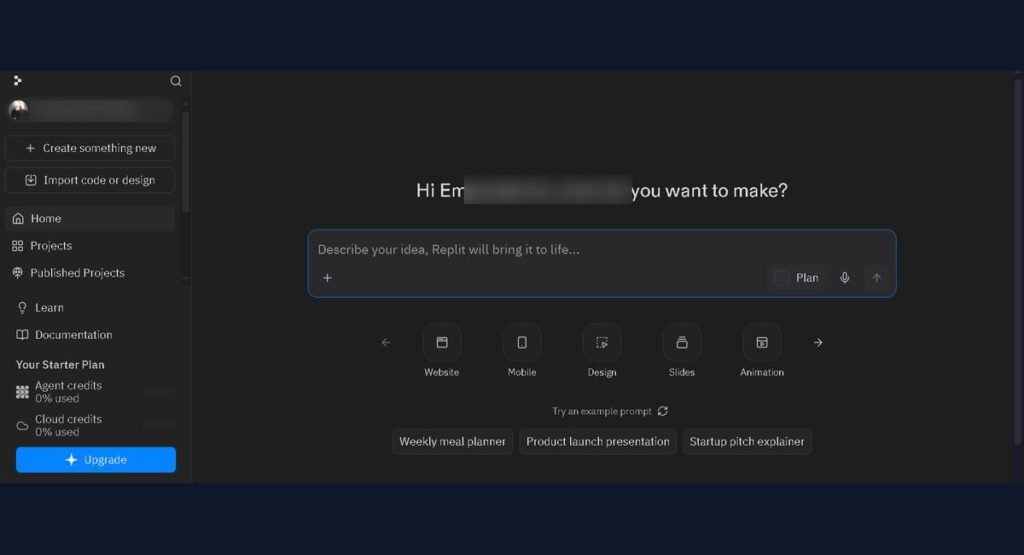
Replit AI is the umbrella term for the AI layer built into Replit’s browser-based IDE — most of which now lives inside Replit Agent 3, the platform’s flagship autonomous coding agent. Instead of just autocompleting lines of code (like GitHub Copilot), Agent 3 takes a natural-language prompt and independently plans, writes, tests, and deploys an entire application: frontend, backend, database, and authentication included.
It’s the difference between a tool that helps you code and one that does the coding — with you supervising rather than typing.
Key Features of Replit Agent
- Full-stack scaffolding from a single prompt — Agent 3 can spin up a Neon Postgres database, wire up authentication, and generate a working UI in a single session, often in under 35 minutes for a moderately complex spec.
- Autonomous testing — the Agent writes unit tests, runs them, and fixes what it finds without being explicitly asked to.
- Sub-agents for automation — Agent 3 can spawn sub-agents to handle parallel workflow tasks instead of doing everything sequentially.
- 160+ built-in integrations — Stripe, Twilio, Slack, Google Sheets, and more, connectable via a single prompt with no manual API key wiring.
- Agent Customization — persistent custom instructions let you lock in a coding style, tech stack preference, or copywriting tone across sessions.
- Real-time multiplayer editing — think Google Docs, but for code, with live cursors for teammates.
- Mobile app support — you can trigger fixes or check on a build from your phone (not ideal for deep work, but genuinely useful for quick nudges).
What LLM Does Replit Use?
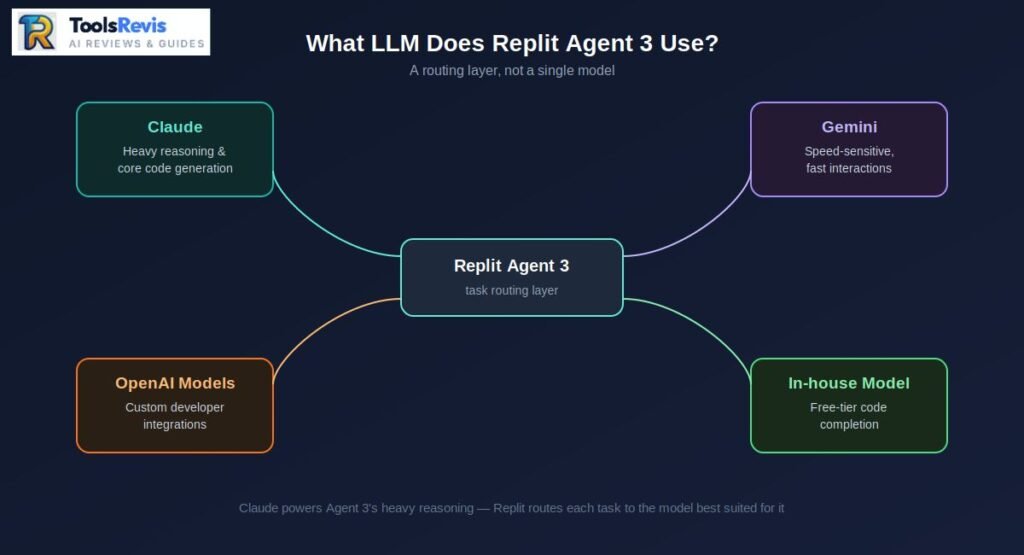
Depending on the specific task, Replit leverages a variety of large language models (LLMs), such as OpenAI, Gemini, Claude, and its own proprietary lightweight model. This is one of the most-searched questions about the platform, and the honest answer is: more than one. Replit doesn’t run on a single model — it’s a multi-model system that routes different tasks to whichever model is best suited for them.
Behind Agent 3’s heavy-duty reasoning and code generation sits Claude, Anthropic’s model family, which Replit selected after evaluating several AI models for this role. For speed-sensitive interactions, Replit leans on Gemini, and developers building their own integrations can also tap OpenAI’s models through Replit’s AI Integrations. Replit also runs its own lightweight in-house model for cost-effective code completion on free-tier accounts.
So no — Replit is not powered by ChatGPT alone, and it’s not a single-model product. It’s a routing layer that picks the right brain for the right job.
Is Replit Just a “Wrapper” Around Claude/GPT?
Short answer: no, and this distinction actually matters.
A “wrapper” — in the dismissive sense people usually mean it — is a thin interface that passes your prompt straight to an LLM’s API and returns the raw response. There’s no real engineering happening in between.
Replit Agent is doing something structurally different: it’s an orchestrated multi-agent pipeline. Rather than exposing one raw LLM, the Agent composes multiple underlying models, which is precisely why non-developers can ship a working first draft without knowing anything about prompt engineering.
Under the hood, that pipeline includes:
- Specialized agent roles — a manager, an editor, and a verifier agent working together, rather than one model trying to do everything.
- Deliberate human-in-the-loop design — Replit’s leadership has been explicit that they intentionally avoid pushing for full autonomy, with the verifier agent frequently checking back in with the user instead of guessing.
- Custom memory management — Replit built systems that compress and truncate long memory trajectories using LLMs themselves, so context doesn’t blow up on longer builds.
- Non-standard tool calling — instead of relying on standard function-calling APIs, Replit has the model generate code to invoke tools directly, which their team found more reliable in production.
That’s an actual engineering system — with error handling, state management, and multi-step planning — not a chat box bolted onto an API key. Whether this setup generates code that is truly production-ready is another matter—spoiler alert: it’s a ‘hit or miss’—and we’ll explore that in the next section.
Can You Use Replit AI to Build a Full Website?
Yes. Replit AI can build a complete full-stack web application, including the frontend, backend, database, authentication, and deployment from a single prompt. You’re not limited to a static landing page. Agent 3 can stand up a complete, functioning web application: frontend, backend, database, and authentication, all from one project.
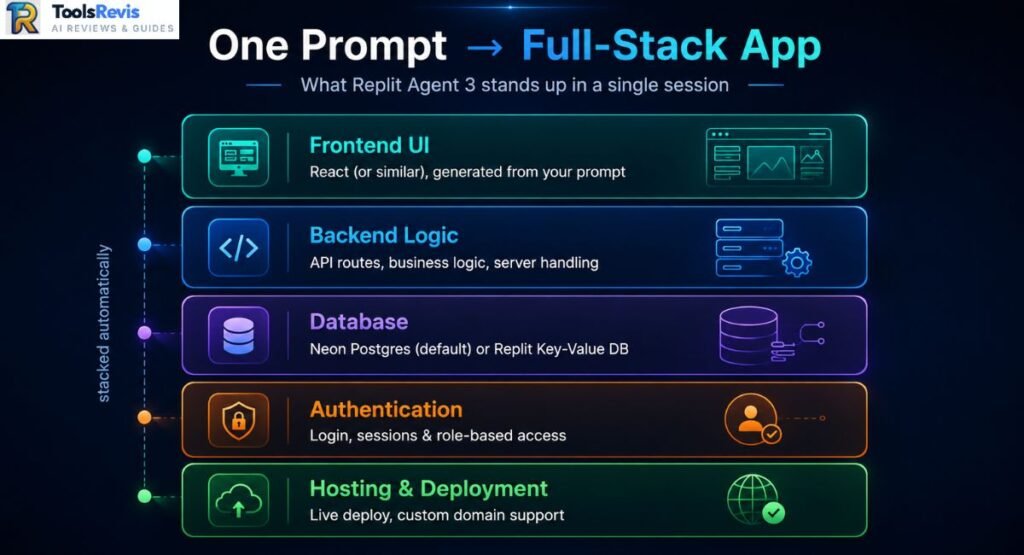
Here’s what a typical full-stack build actually includes:
- Frontend UI — generated from your prompt, typically React or a similar framework
- Backend logic — API routes, business logic, and server-side handling
- Database — Replit defaults to Neon Postgres for most builds, though a simple key-value Replit Database is also available for lighter use cases
- Authentication — login, sessions, and role-based access, wired up without you touching an auth library directly
- Hosting & deployment — one-click deploy to a Replit subdomain, with custom domain support if you want to move off .replit.app
We’ve seen (and personally tested) real builds across a wide range of use cases: a recipe-scaling app that converts ingredient quantities based on serving size, a browser-based invoice data extractor pulling structured fields out of PDFs, and internal analytics dashboards pulling from a connected database. In each case, the core skeleton — routes, schema, basic UI — was standing within the first session, often in under 35 minutes.
That said, “can build a website” and “will deploy cleanly” are two different claims. Known friction points show up consistently across user reports:
- White-screen deploys — the build succeeds, but the live app loads a blank page, usually because the frontend is requesting assets that don’t match what got deployed
- Port conflicts — the dev environment binds to a port the deployment doesn’t expect, so the preview works but the published app doesn’t
- Neon DB connection failures — intermittent issues where the app can’t reach its own database post-deploy, especially after schema changes made mid-session
- Limited production logging — when something breaks in production, you often just get a crash with little to debug from, which is a real problem since prod database setup and detailed logging aren’t handled by default
The practical fix that experienced users land on: always separate your development and production databases, and add your own logging early rather than relying on Replit’s default output. It costs you a few extra prompts up front and saves hours of guessing later.
Replit AI Hands-On Performance & Feature Audit
On raw speed, Replit is fast. Simple CRUD features and UI tweaks land in seconds. Full-feature builds — a working auth flow, a dashboard with live data — typically complete in single-digit minutes rather than the hour-plus you’d spend doing it manually.
Context awareness is genuinely strong within a session — the Agent tracks what it built earlier and rarely asks you to repeat yourself. It gets shakier across long-running projects, where it can lose the thread of an early architectural decision and quietly contradict itself several features later.
Desktop app vs. Web app: the browser version is still the primary experience and gets features first. The mobile app is fine for checking on a build or nudging a small fix, but it’s not built for extended sessions — treat it as a monitoring tool, not a workstation.
The “Analyze-Fix-Loop” Bug & Credit Loss
One of the more expensive failure patterns: the Agent hits an error, enters a debugging loop, tries a fix, re-analyzes, tries another fix — and keeps going without resolving the root cause. Each pass through that loop burns credits, and because it looks like productive work (logs scrolling, checkpoints firing), it’s easy to let it run far longer than you should.
Multiple users have reported a related issue — agent freezing during a task and still getting billed for the runtime, with jobs that should take ten seconds instead getting stuck and charged as one to two minutes of active work. At scale, that adds up fast.
The fix: set a hard mental cap. If the Agent hasn’t resolved an error in two or three attempts, stop it manually, read the actual error yourself, and give it a more specific instruction rather than letting it keep guessing on your dime.
Authentication & Login Setup Nightmares for Beginners
Auth is the single most common place where non-technical users get stuck. The Agent can scaffold login and session logic quickly, but the moment something goes wrong — a redirect loop, a session that won’t persist, a password reset flow that silently fails — beginners have no mental model to debug it with.
Practical guidance if you’re not a developer:
- Ask the Agent to explain what it built for auth before moving on, not just confirm it works
- Test login/logout/reset immediately after it’s built, before adding more features on top
- If it breaks, don’t just say “fix the login” — describe the exact behavior you’re seeing (e.g., “I get redirected to /dashboard but then immediately bounced back to /login”)
Does Replit Overwrite Your Existing Codebase?
It can, and this is one of the more legitimate concerns from developers bringing existing projects in. Rather than surgically editing the specific function you asked about, the Agent sometimes bloats the codebase by writing new code alongside old logic instead of replacing it cleanly — leaving you with duplicate or dead code to clean up later.
Two settings meaningfully reduce this risk:
- Disable “automatically publish changes” so you can review a diff before it goes live
- Use checkpoints and rollbacks deliberately — treat every checkpoint as a save point you’d actually want to return to, not just a byproduct of the Agent working
Best Prompting Practices for Replit Agent
The single biggest lever you have over both output quality and credit spend is prompt discipline. Vague, multi-part prompts are exactly what triggers the analyze-fix-loop and codebase bloat above. Give the Agent one clear task, with explicit constraints, and it performs dramatically better.
A template that consistently works well:
Task: [One specific feature or fix — nothing else]
Context: [What currently exists — relevant files, current behavior]
Constraint: Do not modify [file/feature] unless required for this task.
Expected outcome: [What “done” looks like, specifically]
Before finishing: Show me a summary of every file you changed.
Run one task, review the diff, confirm it works, then move to the next task. It’s slower turn-by-turn but noticeably cheaper and cleaner over a full project.
Optimize Your Code Before You Deploy
Even with Replit Agent, AI-generated code can include duplicate logic, inefficient functions, and unnecessary API calls.
Use our Advanced Code Optimizer to analyze your code, improve performance, reduce token usage, and receive optimization suggestions before deployment.
Replit AI Pricing, Subscriptions & Hidden Costs
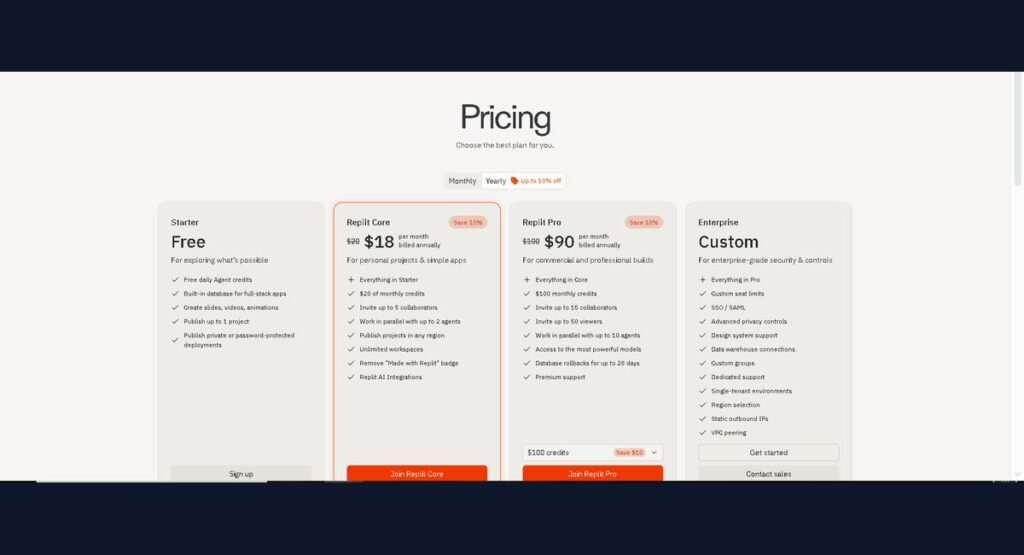
Replit offers Free, Core, Pro, and Enterprise plans with effort-based pricing for AI Agent usage. Replit’s pricing has four tiers:
- Starter (Free) — limited Agent access, good for testing the waters
- Core (~$18/month, annual billing) — includes monthly credits, no rollover
- Pro (~$90/month, annual billing) — higher credit allowance with one month of rollover
- Enterprise — custom pricing, starts around $500/month for teams
Canceling a subscription:
- Go to your Account Settings (click your profile icon)
- Open the Billing or Subscription tab
- Select Manage Subscription / Cancel Plan
- Confirm cancellation — access typically continues through the end of your current billing period
- Check your email for a cancellation confirmation, and screenshot it — several users have reported being charged again after canceling, so keep a paper trail
Understanding Effort-Based Pricing (2026 Update)
Since mid-2025, Replit moved away from a flat per-checkpoint fee to effort-based pricing, where cost scales with task complexity rather than a fixed rate. Simple edits run under $0.25, but complex, multi-step builds involving heavier reasoning models can climb well past that per checkpoint.
In practice, this is where the “hidden cost” reputation comes from: users doing intensive sessions — heavy debugging loops, large feature builds, or frequent Agent-driven rewrites — have reported burning through $8 or more in a single ten-minute stretch, and in extreme cases, power users running near-continuous sessions have reported spend approaching $500 in a single week. It’s worth noting Replit’s billing also folds in third-party API costs — when the Agent calls Claude, GPT, or Gemini behind the scenes, you’re billed at that provider’s public API rate on top of the base credit cost.
The Strict No-Refund Policy: What Users Must Know
Replit’s standard position is that consumed credits are not refundable, even in cases where the Agent stalls, loops, or produces unusable output. This has been a recurring source of frustration in user reviews — support tickets around billing disputes are frequently closed as “resolved” without an actual credit or refund issued, even when the user can point to a clear technical bug (like being charged for a session where the Agent was frozen, not working).
The practical takeaway: don’t assume you can dispute your way out of a bad session. Treat every credit-consuming action as a real cost from the start, not a refundable trial.
Step-by-Step Guide: Setting Usage Caps to Prevent Surprise Bills
- Open Account Settings → Usage (or Billing → Usage Limits, depending on your current dashboard layout)
- Locate the Monthly Spend Limit or Usage Cap field
- Set a hard dollar ceiling below your card’s available balance — don’t rely on the default, which is often uncapped or set high
- Enable email/usage alerts at 50% and 80% of your cap so you get warned before you hit it
- For any high-stakes session (large feature build, unfamiliar codebase), check your usage dashboard mid-session rather than waiting until the end — credit burn is much easier to catch early than to dispute after the fact
- If you’re testing something experimental or prone to loops (see the Analyze-Fix-Loop above), consider working in Plan Mode first, where the Agent proposes an approach before spending credits on execution
Replit AI vs. Modern AI Coding Competitors
Replit competes with Cursor, Claude Code, Bolt.new, Lovable, and v0.dev, but each platform targets different developer needs. Replit doesn’t exist in a vacuum — it’s competing against a fast-growing field of “prompt-to-app” tools, each with a different philosophy about who they’re really built for.
Replit AI vs. Lovable AI
Lovable is the sharper choice for non-technical founders building a SaaS MVP. It leans heavily on seamless Supabase integration and account-based pricing that’s noticeably cheaper for teams, with an onboarding experience built specifically for people who’ve never touched a terminal. Replit, by contrast, hands you an actual development environment alongside the AI — a persistent filesystem, real Git integration, and a broader infrastructure layer covering databases, secrets, and deployments. If you want the AI to disappear and just hand you an app, Lovable feels smoother. If you want to eventually poke around under the hood yourself, Replit gives you more to work with.
Replit AI vs. Cursor / Claude Code
This comparison isn’t really Replit vs. Cursor — it’s browser-first vs. IDE-native. Cursor and Claude Code live inside a local development setup, which means deeper git workflows, better handling of large existing codebases, and more precise control over what gets changed. Replit trades that precision for zero-setup speed. The honest framing: Replit wins the first draft; Cursor and Claude Code win the production build.
Replit AI vs. Bolt.new vs. v0.dev
| Feature | Replit AI | Bolt.new | v0.dev |
| Pricing | Free tier; Core ~$20–25/mo; Pro ~$95–100/mo | Free tier; paid plans from ~$25/mo | Free tier ($5/mo in credits); paid plans scale from there |
| Best For | Full dev environment + AI, non-coders to small teams | Fast full-stack JS prototypes, agencies | Polished React/UI components, design systems |
| Execution Environment | Full cloud IDE with terminal, persistent filesystem | Browser-based WebContainers (runs live in-browser) | Component preview only — no backend runtime |
| DB Integration | Built-in Neon Postgres + Replit Database | Prisma-based DB, generated per project | None — frontend only, pairs with external backend |
Why Developers “Graduate” From Replit
Developers usually move beyond Replit when projects require advanced Git workflows, production infrastructure, and large-scale code management. There’s a well-worn migration path among developers who start on Replit and eventually move on, and it usually looks like this:
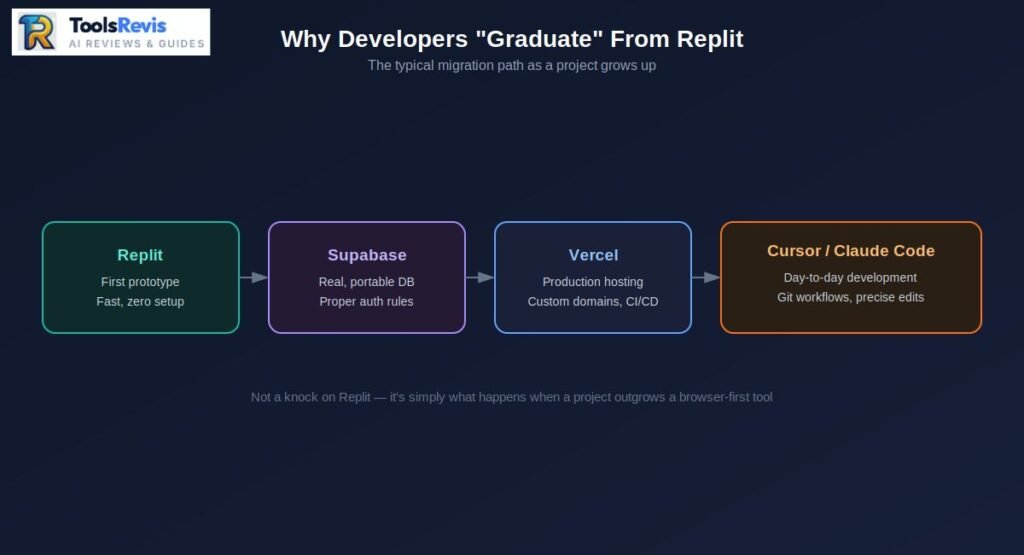
- Replit — for the first prototype. Fast, zero setup, good for validating an idea.
- Supabase — once the app needs a real, portable database and proper auth rules beyond what Replit’s built-in Postgres offers.
- Vercel — for production hosting, once custom domains, edge performance, and CI/CD matter more than one-click convenience.
- Cursor (or Claude Code) — for the actual day-to-day development once the codebase is large enough that git workflows, precise multi-file edits, and IDE tooling become non-negotiable.
This isn’t a knock on Replit — it’s simply what happens when a project’s needs outgrow a browser-first tool. Replit provides the deepest backend runtime environment among the prompt-to-app tools, which is exactly why it’s so good at stage one, and exactly why serious teams eventually need something more specialized for stage three and four.
Is Replit Safe, Legit, and Enterprise-Ready?
Yes. Replit is a legitimate AI development platform, but enterprise teams should evaluate its security, compliance, and deployment limitations before adopting it. Replit is a legitimate, well-funded platform — not a fly-by-night tool. That said, “safe for a solo prototype” and “safe for enterprise data” are different bars.
For code privacy: your projects are private by default on paid tiers, and Replit does offer secrets management for environment variables and API keys. For reliability: uptime is generally solid for development work, but as covered earlier, production-grade logging and monitoring are thin compared to dedicated hosting providers — if something breaks in a live app, you may not get much more than a crash report.
Vendor Lock-In Concerns
This is a real and fair criticism. While Replit lets you export your code, your hosting, database, and deployment configuration are tied to Replit’s ecosystem in a way that makes a clean exit harder than it looks. Compare that to tools like v0, where you’re just exporting standard React components — there’s almost nothing to untangle. Replit sits in the middle of the lock-in spectrum: easier to leave than Bolt.new’s fully browser-contained setup, harder to leave than a tool that exports plain, framework-standard code.
Practical mitigation: connect your Replit project to GitHub from day one, not as an afterthought. It won’t eliminate lock-in on hosting and database, but it guarantees your actual codebase has a home outside Replit if you ever need it.
The Browser-First Limitation
Everything about Replit assumes you’re working in a browser tab, and that has real consequences at scale:
- No true offline development
- Heavier reliance on Replit’s own infrastructure staying up and responsive
- Production debugging is harder without local terminal access to your own logs and environment
- Large, complex codebases feel noticeably less comfortable to navigate than in a dedicated local IDE
None of this makes Replit unsafe. It makes it the wrong tool once your project graduates past “prototype.”
Read Next
Want to explore more AI development tools before making your decision? These in-depth guides can help you compare platforms, understand AI coding workflows, and choose the right solution for your needs.
– Cursor AI Review – See how Cursor compares with Replit for professional development, code editing, and large-scale projects.
– Best AI Tools for Developers – Discover the top AI coding assistants, IDEs, and productivity tools for developers in 2026.
– Claude Sonnet 5 Review – Learn about Claude’s coding capabilities, reasoning performance, pricing, and ideal use cases.
– Claude Sonnet 5 vs GPT-5.6 SOL– Compare two leading AI models for coding, content generation, and technical problem-solving.
Frequently Asked Questions (FAQs)
1. Is Replit AI good for complete beginners with no coding experience?
Yes, for building a first working prototype. The Agent handles the technical scaffolding, but you should still expect to test features carefully and describe bugs precisely — “it’s broken” gets a worse result than “the login button redirects but the page stays blank.”
2. What LLM does Replit Agent actually use?
It’s multi-model, not a single LLM. Claude handles the heavy reasoning and code generation, Gemini is used for faster interactions, and OpenAI’s models are available for custom integrations — Replit’s own lightweight model handles free-tier code completion.
3. Can I export my Replit project and host it elsewhere?
Yes, your code can be pushed to GitHub or exported. Your database and deployment setup, however, are more tightly coupled to Replit’s environment, so plan for some rework if you migrate hosting.
4. Why did my Replit bill come in higher than expected?
Almost always effort-based pricing plus an analyze-fix-loop — the Agent got stuck debugging and kept iterating, with each pass consuming credits. Setting a usage cap and stopping the Agent after two or three failed fix attempts prevents most of this.
5. Is Replit Agent good enough for production apps?
For small, low-complexity apps, yes. For anything with real users, compliance requirements, or complex business logic, most experienced teams use Replit for the prototype and migrate the production build to a dedicated stack (Supabase, Vercel, Cursor).
6. Does Replit offer refunds if the Agent makes a mistake or freezes?
Generally no — Replit’s standard policy treats consumed credits as non-refundable, even in disputed cases like agent freezes. Set spending caps proactively rather than relying on a refund afterward.
Final Verdict: Should You Buy Replit AI?
If you’re a non-coder, a solo founder, or a PM who needs to validate an idea fast — buy it. Replit genuinely delivers on its core promise: a working full-stack prototype, live and shareable, often within an hour. The Core plan is a reasonable entry cost for what you get, and the learning curve is close to zero.
If you’re a professional developer or an engineering team building something you intend to maintain long-term — use it selectively. Replit is an excellent stage-one tool: fast discovery, internal tools, client demos. But budget for the “graduation” — moving your database to Supabase, your hosting to Vercel, and your day-to-day development to Cursor or Claude Code once the project earns real users and real stakes.
Replit isn’t overhyped, and it isn’t a scam — it’s a genuinely capable tool that’s honest about what it’s optimized for, even when its pricing and production gaps aren’t. Know which stage of the build you’re actually in, and it’ll serve you well.

I’m Umair Ahmad, founder of ToolsRevis. I personally test every AI tool we cover — signing up, running real workflows, checking pricing tiers, and comparing outputs — before writing a single word. My goal: cut through AI marketing hype with honest, hands-on verdicts.
Let’s achieve more together!