
Two identical price tags, two completely different philosophies. Two $20 AI subscriptions, two very different approaches to getting work done. ChatGPT Plus focuses on breadth, multimedia capabilities, and everyday productivity, while Claude Pro is particularly strong for writing, reasoning, coding, and long-document workflows.
Quick answer: Go with ChatGPT Plus if you need voice conversations, image generation, and an all-purpose AI assistant. Choose Claude Pro for advanced writing, coding, and in-depth document analysis. Using both? Let Claude Sonnet 5 handle complex work while ChatGPT is your go-to for fast research and everyday tasks.
Why This Comparison Still Matters in 2026
The premium AI market has evolved significantly in 2026, making the ChatGPT Plus vs. Claude Pro comparison more useful than ever. The conversation has moved beyond simply asking which model is “smarter.” Today, the bigger question is how each platform fits into a broader workflow, from research and writing to coding, productivity, and creative tasks.
For professionals, students, and creators, choosing between the two is no longer just about selecting a chatbot. It is about finding the platform that best matches their daily needs and preferred way of working. Although both subscriptions are priced at $20 per month, their strengths, tools, and overall user experiences are quite different.
This comparison looks beyond basic feature lists to examine practical differences such as usage limits, workflow capabilities, pricing, and real-world usage patterns. The goal is to help you decide which subscription provides greater value for your specific use case.
ChatGPT Plus vs Claude Pro: At-a-Glance Comparison
Here’s a quick overview of how ChatGPT Plus and Claude Pro compare across the most important features and capabilities in 2026, before we get into the technical details.
| Feature | ChatGPT Plus | Claude Pro | Better For |
|---|---|---|---|
| Price | $20/month* | $20/month* | Tie |
| General AI assistance | Excellent | Excellent | ChatGPT Plus |
| Voice | Strong | Strong | ChatGPT Plus |
| Image generation | Yes | More limited | ChatGPT Plus |
| Long-form writing | Excellent | Excellent | Claude Pro |
| Coding | Excellent | Excellent | Claude Pro |
| Document analysis | Strong | Strong | Claude Pro |
| Data analysis | Strong | Strong | ChatGPT Plus |
| Best overall | Broad feature set | Focused workflows | Depends |
Which AI fits your workflow? Try it yourself
Rather than going through the entire comparison, answer these three quick questions to receive a recommendation tailored to how you actually plan to use the tool.
ChatGPT Plus vs Claude Pro: Which Is Better for Your Use Case?
| If you mainly need… | Choose |
|---|---|
| Everyday AI assistance | ChatGPT Plus |
| Voice conversations | ChatGPT Plus |
| Image generation | ChatGPT Plus |
| Data analysis | ChatGPT Plus |
| Long-form writing | Claude Pro |
| Large document analysis | Claude Pro |
| Complex coding | Claude Pro |
| Architecture-heavy development | Claude Pro |
| Creative writing | Claude Pro |
| Both general + deep workflows | Both |
ChatGPT Plus vs Claude Pro: Feature-by-Feature Comparison
Core AI Models Compared: How OpenAI and Anthropic Differ in 2026
OpenAI and Anthropic have taken noticeably different approaches to improving their AI assistants. OpenAI has focused on making ChatGPT a versatile, all-purpose assistant that can handle a broad range of tasks within one platform. Features such as natural voice conversations, web-based capabilities, visual understanding, and integrated tools make ChatGPT Plus useful for everything from research and content creation to everyday productivity.
Anthropic has taken a more focused approach with Claude Pro, prioritizing accuracy, reasoning quality, and reliable instruction following. Instead of emphasizing a large collection of consumer-facing features, Claude is designed around deeper collaboration with users, particularly when working with complex instructions, long documents, code, and other information-heavy tasks. This makes the two platforms feel different in practice: ChatGPT emphasizes versatility and a wide range of capabilities, while Claude places greater emphasis on focused reasoning and consistent, high-quality responses.
How ChatGPT Plus and Claude Pro Handle Usage Limits
Both subscriptions impose usage limits, but the experience can differ depending on the model, workload, conversation length, file size, and current system demand. ChatGPT Plus generally feels more predictable for frequent everyday interactions, while Claude Pro can become more restrictive during long, compute-intensive sessions. Because these limits can change, published numbers should be treated as current plan-specific figures rather than permanent guarantees.
Claude Pro uses a more flexible but less predictable system based on rolling usage and computational demand over five-hour windows. Large inputs can consume significantly more of that allowance because the model has to process substantial context alongside subsequent prompts. As a result, users working with large codebases, lengthy documents, or other complex workloads may reach their usage limits after only a handful of intensive interactions. Unlike ChatGPT’s fallback approach, Claude may restrict further access to the higher-capability models until the usage window resets.
Why Heavy Claude Pro Workloads Can Hit Limits Quickly
If you’ve searched Reddit for “Claude Pro limit,” you already know the pattern: a wall of frustrated power users hitting “you’ve reached your usage limit” mid-task, often on the very session where they finally had momentum. This isn’t a fringe complaint — it’s one of the most consistent gripes about the $20/month tier, and it comes down to how Anthropic meters usage.
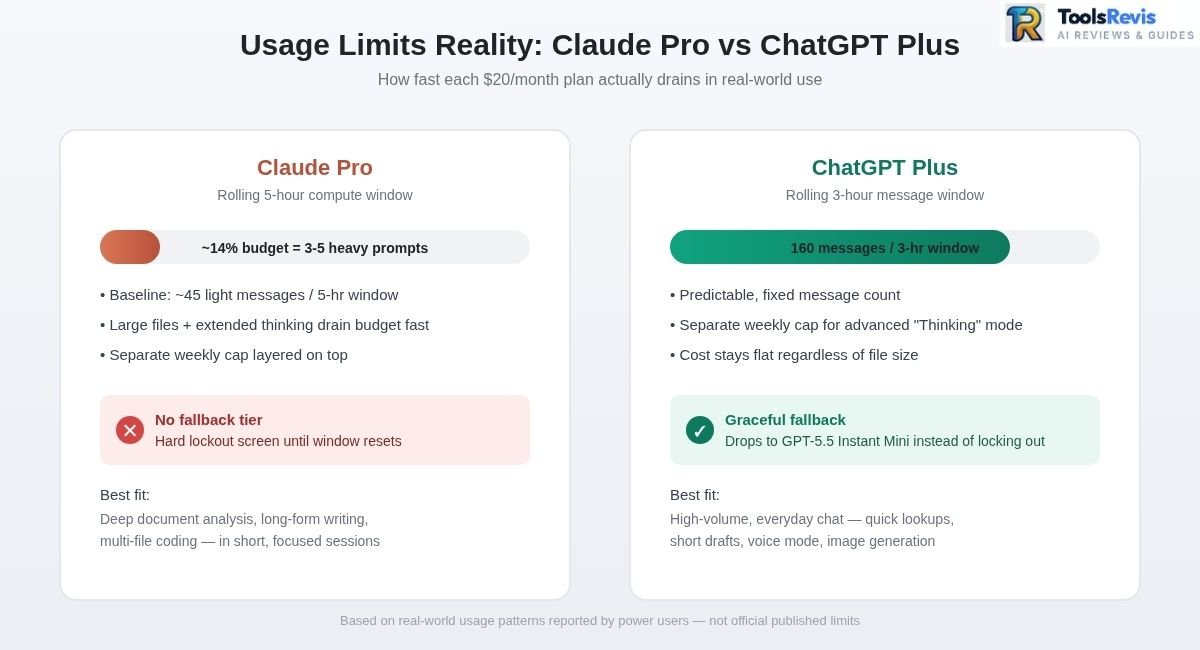
Claude Pro doesn’t cap you by a fixed daily message count. Instead, it runs on a rolling 5-hour session window, and how fast that window drains depends entirely on what you’re asking Claude to do. Anthropic’s own baseline is “at least 45 messages” in that window — but that figure assumes short, low-effort exchanges.
Heavy workloads can consume a usage allowance much faster than ordinary chat. Large documents, long conversations, extended reasoning, and coding tasks can require substantially more processing than short questions. As a result, some users may encounter limits after only a small number of intensive interactions, but there is no universal “3–5 prompt” limit.
Here’s the practical comparison that keeps coming up in side-by-side threads:
- Claude Pro ($20/mo): Rolling 5-hour session, roughly 45+ light messages as a baseline — but heavy reasoning or large-file tasks can exhaust that same window in single digits, plus a separate weekly cap layered on top.
- ChatGPT Plus ($20/mo): A more generous rolling window — around 160 standard messages every 3 hours, with a separate weekly allowance (in the thousands) for its advanced “Thinking” reasoning mode.
For everyday, high-volume workflows, that structural gap is why Plus subscribers rarely feel the ceiling the way Claude Pro users do — the reasoning-heavy work that eats a Claude session fast is metered far more loosely on the OpenAI side.
The practical fix: stop defaulting to the heaviest model and extended thinking for every task. Reserve deep reasoning for the one or two prompts that genuinely need it, and use standard Sonnet for quick lookups, formatting, or simple Q&A — those cost a fraction of the session budget. Batch your context, too: instead of uploading a file and asking five follow-up questions one at a time, consolidate your questions into a single, well-scoped prompt. It won’t eliminate the ceiling, but it can meaningfully stretch a $20/month plan through a full workday.
A quick honesty note: Anthropic doesn’t publish an exact per-task message count, and real-world usage varies by file size, conversation length, and demand — so “3-5 prompts” reflects what heavy users commonly report for reasoning-intensive sessions, not a hard published limit. For the official breakdown, see Anthropic’s own usage and length limits documentation.
Which is Better For Everyday Use?
For standard everyday tasks—such as draft drafting, cooking adjustments, quick web lookups, and basic administrative help—ChatGPT Plus secures the win.
Its maturity on mobile devices, integration with live web-browsing mechanics, and frictionless consumer features make it much easier to use as a general assistant. If you want to take a walk and verbally brainstorm a business idea, ChatGPT’s Advanced Voice Mode provides a seamless, human-like verbal loop that Claude cannot replicate natively on the go.
Which is Better For Students and Researchers?
Claude Pro can be the stronger choice for students and researchers who regularly work with long documents, transcripts, and dense textual material. ChatGPT Plus may be the better option when research involves web browsing, calculations, data analysis, charts, or mixed media.
Claude Document Ingestion Flow:
[1-Million Token Context] ──> [Rigid Semantic Extraction] ──> [No Clichés / High-Fidelity Citations]
While ChatGPT Plus can sometimes lose focus or hallucinate minor details when parsing enormous individual files, Claude Pro’s underlying architecture is specifically tuned to follow highly restrictive academic prompts with surgical accuracy. It extracts precise textual citations without adding the generic, fluffy filler paragraphs often found in OpenAI’s standard responses.
Initial Verdict & Structural Recommendation
The ToolsRevis Take: If you require a multi-media toolkit that handles voice, image parsing, and quick programmatic updates under highly predictable hourly limits, ChatGPT Plus is your ideal match. However, if your day-to-day income relies on complex technical writing, dense document organization, or heavy code curation, Claude Pro’s superior linguistic generation makes it well worth managing its strict, compute-heavy limitations.
Writing & Content Quality: The “Lazy Intern” vs The “Professional Writer”
When analyzing text generation for creators, marketers, and copywriters, the choice between these two platforms comes down to a choice between structural speed and literary depth.
Claude Pro for Content (The Human Touch)
Claude Pro has become the undisputed favorite across Reddit’s professional writing communities. The model handles narrative flow, shifts in perspective, and complex vocabularies with exceptional skill.
- Storytelling Capabilities: Unlike older AI architectures that rely heavily on clichéd templates, Claude molds its output to match specific editorial voices, brand guidelines, and unique human styles.
- No Vocabulary Padding: It naturally avoids repetitive language, making it ideal for long-form essays, email marketing sequences, and thought-leadership articles.
Long-Form Writing: Which Model Maintains Style Better?
Ask anyone who writes long-form content with AI daily, and they’ll describe the same phenomenon: paragraph 1 is great, paragraph 10 is a stranger. The model nails your voice, your structure, your formatting rules in the opening section — then somewhere past the midpoint, it quietly reverts to generic, textbook-AI phrasing, as if it forgot the brief entirely. Writers and prompt engineers have taken to calling this pattern “drift,” and it’s one of the most consistent complaints in long-document workflows.
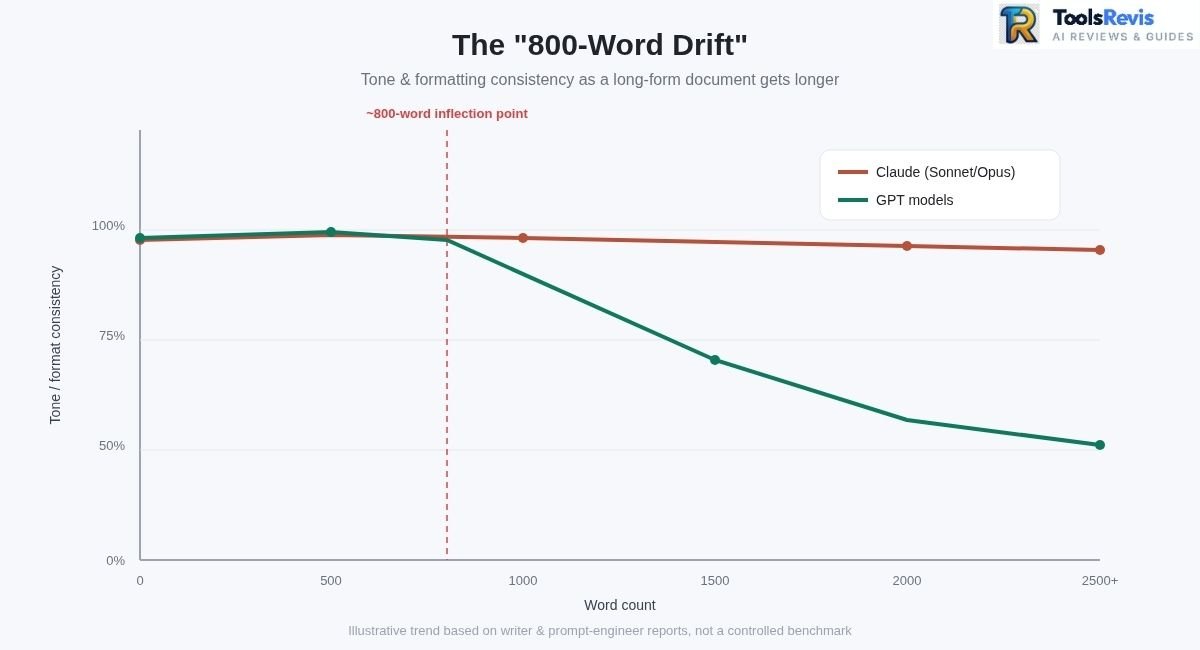
Where GPT models tend to lose the thread: In PRDs, long-form essays, and technical documentation, GPT models are genuinely strong out of the gate — clean structure, on-brief tone, tight formatting. But testers repeatedly flag the same inflection point: around the 800-word mark, output starts sliding back toward generic, over-explained, “as an AI language model” cadence. Bullet hierarchies flatten, custom voice guidelines fade, and strict system-prompt constraints (like “never use em dashes” or “always answer in second person”) start getting violated without any new instruction from the user.
The result is a document that reads like two different writers stitched it together — sharp at the top, bland by the end — which usually forces a round of manual re-prompting or heavy editing to drag the back half back in line.
Where Claude tends to hold up: This is the gap that shows up most often when people search for “what Claude model is best for writing” or look for a “Claude alternative for creative writing” — and, notably, land on Claude anyway. Both Sonnet and Opus are frequently reported to carry voice, tone constraints, and complex structural rules (nested formatting, persona instructions, section-specific style shifts) across 2,500+ words without the writer needing to re-paste the system prompt or nudge the model back on track.
Long documents — think full blog posts, multi-section reports, or branching narrative fiction — tend to stay coherent end-to-end, with the same register in the closing paragraph as the opening one.
First 500 Words vs. After 1,500 Words
| GPT models | Claude (Sonnet / Opus) | |
|---|---|---|
| First 500 words | Strong — sharp tone, correct formatting, on-brief | Strong — sharp tone, correct formatting, on-brief |
| After 1,500 words | Often drifts toward generic phrasing; formatting rules loosen; voice flattens | Tone and structural rules typically hold steady; voice stays consistent |
| Re-prompting needed? | Frequently — users often re-paste style guides mid-document | Rarely — fewer manual corrections reported for long-form runs |
Why the difference? The practical difference is easier to observe than to explain: in our long-form workflows, Claude generally required fewer reminders to preserve the requested tone and structure. However, results vary by model version, prompt quality, and task.
Claude’s architecture appears to keep the original system prompt and style constraints “in view” more persistently across a long generation, rather than letting the accumulating output gradually outweigh the initial brief. For anyone producing documentation, PRDs, or long-form creative writing at scale, that’s the practical difference between a document you can publish as-is and one that needs a full tone-editing pass.
Worth noting: this is based on real-world usage patterns reported by writers and prompt engineers rather than a controlled benchmark — model behavior shifts with updates, so it’s worth spot-checking your own long-form output against your style guide before publishing either way.
ChatGPT Plus for Content (The Structural Builder)
ChatGPT Plus approaches content generation like an efficient administrative manager. It excels at breaking down vague ideas into clean layouts.
- Outlining and Layouts: If you need to build a content calendar, create a structural outline for an ebook, or generate 50 distinct variations of short-form ad copy, ChatGPT handles the bulk organization rapidly.
- The “Fluff” Factor: However, ChatGPT frequently struggles with what creators call the “Lazy Intern” syndrome. Without highly specific instructions, its writing often relapses into predictable introductory hooks and generic phrases like “In conclusion, it’s worth noting…” or “In today’s fast-paced digital landscape…”
Coding & Developer Workflows: Terminal Autonomy vs Sandbox Debugging
For software engineers and “vibe coders,” the 2026 development environment has split into two distinctly powerful approaches.
Claude Code & Live UI Artifacts
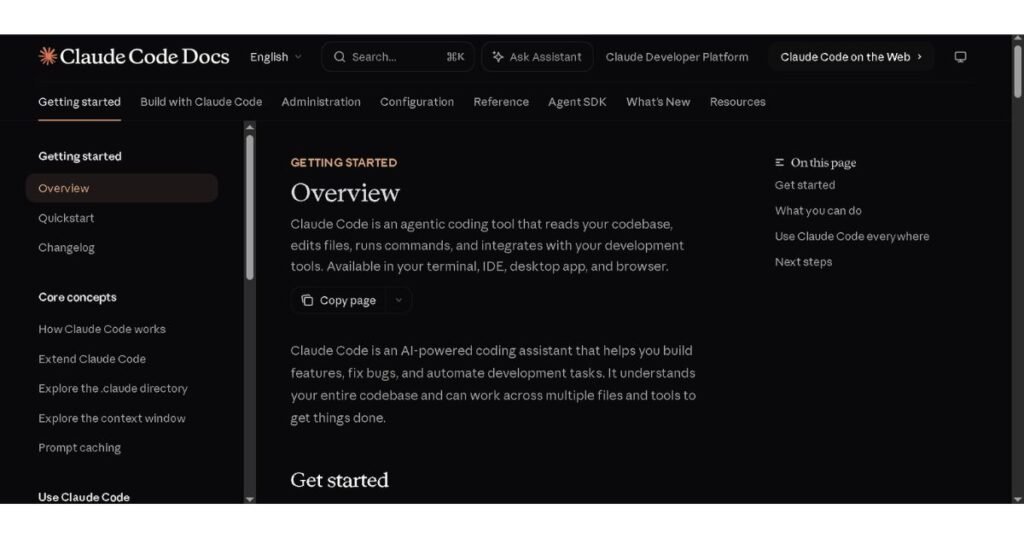
Anthropic’s standalone environment, Claude Code, operates directly inside your local developer terminal. Rather than forcing you to copy and paste single functions, it reads your multi-file directories natively, runs local builds, and autonomously addresses complex software errors across multiple dependent files.
Claude Workspace Interaction:
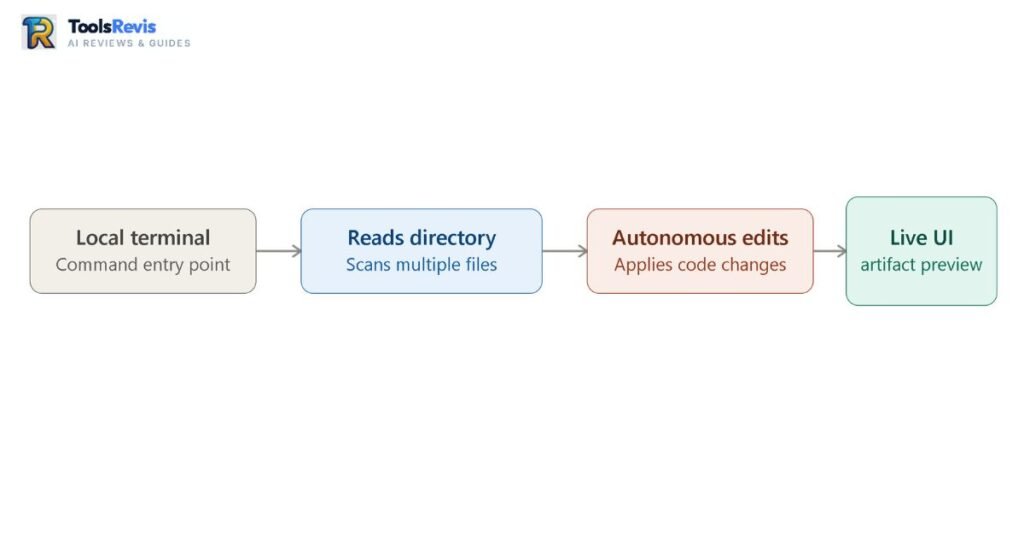
When paired with its live Artifacts interface, front-end developers can preview rendering applications in real time right beside their prompt window.
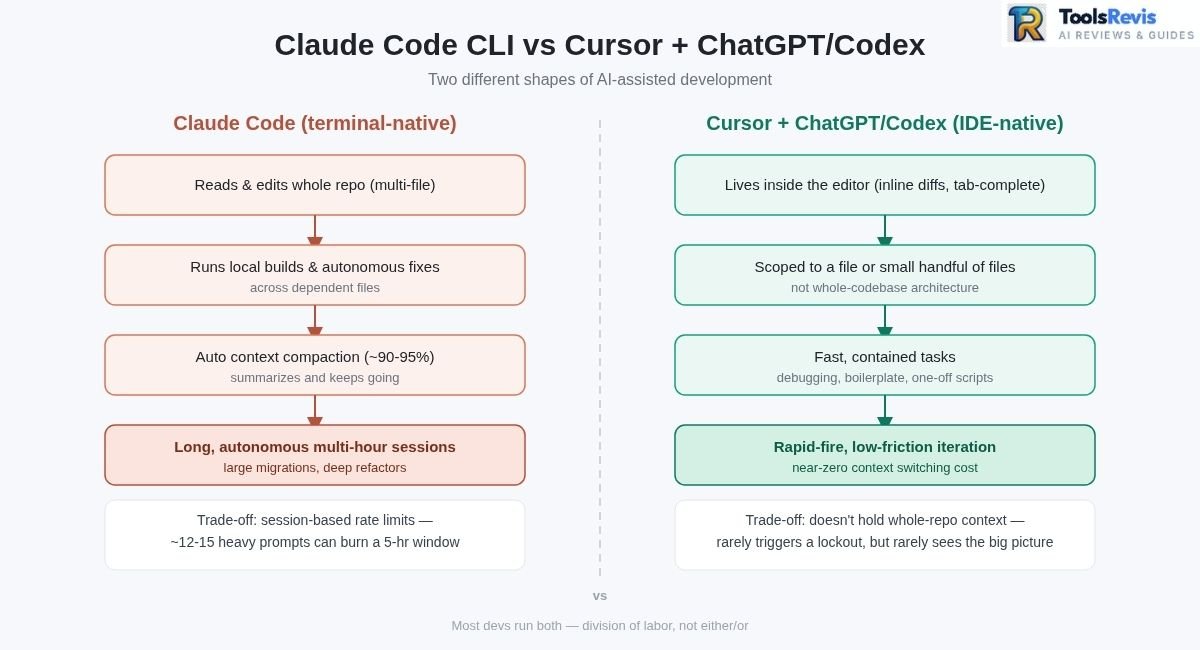
Claude Code CLI vs Cursor IDE Integration
For developers deciding between an agentic terminal workflow and a traditional IDE-plus-copilot stack, the real difference shows up not in day-one demos but in hour four of a messy refactor. Here’s how the two approaches actually hold up.
Claude Code: the terminal-native agent
- Runs as a CLI/agentic tool, not an editor plugin — it reads, edits, and executes across your whole repo rather than one open file.
- Uses automatic context compaction: as a session approaches its context limit, Claude Code pauses, summarizes the conversation (goals, decisions, file states, constraints), and continues from that condensed history instead of hitting a hard wall.
- This matters most in multi-file refactoring: instead of the agent losing track of changes made 40 files ago, it carries forward a compressed “memory” of what’s been touched and why.
- Compaction isn’t fully optional — it triggers automatically near ~90-95% of the context window — but it can be steered manually (
/compact, with an optional focus argument) at natural checkpoints like “PR merged” or “bug isolated,” which tends to produce a cleaner summary than waiting for the automatic trigger mid-task. - Net effect: long, autonomous sessions (multi-hour refactors, large migrations) that would choke a fixed-context tool can keep running.
Cursor IDE + ChatGPT/Codex stack: the localized approach
- Cursor Pro keeps everything inside the editor — inline diffs, tab-complete, chat panel — which is where most devs already live, so context-switching cost is near zero.
- Paired with ChatGPT Plus or Codex, it’s optimized for fast, contained tasks: quick function debugging, boilerplate generation, one-off scripts, syntax questions.
- The trade-off is scope: this stack is strongest when a task fits inside a file or a small handful of files, not when it spans an entire codebase’s architecture.
Why a lot of devs run both, not either/or
This is the practical answer to “claude 4 sonnet vs gpt 5 for coding” — it’s less a head-to-head and more a division of labor:
- ChatGPT Plus stays in rotation for rapid debugs, quick scripts, and IDE-embedded autocomplete where speed matters more than deep repo awareness.
- Claude gets pulled in for architecture-level work — large refactors, dependency untangling, multi-file feature builds — where holding context across the whole codebase outweighs raw response speed.
The trade-off nobody skips past: rate limits vs. execution depth
- Complex terminal agents like Claude Code run against session-based usage limits (the same 5-hour rolling window covered in Pro/Max plans), and heavy agentic loops — lots of tool calls, file reads, and compactions — burn through that budget fast.
- IDE-embedded setups don’t hit that same wall as aggressively, because each interaction is smaller and more contained.
- So the real trade-off is: continuous, deep, autonomous execution (Claude Code) vs. rapid-fire, low-friction iteration (Cursor + ChatGPT) that rarely triggers a lockout.
On “replit vs claude code”: Replit’s agent is built for spinning up and deploying full projects inside a hosted, browser-based environment — good for shipping a working app fast. Claude Code is closer to a local, repo-aware pair programmer you run from your own terminal against your own codebase, which tends to suit teams doing ongoing maintenance and architectural work on an existing project rather than greenfield app scaffolding.
Bottom line: if your week is mostly quick fixes, Cursor’s IDE integration wins on speed. If you’re regularly doing deep, multi-file architecture work where losing context mid-task is costly, Claude Code’s compaction-driven autonomy is built for exactly that — just budget for its rate limits the way you’d budget for a slower, sturdier tool.
ChatGPT Plus Sandbox
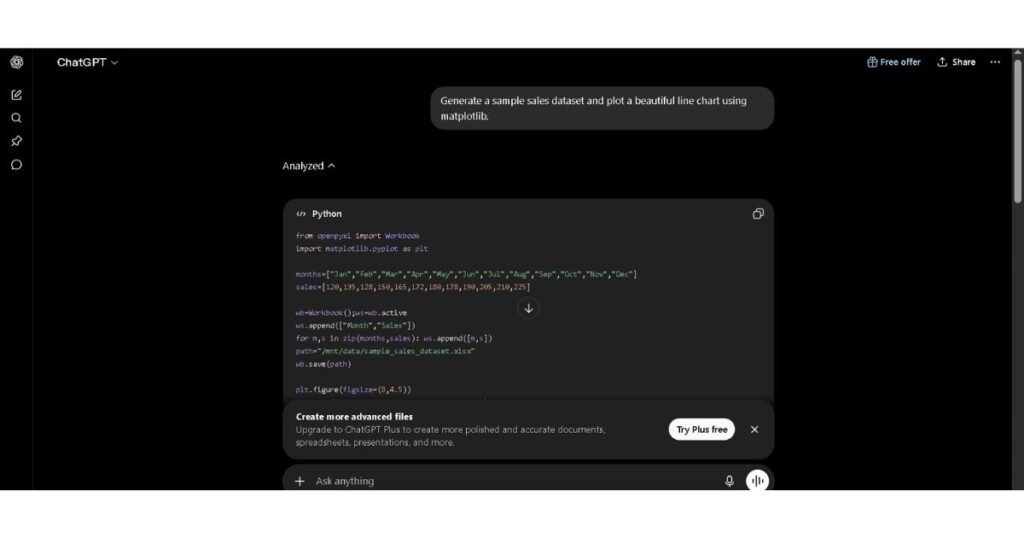
ChatGPT Plus handles programmatic execution using an integrated Python Sandbox (Advanced Data Analysis). This makes it incredibly efficient for running data science scripts, generating visualization plots on the fly, and troubleshooting individual code blocks safely in an isolated cloud pipeline. For developers already relying on an editor-native assistant like GitHub Copilot, ChatGPT Plus’s sandbox works well as a companion tool rather than a replacement.
Real Developer Pain Points (The Limits Reality Check)
Despite Claude’s advanced software logic, community reports from platforms like r/ClaudeCode highlight significant infrastructure frustrations:
- The Token Burn: Because Claude Code passes large portions of your codebase through the context window with every iterative update, you can hit your 5-hour compute quota in just 12 to 15 prompts.
- The Disconnection Error: A common issue shared by developers is the sudden claude code ide disconnected error. This usually happens when local firewalls block the background agent socket, or when a massive token payload crashes the streaming connection mid-build.
Data Analysis, Transcripts & The Brutal Reality of “Limits”
When handling massive data dumps, interview audio transcripts, or sprawling research files, handling capabilities diverge based on context logic and hard boundaries.
1-Million Token Reality Check
Both platforms support large-context workflows, but the maximum usable context depends on the model, feature, subscription, and workload. A model’s advertised context window should not automatically be interpreted as the amount of information every subscriber can use in every feature.
- Claude Pro runs a dense semantic parsing engine. When you throw multiple long-form podcast transcripts at it, it tracks thematic shifts across files, pulling out obscure quotes with structural accuracy.
- ChatGPT Plus For massive tabular sheets, it is highly efficient, but it can occasionally overlook subtle nuances buried deep in the middle of a massive plain-text document.
The Lock-Out Truth (Reddit Insight)
One of the most shared frustrations on r/chatgpt and r/ClaudeAI is what happens when you maximize these massive context windows:
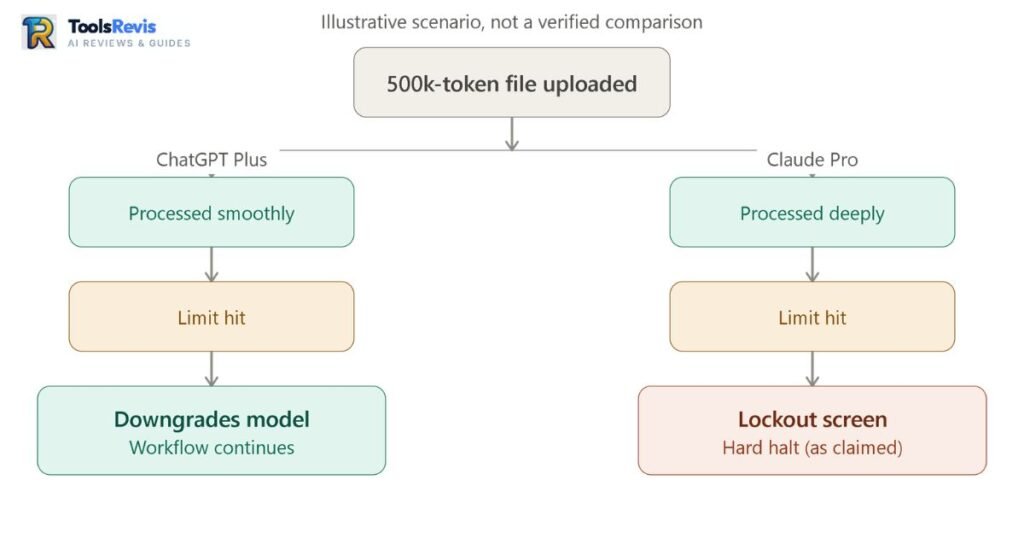
Follow-up questions on large uploaded documents can require substantial additional context processing, which may cause usage to accumulate faster during intensive sessions. ChatGPT Plus offers a smoother safety net; once your premium quota runs dry, it drops you down to an integrated fallback model (GPT-5.5 Instant Mini), keeping your session alive.
Understanding “Prompt Bloat”: Cold Starts & Context Pollution
Before you’ve typed a single word, your context window is already partially spent. Every chat session carries invisible overhead: default tool definitions (web search, code execution, file handling, connectors), system prompts that govern tone and safety behavior, standing instructions you’ve saved (custom styles, memory, project files), and background schemas that describe available functions to the model.
None of this is visible in the chat UI, but all of it competes for the same context budget as your actual conversation. This is what practitioners call “prompt bloat” — and it’s a big part of why two people on the same $20 plan can have wildly different experiences with the same task.
The downstream effect is a “cold start” problem in long sessions. As a conversation stretches on, the model isn’t just holding your messages — it’s holding the accumulated tool schemas, retrieved search results, uploaded file contents, and earlier (now-irrelevant) back-and-forth, all stacked on top of that initial overhead.
Once that mix gets crowded, two things tend to happen: the model starts pulling from stale or conflicting context and hallucinates details that were true five turns ago but aren’t anymore, or you hit a sudden usage/rate-limit warning that feels disproportionate to what you actually asked. It’s rarely “one big prompt” that causes this — it’s cumulative pollution from everything sitting silently in the background.
Here’s how to keep it under control on both platforms:
- Start new conversations at natural task boundaries, not just when things break.
Don’t wait for a hallucination or a limit warning to signal it’s time to reset. Once a thread has finished its actual purpose — a bug is fixed, a draft is approved, a research question is answered — start a fresh chat for the next task instead of tacking it onto the same thread. This clears out accumulated tool outputs, old file contents, and dead-end exchanges that are no longer relevant but are still silently taking up space. - Turn off tools and connectors you’re not actively using.
Every enabled connector, custom GPT/plugin, or tool integration adds its schema to the background context whether you invoke it or not. If a task doesn’t need web search, file access, or a specific connector, disable it for that session. This is one of the few genuinely low-effort ways to reclaim real context space and reduce how much “invisible” overhead you’re paying for on every single message. - Move standing instructions into structured references instead of repeating them inline.
Rather than re-pasting style guides, project context, or persona instructions into every message (or letting them balloon inside one giant thread), use Projects, saved memory, or reference files that the model pulls from as needed. This keeps your active conversation lean while still giving Claude or ChatGPT access to the same standing context — you get the consistency without the per-message cost of re-stating it.
The common thread across all three: treat your context window like a budget, not a scratchpad. The less dead weight sitting in the background — unused tools, stale history, redundant instructions — the more of that budget is actually working for the task in front of you.
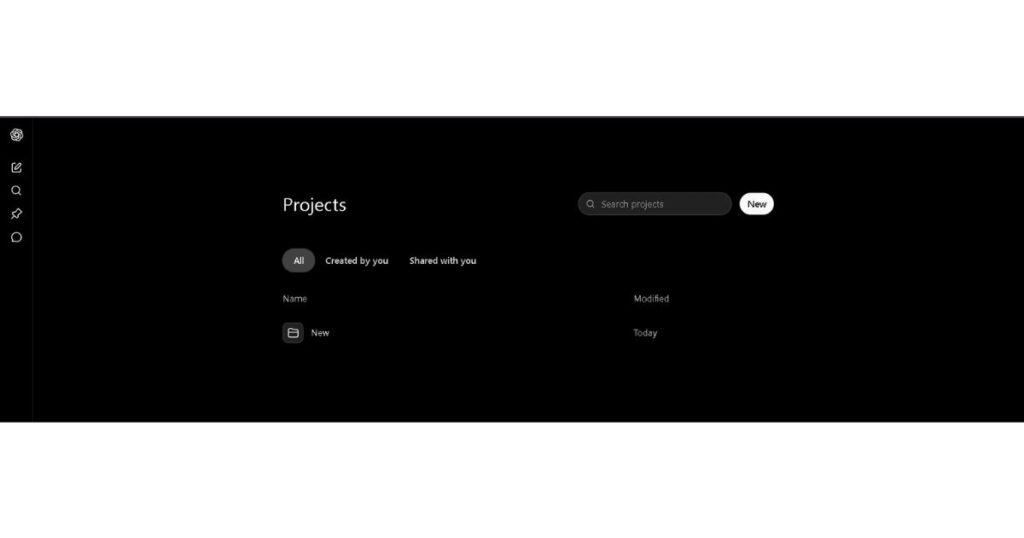
Workspaces: Claude Projects vs ChatGPT Projects
For grounding your data, both platforms offer dedicated workspace hubs to house specific files and custom instructions:
- Claude Projects: Best for setting a highly strict stylistic tone. You can upload your company’s brand guidelines, past articles, and target profiles to ensure every output feels unified and human.
- ChatGPT Projects: Tailored for functional automation. It links custom instructions alongside web search pipelines and dynamic data connectors, making it a live workspace for executing tasks rather than just editing text.
What is the Claude Equivalent of a Custom GPT?
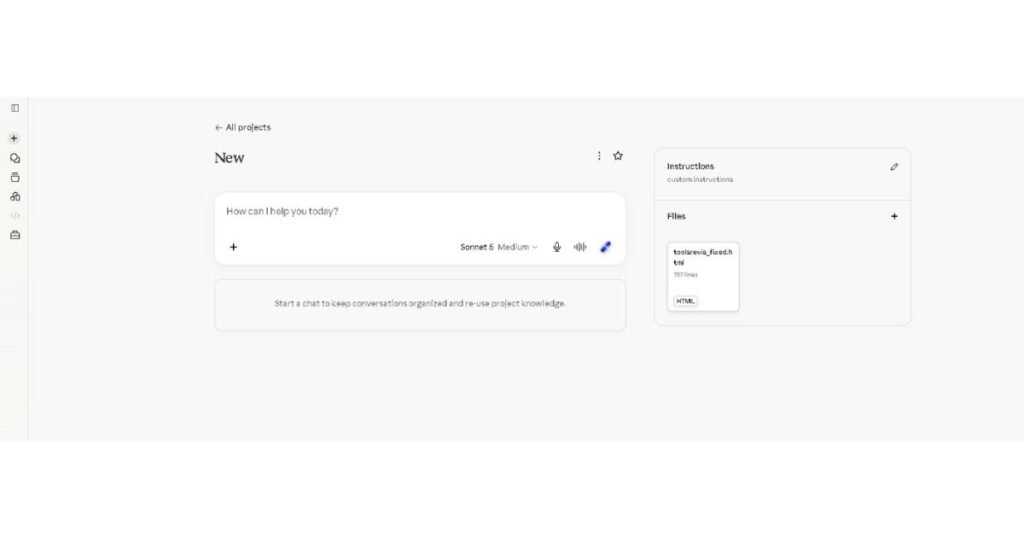
Claude Projects is Anthropic’s direct equivalent to OpenAI’s Custom GPTs — a persistent workspace where you load reference documents, set custom instructions, and give Claude a stable knowledge base it draws on across every conversation inside that Project, without you re-uploading files or re-explaining context each time.
Both features solve the same core problem — turning a general-purpose model into a scoped, repeatable tool for a specific job — but they’re built around different strengths.
| Claude Projects | Custom GPTs | |
|---|---|---|
| Context capacity | Up to 200K tokens standard, 1M tokens on supported models (Opus/Sonnet) — enough for large codebases, full contract sets, or long research libraries in one workspace | Bounded by the underlying model’s context window; not built around massive persistent document loads |
| Best for | Long-document reasoning, multi-file codebase work, holding large knowledge bases without losing coherence | Multimodal and connected tasks — browsing, image generation, live actions |
| Content handling | Persistent docs, code, and generated artifacts stay attached to the Project across sessions | Files can be attached, but the model isn’t optimized around sustained, deep reasoning over huge document sets |
| Web browsing | Not a core built-in feature of the Project itself (available via Claude’s broader web search tool in-chat) | Native, built into the GPT |
| Image generation | Not built in | Native DALL-E integration |
| Custom actions/API calls | Achieved via MCP connectors, not a native “custom action” builder | Native custom API Actions, purpose-built for this |
| Sharing/distribution | Team collaboration within a workspace/org | Public GPT Store — built for external distribution to anyone with a ChatGPT account |
| Collaboration model | Designed for teams working from a shared, stable knowledge base | Designed more for individual or public-facing single-purpose bots |
Which one to pick: If your work is document- or code-heavy — legal review, long-form research synthesis, codebase refactoring, anything where you need the model to reason cleanly across huge amounts of text without losing the thread — Claude Projects is the stronger fit. If your work leans on web browsing, image generation, custom API actions, or public-facing multimodal tools, a Custom GPT is the better-built option, since those capabilities are native to it in a way Claude Projects doesn’t directly replicate.
Premium Tiers: Plus vs Pro vs Max (Beyond the $20 Mark)
For power users who find themselves repeatedly hitting the ceiling of the standard $20 subscriptions, both OpenAI and Anthropic have introduced higher-tier paths in 2026.
OpenAI’s Tier System
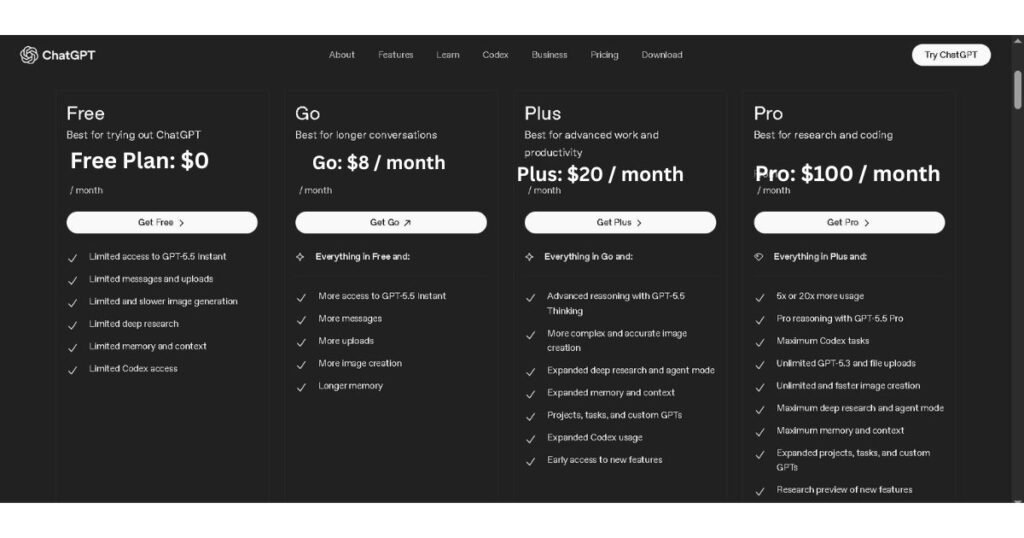
OpenAI has split its power-user options into three distinct consumer steps: Plus ($20), Pro ($100), and Pro ($200).
- The $100 Pro Tier: Launched to bridge the gap for intense data workers, giving you a 5x increase in core model quotas and expanded access to advanced research modules.
- The $200 Pro Tier: Removes standard usage constraints completely. It unlocks a full 1-Million token context window natively and grants priority processing for Sora video generation and dedicated coding agents.
Anthropic’s Counter-Tiers
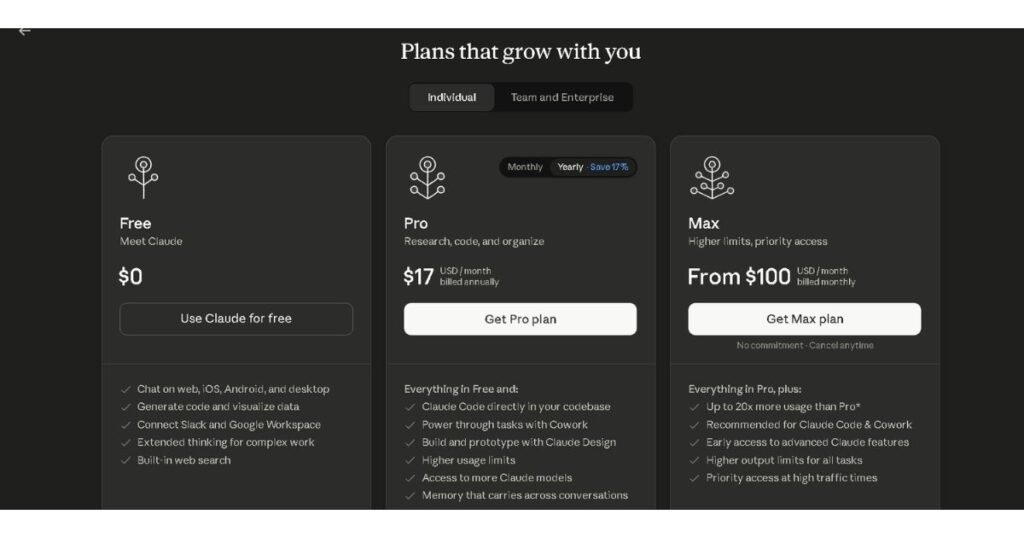
Anthropic bypasses granular mid-steps by moving users straight from Claude Pro ($20) to their high-octane performance tiers:
- Claude Max (5x at $100 / 20x at $200): Built explicitly for developers running endless terminal operations via Claude Code.
- Backed by recent infrastructural expansions, upgrading to a Max account eliminates peak-hour limits and scales up computational headroom to prevent unexpected mid-day lockouts.
Pros and Cons Matrix
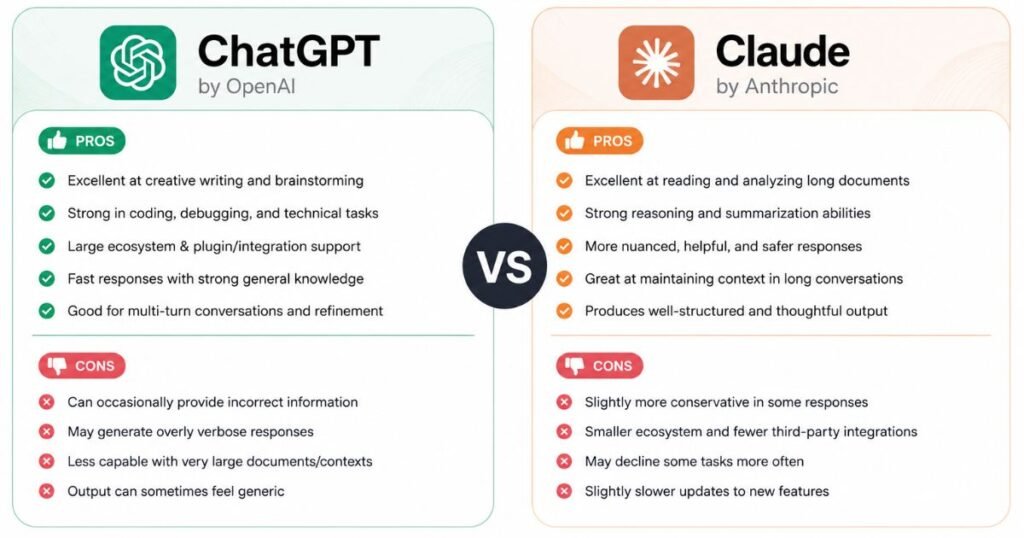
To help you make a definitive decision without sifting through marketing fluff, here is a direct, unfiltered breakdown of both premium platforms based on real user feedback from Reddit, Quora, and hands-on performance auditing.
| Platform | Pros | Cons |
| ChatGPT Plus ($20/mo) | Multimodal Mastery: Flawless integration of native image generation (DALL-E 3), advanced voice modes, and live web access.Graceful Fallback: If you hit the premium limit, you automatically downgrade to a faster mini model instead of getting locked out.Advanced Data Execution: Built-in Python sandbox lets you run actual code, parse sheets, and generate visual charts instantly. | The “Lazy Intern” Problem: Tends to rely on repetitive phrasing, AI clichés, and verbose, surface-level summaries unless heavily prompted.Memory Bloat: The cross-chat memory feature can get cluttered over time, occasionally pulling irrelevant past context into new sessions. |
| Claude Pro ($20/mo) | Superior Writing Tone: Exceptional literary depth, rich vocabulary, and an adaptive human-like tone that easily bypasses robotic AI styles.Terminal Autonomy: Claude Code works beautifully inside your local dev setup for multi-file system tasks.Deep Semantic Reasoning: Exceptionally accurate at tracing themes, fine details, and technical arguments in massive transcripts. | Aggressive Rate Limits: The rolling token-compute budget can completely lock you out of the platform after only 4–5 dense prompts.No Fallback Tier: Once you hit your limit, you face a hard lockout screen with no lower-tier model to continue your work.No Native Media: Lacks integrated image or video generation tools. |
Final Verdict: The Two-Pass Workflow Strategy
Choosing between ChatGPT Plus and Claude Pro in 2026 isn’t about which model is objectively “better”—it is entirely about aligning with your primary daily output.
- Choose ChatGPT Plus if: your work moves quickly, depends on images, voice, or data visualizations, requires frequent short-form content, and benefits from a consistent message allowance throughout the day.
- Buy Claude Pro if: Your income relies on high-quality long-form writing, complex multi-file engineering pipelines, or parsing massive corporate and academic documents where semantic precision is non-negotiable.
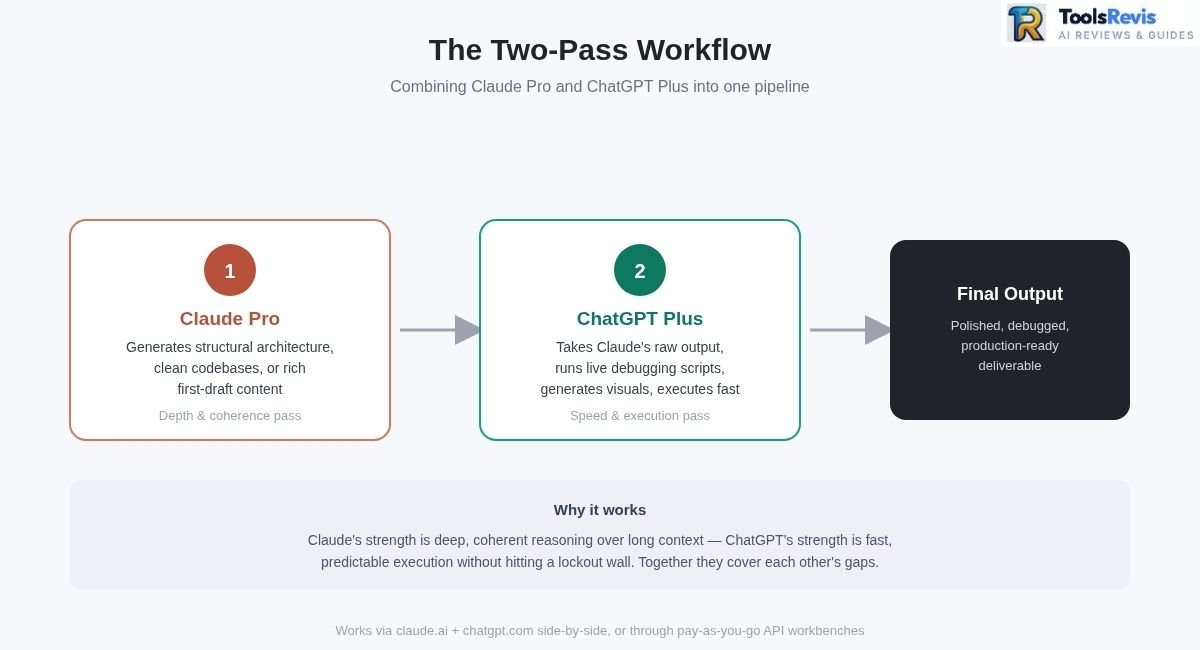
The ToolsRevis Power Hack: The “Two-Pass” Workflow
If your budget allows for both, or if you route them through pay-as-you-go API workbenches, the smartest strategy found across Reddit’s power-user communities is to combine their strengths into a dual pipeline:
Further Reading
Claude Sonnet 5 vs GPT-5.6 Sol: Full Comparison
Compare Claude Sonnet 5 and GPT-5.6 Sol across coding, reasoning, pricing, and overall performance in this in-depth comparison.
Frequently Asked Questions (FAQs)
1. Is ChatOn the Same as Claude?
No — ChatOn is a third-party wrapper app that bundles Claude alongside GPT and Gemini; it isn’t an official Anthropic product. Real Claude Pro (Projects, Artifacts, Claude Code) is only available directly through claude.ai.
2. Can I Use Claude and ChatGPT Together for Maximum Productivity?
Yes — many users pair Claude for deep writing and reasoning with ChatGPT for quick tasks and debugging. Tools like Cursor or API-based workbenches let you run both side by side efficiently.
3. Why Does Claude Pro Lock Me Out So Much Faster Than ChatGPT Plus?
Claude Pro’s usage is metered through a rolling 5-hour window that scales with conversation length, file size, and model used, so long or file-heavy chats can use up capacity faster. ChatGPT Plus’s limits tend to feel more predictable for typical day-to-day chat volume.
4. How Do Usage Limits Compare Between Claude Pro and ChatGPT Plus?
Claude Pro combines a 5-hour rolling limit with a separate weekly cap, both of which scale with conversation size and tool use. ChatGPT Plus uses a simpler rolling message allowance that resets more predictably, though exact limits on both platforms change over time.
5. Can Claude Pro Summarize Transcripts Better Than ChatGPT Plus?
Claude’s large context window generally helps it track detail and connections across long transcripts (60+ pages) more consistently. ChatGPT can handle long documents too, but is more prone to surface-level summarization on very long files.
Ready to Take Action? Try Our Free Tools
If you made it this far, here is how you can put these strategies into practice with our free utilities:
1. Find the Right AI Tool
Not sure which AI solution fits your needs? Simply describe your goal, and our AI-powered recommendation tool will identify the most suitable option for your specific task in just a few seconds. It’s completely free and requires no sign-up.

I’m Umair Ahmad, founder of ToolsRevis. I personally test every AI tool we cover — signing up, running real workflows, checking pricing tiers, and comparing outputs — before writing a single word. My goal: cut through AI marketing hype with honest, hands-on verdicts.
Let’s achieve more together!