
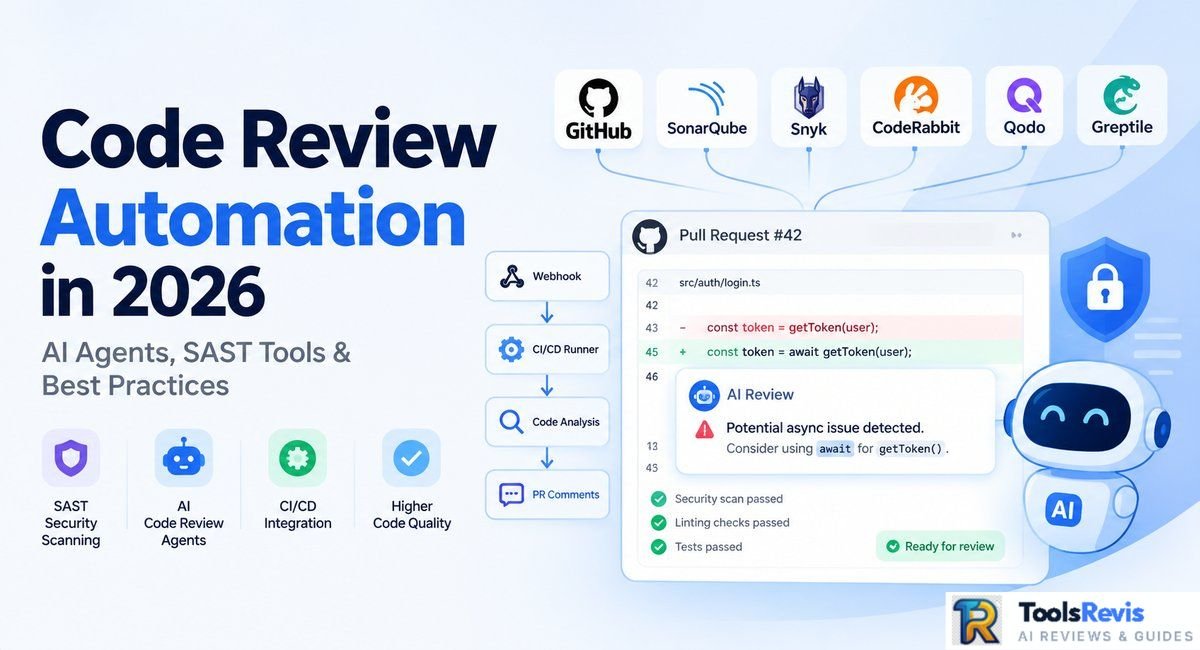
Code review is becoming less about manually reading every changed line and more about catching routine problems before they reach a senior developer.
In 2026, teams can combine deterministic SAST checks with context-aware AI reviewers for faster, more consistent pull-request feedback.
Manual review still matters, but it does not need to carry every part of the quality-control process. Modern engineering teams using the best AI tools for developers know that routine checks can be offloaded early. Modern repositories can automatically analyze a pull request, run security and quality checks, understand relevant project context, and leave actionable feedback before a human reviewer spends time on it.
That changes the role of the reviewer. Instead of spending review time on formatting issues, obvious vulnerabilities, or straightforward code-quality violations, senior developers can concentrate on decisions that require deeper product and architectural context.
This guide explains what code review automation is, where SAST and AI agents fit, what should remain human-reviewed, and how to build an automated review workflow without flooding developers with low-value bot comments.
What is Code Review Automation?
Code review automation is the use of software tools to automatically inspect code changes before or during the pull-request review process. Traditional tools rely heavily on deterministic rules, while newer AI reviewers can analyze broader repository context and explain potential problems in natural language.
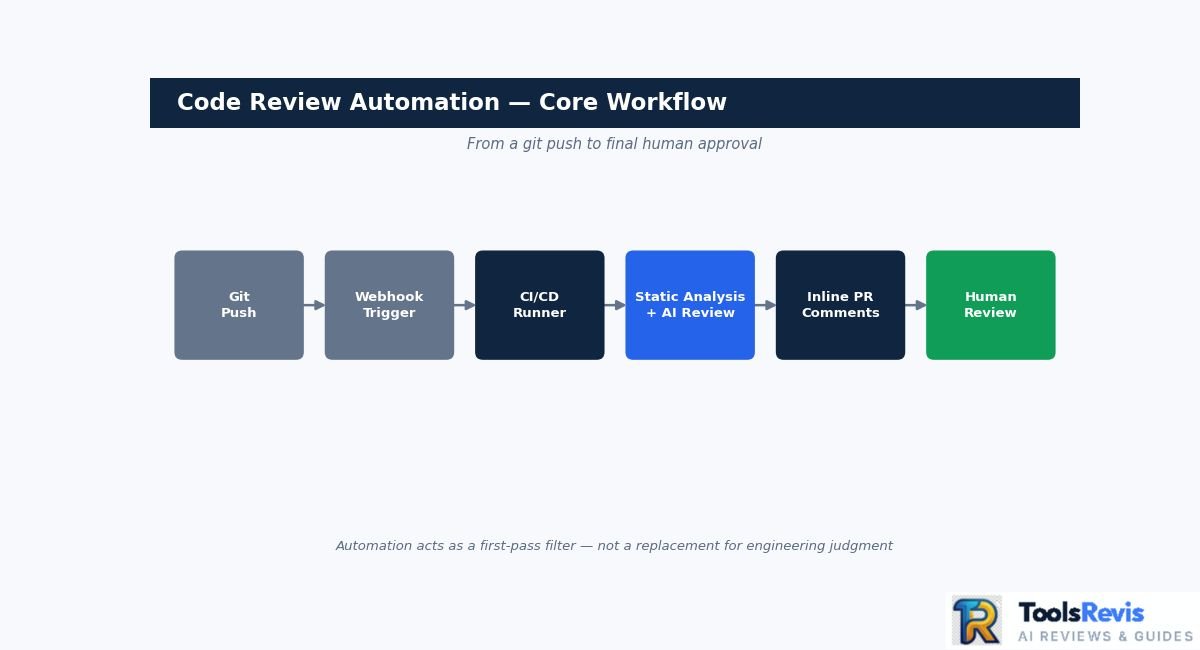
A typical automated review can begin when a developer pushes a commit or opens a pull request:
Git push → Webhook → CI/CD runner → Static analysis and/or AI review → Inline PR comments → Human review
The important distinction is that automation is generally a first-pass filter, not a replacement for engineering judgment.
Traditional linters and static analyzers are particularly effective when the expected result can be expressed as a rule: an insecure dependency, a type error, a known vulnerability pattern, an invalid syntax construct, or a project-specific coding standard.
AI-based reviewers add another layer. They can examine changed code alongside surrounding files and repository instructions, identify possible logical problems, explain why a change may be risky, and sometimes suggest a concrete fix. GitHub’s current Copilot code review, for example, can gather broader project context and use repository-level instructions, agent skills, and MCP servers when configured.
The 70/30 Hybrid Review Rule: Automation vs. Human Oversight
The 70/30 hybrid review rule means automation should handle roughly 70% of routine pull-request checks while humans handle the remaining 30% of high-judgment decisions. This is best treated as a practical editorial guideline rather than a measured industry standard—a framing widely debated in Reddit developer discussions on automated code reviews.
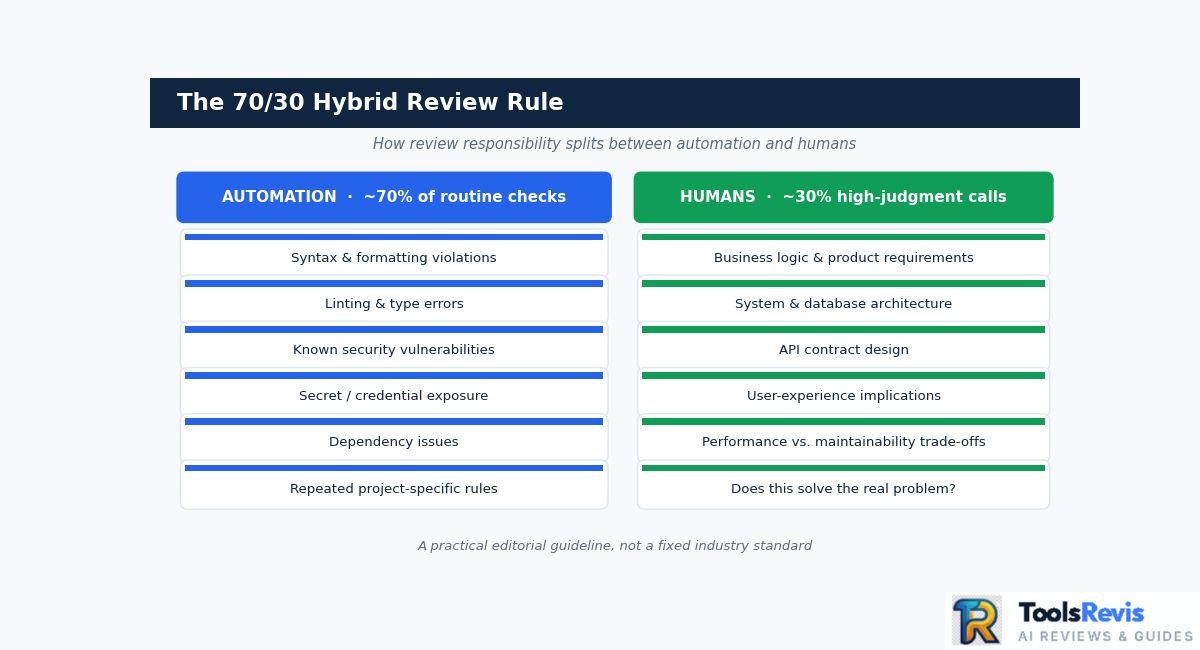
The automated layer should handle the repetitive checks that are easy to validate consistently:
- Syntax and formatting violations
- Linting and type errors
- Known security vulnerabilities
- Secret or credential exposure
- Dependency issues
- Common code-quality problems
- Regression and test checks
- Repeated project-specific rules
Human reviewers should retain responsibility for decisions where repository context alone may not be enough:
- Business logic and product requirements
- System and database architecture
- API contract design
- Business logic and product requirements (as highlighted on Reddit regarding missed intent during code reviews)
- User-experience implications
- Trade-offs between performance, maintainability, and complexity
- Whether a proposed implementation actually solves the underlying problem
This division is important because AI-generated review feedback can still be wrong. GitHub explicitly advises developers to validate Copilot’s feedback and supplement it with human review.
For teams already using autonomous coding workflows—such as GitHub Copilot agent mode—the same principle applies to agent-generated changes: automation can increase the amount of code that reaches review, but it does not eliminate the need for someone to understand and approve the resulting change.
A good automated review therefore behaves more like a quality gate and assistant than an autonomous engineering authority. The machine handles predictable checks first; experienced developers make the final decisions about whether the change belongs in the codebase.
Benefits of Automated Code Reviews (And Why Manual Reviews Fail)
Automated code review’s biggest benefit is speed: it removes repetitive work from the review queue so reviewers can focus on higher-value decisions, not on replacing experienced engineers. Manual reviews remain essential for architecture and business logic, but routine checks can be performed earlier and more consistently by automated tools.
At scale, this matters because pull requests can sit waiting for reviewer attention while developers switch between tasks. Microsoft reported that its AI review assistant was used across more than 90% of internal PRs and that an analysis of 5,000 repositories found a 10–20% median improvement in PR completion time after onboarding to AI code review (Source: Microsoft Engineering Study on AI Code Reviews).
The improvement should not be interpreted as a universal 40–60% reduction in review time. Results vary by repository, review process, tool configuration, and the type of code being reviewed. GitHub now provides organization-level metrics specifically for measuring median time to merge and other PR outcomes, which is a better approach than assuming a fixed productivity percentage.
Why Manual-Only Reviews Create Bottlenecks
Manual-only review creates bottlenecks because it requires a human to repeatedly catch problems that automated tooling can detect almost immediately. Formatting violations, known vulnerability patterns, type errors, and certain code-quality issues do not necessarily require senior engineering judgment.
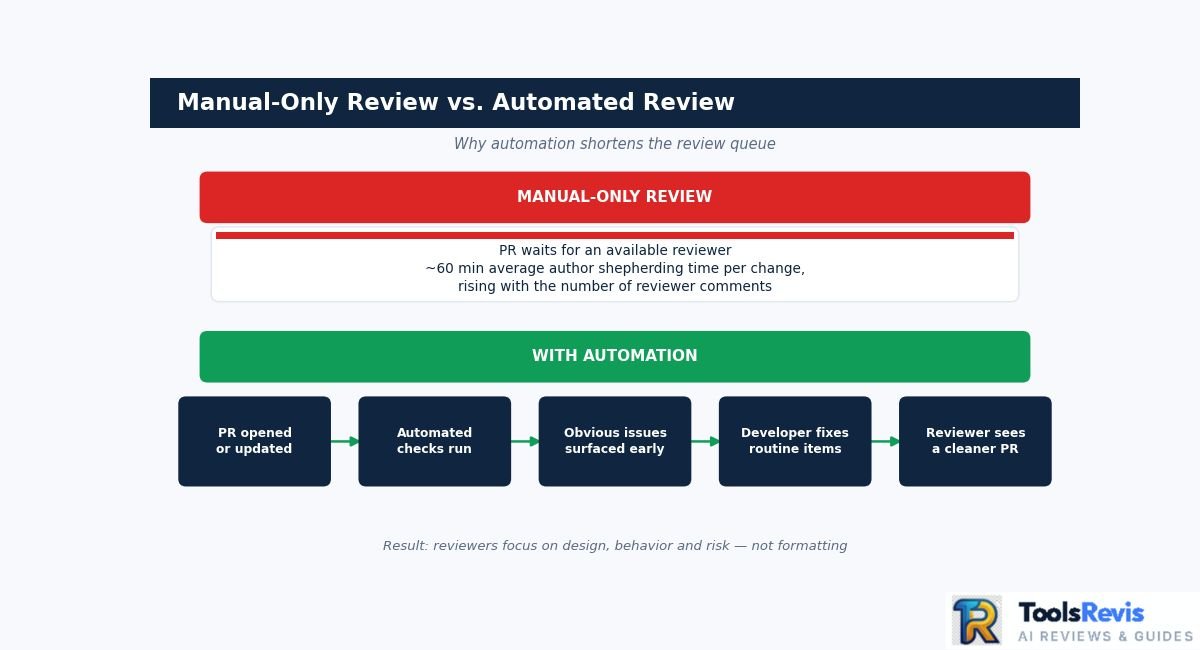
There is also a human cost to large numbers of review comments. Google researchers reported that authors spend about 60 minutes of active shepherding time on average between submitting code for review and finally submitting the change, with the required effort increasing as the number of reviewer comments increases. (Source: Google Research Study on Resolving Code Review Comments).
Automation changes that sequence by providing feedback earlier:
- A developer opens or updates a pull request.
- Automated checks inspect the change.
- Obvious issues are identified before a human reviewer spends time on them.
- The developer fixes routine problems.
- Human reviewers receive a cleaner PR focused more heavily on design, behavior, and risk.
That does not make the automated review inherently correct. It makes the review queue more focused.
Code Quality Analytics vs Manual Code Review: Pros and Cons
Automated code review outperforms manual-only review on speed, consistency, and security enforcement, while manual review stays stronger for business logic and architecture — the table below breaks down each dimension.
The strongest case for automation is therefore not simply speed. It is the combination of earlier feedback, consistent checks, and better allocation of human review time.
GitHub’s current reporting also reflects this distinction: organizations can measure PRs reviewed by Copilot, review suggestions, median time to merge, and related review metrics rather than relying on a generic claim that AI automatically makes every review faster.
A practical workflow is to let automation catch what can be checked reliably, then reserve human reviewers for questions such as “Does this implementation actually satisfy the requirement?” and “Is this the right architectural decision?” Those questions remain difficult to reduce to deterministic rules or a single AI-generated comment.
Static Analysis (SAST) vs. Generative AI Code Reviews
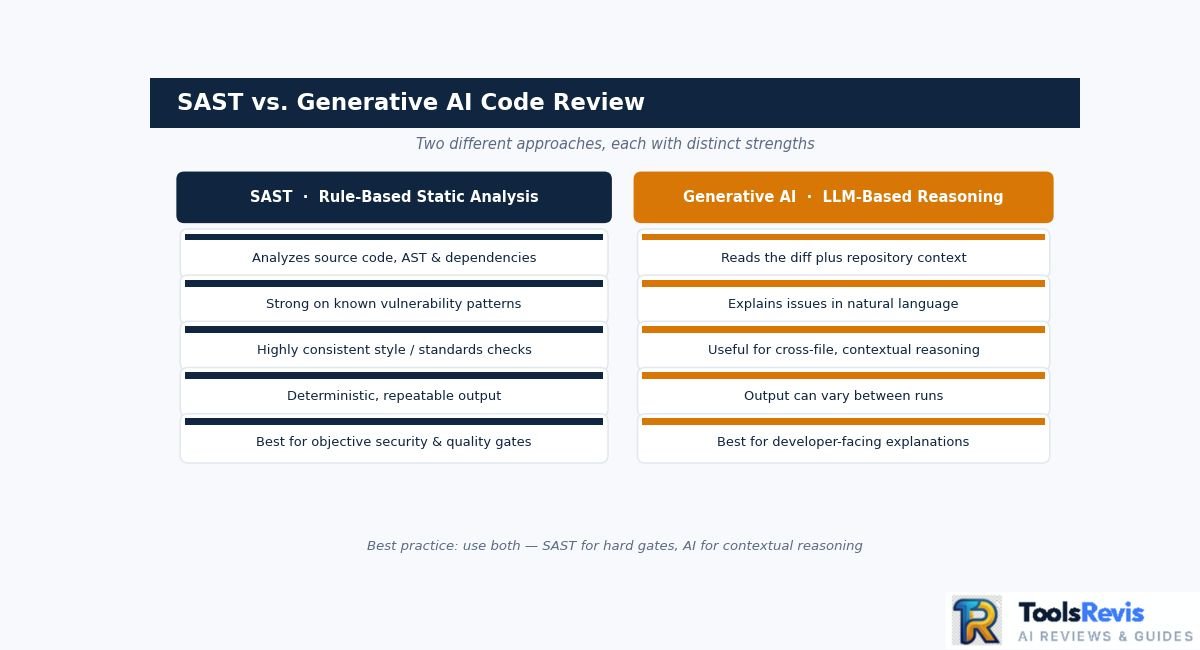
SAST and generative AI code reviews solve different problems, so modern development workflows can use both rather than treating them as competing approaches.
SAST tools analyze source code and its structure against predefined security and quality rules. Generative AI reviewers use language models to interpret code changes, surrounding context, and developer intent, then explain potential problems or suggest changes.
Why Teams Combine SAST and AI Review
Teams combine SAST and AI review because each catches different classes of defects: SAST enforces repeatable, rule-based checks, while AI reasons about context a static scanner can’t see. A security or quality rule can be configured once and applied consistently across pull requests. This makes static analysis useful for compliance requirements and automated merge gates.
AI reviewers address a different layer. They can examine a change in context and produce explanations that are closer to the way a human reviewer communicates. For example, an AI reviewer might point out that a new function appears to bypass an existing validation path and explain which related code should be considered.
Neither approach is sufficient for every type of defect.
A SAST scanner may reliably identify a known SQL-injection pattern, while an AI reviewer may notice that a multi-file change creates an inconsistent validation flow. Conversely, an AI model can misunderstand legitimate code and raise a false-positive comment, while a deterministic security rule can enforce a specific requirement consistently.
That is why a dual-layer review pipeline is useful:
SAST → deterministic security/quality gate → AI contextual review → human review
This separates objective checks from contextual feedback instead of asking one tool to perform every part of the review.
SAST Tools During Code Review
SAST tools scan code for security and quality violations before a pull request reaches final approval; common platforms include SonarQube, Snyk, and Semgrep. Their exact capabilities differ, but the underlying principle is similar: analyze code without executing the application and identify patterns associated with security, reliability, maintainability, or policy violations.
For developers, the benefit of using SAST tools during code review is that many problems can be detected before the pull request reaches final approval. A CI pipeline can run the scanner against a proposed change and expose findings directly in the pull request or prevent the quality gate from passing.
AI review then provides an additional contextual layer rather than replacing that gate.
For example:
- SAST: “This code matches a known security vulnerability pattern.”
- AI reviewer: “This change bypasses the validation helper used by these related endpoints.”
- Human reviewer: “The proposed behavior is or is not appropriate for this product requirement.”
That division gives each layer a clearer responsibility and reduces the temptation to treat AI-generated review comments as authoritative security findings.
AI Code Review and SAST Tools in 2026
The 2026 automated code-review market spans several tool categories — AI-generated PR feedback, repository-aware analysis, and deterministic SAST platforms — rather than one standard type.
Some products focus on AI-generated pull-request feedback, others prioritize whole-repository context, while SAST platforms emphasize deterministic security and quality rules.
The table below separates those roles so you can evaluate tools based on how they review code, not simply whether they advertise AI capabilities.
CodeRabbit
CodeRabbit focuses on automated pull-request review and developer-facing feedback. Its current documentation lists PR summarization, IDE/CLI reviews, configurable learnings, code-graph analysis, integrations, and support for linters and SAST tools among its capabilities, depending on the plan.
For pricing, CodeRabbit’s current FAQ lists Essentials at $30 per developer per month or $24 per developer per month when billed annually. It also provides free reviews for public repositories and open-source projects under its qualifying conditions.
That makes CodeRabbit particularly relevant when the main requirement is automated PR feedback without building a review system internally.
Greptile
Similar to IDE-level indexing found in tools like Cursor AI, Greptile takes a repository-oriented approach to AI code review across PRs. Its current product and pricing documentation describes unlimited repositories on its Starter plan, with 50 review credits per month for one active developer. The Pro plan is $30 per seat per month and includes 50 credits per seat, with additional credits priced at $1 each.
Greptile has also added a security-review layer combining static scanning, dependency checks, and an AI security agent, illustrating how AI review products are increasingly combining deterministic scanners with contextual analysis.
Qodo
Qodo provides AI-assisted pull-request review across GitHub, GitLab, Bitbucket, Azure DevOps, and other development environments. Its current product information describes repository-aware review capabilities and integrations with major IDEs and Git providers.
Qodo’s current Pro Team pricing uses a credit-based model at $0.012 per credit, with credit packs determining the approximate number of reviews available. Enterprise deployments add options such as SSO/SAML, BYOK, and single-tenant or on-premises deployment.
GitHub Copilot Code Review
GitHub Copilot Code Review is the most tightly integrated option for teams already using GitHub pull requests. GitHub says Copilot can review pull requests, identify issues, and suggest fixes, while automatic reviews can be configured for newly opened pull requests, draft pull requests, or subsequent pushes. Check GitHub Copilot pricing plans to see credit usage limits across tiers.
Its current review system also supports different review-effort levels. The deeper Balanced mode is designed for more complex logic, security-sensitive code, and cross-service changes. GitHub explicitly notes that Copilot can make mistakes and recommends validating its feedback with human review.
For teams already centered on GitHub, the main differentiator is therefore workflow integration, rather than simply the presence of an AI reviewer.
SonarQube
SonarQube Community Build represents the deterministic side of automated code review. SonarQube describes Community Build as a self-managed static-analysis and automated code-review tool that checks supported code against rules covering maintainability, reliability, and security.
It can connect analysis to CI pipelines and analyze branches and pull requests, although the exact pull-request and branch capabilities vary between Community Build, Cloud, and commercial Server editions.
This makes SonarQube useful as the quality gate layer in a hybrid setup, while an AI reviewer handles contextual explanations and higher-level review suggestions.
How These Tools Fit Together
A modern automated review stack combines SAST and AI rather than choosing between them. One practical architecture is:
SonarQube/Snyk/Semgrep → deterministic security and quality checks → AI PR reviewer → human approval
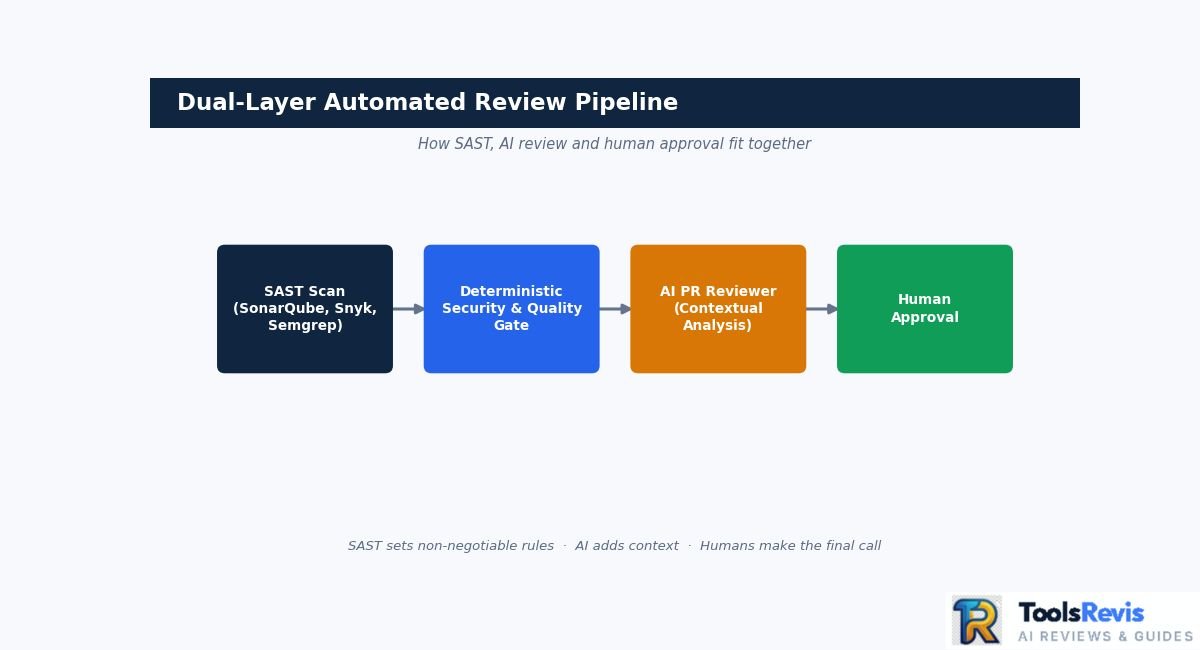
The static-analysis layer establishes rules that should not be negotiable, while the AI layer can investigate context and communicate potential issues in a developer-friendly way.
The right combination depends on your repository size, Git provider, security requirements, review volume, and whether your organization needs self-hosting or cloud-based analysis. Pricing and included usage can also change, so the figures above should be treated as September 2026 reference points, not permanent prices.
How to Setup Automated Code Reviews in GitHub Workflows
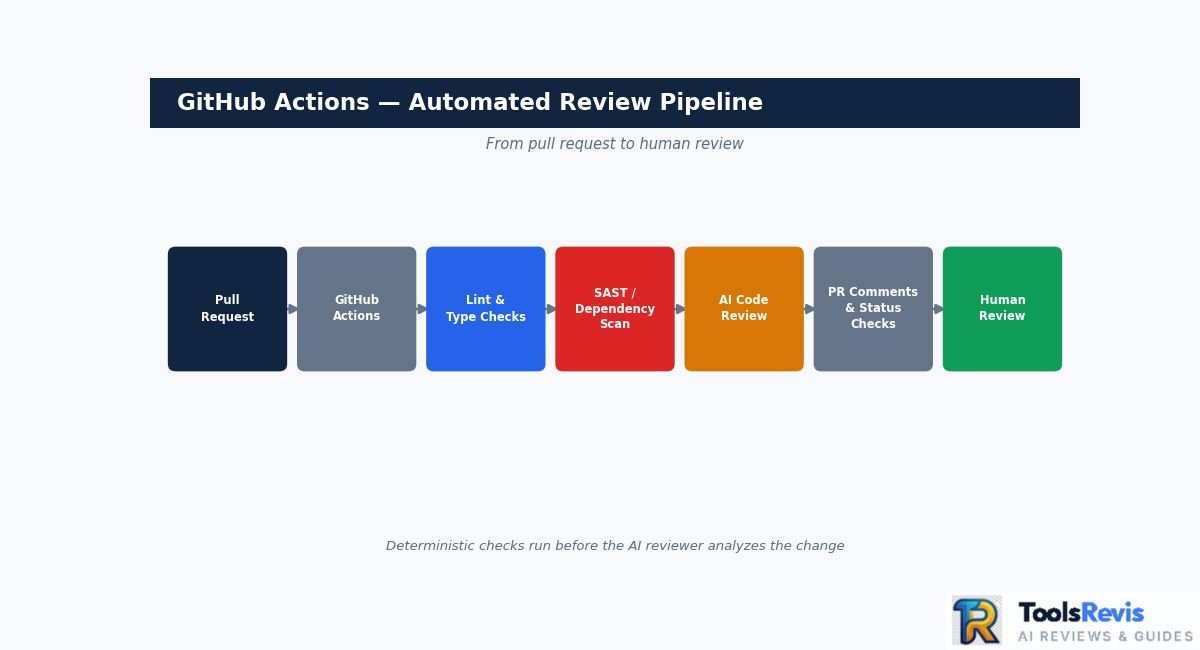
You set up automated code review in GitHub Actions by triggering a workflow whenever a pull request is opened or updated, then running linters, SAST scanners, or an AI review action before human approval. A workflow can run linters, tests, SAST scanners, or an AI review action before the PR reaches human approval.
The workflow itself is a YAML file stored inside .github/workflows/. GitHub executes the configured jobs on a runner, which can be GitHub-hosted or self-hosted.
Basic GitHub Workflow Setup
A basic automated review workflow lives in one YAML file. Start by creating a file such as:
The pull_request trigger is important because GitHub can start the workflow when a PR is opened or when additional commits are pushed to it. GitHub’s documentation also notes that the default pull_request activity types include opened, synchronize, and reopened; explicitly declaring them makes the intended behavior easier to understand.
The example above is intentionally generic. The final review step depends on the service you choose. For example, a team might run a SAST scanner first and then invoke an AI review action, keeping deterministic security checks separate from contextual AI feedback.
Add Security and Quality Checks Before AI Review
A complete review pipeline runs deterministic checks before AI review, following this sequence:
This ordering gives deterministic checks a clear role before the AI reviewer analyzes the change. It also allows teams to configure certain failures as required checks rather than treating every AI comment as a merge blocker.
For larger repositories, use GitHub’s paths or paths-ignore filters when appropriate. For example, a workflow can be restricted to pull requests that modify JavaScript files rather than running for every documentation-only change. GitHub supports combining branch and path filters for pull_request workflows.
One security detail matters when implementing this in public repositories: do not automatically switch to pull_request_target simply to obtain broader permissions or secrets. GitHub documents specific security risks around this event, and its current Actions protections include controls intended to restrict unsafe workflow execution.
For most standard PR review workflows, start with pull_request, grant only the permissions the selected action actually needs, and add stronger permissions only when the integration requires them. This keeps the automated reviewer inside the same controlled CI/CD process as the rest of the repository checks.
Blueprint: How to Eliminate “AI Bot Comment Spam”
Eliminating AI bot comment spam means raising the threshold for what deserves a PR comment — not removing the reviewer. AI review becomes counterproductive when every minor formatting issue, uncertain suggestion, or low-confidence observation appears as a new comment. The solution is not necessarily to remove the reviewer; it is to raise the threshold for what deserves human attention.
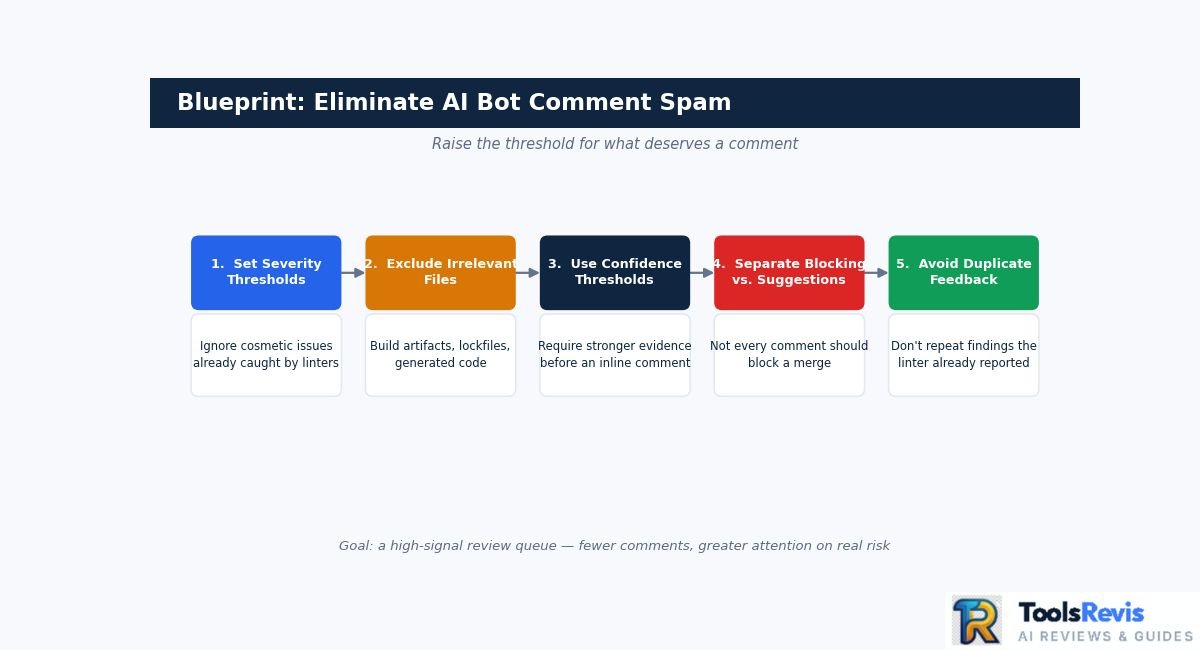
Use a configuration strategy like this:
- Set severity thresholds
- Ignore formatting and cosmetic issues when a formatter or linter already handles them.
- Prioritize CRITICAL and HIGH security findings.
- Allow medium-severity findings only when they represent a meaningful correctness or maintainability concern.
- Exclude generated and irrelevant files
Configure the reviewer to ignore files such as:
- Generated API clients
- Minified JavaScript
- Build artifacts
- Lock files where appropriate
- Coverage output
- Vendored dependencies
- Generated documentation
- The exact configuration syntax depends on the review platform. For example, CodeRabbit supports repository-level configuration through .coderabbit.yaml, while Qodo provides repository rules and configuration mechanisms for controlling review behavior.
- Use confidence thresholds carefully
An 80% confidence threshold can be a useful team policy, but it should not be presented as a universal standard. AI confidence scores are tool-specific and are not directly comparable between vendors.
If your selected reviewer provides a configurable confidence or certainty threshold, require stronger evidence before allowing an inline comment. Otherwise, use severity, rule categories, or review policies as the filtering mechanism. - Separate blocking findings from suggestions
Not every AI comment should prevent a merge.
A practical policy is:
Blocking: confirmed security or correctness issue
Review required: potentially serious behavioral problem
Suggestion: refactoring or maintainability improvement
Ignore: formatting, stylistic preference, or low-confidence observation - Avoid duplicate feedback
If ESLint, Prettier, SonarQube, or another deterministic tool already reports an issue, configure the AI reviewer not to repeat the same finding whenever the platform supports this. The goal is to make the PR easier to review, not to produce the largest possible comment count.
The result should be a high-signal review queue: fewer comments, but greater attention on issues that can materially affect security, correctness, reliability, or maintainability.
Frequently Asked Questions (FAQs)
1. Can ChatGPT perform an automated code review?
Yes. ChatGPT can analyze code and, when GitHub is connected, retrieve permitted repository content for analysis. However, that is different from a dedicated pull-request review system that automatically runs on every PR and posts structured review feedback. For continuous review, GitHub Actions or dedicated PR agents can provide the required workflow integration.
2. What are some free or open-source options for automated code review?
For deterministic static analysis, SonarQube Community Build is a free self-managed option. For AI-assisted review, developers can run open models locally through tools such as Ollama, then connect them to their own development or CI workflows. The setup can reduce dependence on external AI services, but hardware and maintenance costs still apply.
3. Does automated code review replace human reviewers entirely?
No. Automated review is most useful for repetitive checks such as linting, security patterns, dependency issues, and other predictable findings. Human reviewers should still evaluate architecture, business logic, requirements, API contracts, and unusual edge cases. AI review tools themselves can produce incorrect findings, so automated feedback should be validated before merging.
4. How much do AI code review tools cost in 2026?
Pricing varies considerably by provider and usage model. CodeRabbit currently lists Essentials at $30 per developer monthly or $24 annually, while higher plans cost more; it also offers usage-based reviews. Other services use credits, seats, or usage-based billing, while local models can avoid per-review API charges but require suitable hardware and infrastructure.

I’m Umair Ahmad, founder of ToolsRevis. I personally test every AI tool we cover — signing up, running real workflows, checking pricing tiers, and comparing outputs — before writing a single word. My goal: cut through AI marketing hype with honest, hands-on verdicts.
Let’s achieve more together!