

Lua is easy to read, but small dialect differences can make AI-generated code fail in ways that are surprisingly hard to spot. The right AI tool can reduce those mistakes by understanding your project context, editor, Lua version, and whether you are actually writing Luau.
Introduction
The best AI for Lua coding is not necessarily the model that performs well on Python, JavaScript, or C++. Lua has its own traps, including 1-based indexing, flexible tables, metatables, local scoping, and major differences between standard Lua and Roblox’s Luau.
Your choice also depends on where you write code. A developer building a standalone Lua application may need strict Lua 5.1 or 5.4 compatibility, while a Roblox developer needs Luau-specific APIs and conventions. A Neovim user may care more about editor integration, whereas someone maintaining a large Roblox project may need an AI assistant that can understand many files at once.
One important correction is necessary for a 2026 article: Claude 3.5 Sonnet should not be presented as Anthropic’s current leading Sonnet model. Anthropic has since released newer Sonnet generations, including Sonnet 4.6 and Sonnet 5 — see our Claude Sonnet 5 review for a full breakdown. Sonnet 5 was announced in June 2026 and is available for coding and agentic workflows.
The comparison below therefore focuses on the current tools and workflows rather than treating an older model name as the 2026 winner. Pricing and availability can also change, so the figures shown here are current reference points rather than permanent prices.
Top AI Tools for Lua Coding Compared (2026 Matrix)
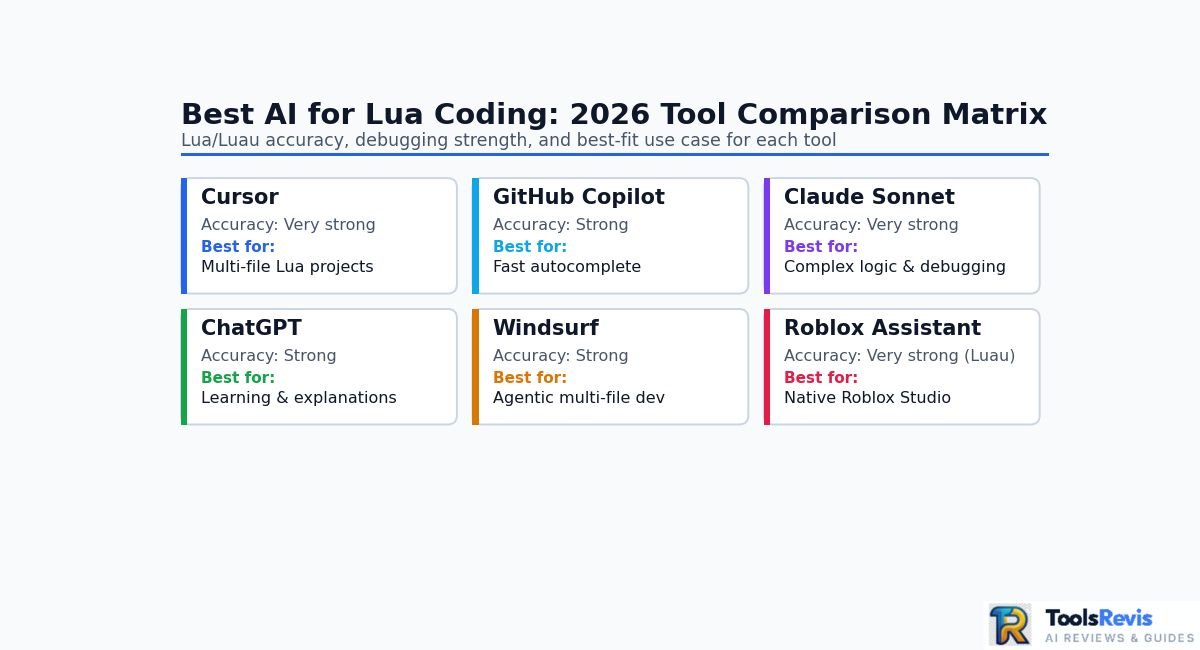
The strongest Lua AI choice depends on what you are trying to do: Cursor and Windsurf are better suited to multi-file development (see our Windsurf vs Cursor comparison), GitHub Copilot is particularly useful for real-time completion, Claude is strong for complex reasoning and debugging, ChatGPT is useful for explanations and code generation, and Roblox Assistant is specifically designed around Luau development inside Roblox Studio.
The ratings below are practical workflow assessments, not results from a standardized Lua benchmark. Lua/Luau accuracy can change substantially depending on the model selected, prompt, project context, and whether the tool understands your project’s dialect.
| AI Tool | Lua/Luau Accuracy | Debugging Ability | IDE Integration | Free Tier? | Best For | Limitations |
| Cursor | Very strong | Very strong | Excellent | Yes | Multi-file Lua projects and AI-assisted development | Paid Pro tier needed for heavier usage; not ideal for quick one-off scripts |
| GitHub Copilot | Strong | Strong | Excellent | Yes | Fast autocomplete and everyday coding | Weaker at deep multi-file reasoning and architecture-level debugging |
| Claude Sonnet | Very strong | Very strong | Via Claude Code and supported IDE workflows | Yes | Complex Lua logic, debugging, and refactoring | No native standalone IDE; needs Claude Code or a supported editor for project context |
| ChatGPT | Strong | Strong | Primarily chat/API-based workflows | Yes | Learning Lua, explanations, and generating snippets | Limited native project-wide context without manual file pasting |
| Windsurf | Strong | Very strong | Excellent | Yes | Agentic, multi-file development | Branding/product status has shifted recently — verify current name and pricing |
| Roblox Assistant | Very strong for Luau | Strong for Roblox tasks | Native Roblox Studio | Included in Roblox Studio | Roblox scripting and Studio workflows | Limited outside Roblox Studio; not suited for standalone Lua or multi-file external projects |
Cursor
Cursor is one of the strongest choices when Lua development involves multiple files rather than isolated snippets. Its current plans include a free Hobby tier and a Pro plan at $20/month, with access to frontier models and agent features.
For Lua developers, the important advantage is not simply the underlying model. It is the combination of an AI-capable editor, project context, code navigation, and the ability to work across a larger codebase.
Best for: developers maintaining larger Lua or Luau projects who want AI assistance directly inside the editor.
GitHub Copilot
GitHub Copilot is a strong option when your priority is fast coding assistance inside a supported editor. Its current Free plan includes 2,000 code completions per month, while Copilot Pro is $10 per month and adds broader coding and agent capabilities.
For Lua, Copilot is especially useful for repetitive functions, module patterns, event handlers, and boilerplate where immediate inline suggestions save time.
Best for: developers who want AI autocomplete without changing their existing development workflow.
Claude Sonnet
Claude’s current Sonnet lineup is more relevant to a 2026 comparison than Claude 3.5 Sonnet. Anthropic lists Sonnet 4.6 and Sonnet 5 among its current Sonnet generations, with Sonnet 5 specifically positioned around coding, tool use, and agentic development.
Claude can be particularly useful when a Lua problem requires reasoning across several functions, understanding a complicated table structure, diagnosing a runtime error, or explaining why a generated implementation fails.
Best for: complex Lua logic, debugging, refactoring, and developers who want detailed explanations alongside generated code.
ChatGPT
ChatGPT is useful for beginner-to-intermediate developers who need to move between code generation and explanation. It can generate Lua examples, explain unfamiliar syntax, convert pseudocode into Lua, and help reason through errors.
For API-based workflows, OpenAI currently lists GPT-4o as an available model with text and image input and a 128,000-token context window, although developers should check the current model catalog before choosing a specific model for a new project.
Best for: beginners, quick experiments, learning Lua concepts, and explaining existing scripts.
Windsurf
Windsurf is aimed at AI-assisted software development with editor and agent workflows. Product branding and ownership have shifted over time, so confirm the current product name and pricing page directly before relying on it; at last check it listed a free tier and a $20/month Pro plan.
For Lua developers, its main value is the ability to work with project-level context rather than repeatedly pasting individual scripts into a browser chatbot.
Best for: developers who want an AI-first editor for larger Lua or Luau codebases.
Roblox Assistant
Roblox Assistant is the most specialized option in this list because it is built directly into the Roblox development environment. Roblox documentation states that Assistant can reference the game being developed in Studio and help create or modify objects and scripts based on the project’s context.
That makes it particularly useful for Roblox developers who are working directly in Studio and need help with Luau-specific game-development tasks.
Best for: Roblox developers who want native assistance with Luau and Roblox Studio workflows.
Which one should you choose?
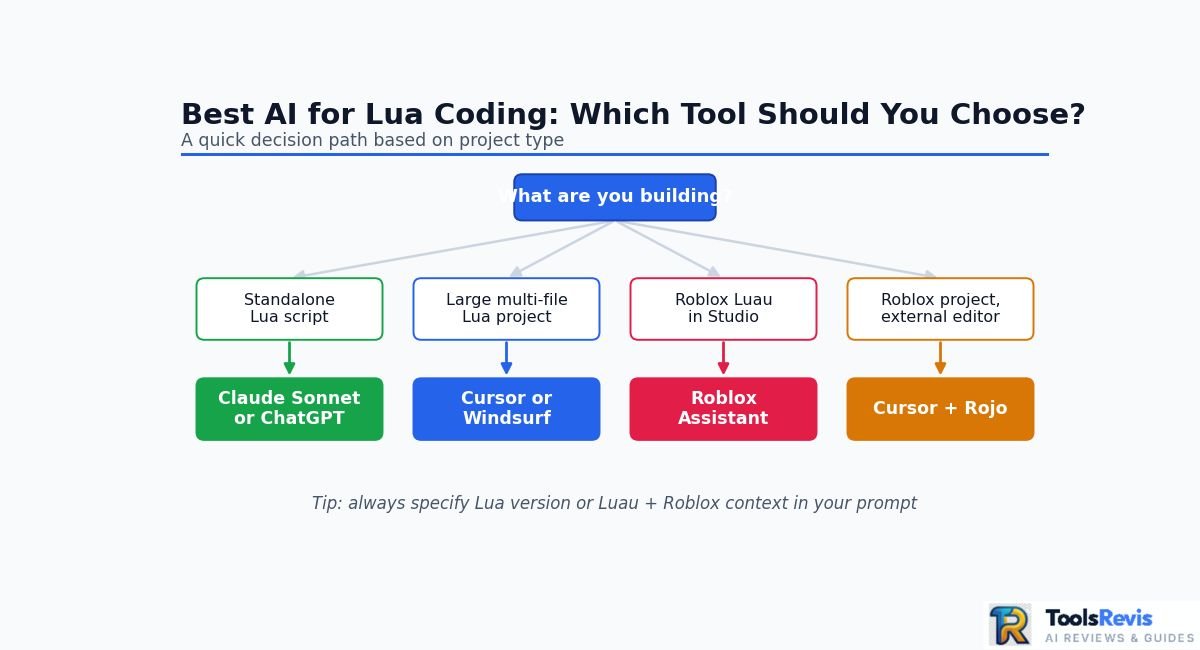
Your choice depends on project type: standard Lua developers should start with a general-purpose coding model such as Claude Sonnet, ChatGPT, Cursor, or Copilot and explicitly specify their Lua version.
If you are building a large multi-file Lua project, an AI editor such as Cursor or Windsurf can be more useful than a browser-only chatbot because the assistant can work with project context.
If you are primarily doing Roblox development, Roblox Assistant is the most specialized starting point, while an external editor such as Cursor can become useful when your workflow expands beyond simple Studio edits.
For most developers, the biggest improvement will come from correctly identifying Lua vs Luau and the target Lua version before asking an AI to generate code. That context can matter more than simply choosing the model with the highest general coding reputation.
If you’re comparing AI coding assistants beyond Lua, see our guide to the best AI coding tools for developers for a broader comparison.
Standard Lua vs Roblox Luau: Why AI Choice Depends on Your Project
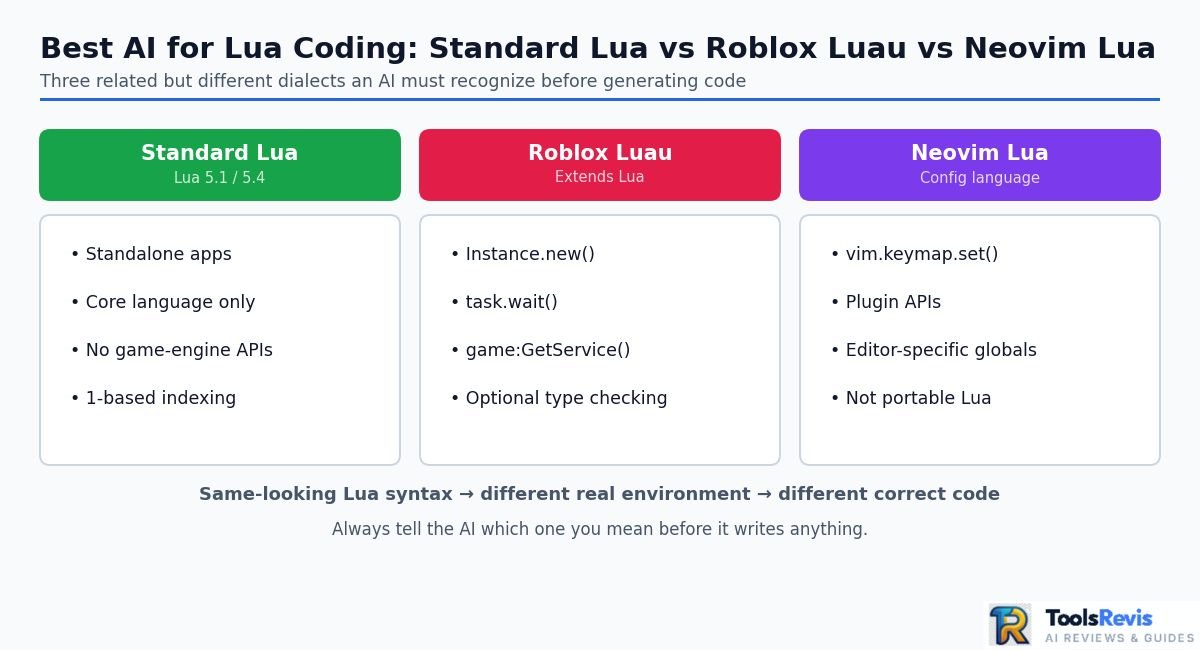
Standard Lua, Roblox Luau, and Neovim Lua are related but different environments, so an AI assistant must know which dialect and APIs your project uses before generating code. A script that is correct for Roblox can be completely wrong for a standalone Lua application, while Neovim configuration adds another layer of editor-specific APIs.
Vanilla Lua: Lua 5.1 vs 5.4
Standard Lua is the language used outside specialized platforms such as Roblox. However, even within standard Lua, the target version matters.
Lua 5.1 and Lua 5.4 share the core language syntax, but they differ in areas such as modules, environments, garbage collection, coroutine behavior, and available standard-library functionality. An AI-generated script that assumes a feature from a newer Lua release may therefore fail in an older application.
When prompting an AI for standard Lua, specify the version explicitly:
Write this for Lua 5.1.
Do not use Lua 5.2+ features.
Return only standard Lua code.
Do not use Roblox/Luau APIs.
For Lua 5.4 projects, use the same approach:
Target Lua 5.4.
Use only standard Lua 5.4 features and libraries.
Do not use Roblox Luau APIs or game-engine-specific functions.
This simple constraint can prevent an AI from silently importing APIs or syntax from another environment.
Roblox Luau
Luau is Roblox’s scripting language and extends Lua with features designed for game development, including Roblox-specific APIs, optional type checking, and language features that are not part of ordinary standalone Lua projects.
This is where AI-generated code can become particularly confusing. A model may produce something that looks like Lua but assumes Roblox objects or services exist.
For example:
task.wait(1)
local part = Instance.new(“Part”)
part.Parent = workspace
That code belongs to the Roblox/Luau environment. It is not portable standard Lua.
If you are developing for Roblox, tell the AI that explicitly:
Target: Roblox Luau
Environment: Roblox Studio
Use modern Luau syntax.
Use Roblox APIs where appropriate.
Do not generate standard-Lua-only alternatives unless requested.
For stricter projects, you can also request typed Luau and specify that the generated code should respect your project’s type-checking conventions.
Neovim Lua
Neovim introduces another important distinction because Lua is used as the configuration language, but the environment provides its own APIs.
For example:
vim.keymap.set(“n”, “<leader>ff”, function()
print(“Find files”)
end)
This is Lua syntax, but vim.keymap is a Neovim API. An AI that treats the file as generic Lua may misunderstand the available environment.
For Neovim configuration, provide the environment in the prompt:
Target environment: Neovim
Language: Lua
Use the Neovim Lua API.
Do not use Roblox APIs.
Keep the configuration compatible with my installed Neovim version.
This distinction is especially important when asking an AI to modify an existing configuration because the correct answer depends on both Lua syntax and the host application’s API.
Why AI Sometimes Mixes Lua and Luau
The most common problem is context contamination. AI coding models have encountered large amounts of Lua and Roblox/Luau code, so a vague request such as “write a Lua script that waits two seconds and creates an object” can leave the environment ambiguous.
A model may respond with Roblox-specific functions such as task.wait() or Instance.new() even when the intended target is standard Lua.
The reverse can also happen: a developer working in Roblox may receive generic Lua code that ignores Roblox services, instances, events, or Luau-specific patterns.
The solution is to specify four things before generating code:
- Language: Lua or Luau.
- Version: such as Lua 5.1, Lua 5.4, or the project’s required Luau environment.
- Platform: standalone application, Roblox Studio, Neovim, LÖVE, Solar2D, or another runtime.
- Existing code context: relevant modules, APIs, errors, and project conventions.
The 1-Based Indexing Trap
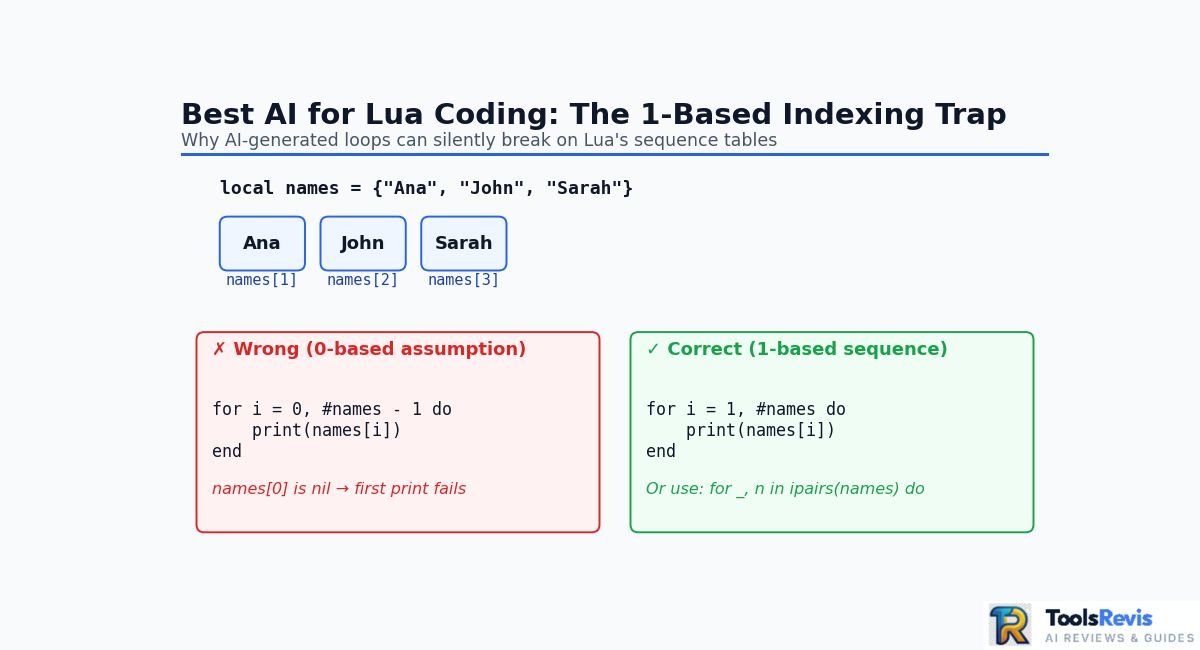
Lua uses 1-based indexing by convention for sequence-style tables, unlike languages such as Python and JavaScript that commonly use 0-based indexing.
For example:
local names = {“Ana”, “John”, “Sarah”}
print(names[1]) — Ana
print(names[2]) — John
An AI that incorrectly assumes a zero-based array can generate subtle bugs:
for i = 0, #names – 1 do
print(names[i])
end
The problem is not that Lua forbids index 0; tables can have a key of 0. The problem is that this loop does not follow the normal 1-based sequence convention and will produce nil for names[0].
This is one reason prompts should state the indexing convention when generating sequence-heavy code.
Why Project Context Matters More Than the Model Name
Choosing a powerful model does not guarantee correct Lua code. An AI assistant can still make mistakes if it cannot see the modules, APIs, configuration, or runtime assumptions surrounding the code it is editing.
For a small script, a browser-based AI may be enough. For a multi-file application, project-aware tools such as Cursor or Windsurf can provide more useful context. For Roblox development, native Roblox tooling can provide platform-specific context that a generic chatbot does not automatically have.
Practical recommendation: before judging an AI’s Lua ability, test it on the same real project, using the same dialect, version, files, and error messages. A model that produces excellent isolated snippets may perform very differently when asked to modify an existing Lua codebase.
Deep Dive: The Top AI Assistants & Models for Lua Coding
1. Claude Sonnet — Best Overall for Complex Lua Logic & Metatables
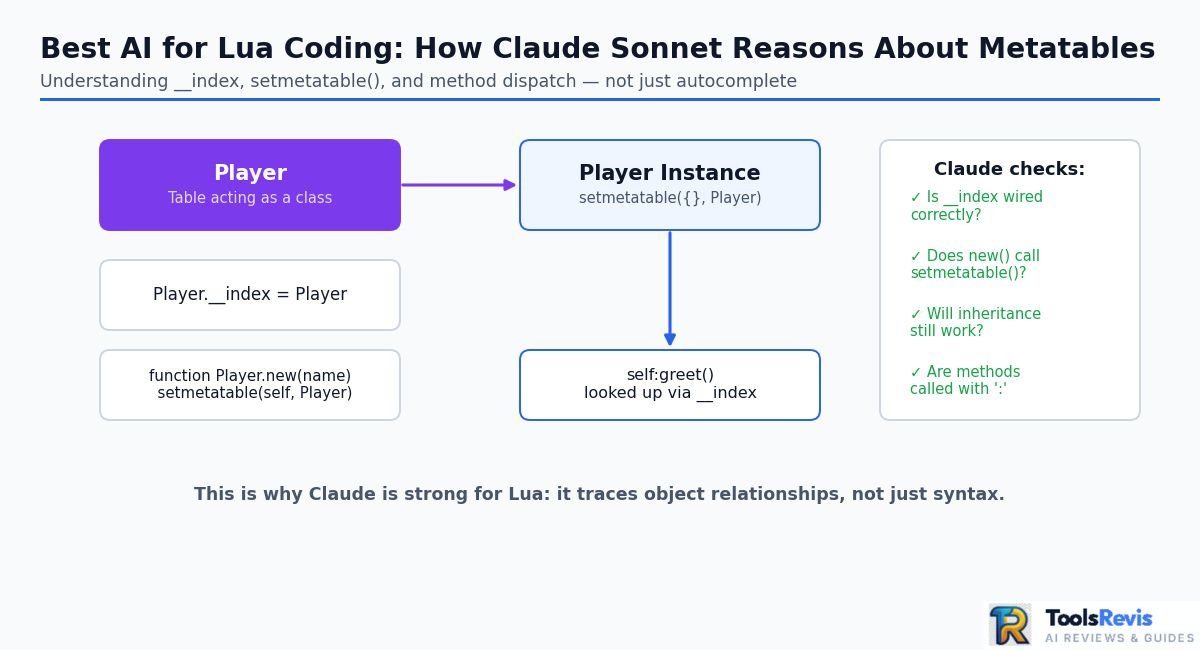
Claude 3.5 Sonnet was a strong choice for complex Lua reasoning, but it is no longer the current Sonnet generation in 2026. Anthropic has since released newer Sonnet models, including Sonnet 4.6 and Sonnet 5, so a current 2026 workflow should use the latest available Sonnet model rather than deliberately selecting the older 3.5 release.
The reason Claude became popular among developers working with Lua is its ability to reason through code structures rather than simply autocomplete the next line. That matters when a script relies heavily on tables, metatables, closures, callbacks, or several interacting modules.
For example, metatable-based object systems can require the AI to understand how __index, constructors, inheritance patterns, and method calls interact:
local Player = {}
Player.__index = Player
function Player.new(name)
local self = setmetatable({}, Player)
self.name = name
return self
end
function Player:greet()
return “Hello, ” .. self.name
end
A useful AI assistant should be able to explain why Player.__index = Player is being used, identify how setmetatable() connects an object to its methods, and modify the design without accidentally replacing the metatable behavior with an incompatible pattern.
Best used via: Claude Code, Cursor, or Windsurf when the workflow requires project-level context and multi-file changes.
For developers already using Claude for terminal-based development, see the Claude Code in the terminal guide.
Best for: complex Lua logic, metatables, debugging, refactoring, architecture discussions, and explaining difficult code.
2. Cursor & Windsurf — Best IDEs for Multi-File Lua Architecture
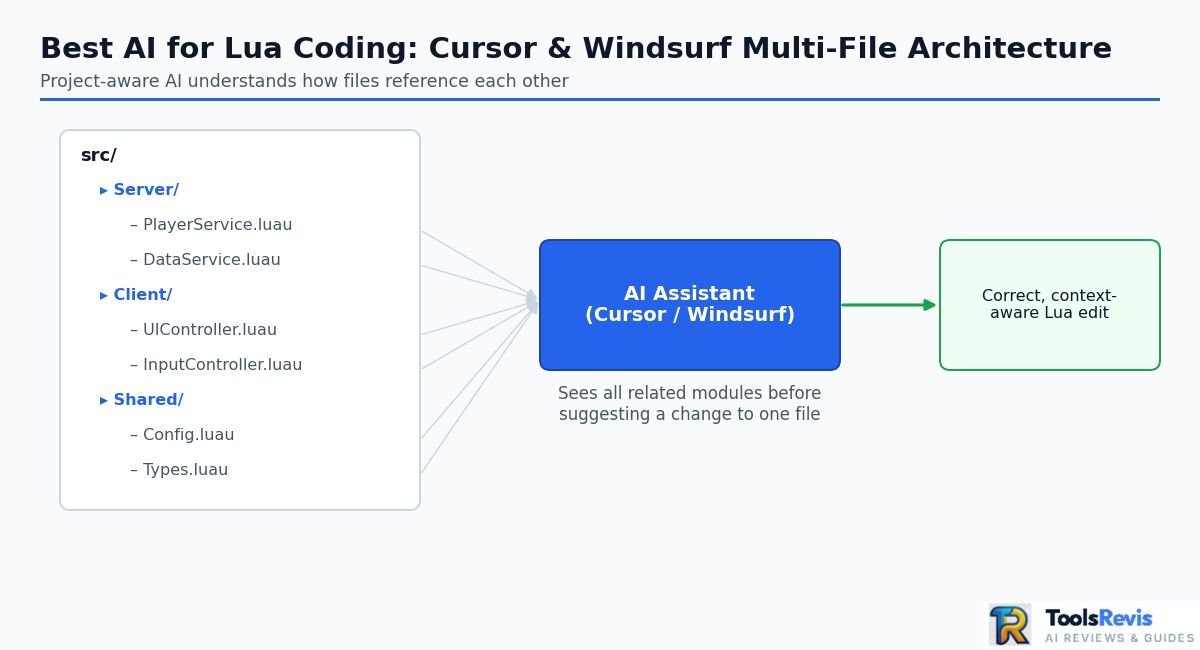
Cursor and Windsurf are strongest for intermediate-to-advanced developers when your Lua project contains multiple related files and the AI needs to understand how those files work together.
This is a major difference from asking a browser chatbot to generate one script at a time. A project-aware coding environment can work from the surrounding repository, making it easier to reason about imports, modules, shared functions, configuration files, and references between scripts.
For example, a Roblox project might contain:
src/
├── Server/
│ ├── PlayerService.luau
│ └── DataService.luau
├── Client/
│ ├── UIController.luau
│ └── InputController.luau
└── Shared/
├── Config.luau
└── Types.luau
If UIController.luau depends on Types.luau and Config.luau, changing one file without understanding the others can introduce errors. Project-aware AI is much more useful in this situation than isolated code generation.
Cursor currently offers a free Hobby tier and a $20/month Pro plan, with higher tiers available for heavier agent usage.
Windsurf is similarly suited to agent-style coding workflows, particularly when the task involves modifying several files rather than generating a standalone Lua snippet.
You can also read the full Cursor AI review for more detail on its workflow.
Best for: large Lua repositories, Roblox projects using external development workflows, Neovim configuration trees, and developers who regularly make cross-file changes.
3. GitHub Copilot — Best for Real-Time Autocomplete in VS Code
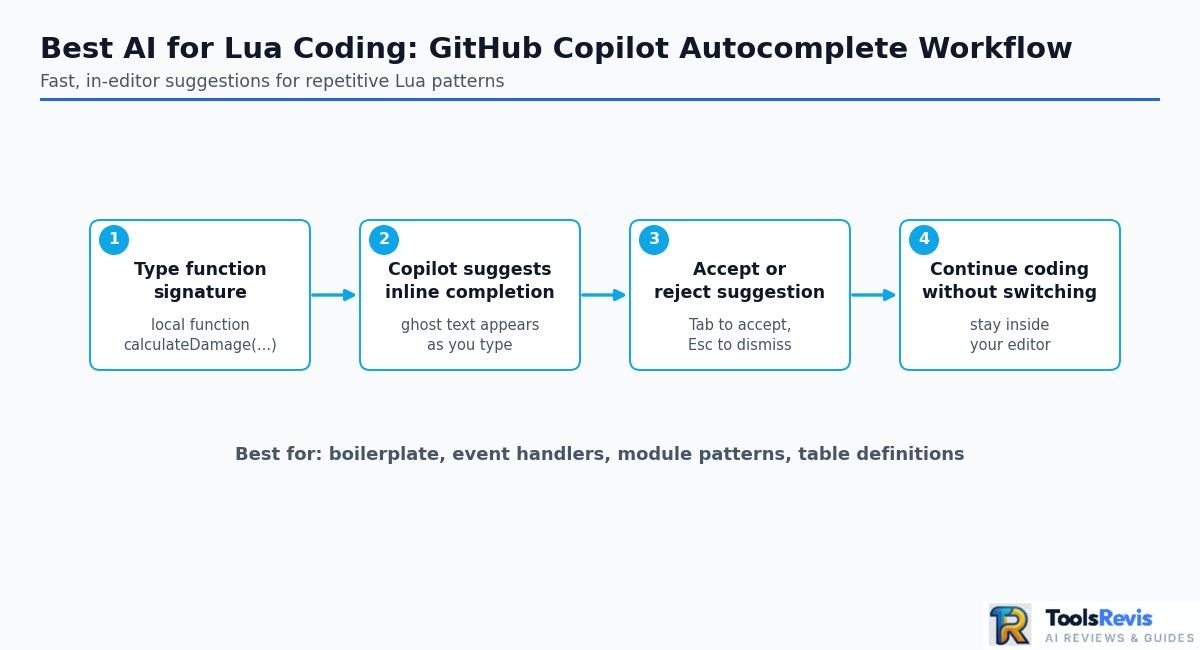
GitHub Copilot is particularly useful for Lua developers who want fast inline suggestions while writing code rather than relying on a separate chat window.
This makes it a good fit for repetitive Lua work such as module functions, event callbacks, table definitions, configuration code, and common utility functions.
For example, after defining a function signature, Copilot can often suggest the implementation as you type:
local function calculateDamage(baseDamage, multiplier)
— AI-assisted completion can suggest the implementation here
end
The main advantage is speed. You remain in your editor, accept or reject suggestions, and continue coding without repeatedly switching between your IDE and a browser.
GitHub’s current Copilot Free plan includes 2,000 code completions per month, while Copilot Pro is listed at $10/month. Paid plans also provide broader model and agent capabilities.
Copilot is therefore a particularly practical option if your main requirement is continuous coding assistance rather than deep architectural conversations.
For a more detailed evaluation, see our GitHub Copilot hands-on review. Developers using JetBrains-based environments can also see our GitHub Copilot IDE setup guide.
Best for: autocomplete, boilerplate, small functions, and developers who already work heavily inside VS Code or another supported IDE.
4. OpenAI GPT-4o / ChatGPT — Best for Beginners & Script Explanations
ChatGPT is especially useful for learning Lua, explaining unfamiliar scripts, converting pseudocode into Lua, and troubleshooting smaller pieces of code.
A beginner can paste a function and ask the AI to explain it line by line:
local total = 0
for _, value in ipairs(numbers) do
total = total + value
end
Instead of simply returning modified code, ChatGPT can explain what ipairs() does, why the underscore is commonly used for an unused index, and how the accumulator changes during each iteration.
That makes conversational AI valuable for developers who are still learning Lua or moving from another programming language.
However, the model should still be given explicit environment information. A prompt such as:
“Write Lua code”
is considerably less precise than:
“Write standard Lua 5.4. Do not use Roblox or Luau APIs. Use 1-based sequence indexing and return only compatible Lua 5.4 code.”
That extra context reduces the chance of receiving code designed for the wrong runtime.
For developers deciding between the two ecosystems, our ChatGPT Plus vs Claude Pro comparison can provide additional context.
Best for: beginners, explanations, code conversion, debugging discussions, and quick standalone Lua scripts.
5. Qwen 2.5 Coder & Kimi K2.5 — Best Free & Open-Source Options for Local Workflows
Open-weight coding models can be attractive for Lua developers who want more control over their development environment, but model availability, hardware requirements, licensing, and hosted API pricing should be checked before choosing a specific model.
Qwen’s coding models have been widely used in local and editor-integrated workflows, while Kimi’s newer coding-oriented models can also be considered when an API or compatible coding interface is available.
A local or self-hosted workflow can look like:
Lua project
↓
VS Code / compatible editor
↓
AI coding extension
↓
Local or hosted coding model
↓
Generated / modified Lua code
The major advantage is flexibility. Developers can choose where inference happens and, depending on the setup, avoid sending every source file to a third-party hosted coding service.
The trade-off is setup complexity. Local models require suitable hardware or a compatible hosted endpoint, and a model that performs well on general programming tasks may still need explicit instructions about Lua version, Luau, Roblox APIs, or Neovim APIs.
Do not automatically assume that an open-weight model is “free” in every workflow. Local inference can have hardware and electricity costs, while hosted APIs can charge according to usage.
Best for: developers interested in local AI, open-weight models, privacy-conscious workflows, experimentation, and custom editor integrations.
Bottom line: For most Lua developers, start with a strong current coding model inside a capable IDE. Use a project-aware editor when working across multiple files, Copilot when autocomplete is the priority, ChatGPT when learning or explaining code, and local/open-weight models when control over the AI stack matters more than convenience.
AI Lua Code Generators vs Full AI Coding Assistants
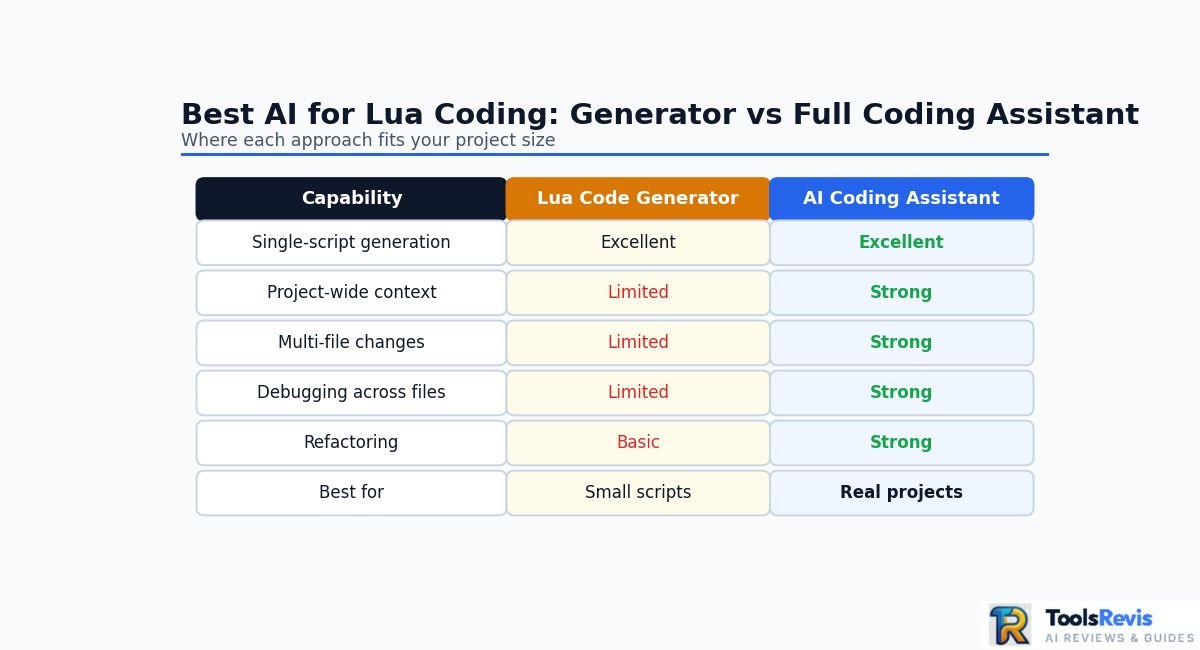
A Lua code generator creates code from a prompt, while a full AI coding assistant can inspect your project, understand related files, and help modify, debug, and refactor the existing codebase. The difference becomes important as soon as your Lua project grows beyond a single script.
AI Lua Code Generators
A standalone lua code generator is useful when you need a quick, self-contained result.
Typical requests include:
- Generate a Lua function.
- Create a simple game script.
- Convert pseudocode into Lua.
- Explain or rewrite a short script.
- Create a basic Roblox or Luau snippet.
- Fix a small syntax error.
For example, you might ask:
Create a Lua 5.4 function that takes a table of numbers
and returns the largest value.
A browser-based generator can produce the function quickly without requiring access to your entire project.
The limitation is context. Unless you provide the relevant files and project requirements, the generator does not automatically know how the new code interacts with the rest of your application.
Full AI Coding Assistants
An AI coding assistant works closer to your development environment. Depending on the tool, it can use project files, editor context, code references, terminal output, and existing implementation patterns.
That makes it more appropriate for tasks such as:
- Updating several related Lua modules.
- Finding references to a function before changing it.
- Debugging an error across multiple files.
- Refactoring an existing architecture.
- Generating code that follows project conventions.
- Reviewing changes before they are applied.
For example, changing this function:
function Player:GetScore()
return self.score
end
may seem simple. But if dozens of other modules call GetScore(), changing its return value or behavior without checking those dependencies can break the project.
A project-aware coding assistant is better positioned to identify those relationships.
Browser Generator vs AI Coding Assistant
| Capability | Lua Code Generator | AI Coding Assistant |
| Single-script generation | Excellent | Excellent |
| Quick code examples | Excellent | Excellent |
| Project-wide context | Limited | Strong |
| Multi-file changes | Limited | Strong |
| Debugging across files | Limited | Strong |
| Refactoring | Basic | Strong |
| IDE integration | Usually limited | Core feature |
| Best for | Small scripts | Real projects |
Practical rule: Use a browser-based lua ai code generator when you need a quick standalone script. Use an AI coding assistant when the code needs to work with an existing project.
When a Lua Code Generator Is Enough
A standalone generator makes sense for small tasks where the surrounding project does not matter.
For example, if you need a table-sorting function, a basic file parser, or a short mathematical utility, there is little benefit in giving an AI assistant access to an entire repository.
It can also be useful while learning Lua because you can generate a small example and then ask the AI to explain each part.
Try It Yourself: Free Lua Code Generator
Skip the guesswork — generate Lua and Luau-ready code instantly with our free in-browser AI tool, built specifically for standard Lua and Roblox workflows.
Try the Lua Code Generator →When You Should Use an AI Coding Assistant
Move to an integrated assistant when you repeatedly find yourself copying multiple files into a chatbot.
That is usually a sign that the AI needs more context than a single prompt can provide.
For Roblox developers, this distinction is particularly important. A simple ai lua code generator may create a valid-looking Luau script, but a larger Roblox system can involve services, ModuleScripts, RemoteEvents, client/server boundaries, shared types, and dependencies across many files.
An assistant that can work with the project structure is much better suited to that situation.
The Hidden Trade-Off: More Context Is Not Always Better
Giving an AI access to an entire repository does not automatically make every answer correct.
Large projects can contain outdated modules, duplicate implementations, generated files, experimental code, and inconsistent conventions. The assistant may use the wrong example if the project context is poorly organized.
For that reason, developers should still tell the AI exactly what it should change and what it must leave untouched.
A useful instruction is:
Modify only the inventory module.
Do not change the public API.
Keep compatibility with Lua 5.4.
Do not introduce Roblox or Luau APIs.
Before changing the function, check its existing callers.
That is more reliable than simply asking:
Fix my Lua project.
Which Should You Choose?
Choose a Lua code generator when you need:
- A quick standalone function.
- A small script.
- A learning example.
- A code explanation.
- A one-off conversion.
Choose a full AI coding assistant when you need:
- Multi-file changes.
- Project-aware debugging.
- Refactoring.
- Architecture assistance.
- IDE-based development.
- Codebase-wide context.
For serious development, the second category is generally more useful because Lua correctness depends heavily on the runtime, project structure, and surrounding APIs—not just whether the generated snippet is syntactically valid.
Can AI Generate, Debug, and Fix Complex Lua Code?
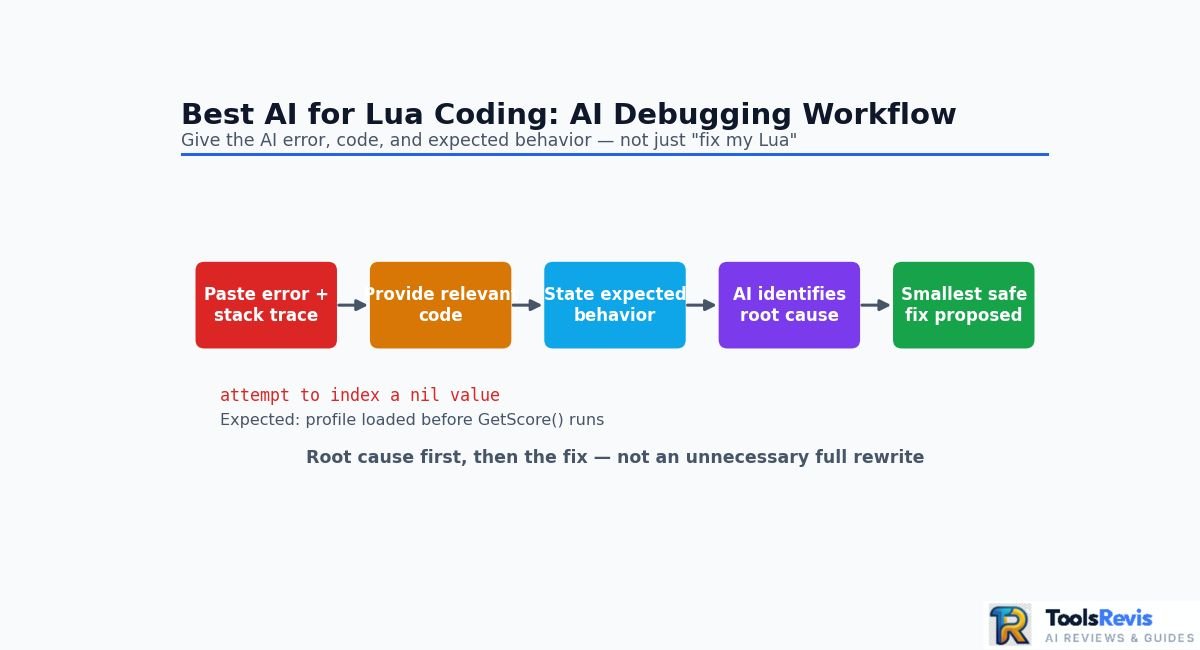
Yes, AI can generate, debug, explain, and refactor complex Lua code, but reliable results depend on giving it the correct Lua version, runtime context, relevant files, and complete error information. AI is most useful as a coding partner that proposes and explains fixes, not as a replacement for testing the code.
Code Generation
AI coding tools can generate common Lua structures such as ModuleScripts, event handlers, configuration tables, object-oriented patterns, and UI controllers.
For example, a developer can describe the desired behavior:
Create a Lua module that manages player inventory.
It should support adding, removing, and checking items.
Keep the public API small and avoid global variables.
A capable coding assistant can turn that specification into a starting implementation.
For Roblox development, the prompt should identify Luau and the Roblox environment:
Create a Roblox Luau ModuleScript for inventory management.
Use modern Luau syntax.
Keep server-side inventory state separate from client UI code.
The more specific the requirements, the less likely the AI is to invent incompatible APIs or architectural assumptions.
Debugging and Error Fixing
AI can also help identify common Lua failures such as nil indexing, incorrect table access, scope problems, malformed patterns, and incorrect assumptions about APIs.
The most useful debugging prompt includes three pieces of information:
- The complete error message or stack trace.
- The relevant code.
- What you expected the code to do.
For example:
Error:
attempt to index a nil value
Expected:
The player profile should be loaded before GetScore() runs.
Code:
[paste the relevant module and caller]
This gives the AI enough information to reason about the failure rather than simply guessing at a replacement.
Before: A Common Indexing Bug
Consider this simplified example:
local players = {“Anna”, “John”, “Sarah”}
for i = 0, #players – 1 do
print(players[i])
end
The problem is the loop starts at 0, while the sequence is conventionally indexed from 1.
A safer version is:
local players = {“Anna”, “John”, “Sarah”}
for i = 1, #players do
print(players[i])
end
For sequential tables, using ipairs() can make the intent even clearer:
for _, playerName in ipairs(players) do
print(playerName)
end
The important lesson is not simply “AI makes indexing mistakes.” The real issue is that a developer should validate generated code against Lua’s actual table semantics instead of assuming that syntactically valid code is logically correct.
Debugging nil Values
One of the most common Lua runtime problems is attempting to access something that is nil.
For example:
local player = getPlayer()
print(player.name)
If getPlayer() returns nil, the second line fails.
An AI assistant can help trace where the unexpected nil originated, but it needs enough surrounding code to follow the data flow.
A useful debugging request is:
Find the source of the nil value.
Do not rewrite the whole module.
Trace the value from getPlayer() to player.name.
Explain the root cause first, then propose the smallest safe fix.
That instruction is often better than asking the AI to “fix the error,” because it encourages a root-cause analysis instead of an unnecessarily large rewrite.
Explaining Existing Lua Code
AI is also valuable for understanding legacy Lua code.
You can provide a complicated function and ask the assistant to explain:
- What each table represents.
- Which variables are local or global.
- How functions call one another.
- Where metatables are involved.
- Which values can become nil.
- What assumptions the code makes about its environment.
This is particularly useful when inheriting an older project where documentation is incomplete.
Refactoring Lua Code
AI can help clean up duplicated logic, improve naming, split large functions, and make existing code easier to maintain.
However, refactoring requires more caution than generating a new function. A seemingly harmless change can break callers that depend on the existing behavior.
Instead of:
Refactor this Lua code.
use a constrained instruction:
Refactor this Lua module for readability.
Requirements:
– Preserve the public API.
– Preserve existing behavior.
– Do not change return values.
– Do not change external dependencies.
– Do not convert Lua to Luau.
– Show the proposed changes before rewriting unrelated functions.
This keeps the AI focused on the actual maintenance task.
Information Gain: Test the AI With a Real Bug
A useful way to evaluate an AI Lua tool is to give it a real bug from your project rather than asking for a generic example.
Compare the tools using the same:
- Lua or Luau version.
- Source code.
- Error message.
- Expected behavior.
- Project context.
Then evaluate whether the AI:
- Identifies the actual root cause.
- Explains why the error occurs.
- Makes the smallest reasonable change.
- Preserves existing behavior.
- Avoids introducing unrelated APIs.
- Produces code that passes your tests.
This gives you a much more meaningful comparison than simply asking several AI tools to “write a Lua script.”
Practical Recommendation
AI is highly useful for Lua code generation, debugging, explanation, and refactoring, but you should treat generated code as a proposed implementation until it has been tested.
For simple scripts, a chatbot or standalone generator may be enough. For complicated applications, use a project-aware assistant and provide the relevant files, runtime, Lua version, error output, and expected behavior. That combination gives the AI the context it needs to produce substantially more reliable fixes.
Best AI for Roblox Lua / Luau Scripting
For Roblox development, the best AI workflow depends on whether you need quick Studio assistance or deeper help across a larger Luau codebase. Roblox Assistant is the most directly integrated option inside Roblox Studio, while external AI coding environments can be more useful for complex, multi-file projects.
Roblox Assistant (Native)
Roblox Assistant is designed specifically for Roblox Studio, making it the most natural starting point for developers who want AI help without leaving the Roblox development environment.
It can help with tasks such as generating or modifying scripts, explaining code, and working with objects in the Studio environment. Roblox’s documentation describes Assistant as being able to use context from the experience being developed, which is an important advantage over a generic browser-based roblox ai script generator. (Roblox Creator Hub)
For example, a developer can ask for a simple server-side script and then refine the result inside Studio instead of manually copying code between applications.
The main limitation is scope. Native Studio assistance is convenient for Roblox-specific tasks, but developers working on larger architectures may want more control over project-wide editing, version control, code navigation, and external development tools.
Best for: beginners, quick Roblox scripting tasks, Studio-based development, and developers who want native Roblox context.
Cursor + Rojo for Larger Roblox Projects
For serious Roblox development, many developers separate their source code from Roblox Studio and use tools such as Rojo to synchronize a filesystem-based project with Roblox.
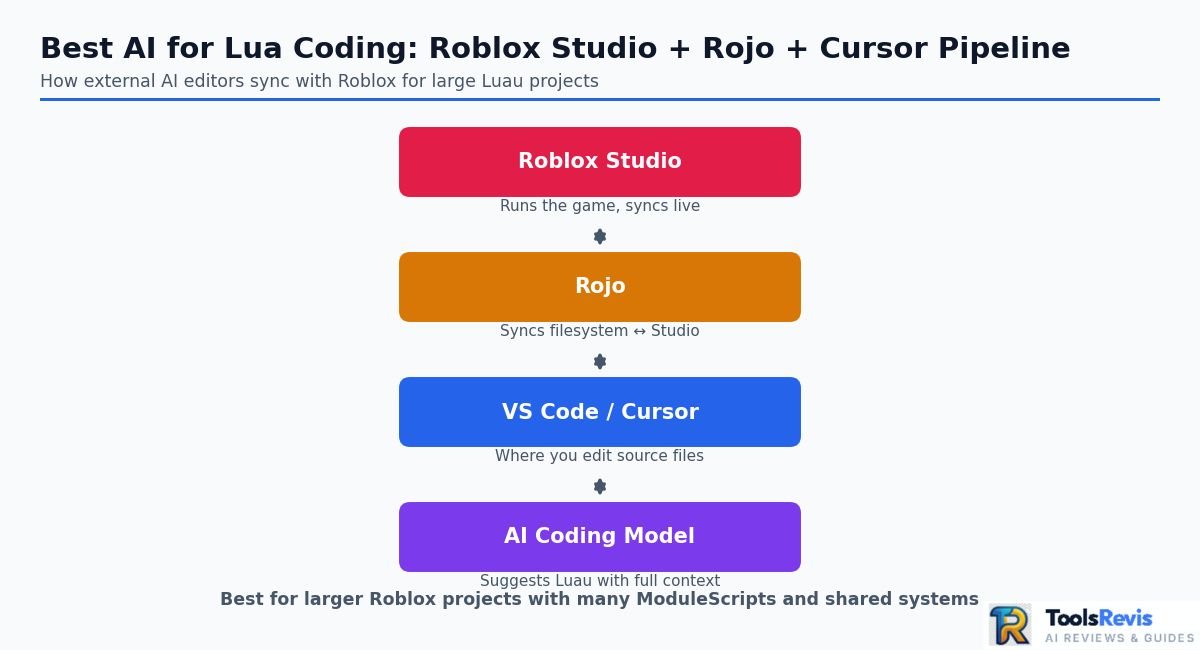
That creates a workflow closer to conventional software development:
Roblox Studio
↕
Rojo
↕
VS Code / Cursor
↕
AI coding model
This approach becomes useful when the project contains many ModuleScripts and shared systems.
For example:
src/
├── ServerScriptService/
│ ├── Services/
│ │ ├── PlayerService.luau
│ │ └── DataService.luau
│ └── Server.server.luau
├── ReplicatedStorage/
│ ├── Shared/
│ │ ├── Config.luau
│ │ └── Types.luau
│ └── Remotes/
└── StarterPlayer/
└── StarterPlayerScripts/
└── Client.client.luau
An AI coding environment can then work with the actual files instead of treating every request as an isolated snippet.
This is especially useful for changes that cross server, client, and shared modules. The AI can inspect related implementations before suggesting a change, although developers should still review generated changes carefully.
Why Roblox Context Matters
Roblox scripting is not simply standard Lua with a different editor.
A Roblox project can depend on services and APIs such as:
local Players = game:GetService(“Players”)
local ReplicatedStorage = game:GetService(“ReplicatedStorage”)
It may also use Roblox-specific concepts such as:
- Instance
- RemoteEvent
- RemoteFunction
- ModuleScript
- RunService
- CollectionService
- task
- Client/server execution
- Luau type checking
A generic roblox script ai generator that does not understand these concepts can produce code that looks plausible but does not fit the project’s architecture.
This is why prompts should identify Roblox explicitly rather than simply saying “write Lua.”
Use –!strict When Your Project Requires It
For projects using Luau’s type checking, tell the AI to preserve the project’s type-checking conventions.
For example:
–!strict
type PlayerData = {
coins: number,
level: number,
}
local data: PlayerData = {
coins = 0,
level = 1,
}
If your project already uses strict typing, an AI should not casually remove type annotations just to make an error disappear.
A useful instruction is:
This is a Roblox Luau project using –!strict.
Preserve existing type annotations.
Do not weaken types to silence errors.
Keep the solution compatible with the existing architecture.
Roblox AI vs External AI: Which Is Better?
| Workflow | Best Choice | Why |
| Simple Studio script | Roblox Assistant | Native Roblox context |
| Learning Luau | Roblox Assistant or ChatGPT | Explanations and quick examples |
| Small game prototype | Roblox Assistant | Fast iteration inside Studio |
| Large multi-file project | Cursor + Rojo | Project-level context |
| Complex refactoring | Cursor or another project-aware assistant | Cross-file reasoning |
| Existing external Git workflow | Cursor / Windsurf | Fits conventional development workflows |
Best AI for Roblox Studio
If you mainly work inside Roblox Studio, start with Roblox Assistant because it understands the platform-specific environment better than a generic Lua generator.
If you are building a larger professional project and already manage your source code externally, a workflow such as Rojo + VS Code/Cursor + a strong coding model can provide more control over multi-file architecture.
The key is not to ask an AI simply for “Lua code.” Tell it Roblox Luau, provide the relevant project context, preserve your type-checking requirements, and explain whether the code runs on the server, client, or in a shared module.
That distinction can prevent many of the errors that make otherwise convincing AI-generated Roblox scripts fail in a real game.
How to Prompt AI for Accurate Lua Scripts (Copy-Paste Templates)
The most reliable way to prompt AI for Lua is to specify the language version, runtime, project constraints, expected behavior, and output format before asking for code. This prevents common mistakes such as mixing standard Lua with Luau, using unsupported APIs, or applying the wrong indexing conventions.
Why Lua Prompts Need More Context
A short request such as:
Write a Lua inventory system.
leaves several important questions unanswered.
The AI does not know whether you mean:
- Lua 5.1
- Lua 5.4
- Roblox Luau
- Neovim Lua
- LÖVE
- Solar2D
- Another Lua-based environment
It also does not know whether the code must work with an existing project architecture.
A better prompt identifies the environment first and then defines what the generated code must and must not do.
Template 1: Standard Lua 5.1/5.4
Use this template when you need ordinary Lua rather than Roblox Luau:
You are writing code for a standard Lua project.
Target version: Lua 5.4
Environment: standalone Lua application
Requirements:
– Use only Lua 5.4-compatible syntax and standard libraries.
– Do not use Roblox or Luau APIs.
– Treat sequence-style tables as 1-based.
– Do not assume zero-based arrays.
– Avoid global variables unless explicitly requested.
– Preserve existing function names and return values.
– Keep the implementation simple and readable.
Task:
[DESCRIBE THE TASK]
Input/context:
[PASTE RELEVANT CODE]
Expected behavior:
[DESCRIBE WHAT THE CODE SHOULD DO]
Return:
1. The corrected or generated Lua code.
2. A short explanation of the implementation.
3. Any compatibility assumptions you made.
If your project uses Lua 5.1, replace the target version and explicitly prohibit newer language features:
Target version: Lua 5.1
Do not use Lua 5.2, 5.3, or 5.4-specific features.
This is especially useful when maintaining an older application where upgrading the runtime is not an option.
Template 2: Roblox Luau with Type Checking
For Roblox development, explicitly identify Luau and the Roblox environment:
You are writing code for Roblox Luau.
Environment:
– Roblox Studio
– Target: modern Luau
– Execution context: [SERVER / CLIENT / SHARED]
Requirements:
– Use Roblox APIs where appropriate.
– Use modern Luau syntax.
– Preserve existing project conventions.
– Use –!strict when the file/project requires strict type checking.
– Do not use generic Lua libraries when a Roblox API is required.
– Do not invent Roblox services, methods, properties, or events.
– Preserve existing public APIs unless I explicitly ask you to change them.
– Keep server and client responsibilities separate.
Task:
[DESCRIBE THE TASK]
Relevant code:
[PASTE CODE]
Expected behavior:
[DESCRIBE EXPECTED RESULT]
Return the implementation first, followed by a concise explanation.
The execution context is particularly important. A server Script and a LocalScript do not have the same responsibilities or access patterns, so telling the AI where the code runs reduces architectural mistakes.
Template 3: Debugging a Lua Error
When fixing an existing bug, don’t provide only the error message. Give the AI the stack trace, relevant code, expected behavior, and runtime.
Debug this Lua code.
Environment:
Lua 5.4
[OR: Roblox Luau / Neovim Lua / OTHER]
Error:
[PASTE COMPLETE ERROR MESSAGE]
Stack trace:
[PASTE COMPLETE STACK TRACE]
Expected behavior:
[EXPLAIN WHAT SHOULD HAPPEN]
Relevant code:
[PASTE CODE]
Instructions:
1. Identify the root cause.
2. Explain which line or assumption causes the failure.
3. Propose the smallest safe fix.
4. Do not rewrite unrelated code.
5. Preserve existing APIs and behavior.
6. Do not introduce APIs unavailable in this environment.
Return:
– Root cause
– Fixed code
– Brief explanation
This structure encourages the AI to diagnose the problem before making a large rewrite.
Template 4: Refactoring an Existing Lua Module
For refactoring, add strict boundaries so the AI does not change behavior accidentally:
Refactor the following Lua module for readability and maintainability.
Environment:
[Lua version / Luau / framework]
Preserve:
– Existing public functions
– Function arguments
– Return values
– External APIs
– Existing behavior
– Error handling behavior
Allowed:
– Improve variable names
– Remove unnecessary duplication
– Simplify complex control flow
– Extract small private helper functions
– Improve comments where useful
Do not:
– Change the public API
– Add unrelated dependencies
– Convert Lua to Luau
– Change runtime behavior
– Rewrite unrelated functions
Before producing the final version:
1. Identify the main problems.
2. Explain the planned changes.
3. Then provide the refactored code.
Template 5: Generate Lua From Pseudocode
For developers who know what they want but are not comfortable writing Lua yet:
Convert the following pseudocode into Lua 5.4.
Rules:
– Use idiomatic Lua.
– Use 1-based sequence indexing.
– Avoid unnecessary global variables.
– Do not use Roblox/Luau APIs.
– Preserve the exact behavior of the pseudocode.
– Add short comments only where they improve clarity.
Pseudocode:
[PASTE PSEUDOCODE]
After the code, explain:
1. How the pseudocode maps to Lua.
2. Any Lua-specific decisions.
3. Any assumptions that could affect the implementation.
Prompting Tip: Tell AI What It Must Not Do
Negative constraints are useful when an AI repeatedly makes the same type of mistake.
For example:
Do not use Roblox APIs.
Do not use 0-based indexing for sequence tables.
Do not introduce external libraries.
Do not change the function signature.
Do not rewrite unrelated modules.
These instructions are more useful than simply saying “write correct Lua,” because they define the boundaries of correctness for your project.
The Best Prompt Structure
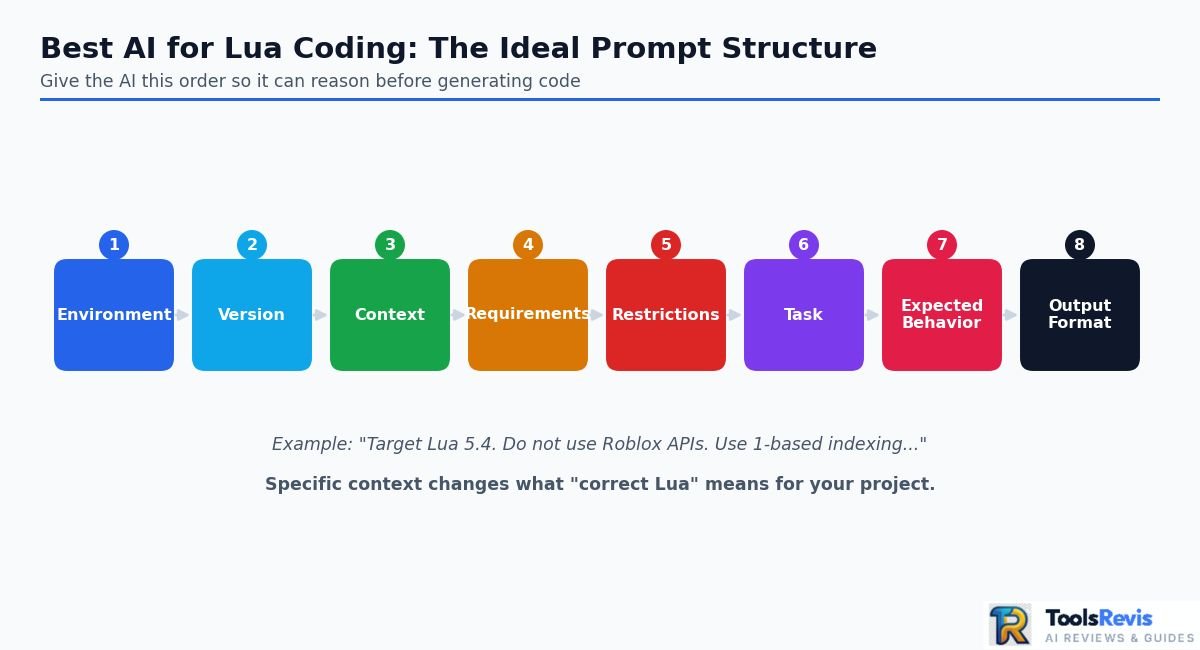
For most Lua tasks, use this order:
Environment → Version → Context → Requirements → Restrictions → Task → Expected behavior → Output format
That structure gives the AI enough information to reason about the code before generating it.
The goal is not to make prompts unnecessarily long. It is to provide the specific context that changes what “correct Lua” means for your project.
Best AI for Lua Coding: Free vs Paid Options
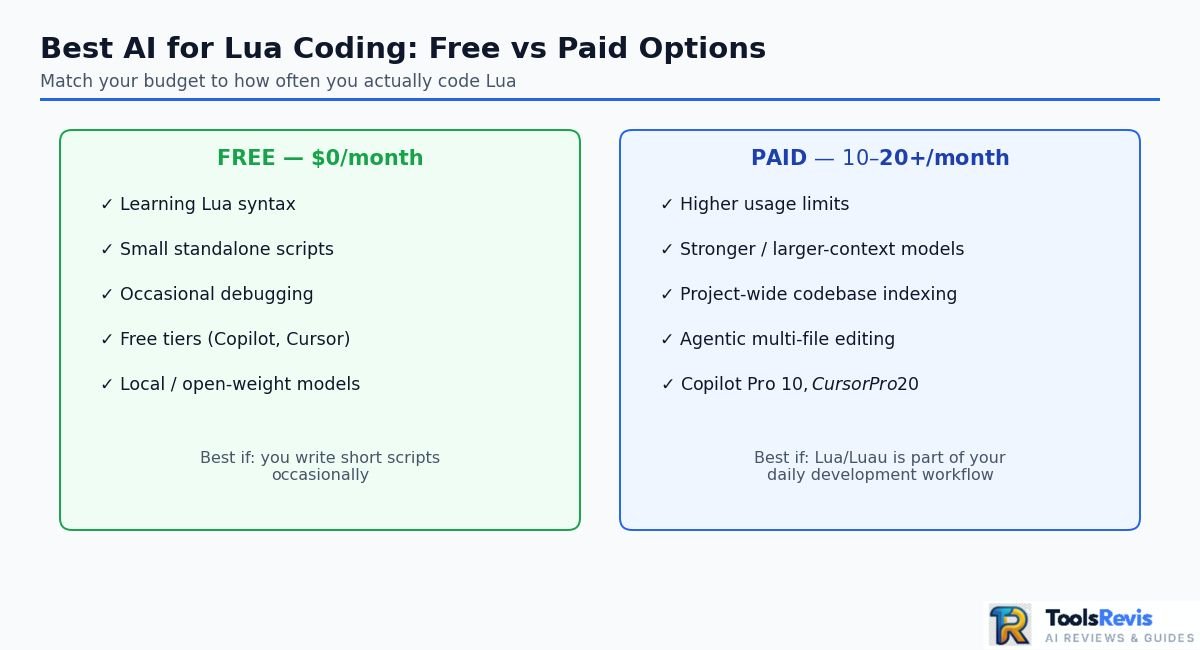
The best free AI for Lua coding is usually a combination of a capable coding model and an editor rather than a single “free Lua AI” website. Free tiers can handle small scripts and debugging, while paid tools become more valuable when you need higher usage limits, stronger models, project context, and agentic coding features.
Free AI Options for Lua
You can start without paying for an AI coding subscription. The most practical choices include free tiers from mainstream coding assistants, free model access where available, and local or open-weight models.
For simple Lua tasks, a free chatbot can handle requests such as:
- Generate a Lua function.
- Explain a table or metatable.
- Fix a syntax error.
- Convert pseudocode into Lua.
- Create a small utility script.
- Explain a Roblox Luau snippet.
The limitation is usually usage, model access, context, or advanced coding features, rather than Lua itself.
Paid AI Tools for More Serious Development
Paid plans become more useful when AI is part of your daily development workflow.
A paid coding environment can provide greater access to advanced models, larger usage allowances, project context, and agent-style features. For example, Cursor currently lists a $20/month Pro plan, while GitHub Copilot lists Pro at $10/month.
That does not mean a paid subscription automatically generates better Lua. A poorly specified Roblox prompt can still produce incorrect code with an expensive model.
The main benefit is having more capable tools available consistently.
Best AI for Lua Coding Free
If your requirements are modest, start with a free workflow before paying.
A sensible setup is:
VS Code
↓
Free AI coding extension
↓
Available coding model
↓
Lua / Luau project
For standard Lua, explicitly specify the version:
Target: Lua 5.4
Environment: standalone Lua
Do not use Roblox or Luau APIs.
Use 1-based sequence indexing.
For Roblox:
Target: Roblox Luau
Environment: Roblox Studio
Execution context: Server
Use modern Luau syntax.
Preserve existing project conventions.
This matters more than simply searching for a tool advertised as a “free Lua AI.”
Can You Build a $0 Lua AI Setup?
Yes, you can build a no-subscription Lua development workflow, but $0 does not necessarily mean unlimited AI usage.
A typical setup could combine:
- VS Code.
- A compatible AI coding extension.
- A free or locally available coding model.
- Git for version control.
- Lua language support and formatting tools.
If you use a hosted API, check the provider’s current pricing and limits before assuming the workflow is permanently free. API access may be metered even when a model or editor has a free tier.
Local Models: The Alternative to Subscription Fees
Developers who want to avoid recurring AI subscriptions can consider running an open-weight coding model locally.
The workflow can look like:
Lua Project
↓
VS Code
↓
AI Extension
↓
Local Model
↓
Generated / Edited Lua
The advantage is greater control over where your source code is processed and how the model is integrated.
The trade-off is hardware. A model that is practical on one computer may be slow or impractical on another, and larger models generally require more memory and compute resources.
There can also be a difference between model cost and total workflow cost. Running a model locally may avoid an API bill but still require suitable hardware.
What About Qwen and Other Open-Weight Coding Models?
Open-weight coding models can be useful for developers who want a more customizable workflow.
They can be integrated into compatible editor tools or run locally when the hardware and software stack support them. However, model names, releases, licensing terms, hosted endpoints, and hardware requirements change over time.
For that reason, don’t choose a model solely because an old article calls it the “best free coding model.” Test the current model against your actual Lua workload.
A useful test set should include:
- A normal Lua function.
- A metatable-based implementation.
- A debugging task.
- A multi-file refactoring task.
- A Lua-version compatibility task.
- A Roblox Luau task if Roblox is part of your workflow.
Free vs Paid: Which Is Better?
| Need | Free Workflow | Paid Workflow |
| Learning Lua | Excellent | Usually unnecessary |
| Small scripts | Excellent | Optional |
| Occasional debugging | Good | Better for frequent use |
| Large projects | Limited | Better suited |
| Multi-file context | Depends on tool | Usually stronger |
| Heavy daily usage | May hit limits | Better choice |
| Advanced agent workflows | Limited | Usually stronger |
| Local/private workflow | Possible | Possible |
Best Choice by Budget
$0: Start with a free AI tier and your existing editor. This is enough for learning Lua, generating small scripts, and occasional debugging.
Around $10/month: GitHub Copilot Pro is a practical choice if inline completion is your priority. (GitHub Copilot plans)
Around $20/month: Cursor Pro or a comparable AI-first development environment becomes more attractive when you need project context and heavier AI-assisted coding. (Cursor pricing)
Local workflow: Consider an open-weight coding model if you have suitable hardware and want more control over the inference environment.
What I Recommend for Most Lua Developers
Start free and test your real workflow before subscribing.
If you mainly write short Lua scripts, a free chatbot or coding assistant may be enough. If you write Roblox games or large Lua repositories, the value of a project-aware editor becomes much higher.
For daily professional development, paying for a strong coding assistant can make sense because the benefit comes from consistent access, project context, and workflow integration, not simply from the ability to generate Lua code.
And if your goal is specifically roblox coding ai free, remember that Roblox-specific context matters: a generic free Lua generator may produce syntactically valid code that still fails because it misunderstands Luau, Roblox services, or client/server execution.
How to Choose the Best AI Tool for Your Lua Workflow
The best AI tool for Lua depends on your Lua version, project size, preferred lua programming ide, context requirements, and budget—not simply which model produces the best code in a single prompt.
1. Match the AI to Your Lua Environment
First, identify exactly what you are coding before choosing an assistant.
For standard Lua, look for an AI that can follow the specific Lua version used by your project, such as Lua 5.1 or Lua 5.4. This helps prevent the model from introducing APIs or syntax from another environment.
For Roblox Luau, the assistant needs to understand Roblox-specific objects, services, events, ModuleScripts, and Luau syntax. A general Lua answer can be technically valid Lua but still be completely wrong for Roblox.
For Neovim, Lua is commonly used for configuration and plugin development. In this case, an assistant that can understand your existing configuration files and plugin structure is often more useful than a standalone code generator.
Rule: Always tell the AI whether you are using Lua 5.1, Lua 5.4, Luau, or Neovim Lua before asking it to generate code.
2. Check How Much Project Context the Tool Can Understand
For small scripts, a browser-based AI can be enough. For larger Lua projects, choose an assistant that can work with multiple files and understand relationships between modules.
For example, a game project might contain:
src/
├── client/
│ ├── PlayerController.lua
│ └── UIController.lua
├── server/
│ ├── GameManager.lua
│ └── DataService.lua
└── shared/
├── Constants.lua
└── Utility.lua
If you ask an AI to modify PlayerController.lua without showing DataService.lua, Constants.lua, or the modules it depends on, it may produce locally correct code that breaks the wider application.
This is where AI-powered IDEs such as Cursor and Windsurf become more useful than a basic lua code editor with simple autocomplete. Project-aware assistants can provide context from related files when planning or changing code.
3. Choose an IDE That Fits Your Existing Workflow
Your AI assistant should fit the editor you already use instead of forcing you to rebuild your development workflow.
| Workflow | Good AI setup |
| VS Code + Lua | GitHub Copilot, Cursor, or another VS Code-compatible assistant |
| Roblox Studio | Roblox Assistant for Studio-native help |
| Roblox + external development | VS Code/Cursor + Rojo + AI assistant |
| Neovim | AI plugin/assistant integrated with your existing Lua workflow |
| Quick scripts | ChatGPT or another browser-based coding assistant |
| Large multi-file project | Cursor, Windsurf, or another project-aware coding agent |
The important factor is not the editor’s marketing label. Check whether the assistant can actually access the files, symbols, dependencies, and project instructions it needs.
4. Compare Pricing, Limits, and Usage
Price matters because AI coding tools can have very different limits.
A tool that looks inexpensive may become restrictive if you frequently generate code, analyze large files, or use higher-capability models. Conversely, paying for an AI assistant may not be worthwhile if you only generate occasional Lua scripts.
Consider:
- Monthly subscription price
- Model availability
- Message or usage limits
- Large-context support
- Codebase indexing
- Agentic editing capabilities
- IDE integration
- API costs, if applicable
- Availability of a useful free tier
For occasional Lua work, start with a free option and upgrade only when its limits affect your workflow.
For daily development, a paid project-aware assistant can provide more value because it reduces the time spent copying files, explaining project structure, and manually moving generated code into your editor.
A Simple Decision Checklist
Use this checklist before choosing an AI Lua coding tool:
- Environment: Does it understand Lua 5.1/5.4, Luau, or your specific Lua-based framework?
- Context: Can it understand multiple ModuleScripts or project files?
- IDE: Does it work with VS Code, Cursor, Windsurf, Neovim, Roblox Studio, or your preferred editor?
- Accuracy: Can you verify its API usage and prevent it from mixing Lua and Luau?
- Debugging: Can it analyze stack traces and explain runtime errors?
- Cost: Are the model limits reasonable for your actual usage?
- Workflow: Does it save time compared with using a normal lua programming ide and manually asking a chatbot?
Which Setup Should You Choose?
For small Lua scripts and learning, a general AI chatbot is usually sufficient.
For daily Lua development, an IDE-integrated assistant is more practical because the AI can work closer to your actual code.
For large multi-file Lua projects, prioritize project context, codebase search, and agentic editing over simple autocomplete.
For Roblox development, use tools that understand Luau and Roblox APIs rather than treating Roblox code as ordinary Lua.
For Neovim configuration or Lua-based tooling, prioritize an assistant that can understand your existing configuration and plugin ecosystem.
The best choice is therefore the one that matches your runtime + codebase + editor + budget. Model quality matters, but giving the model the right Lua context often has a bigger effect on the quality of the final code.
Frequently Asked Questions About AI for Lua Coding
What is the best AI for Lua coding?
The best AI for Lua coding depends on your workflow, but Claude, ChatGPT, Cursor, and Windsurf are strong choices for complex Lua development. For large projects, a project-aware IDE such as Cursor or Windsurf can be more useful than a standalone chatbot because it can work with multiple files and project context.
Can ChatGPT write functional Lua code?
Yes, ChatGPT can generate functional Lua code, explain existing scripts, debug errors, and help refactor Lua projects. The quality improves when you specify the Lua version, framework, expected behavior, and constraints. For Roblox, explicitly state that the project uses Luau and provide relevant Roblox APIs or project files.
Is there a completely free AI Lua code generator?
Yes, there are free AI options for generating Lua code, although usage limits and model availability vary. You can use free AI coding assistants or open-weight coding models through supported local or developer tools. For serious development, check the current limits and licensing before relying on a free service for an entire project.
What is the best AI for Roblox scripting?
For simple Roblox scripting tasks, Roblox Assistant is a convenient choice because it works directly within the Roblox development environment. For larger projects, an external workflow using tools such as Cursor or Windsurf with Rojo can provide stronger multi-file context, refactoring, and codebase-level assistance.
Can AI debug and fix Lua runtime errors?
Yes, AI can help debug Lua runtime errors when you provide the error message, stack trace, relevant code, and expected behavior. It can identify common problems such as nil values, incorrect table indexing, scope mistakes, missing modules, and incorrect API usage. Always test the suggested fix because an AI-generated solution can introduce a different bug.
Is Lua harder for AI to generate than C++ or Python?
Lua is not inherently harder for AI to generate than C++ or Python, but Lua projects can be harder for an AI to understand when the project relies heavily on framework-specific APIs, metatables, dynamic tables, or custom conventions. The biggest factor is context: an AI that knows the Lua version, framework, APIs, and surrounding files is much more likely to produce reliable code.
For the best results, specify the exact environment before generating code—for example, Lua 5.4, Lua 5.1, Roblox Luau, or Neovim Lua—and give the AI enough project context to understand how the code will be used.
Final Verdict: Choosing the Right AI for Lua Coding
The right AI for Lua coding depends more on your development environment and workflow than on a single model benchmark.
For standard Lua, a capable general-purpose coding model can handle scripts, debugging, refactoring, and explanations when you provide the correct Lua version and project context.
For Roblox Luau, the environment matters even more. Roblox-specific assistance can be useful for Studio tasks, while a project-aware IDE can become more valuable when your project contains many ModuleScripts and interconnected systems.
For large Lua projects, prioritize:
- Multi-file project context
- Reliable codebase search
- Debugging and refactoring
- IDE integration
- Support for your specific Lua environment
- Reasonable usage limits
For beginners, a general AI chatbot can be a practical starting point because you can ask it to explain syntax, generate examples, and walk through errors step by step.
For professional development, an AI coding assistant integrated with your editor can reduce the amount of manual context you need to provide and make it easier to modify existing code.
Most importantly, don’t judge a Lua AI tool only by whether it can generate a script that looks correct. Test the code in the actual runtime, verify API names, check Lua versus Luau compatibility, and review changes before putting them into production.
Read Next
-
Cursor vs Codex: Which AI Coding Tool Wins in 2026?
A side-by-side look at two of the most popular AI coding agents, comparing accuracy, speed, and real-world project handling.
-
Windsurf AI Review: Features, Pricing & Verdict
An in-depth breakdown of Windsurf’s agentic coding features, current pricing tiers, and whether it’s worth switching to.
-
Claude Sonnet 5 vs GPT-5.6: Which Is Better for Coding?
A head-to-head comparison of Anthropic and OpenAI’s latest flagship models for coding, reasoning, and agentic tasks.

I’m Umair Ahmad, founder of ToolsRevis. I personally test every AI tool we cover — signing up, running real workflows, checking pricing tiers, and comparing outputs — before writing a single word. My goal: cut through AI marketing hype with honest, hands-on verdicts.
Let’s achieve more together!