
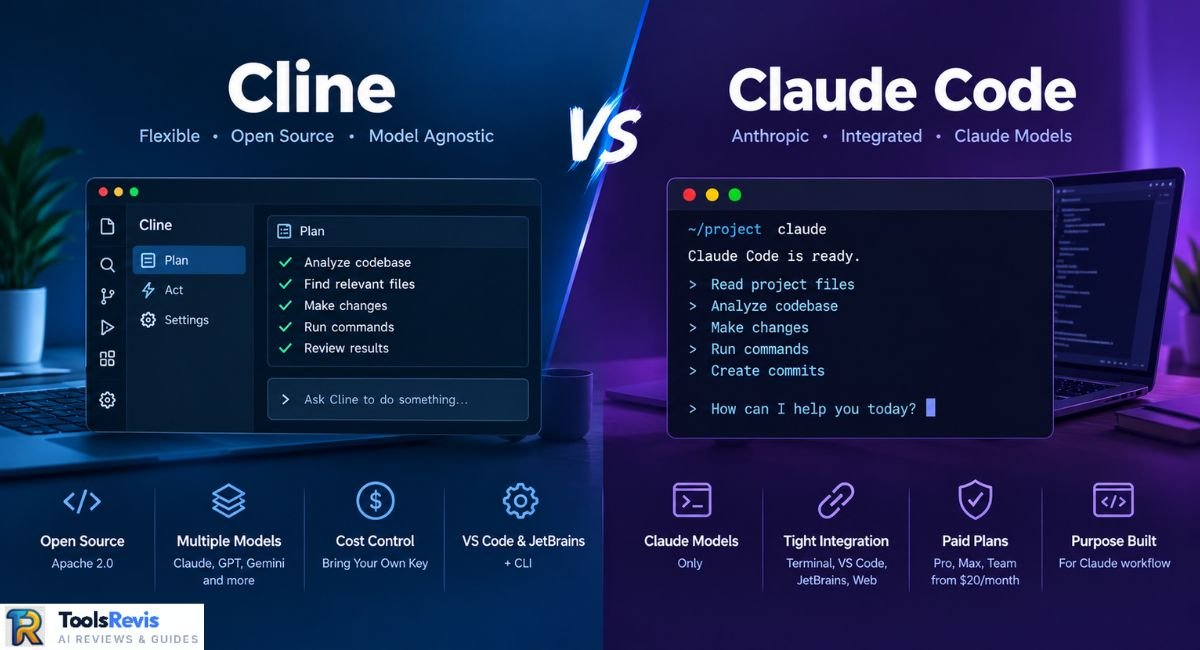
In the Cline vs Claude Code debate, the core trade-off comes down to this: Cline gives you model and provider flexibility, while Claude Code gives you a workflow built specifically around Anthropic’s Claude models and tooling. Which one fits your terminal depends on whether you prioritize model choice or a tighter, managed Claude Code experience.
Quick Answer
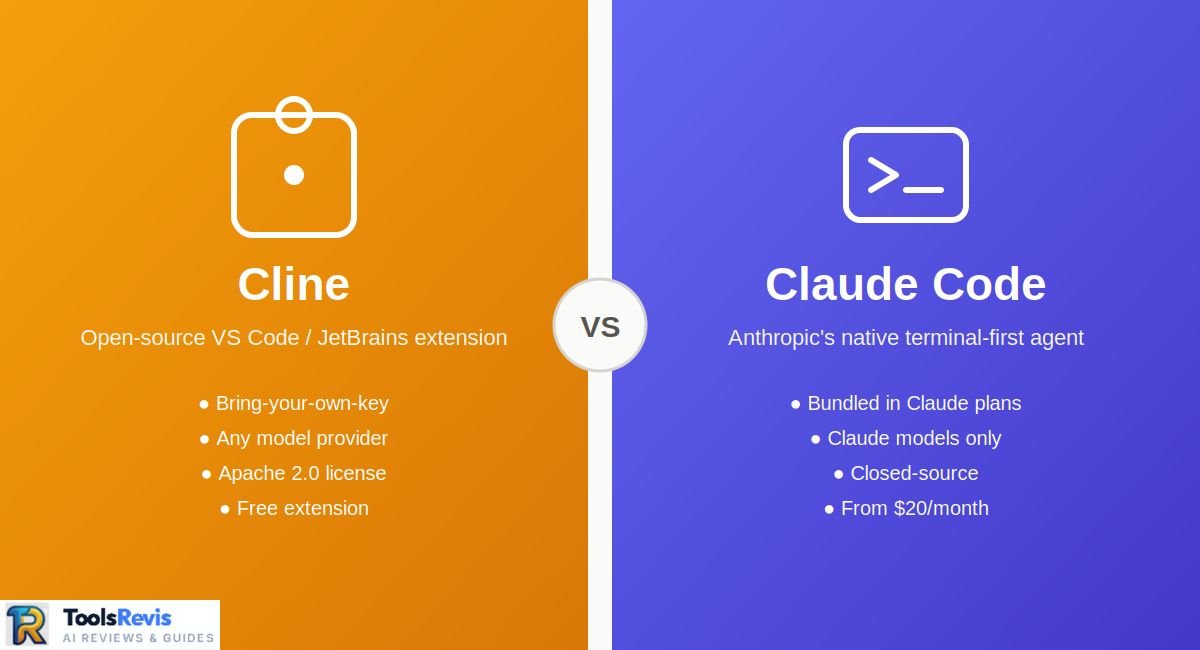
Claude Code is Anthropic’s terminal-first coding agent, bundled into Claude Pro, Max, and Team plans from $20/month. Cline is a free, open-source VS Code and JetBrains extension that works with any model via your API key. Pick Cline for flexibility, Claude Code for tight integration.
Both tools get lumped into the same “AI coding agent” bucket, but they’re built on different premises. Cline started as an open-source VS Code extension where you bring your own API key and choose your own model. Claude Code is Anthropic’s own agent, built around Claude models specifically and designed to work the same way whether you’re in a terminal, VS Code, JetBrains, or the web.
Neither is a simple autocomplete tool — both plan, edit files, run commands, and iterate — but how they’re priced, who controls the model, and how much autonomy they’re given by default is where the real differences show up. This guide breaks down features, pricing, platform support, and which type of developer each one actually fits, based on current documentation rather than marketing claims.
What is Claude Code?
Claude Code is Anthropic’s own agentic coding tool, built to work directly with Claude models against a real codebase — reading files, writing code, running terminal commands, and handling git operations like commits and pull requests. It started as a terminal-first CLI tool, and the CLI is still the most complete surface: full command set, scripting support, and the easiest way to wire it into CI pipelines.
That said, Claude Code is no longer terminal-only. Anthropic maintains an official VS Code extension (20M+ installs) with inline diffs and session management, plus an official JetBrains plugin (currently in beta) for IntelliJ, PyCharm, WebStorm, and similar IDEs. There’s also a desktop and web surface through claude.ai/code. All of these surfaces share the same underlying engine, the same CLAUDE.md project instructions, and the same permission settings — so switching between terminal and IDE doesn’t mean switching configurations.
Access to Claude Code isn’t sold separately. It’s bundled into Claude’s paid plans: Pro at $20/month gets you Claude Code with standard usage limits, while Max ($100 or $200/month) raises those limits for heavier daily use.
What is Cline?
Cline is an open-source, model-agnostic coding agent that runs as a VS Code extension, a JetBrains plugin, and a standalone CLI/terminal tool. It started life as “Claude Dev” in 2024 and has since grown past 1.5 million VS Code Marketplace installs. The entire project is released under the Apache 2.0 license, meaning the source is public, auditable, and free to self-host or modify — a meaningfully more open license than Claude Code’s closed-source model.
The core idea behind Cline is bring-your-own-key (BYOK). Instead of tying you to one company’s models, Cline lets you connect an API key from Anthropic, OpenAI, Google, OpenRouter, or a local runtime like Ollama or LM Studio, and switch between them per task. It works in Plan/Act mode — Cline can sketch a multi-step plan before touching any files — and every file edit or shell command runs through a human-in-the-loop approval step by default, so you see and confirm changes before they happen.
The extension is 100% free to install and start using. The only recurring cost most developers see is inference — whatever your chosen model provider charges per token. For people who’d rather not manage API keys directly, Cline also offers a hosted, usage-based credit system, a Teams plan at 20/user/month(withthefirst10seatsfree),anoptionalClinePasssubscription(4.99 first month, then $9.99/month) for generous-quota access to open-weight models, and a custom-priced Enterprise tier with SSO and JetBrains support for teams.
Architecture & Capability Comparison: Cline vs. Claude Code
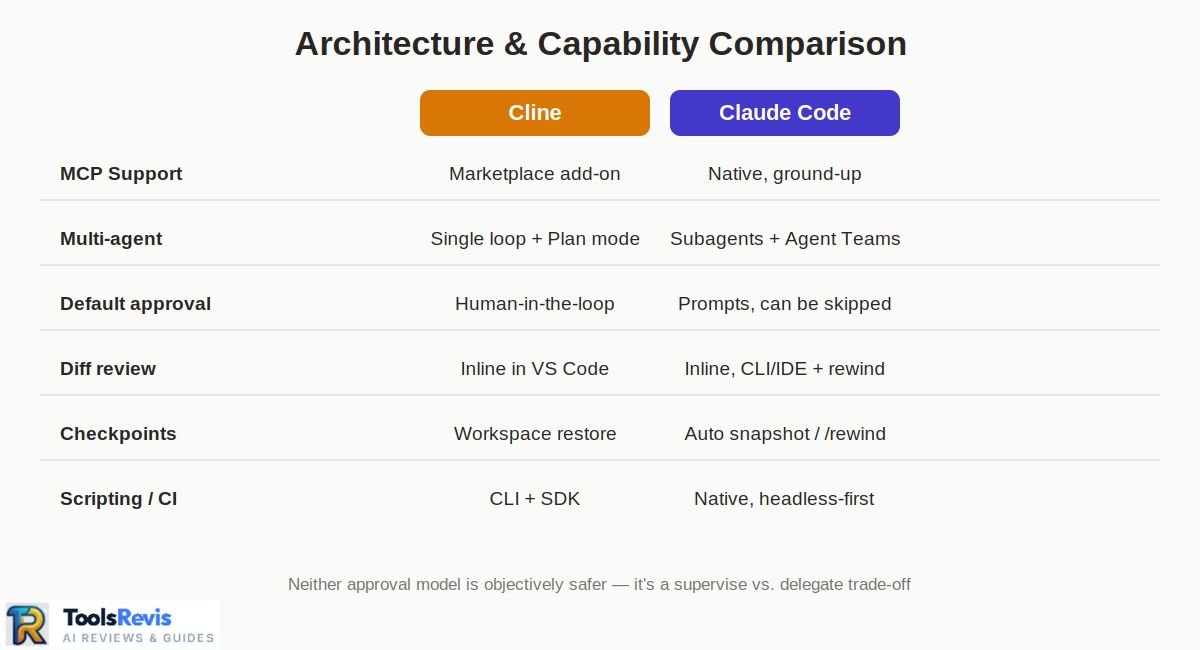
The core difference isn’t raw coding ability — both are strong agents when paired with a capable model. It’s how much control you have over the model, and how much autonomy the agent is given by default.
MCP support: Both tools support the Model Context Protocol for connecting to external tools like GitHub, databases, Figma, and Slack. Claude Code was built with MCP from the ground up, while Cline added MCP support as a later addition, though Cline’s MCP Marketplace makes installing servers straightforward from inside the editor.
Autonomy and subagents: Claude Code has a more elaborate multi-agent system — subagents that run with their own isolated context and tools, plus Agent Teams for coordinating multiple agents on a shared task list. Cline’s autonomy model is simpler: a single agent loop that reads, writes, runs commands, and calls MCP tools, with Plan mode available to sketch an approach before it executes anything.
Approval workflow: This is where the two tools philosophically diverge. Cline defaults to human-in-the-loop approval — you see each proposed file edit or command before it runs, with an option to auto-approve if you trust the session. Claude Code offers permission modes ranging from prompting on every action to –dangerously-skip-permissions, which skips confirmation entirely — useful for CI but riskier for interactive sessions if enabled carelessly.
Diff viewing and checkpoints: Both tools show diffs before changes are applied and let you roll back. Claude Code snapshots state automatically and lets you rewind by pressing Escape twice or using /rewind. Cline shows inline diffs directly in the VS Code editor and keeps workspace checkpoints you can restore to if a multi-step task goes sideways.
Neither approval model is objectively safer — Cline’s default is more cautious out of the box, while Claude Code gives you more granular control over when to loosen it, which matters more once you’re running longer, less-supervised sessions.
Pricing & Cost — Cline vs Claude Code
Claude Code’s cost is fixed to a subscription tier, while Cline’s cost depends entirely on which model you choose and how much you use it.
Claude Code pricing: There’s no standalone price — Claude Code access comes bundled into Claude’s consumer and team plans.
There’s no free tier for Claude Code — the CLI installs for free, but running it requires a paid Claude plan or API credits.
Cline pricing: The open-source extension itself is free — no subscription required. What you pay for is model inference, through one of three paths — your own API key (billed directly by Anthropic, OpenAI, or whichever provider you choose), Cline’s prepaid usage credits, or ClinePass ($9.99/month after a discounted first month) for generous-quota access to open-weight models. A Teams plan ($20/user/month, first 10 seats free) and a custom-priced Enterprise tier add SSO and team features.
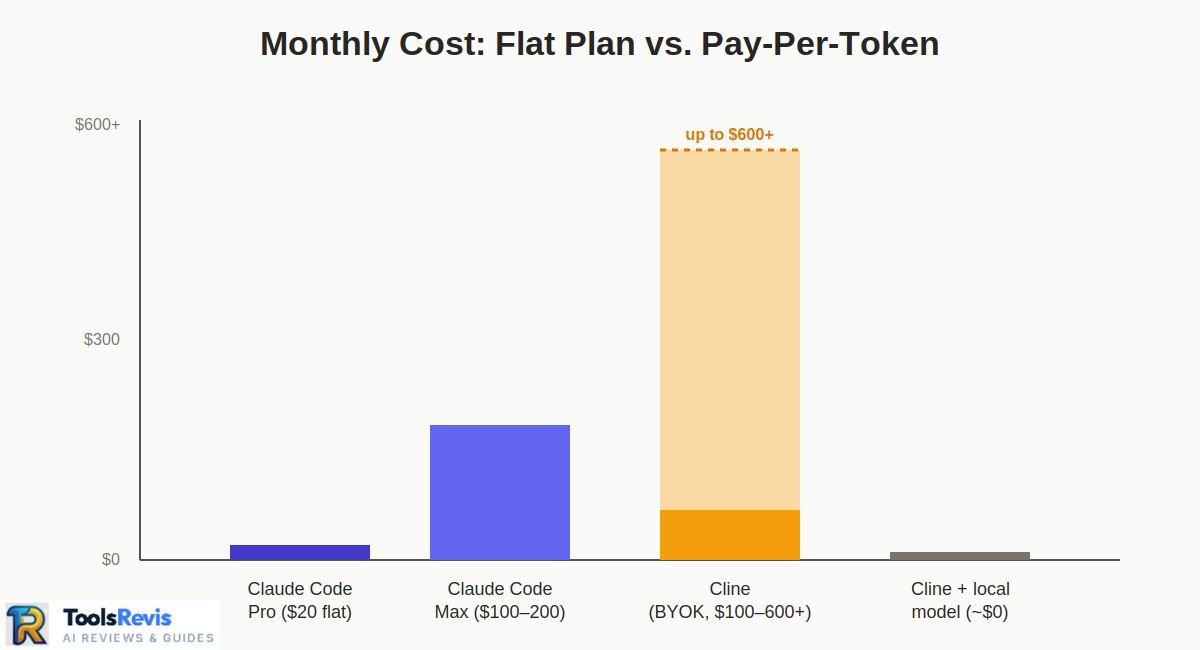
A worked cost scenario: Take a developer doing a few focused hours of agentic coding daily on a mid-sized repo, mostly on Claude Sonnet.
- On Claude Code, that usage pattern typically fits inside the Pro plan’s 5-hour session limits, so the cost is a flat $20/month — predictable, but capped. Push into daily Opus-heavy sessions or a large monorepo, and you’ll likely need Max at $100+/month.
- On Cline using the same Claude Sonnet model via your own API key, active daily use commonly runs $5–30/day depending on task volume — which can land anywhere from roughly $100 to $600+/month for a heavy user, but drops close to zero if you switch to a local model via Ollama for lower-stakes tasks.
The takeaway: Claude Code’s subscription caps your bill but also caps your usage. Cline’s BYOK model has no ceiling on usage, but also no ceiling on spend unless you set one yourself.
Not sure what your Claude Code usage will cost?
Calculate Your Claude API Cost →IDE & Platform Support
Claude Code is often assumed to be terminal-only — that’s outdated. Anthropic maintains an official VS Code extension (20M+ installs) with inline diffs and session management, and an official JetBrains plugin (currently in beta) covering IntelliJ IDEA, PyCharm, WebStorm, and other JetBrains IDEs. Add the CLI itself plus a desktop/web surface at claude.ai/code, and Claude Code runs across four distinct surfaces — all sharing the same CLAUDE.md config, permissions, and MCP setup, so switching surfaces mid-project doesn’t mean reconfiguring anything.
Cline’s platform footprint is narrower but still multi-surface: a VS Code extension (its primary and most mature surface), an official JetBrains plugin, and a standalone CLI/SDK for scripting or headless use. There’s also a Kanban mode for running multiple agent tasks in parallel from a web-based task board, each with its own worktree.
In practice, if you live entirely in VS Code or JetBrains, both tools cover you equally well. The gap shows up if you want a browser-based or desktop surface without opening an editor at all — that’s currently a Claude Code-only option.
Model Support & Flexibility
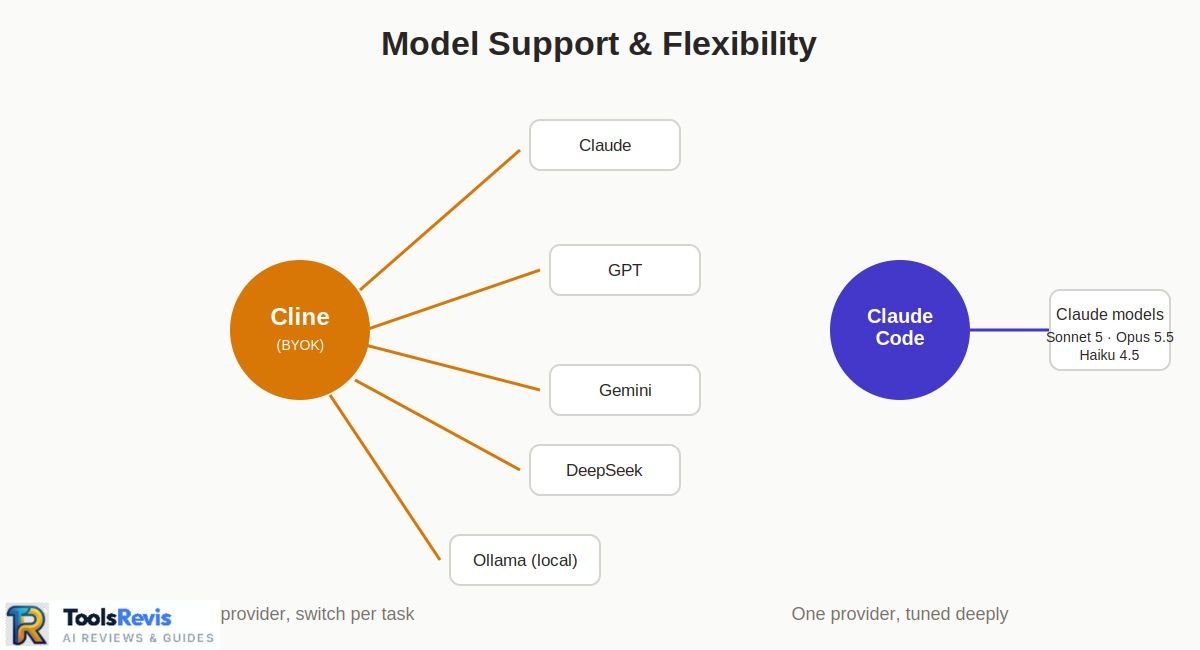
This is the single biggest structural difference between the two tools. Cline is model-agnostic by design — connect an API key from Anthropic, OpenAI, Google, Mistral, OpenRouter, or run a local model through Ollama or LM Studio, and switch between them per task or per project. Nothing about Cline ties you to one model provider.
Claude Code only runs Claude models. As of this writing (September 2026), that means Claude Sonnet 5, Claude Opus 5.5, and Claude Haiku 4.5, selected either automatically or manually depending on the task’s complexity — check Anthropic’s current model lineup before publishing, since this changes over time. There’s no option to point Claude Code at a GPT or Gemini model — it’s built specifically around Anthropic’s model lineup and tuned to work with Claude’s tool-use behavior.
Does Cline support Claude models? Yes — Claude is one of Cline’s most commonly used providers, and you can run Claude Sonnet or Opus through Cline the same way you’d run any other model, just billed through your own Anthropic API key rather than a Claude subscription.
Which setup is “better for coding” depends on what you’re optimizing for. Claude Code’s single-model focus means Anthropic can tune prompts, tool-calling, and context handling specifically for Claude’s behavior — there’s no abstraction layer translating between different providers’ quirks. Cline’s flexibility means you can swap in a cheaper or faster model for simple tasks and reserve a stronger model for complex refactors, or run entirely offline with a local model when privacy or cost requires it.
Developers who want the best Claude-specific experience tend to prefer Claude Code; developers who want to benchmark models against each other, or who aren’t committed to one provider, tend to prefer Cline.
Is Cline / Claude Code Open Source?
Cline is open source, licensed under Apache 2.0. The full codebase is public on GitHub, which means anyone can audit exactly what data leaves their machine, inspect how tool calls are constructed, self-host it, or modify it for their own workflow. That said, using Cline’s official VS Code extension still means accepting Cline Bot Inc.’s Terms of Service, which is a separate agreement from the open-source license itself — worth reading if data handling matters to your team, since the extension’s ToS and the Apache 2.0 code license aren’t governed by identical terms.
Claude Code is not open source. It’s a closed-source CLI and set of IDE extensions maintained entirely by Anthropic. You can inspect its behavior through its documentation, hooks, and configuration files, but you can’t read or modify the underlying source code the way you can with Cline.
For teams with strict “no closed-source tooling” or “no third-party SaaS” policies, this distinction can be decisive on its own, independent of features or pricing. For most individual developers, it matters less day-to-day, but it does affect how much you can verify about what the agent is actually doing with your code and prompts.
Claude Code Usage Limits Explained
Claude Code’s usage limits are tied to your plan, not to a hard message count, which makes them easy to misjudge until you actually hit one mid-task.
Every plan works on a rolling 5-hour session window, plus a broader weekly cap. Exact token ceilings vary by plan and have changed more than once in 2026 (Anthropic doubled Claude Code’s 5-hour limits across Pro, Max, Team, and Enterprise earlier this year), so check Anthropic’s current documentation for the live numbers rather than relying on a fixed figure. Directionally: Pro covers a few focused hours on a small-to-medium repo, a single complex session can burn far more tokens depending on context size and tool calls, and Max tiers raise that ceiling substantially.
The part that catches people off guard: limits reset weekly as well as per-session, and hitting either one mid-task doesn’t necessarily stop your work outright — depending on your plan and settings, usage can spill over into pay-per-token API billing without an explicit warning first. Developers running Claude Code continuously on large repositories, or leaning heavily on Opus rather than Sonnet, are the ones most likely to hit these walls regularly.
This is a big part of why BYOK tools like Cline appeal to heavy users: since Cline bills per token through your own API key, there’s no Claude Code-style 5-hour session cap to run into — but your usage still remains subject to your model provider’s own rate limits, credits, and your personal budget. The trade-off is that Cline gives you no built-in spend ceiling the way a flat subscription does, where Claude Code’s plan at least caps the damage until you choose to upgrade or switch to API billing.
What Developers Are Actually Saying (Reddit Insights)
Official documentation tells you what a tool is supposed to do. Developer communities tell you where that breaks down in practice. A few patterns show up repeatedly in developer discussions and community-focused writeups about both tools — worth treating as reported experience, not universal fact.
Usage limits are the most common Claude Code complaint. Across multiple community roundups, the recurring criticism is that the Pro plan’s limits get consumed quickly during heavy use, with developers reporting they switch to a different tool mid-session once they hit the rate limit — even when they consider Claude Code the stronger tool for the task. In head-to-head sentiment analysis against other agents, Claude Code is frequently rated ahead on code quality and complex reasoning, but its usage limits are cited as the main reason it’s impractical for some developers to use all day, every day.
Cline’s appeal, by contrast, centers on control rather than limits. Community-facing comparisons position Cline specifically as the answer for developers who want a battle-tested, agentic coding assistant inside VS Code with full model freedom, rather than being tied to one vendor’s session caps.
There’s a real UX preference split. Some developers strongly prefer Cline’s visible, step-by-step tool-call UI and default approval gate for trust and transparency; others find Claude Code’s more autonomous defaults and subagent system better suited to letting longer tasks run without constant interruption. Neither preference is “wrong” — it tends to track how much a developer wants to supervise versus delegate.
Treat all of the above as reported community sentiment rather than benchmarked fact — individual experiences vary by codebase size, model version, and how well a project’s CLAUDE.md or equivalent config is set up.
Real-World Example — Same Task in Both Tools
To make the workflow difference concrete, here’s how a common task — “add JWT authentication to an Express API” — typically plays out in each tool.
In Claude Code (terminal or VS Code extension):
- You describe the task directly: claude “Add JWT auth to the Express API in this repo, including login/refresh routes and middleware.”
- Claude Code reads the repo structure, checks for existing auth patterns or dependencies, and can enter Plan mode to lay out the approach before touching files.
- It proposes file edits and new files (middleware, routes, token utilities) with inline diffs; depending on your permission mode, it either asks for approval on each step or proceeds automatically.
- A checkpoint is saved before changes apply, so you can rewind with /rewind if the implementation goes off track.
- It can run the test suite itself, read the output, and fix failures in the same session — using a subagent if you’ve configured one for testing specifically.
In Cline (VS Code extension):
- You open the Cline panel and describe the same task in chat.
- Cline enters Plan mode by default, laying out proposed files and changes before writing anything, using whichever model you’ve connected — Claude, GPT, or a local model.
- Each file edit and terminal command is shown for approval before it executes, with the tool-call list visible in the sidebar as it works.
- Diffs appear inline in the VS Code editor, and workspace checkpoints let you restore to an earlier state if a step breaks something.
- If you want, you can swap the model mid-task — for example, running the initial scaffolding on a cheaper model, then switching to a stronger one for the trickier middleware logic.
The end result — a working JWT implementation — looks similar either way. The difference is felt in the process: Claude Code’s flow is faster to start (one command, native Claude tuning) and better suited to autonomous, multi-step execution; Cline’s flow gives you more visibility into each step and lets you choose exactly which model handles which part of the job.
Cline or Claude Code — Who Should Choose Which?
There’s no universal winner here — the right choice depends on what you’re optimizing for: predictable cost, model freedom, or the tightest possible Claude workflow.
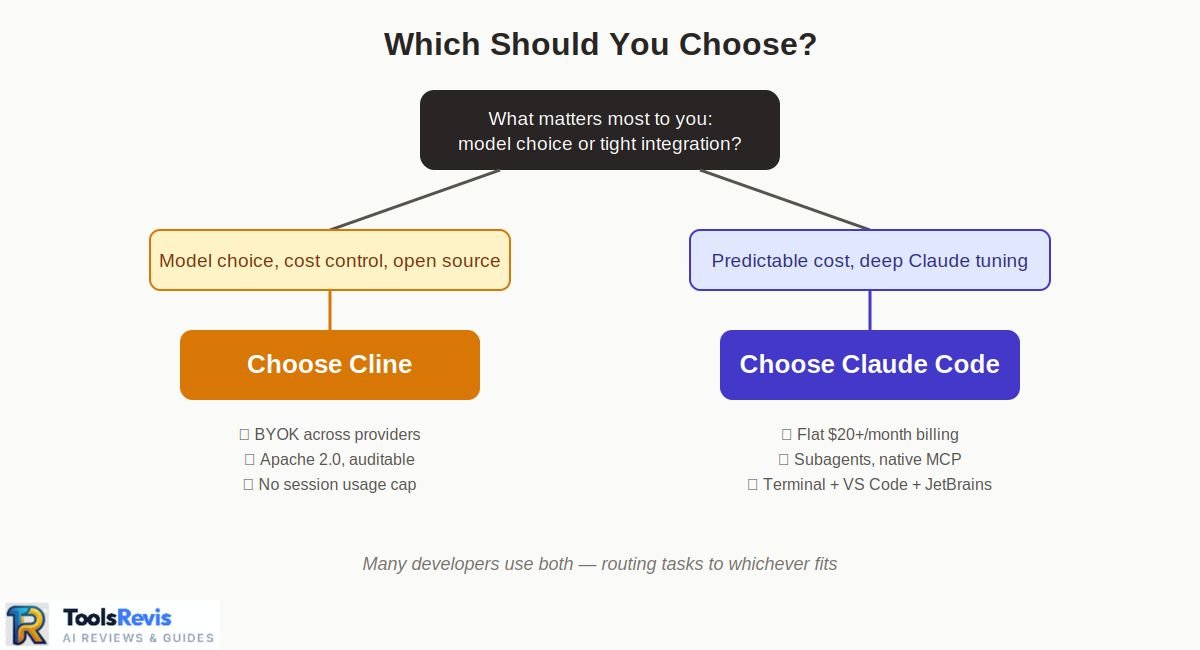
If you’re just starting out and want the simplest possible setup, Claude Code’s bundled subscription removes the need to manage API keys or pick a model — you install it, log in, and it works. If you’re the type of developer who already juggles multiple API keys and wants to control exactly which model handles which part of a task, Cline’s flexibility will likely feel less like overhead and more like an advantage.
Can You Use Cline and Claude Code Together?
Yes — and a fair number of developers do, rather than treating this as an either/or decision. Because the two tools solve different problems (native Claude tuning versus model flexibility), routing different kinds of work to each one is a practical setup rather than a compromise.
A common pattern: use Claude Code for complex, multi-step refactors and CI/headless automation where its subagents and native CLI scripting matter most, and use Cline for exploratory work, tasks where a cheaper or local model is good enough, or situations where you specifically want to see and approve every step before it runs.
Some teams also lean on Cline when a task calls for a non-Claude model — say, testing an implementation against GPT or a local model for comparison — while keeping Claude Code as the default for day-to-day work inside a Claude subscription.
Both tools support MCP, so if you’re already running MCP servers for things like GitHub, databases, or design tools, that setup can often be reused across both agents rather than configured twice.
The main friction is context — each tool keeps its own session history and checkpoints, so switching mid-task means re-establishing context in the second tool rather than picking up seamlessly where the first left off. For that reason, most developers who use both tend to assign each one to a distinct type of task, rather than bouncing between them on the same piece of work.
Other AI Coding Agents Worth Comparing
Cline and Claude Code aren’t the only agentic coding tools worth knowing about — a few others come up constantly in the same conversations, each with a different trade-off profile.
Cursor takes a different approach entirely: an AI-native code editor (a VS Code fork) rather than an extension or CLI, with tight Tab-completion and agent mode built into the editing experience itself. It’s a common alternative for developers who want polish and speed over open-source transparency.
GitHub Copilot remains the most widely adopted option by sheer install base, with deep GitHub and Visual Studio integration, though its agentic capabilities have historically trailed Claude Code and Cline in autonomous, multi-step execution.
Windsurf sits closer to Cursor’s category — an AI-native editor with its own agent mode — and is frequently compared against Cursor rather than against Cline or Claude Code directly.
FAQ
1. Is Cline better than Claude Code?
Neither is objectively better — they optimize for different things. Cline emphasizes model flexibility, cost transparency, and open-source auditability. Claude Code emphasizes native Claude tuning, subagent autonomy, and a simpler, subscription-based setup. Which matters more depends on whether you value control over models or a tighter, managed workflow.
2. Is Cline free?
The Cline extension itself is free and open source. You still pay for model inference through your own API key, prepaid Cline credits, or the optional ClinePass subscription ($9.99/month) for open-weight model access.
3. Is Claude Code open source?
No. Claude Code is closed-source software maintained by Anthropic. Cline, by contrast, is fully open source under the Apache 2.0 license.
4. Does Claude Code cost more than Cline?
It depends on usage. Claude Code’s Pro plan is a flat $20/month regardless of how much you code, as long as you stay within session limits. Cline has no subscription requirement, but active daily use billed through an API key commonly runs $5–30/day, which can exceed Claude Code’s flat rate for heavy users.
5. Can I use Claude Code in VS Code?
Yes. Anthropic maintains an official VS Code extension for Claude Code with inline diffs and session management, in addition to the terminal CLI, an official JetBrains plugin, and a web/desktop surface.
6. Which is better for beginners — Cline or Claude Code?
Claude Code is generally simpler to start with — install, log in with a Claude subscription, and it works without any API key setup. Cline requires connecting a model provider first, which adds a setup step but also removes any dependency on a single vendor’s plan.
7. Can Cline and Claude Code be used together?
Yes. Many developers use Claude Code for complex refactors and CI automation, and Cline for exploratory work or tasks suited to a different model — routing tasks between the two rather than choosing one exclusively.
8. Does Cline support Claude models?
Yes. Claude is one of Cline’s most commonly used model providers — you connect it via your own Anthropic API key rather than through a Claude subscription.
Conclusion
Claude Code and Cline both handle real agentic coding work — reading codebases, editing files, running commands, and iterating on their own output. The more useful question isn’t which one codes better — it’s which trade-off fits your workflow: model flexibility, provider control, subscription billing, or Claude-native tooling. Claude Code offers a managed, Claude-native experience with predictable subscription pricing and deeper autonomy features like subagents, at the cost of session limits and no model choice. Cline offers full model freedom, open-source transparency, and no fixed subscription cap, at the cost of managing your own provider rate limits and API spend.
One practical approach: use both, and let the task decide which tool you reach for. If you’re still weighing this against other agentic tools, our best AI tools for developers roundup covers how Cursor, Copilot, and Windsurf fit into the same decision.
📚 Read Next

I’m Umair Ahmad, founder of ToolsRevis. I personally test every AI tool we cover — signing up, running real workflows, checking pricing tiers, and comparing outputs — before writing a single word. My goal: cut through AI marketing hype with honest, hands-on verdicts.
Let’s achieve more together!