
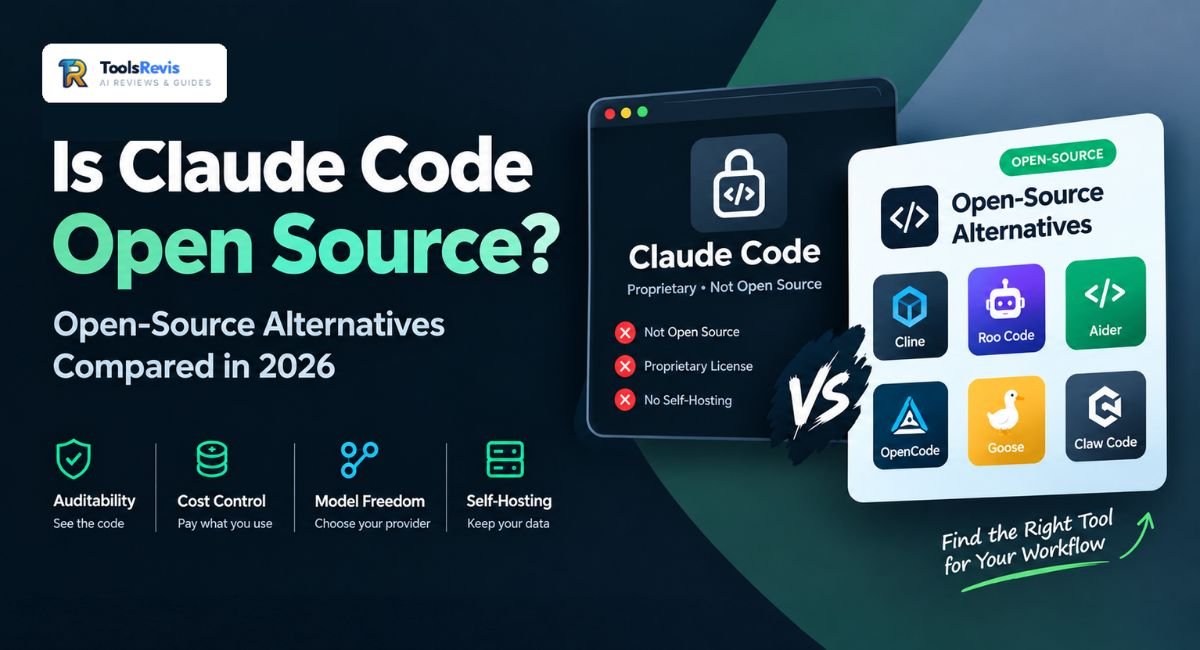
You typed “is Claude Code open source” because you want to know exactly what you’re trusting with your codebase — and whether you’re locked into one company’s pricing forever.
The real answer is more interesting than a yes or no, and the alternatives might change how you work entirely.
Introduction
If you’ve ever tried to fork Claude Code, read its permission logic, or run it without an Anthropic API key, you’ve probably hit a wall — and started searching for a way around it. That wall is intentional. Claude Code is a commercial product, and understanding exactly where the line sits between “proprietary tool” and “open ecosystem” changes how you evaluate it, budget for it, and decide whether to trust it with a regulated codebase.
This matters more than it might seem. Teams doing security reviews need to know whether they can audit the code that’s editing their files. Developers on a budget need to know whether there’s a genuinely free path to the same agentic coding workflow. And privacy-conscious engineers want to know if they can run something similar entirely on local hardware, with no API calls leaving the building at all.
This guide settles the Claude Code open source question directly, then walks through the open-source coding agents — Cline, Roo Code, Aider, OpenCode, and others — that fill the gaps Claude Code’s license leaves behind, so you can pick the right tool for your workflow instead of guessing.
Is Claude Code Open Source?
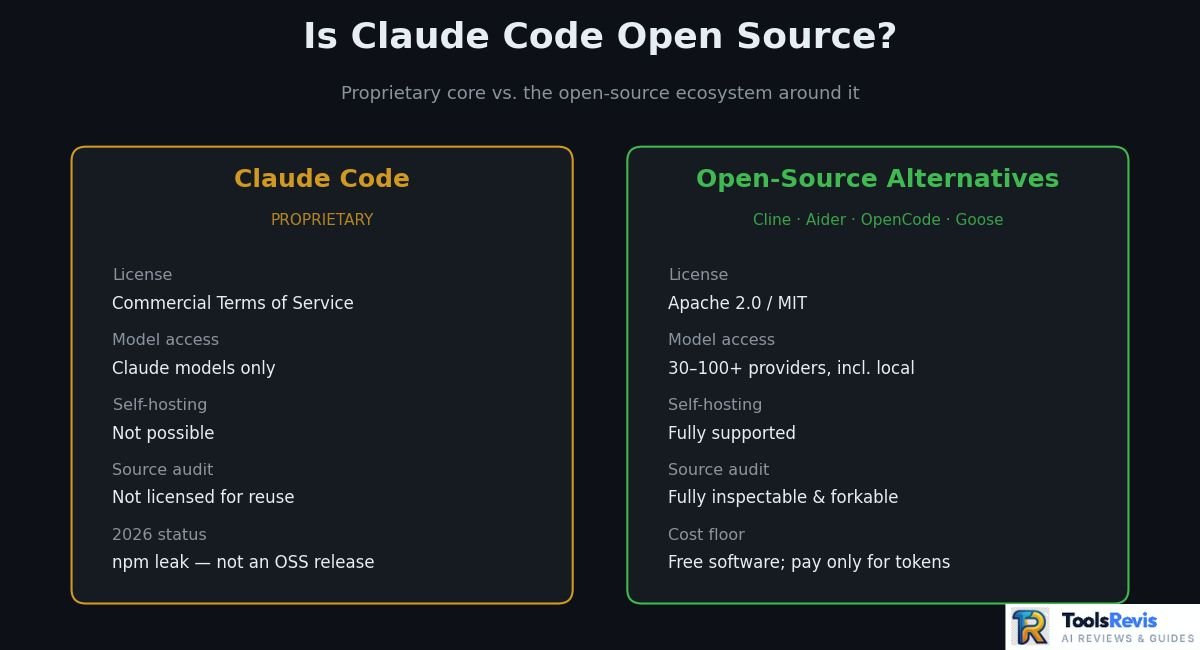
No. Claude Code is proprietary software, not an open-source project. It’s distributed under Anthropic’s Commercial Terms of Service, not an OSI-approved license like MIT, Apache 2.0, or GPL. Anthropic has been explicit about this: a GitHub issue (#8517) specifically requesting open-source licensing was closed by the company as “not planned.”
Here’s what that means in practice, piece by piece.
What’s proprietary. The Claude Code CLI — the agent loop, the tool-calling logic, the permission system, the context management pipeline — is owned and controlled by Anthropic. You can install it, configure it, and extend it through supported mechanisms, but you don’t have a license to fork the official product, redistribute it, or build a competing commercial tool on top of its source.
Claude Code CLI vs. the underlying Claude models. It’s worth separating two different things people mean when they ask this question. Claude Code is the agent — the terminal application that reads your files, runs commands, and manages git workflows. The models it calls (Claude Opus, Sonnet, and so on) are a separate, even more tightly held layer. Even in a hypothetical world where the CLI’s code were fully open, the model weights powering it would still not be — that’s true of every major AI lab’s coding agent, not just Anthropic’s.
What “open source” actually means. Open source isn’t just “the code became visible at some point.” It means a maintainer deliberately licenses code under terms that let anyone view, modify, redistribute, and build derivative works from it — usually via a license like MIT, Apache 2.0, or GPL.
A company intentionally releasing code for anyone to use, modify, and share under a license that spells out the rules is what makes something open source — Linux and Android are open source in that sense. Claude Code has never carried such a license.
Source-code availability vs. API access. These are also frequently confused. Even if you could read every line of Claude Code’s TypeScript, that wouldn’t give you free access to Claude models — every request the agent makes still routes through Anthropic’s paid API or a subscription plan. Visibility into code is not the same as ownership of, or free access to, the intelligence behind it.
The npm bundle leak vs. official status. In late March 2026, this distinction became very real. A packaging error exposed Claude Code’s full 512,000-line TypeScript codebase through npm source maps — specifically, a 59.8 MB source map file accidentally shipped inside the @anthropic-ai/claude-code npm package, exposing roughly 1,900 files of unobfuscated source.
Anthropic described it as a release packaging issue caused by human error, not a security breach, pulled the bad version, and shipped a clean replacement. Anthropic subsequently issued DMCA takedown notices against roughly 8,100 repositories hosting direct copies of the leaked code. Anthropic later acknowledged the takedown had overreached, sweeping up legitimate forks along with infringing copies, and retracted all but one repository and 96 forks within hours.
Even before the March 2026 leak, developers had already stumbled onto a smaller-scale version of this discovery. Inspecting the @anthropic-ai/claude-agent-sdk npm package, some found that its minified cli.js file — while compressed — still contained fully readable system prompt text: the CLI’s core identity strings, tool-usage rules, over-engineering guidelines, and git commit templates, all sitting as plain, grep-able strings. This sparked its own round of debate in communities like r/ClaudeCode and r/ClaudeAI over what “open source” even means.
The consensus among more technical commenters was consistent with Anthropic’s official position: minified JavaScript being technically inspectable is not the same as a licensed open-source release — the GitHub repository still carried an all-rights-reserved license, and nothing about the discovery changed that legal status.
Important note: an accidental leak does not equal an open-source release. The code being briefly visible is fundamentally different from Anthropic licensing it for reuse. Community forks that copy the leaked source verbatim are operating in a legal gray zone at best; clean-room reimplementations that study the leak’s architecture but rewrite the code independently are a different matter — and are part of why several genuinely open-source alternatives have gained real traction in 2026, which we’ll cover next.
Why Isn’t Claude Code Fully Open Source?
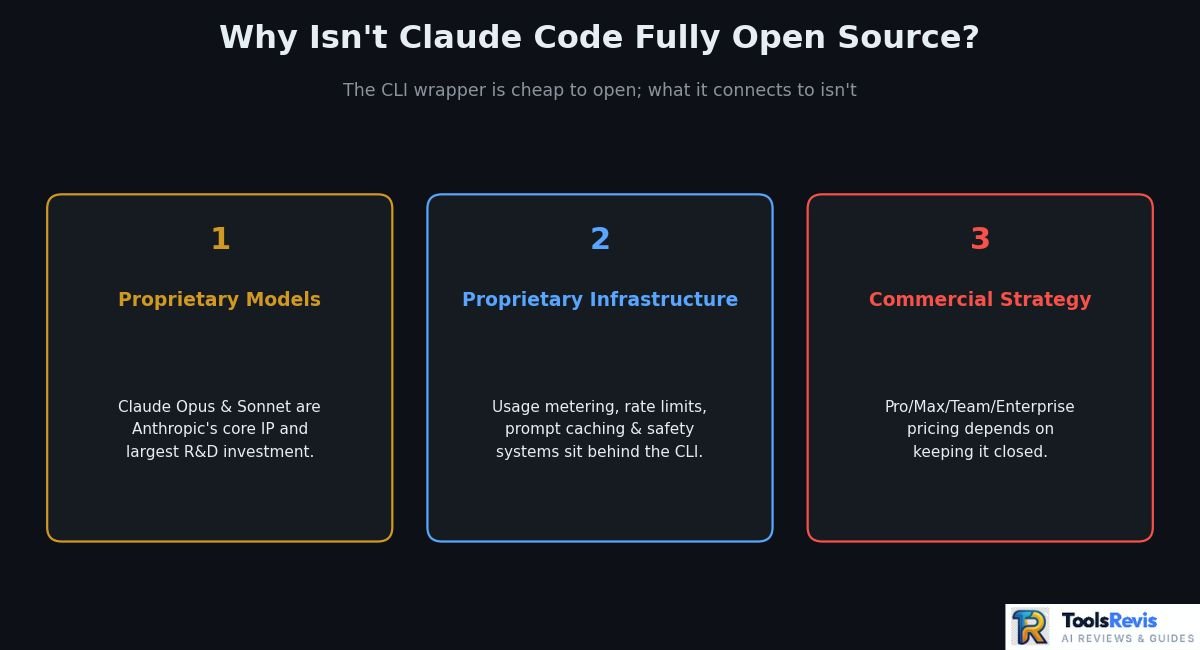
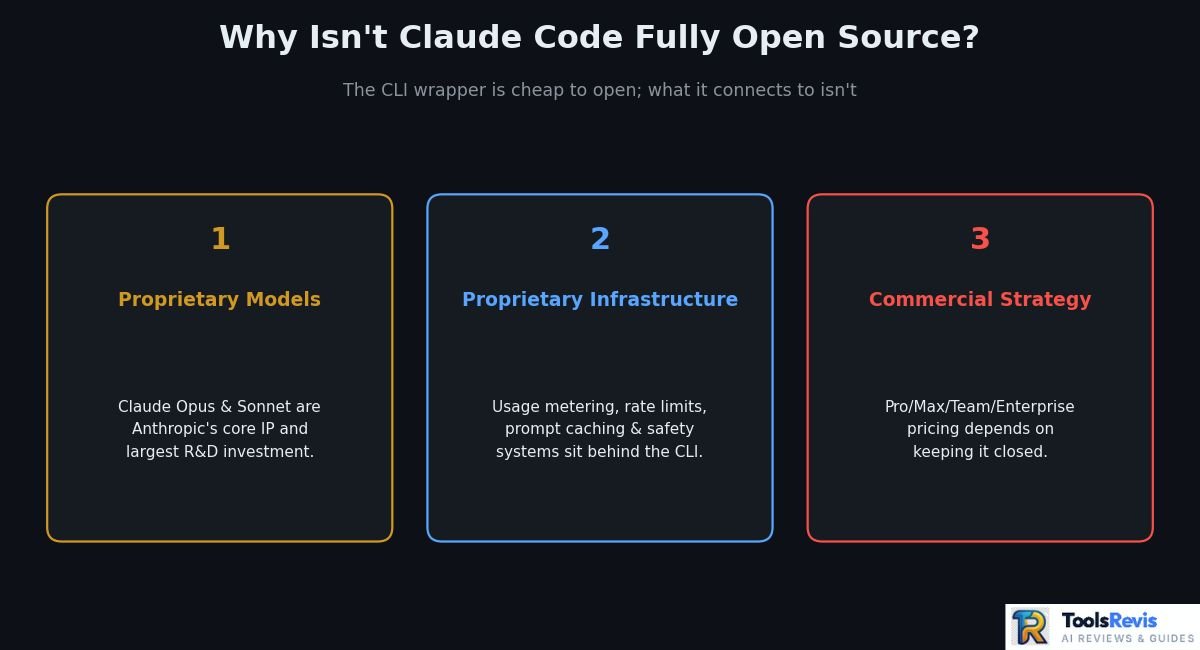
The short version: Claude Code’s value doesn’t live in the CLI wrapper — it lives in the models, infrastructure, and subscription business built around it, and Anthropic has strong commercial reasons to keep all three closed.
Proprietary Models
Claude Code is only as good as the model answering its requests, and those models — Claude Opus, Sonnet, and the rest of the lineup — represent Anthropic’s core intellectual property and its largest R&D investment. Releasing the CLI’s orchestration code costs Anthropic relatively little competitively, since a clone still needs a frontier model to be useful. But releasing model weights would give away the actual product.
This is why even the leaked TypeScript source didn’t functionally “unlock” a free Claude Code: every meaningful action still requires calling Anthropic’s paid model endpoints.For a closer look at Anthropic’s coding model, read our Claude Sonnet 5 review.
Proprietary Infrastructure
Beyond the models themselves, Claude Code depends on backend infrastructure Anthropic operates directly — usage metering, rate limiting, prompt caching, extended-thinking budgets, and the safety and abuse-prevention systems that sit between the CLI and the model. None of that infrastructure is something a self-hosted fork could replicate just by having the client-side code.
It’s one reason “open-sourcing the agent” and “giving away the product” aren’t really the same thing here — the agent is a thin client over a much larger, closed system.
Commercial Product Strategy
Claude Code is a deliberate part of Anthropic’s revenue model, not a side project. It’s sold through Pro ($20/month), Max ($100–$200/month), Team (from $20/seat, with Claude Code requiring $100/seat Premium tiers), Enterprise, and pay-as-you-go API pricing (pricing as of early-to-mid 2026 — check Anthropic’s site for current rates). Keeping it proprietary lets Anthropic control quality, prevent unauthorized commercial forks, and tie usage directly to metered billing.
Estimate your Claude API costs before choosing a plan.
Calculate Claude API Costs →Quick take: none of this is unusual. OpenAI’s Codex CLI is a partial exception — its client ships under Apache 2.0 while the backing service stays proprietary — but every major lab keeps its actual model weights closed. What varies is how much of the agent shell each company is willing to open up, and that’s exactly the gap the alternatives in this guide step into.
What Can You Actually Customize in Claude Code?
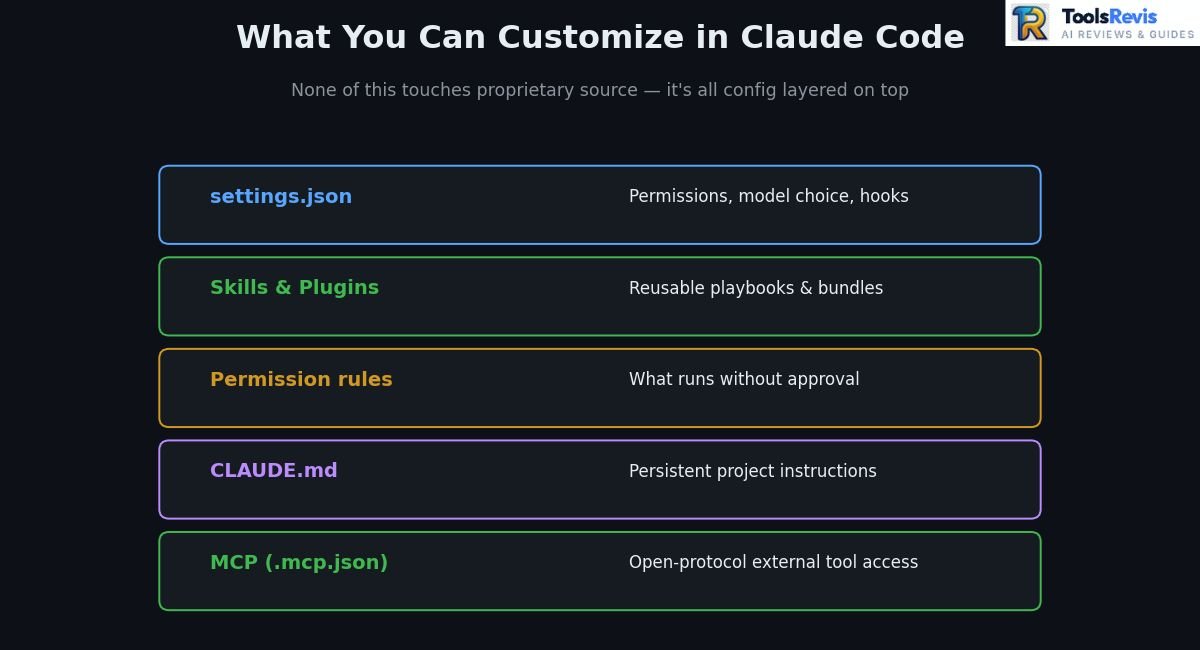
Quite a lot, even without access to the underlying source. Claude Code exposes a layered configuration system — settings files, memory files, permission rules, skills, plugins, and external tool connections — that lets you shape its behavior extensively without ever touching proprietary code.
Everything below lives inside a .claude/ directory, either at the project root or in your home folder for global settings. Most users only ever need to touch two of these files directly; the rest are opt-in as your workflow grows.
Configuration
The core of Claude Code’s customization is settings.json, which controls things like default permission behavior, model selection, and tool-level preferences. Project-scoped settings live inside your repo’s .claude/ folder, while global preferences live in your home directory, so you can set sane defaults everywhere and override them per project. This is also where hooks — scripts that run automatically before or after specific actions — get registered.
Skills and Plugins
Skills package reusable instructions and workflows that Claude Code can invoke on demand — think of them as a domain-specific playbook (a testing convention, a deployment checklist, a formatting standard) that the agent follows consistently instead of you re-explaining it every session. Plugins bundle skills, commands, and sometimes MCP connections together into a single installable unit. Typing / at the start of a prompt surfaces every command and skill currently available, including custom, plugin-provided, and MCP-provided ones.
Pro tip: Treat skills like documentation you’re writing for a very literal new hire. The more specific and example-driven a skill file is, the more consistently Claude Code applies it.
Permissions
Claude Code’s permission system decides what the agent can do without asking — read files, run shell commands, edit code, push to git — and what requires your explicit approval first. You can run in a fully interactive mode where every action needs confirmation, switch to an “auto” mode where a built-in classifier decides what’s safe to run unprompted, or bypass prompts entirely with a flag for trusted, sandboxed environments.
Important note: that bypass flag removes a real safety layer — reserve it for containers or throwaway environments, not your main working directory with production credentials nearby. You can also write explicit permission rules, such as denying reads of credential files, which is worth doing on any project that touches secrets.
CLAUDE.md & Memory Persistence
CLAUDE.md is the single most impactful file you’ll customize. Placed at your project root, it’s automatically loaded into context at the start of every session and acts as persistent instructions — coding conventions, architecture notes, commands to run tests, things the agent should never do. Because it’s just a markdown file, it’s version-controlled alongside your code, so the whole team works from the same playbook instead of everyone re-explaining project quirks individually.
Beyond CLAUDE.md, Claude Code also supports auto-generated memory and rules files that accumulate context across sessions, reducing how often you need to re-establish the same background information. This is the closest thing to “training” Claude Code on your codebase without any actual model fine-tuning — it’s prompt-level persistence, not weight changes, but it meaningfully improves continuity on long-running projects.
Common mistake: Letting CLAUDE.md grow unchecked. A bloated memory file burns context tokens every single session, which directly increases your API cost. Prune it periodically the way you’d prune stale comments in code.
MCP (Model Context Protocol) and External Tools
The Model Context Protocol lets Claude Code connect to external tools and data sources — databases, project management tools, internal APIs, browsers — through a standardized interface, configured via an .mcp.json file at the project level.
This is what turns Claude Code from “an agent that edits files” into “an agent that can also check your Jira board, query your database, or open a browser,” and it’s one of the more genuinely open pieces of the ecosystem: MCP itself is an open protocol, so the servers you connect aren’t locked to Anthropic’s proprietary code at all.
Practical recommendation: if source-level auditability is the whole reason you’re evaluating alternatives, MCP is worth understanding either way — every open-source alternative covered next (OpenCode, Cline, Roo Code) also speaks MCP, so investments you make in MCP servers carry over regardless of which agent you end up running.
What Are the Best Open-Source Alternatives to Claude Code?
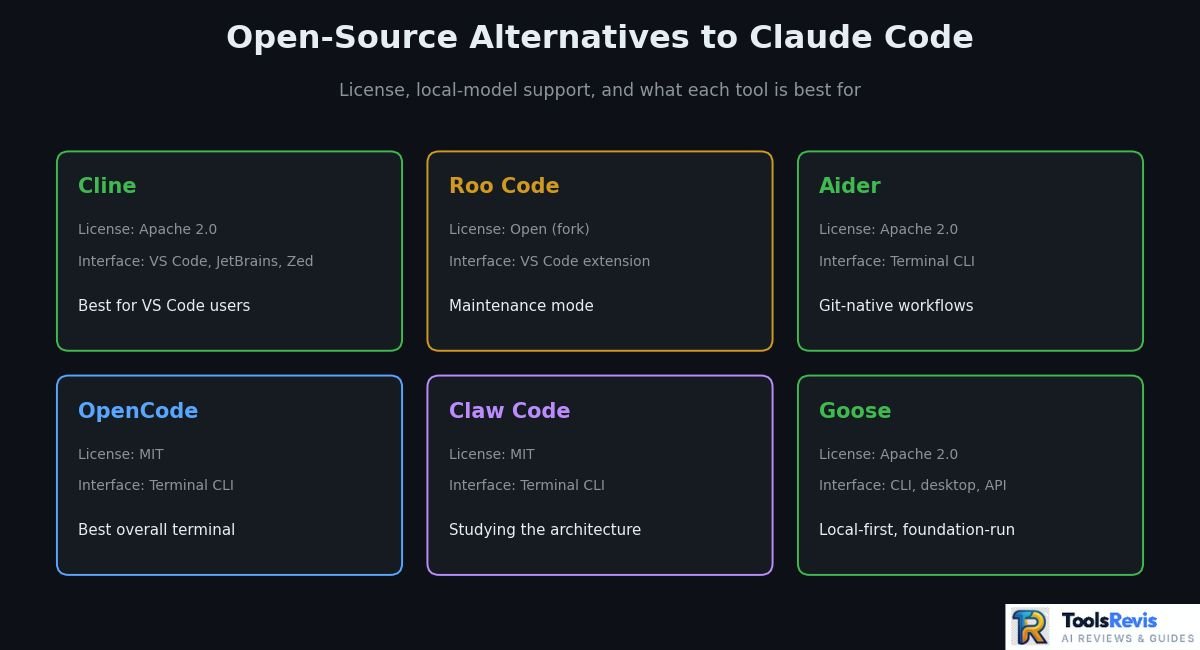
If auditability, self-hosting, or model freedom matter to you, six projects currently cover the ground Claude Code’s license won’t let you touch. Here’s how they stack up before the deep dive on each.
If you’re comparing Claude Code with other AI coding assistants, see our guide to the best AI tools for developers.
| Tool | Open Source | Local Models | Interface | Stack | Best For |
| Cline | Yes (Apache 2.0) | Yes (BYOK, Ollama-compatible) | VS Code, JetBrains, Zed, Neovim, CLI | TypeScript | Best for VS Code users wanting granular, step-by-step approval |
| Roo Code | Yes (Cline fork) | Yes | VS Code extension | TypeScript | Best for multi-mode workflows (now in maintenance-only mode) |
| Aider | Yes (Apache 2.0) | Yes | Terminal CLI | Python | Best for git-native, editor-agnostic terminal pair programming |
| OpenCode | Yes (MIT) | Yes (75+ providers) | Terminal CLI | TypeScript | Best for provider-agnostic, LSP-aware terminal agents |
| Claw Code | Yes (MIT) | Yes | Terminal CLI | Python/Rust | Best for studying or extending a Claude Code-style architecture |
| Goose | Yes (Apache 2.0) | Yes (Ollama, LM Studio) | CLI, desktop, API | Rust | Best for foundation-governed, MCP-first local automation |
Cline (VS Code Agent)
Cline is the most established open-source agentic coding extension, and it’s the closest thing to “Claude Code inside VS Code” that exists today.
Originally launched as “Claude Dev,” Cline has grown into an Apache 2.0-licensed autonomous agent with over 5 million installs and 60,000+ GitHub stars (as of mid-2026) . It reads your codebase, creates and edits files, runs terminal commands, and can even drive a real browser to verify UI changes — all while asking for your approval at each step, which makes it a strong fit for teams that need an audit trail.
Details: Cline supports 30+ LLM providers, so you’re never locked into one vendor, and it ships an MCP Marketplace for plugging in databases, observability tools, or internal APIs with minimal setup. A “Plan/Act” mode separates thinking from doing, and .clinerules/ files let you turn team coding standards into version-controlled, file-scoped rules — functionally similar to CLAUDE.md. As of 2026, Cline also ships a preview CLI and SDK, extending beyond VS Code into JetBrains, Zed, Neovim, and headless CI/CD use.
Choose Cline if you want to keep your existing VS Code setup exactly as it is and add Claude Code-style autonomy without migrating to a forked editor like Cursor.
Roo Code (Autonomous IDE Coding)
Roo Code is a Cline fork built for developers who want more configurability and autonomy than Cline’s default, more cautious posture — but it’s worth knowing upfront that the project has entered maintenance mode.
Explanation: Roo Code introduced custom “modes” — Architect, Code, Debug, and user-defined roles — each with its own system prompt and tool allowlist, letting the agent hand off between planning and implementation mid-task. It also loosened default approval behavior, trading some of Cline’s caution for speed.
As of 2026, the Roo Code team shipped what it calls its final release and pivoted focus to Roomote, a cloud agent platform. The extension keeps working indefinitely, but there are no more bug fixes, feature additions, or model updates coming. A chunk of its former user base has migrated to Kilo Code, a newer fork that combines ideas from both Cline and Roo Code.
Roo Code is still usable today and fine for existing projects, but for new setups, evaluate Kilo Code or Cline instead if you want a tool with an active roadmap.
Aider (Terminal Git Workflow)
Aider is the strongest terminal-native, editor-agnostic option, built around the idea that every AI-driven change should be a clean, reviewable git commit.
Explanation: Unlike Cline or Roo Code, Aider doesn’t live inside an editor at all — it runs in your terminal and edits files on disk directly, so it works identically whether you’re in VS Code, JetBrains, Vim over SSH, or a bare tmux session on a build server.
Details: Aider is Apache 2.0-licensed, supports well over 100 programming languages, and builds a tree-sitter-based map of your entire repository to give the model useful context on large codebases without flooding the prompt. Every edit is committed automatically with a descriptive message, so git diff and /undo become your safety net instead of a proprietary undo stack. It connects to Anthropic, OpenAI, Gemini, DeepSeek, Grok, and local Ollama models, plus an experimental architect/editor mode that pairs a stronger “planning” model with a cheaper “editing” model to cut costs.
Practical recommendation: Choose Aider if your workflow is genuinely editor-agnostic — SSH sessions, CI pipelines, or a team split across different IDEs — and you want git history to be the single source of truth for every AI-made change.
OpenCode & OpenClaudia (Terminal Agents)
OpenCode has become the de facto open-source terminal answer to Claude Code itself — not a fork of Cline’s lineage, but a purpose-built, provider-agnostic terminal agent.
Details on OpenCode: Released under the MIT license, OpenCode has crossed 160,000+ GitHub stars and connects to 75+ LLM providers through Models.dev, including local Ollama models, with the ability to switch providers mid-session. Internally, it splits work between a Plan agent (task decomposition) and a Build agent (execution), and its LSP integration brings real symbol resolution into the terminal — something most terminal agents lack. Multi-session support lets you run several parallel agents against the same project.
Details on OpenClaudia: OpenClaudia is a newer, Rust-based “universal agent harness” that aims to turn any LLM into a Claude Code-style agent, with multi-provider support (Anthropic, OpenAI, Gemini, DeepSeek, Qwen, and local endpoints via Ollama or LM Studio) and a configurable behavioral-mode system for tuning agent autonomy. Important note: independent project audits as of mid-2026 flagged it as not yet production-ready — real gaps exist around isolation, credential handling, and unattended destructive actions — so treat it as an actively developing project rather than a Claude Code-equivalent you’d point at sensitive repositories today.
Recommendation: Start with OpenCode if you want a mature, widely adopted terminal agent right now. Keep an eye on OpenClaudia if you specifically want a Rust-based harness and are comfortable running pre-production tooling in sandboxed, non-sensitive environments.
Claw Code Agent (Python-Based Open-Source Alternative)
Claw Code emerged in the aftermath of Claude Code’s March 2026 source-code incident and describes itself as an independent, clean-room implementation built in Python and Rust.
Explanation: After the leak, developer Sigrid Jin published a Python port that mirrored Claude Code’s architectural patterns — the tool-calling loop, query engine, and memory management — without reusing any leaked source directly. It became one of the fastest-growing repositories in GitHub’s history, and a Rust runtime port followed shortly after for improved performance and memory safety.
Details: MIT-licensed, Claw Code reimplements multi-agent orchestration, a plugin-based tool system, and a provider-agnostic LLM layer supporting Claude, OpenAI, and local models. Common mistake to avoid: treating it as a drop-in Claude Code replacement. Independent teardowns found it still lacks pieces of production Claude Code’s feature set — dynamic CLAUDE.md discovery, a full hooks/skills pipeline, and IDE bridge/server architecture for VS Code and JetBrains integration are notably thinner or absent.
Claw Code is best suited to developers who want to study, extend, or build on an open, Claude Code-inspired architecture — not teams looking for a fully polished, feature-complete replacement out of the box.
Note: clean-room status here is legally untested — treat this as a research/study tool rather than a commercially safe drop-in, especially for production or client-facing use.
Goose AI & Local Harnesses
Goose is the strongest choice when local-first execution and vendor-neutral governance matter more than matching every Claude Code feature exactly.
Explanation: Originally built by Block (the company behind Square and Cash App), Goose was donated to the Agentic AI Foundation under the Linux Foundation in 2026 — meaning it’s no longer dependent on a single company’s roadmap or business priorities.
Details: Built in Rust for performance, Goose runs as a CLI, desktop app, or API on macOS, Linux, and Windows, under a fully permissive Apache 2.0 license. It supports 15+ LLM providers (Anthropic, OpenAI, Gemini, Ollama, and more) and 70+ MCP extensions, and it can both consume and expose MCP servers. A continuous mode lets it iterate unattended against a dollar budget cap, which is useful for longer autonomous batch tasks rather than interactive back-and-forth sessions.
Practical recommendation: Choose Goose if foundation governance, Rust-level performance, and true local execution with Ollama are priorities — and consider pairing it with Claude Code itself for interactive work, using Goose for longer-running unattended tasks, since the two tools’ strengths are genuinely complementary rather than purely competitive.
Language-Based Open-Source Alternatives: Rust vs. Python
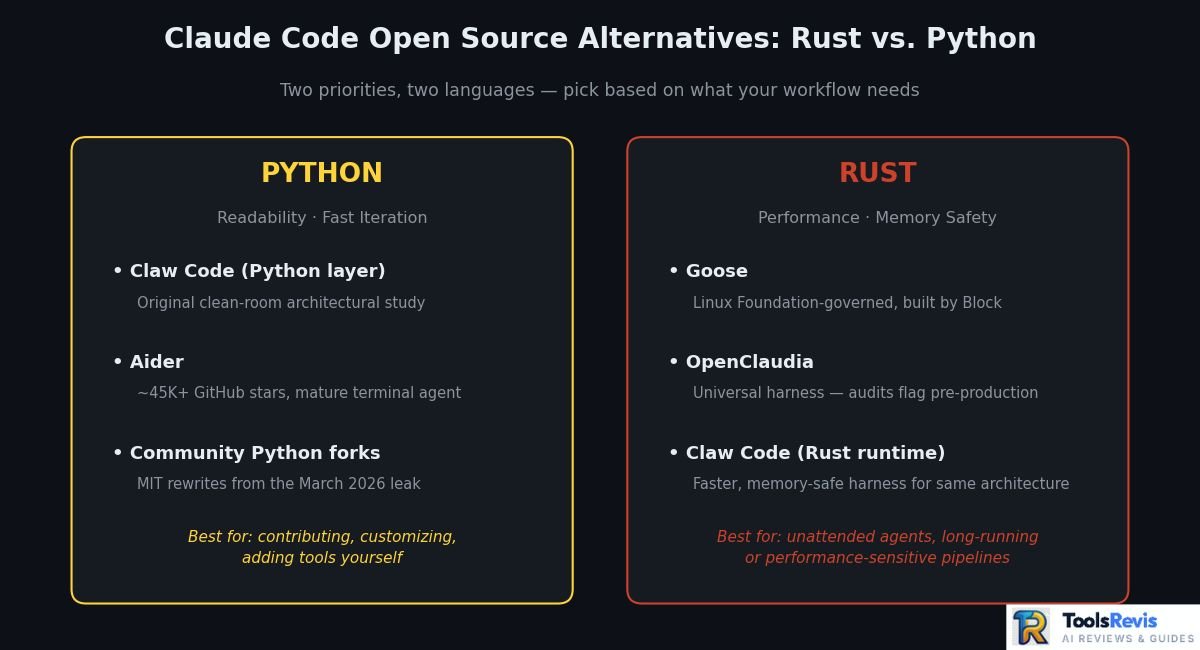
If you’re specifically searching for “claude code open source rust” or “claude code open source python,” the split maps cleanly onto two different priorities — Python projects tend to prioritize readability and fast iteration, while Rust projects prioritize runtime performance and memory safety for long-running, unattended agent sessions.
Claude Code Open-Source Python Implementations
Python has become the default language for clean-room Claude Code rewrites, largely because it’s fast to prototype in and easy for a wider pool of contributors to read and extend.
- Claw Code (Python layer) — the original clean-room port of Claude Code’s architecture, covering the query engine, tool routing, and session management in idiomatic Python. It’s positioned more as an architectural study and extensible framework than a runtime-equivalent replacement.
- Aider — while not a Claude Code clone by design, Aider is the most mature Python-based terminal coding agent, with roughly 45,000+ GitHub stars, Apache 2.0 licensing, and native support for both cloud models and local Ollama models.
- Community Python forks (such as Clawd Code and similar projects) — several MIT-licensed rewrites emerged from the March 2026 leak, describing themselves as high-fidelity Python ports of Claude Code’s original TypeScript architecture, complete with a tool-calling loop and streaming REPL.
Practical recommendation: Python implementations are the better starting point if you want to read, modify, or contribute to the agent’s internals yourself — the code is generally more approachable for adding a custom tool or tweaking the agent loop.
Claude Code Open-Source Rust CLI Projects
Rust has become the language of choice for teams that want a genuinely fast, low-overhead agent runtime — important when an agent might run continuously in the background or inside resource-constrained CI environments.
- Goose — built entirely in Rust by Block and now governed by the Linux Foundation’s Agentic AI Foundation, explicitly chosen for native performance and low resource usage across CLI, desktop, and API surfaces.
- OpenClaudia — a Rust-based “universal agent harness” aiming for Claude Code-like capabilities across any model provider, though as noted above, independent audits flag it as still pre-production.
- Claw Code (Rust runtime) — following the initial Python port, a Rust implementation was developed specifically to deliver a faster, memory-safe harness runtime for the same clean-room architecture.
- OpenAI’s Codex CLI — worth noting for comparison purposes: it’s also built primarily in Rust under an Apache 2.0 license, with a strong sandboxed-execution model, though it isn’t a Claude Code-specific clone.
Common mistake: assuming “written in Rust” automatically means “more secure” or “production-ready.” Language choice affects performance and memory safety, not the completeness of the permission system, credential handling, or sandboxing logic layered on top — those still need to be evaluated project by project, as the OpenClaudia audit findings illustrate.
Recommendation: Reach for a Rust-based option when you need an agent running unattended for extended periods or in a performance-sensitive pipeline; reach for a Python option when you’re prioritizing ease of customization and community contribution speed.
Claude Code vs. Open-Source Alternatives
Having covered what each tool does on its own, here’s how they actually compare head-to-head against Claude Code across the dimensions that matter most for a decision: pricing model, model flexibility, and governance.
Claude Code
- License: Proprietary, Commercial Terms of Service
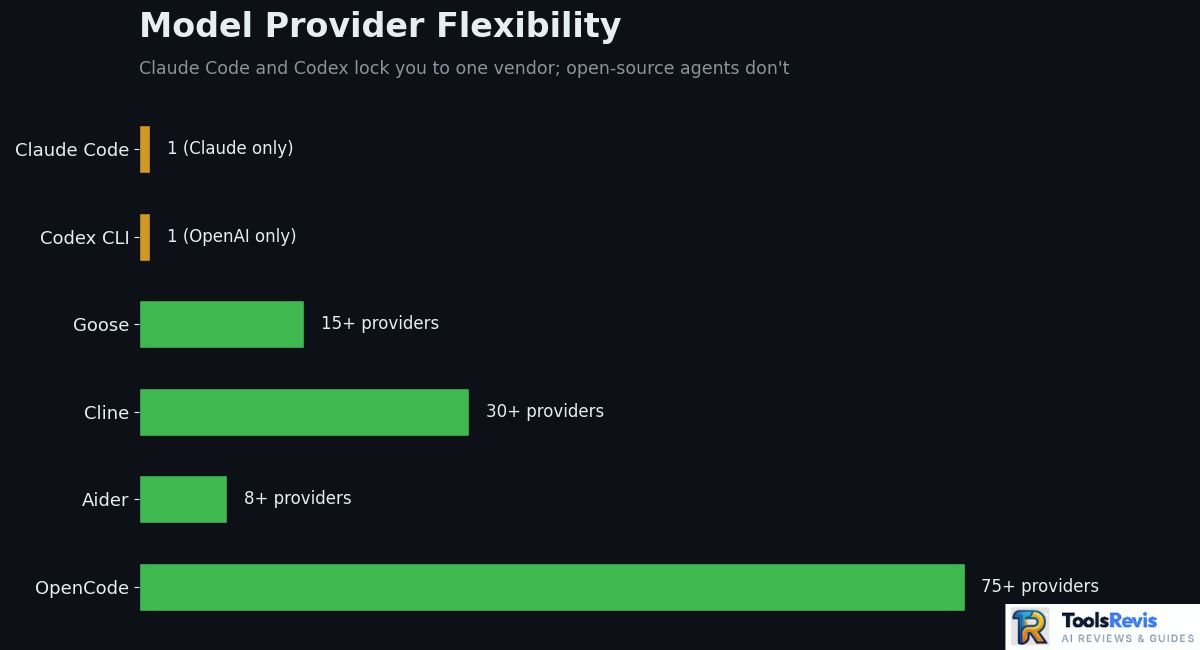
- Model access: Claude models only (Opus, Sonnet); no BYOK to other providers
- Pricing: Pro ($20/mo), Max ($100–$200/mo), Team (from $20/seat, $100/seat for Claude Code access), Enterprise, or pay-as-you-go API (verify current pricing before publishing/updating)
- Pros: Best-in-class context handling and multi-file reasoning; tightest integration with Claude’s own capabilities; official support and a growing skills/plugin ecosystem; works across terminal, IDE extensions, and desktop
- Cons: No self-hosting, no source auditability of the shipped product, and you’re fully dependent on Anthropic’s pricing and rate-limit policies
Cline
- License: Apache 2.0, fully open source
- Model access: 30+ providers, including Anthropic, OpenAI, and local models
- Pricing: Free extension; you pay only your chosen model provider for tokens
- Pros: Closest open-source match to Claude Code’s step-by-step approval workflow; strong MCP marketplace; runs inside your existing VS Code setup
- Cons: Less polished multi-file reasoning than Claude Code on very large codebases; quality depends heavily on which model you connect
Roo Code
- License: Open source (Cline fork)
- Model access: Broad multi-provider support inherited from Cline’s lineage
- Pricing: Free; model costs only
- Pros: Multi-mode workflows (Architect/Code/Debug) give more structured autonomy than Cline’s default
- Cons: Now in maintenance-only mode with no further feature development, making it a weaker long-term bet than Cline or its newer fork, Kilo Code
Aider
- License: Apache 2.0, fully open source
- Model access: Claude, GPT, Gemini, DeepSeek, Grok, Ollama, and more
- Pricing: Free; model costs only
- Pros: Best git-native workflow of any tool on this list — every change is an atomic, reviewable commit; genuinely editor-agnostic
- Cons: No IDE-integrated visual diff review the way Cline offers; less suited to teams that want a graphical approval flow
OpenCode
- License: MIT, fully open source
- Model access: 75+ providers via Models.dev, including local models
- Pricing: Free; model costs only
- Pros: Purpose-built terminal agent (not a fork), with a genuine Plan/Build dual-agent architecture and real LSP integration; the largest and most actively growing open-source terminal community
- Cons: Newer ecosystem than Claude Code’s, so some enterprise-grade polish (admin controls, compliance tooling) that Anthropic’s Team/Enterprise plans offer isn’t there yet
Quick takeaway: if the decision comes down to one axis, it’s this — Claude Code wins on out-of-the-box model quality and polish; every alternative above wins on cost transparency, model freedom, and auditability. Which one wins for you depends on which of those two things your project actually needs more.
Are Open-Source Claude Code Alternatives Actually Free?
The software itself, yes — Cline, Roo Code, Aider, OpenCode, Claw Code, and Goose are all free to download and use. But “free alternative to Claude Code” and “zero ongoing cost” are two different claims, and conflating them is where most budget estimates go wrong.
Here’s the honest cost breakdown, piece by piece.
Software Cost
Every tool covered in this guide — Apache 2.0 or MIT licensed — costs nothing to install, run, fork, or modify. There’s no subscription fee, no seat license, and no feature paywall on the core agent. This is the genuine, unambiguous “free” part of the equation, and it’s a real advantage over Claude Code’s Pro/Max/Team tiers.
API Costs (Anthropic API vs. OpenAI)
The moment you point any open-source agent at a cloud model — Claude, GPT, or Gemini — you’re paying that provider per token, exactly as you would through Anthropic’s own API. Aider, Cline, Roo Code, and OpenCode all default to a bring-your-own-key model, so a heavy day of agentic coding against Claude Sonnet or GPT-5 through one of these tools can cost roughly the same per token as running Claude Code itself, since you’re often calling the identical underlying model.
Important note: the agent is free; the intelligence it calls usually isn’t, unless you route to a local model.
Local Model Costs (Ollama / vLLM / Qwen)
This is where “free alternative to Claude Code” becomes genuinely true. Running Aider, Cline, OpenCode, or Goose against a local model through Ollama, vLLM, or LM Studio means zero per-token cost — your only expense is the electricity and the hardware you already own.
Coding-focused local models worth knowing:
- Qwen2.5-Coder / Qwen3-Coder — widely regarded as the strongest fully local coding model family, with the 32B variant scoring close to GPT-4o on Aider’s polyglot benchmark
- DeepSeek R1 (distilled) — a reasoning-focused model that shows its chain-of-thought before answering, useful for debugging and logic-heavy tasks, though slower than non-reasoning coders on quick edits
- DeepSeek-Coder-V2-Lite and Codestral — solid mid-range picks for machines with 10–16GB of VRAM
Hardware Requirements (RAM & GPU VRAM Needed)
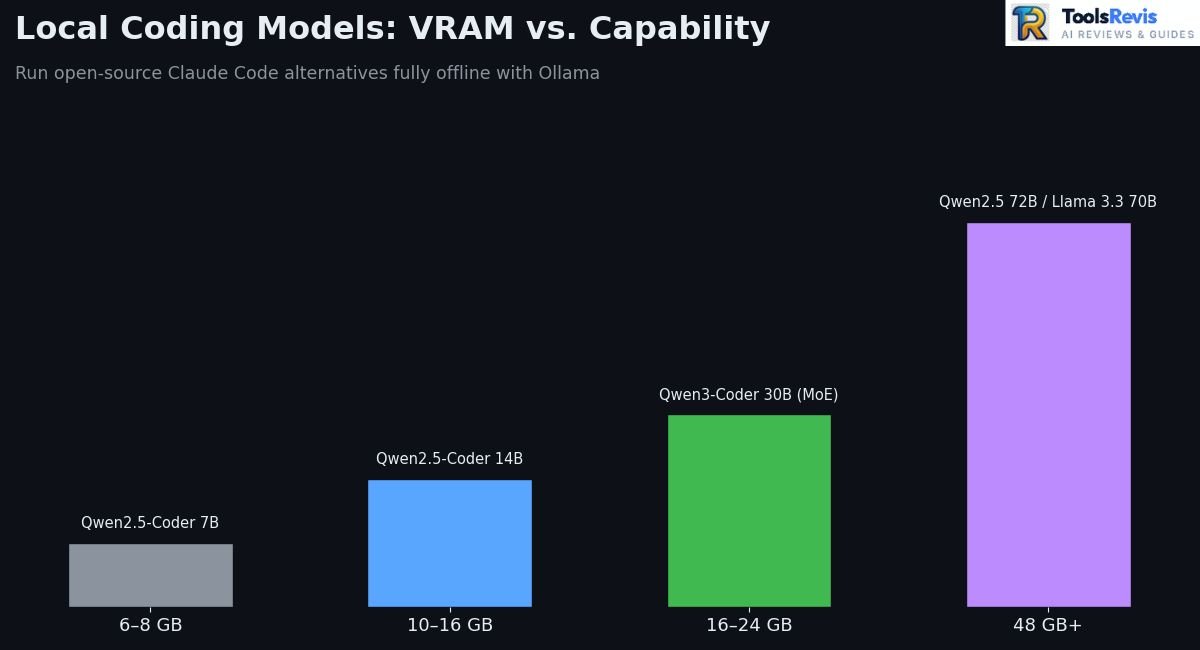
Local model performance scales directly with the VRAM or unified memory you have available:
| VRAM / Unified Memory | Realistic Local Coding Model | Notes |
| 6–8 GB | Qwen2.5-Coder 7B, DeepSeek-Coder-V2-Lite 6.7B | Usable for autocomplete and small edits |
| 10–16 GB | DeepSeek-Coder-V2-Lite 16B, Qwen2.5-Coder 14B | Good balance of speed and reasoning |
| 16–24 GB | Qwen3-Coder-30B (MoE), Qwen2.5-Coder 32B, DeepSeek R1 32B | Near-GPT-4o-class results on some benchmarks |
| 48 GB+ (or dual GPU / 64GB Apple Silicon) | Llama 3.3 70B, Qwen2.5 72B, DeepSeek-R1 70B | Strongest local option, workstation-tier hardware |
Pro tip: quantization (Q4_K_M is the common sweet spot) cuts VRAM needs by roughly half with minimal quality loss, so a “32B model” often fits in less memory than the raw parameter count suggests.
Hidden Costs & Claude Code Max Plan Comparison
The costs that don’t show up in a quick comparison table:
- Your time tuning local setups. Getting a local model reliably calling tools through MCP takes real setup effort that a Claude Code subscription skips entirely.
- Weaker tool-calling on small models. Models under roughly 14B parameters handle multi-step agentic tool use far less reliably than frontier cloud models — you may need more retries, which eats into the time savings.
- Cloud API costs can rival or exceed Claude Code’s subscription. Anthropic’s own data puts average Claude Code usage around $6–$13 per developer per day, or roughly $100–$250 per developer per month at the Max tier. Running Cline or Aider against the same cloud models at pay-as-you-go API rates can land in a similar range — the open-source agent doesn’t discount the model itself.
Practical recommendation: if your goal is genuinely $0 ongoing cost, commit to a local model workflow (Aider, Cline, or Goose plus Ollama) and accept some quality trade-off on complex tasks. If your goal is cost transparency and control rather than zero cost, an open-source agent paired with a cloud model still beats a subscription, since you only pay for what you actually use, with no plan minimum.
What Is the Best Free Alternative to Claude Code?
There’s no single “best” open-source alternative to Claude Code — the right pick depends on where you work and what you value most. Here’s the breakdown by use case.
Best Overall: OpenCode
OpenCode earns the top overall spot because it was purpose-built as a terminal coding agent rather than forked from something else, and its scale backs that up — 160,000+ GitHub stars and access to 75+ model providers through Models.dev. The dual Plan/Build agent architecture and real LSP integration give it a level of polish that most terminal-first alternatives haven’t reached, and its MIT license keeps it fully open for commercial use.
Best for VS Code: Cline
If you live in VS Code and don’t want to change that, Cline is the clearest choice. It brings genuinely agentic, multi-step coding directly into your existing editor setup — file edits, terminal commands, and even browser-based verification — with granular per-step approval that makes it easy to trust with real work.
Its MCP Marketplace and 30+ provider support round it out as the most complete open-source IDE agent available. If you’re considering a dedicated AI code editor instead, see our Cursor AI review.
Best for Terminal: Aider
For developers who want to stay editor-agnostic and treat git as the source of truth, Aider remains unmatched. It doesn’t care whether you’re in Vim, JetBrains, or a bare SSH session — every change becomes a clean, atomic commit you can diff, revert, or review with tools you already know.
Best for Local AI: Goose
Goose is the strongest pick when running entirely offline, on your own hardware, matters more than anything else. Its Linux Foundation governance, Rust-native performance, and first-class Ollama support make it the most credible option for regulated environments or genuinely air-gapped workflows, and its continuous mode with a budget cap is a smart guardrail for unattended local runs.
Best for Beginners: Cline
For someone new to agentic coding tools generally, Cline again has the edge — not because it’s the most powerful, but because its step-by-step approval workflow makes it the easiest to understand and trust while you’re learning what an AI coding agent actually does. You can watch each action before it happens, which builds intuition faster than a more autonomous tool that acts first and explains after.
Quick takeaway: if you only remember one thing from this section — match the tool to your environment first (IDE vs. terminal vs. local-only), and worry about squeezing out maximum capability second. All five options above are free to run and genuinely capable; the wrong choice is picking one that fights your existing workflow.
Claude Code vs. OpenAI’s Equivalent (Operator / Codex / Canvas)
The genuine OpenAI equivalent to Claude Code is Codex CLI, not Operator or Canvas. Operator is a general browser-automation agent, and Canvas is a collaborative writing/code-editing surface inside ChatGPT — neither is a terminal-based, repository-aware coding agent the way Claude Code and Codex CLI both are. It’s a common mix-up worth clearing up before comparing anything else.
Conceptual Comparison
Claude Code and Codex CLI solve the same core problem — an AI agent that reads your repository, plans changes, edits files, and runs commands — but they take different architectural bets. Claude Code runs directly in your local environment with access to your files, git history, and shell.
Codex, by contrast, spans a CLI, a VS Code extension, a web app, an iOS app, and a desktop app, with much of its work happening asynchronously in OpenAI-managed cloud sandboxes rather than purely on your machine.
Interesting distinction: Codex CLI’s client is actually released under an Apache 2.0 license — genuinely open source at the client layer — while the backing model service stays proprietary, exactly like Claude Code. That makes Codex CLI a partial exception among major-lab coding agents, even though it isn’t fully open the way Aider or OpenCode are.
Terminal Workflow
Both tools run natively in the terminal, but the safety model differs. Codex uses OS-level sandboxing — Apple’s Seatbelt framework on macOS, Landlock and seccomp-bpf on Linux — that restricts file and network access during execution at the kernel level. Claude Code’s permission system operates more at the application layer, with interactive approval, an auto-classifier mode, and explicit permission rules rather than kernel-enforced isolation.
Practical recommendation: if you’re running agents against untrusted or adversarial input — reviewing an external contractor’s code, for instance — Codex’s kernel-level sandboxing is the more conservative choice for that specific task.
Agentic Capabilities
Independent benchmarking through 2026 has generally found the two trade blows depending on the task type: Codex tends to be faster and more token-efficient on terminal-native and DevOps-style tasks, while Claude Code has shown an edge on complex, repository-level refactors and architectural reasoning, aided by its large context window. Neither tool wins universally, and results shift meaningfully with each new model release from either company, so treat any specific benchmark percentage as a snapshot rather than a permanent verdict.
Model Flexibility
Neither Claude Code nor Codex CLI lets you swap in a different vendor’s model — Claude Code runs Claude models exclusively, and Codex runs OpenAI’s GPT-5-family models exclusively. This is precisely the constraint that open-source alternatives like Aider, Cline, and OpenCode remove entirely, since all three let you point the same agent at Claude, GPT, Gemini, DeepSeek, or a fully local model without switching tools.
Pricing Model
Subscription pricing between the two has converged closely: both offer an entry tier around $20/month (Claude Pro or ChatGPT Plus) scaling to power tiers around $100–$200/month (Claude Max or ChatGPT Pro), plus pay-as-you-go API access for both. OpenAI additionally bundles some Codex access into its cheaper Free and Go tiers, giving it a lower-friction trial path, though actual usable capacity at those tiers is limited.
For a broader look at their subscription plans, see our ChatGPT Plus vs Claude Pro comparison.
Quick takeaway: if you’re choosing between Claude Code and Codex specifically, it’s a genuine two-horse race between comparably priced, comparably capable proprietary tools — the real leap in cost transparency and model freedom only comes from stepping outside both, into the open-source alternatives covered earlier in this guide.
Developer Community Sentiments (Reddit & Quora Insights)
The two complaints that come up most consistently across Reddit’s r/ClaudeAI, Anthropic’s own Discord, and Hacker News aren’t about code quality — they’re about context management and unpredictable token consumption. Both concerns push a meaningful number of developers toward evaluating open-source alternatives, even ones who otherwise like Claude Code’s output.
Autocompact & Context Drift Issues
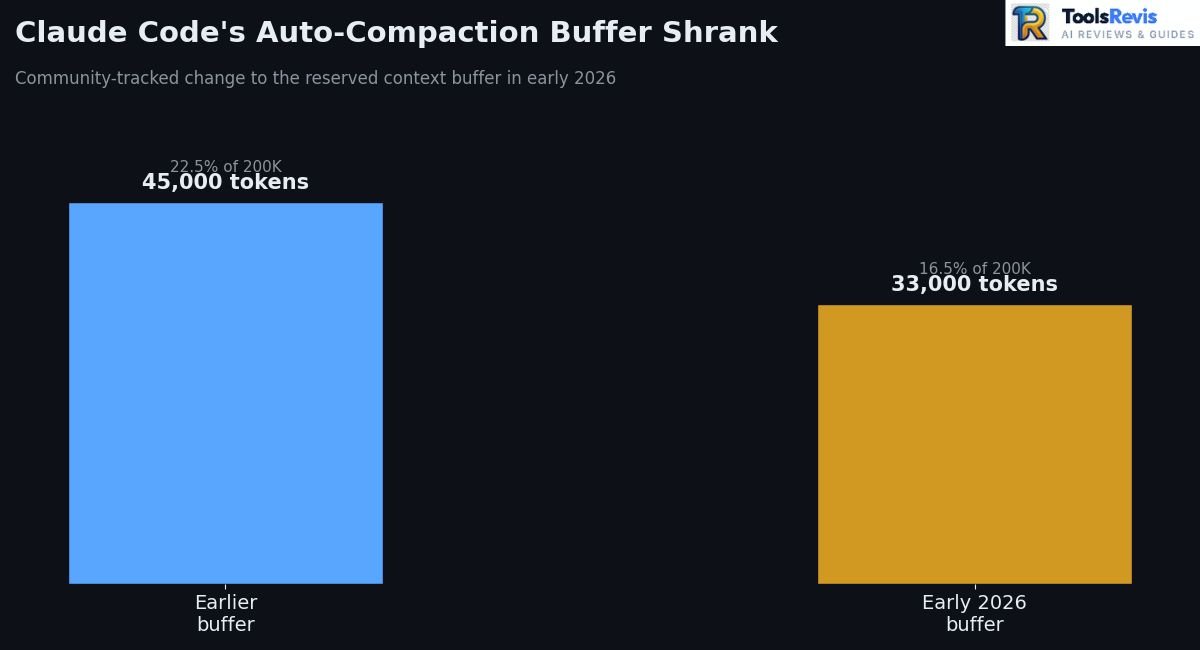
The pattern developers report: long Claude Code sessions have a predictable failure mode. Things start sharp, then somewhere in a long session, Claude begins re-asking questions it already got answered, forgetting earlier architectural decisions, or suggesting code that contradicts something it wrote an hour earlier. This is generally referred to as context rot or context drift, and it happens because Claude Code reserves a portion of the context window as a buffer before triggering automatic compaction — a summarization step that condenses older conversation history to make room for new work.
What actually changed: that reserved buffer has shifted over time — one detailed community analysis tracked it moving from roughly 45,000 tokens (22.5% of a 200K window) down to around 33,000 tokens (16.5%) in early 2026, a change that wasn’t clearly documented in the official changelog.
Community workarounds have emerged around an environment variable that lets you control the percentage threshold at which auto-compaction fires, letting power users trigger compaction earlier (preserving more working memory) or later (maximizing usable context before the first summarization pass).
Community-recommended practice: several practitioner guides now recommend manually triggering compaction around 60% context capacity with specific instructions about what to preserve, rather than letting it fire automatically near 95% — proactive compaction reportedly produces cleaner continuity than reactive, last-minute summarization.
Token Burnout & Local Execution Solutions
The pattern developers report: a recurring Reddit and Discord theme is that token consumption has, at various points, felt disproportionate to the work being done — developers with several active plugins have reported system context alone consuming 35,000–40,000 tokens just from loading CLAUDE.md and memory files, before any actual task work begins. In January 2026, a wave of Reddit threads and Discord posts flagged sudden, unexplained jumps in usage-limit consumption;
Anthropic publicly acknowledged developers were “hitting usage limits way faster than expected” and called it a top investigation priority, though the company also stated it hadn’t identified a specific inference bug behind every report.
Common root causes practitioners point to:
- Bloated CLAUDE.md and memory files that get re-injected into every session
- Multiple active plugins/skills stacking system-prompt overhead
- Long sessions re-sending full conversation history on every request, so a 100K-token conversation costs 100K input tokens on every subsequent call
Where local execution fits in: this exact pain point is what’s driving real interest in the open-source, locally-hosted alternatives covered earlier in this guide. Running Aider, Cline, or Goose against a local Ollama model sidesteps the token-cost conversation entirely, since there’s no per-token billing to burn through — the trade-off, as covered earlier, is reduced reliability on complex multi-step tool calls compared to frontier cloud models.
Practical recommendation: if token burn is your main frustration rather than a dealbreaker, first try pruning CLAUDE.md, disabling unused plugins, and compacting proactively before assuming you need to switch tools entirely — several of the worst-reported cases traced back to configuration bloat rather than a fundamental platform problem.
The Open-Source Ecosystem Built Around Claude Code
Direct answer: Even though Claude Code’s core stays closed, community showcases on r/ClaudeCode and r/ClaudeAI reveal a genuinely large open-source ecosystem built around it — a pattern worth understanding on its own.
Dozens of developers have released free, open-source tools that wrap or extend Claude Code without touching its proprietary internals: self-hosted dashboards like Codeman and Claude Command Center for managing multiple parallel sessions across machines, desktop monitors like ClaudeWatch that track running sessions and notify when one goes idle or needs input, IDE-style wrappers like Vibeyard that add cost tracking and split-pane session management, and task-assignment platforms like Multica that let teams treat Claude Code agents like project teammates. Lightweight remote-access tools such as TailClaude also let developers resume an active Claude Code session from a phone browser in under a minute.
Practical takeaway: this ecosystem is a useful signal for anyone deciding between Claude Code and a fully open-source alternative — it shows that a closed core doesn’t prevent an open, community-driven tooling layer from forming on top of it, much the way VS Code (also source-available, not fully open) still supports a massive open extension ecosystem. If session management, cost tracking, or multi-agent orchestration is your actual pain point rather than source auditability itself, one of these community tools might solve it without switching agents entirely.
Open Claude GitHub Repositories & Contributors
“Open Claude GitHub” searches usually lead to one of two very different things — Anthropic’s own official repository, which is documentation-only, and the community ecosystem of clean-room rewrites and forks that emerged from the March 2026 leak. Knowing which is which matters if you’re deciding what to actually use or contribute to.
The Official Repository
github.com/anthropics/claude-code is Anthropic’s real, official repository — but it holds documentation, issue tracking, and release notes, not the application’s full source. As of mid-2026 it had accumulated well over 140,000 stars, 22,000+ forks, and several thousand open issues, reflecting Claude Code’s massive install base rather than an open codebase to contribute code to directly. The GitHub issue requesting a formal open-source license (#8517) remains closed as “not planned,” which is the clearest official signal that this status isn’t changing soon.
Key Contributors & Open Source Repositories
Claw Code is the most notable independent project to come out of this ecosystem. Developer Sigrid Jin (GitHub handle instructkr) published a Python port within hours of the March 31, 2026 incident, describing it as an independently written implementation that mirrors architectural patterns rather than reusing source code directly. It became one of the fastest-growing repositories in GitHub’s history, later followed by a community-driven Rust runtime for improved performance and memory safety.
Community archive and study repositories — several GitHub users have organized collections that separate the raw leaked TypeScript source (preserved for research and historical record) from clean-room rewrites like Claw Code, explicitly labeling which is which to avoid legal ambiguity for anyone browsing them.
The fork tree around Cline represents the other major contributor lineage: Cline itself (originally “Claude Dev,” now Apache 2.0 under Cline Bot Inc.), forked into Roo Code (now in maintenance mode after pivoting to a cloud product called Roomote), which was itself forked into Kilo Code, a newer, actively funded project absorbing much of Roo Code’s former user base.
OpenCode’s team built independently of the Cline lineage entirely, growing to 160,000+ stars under an MIT license with its own dual-agent (Plan/Build) architecture — one of the largest genuinely from-scratch open-source coding agent projects in this space.
Important legal note: Anthropic issued DMCA takedown notices against roughly 8,100 repositories that hosted direct, unmodified copies of the leaked source code. Most of these notices were retracted within hours after Anthropic said the sweep had unintentionally hit legitimate, unrelated forks.
Clean-room reimplementations like Claw Code — which describe themselves as architecturally inspired rather than copied — were generally not targeted, but this remains a legally untested area. If you’re evaluating any “Claude Code source” repository for actual use, checking whether it’s a direct copy versus an independently written clean-room implementation isn’t just an academic distinction — it affects whether you’re touching contested intellectual property at all.
Practical recommendation: for anything beyond casual study, contribute to or build on the clearly independent, actively maintained projects — Cline, OpenCode, Aider, Goose, or the Claw Code clean-room rewrite — rather than any repository hosting a direct copy of the leaked TypeScript source.
Should You Use Claude Code or an Open-Source Alternative?
There’s no universally “better” choice here — it comes down to whether you value polish and out-of-the-box model quality, or auditability, cost control, and model freedom. Match your priority to the profiles below.
Choose Claude Code If…
- You want the best available out-of-the-box performance on complex, repository-level refactors without tuning anything yourself
- Your organization already has a Claude subscription (Pro, Max, Team, or Enterprise) and per-seat cost isn’t the constraint
- You need official support, a curated skills/plugin ecosystem, and enterprise features like SSO, audit logs, and centralized billing
- You’re comfortable being fully dependent on Anthropic’s models, pricing, and rate-limit policies in exchange for that polish
- Source-level auditability isn’t a hard requirement for your security or compliance process
Choose Cline/Roo Code If…
- You want to keep your existing VS Code (or JetBrains, Zed, Neovim) setup exactly as it is
- Granular, step-by-step approval of every action matters for your team’s audit trail or your own comfort level with AI autonomy
- You want the flexibility to switch between 30+ model providers without changing tools
- Note: if choosing between the two, lean toward Cline over Roo Code specifically — Roo Code is now in maintenance-only mode with its team focused on a separate cloud product, while Cline and its more recently active fork, Kilo Code, continue shipping updates
Choose Aider If…
- Your workflow is genuinely editor-agnostic — SSH sessions, multiple IDEs across a team, or CI/CD pipelines
- You want every AI-driven change to be a clean, atomic, reviewable git commit by default
- You’d rather work from the command line without a GUI diff-review layer
- You’re comfortable working across dozens of supported languages without IDE-specific tooling
Choose a Local Model If…
- Zero per-token cost matters more than squeezing out the absolute best model quality on hard tasks
- You’re working in a regulated, air-gapped, or genuinely offline environment where no code can leave the machine
- You have at least a mid-range GPU (8GB+ VRAM) and are willing to accept reduced reliability on complex multi-step tool calls from smaller models
- You want foundation-level governance rather than a single vendor’s roadmap — Goose, under the Linux Foundation’s Agentic AI Foundation, is the strongest option here
Quick decision shortcut: if you had to boil this down to one question, ask yourself: “Am I optimizing for the best possible output today, or for control over cost, auditability, and model choice over the long run?” The first answer points to Claude Code. The second points to the open-source ecosystem — and increasingly, to Aider, Cline, or OpenCode specifically, since all three combine genuine open licensing with production-grade capability in 2026.
More AI Coding Guides
Explore these related guides to compare Claude models, AI coding editors, and alternative developer tools.
Claude Sonnet 5 vs GPT-5.6 Sol
Compare two leading AI models for coding, reasoning, and development workflows.
Read ComparisonWindsurf vs Cursor AI
Compare two popular AI-powered coding environments and their developer workflows.
Read ComparisonCursor AI vs Kimi K3
See how Cursor compares with Kimi K3 for AI-assisted coding and development.
Read ComparisonFrequently Asked Questions
1. Is Claude Code open source?
No. Claude Code is proprietary software distributed under Anthropic’s Commercial Terms of Service, with no OSI-approved license attached. A March 2026 npm packaging error briefly exposed its TypeScript source, but that accidental leak never changed its official licensing status — a formal request to open-source it was closed by Anthropic as “not planned.”
2. Is there a free open-source alternative to Claude Code?
Yes. Cline, Roo Code, Aider, OpenCode, Claw Code, and Goose are all free, open-source coding agents under Apache 2.0 or MIT licenses. The software itself costs nothing; you only pay if you connect them to a paid cloud model instead of running a local one through Ollama or a similar tool.
3. What is the best open-source alternative to Claude Code?
It depends on your environment: OpenCode is the strongest overall terminal-native pick, Cline is best for staying inside VS Code, Aider is best for a purely terminal, git-native workflow, and Goose is best if local execution and foundation governance matter most to you.
4. Is Claude Code better than Cline?
Claude Code generally produces stronger results on complex, repository-wide refactors out of the box, thanks to its large context window and tight integration with Claude’s models. Cline closes much of that gap for VS Code users and adds model flexibility and full source auditability that Claude Code doesn’t offer — which tool is “better” depends on whether you’re prioritizing raw output quality or openness and cost control.
5. Can Claude Code run locally?
The CLI itself runs on your local machine and works directly with your files, git history, and shell. However, it always calls Anthropic’s cloud-hosted models for the actual reasoning — there’s no way to point Claude Code at a fully local, self-hosted model the way you can with Aider, Cline, or Goose.
6. Is OpenCode an alternative to Claude Code?
Yes, and one of the strongest available. OpenCode is a purpose-built, MIT-licensed terminal coding agent — not a fork of Claude Code or Cline — with support for 75+ model providers, including local Ollama models, and a dual Plan/Build agent architecture that handles task decomposition and execution separately.
7. Can I see Claude Code’s system prompt without the March 2026 leak?
Yes, partially. Even before the full source leak, developers found that Claude Code’s minified npm package still contained readable system prompt text — tool-usage rules, identity strings, and commit templates — though this was always distinct from an official open-source release.
Final Verdict
Claude Code is not open source, and it isn’t going to become open source based on Anthropic’s own public stance — the March 2026 leak was an accident, not a policy shift. That single fact should shape how you evaluate it, not how you feel about the tool’s actual coding ability, which remains genuinely strong.
If your priority is budget, the local-model path through Aider, Cline, or Goose paired with Ollama gets you to genuinely free, with the honest trade-off of reduced reliability on the hardest multi-step tasks. If your priority is privacy or regulatory compliance, Goose’s Linux Foundation governance and true offline execution make it the most defensible choice for audits.
If your priority is developer experience inside an existing IDE, Cline is the most polished bridge between Claude Code’s agentic feel and full openness — just steer clear of Roo Code for new projects now that it’s in maintenance mode. And if your priority is agentic coding power above all else, and you’re comfortable being fully dependent on one vendor’s pricing and roadmap, Claude Code remains a legitimately excellent tool — just go in knowing exactly what you’re trading away to get it.
There’s no wrong answer here, only a mismatched one. Pick based on which of these four things — budget, privacy, developer experience, or raw power — actually matters most for what you’re building.

I’m Umair Ahmad, founder of ToolsRevis. I personally test every AI tool we cover — signing up, running real workflows, checking pricing tiers, and comparing outputs — before writing a single word. My goal: cut through AI marketing hype with honest, hands-on verdicts.
Let’s achieve more together!