
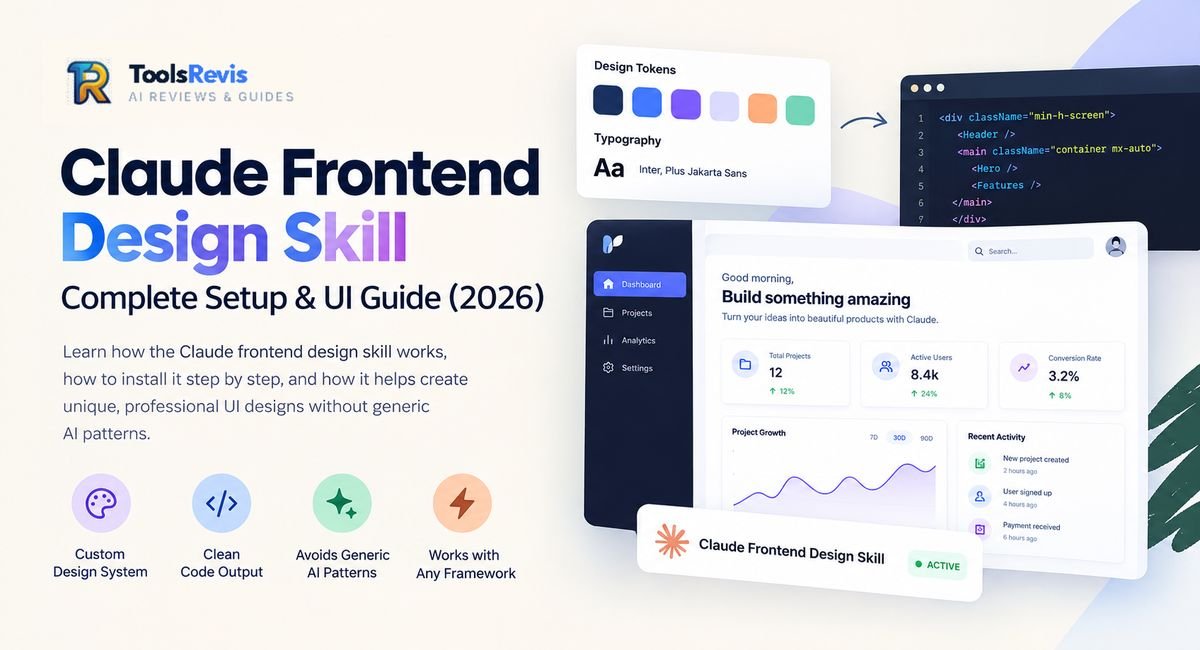
Ask Claude to “build a landing page” and you’ll probably get the same page everyone else gets: Inter font, purple gradient, rounded cards. That’s the exact problem this skill was built to fix.
Introduction
If you’ve spent any time building UI with an AI coding agent, you’ve probably noticed a pattern: every “modern SaaS dashboard” looks the same, every “landing page” reaches for the same purple-to-blue gradient, and every card component gets the identical soft grey shadow. This isn’t a coincidence — it’s a known limitation of how language models generate design. Left alone, a model gravitates toward the statistical average of what it’s seen, which is exactly why AI-generated interfaces are so easy to spot at a glance.
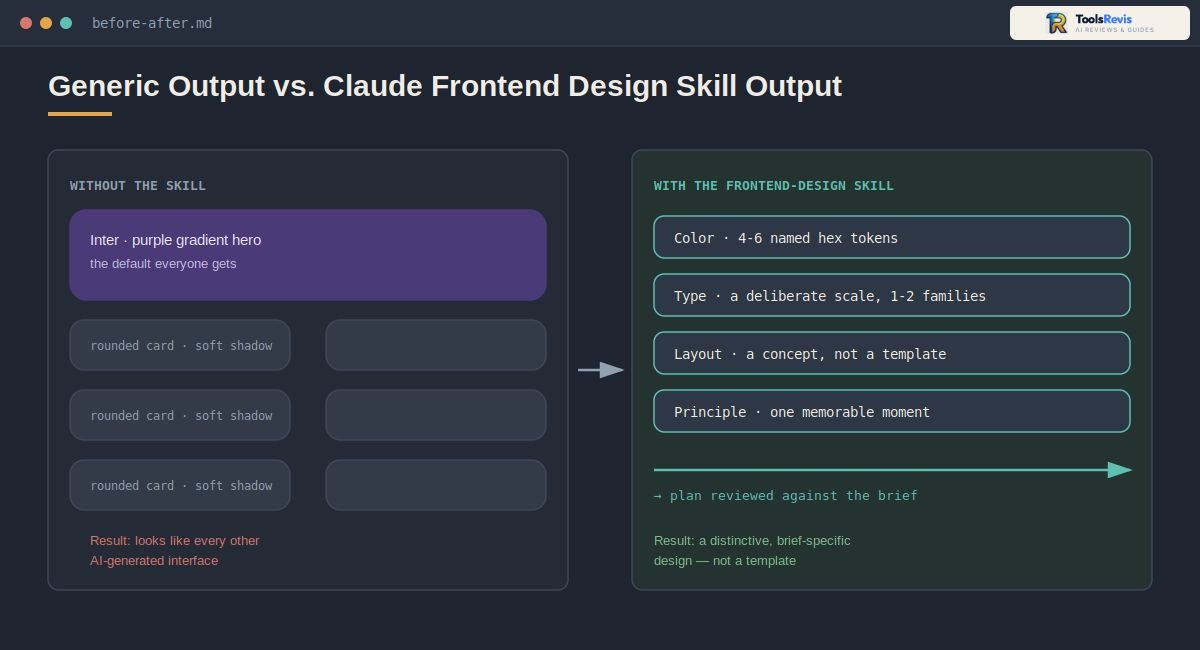
The Claude frontend design skill exists specifically to break that pattern. Instead of leaving Claude Code to guess at colors and layout on the fly, this skill makes it plan a real design system first — palette, typography, layout logic, and a guiding design principle — before a single line of code gets written.
This guide walks through what the skill actually does, how to install and configure it (including local project setups), where it fits alongside Claude’s other plugins, and how to fix it when it isn’t behaving the way you expect. Along the way, we’ll also look at how it compares to just prompting Claude manually, and answer the most common questions developers run into while using it.
Before diving into skill setup, you can check our complete analysis on Is Claude Code Open Source? to see how its ecosystem and free alternatives compare.
What Is the Frontend-Design Skill in Claude Code?
The frontend-design skill is Anthropic’s official agent skill that gives Claude Code a design methodology to follow — a plain-language rulebook, not a code generator — so its UI output looks intentionally designed instead of assembled from defaults.
Definition and Function
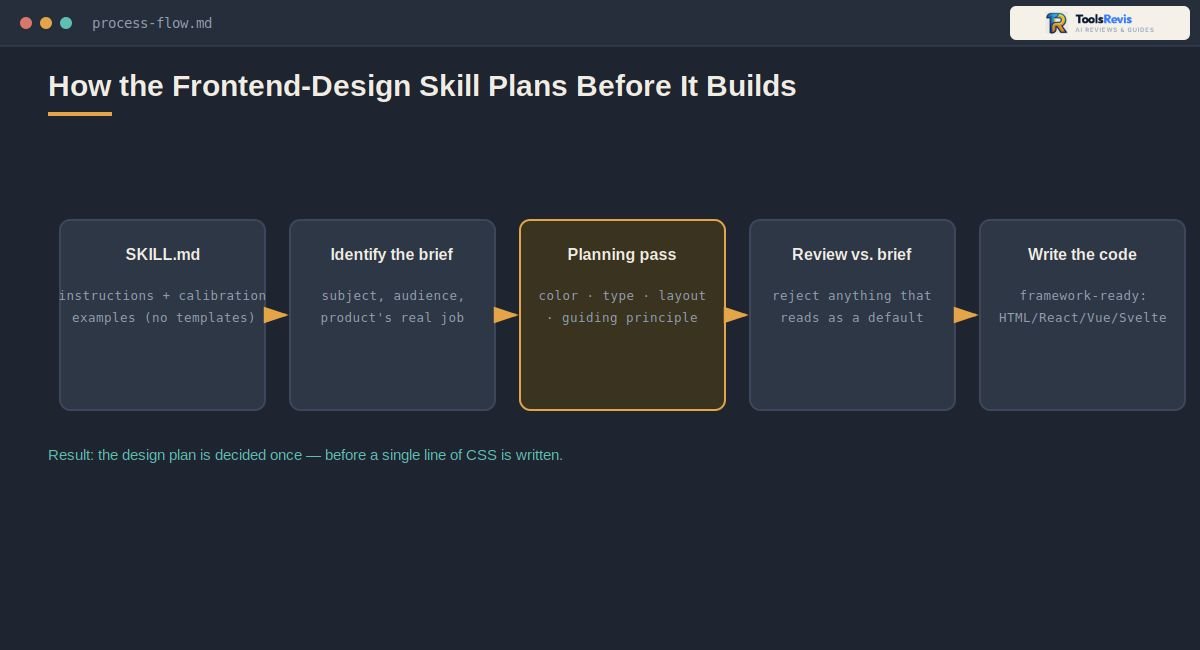
Structurally, the claude code frontend design skill is a SKILL.md file: a markdown document containing instructions, principles, and calibration examples rather than templates or a component library. It ships as part of Anthropic’s official plugin repositories on GitHub, maintained by Anthropic’s own team. When it’s active, Claude is instructed to behave like the design lead at a studio that refuses to hand every client the same look — meaning it has to identify the subject matter, the audience, and the product’s purpose before making any visual decisions.
This matters because it changes when Claude thinks about design. Instead of deciding on colors and layout token-by-token while writing CSS, the skill front-loads that thinking into a planning pass, then only writes code once that plan holds up.
Web Design Capabilities
The claude web design skill side of this covers the practical output: responsive layouts, a defined type scale, a compact color-token system (typically four to six named hex values), and layout concepts sketched out in plain language or ASCII wireframes before implementation. It’s framework-agnostic in principle — the design thinking applies whether the final code lands in plain HTML/CSS, React, Vue, Svelte, or a Tailwind + Shadcn UI setup. For a closer look at Claude’s latest model capabilities, see our Claude Sonnet 5 review.
Practically, this means Claude is deciding things like:
- Whether content should be left-aligned, centered, or justified — and why
- Whether two typefaces are actually needed, or one family with varied weights does the job
- Where the “one memorable moment” of the page should live, rather than spreading emphasis evenly
The Anti-“AI Slop” Approach
A defining feature of this skill is that it explicitly names the visual clichés Claude should avoid, rather than leaving “don’t look generic” as a vague instruction. Verify your installed version if the skill’s behavior doesn’t match what’s described here: as an actively maintained Anthropic skill, its calibration examples and banned-pattern list get updated periodically, and an older cached copy in a global install can behave differently from a freshly pulled one. You can also review Anthropic’s official frontend-design SKILL.md to see the design principles and anti-generic guidance directly from the source.
| Common “AI look” | What it typically involves |
| Warm-cream + serif | Cream background (~#F4F1EA), high-contrast serif display, terracotta accent |
| Dark mode default | Near-black background with a single neon or acid-green accent |
| Broadsheet layout | Hairline rules, zero border-radius, dense newspaper-style columns |
| SaaS-card kit | Identical rounded cards, one shadow style on everything, gradient washes |
| Template chrome | ALL-CAPS eyebrow labels, middot-joined meta text, arrow-suffixed buttons |
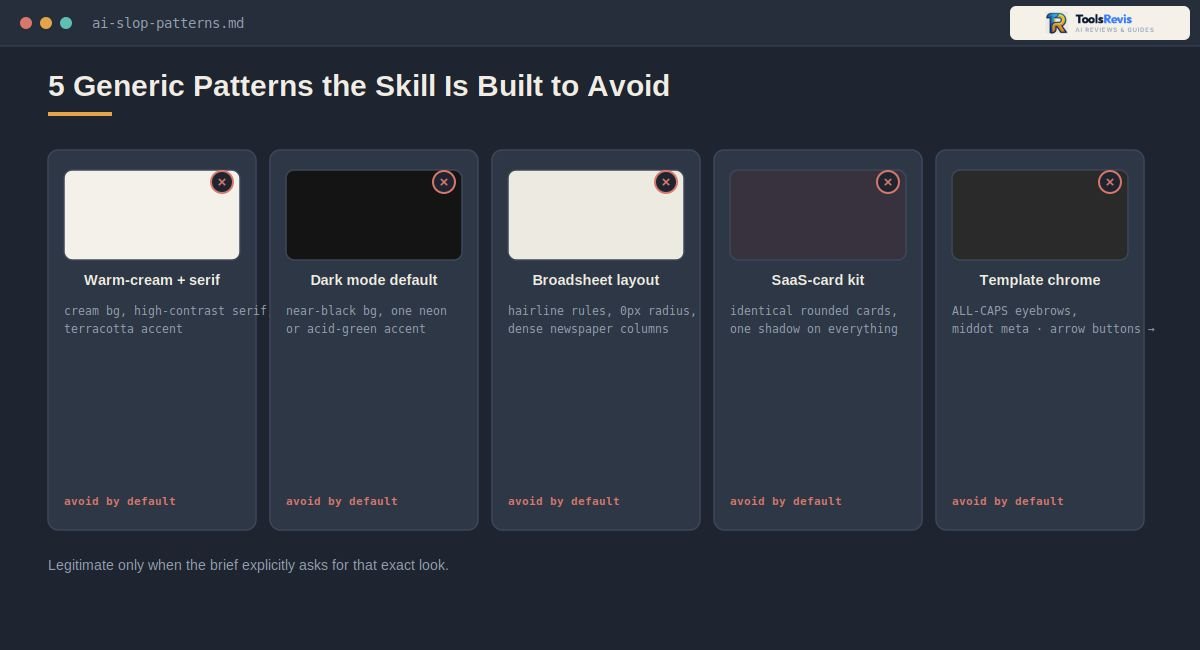
Note: None of these looks are wrong on their own — the skill’s point is that they shouldn’t appear by default on every brief regardless of subject matter. If a project brief genuinely calls for one of these styles, the skill is built to follow that brief rather than override it.
Activation Trigger
Here’s the direct answer developers usually want: you don’t need a special command to activate it. Claude Code is designed to detect frontend-design intent automatically — prompts like “build a landing page for a fintech app” or “design a settings panel with dark mode” are enough to trigger the skill’s design-planning process, distinguishing that kind of request from a generic coding task like fixing a bug or writing a backend function.
Some marketplace listings and community setups also expose it as an explicit slash command (e.g., /frontend-design) for cases where you want to force the skill on for a task that wouldn’t normally trigger it — useful if Claude defaults to a plain implementation on an ambiguous prompt.
How to Install & Use the Frontend Design Plugin
You install the claude code frontend design plugin with a single terminal command — either globally through the skills CLI or locally inside a project’s .claude/skills folder — and Claude Code loads it automatically from there with no extra configuration.
Prerequisites
Before installing, make sure you have:
- Claude Code CLI installed and authenticated to your Anthropic account
- Node.js available on your machine, since installation runs through npx
- Workspace write permissions in the project directory where you want the skill active (needed to create the .claude/skills folder)
Quick tip: If you’re not sure whether Claude Code is installed, run claude –version in your terminal first. If that command isn’t recognized, install Claude Code itself before attempting to add any skill.
Step-by-Step Installation
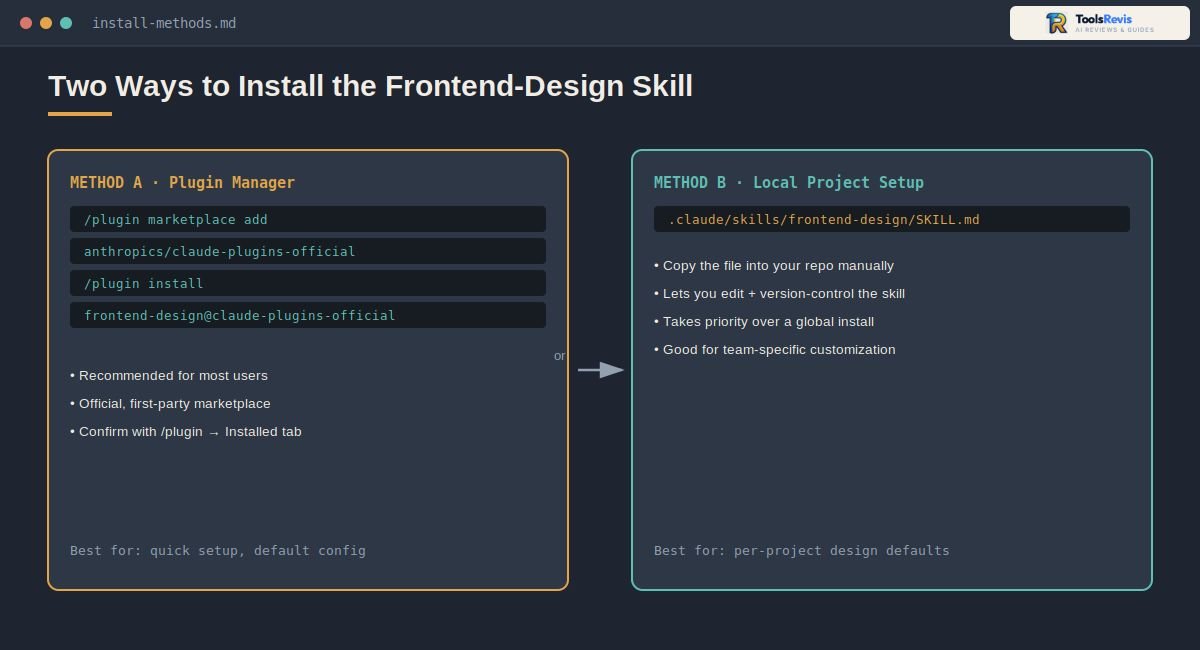
There are two practical ways to get the anthropic frontend design skill into a project, depending on whether you want it available everywhere or scoped to a single repo.
Method A: Built-in plugin manager (recommended for most users)
The frontend-design skill ships as an official Anthropic plugin, and Claude Code’s own plugin manager is the documented way to install it — no external tooling required. From inside a Claude Code session, run:
`/plugin marketplace add anthropics/claude-plugins-official
/plugin install frontend-design@claude-plugins-official
Anthropic’s official marketplace is registered automatically the first time you launch Claude Code interactively, so in most setups the marketplace step is already done and you can go straight to the install command. Run /plugin afterward to confirm it’s listed under the Installed tab.
(Note: the exact marketplace and plugin identifiers for first-party Anthropic plugins have shifted more than once as Claude Code’s plugin system has evolved. If this command doesn’t resolve, run /plugin in your Claude Code session and use the Discover tab to search “frontend-design” directly rather than troubleshooting the CLI string.)
If you’d rather use a third-party, community-maintained CLI instead of Claude Code’s built-in manager, tools like npx skills can also pull the skill directly from GitHub — but note these are independent open-source projects, not Anthropic tooling. Because command syntax for these tools changes frequently, check the tool’s own README for the current syntax before running it, rather than relying on a single hard-coded command here.
Method B: Local project-level setup
If you’d rather manage the skill file manually — useful for teams that want to customize it or check it into version control — copy the skill directly into your project’s local skills directory:
.claude/skills/frontend-design/SKILL.md
Anthropic also maintains the source file in its public repositories, so you can pull the raw SKILL.md content from GitHub and drop it into that path yourself. This local approach is also how you’d apply project-specific edits (covered later in the customization section) without touching the globally installed version.
Pro tip: Project-level skills in .claude/skills take priority for that repo, which makes Method B the better choice if different projects on your machine need different design defaults.
Usage Guide
Once installed, there’s no special syntax needed to use it. Just describe the interface you want:
- “Build a dashboard for a music streaming app”
- “Create a landing page for an AI security startup”
- “Design a settings panel with dark mode support”
Claude Code detects that these are frontend-design tasks, runs its internal planning pass (palette, type, layout, principle) before writing code, and returns a complete implementation — typically HTML/CSS/JS or a framework-specific component, depending on what your project already uses.
If you installed the skill but want to confirm it’s active, you can list your installed skills:
npx skills list
Practical tip: give Claude screenshots or a design-tokens file for existing projects
The r/ClaudeCode thread (“Gave Claude screenshots instead of code”) has a solid practical insight — when adding a page to an existing app, Claude inferring the UI from code alone often causes visual mismatch. Screenshots or a small design-tokens file fix this far more reliably than letting it guess.
If you’re exploring the wider AI coding ecosystem, our guide to the best AI tools for developers covers other tools and workflows worth considering.
Claude Plugins vs. Skills & Projects: What’s the Difference?
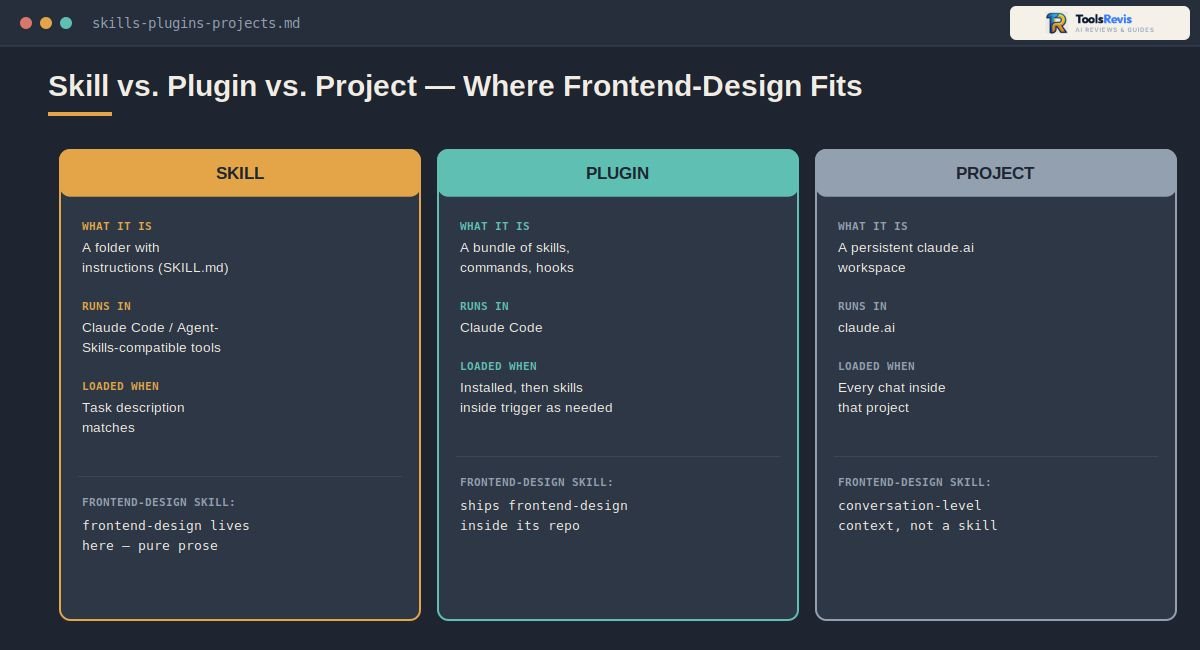
In short: a skill is a focused set of instructions Claude loads only when a task needs it; a plugin is a bundle that can package several skills together with commands and configuration; and a project (on claude.ai) is a persistent workspace with its own instructions and reference files — they solve different problems and aren’t interchangeable.
Core Distinction
The claude plugins vs skills question comes up constantly because the two overlap in what they feel like to use, even though they’re structurally different things.
- Skills are folders containing a SKILL.md file — YAML metadata plus markdown instructions, sometimes with reference documents or helper scripts attached. The frontend-design skill is a good example: it’s pure instructional content, no bundled scripts or UI templates. Claude pulls a skill into context only when the task at hand matches its description.
- Plugins are the distribution layer. A plugin can bundle multiple skills, slash commands, subagent configurations, and hooks into a single installable package. Think of a plugin as the shipping container and a skill as one of the items inside it — frontend-design ships as a skill housed inside Anthropic’s official plugin repository.
As for claude projects vs skills: Projects are a claude.ai feature for organizing conversations around a specific piece of work, with custom instructions and uploaded reference files scoped to that workspace. They’re conversation-level context you set up once and reuse in a project’s chat history. (The frontend-design skill’s README also credits Anthropic’s own Frontend Aesthetics Cookbook as further reading for prompting technique — worth checking if you want more calibration examples beyond what’s in the skill file itself.)
Skills, by contrast, are portable instruction sets that travel with your coding agent (Claude Code, and other Agent-Skills-compatible tools) and get loaded automatically based on the task — not tied to a single conversation thread.
If you’re comparing Claude Code with other AI coding environments, see our Windsurf vs Cursor AI comparison.
| Skill | Plugin | Project | |
| What it is | A folder with instructions (SKILL.md) | A bundle of skills, commands, hooks | A persistent claude.ai workspace |
| Where it runs | Claude Code / Agent-Skills-compatible tools | Claude Code | claude.ai |
| Loaded when | Task description matches | Installed, then skills inside trigger as needed | Every chat inside that project |
| Best for | Narrow, reusable procedural knowledge | Distributing a toolkit (multiple skills + commands) | Ongoing work needing shared context/files |
Execution Difference
A skill doesn’t call out to external services on its own — it directly shapes how Claude reasons and what it writes to your local files, which is exactly how frontend-design works: it changes the planning and code Claude produces in your terminal session. Plugins can go further, since a bundled component might connect to external APIs or tools (via MCP configuration) as part of the same package.
So when you see claude code plugins frontend design discussed together, understand that frontend-design itself stays local and file-based; it’s the plugin wrapper around it that’s capable of including networked components, even though this particular skill doesn’t need any.
Context & Token Efficiency
This is worth understanding before you install a dozen skills at once: each skill’s description is loaded into Claude’s context so it can decide whether to use it, and the full instruction body only loads once the skill is actually triggered. That’s why skills are typically kept lean — the frontend-design file itself is a few dozen lines of prose, not a sprawling reference manual, specifically so it doesn’t eat into your available context window when it’s sitting idle.
If you’re stacking many skills in one project, keeping each one’s SKILL.md focused (rather than padding it with redundant examples) is the practical way to protect token budget for the actual coding work.
Claude Design vs. the Frontend-Design Skill
These two names get confused constantly, and it’s worth being precise about the difference before you install anything. Claude Design is a separate, standalone product accessible at claude.ai/design — you describe what you want, and it hands you back an HTML/CSS visual prototype plus a “handoff bundle” you can either download or pass directly into Claude Code to implement in your actual stack. It’s a design tool that sits outside your terminal entirely.
The frontend-design skill, by contrast, lives inside Claude Code itself. It doesn’t produce a separate prototype to hand off — it shapes the code Claude writes for you directly, in the same session, in your actual project files. In practice, the two often work together: Claude Design is reportedly built on the same underlying design philosophy as the frontend-design skill, which is part of why output from either one can carry a similar visual signature.
Why this matters: If you’re troubleshooting “generic-looking output” and you’re not sure which one you’re using, check where the output came from. A prototype link or downloadable bundle means Claude Design. Code appearing directly in your terminal session means the skill.
What Can It Actually Do? Key Features & Capabilities
At its core, the skill plans a design system, then writes framework-ready code from it — but the wider Claude Code ecosystem also includes several separate, complementary skills that people often lump in with frontend-design even though they’re built by different teams and solve different parts of the workflow. Explore more AI tools and developer resources on ToolsRevis.
UI/UX Generation
The frontend-design skill itself covers the full front-of-pipeline: it defines a color palette (typically 4–6 named hex values), a typography system, a layout concept, and a guiding design principle, then implements that plan as working code. For another AI-assisted approach to building applications, see our Replit AI review.
It’s stack-agnostic — the same planning process applies whether the output lands as plain HTML/CSS/JS or as components in Tailwind CSS, React, Vue, Svelte, or Shadcn UI. What changes is only the syntax of the final implementation, not the design reasoning behind it.
Advanced UI Capabilities
Here’s a distinction worth being precise about: ui ux pro max claude code and claude ui ux pro max skill refer to a separate, third-party skill (built by an independent developer, not Anthropic) that takes a different approach — it ships a searchable database of pre-built UI styles, color palettes, font pairings, and UX guidelines that Claude queries before implementing. Anthropic’s own frontend-design skill, by contrast, doesn’t ship a database at all; it works by reasoning through calibration examples and principles rather than searching a catalog.
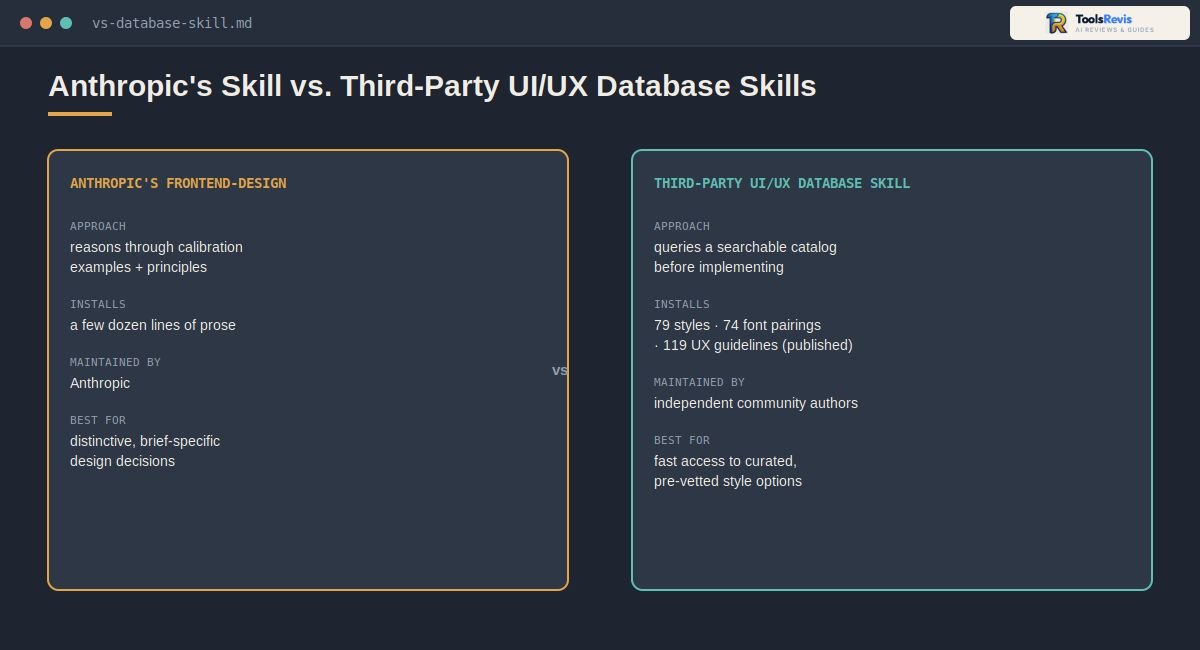
Neither approach is strictly “better” — they solve the problem differently:
| Anthropic’s frontend-design | Third-party UI/UX database skills | |
| Installs | Anthropic’s own catalog listing | 79 searchable styles (50 active), 74 font pairings, 119 UX guidelines (per published third-party listings) |
| File size | A few dozen lines of prose | Larger, with scripts and reference data |
| Maintained by | Anthropic | Independent community authors |
| Best for | Distinctive, brief-specific design decisions | Fast access to curated, pre-vetted style options |
If you’re choosing between them, it’s reasonable to run Anthropic’s skill for the aesthetic judgment and reach for a database-style skill when you want a large library of ready-made style references to pull from.
Note: In the same conversations where developers compare frontend-design to database-style alternatives, you’ll also frequently see “Impeccable” (impeccable.style) mentioned as another option. It’s an independent, community-built design tool — not an Anthropic product — that some developers reach for as an alternative or companion to the built-in skill. Opinions on it are mixed in practice, so it’s worth trying alongside frontend-design rather than assuming either one is a universal fix for generic-looking output.
Interactive Prototyping
The frontend-design skill itself doesn’t produce a separate visual prototype or canvas — its output is working, production-ready code delivered directly in your project files. If you want a standalone visual mockup before committing to code, that’s a different workflow (covered in the “Claude Design vs. the Frontend-Design Skill” section above), not a built-in feature of this particular skill.
Workflow Ideation
The claude code brainstorm skill that shows up frequently in “must-install” lists is a community-built skill (most notably from the widely used obra/superpowers collection), not an Anthropic-authored one. It works upstream of frontend-design: rather than jumping into code, it runs a structured Q&A to refine a rough idea into an approved design spec first, and only then hands off to an implementation skill. Pairing a brainstorming skill with frontend-design is a common pattern — refine the idea first, then let frontend-design handle the visual execution.
Design System Customization
You can edit your local copy of SKILL.md (the one you placed in .claude/skills/frontend-design/) to bake in your own constraints — for example, hard-coding your brand’s actual hex values instead of letting Claude choose a palette, specifying that your team always uses Shadcn UI conventions, or adding a note that headings should follow a specific type scale. Since the file is just markdown instructions, this doesn’t require touching any code — you’re editing prose, the same way you’d hand a written brief to a designer.
Common mistake: Editing the globally installed skill instead of a local project copy. If you want customizations to apply to only one repo, always edit the version inside that project’s .claude/skills/ folder — not a global install, which will affect every project on your machine.
Design-to-Code Workflow
End to end, the practical flow looks like this: you describe the interface → the skill plans a token system and checks it against clichés it’s told to avoid → Claude writes the implementation in your target stack → you get production-ready code rather than a mockup that still needs translating into a real component.
Optimize Your Claude-Generated Code
Turn AI-generated code into cleaner, more efficient code before you ship it. Paste your HTML, JavaScript, or Python and get an optimized version with a practical improvement checklist.
Free to use · No account required · Runs in your browser
Frontend Design Skill vs. Manual Prompting
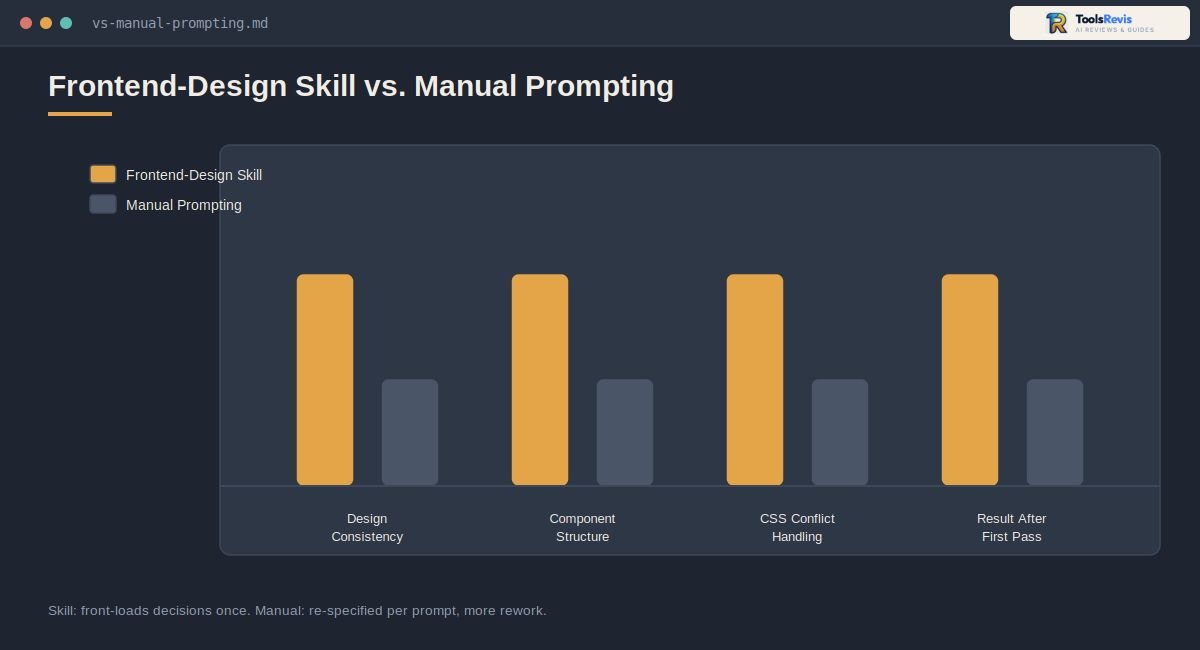
Using the skill consistently beats manual prompting because it front-loads design decisions into a structured planning step instead of leaving Claude to improvise palette and layout choices mid-response — the practical difference shows up most in consistency across a multi-page project and in how much back-and-forth it takes to avoid the generic “AI look.”
If you’ve ever manually prompted Claude with something like “make it look modern and professional, not generic,” you already know the problem: that instruction is vague enough that Claude still tends to default toward the same familiar patterns, just with slightly different wording in its response. The skill replaces that vague instruction with a concrete process — plan tokens, check against known clichés, then build.
If you’re also comparing the models behind different AI coding workflows, see our Claude Sonnet 5 vs GPT-5.6 Sol comparison.
| Feature | Frontend Design Skill | Manual Prompting |
| Design Consistency | Plans a token system (color, type, layout) once, then reuses it across every component and page in the session | Each new prompt risks a slightly different palette or type choice unless you re-paste your constraints every time |
| Component Structure | Structures components around the planned design system, so spacing and hierarchy stay coherent | Structure depends on how well you specify it per prompt; easy to end up with inconsistent margins/spacing across sections |
| Tailwind & CSS Handling | Actively avoids CSS specificity conflicts (e.g., type-based vs. element-based selectors cancelling each other out) as part of its build process | You have to catch and correct these conflicts yourself, since a plain prompt has no built-in check for them |
| Workflow Speed | Slightly slower per-response (it runs a planning pass first), but faster overall since you avoid multiple “make it less generic” follow-ups | Faster first response, but often needs several rounds of manual correction to reach a distinctive result |
When Manual Prompting Still Makes Sense
The skill isn’t strictly better in every situation. If you already have an extremely specific brief — exact hex codes, a locked-down component library, pixel-perfect Figma specs — manual prompting with your own detailed instructions can be just as fast, since there’s little ambiguity left for a planning pass to resolve. The skill earns its keep specifically in the more common case: an open-ended brief where Claude would otherwise have to invent the visual direction itself.
For another AI coding environment, see our Windsurf AI review for a closer look at its features and workflow.
Practical takeaway: Use the skill by default for any greenfield UI work where you haven’t already decided on exact colors and layout. Fall back to precise manual prompting when you’re implementing an existing, fully specified design system rather than creating one.
If you prefer an AI-first code editor for frontend work, our Cursor AI review covers how it compares as a development workflow.
Common Issues & Troubleshooting (Community Pain Points)
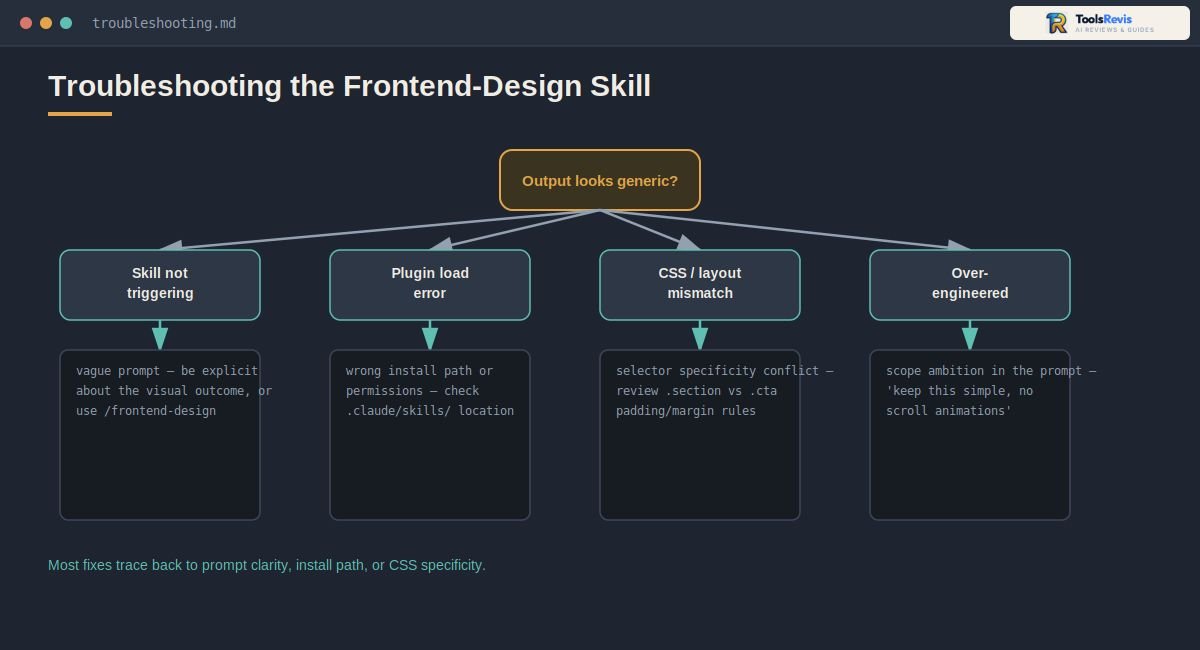
Most problems with this skill trace back to one of four things: it isn’t triggering at all, the plugin didn’t install correctly, the CSS it wrote is fighting itself, or it’s over-building beyond what you asked for — each has a specific, fixable cause.
Skill Not Triggering
If Claude responds with a plain, generic implementation instead of running through the design-planning process, the most common cause is an ambiguous prompt. Since activation depends on Claude recognizing frontend-design intent, vague requests like “fix this component” or “update the page” may not read as clearly as UI-generation tasks, so the skill doesn’t kick in.
Fix it by:
- Being explicit about the visual outcome you want (“redesign this settings panel with a distinct aesthetic direction”) rather than just describing a functional change
- Using the /frontend-design slash command directly, if your setup exposes it, to force activation regardless of how the prompt is phrased
- Confirming the skill is actually installed and visible with npx skills list before assuming it’s a triggering issue rather than an installation one
Plugin Loading Errors
Installation issues almost always come down to path or permission problems rather than the skill file itself being broken.
- Wrong install location: If you used Method B (manual copy) and placed the file somewhere other than .claude/skills/frontend-design/SKILL.md, Claude Code won’t discover it. Double-check the exact folder structure.
- Permission errors during npx skills add: These typically mean your workspace directory doesn’t have write access. Re-run the command from a directory you own, or check that you’re not inside a read-only mounted path.
- Stale global vs. local conflict: If you have both a global install and a local project copy, the local one takes priority — but if you were expecting the global version’s behavior, this can look like the “wrong” skill is running. Remove whichever copy you don’t intend to use.
CSS & Layout Mismatches
This is a known, documented failure mode rather than a random bug: generated CSS can end up with selector specificity conflicts, particularly when a type-based selector (like .section) and an element-based selector (like .cta) both target padding or margin on the same element and cancel each other out. The skill’s own guidance calls this out explicitly as something to watch for while writing code.
Fix it by:
- Asking Claude directly to review specificity when spacing looks wrong (“check for selector conflicts in the padding/margin rules”)
- Inspecting the rendered page in dev tools to see which rule is actually winning, then pointing Claude at the specific class names involved
- Preferring more explicit, scoped class names over broad type selectors when you’re hand-editing the output afterward
Over-Engineered Code Fixes
A different complaint that comes up in practice: the skill’s push toward “one memorable moment” and orchestrated motion can occasionally tip into more animation, more custom interaction, or more dependencies than a simple page actually needs.
Fix it by:
- Explicitly scoping ambition in your prompt — “keep this simple and static, no scroll animations” — since the skill is designed to follow a brief’s explicit constraints over its own defaults
- Asking Claude to justify any added npm package before accepting it, especially for animation libraries that aren’t already in your project
- Reviewing the diff of what got added versus what you asked for, and trimming anything (extra micro-interactions, unused dependencies) that wasn’t part of the original request
Important note: Because the skill is built to defer to an explicit brief, most “over-engineering” complaints are solved simply by being more specific about constraints up front, rather than needing to fight the skill after the fact.
“Every Claude App Looks the Same” — Is the Anti-Slop Approach Actually Working?
This is a fair criticism worth addressing directly, and honestly: yes, to a real extent, it’s true. The skill is explicitly built to steer Claude away from the old set of generic AI patterns — Inter font, purple gradients, identical rounded cards.
But developers have noticed that this has produced its own recognizable look: a warm cream background, a high-contrast serif headline, and a terracotta accent color show up often enough across Claude-built projects that some users can now identify a “Claude-made” site on sight, and community-built “anti-slop” tools have sprung up specifically trying to catch and remove that pattern.
This isn’t a contradiction in the skill’s design so much as a limitation of what an automatic default can do. The skill’s calibration examples explicitly call out that specific palette as a tell to avoid — but when a prompt gives Claude no real constraints (“make it modern and professional”), it still has to choose something, and it tends to converge on the same handful of choices it’s evaluated well against internally.
Fix it by:
– Never leaving color and typography entirely up to the skill’s judgment on projects where distinctiveness matters — supply your own hex values, even just two or three, in the prompt
– Feeding Claude reference material (a competitor site you like, a brand style guide, even just “avoid cream backgrounds and serif display type”) rather than trusting the default calibration to differ every time
– Treating the skill as a good starting discipline (plan before you code) rather than a guarantee of originality — the planning process is reliable; the specific aesthetic choices still benefit from your input
<em>Affiliate/editorial disclosure: This guide reflects ToolsRevis’s independent testing and research; some linked tools may be evaluated in future comparison articles.</em>
Frequently Asked Questions (FAQs)
Q1: How do I activate the claude frontend design skill in my terminal?
You don’t need to activate it manually — Claude Code detects frontend-design intent automatically from prompts like “build a landing page” or “design a dashboard.” If it’s not triggering, install it first via Claude Code’s plugin manager (/plugin marketplace add anthropics/claude-plugins-official, then /plugin install frontend-design@claude-plugins-official), or through a third-party skills CLI if you prefer — check that tool’s current syntax, since community CLI commands change often, then use the /frontend-design slash command (where available) to force it on.
Q2: How to use claude code frontend-design plugin for existing React projects?
Install it the same way as a new project, then describe the change you want made (“redesign this component with a distinct aesthetic”). The skill plans a design token system that respects your existing codebase rather than replacing it wholesale, so it works on individual components as well as full new pages.
Q3: What is the main difference between claude plugins vs skills (and claude projects vs skills)?
A skill is a focused SKILL.md instruction set loaded when a task matches it; a plugin is a distributable bundle that can package multiple skills, commands, and hooks together. A project (on claude.ai) is a separate concept entirely — a persistent chat workspace with its own instructions and files, not something Claude Code skills interact with directly.
Q4: Is the anthropic frontend design skill supported across all frameworks?
It’s framework-agnostic in its design reasoning, and its guidance applies whether the output is plain HTML/CSS, React, Vue, Svelte, or Tailwind with Shadcn UI. The specific syntax of the generated code depends on what your project is already using.
Q5: How does the claude web design skill handle design system consistency?
By committing to a compact token system — typically 4–6 named colors, a defined type scale, and a layout concept — before writing any code, and reusing those same tokens across every subsequent component in that session rather than reinventing choices per prompt.
Q6: What should I do if the claude code front end design skill isn’t reading my workspace files?
Check installation location first: a local, project-specific install needs to sit exactly at .claude/skills/frontend-design/SKILL.md. If you installed globally instead and expected project-level behavior, that mismatch is the likely cause — verify with npx skills list.
Q7: Is Claude good for frontend design?
Yes, particularly with this skill active — it’s specifically built to counter the tendency of AI-generated interfaces to converge on the same generic patterns (Inter font, purple gradients, identical rounded cards). Without it, Claude can still build functional UI, but is more likely to default to familiar, less distinctive choices.
Q8: Is there a free Claude design skill on GitHub?
Yes — Anthropic’s official frontend-design skill is free and open in its public GitHub repositories, installable via the npx skills add command. Several third-party alternatives (like community UI/UX database skills) are also freely available on GitHub, though they’re maintained independently of Anthropic.
ChatGPT Plus vs Claude Pro
Not sure which AI assistant fits your workflow? Compare ChatGPT Plus and Claude Pro across pricing, features, coding, writing, usage limits, and real-world use cases.
Read the full comparison →
I’m Umair Ahmad, founder of ToolsRevis. I personally test every AI tool we cover — signing up, running real workflows, checking pricing tiers, and comparing outputs — before writing a single word. My goal: cut through AI marketing hype with honest, hands-on verdicts.
Let’s achieve more together!