
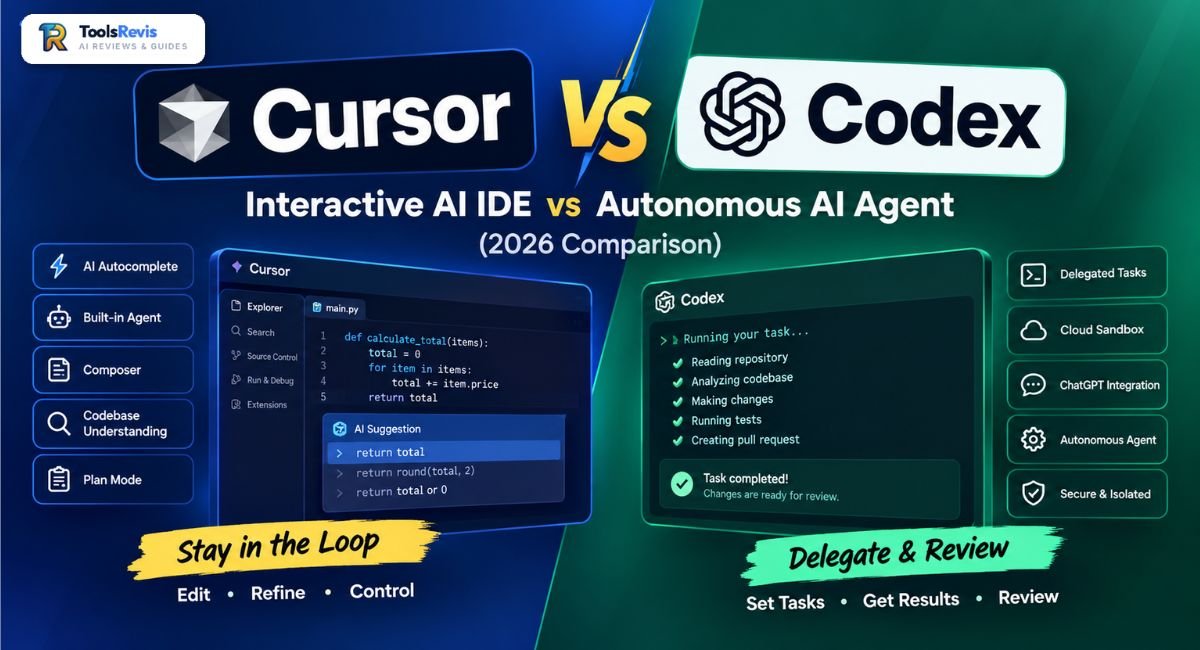
The real choice is no longer simply which AI writes better code—it is how much of the coding process you want to control yourself.
Cursor is interaction-first, keeping the developer close to the coding workflow, while Codex is delegation-first and is designed to handle larger software-engineering tasks with increasing autonomy.
Introduction
The difference between Cursor and Codex becomes clearer when you stop comparing them as simple AI coding assistants. Both can work with code, reason about repositories, and perform multi-step development tasks, but their workflows are designed around different developer habits.
Cursor is centered on an AI-native coding environment where you can inspect, edit, prompt, review, and iterate without leaving your development workspace. Codex, by contrast, is positioned around delegating coding work to an agent and reviewing what it produces.
That makes Cursor vs Codex less about finding a universal winner and more about deciding where you want to sit in the development loop: alongside the AI or one step removed from the execution.
If you are comparing Cursor and Codex as part of a broader search for developer-focused AI tools, see our guide to the best AI tools for developers.
What Is Cursor?
Cursor is an AI-native coding editor with a built-in coding agent that can understand a codebase, edit files, run commands, and help complete development tasks. Its defining advantage is that these AI capabilities are integrated directly into the developer’s working environment, making it easier to move between prompting, coding, reviewing, and refining.
Key Features
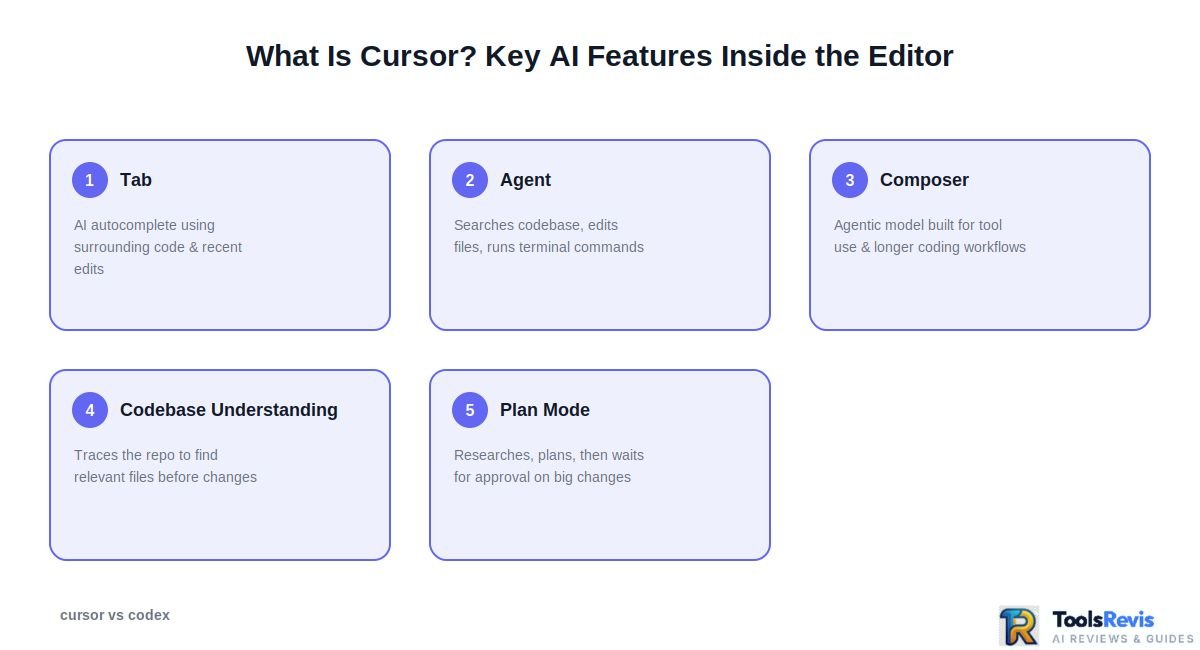
Cursor combines traditional editor workflows with several layers of AI assistance:
- Tab: Cursor’s AI autocomplete suggests code as you type, using surrounding code, recent edits, and other available context. It can also make larger coordinated edits across code.
- Agent: Cursor’s Agent can handle more complex coding tasks by searching the codebase, editing files, running terminal commands, and checking results. This moves Cursor beyond simple autocomplete into agentic development.
- Composer: Cursor’s agentic Composer model is designed for software-engineering tasks and is optimized for tool use, file edits, terminal operations, and longer coding workflows.
- Codebase understanding: Cursor can search and trace a repository to identify relevant files before making changes, which is particularly useful when a task spans multiple parts of a project.
- Plan Mode: For larger changes, Cursor can research the codebase, create an implementation plan, and wait for approval before proceeding.
The important point is that Cursor is not limited to autocomplete anymore. Its current workflow combines inline assistance with increasingly autonomous agent capabilities. However, the developer remains close to the work, making Cursor particularly useful when you want to inspect changes as they happen and steer the implementation.
If you want a deeper look at Cursor’s overall capabilities, you can also explore our full Cursor AI review.
Who Cursor Is Best For
Cursor is best suited to developers who want AI assistance without giving up the editor-centered development experience.
It is a strong fit when you:
- Want to see and refine AI-generated changes while working.
- Frequently switch between writing code, debugging, and asking the AI questions.
- Need detailed control over how changes are implemented.
- Work on features that require frequent human decisions and iteration.
- Want access to multiple model providers rather than being tied to one model family.
- Prefer an AI coding environment where the editor, agent, terminal, and codebase context are closely connected.
For example, if you are debugging a component and need to repeatedly inspect a file, ask for a change, test it, reject part of the implementation, and refine another part, Cursor’s interactive workflow fits naturally.
What Is Codex?
Codex is an AI coding agent designed around delegating software-development tasks to an agent that can work through code, execute tasks in an isolated environment, and return results for human review. Its workflow is more delegation-oriented than a traditional editor-first coding assistant.
Codex CLI, Cloud Sandbox, and ChatGPT Integration
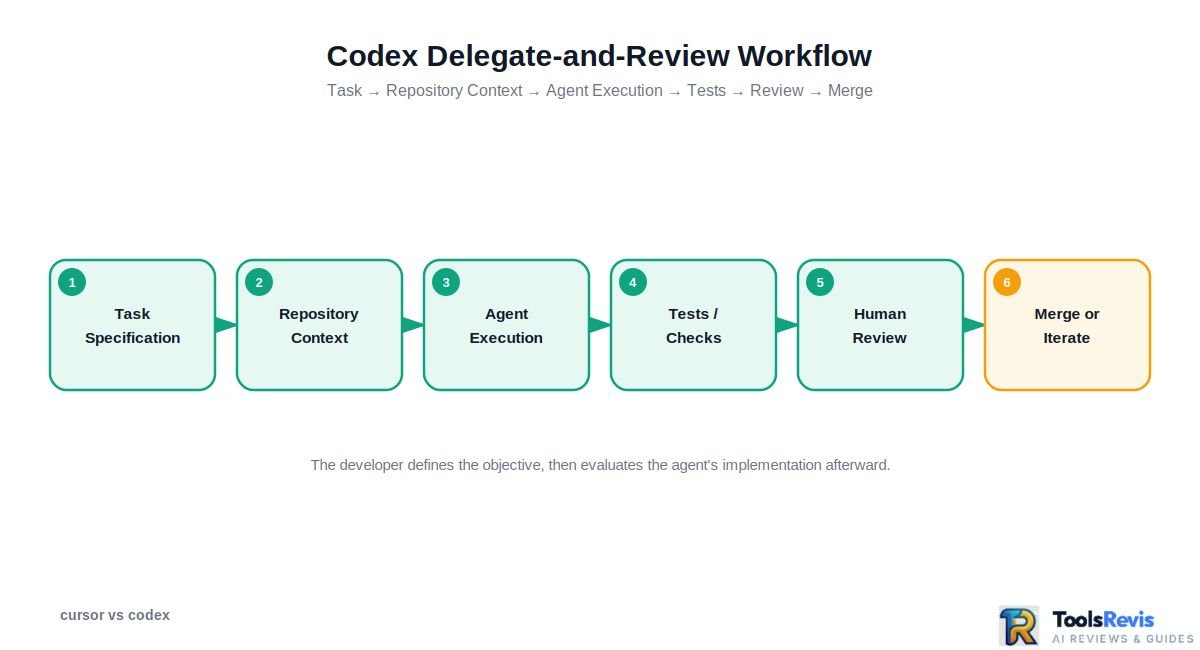
Codex is best understood as an agent ecosystem rather than a single code editor. Its workflow can extend across the terminal, cloud-based execution environments, and ChatGPT, depending on how you use it.
Codex CLI brings the agent into the terminal, allowing developers to work with repositories from a command-line environment. Instead of requiring every change to happen manually inside an editor, you can give Codex a coding task and let it inspect the project, make changes, and execute relevant commands.
The cloud-oriented workflow takes the delegation model further. A developer can assign a task for Codex to work on in an isolated environment, allowing the agent to investigate the repository and implement changes without requiring the developer to supervise every individual edit.
A typical delegated workflow looks like this:
Task → Repository context → Agent execution → Tests/checks → Review → Merge or iterate
This changes the developer’s role. Rather than continuously prompting an AI while editing a file, you can describe the outcome you want and review the implementation after the agent has worked through the task.
Codex also connects with the broader ChatGPT ecosystem, making it useful for developers who already use ChatGPT as part of their development workflow. The important distinction is that Codex’s value comes from its ability to execute software-engineering work, not simply generate a code snippet in a conversation.
Another important difference in the Cursor vs Codex comparison is model flexibility. Codex is built around OpenAI’s coding-agent ecosystem, whereas Cursor is designed to give users access to models from multiple providers. If model choice is a major factor in your workflow, this difference can materially affect which tool fits better.
For developers who want to compare Codex with other terminal-based agents, Claude Code in Terminal provides another useful point of reference.
Who Codex Is Best For
Codex is best for developers who want to delegate well-defined coding work and review the resulting implementation rather than manually drive every step.
It is particularly useful for tasks such as:
- Background refactoring across multiple files.
- Fixing a defined group of bugs.
- Adding or updating tests.
- Investigating repository-level issues.
- Implementing a clearly specified feature.
- Preparing changes that can be reviewed before merging.
- Running repetitive engineering tasks without constant editor interaction.
For example, instead of opening several files and manually applying the same architectural change throughout a repository, you could give Codex a clearly defined refactoring task, let the agent work through the repository, and then inspect the resulting changes.
That does not mean Codex removes the need for developer oversight. Agent-generated code still needs review, testing, and judgment—especially for architectural decisions or changes with significant production impact.
Architecture & Workflow Comparison — Interactive Editor vs Autonomous Agent
The core difference between Cursor and Codex is workflow: Cursor is more interaction-first, while Codex is more delegation-first. Both can now perform increasingly autonomous coding tasks, so the practical distinction is how much the developer wants to steer the work during execution.
How Cursor’s Real-Time Workflow Works
Cursor’s workflow keeps the developer close to the implementation. You describe what you want, the agent explores the relevant code, proposes or applies edits, runs commands when needed, and shows the resulting changes for review.
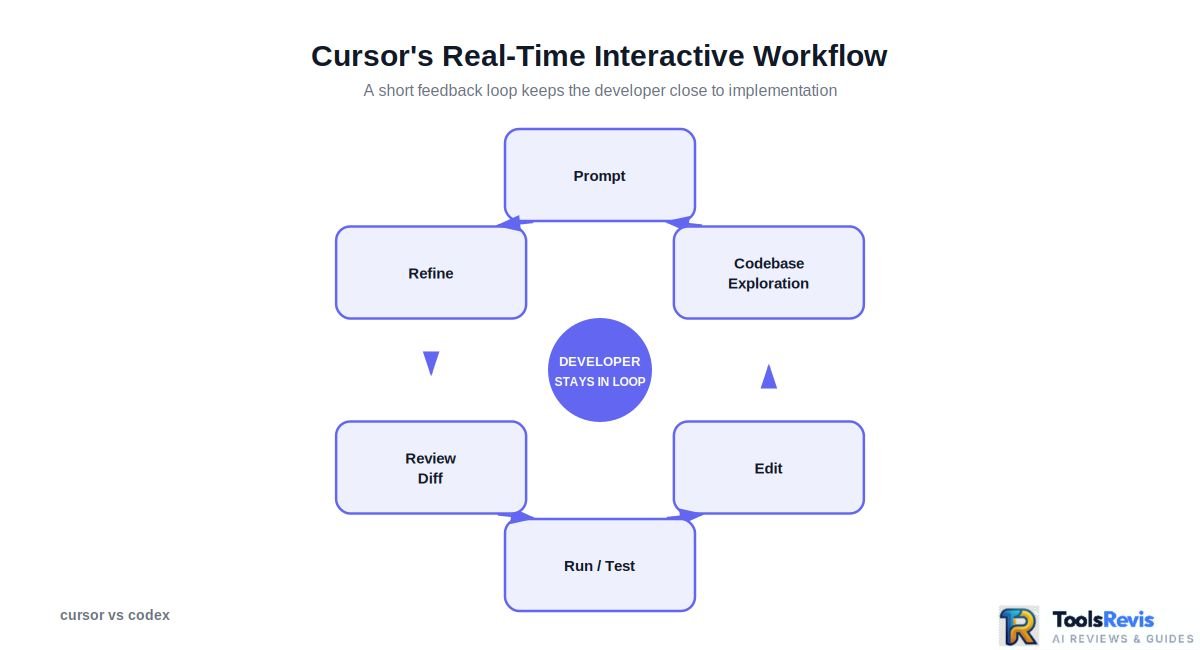
A typical Cursor workflow looks like this:
Prompt → Codebase exploration → Edit → Run/test → Review diff → Refine
The important part is the short feedback loop. You can inspect the changes while the task is progressing, redirect the agent, provide additional context, or reject changes that do not match your intent.
Cursor’s Agent can search files, edit multiple files, execute terminal commands, and work through errors rather than stopping after generating a code snippet.
That makes Cursor particularly effective for work where the implementation direction can change as you investigate the codebase—for example, debugging an unfamiliar component, experimenting with an architecture, or iteratively refining a UI.
Cursor also now supports cloud-based agents, so its workflow is no longer exclusively local or editor-bound. Cloud Agents can run in isolated virtual machines, continue working remotely, test changes, and return artifacts or code for review.
So the more accurate 2026 framing is interactive-first rather than interactive-only.
How Codex’s Delegate-and-Review Workflow Works
Codex is built around a more explicit delegation loop: give the agent a software-engineering objective, provide the necessary repository and environment context, let it work through the task, and then review what it produces.
The conceptual workflow is:
Task specification → Agent investigation → Implementation → Tests/checks → Review → Merge or iterate
This approach works particularly well when the task has a reasonably clear definition of done. Instead of directing every individual edit, the developer can focus on describing the desired outcome and evaluating the agent’s implementation afterward.
The distinction matters because autonomy is not simply about whether an AI can edit files. Both modern coding agents can search repositories, modify code, execute commands, and test their work. The more useful question is where the human sits in the execution loop.
| Workflow dimension | Cursor | Codex |
| Primary interaction | Interactive development | Task delegation |
| Developer involvement | Frequent steering and review | Define task, then review output |
| Typical loop | Prompt → edit → inspect → refine | Assign → execute → review |
| Best fit | Exploratory and iterative coding | Well-defined engineering tasks |
| Feedback style | Continuous and immediate | More outcome-oriented |
| Mental model | AI coding partner | AI software-engineering agent |
This is why a simple “which AI is smarter?” comparison can be misleading. The better question is whether your work benefits more from continuous human-AI interaction or delegated execution.
For example, imagine you discover a bug while debugging a complex authentication flow. You may want to inspect the relevant files, ask the AI why a particular function behaves incorrectly, change one assumption, test it, and immediately adjust the implementation. That favors Cursor’s interactive workflow.
Now consider a different task: “Find all deprecated API calls in this repository, replace them with the supported equivalents, update the affected tests, run the test suite, and prepare the changes for review.” A delegation-first workflow can make more sense because the objective and completion criteria are easier to specify upfront.
The Practical Difference
The distinction can be reduced to one question:
Do you want to stay closer to the implementation, or delegate more of the task and evaluate the result afterward?
Choose Cursor when the work is exploratory, highly iterative, or benefits from frequent human judgment during implementation.
Choose Codex when the work can be clearly scoped and delegated as an engineering task with defined acceptance criteria.
Neither workflow is universally better. In fact, the boundary is becoming less rigid: Cursor itself now offers Cloud Agents capable of long-running autonomous work, which means the competitive difference increasingly comes from how each product structures the developer-agent relationship, rather than simply whether an agent can operate autonomously.
Context, Rules & MCP Support (Agentic Workflows)
Cursor and Codex both use repository context and project-level instructions to guide coding agents, but they organize that context differently: Cursor centers its workflow around codebase indexing and .cursorrules, while Codex uses AGENTS.md and supports MCP for extending agent capabilities.
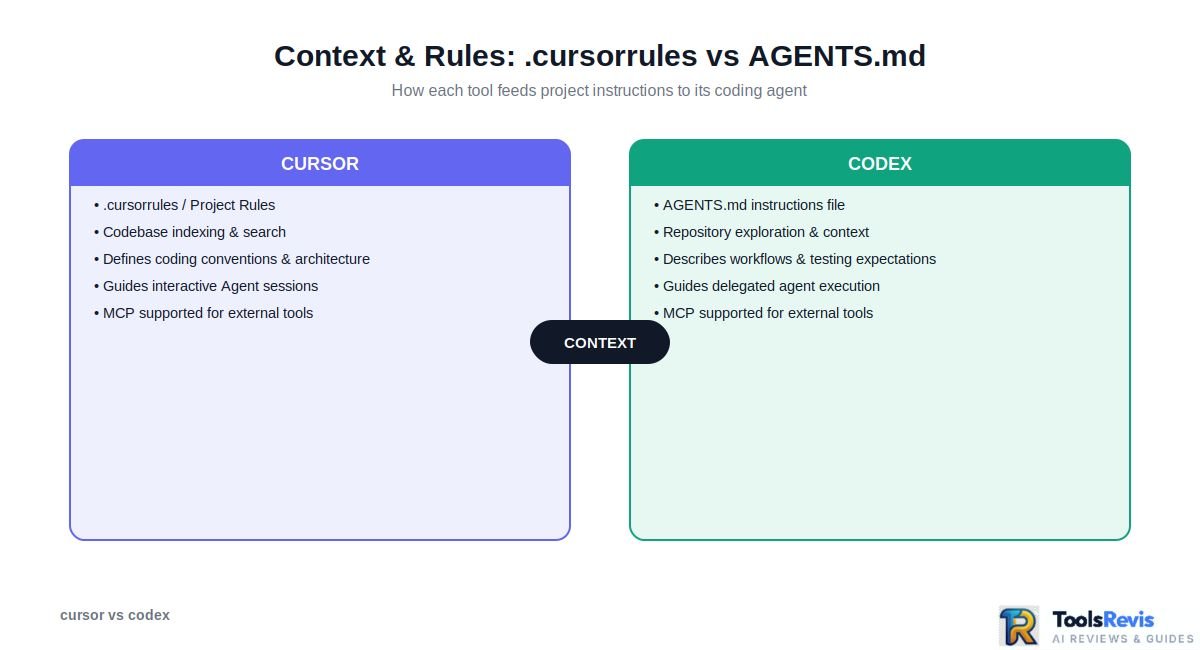
Cursor’s .cursorrules and Codebase Indexing
Cursor can use project-specific instructions to tell its AI how a repository should be understood and modified. Historically, these instructions were commonly provided through .cursorrules, while newer Cursor workflows use project rules to provide more structured, scoped guidance.
Rules can define conventions such as:
- Preferred coding patterns.
- Project architecture and directory conventions.
- Framework-specific instructions.
- Testing requirements.
- Formatting expectations.
- Files or approaches the agent should avoid.
Cursor also builds context around the codebase so its AI can locate relevant files and understand relationships between different parts of a project. This is important for repository-level tasks because the agent does not have to rely only on the contents of the file currently open in the editor.
For example, if you ask Cursor to update an authentication flow, it can search the repository for related components, configuration, utilities, and tests before making changes.
The practical advantage is context-aware interactive development: you can give the agent project rules, let it investigate the codebase, and then continue steering the implementation from inside the editor.
Codex’s AGENTS.md and MCP Setup
Codex uses AGENTS.md files to provide instructions to the coding agent. These files can describe repository conventions, workflows, testing expectations, and other instructions the agent should follow while completing a task.
This makes AGENTS.md particularly useful for delegated work. A repository can contain instructions that establish how an agent should approach changes without requiring those rules to be repeated in every prompt.
Codex can also work with MCP (Model Context Protocol) servers, allowing the agent to connect to external tools and sources when configured. Instead of treating the coding agent as isolated from the rest of a development workflow, MCP can provide additional capabilities or context.
For a developer researching how to add MCP to Codex, the key point is that MCP is an extension mechanism rather than a replacement for repository instructions. AGENTS.md tells the agent how it should work within the project, while MCP can provide additional tools or external context.
In practice, that distinction looks like this:
| Context layer | Cursor | Codex |
| Project instructions | Cursor project rules / .cursorrules | AGENTS.md |
| Repository understanding | Codebase indexing and search | Repository exploration and context |
| External tool extension | MCP support | MCP support |
| Main benefit | Consistent interactive coding | Consistent delegated agent execution |
The difference is therefore less about one tool having “context” while the other does not. Both need reliable context to perform repository-level work; the distinction is how that context fits into their broader workflow.
And for reusable agent workflows, Claude Code templates provide useful context for how project instructions, commands, and agent workflows can be structured.
Bottom line: Cursor’s context system is particularly natural for developers working interactively inside an AI-native editor, while Codex’s AGENTS.md approach fits naturally with delegated, repository-level tasks where consistent instructions need to travel with the project.
Feature Comparison Table
Cursor and Codex overlap on modern agentic coding capabilities, but Cursor is more editor-centered and model-flexible, while Codex is more focused on delegated software-engineering work across its app, CLI, IDE, and cloud workflows. The table below reflects the current 2026 product landscape rather than older descriptions of either tool.
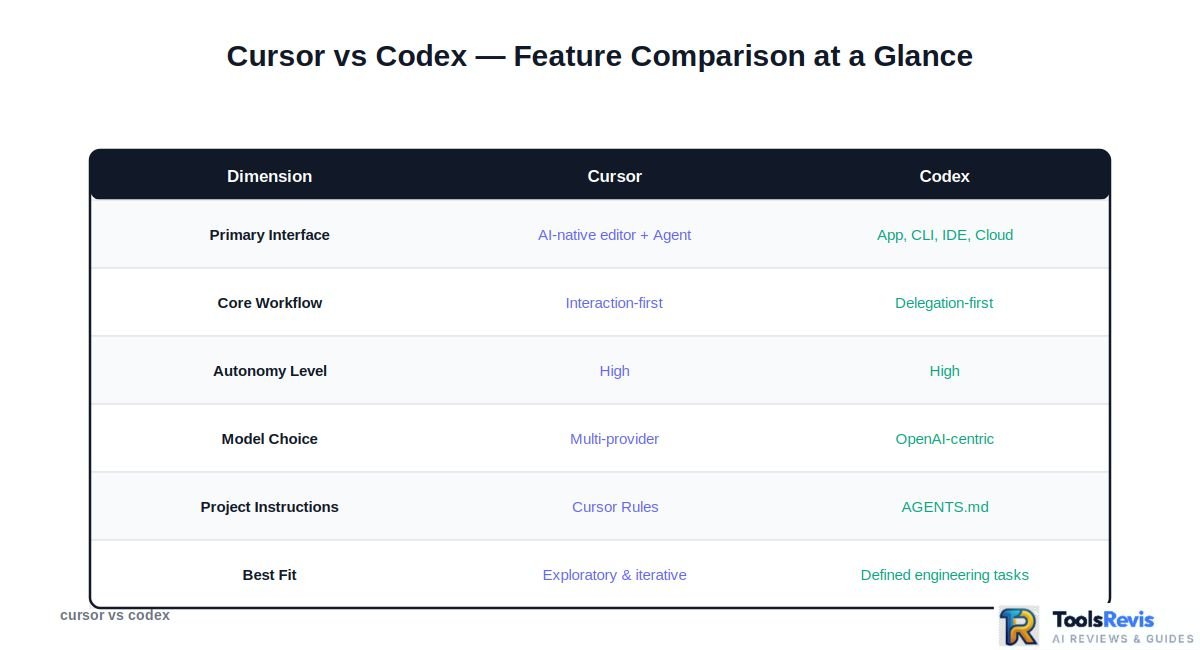
| Feature | Cursor | Codex |
| Primary interface | AI-native code editor with Agent, Tab, terminal, browser, and cloud-agent workflows | Codex app, CLI, IDE integration, and cloud-based agent workflows |
| Core workflow | Interaction-first coding plus agentic task execution | Delegation, parallel agent work, and review |
| Autonomy level | High — Agent can search code, edit multiple files, run commands, test, and fix errors | High — designed for longer software-development tasks, parallel work, and delegated execution |
| Execution environment | Local editor/terminal plus Cloud Agents and remote execution options | Local CLI/IDE workflows plus sandboxed cloud tasks and the Codex app |
| Model choice | Multi-provider: OpenAI, Anthropic, Google, xAI, and Cursor models | Primarily OpenAI’s Codex/model ecosystem |
| Codebase context | Codebase search/indexing, rules, Agent context | Repository context, AGENTS.md, task instructions, and agent environment |
| Project instructions | Cursor Rules / project instructions | AGENTS.md |
| MCP support | Yes | Yes |
| Terminal execution | Yes | Yes |
| Multi-file editing | Yes | Yes |
| Background / cloud agents | Yes | Yes |
| Human control | Strong interactive steering through the editor and Agent panel | More delegation-oriented, with review after agent execution |
| Best fit | Exploratory coding, debugging, iterative development, granular control | Defined engineering tasks, background work, parallel delegation, repository-level automation |
What This Table Means in Practice
The most important row is workflow, not raw feature count.
Cursor’s current Agent can search a codebase, edit files, run terminal commands, use browser tools, and work through complex coding tasks. Its documentation describes the Agent as an assistant that can independently complete coding tasks while still operating directly within Cursor’s development environment.
Codex has also moved well beyond a simple terminal coding assistant. OpenAI’s 2026 Codex app is designed to manage multiple agents, run work in parallel, and supervise longer-running tasks. Codex is available through the app, CLI, IDE, and cloud workflows.
The model-choice difference is also significant. Cursor currently supports models from multiple providers, including OpenAI, Anthropic, Google, xAI, and its own models. Codex, by contrast, is centered on OpenAI’s own coding-agent and model ecosystem.
That means a developer choosing Cursor can treat the editor as a model-selection layer, while someone choosing Codex is generally choosing deeper integration with OpenAI’s agent stack.
One final distinction is important: “autonomous” does not mean “human-free.” Both tools can perform multi-step work, but production code still benefits from human review, testing, and approval—especially for architectural changes, security-sensitive code, and large refactors.
2026 Verdict From the Feature Comparison
If your priority is maximum flexibility inside an AI coding environment, Cursor has the stronger fit.
If your priority is delegating larger software tasks to agents and supervising the results, Codex has the stronger fit.
The gap is not absolute, however. Both products increasingly support cloud/background agents, which means the practical choice should be based on workflow preference, model ecosystem, and how much control you want during execution, rather than simply labeling one tool “interactive” and the other “autonomous.”
Real-World Use Case Scenarios — When to Choose Which
Choose Cursor when you want to stay actively involved in coding and steer the AI through rapid iterations; choose Codex when you can clearly define a task and want an agent to execute more of the work before you review it.
Choose Cursor If…
Cursor is the better fit when the path to the solution may change while you are working.
Choose Cursor for:
- Exploratory coding: You are investigating an unfamiliar codebase and want to ask questions, inspect files, and experiment with implementations interactively.
- Live debugging: You want to reproduce an issue, inspect the relevant code, make a change, run the application or tests, and immediately refine the solution.
- Granular control: You want to approve, modify, or redirect AI-generated changes as the implementation develops.
- UI development: Visual and iterative work often benefits from staying inside the editor and rapidly adjusting the implementation.
- Model experimentation: You want the ability to switch between supported AI models rather than building your workflow around a single provider.
A simple example: imagine you are redesigning a React component and are not yet sure whether the problem is in the component, state management, or API response. Cursor works well here because you can investigate each possibility interactively and change direction as you learn more.
For developers comparing other AI-native editors, our Cursor vs Windsurf comparison is a natural next step when Cursor is not the only editor-centric option being considered.
If you are also considering a more traditional AI coding assistant, see our GitHub Copilot review for a closer look at its workflow and features.
Choose Codex If…
Codex is the better fit when you can describe the desired outcome clearly enough for an agent to work through the implementation with less continuous supervision.
Choose Codex for:
- Background refactors: Delegate a well-defined repository-wide refactoring task.
- Batch bug fixes: Give the agent several related issues with clear acceptance criteria.
- Test work: Ask the agent to add, update, or repair tests around a defined change.
- Repository maintenance: Handle repetitive engineering tasks without manually driving every edit.
- PR-oriented workflows: Let the agent implement a task and then review the resulting changes before integrating them.
For example, suppose a repository has a deprecated API used across dozens of files. Instead of manually locating every occurrence, you could give Codex a defined migration task, ask it to update the affected code and tests, and then review the resulting changes.
The important requirement is task clarity. Delegation works best when you can specify what should change, what must remain unchanged, and how success should be verified.
Cursor vs Codex for Beginners / Non-Technical Users
For beginners, Cursor is generally easier to understand when the goal is learning and actively working with code, while Codex is more useful when the user can describe a software task clearly enough for an agent to execute and review.
| User type | Better fit | Why |
| Solo developer | Cursor or Codex | Cursor for hands-on development; Codex for delegating defined tasks |
| Experienced developer | Either | Choose based on whether the workflow is interactive or delegation-heavy |
| Team lead | Codex | Useful when breaking defined engineering work into agent-executable tasks |
| Beginner learning to code | Cursor | More direct feedback and visibility inside the coding environment |
| Non-technical builder | Depends | Codex can be attractive for outcome-oriented tasks, but understanding and reviewing the generated code still matters |
For a beginner, the key issue is not simply whether an AI can write the code. The ability to understand what the AI changed becomes more important as the task becomes more complex.
A user who is learning development may benefit from Cursor’s immediate editor feedback because they can inspect the generated code, ask follow-up questions, and make changes interactively.
A non-technical user may prefer the idea of describing an outcome and delegating the implementation, but that convenience comes with an important limitation: AI-generated software still needs meaningful validation, particularly when security, payments, authentication, data handling, or production infrastructure are involved.
Quick Decision Framework
| If your priority is… | Choose |
| Stay in the editor and work alongside AI | Cursor |
| Explore an unfamiliar codebase interactively | Cursor |
| Debug while continuously steering the AI | Cursor |
| Delegate a clearly defined engineering task | Codex |
| Run several task-oriented workflows with less intervention | Codex |
| Review completed agent work rather than direct every edit | Codex |
| Use multiple AI model providers | Cursor |
| Build a workflow around OpenAI’s coding-agent ecosystem | Codex |
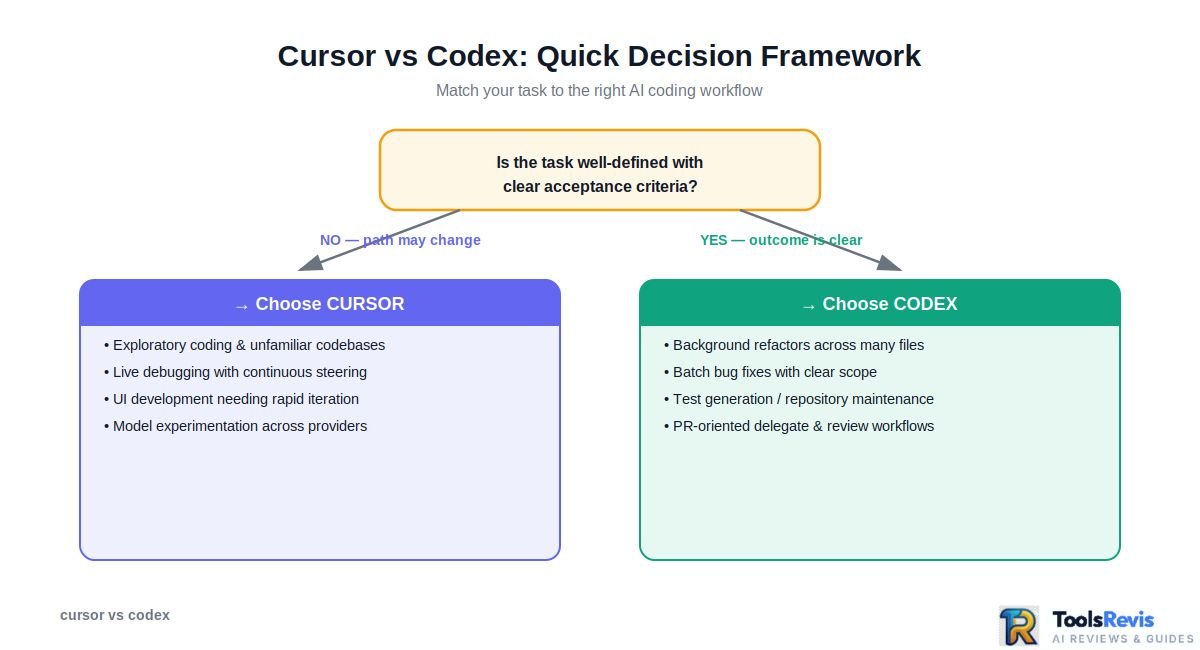
The simplest rule: if you are thinking “help me build this with me,” Cursor is usually the more natural fit. If you are thinking “take this task and bring me back something I can review,” Codex is closer to that workflow.
Pricing & Usage Cost Breakdown
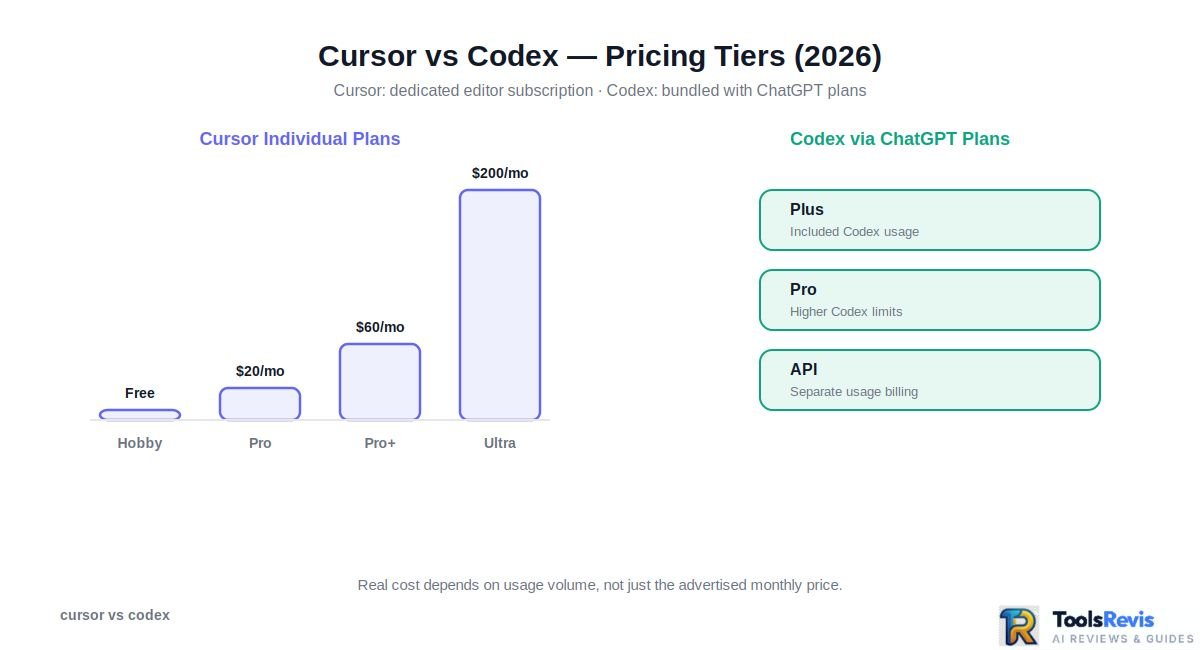
Cursor and Codex use different pricing models: Cursor is primarily priced as a dedicated AI coding editor with usage-based differences between tiers, while Codex access is tied to ChatGPT plans and, in some workflows, separate API usage.
Cursor Pricing Explained
Cursor currently offers several individual and team tiers, with the main differences involving included usage, model access, and higher limits for heavier users.
For individual developers, the current structure includes:
- Hobby: Free tier for trying Cursor with limited usage.
- Pro: $20/month, aimed at regular individual developers.
- Pro+: $60/month, providing substantially more usage for heavier users.
- Ultra: $200/month, designed for very heavy agent usage.
- Teams: Team-oriented billing with administrative and collaboration features.
Cursor pricing is not simply a flat fee for unlimited AI coding. Pro, Pro Plus, and Ultra currently include two monthly usage pools: a Cursor Models pool for Cursor’s own models and an Other Models pool for third-party models. Your model choice affects how quickly included usage is consumed. When included usage runs out, eligible plans can continue with on-demand usage at the applicable model rates or upgrade to a higher tier.
For developers comparing plans, the key detail is that Cursor’s included usage is tracked separately across its two pools, while additional on-demand usage can be enabled after the included allowance is consumed.
Codex Pricing Explained
Codex access works differently because it is integrated into OpenAI’s broader ChatGPT ecosystem.
Codex can be accessed through eligible **ChatGPT plans**, while developers using OpenAI’s API have a separate usage-based billing model. The amount of Codex usage available through a ChatGPT subscription depends on the plan, task, and current usage limits. On eligible Plus and Pro plans, users who reach their included Codex limit can purchase additional credits to continue supported Codex usage without changing their subscription plan.
This means Codex pricing cannot be compared with Cursor simply as “$X versus $Y.” You need to consider what is included with the relevant ChatGPT plan, how heavily you use Codex, and whether your workflow also requires API usage.
For developers who already subscribe to ChatGPT for other work, Codex can therefore have a different perceived cost: the coding agent may be an additional capability within an existing subscription rather than a completely separate software purchase.
If you are comparing broader AI subscriptions, your ChatGPT Plus vs Claude Pro comparison can provide additional context around the subscription-bundling question.
Cost at Scale — Solo Dev vs 5-Person Team
The most useful way to compare Codex vs Cursor pricing is to consider the workflow rather than looking only at the monthly sticker price.
| Scenario | Cursor | Codex |
| Solo developer, light AI use | Lower-tier Cursor may be sufficient | A suitable ChatGPT plan may provide Codex access |
| Solo developer, heavy agent use | Higher Cursor tier or on-demand usage may make sense | Higher ChatGPT plan or additional Codex credits may be useful |
| 5-person development team | Team pricing provides centralized management | Cost depends on the ChatGPT plans and organizational setup used |
| API-driven automation | Cursor subscription is not the same as API billing | OpenAI API usage is billed separately |
| Primary concern | Editor + model usage | Agent access + ChatGPT/API usage |
For a five-person team, the right calculation is not simply monthly subscription × five. Estimate how frequently each developer uses agents, which models or workloads they run, and whether the team needs centralized administration.
Which Is Cheaper?
There is no universal winner on cost.
Cursor can be more straightforward if your team wants a dedicated AI coding environment with clear subscription tiers and usage-based options. Codex can be attractive when developers already use ChatGPT and want coding-agent capabilities within that ecosystem.
For either product, the real cost is influenced by how heavily the agent is used, not just the advertised monthly plan.
Pricing changes frequently, so check the official pricing pages immediately before publishing this article rather than treating the figures above as permanent.
For another developer-focused pricing comparison, see our GitHub Copilot pricing guide.
Need Help Choosing an AI Coding Tool?
Not sure whether Cursor, Codex, or another AI coding assistant fits your workflow? Use our AI Tool Finder to compare your needs and discover a suitable option.
Find Best AI Tool →Usage Limits & Reliability — What Reddit Users Actually Say
Cursor and Codex both have usage limits, and user frustration tends to increase when heavy agent workflows consume allowances faster than expected; the practical issue is therefore not only the advertised limit, but how much work your typical agent tasks consume.
Cursor’s 2025 Credit-System Backlash — What Changed
Cursor’s usage model became a significant discussion point in 2025 as the product moved toward more explicit usage accounting for agent workloads and different model costs.
The important lesson for a 2026 comparison is that a monthly subscription should not automatically be interpreted as unlimited access to every model and every agent workload. More demanding requests can consume substantially more resources than lightweight autocomplete.
This matters because developers often experience usage very differently:
- Short Tab completions consume relatively little compared with extended agent sessions.
- Large repository tasks can require many model interactions.
- Expensive models can consume usage faster than lightweight models.
- Repeated agent iterations can turn one apparently simple task into a much larger workload.
As a result, some of the strongest criticism around Cursor’s pricing was not simply about the subscription price. It was about predictability and user expectations around usage.
For 2026 readers, the useful takeaway is to evaluate Cursor based on your actual workflow rather than assuming that the plan name alone determines how much AI coding you can perform.
Common Complaints About Both Tools
Reddit discussions around AI coding agents tend to reveal a similar set of practical frustrations across products: usage limits, inconsistent results, unnecessary edits, and the need to supervise generated code.
For Cursor, common complaints can include:
- Agent usage being consumed faster during intensive sessions.
- Large tasks producing more changes than expected.
- AI making edits that require careful review.
- Context limitations becoming noticeable in very large repositories.
- Developers needing to iterate on prompts to get the intended implementation.
For Codex, the same general class of concern applies to agentic workflows:
- A delegated task may require additional clarification or follow-up.
- Generated changes still need human review.
- Larger or more complex tasks can take longer to complete.
- Agent output can vary depending on repository context and task specification.
- Usage allowances can matter for developers running agents frequently.
The cursor vs codex Reddit conversation is therefore most useful when treated as qualitative evidence rather than a benchmark. Individual Reddit experiences can vary considerably depending on the plan, model, repository size, task complexity, and period in which the user tested the product.
Reliability: What Developers Should Actually Measure
Instead of asking “Which tool never makes mistakes?”, developers should evaluate reliability using practical criteria:
| Reliability factor | What to watch |
| Task completion | Does the agent finish the requested task without constant intervention? |
| Code quality | Are the resulting changes maintainable and consistent with the project? |
| Context accuracy | Does it identify the correct files and dependencies? |
| Test discipline | Does it actually run relevant checks and respond to failures? |
| Change scope | Does it avoid unnecessary modifications? |
| Usage predictability | Can you estimate how much agent usage your workflow will consume? |
| Human review burden | How much time do you spend correcting or supervising the output? |
This produces a more useful definition of reliability than simply counting how often an AI generates an incorrect line of code.
The practical takeaway: both Cursor and Codex should be treated as productivity tools that require review, not autonomous replacements for engineering judgment. If your workflow depends heavily on long-running agents, monitor usage and task completion rather than relying solely on the advertised subscription tier.
Model Flexibility & Ecosystem
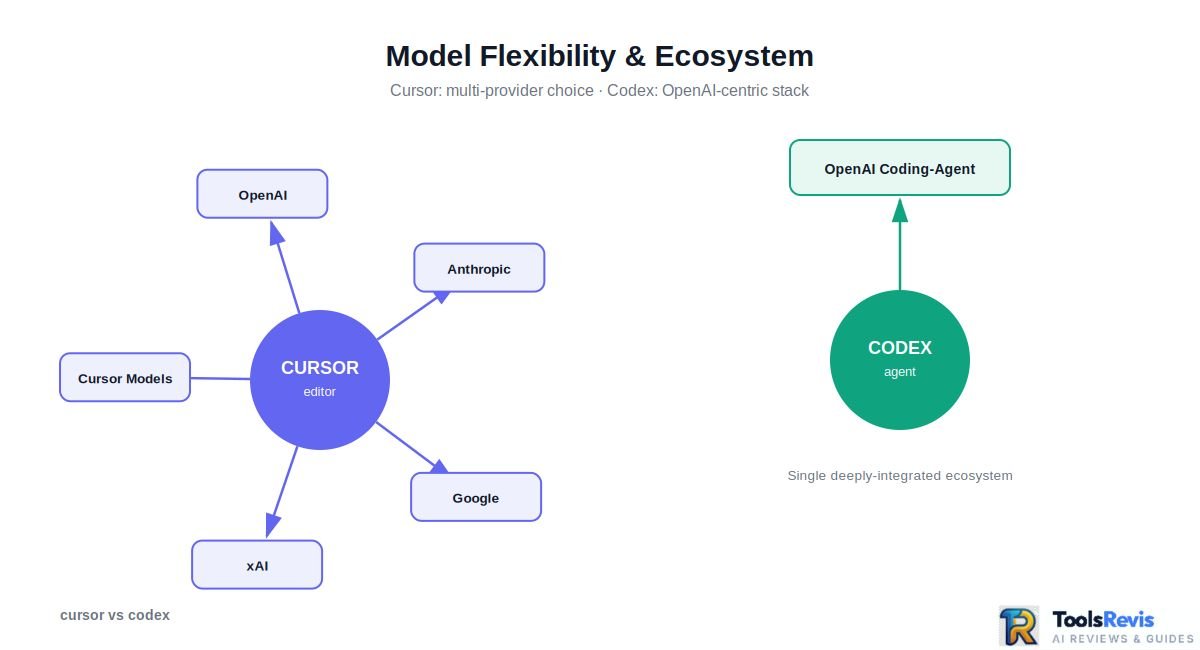
Cursor gives developers broad model choice across providers, while Codex is centered on OpenAI’s coding-agent and model ecosystem; this makes model flexibility one of the clearest practical differences between the two tools.
Cursor currently supports models from OpenAI, Anthropic, Google, xAI, and Cursor itself, with the available selection depending on the plan and region. Its current model catalog includes options such as Claude, Gemini, GPT, Grok, and Cursor’s Composer models.
That flexibility matters because different coding tasks can benefit from different model characteristics. A developer might prefer one model for complex reasoning, another for fast interactive edits, and another for a particular repository or workflow.
Cursor also allows supported users to bring their own API keys for providers such as OpenAI, Anthropic, and Google, giving developers another way to control which model infrastructure they use.
Codex takes a different approach. Its product experience is built around OpenAI’s own coding-agent ecosystem, including Codex-specific models and the Codex app, CLI, IDE integrations, and cloud workflows. OpenAI’s current Codex ecosystem is designed for agentic software development, including long-running tasks, tool use, parallel work, and delegated execution across the app, CLI, IDE, and cloud workflows.
That does not necessarily make Codex less capable. It means the trade-off is different:
| Model strategy | Cursor | Codex |
| Multiple model providers | Yes | Primarily OpenAI |
| OpenAI models | Yes | Core ecosystem |
| Anthropic models | Yes | No equivalent provider switching |
| Google models | Yes | No equivalent provider switching |
| Model switching inside workflow | Strong | More OpenAI-centric |
| BYO supported provider API keys | Yes | Different OpenAI/API model |
| Best for model experimentation | Cursor | Codex if you prefer OpenAI |
What About Claude 3.5 Sonnet in Cursor?
If you see “Claude 3.5 Sonnet in Cursor” in older comparison articles, treat it as a historical reference rather than a current-model recommendation. Cursor’s model catalog has changed substantially since Claude 3.5 Sonnet was a common choice, and the current catalog now lists newer Claude generations alongside models from other providers.
The broader point remains relevant: Cursor’s architecture allows the developer to choose among supported model providers, whereas Codex is intentionally built around OpenAI’s agent and model stack.
If you are evaluating Cursor against other AI coding editors and models, our Cursor AI vs Kimi K3 comparison provides another useful comparison.
Which Ecosystem Is Better?
Choose Cursor if model choice is important to you and you want the freedom to compare different providers inside one coding environment.
Choose Codex if you prefer a tightly integrated OpenAI coding-agent workflow and would rather optimize around the capabilities of the Codex ecosystem than switch between providers.
For developers who want to compare specific models rather than coding environments, see our Claude Sonnet 5 vs GPT-5.6 model comparison.
The key takeaway: Cursor’s advantage is model optionality; Codex’s advantage is deep integration with a single AI ecosystem. Neither approach is inherently better—the right choice depends on whether you value experimentation across models or consistency within one agent stack.
Can You Use Cursor and Codex Together? (Hybrid Workflow)
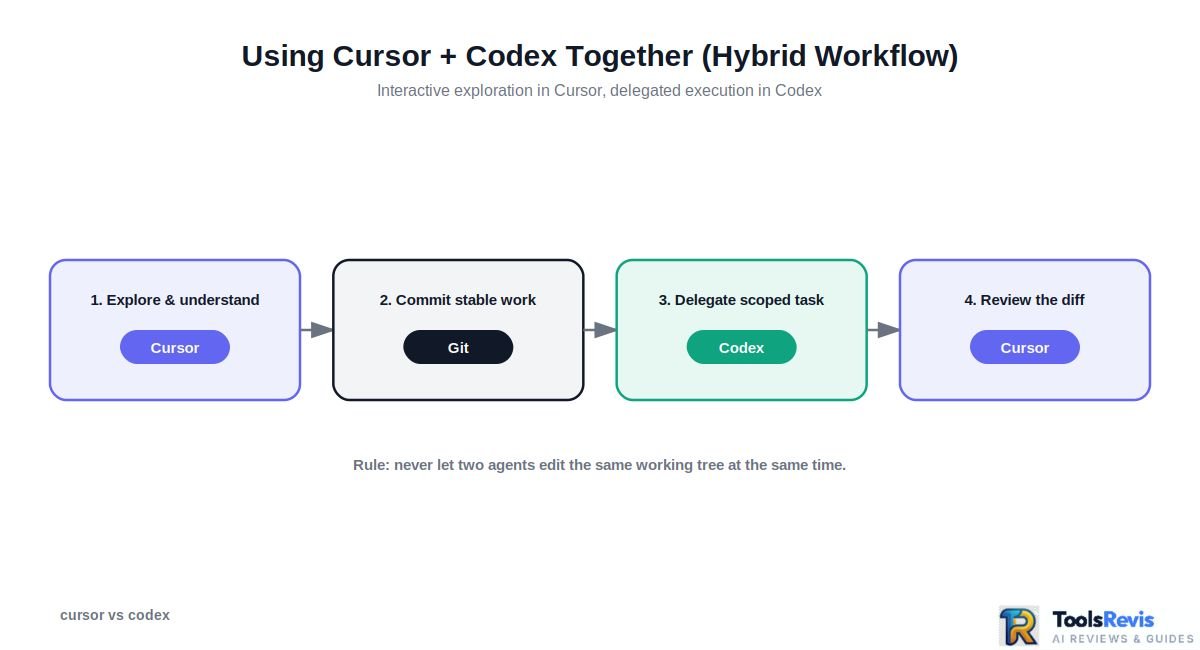
Yes. You can use Cursor and Codex together by keeping Cursor as your interactive development environment and using Codex for delegated, longer-running, or parallel coding tasks.
The combination works best when each tool has a clearly defined role rather than having both agents modify the same files at the same time.
A Practical Cursor + Codex Workflow
A productive hybrid workflow is to build and investigate in Cursor, then delegate larger implementation or cleanup tasks to Codex.
| Task | Better Fit | Why |
| Explore an unfamiliar codebase | Cursor | Interactive context and immediate feedback |
| Debug code while testing changes | Cursor | Fast edit → run → inspect iteration |
| Build a UI interactively | Cursor | Easier granular control over changes |
| Try different AI models | Cursor | Broader model selection |
| Large repository refactor | Codex | Better suited to delegated work |
| Generate or update tests across many files | Codex | Useful for task-oriented execution |
| Batch bug fixes | Codex | Can handle defined tasks without constant interaction |
| Review and refine generated changes | Cursor | Developer stays close to the implementation |
For example, you might investigate a difficult authentication bug in Cursor, understand the affected files, and then delegate a well-defined refactoring or test-generation task to Codex. Once Codex produces the changes, you can inspect and refine them in Cursor.
How to Avoid Conflicts
The main rule is simple: do not let two coding agents independently modify the same working tree at the same time unless you have a deliberate Git workflow for managing their changes.
A safer setup is:
- Start in Cursor to understand the task and make exploratory changes.
- Commit your stable work to Git.
- Delegate a clearly scoped task to Codex.
- Let Codex work in an isolated branch or suitable worktree when possible.
- Review the resulting diff and tests.
- Bring the accepted changes back into your main development workflow.
- Continue interactive refinement in Cursor.
This separation reduces the risk of conflicting edits, duplicated work, or one agent overwriting another agent’s changes.
When the Hybrid Approach Makes Sense
Using both tools makes the most sense when your development workflow contains two different types of work: high-touch coding and low-touch delegation.
Cursor is particularly useful when you want to stay involved in the implementation: inspecting code, experimenting with approaches, debugging, changing individual functions, or switching between models.
Codex becomes more useful when the task can be expressed as a concrete objective that an agent can work through independently, such as a repository-wide refactor, test updates, or a batch of well-defined fixes.
The practical split is: Cursor for interactive control, Codex for delegated execution.
That makes the question “can you use Cursor and Codex together?” less about choosing one winner and more about assigning each tool the work it handles best.
Pros & Cons
Cursor and Codex both provide agentic coding capabilities, but their strengths are different: Cursor favors interactive development and control, while Codex is better aligned with delegated, task-oriented workflows.
Cursor — Pros & Cons
Pros
- Interactive development: You can work directly inside the editor while the AI analyzes, edits, and explains code.
- Strong codebase context: Cursor can work across project files rather than limiting assistance to the file currently open.
- Model flexibility: You can choose between supported models from multiple providers instead of being tied to a single model family.
- Granular control: Developers can inspect proposed changes, guide the agent, and intervene throughout the implementation.
- Good for iterative debugging: The editor-based workflow makes it easy to test a change, inspect the result, and immediately continue refining it.
- Agentic capabilities: Cursor can handle multi-file edits, terminal commands, and larger coding tasks while keeping the developer in the loop.
Cons
- More hands-on: Cursor works best when the developer actively guides and reviews the agent rather than simply handing off a task.
- Editor-centered workflow: Its strengths are closely connected to working inside an AI-native coding environment.
- Usage can become expensive: Heavy agent and model usage can consume more of a paid plan’s included usage, depending on the models and workload.
- Too much choice for some users: Having multiple models and agent options can make it harder for beginners to decide which configuration to use.
Codex — Pros & Cons
Pros
- Delegation-first workflow: Codex is well suited to giving an agent a defined coding task and reviewing the resulting work.
- Long-running tasks: Its workflow is designed to support tasks that may require more than a single interactive edit.
- Parallel agent workflows: Codex can be useful when several independent coding tasks need to be worked on separately.
- Repository-level work: It can handle broader tasks such as refactoring, testing, and implementation across multiple files.
- CLI and cloud options: Developers can use Codex through different environments depending on how they prefer to work.
- Strong OpenAI integration: Codex fits naturally into workflows already centered around OpenAI’s coding-agent ecosystem.
Cons
- Less editor-first: Codex is not primarily designed around the same continuous, editor-centric experience as Cursor.
- Less model flexibility: Its core workflow is more closely tied to OpenAI’s model ecosystem.
- Delegation requires good task definition: Poorly scoped instructions can produce changes that require more review or correction.
- Review remains essential: Autonomous execution does not eliminate the need to inspect code, run tests, and verify the resulting changes.
The Trade-Off in One View
| If you value… | Better fit |
| Interactive coding | Cursor |
| Developer control | Cursor |
| Multiple model providers | Cursor |
| Live debugging | Cursor |
| Delegating defined tasks | Codex |
| Background-oriented work | Codex |
| Parallel agent workflows | Codex |
| OpenAI-centered coding workflows | Codex |
The simplest way to think about the trade-off is control versus delegation. Cursor gives you a tighter feedback loop while coding; Codex gives you more room to hand off defined work and review it afterward.
Neither approach is inherently better. The better choice depends on whether your normal development process benefits more from staying inside the implementation loop or delegating larger tasks to an agent.
Final Verdict — Which Tool Should You Choose?
For most developers, Cursor is the better choice when you want to stay actively involved in coding, while Codex is the better choice when you want to delegate well-defined development tasks to an AI agent.
Choose Cursor If You Want Interactive Control
Choose Cursor if your workflow involves frequent experimentation, debugging, code exploration, and rapid back-and-forth with an AI coding assistant.
Cursor is the stronger fit when you want to:
- Work directly inside an AI-native editor.
- Inspect and modify code interactively.
- Switch between supported AI models.
- Debug problems through repeated edit-and-test cycles.
- Guide an agent closely while it works across your codebase.
- Maintain granular control over implementation decisions.
For solo developers and product builders who spend most of their time actively writing and refining code, Cursor offers the more natural day-to-day experience.
Choose Codex If You Want to Delegate Work
Choose Codex if your priority is turning clearly defined development tasks into agent work that you can review afterward.
Codex is a stronger fit when you want to:
- Delegate repository-level coding tasks.
- Run longer or more autonomous coding workflows.
- Work on multiple independent tasks.
- Generate or update tests across a project.
- Handle broader refactoring or maintenance work.
- Review completed changes instead of guiding every individual edit.
This approach is particularly useful when the task can be described as a concrete objective with clear acceptance criteria.
Cursor vs Codex Which Is Better for Developers?
There is no universal winner in the Cursor vs Codex comparison because the tools optimize for different development loops.
| Developer need | Recommended tool |
| Interactive coding | Cursor |
| Live debugging | Cursor |
| Exploring a codebase | Cursor |
| Choosing between multiple model providers | Cursor |
| Granular implementation control | Cursor |
| Delegating larger tasks | Codex |
| Background-oriented development | Codex |
| Parallel agent work | Codex |
| OpenAI-centered agent workflows | Codex |
| Combining both approaches | Cursor + Codex |
For a developer who wants one primary tool, Cursor is the better default for hands-on software development. Codex becomes especially compelling when your workflow is increasingly based on delegation, automation, and reviewing work produced by coding agents.
The best setup can also be both: use Cursor for interactive development and Codex for tasks that are well defined enough to hand off. That gives you direct control where it matters while allowing autonomous agents to handle work that does not require constant supervision.
Conclusion
Cursor and Codex represent two different approaches to AI-assisted software development. Cursor is built around interactive coding and continuous developer control, while Codex is better suited to delegated, task-oriented agent workflows.
If you want an AI coding environment where you can inspect, guide, debug, and refine changes as you work, Cursor is the stronger fit. If you prefer defining larger tasks and letting an agent work through them before reviewing the results, Codex is the better match.
You can also combine both: use Cursor for hands-on development and Codex for well-defined tasks that benefit from delegation.
Ultimately, the right choice depends less on which tool is “smarter” and more on how you prefer to work with AI during software development.
FAQs
Is Cursor AI or Codex better for developers?
Cursor is generally better for developers who want interactive coding, live debugging, and close control over AI-generated changes. Codex is better suited to developers who prefer delegating clearly defined coding tasks and reviewing the completed work. The better option depends on your preferred development workflow.
Which is better — Codex CLI or Cursor?
Cursor is usually the better choice for interactive, editor-based development, while Codex CLI is better for terminal-based, delegated coding workflows. Choose Cursor when you want continuous visual feedback and model flexibility; choose Codex CLI when you prefer working from the terminal and handing tasks to an agent.
Can I use Codex and Cursor together?
Yes. You can use Cursor for interactive development and Codex for delegated tasks such as refactoring, test generation, or batch fixes. For safer collaboration, avoid having both agents modify the same working tree simultaneously and use Git branches or worktrees when appropriate.
Is Codex free with a ChatGPT Plus subscription?
Codex usage is included with eligible ChatGPT plans, including ChatGPT Plus, subject to the plan’s current usage allowances. These allowances can change, so check OpenAI’s current plan and Codex documentation before relying on a specific usage limit.
Does Cursor work without an internet connection?
Cursor is primarily an online AI coding environment because its AI features require access to remote models and services. Some traditional editor functionality can work locally, but AI-powered features should not be expected to function fully without an internet connection.
Do I need to know how to code to use Cursor or Codex?
Basic coding knowledge is strongly recommended for both tools. Cursor and Codex can generate, explain, modify, and troubleshoot code, but users still need enough technical understanding to describe tasks accurately, evaluate changes, identify mistakes, and verify that the resulting software works correctly.
Read Next
Keep exploring our AI coding tool comparisons and developer guides:

I’m Umair Ahmad, founder of ToolsRevis. I personally test every AI tool we cover — signing up, running real workflows, checking pricing tiers, and comparing outputs — before writing a single word. My goal: cut through AI marketing hype with honest, hands-on verdicts.
Let’s achieve more together!