
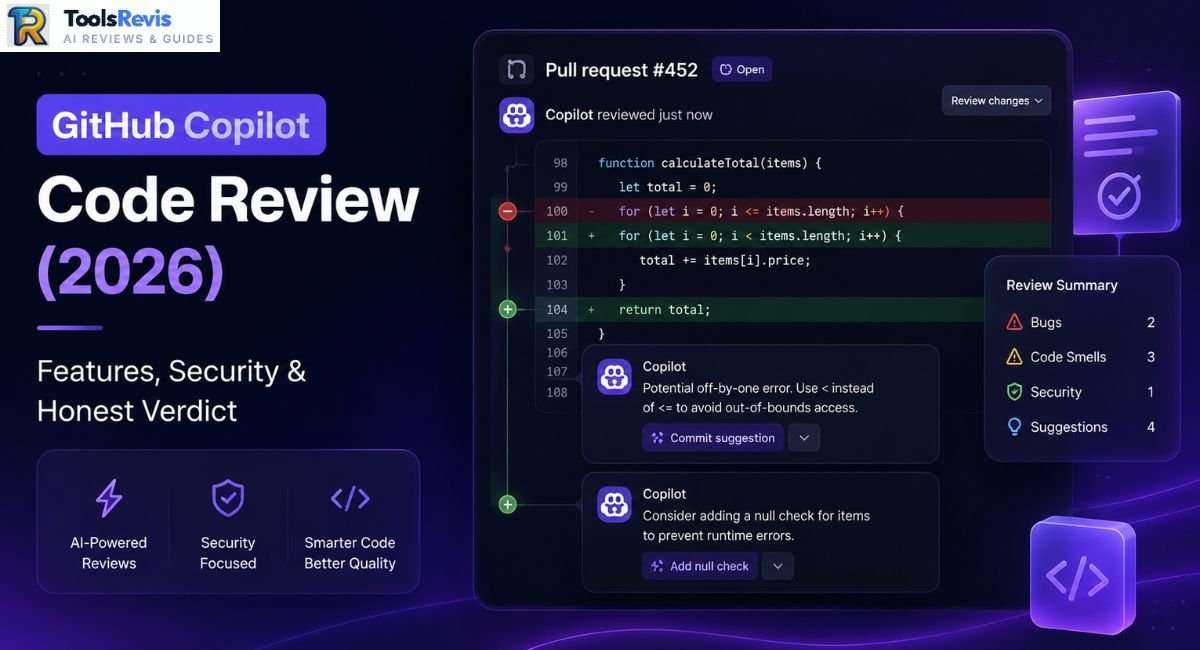
Think about the last time you merged a PR because an AI reviewer found nothing wrong. Comforting, right? Until a subtle bug makes it to production. GitHub Copilot Code Review is built to flag issues early, but it isn’t flawless. The question worth asking is how much trust its review actually deserves before you merge.
Quick Answer: GitHub Copilot Code Review scans pull request changes, flags potential bugs, security risks, and code-quality problems, and offers one-click fixes directly inside GitHub. It’s a strong first-pass reviewer before merging, but architectural flaws still need human review, and security-critical code also needs dedicated scanning tools.
Introduction
Pull request reviews have always been the bottleneck nobody wants to own. Senior engineers get pulled into reviewing junior code they don’t have time for, and junior engineers wait hours for feedback that could’ve been automated. GitHub built Copilot Code Review to close that gap — an AI agent that reads your diff the moment you open a PR and starts leaving comments before a human even clicks in.
But “AI reviewed my code” and “my code was reviewed” are not the same sentence, and that distinction matters more in 2026 than it did during the tool’s early rollout. This piece breaks down exactly how the feature works under the hood, where it earns its keep, where it quietly costs you money and patience, and whether it deserves a permanent slot in your review pipeline.
How GitHub Copilot Code Review Works
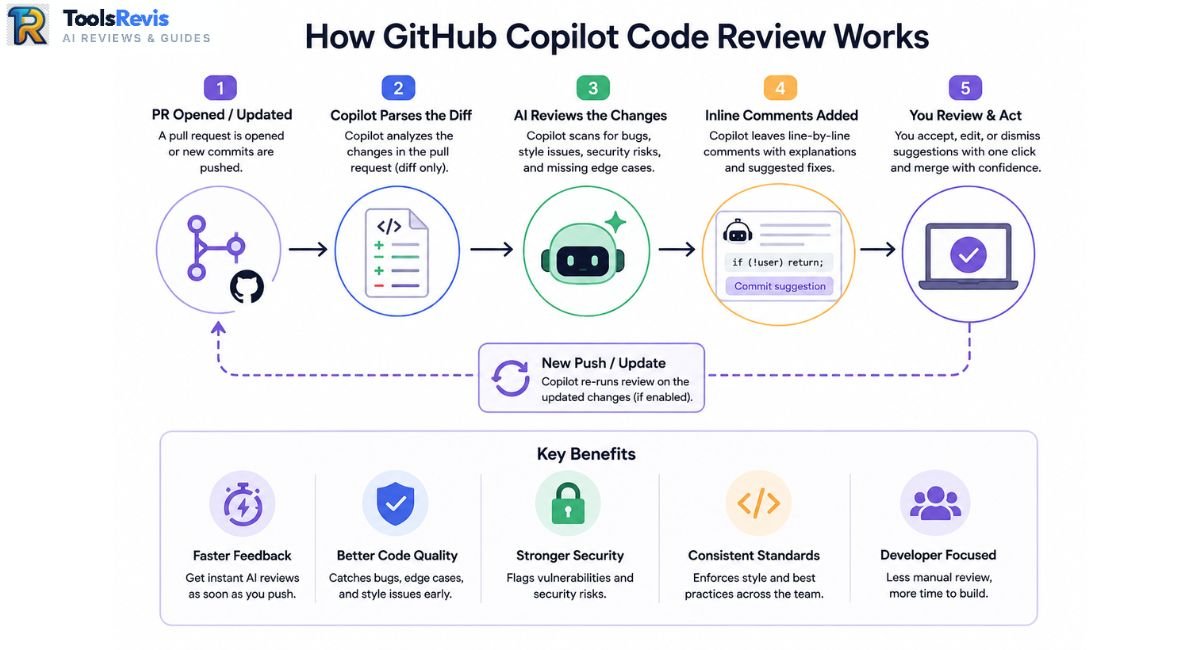
GitHub Copilot Code Review is an automated PR agent that parses pull request diffs, flags inline syntax or style issues, and offers one-click commit suggestions directly within the GitHub interface. For a broader look at Copilot’s coding features beyond pull-request reviews, see our GitHub Copilot Review.
The PR Review Workflow Step-by-Step
- A PR is opened, or an existing PR is pushed to.
- Copilot starts by analyzing the pull request changes, then can gather additional repository context when needed. Review depth depends on the configured review effort and the context available to the agent.
- It generates inline review comments on relevant lines, highlighting potential bugs, code-quality issues, security concerns, and missing edge cases.
- Whenever possible, it includes a one-click code suggestion, allowing you to apply a ready-to-use fix directly from your browser.
- The developer accepts, edits, or dismisses each comment individually.
Copilot Code Review vs Copilot Cloud Agent
GitHub Copilot provides different agent experiences for reviewing pull requests and making code changes, so it is important to understand what each one does.
- Copilot Code Review can be requested as a reviewer for a pull request and provides automated feedback on the proposed changes. Depending on the repository configuration, reviews can also run automatically when pull requests are opened or updated.
- Copilot Cloud Agent is a separate agent experience designed to work on coding tasks and make changes, rather than simply acting as an automated PR reviewer. Keeping these roles separate makes it easier to understand what Copilot is doing during a review versus when it is asked to modify code.
These experiences serve different purposes: Code Review focuses on evaluating pull-request changes, while Copilot’s coding agents can work on tasks and make changes.
Beyond basic syntax checks, the model scans for potential concurrency issues and logic flaws—you can learn more about GitHub Copilot’s code review capabilities to maximize its accuracy.
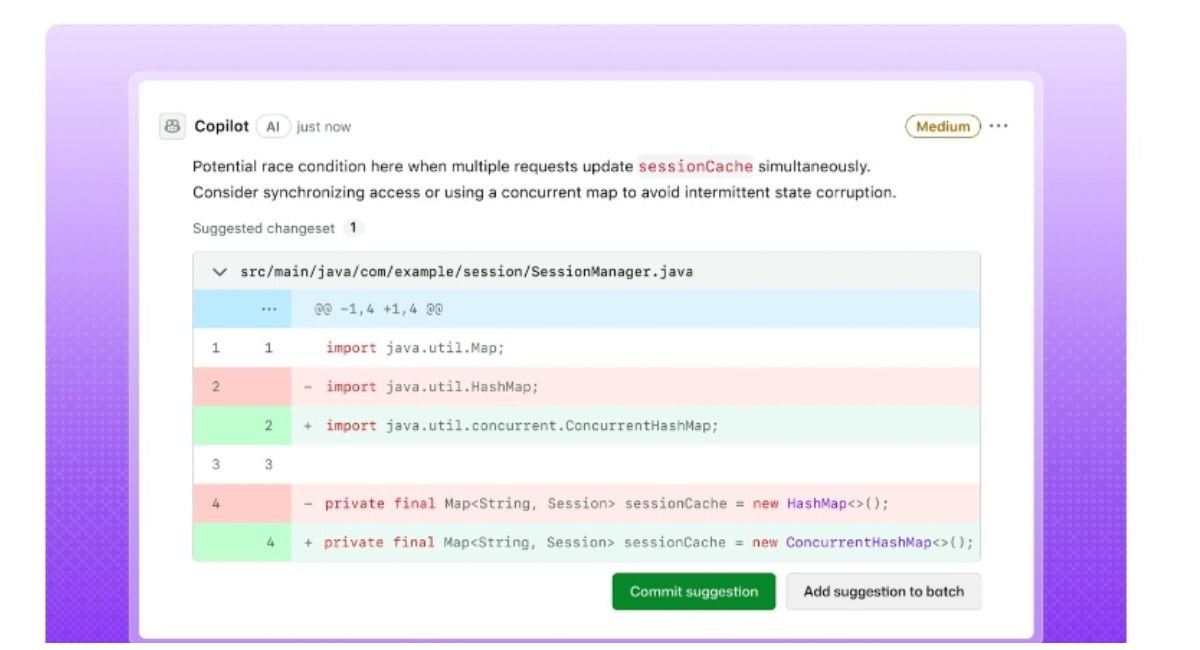
Comparing the Web UI with Traditional IDEs (VS Code & JetBrains)
Inline suggestions differ by surface. In the GitHub web UI, suggestions appear as standard PR review comments with a “Commit suggestion” button — accept it and GitHub commits the change to the branch directly, no local pull required. In VS Code, the experience shifts: Copilot surfaces the same class of suggestions inline in the diff view, but fixes apply directly to your working copy, meaning you review and stage them like any local edit rather than triggering a remote commit. Web UI is faster for small fixes; VS Code is where you want to be for anything touching more than a couple of lines, since you get full IDE context alongside the suggestion.
The “Infinite Loop” Review Fatigue Issue
Repeated review cycles can create review fatigue. When a pull request changes after Copilot’s feedback, another review can surface additional comments, especially when automatic reviews run on new pushes.
Here’s the mechanic: you accept a Copilot suggestion to fix, say, an unhandled exception. That fix changes the line count or structure of the function slightly. Copilot re-scans on the next push — and now flags a new minor issue in the same function, often a style nit or a suggestion adjacent to the fix you just made. Accept that one, and a third micro-suggestion appears.
The practical downside is review churn: individual suggestions may be useful, but repeated small comments can increase the amount of time developers spend triaging and applying changes. On larger diffs, this loop is where teams start asking whether the tool is saving time or just redistributing it.
Security Filters: Strengths, Blind Spots, and Coverage
GitHub Copilot Code Review can identify potential security and code-quality issues in pull requests, but its findings should not be treated as a complete security assessment. Dedicated security tools and human review are still important for deeper vulnerabilities, data-flow issues, and architectural risks.
What Copilot Code Review Can Flag
- Potential Secrets: Copilot can flag potentially exposed credentials or sensitive values in code, but dedicated secret-scanning tools should remain part of the security workflow.
- Potential Injection Risks: Copilot can identify suspicious patterns such as unsafe query construction, but findings should be validated with dedicated security analysis.
- Potential Code and Security Issues: Copilot may surface issues in the changed code, while GitHub’s dedicated security and code-scanning features handle specialized detection tasks.
- Common Security Patterns: Copilot can point out potentially unsafe input handling, insecure APIs, or weak security practices, but it should not be treated as a replacement for dedicated security scanning.
The Multi-File Architectural Blindspot
Copilot Code Review can analyze more than isolated syntax or formatting issues, and newer agentic review capabilities can gather additional repository context when needed. However, deeper architectural and cross-service issues can still require human review and dedicated analysis tools.
Why Teams Pair Copilot with SonarQube & Snyk
Teams may also pair Copilot Code Review with dedicated static-analysis and security tools such as SonarQube, Snyk, or GitHub’s own security features. These tools provide specialized checks that complement AI-generated review feedback. The practical pattern: Copilot handles the fast, cheap, first-pass noise; SonarQube or Snyk runs as the actual security gate before merge.
How Deep Does Copilot Code Go?
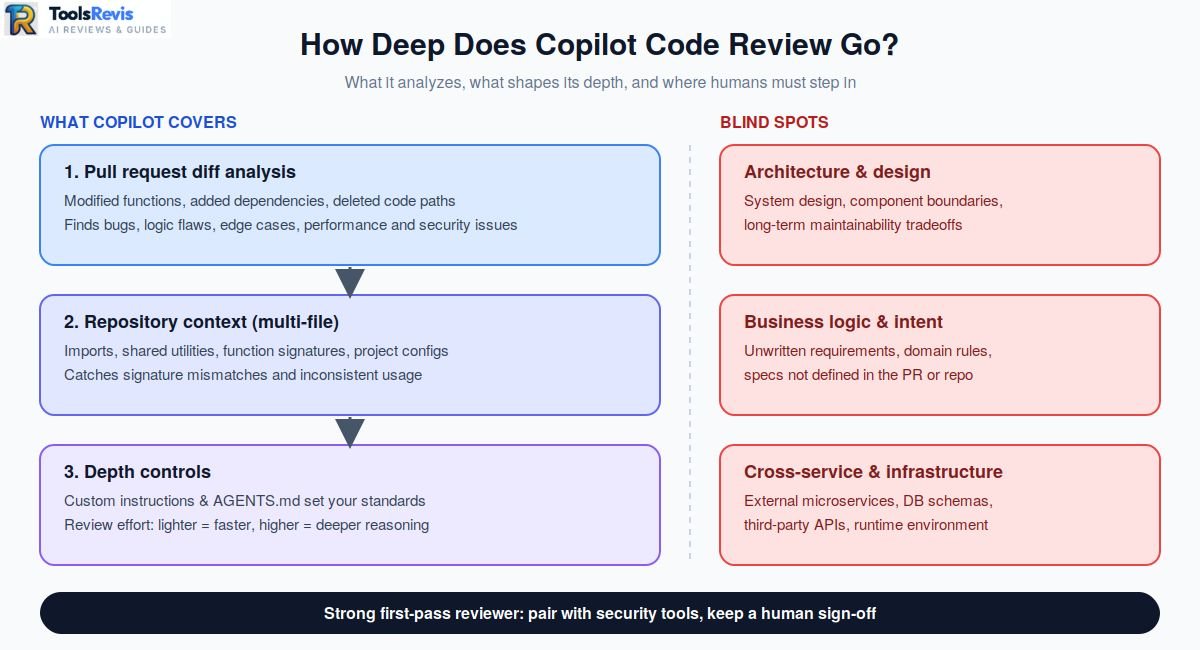
GitHub Copilot Code Review goes beyond surface-level syntax and formatting checks by analyzing the overall logic and functional impact of proposed pull request (PR) changes. Rather than acting solely as an automated linter, it evaluates how code behaves and how different parts of a change interact.
Pull Request Diff Analysis
At its core, Copilot focuses on the line-by-line diff of the pull request. It parses modified functions, added dependencies, and deleted code paths to identify potential bugs, logic flaws, edge-case failures, performance bottlenecks, and security vulnerabilities introduced within those specific edits.
Context-Aware Scanning Across Files
While its review begins at the diff, Copilot can fetch additional context from the broader repository when required. It evaluates how modified code interfaces with imported modules, shared utilities, local function signatures, and project configurations across multiple files. This multi-file awareness helps catch signature mismatches, broken internal API calls, and inconsistent usage patterns across related modules.
Variability Based on Configuration and Effort
The depth and thoroughness of a Copilot review are not strictly fixed; they vary based on repository configuration and review effort settings:
- Custom Instructions & AGENTS.md: Repository and organization-level instructions allow teams to direct Copilot toward specific standards, security policies, or coding conventions.
- Review Effort Settings: Teams can configure Copilot’s evaluation depth. Higher effort modes allocate more reasoning cycles to analyze complex logic paths and subtle interactions, whereas lighter configurations focus on faster, surface-level feedback.
Analysis Boundaries and Blind Spots
Despite its multi-file context indexing, Copilot does not possess a full, holistic understanding of an entire codebase or its external execution environment. Key limitations include:
- Architectural & Design Constraints: It cannot reliably evaluate high-level system architecture, component boundary design, or long-term maintainability tradeoffs.
- Business Logic & Intent: It cannot verify whether code aligns with unwritten business requirements, domain-specific logic, or product specifications not explicitly defined in the PR or repository instructions.
- Cross-Service & Infrastructure Dependencies: It lacks visibility into external microservices, database schemas, third-party APIs, network configurations, and runtime infrastructure behaviors.
Why Human Review Remains Necessary
Copilot Code Review serves as an effective first-pass automated check—flagging obvious oversight before human reviewers open the PR. However, complex architectural decisions, security model validations, and critical business logic verifications still require human judgment. Copilot can also be configured to provide approvals in supported repositories. This approval capability is currently in public preview, so teams should verify the available settings before relying on it as part of their merge workflow.
Auto Code Review Setup & The June 2026 Billing Change
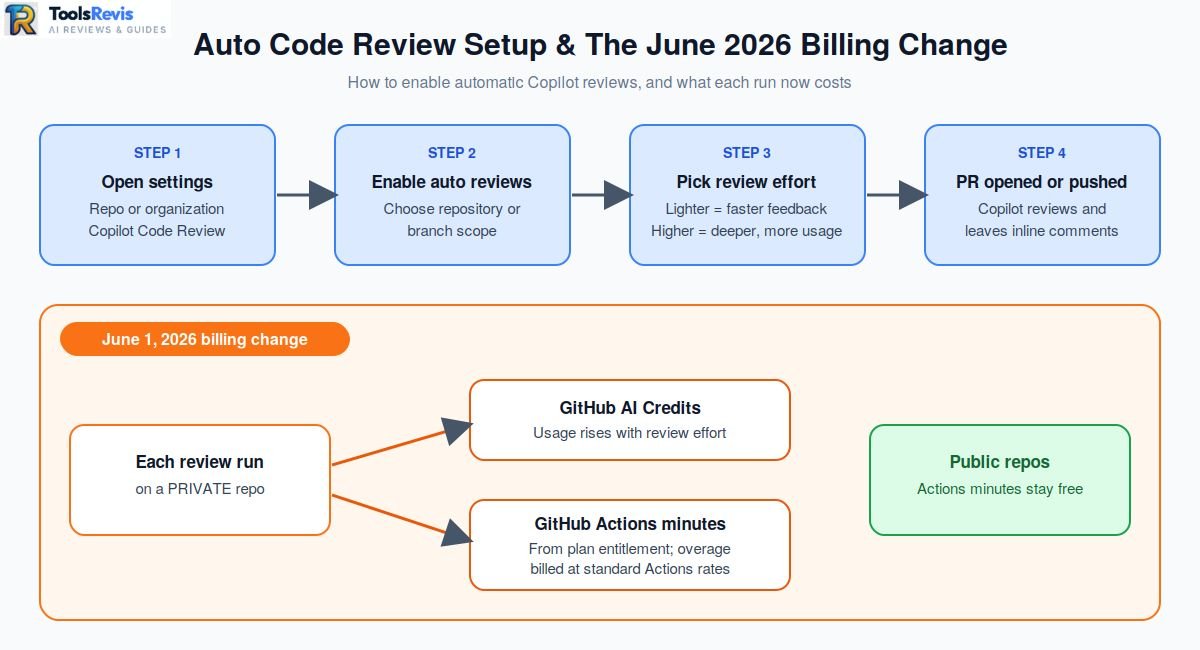
Automating Copilot Code Review requires toggling automatic reviews under repository settings, which consumes both GitHub AI Credits and standard GitHub Actions minutes on private repositories as of June 2026. If you are comparing different approaches to automated PR feedback, see our guide to code review automation.
Copilot Review Effort: Lite vs Balanced
Copilot lets you decide how thorough each review should be, though the exact options depend on your account and repository. Lighter reviews return fast feedback for routine edits, while higher-effort reviews dig into complex logic, sensitive code, and cross-component changes. Just keep in mind that deeper reviews also burn through more usage.
- Open the repository or organization settings for Copilot Code Review and configure automatic reviews according to the options available for your plan and repository.
- Enable automatic Copilot code reviews and choose the repository or branch scope available in your configuration.
- Confirm that the required Copilot subscription, repository access, and organization policies are configured for the people and repositories that will use Code Review.
- Supported repo types include public and private repositories on GitHub.com; GitHub Enterprise Server support varies by version, so check your instance’s release notes before assuming parity.
The June 1, 2026 Billing Change (Actions Minutes Overhead)
The June 1, 2026 billing change is important for teams using automatic reviews on private repositories. GitHub confirmed that starting June 1, 2026, GitHub Actions minutes are consumed from your existing plan entitlement for each Copilot code review run on private repositories, with usage beyond included minutes billed at standard GitHub Actions rates. This means teams need to account for both AI Credits and applicable GitHub Actions usage when estimating the cost of automated reviews. Public repositories are unaffected — Actions minutes remain free there.
In practice, this means every automated review on a private repo now draws from two separate meters at once, and teams running frequent PR cycles are the ones who’ll feel it first. For the full AI Credits and billing breakdown, see our GitHub Copilot Pricing Guide.
Code Review in Azure DevOps & JetBrains
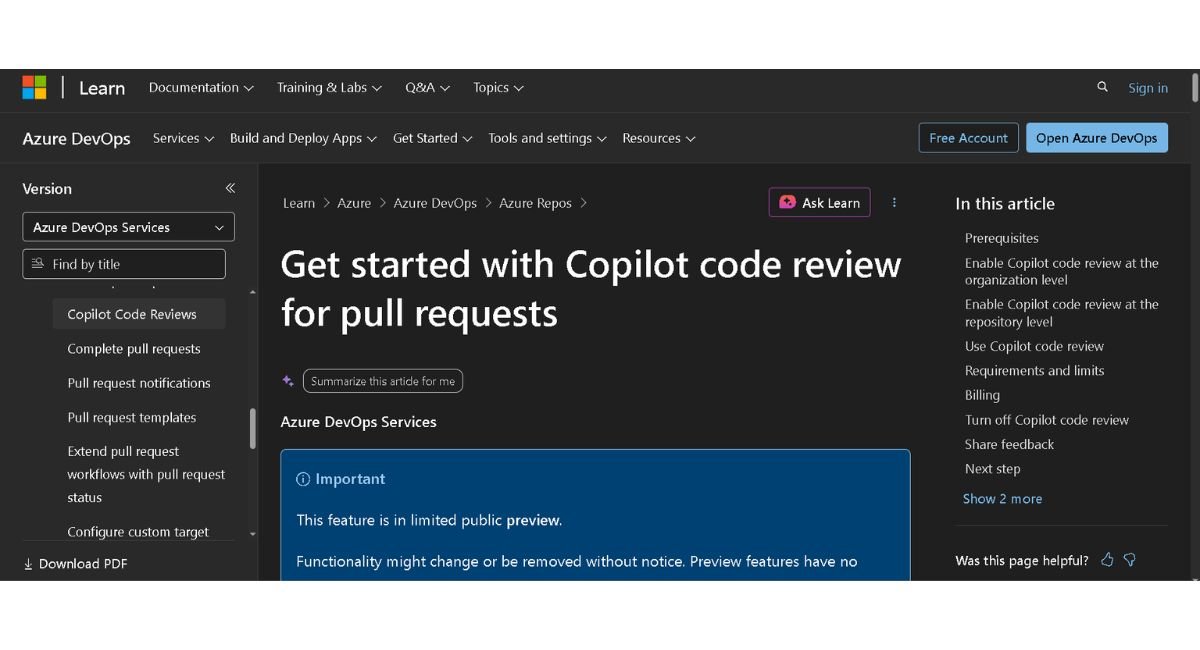
GitHub Copilot Code Review is available for Azure Repos in public preview, with availability and preview limitations subject to the current Azure DevOps rollout.
Azure Repos Public Preview & Practical Workarounds
Copilot code review is also available for Azure Repos through a technical-preview experience. Availability, configuration requirements, and billing can differ from GitHub.com, so check the current Microsoft documentation before configuring it for a production workflow.
That’s a meaningful shift, but it’s still preview-stage: it requires enabling at both the org and repo level, has no GA timeline yet, and doesn’t apply to Azure DevOps Server (on-prem) at all. For teams outside the preview or running self-hosted Azure DevOps, the workarounds developers built over the past year are still the practical path.
Before configuring organization-level policies, make sure to check the requirements outlined in the official Azure DevOps documentation.
The three workarounds that see real production use:
- Azure AI Foundry + CLI agents in pipelines. Teams wire OpenCode or Codex CLI (or the GitHub Copilot CLI itself) into an Azure Pipelines task, running the agent against the PR diff and posting results back as a pipeline-triggered comment. This mirrors what GitHub’s own Reviewers-section agent does, just orchestrated manually.
- Azure DevOps MCP server with a copilot-instructions.md. Pointing an MCP-connected Copilot instance at Azure Repos via the Azure DevOps MCP server, paired with a repo-level copilot-instructions.md file, gives the agent enough project context to produce reviews close in quality to native GitHub behavior — at the cost of setup and maintenance overhead.
- Custom webhooks. The blunt-force option: a Node or Python service listening on Azure DevOps PR webhooks, forwarding the diff to a model API, and posting the response back via the Azure DevOps REST API. Most control, most maintenance burden.
If you are building an AI-assisted engineering workflow, explore our curated guide on the Best AI Tools for Developers.
The JetBrains / IntelliJ IDE Experience
Copilot code review reached JetBrains IDEs — IntelliJ IDEA, PyCharm, WebStorm, Rider, and others — as a self-review feature you trigger before opening a PR. The JetBrains experience differs from the GitHub web workflow because review feedback is presented inside the IDE. Feature availability and interaction details can vary by IDE and Copilot version, so developers should check the current GitHub documentation for the latest supported workflow. Some WebStorm users have also mentioned editor slowdowns and occasional inconsistent suggestions in language-specific edge cases, though these reports are anecdotal rather than benchmarked.
If your team is JetBrains-first, treat Copilot Code Review there as a supplementary check, not a primary workflow tool.
Copilot Code Review vs. CodeRabbit: Which Catches More Real Bugs?
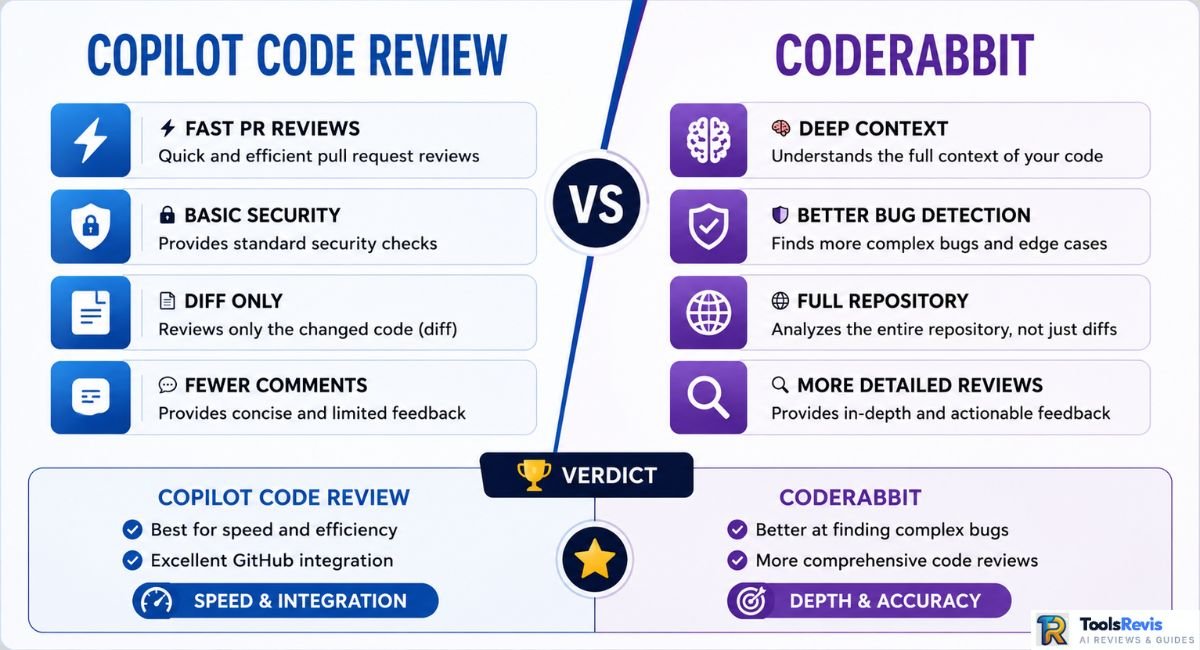
GitHub Copilot Code Review is integrated directly into the GitHub workflow, while CodeRabbit focuses on automated pull-request reviews with its own repository-analysis and review features.
Context Trimming vs. Deep Repository Awareness
Developer sentiment on Copilot’s built-in review is mixed on exactly this point. The result, per repeated feedback, is suggestions that are technically correct but low-utility — style nits and minor refactors rather than the logic error that actually mattered.
CodeRabbit takes a different approach to automated pull-request reviews and is known for providing detailed review feedback. Its higher comment volume can also mean more items for developers to triage. The criticism that follows it just as consistently: it can be “chatty,” generating a high volume of comments per PR, and some of that volume lands as false positives — flagged issues that aren’t actually problems, requiring a developer to triage the noise rather than trust every comment outright.
Other tools worth knowing in this space: Cursor’s PR review (native to Cursor’s IDE workflow), Bito.ai (enterprise-focused, configurable rule sets), Wispbit (lighter-weight, rule-based review automation), and PR-Agent (open source, self-hostable if you want full control over the review pipeline without vendor lock-in).
Next Reads
- Complete Copilot Breakdown:
GitHub Copilot Review: Features, Speed & Real-World Tests
A complete hands-on evaluation of full-line code completion and chat capabilities beyond PR reviews. - Pricing & Cost Analysis:
GitHub Copilot Pricing Guide: Plans, AI Credits & Hidden Costs
Calculate your engineering team budget accounting for the June 2026 Actions minutes updates and AI credits. - Alternative AI Coding Assistant:
Cursor AI Review: Next-Gen AI Code Editor
See whether a dedicated AI IDE delivers better results than GitHub Copilot’s native PR reviewer.
Conclusion: Final Verdict on GitHub Copilot Code Review
GitHub Copilot Code Review delivers genuine value as a fast, automated first-pass filter. It excels at keeping minor syntax errors, formatting inconsistencies, and unhandled edge cases out of human review queues. For busy engineering leads, having an automated agent handle routine diff checks saves valuable time and keeps pull requests moving forward.
However, it is not a complete replacement for human code reviews or dedicated security analysis tools. Although Copilot can gather additional repository context during review, AI-generated feedback can still miss deeper architectural vulnerabilities, business-logic problems, or issues that require broader system understanding.
Furthermore, with the June 2026 billing updates consuming GitHub Actions minutes alongside AI Credits on private repositories, engineering teams must weigh its operational noise and cost against its efficiency gains.
Our Final Verdict: Treat GitHub Copilot Code Review as a strong first-pass reviewer, not your only merge safeguard. Pair it with dedicated static-analysis and security tools such as SonarQube, Snyk, CodeQL, or GitHub security features for deep security checks, and always ensure a human engineer conducts the final architectural sign-off before code hits production.
Frequently Asked Questions
Here are the direct answers to the most common questions regarding GitHub Copilot Code Review capabilities, pricing, security, and platform integrations.
1. What does the GitHub Copilot security filter help prevent?
It can flag potential security and code-quality issues in pull requests, but it should not be treated as a complete security assessment. Dedicated security scanning and human review remain important for deeper vulnerabilities. It works at the diff level, so it’s effective on surface-level issues but doesn’t replace dedicated static analysis for deeper, cross-file security flaws.
2. How does GitHub Copilot perform PR reviews?
It scans the diff between a pull request and its target branch, then posts inline comments directly on affected lines, often with a one-click suggested fix. This runs automatically on PR open or push when added under the Reviewers section. For a broader look at how coding agents work with different levels of autonomy, see our Autonomous Coding Agent guide.
3. What is the difference between GitHub Copilot Code Review and Copilot Cloud Agent?
GitHub Copilot Code Review is focused on reviewing pull-request changes and providing review feedback. The Copilot Cloud Agent is designed for coding tasks and can work on changes rather than simply reviewing the PR. They serve different roles in an AI-assisted development workflow.
4. Does GitHub Copilot code review work on Azure DevOps?
Yes, as of a technical preview launched June 2, 2026, covering Azure Repos with on-demand PR reviews. It’s not yet GA, doesn’t cover Azure DevOps Server (on-prem), and many teams still rely on pipeline-based or MCP server workarounds in the meantime.
5. Will Copilot code review use up my GitHub Actions minutes?
Yes. Automated Copilot Code Review on private repositories can consume GitHub Actions minutes in addition to the applicable AI Credit usage. Check GitHub’s current billing documentation for the latest plan-specific details. Public repos remain unaffected.

I’m Umair Ahmad, founder of ToolsRevis. I personally test every AI tool we cover — signing up, running real workflows, checking pricing tiers, and comparing outputs — before writing a single word. My goal: cut through AI marketing hype with honest, hands-on verdicts.
Let’s achieve more together!