
Introduction
If you opened your Copilot bill this month and did a double-take, you’re not imagining things. On June 1, 2026, GitHub quietly retired the pricing model that had defined the tool since 2023 and replaced it with something closer to how you pay for cloud compute — metered, token-based, and a lot less forgiving if you run Agent Mode all day. Same sticker price on your plan. Completely different math underneath.
This guide breaks down exactly what changed, what still costs nothing, how the new GitHub AI Credits actually get consumed, and — if you’ve decided Copilot’s math no longer works for you — exactly how to cancel without getting stuck in a billing cycle you didn’t expect.
Quick Answer Box
GitHub Copilot pricing in 2026 ranges from Free to $100/month for individuals, teams, and enterprises. It now uses AI Credits instead of Premium Request Units (PRUs), making Chat, Agent Mode, and code reviews usage-based. Code completions remain unlimited. Pro includes $15 in AI Credits, Pro+ $70, and Max $200, with usage depending on model selection and token consumption.
Updated for 2026 pricing changes, AI Credit billing, Agent Mode usage, and Copilot cancellation steps.
If you’re looking for performance, AI models, code review, and real-world testing, read our GitHub Copilot Review 2026.
What GitHub Copilot Pricing Changed in 2026? (PRUs vs. GitHub AI Credits)
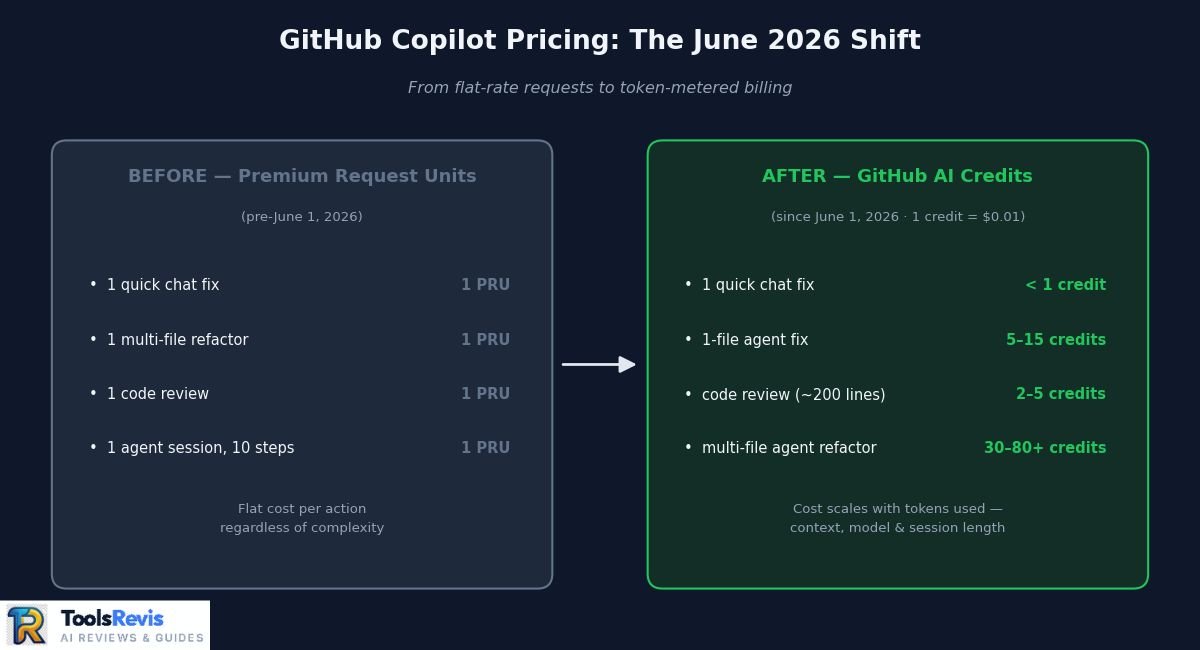
GitHub Copilot pricing changed on June 1, 2026, replacing Premium Request Units (PRUs) with usage-based GitHub AI Credits that charge based on actual token consumption.
For the first few years of Copilot’s life, pricing was simple in a way developers actually liked: pay your monthly fee, get a bucket of Premium Request Units, and every premium interaction — chat message, agent step, code review — cost the same flat number of units regardless of what you actually asked it to do. Ask for a one-line regex fix or tell the agent to refactor 4,000 lines across a dozen files? Same PRU cost either way.
That flat-rate model made budgets predictable, but it also meant GitHub was absorbing wildly uneven compute costs — a quick autocomplete-style question and a multi-file agentic session pulled the same number of units while costing GitHub very different amounts to actually run. As Agent Mode adoption exploded through late 2025 and into 2026, that mismatch stopped being sustainable.
So GitHub switched the entire system to usage-based billing. Premium Request Units are gone. In their place: GitHub AI Credits, priced at exactly $0.01 per credit and consumed based on real token usage — input tokens, output tokens, and cached context tokens — at whatever rate the specific model you’re using publishes.
What’s still free, regardless of plan: inline code completions and next-edit suggestions. GitHub kept these unlimited and outside the credit system entirely, so if your usage is 90% autocomplete, this change barely touches you.
What now burns credits:
- Copilot Chat (in-IDE and on github.com)
- Agent Mode / autonomous multi-step coding sessions
- Cloud agents and background agent runs
- Copilot code review
- CLI-based Copilot usage
In practice, while your subscription rate remains unchanged, the actual value you get now hinges completely on your Copilot usage habits. . A developer who leans on quick chat questions with a lightweight model will barely notice the switch. A developer running long agentic sessions with a frontier model across multiple files can burn through a month’s credit allowance in days — sometimes hours — because every token that flows through that session now has a literal dollar cost attached to it, rather than a flat “1 request” tag regardless of complexity.
That’s the shift underpinning everything else in this guide: the plans below still look familiar, but the value each one delivers now moves with your workflow instead of staying fixed.
GitHub Copilot Pricing Tiers Explained (2026 Comparison)
GitHub Copilot offers six pricing tiers in 2026 — Free, Pro, Pro+, Max, Business, and Enterprise — each with a different AI Credit allowance and feature set. Together they cover everything from solo hobbyists to enterprise engineering orgs. Subscription prices are unchanged from the PRU era — what’s different is that every paid tier now maps to a specific AI Credit allowance instead of a flat request count, and most tiers include more credit value than their sticker price.
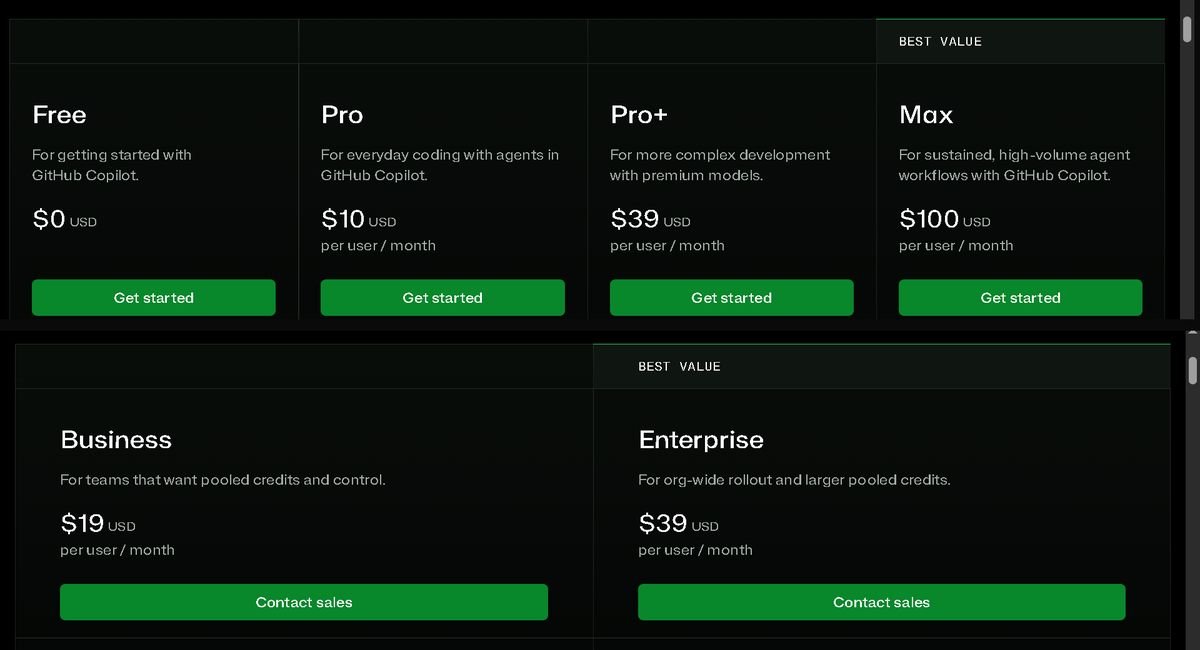
| Tier | Price | Included AI Credits | Code Completions | Chat / Agent Mode | Best For |
|---|---|---|---|---|---|
| Free | $0/mo | Small monthly allowance (auto-selected model) | Limited (2,000/mo) | Limited chat + agent access | Trying Copilot before committing |
| Pro | $10/mo | $15/mo in AI Credits (1,500 AI Credits) | Unlimited | Full access, credit-metered | Individual devs, moderate chat/agent use |
| Pro+ | $39/mo | $70 in AI Credits | Unlimited | Full access + premium model priority | Power users running Agent Mode regularly |
| Max | $100/mo | Included AI Credits: $200/mo (20,000 AI Credits) | Unlimited | Full access + priority for sustained agent workloads | Heavy, near-continuous agentic use |
| Business | $19/user/mo | $19/user/mo (org-pooled) | Unlimited | Full access + admin policy controls | Teams needing centralized billing/policy |
| Enterprise | $39/user/mo | $39/user/mo (org-pooled) | Unlimited | Full access + SAML SSO, audit controls | Larger orgs needing compliance & governance |
How to read this table:
- Credits do not simply match the subscription price. GitHub includes bonus AI Credits with paid plans. For example, Pro includes 1,500 AI Credits ($15 value), Pro+ includes 7,000 AI Credits ($70 value), and Max includes 20,000 AI Credits ($200 value). Actual consumption still depends on the selected model and token usage.
- Business and Enterprise pool credits at the org level, not per seat in isolation. An admin can let one heavy-Agent-Mode developer draw more from the shared pool than a developer who only uses completions — useful, but it also means one runaway agent session can eat into a whole team’s monthly allowance if budget caps aren’t set.
- Code completions are free across every paid tier. If your team’s usage is completion-heavy and chat-light, the tier you pick mostly comes down to seat management and admin controls, not credit volume.
- Free tier is genuinely usable for light workflows but the completion cap (2,000/mo) and limited chat/agent access make it impractical past casual, occasional use.
Enterprise-specific features (SAML SSO, audit logging, IP indemnification, policy management) are the real differentiator over Business — the credit allowance itself scales the same way ($1 of credit per $1 of seat price) on both.
Which GitHub Copilot Pricing Plan Should You Choose in 2026?
The best GitHub Copilot plan depends on how often you use AI features, your team size, and whether you rely on Agent Mode or only code completion.
| User Type | Recommended GitHub Copilot Plan | Why This Plan Fits |
| Students & Beginners | GitHub Copilot Free | Best for learning programming, practicing projects, and occasional AI coding assistance |
| Individual Developers | GitHub Copilot Pro ($10/month) | Best value for daily coding, AI chat, and regular development workflows |
| AI-Heavy Developers | GitHub Copilot Pro+ ($39/month) | Designed for frequent Agent Mode usage, premium models, and advanced coding tasks |
| Small Development Teams | GitHub Copilot Business ($19/user/month) | Provides team billing, admin controls, and organisation management features |
| Large Organisations | GitHub Copilot Enterprise ($39/user/month) | Built for security, compliance, governance, and large-scale software development |
For most individual developers, Copilot Pro remains the best starting point. Developers who frequently use multi-file Agent Mode sessions should consider Pro+ because their AI Credit consumption can increase quickly.
Which Editors Does Copilot Actually Work In?
GitHub Copilot works across multiple editors, including Visual Studio Code, Visual Studio, JetBrains IDEs, Neovim, and GitHub.com. Copilot isn’t locked to one editor. It runs in VS Code, Visual Studio, JetBrains IDEs (IntelliJ, PyCharm, WebStorm), Neovim, and directly on github.com. Credit consumption works identically across all of them — the meter doesn’t care which editor triggered the request, only which model and how many tokens. If you’re comparing Copilot to Cursor, this matters: Cursor is its own editor, Copilot is a plugin into editors you already use.
What Are GitHub AI Credits & Token Traps?
GitHub AI Credits are usage-based credits that are deducted whenever you use Copilot Chat, Agent Mode, code reviews, or other premium AI features.
Key facts:
– 1 AI Credit equals $0.01 USD.
– Charges are based on token usage.
– Code completions remain free.
– Chat, Agent Mode, and reviews consume credits.
The mechanic is simple in theory: every time you send a chat message, kick off an Agent Mode session, or request a code review, Copilot counts the tokens involved — what you sent (input), what the model generated (output), and any cached context it reused — and converts that token count into a dollar cost using the specific model’s published rate. That dollar cost is deducted from your monthly AI Credit balance, where 1 credit = $0.01.
A short chat question with a lightweight model might cost a fraction of a credit. A long Agent Mode session using a frontier model across several files can cost dozens of credits in a single run. Same subscription, wildly different draw depending on what you ask for.
GitHub Copilot Usage Limits Explained
GitHub Copilot usage limits in 2026 depend on your subscription plan, AI Credit balance, selected model, and the features you use.
The main limits users should understand are:
| Feature | Uses AI Credits? | Usage Limit / Billing Method |
| Code Completions | No | Unlimited on paid plans and does not consume AI Credits |
| GitHub Copilot Chat | Yes | Credit-based usage depends on model selection and token consumption |
| Agent Mode | Yes | Higher credit usage because it processes more context and multi-step tasks |
| Copilot Code Review | Yes | Credit consumption depends on code size, complexity, and review requests |
| Premium AI Models | Yes | Uses more credits based on model capabilities and token usage |
Heavy Agent Mode users should monitor their AI Credit dashboard because large repositories, long conversations, and multi-file tasks can increase token usage significantly. The biggest difference from the old PRU system is that Copilot now measures actual AI workload instead of charging a fixed amount per request.
The Hidden Context Trap
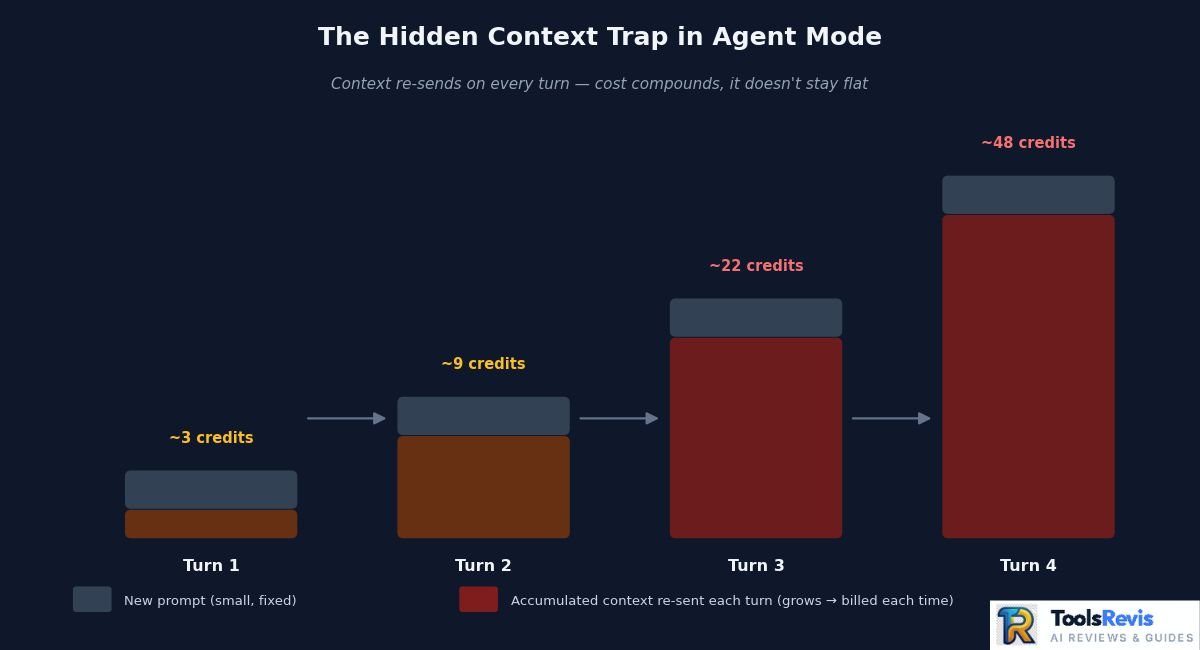
The hidden context trap occurs when GitHub Copilot automatically includes additional project files and conversation history, increasing token usage and AI Credit costs. Here’s where most of the community frustration is actually coming from, and it’s worth understanding before you touch Agent Mode again: your workspace context counts as input tokens, whether you asked for it or not.
When you fire off an Agent Mode query, Copilot doesn’t just process your prompt — it pulls in relevant open files, related code across your workspace, prior conversation history, and any indexed project context it thinks is relevant to give a useful answer. All of that gets counted as input tokens. On a small file, this is negligible. On a large repo with multiple open files and a long agent conversation thread, the context payload can dwarf the actual prompt you typed — and you’re billed for all of it.
This is the exact mechanism behind the “82% of my monthly allowance gone in one day” complaints circulating in developer communities since the June 2026 rollout. It’s not that Agent Mode is inherently expensive — it’s that:
- Context accumulates across a session. Longer agent conversations re-send accumulated context on each turn, so token cost compounds as the session goes on rather than staying flat per message.
- Multi-file operations multiply the trap. Asking an agent to reason across several files pulls all of them into context, even if only one file actually changes.
- There’s no visible warning before the spend. Unlike the old PRU system where every action cost a known, fixed unit, credit consumption per query isn’t obvious until after you’ve run it and checked your balance.
Practical ways to avoid it:
- Keep Agent Mode sessions short and scoped — start a fresh session for a new task rather than letting one long thread accumulate context.
- Close unrelated files before running agent queries; fewer open files means less context Copilot considers “relevant.”
- Check your credit usage dashboard regularly rather than waiting for a monthly surprise — GitHub surfaces per-session token/credit cost if you look for it, but it doesn’t push that information to you proactively.
- For genuinely large refactors, consider whether a lighter model with a narrower, single-file prompt gets you 80% of the result at a fraction of the token cost.
The core takeaway: the credit system isn’t more expensive by design, but it is far less forgiving of sloppy or sprawling agent usage than the flat-rate PRU system it replaced.
Since AI Credit usage depends on the selected model, review the GitHub Models pricing documentation for the latest token rates and supported models.
What a Credit Actually Buys You (Real Examples)
The value of one GitHub AI Credit depends on the AI model, token usage, and task complexity rather than a fixed number of requests.
| Action | Approx. Token Load | Approx. Credit Cost | What You Get |
| Single chat question, lightweight model | Low | Under 1 credit | Quick answer, no file context pulled |
| Code review on 1 file (~200 lines) | Moderate | 2-5 credits | Full review with suggestions |
| Agent Mode, single-file fix, frontier model | Moderate-High | 5-15 credits | Scoped fix, some workspace context pulled |
| Agent Mode, multi-file refactor (5+ files), frontier model | High | 30-80+ credits | Full refactor, but context compounds each turn |
Note: exact numbers vary by model and change with GitHub’s published rates — link this table to GitHub’s official model pricing page (see External Links fix below) and tell readers to check current rates before budgeting.
Looking beyond Copilot? Explore our list of the Best AI Tools for Developers to compare today’s leading coding assistants.
GitHub Copilot Student Discount & Open Source Free Access
Eligible students, teachers, and qualified open-source maintainers can receive GitHub Copilot at no cost through GitHub Education and community programmes. Free access is still real in 2026, but the path to it changed shape this spring — worth knowing before you send someone chasing a dead end.
Important update first: GitHub paused new sign-ups for the free Copilot Student plan on April 20, 2026. If you verified as a student before that date, you keep free access under the new GitHub Copilot Student plan (live since March 12, 2026) — same free cost, but model selection is now auto-only (you can’t hand-pick GPT-5.4 or Claude Opus anymore; Auto mode rotates strong models for you). If you haven’t verified yet, check GitHub’s Education page directly, since the pause has no announced reopening date.
Step-by-step verification (for those still eligible or checking current status):
- Create or log into your GitHub account using an email you’ll keep long-term.
- Go to the GitHub Education Student Pack page at education.github.com/pack and confirm you’re on the Student section, not the Teacher one.
- Click “Sign up for Student Developer Pack” and select “Start an application.”
- Submit proof of enrollment — typically your school-issued email address, or official documentation if your school email isn’t accepted.
- Wait for verification. Academic benefits, including Copilot, typically activate within 72 hours of approval.
- Once verified, activate Copilot manually in your GitHub Copilot settings — verification alone doesn’t automatically switch your plan.
Teachers: Same process through GitHub Education, verified with a school email or official teaching documentation, grants free Copilot Pro (not the limited Student plan).
Open-source maintainers: No application needed — GitHub automatically evaluates public repositories for maintainer activity and popularity. If you qualify, a notice appears directly in your Copilot settings letting you activate free Copilot Pro on the spot.
GitHub Copilot Coupons, Promo Codes & Discounts
GitHub Copilot does not offer official promo codes, and legitimate discounts are limited to free trials and eligibility-based programmes. Short answer: there’s no legitimate promo code or coupon system for GitHub Copilot. GitHub doesn’t run discount codes through third-party coupon sites, and any page claiming a “GitHub Copilot promo code 2026” offering a percentage off Pro or Pro+ is not an official channel — treat these the same way you’d treat any too-good-to-be-true discount site: don’t enter payment or GitHub credentials into them.
What actually exists:
- A 30-day free trial on new Copilot Pro sign-ups — this is the real “discount,” and it’s built into checkout, not something you need a code for.
- Free access tiers covered above (students, teachers, verified open-source maintainers) — the only structural way to get paid tiers at $0.
- Enterprise/Business negotiated pricing — larger organizations negotiating seat counts directly with GitHub sales may get custom terms, but this isn’t a public coupon and isn’t available to individual subscribers.
If a site promises a “50% off Copilot Pro+ code,” it’s almost certainly either expired, fake, or a phishing attempt dressed up as a deal aggregator. The only pricing changes worth tracking are the official ones GitHub announces on its plans page and blog.
How to Cancel GitHub Copilot Subscription (Step-by-Step)
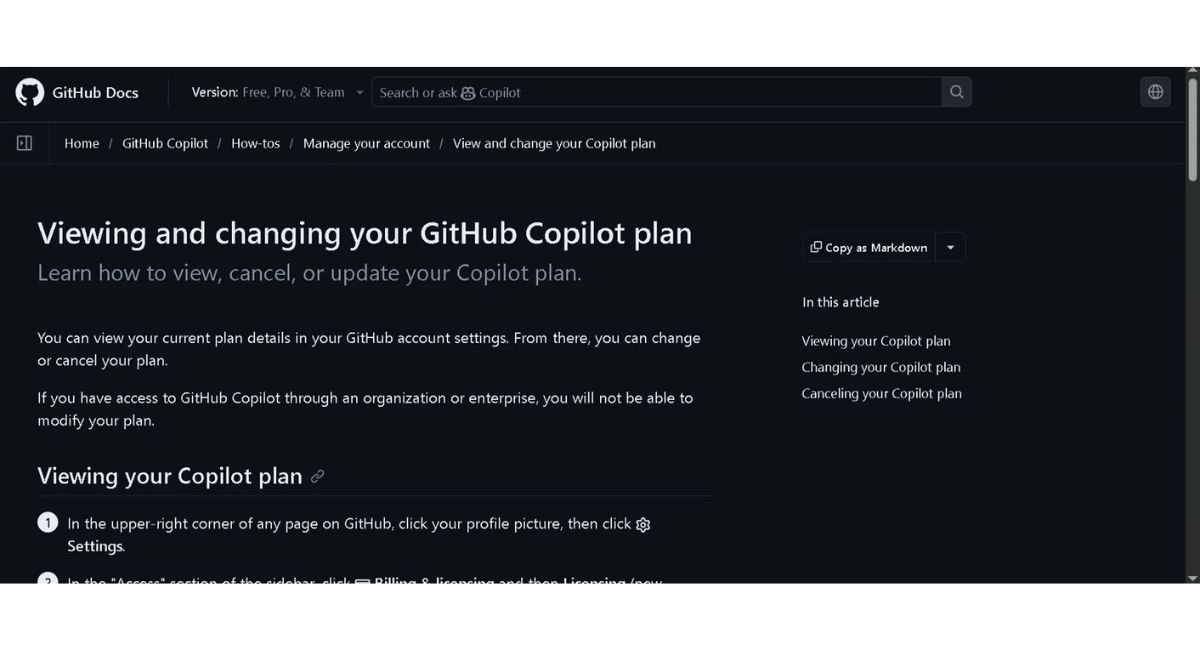
You can cancel your GitHub Copilot subscription from your GitHub account’s billing settings, and your access continues until the current billing cycle ends.
- Go to github.com and log into the personal account being billed for Copilot.
- Click your profile photo in the upper-right corner, then select Settings.
- In the left sidebar under “Access,” click Billing and plans (older layout) or Billing & licensing → Licensing (newer layout) — GitHub is mid-rollout on renaming this section, so either label may appear depending on your account.
- Click Plans and usage.
- In the GitHub Copilot section, click the Manage subscription dropdown.
- Select Cancel subscription.
- Confirm by selecting Cancel Copilot Pro / Pro+ / Max (whichever matches your current plan).
You’ll keep full access until the end of your current billing cycle — cancellation doesn’t cut you off immediately. After the cycle ends, your account automatically drops to Copilot Free rather than losing GitHub Copilot access entirely.
Cancel GitHub Copilot Pro vs Business Plan
Individual GitHub Copilot plans can be cancelled by the account owner, while Business and Enterprise subscriptions are managed by organisation administrators.
Pro / Pro+ (individual billing): You control the cancellation yourself through the steps above. It takes effect at the end of your current billing cycle, with no proration or partial refund for the unused portion of the month in most cases.
Business / Enterprise (org-managed): You typically won’t see a cancel option in your personal settings at all if Copilot is provisioned through your employer’s organization. Seat management sits with the org’s billing admin — cancellation means the admin removes your seat from the organization’s Copilot license, not you clicking cancel on your own account. If you’re an admin managing the org-wide plan, cancellation happens at the organization billing level and affects all assigned seats, so confirm with your team before pulling that lever.
Cost Comparison: GitHub Copilot vs. Cursor vs. Direct API
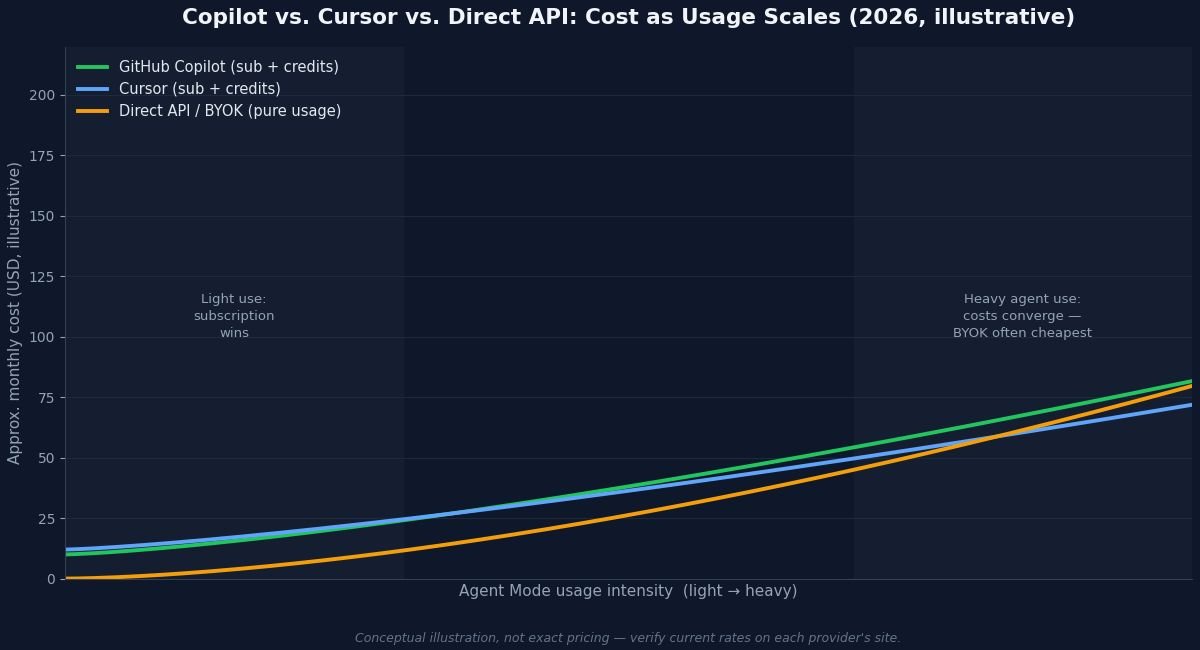
GitHub Copilot, Cursor, and direct AI APIs differ mainly in pricing model, flexibility, and how AI usage is billed. With Copilot’s move to token-metered credits, the gap between it and its main alternatives has narrowed — all three now bill roughly the same way under the hood. The real differences are in flexibility and where the markup sits.
| GitHub Copilot | Cursor | Direct API (BYOK) | |
| Pricing model | Subscription + AI Credits (metered) | Subscription + usage-based credits | Pure pay-per-token, no subscription |
| Base cost | $10–$100/mo (individual tiers) | Comparable subscription tiers, also credit-metered | $0 base — you only pay model providers directly |
| Model choice | GitHub-curated model list, auto or manual selection depending on plan | Broader model selection, frequently updated | Any provider’s API directly (Anthropic, OpenAI, etc.) |
| Predictability | Moderate — same trap as Cursor: agent-heavy sessions burn credits fast | Similar usage-based unpredictability on heavy agent workloads | Most transparent — you see exact per-token cost with no subscription markup |
| Best for | Teams already inside the GitHub ecosystem (PRs, Actions, Issues) | Developers wanting broader model flexibility and IDE-native agent tooling | Heavy, sustained agent users who want to eliminate subscription markup entirely |
The honest takeaway: if your workflow is light-to-moderate (mostly completions, occasional chat), Copilot Pro at $10/month remains hard to beat for the ecosystem integration alone. If you’re running Agent Mode for hours daily, the credit-metered model means Copilot, Cursor, and direct API usage all converge toward “you pay for what you actually burn” — at which point the deciding factor becomes tooling and model choice, not price. Heavy agentic users increasingly find that BYOK tools (paying model providers directly with no subscription layered on top) come out cheapest over a full month, at the cost of losing the polished, integrated IDE experience both Copilot and Cursor provide.
Pricing on Cursor and other competitors moves quickly — verify current tier pricing directly on their sites before budgeting a switch.
If you’re considering switching editors, our Cursor AI Review explains how Cursor compares with Copilot in terms of AI quality, workflow, pricing, and coding experience.
Read Next
GitHub Copilot Review: Real Testing, Pros, Cons & Performance
See how GitHub Copilot performs in real-world coding tasks, explore its biggest strengths and weaknesses, and find out whether it’s worth using before choosing a paid plan.
Cursor AI Review: Is It Better Than GitHub Copilot in 2026?
Compare Cursor AI with GitHub Copilot to learn which coding assistant offers better AI features, workflow, model support, and overall value for developers in 2026.
Cursor AI vs Kimi K3: Which AI Coding Assistant Is Better?
Compare Cursor AI and Kimi K3 side by side to see which assistant delivers better coding accuracy, reasoning, speed, model support, and overall value for developers.
ChatGPT Plus vs Claude Pro: Which AI Subscription Offers Better Value?
Compare ChatGPT Plus and Claude Pro across pricing, features, reasoning quality, coding performance, and everyday productivity to find the best AI subscription for your needs.
Conclusion
GitHub Copilot’s 2026 pricing model is more flexible than before, but it’s also more usage-dependent. If you mainly rely on code completions and occasional chat, the Pro plan remains an excellent value. However, developers who frequently use Agent Mode or premium models should monitor AI Credit consumption carefully to avoid unexpected costs. Before subscribing, compare your workflow, estimate your monthly usage, and choose the plan that best fits your development needs.
FAQs
These frequently asked questions answer the most common concerns about GitHub Copilot pricing, AI Credits, subscriptions, billing, and cancellation.
1. How much does GitHub Copilot cost?
GitHub Copilot offers Free, Pro, Pro+, Max, Business, and Enterprise plans. Pricing varies depending on the plan and included AI Credit allowance.
2. What are GitHub AI Credits?
GitHub AI Credits are the usage-based billing system introduced in 2026. Premium AI features such as Agent Mode, Copilot Chat, and AI-powered code reviews consume credits based on the selected model and token usage.
3. Which GitHub Copilot plan is best?
Most individual developers get the best value from GitHub Copilot Pro, while Business and Enterprise plans are designed for organizations that need security, compliance, and centralized administration.
4. Is GitHub Copilot free for students?
Yes. Eligible students receive GitHub Copilot Pro at no cost through the GitHub Student Developer Pack. Qualified open-source maintainers may also receive free access.
5. How do I cancel GitHub Copilot?
You can cancel your subscription from your GitHub account’s Billing & Licensing settings. Your access remains active until the current billing cycle ends.
6. Does GitHub Copilot offer refunds?
Refund eligibility depends on GitHub’s billing policies and your subscription type. Review the official GitHub billing documentation before requesting a refund.
7. Can I purchase additional AI Credits?
Yes. Developers and organizations can purchase additional AI Credits if they exceed their monthly allowance, depending on their subscription plan.
8. Do GitHub AI Credits expire?
Monthly AI Credits generally reset with each billing cycle and do not roll over unless GitHub announces otherwise for a specific plan or promotion.

I’m Umair Ahmad, founder of ToolsRevis. I personally test every AI tool we cover — signing up, running real workflows, checking pricing tiers, and comparing outputs — before writing a single word. My goal: cut through AI marketing hype with honest, hands-on verdicts.
Let’s achieve more together!