
Roo Code sat on nearly every open source agent list until its repository was archived on May 15, 2026. Lists like this go stale quickly, so this guide shows what is still maintained, what it really costs, and where your code goes.
Search for open source coding agents today and you get a mix of mature projects, abandoned ones, and tools that are only partly open. The label alone doesn’t tell you whether a project is maintained, what license covers it, or how much you’ll pay once the agent starts running against a real codebase.
This guide covers those questions in order. It defines what an open source coding agent is, compares the main options, and explains how to choose by interface, autonomy, privacy, and budget. It then covers the real costs, what leaves your machine, which projects look risky, and how these tools compare with Claude Code. Projects such as Continue, whose team and hosted service changed significantly in 2026, show why maintenance status matters as much as features.
Stars, licenses, and project status are time-sensitive, so each is dated where it appears.
Last verified: October 5, 2026
What Is an Open Source Coding Agent?
An open source coding agent is software whose source code is publicly available and that can act on a codebase instead of only suggesting text. It accesses and modifies files, executes command-line instructions, runs test suites, and can automatically create pull requests in select environments. You supply the AI model, usually through an API key or a local model, and the agent handles the work around it.
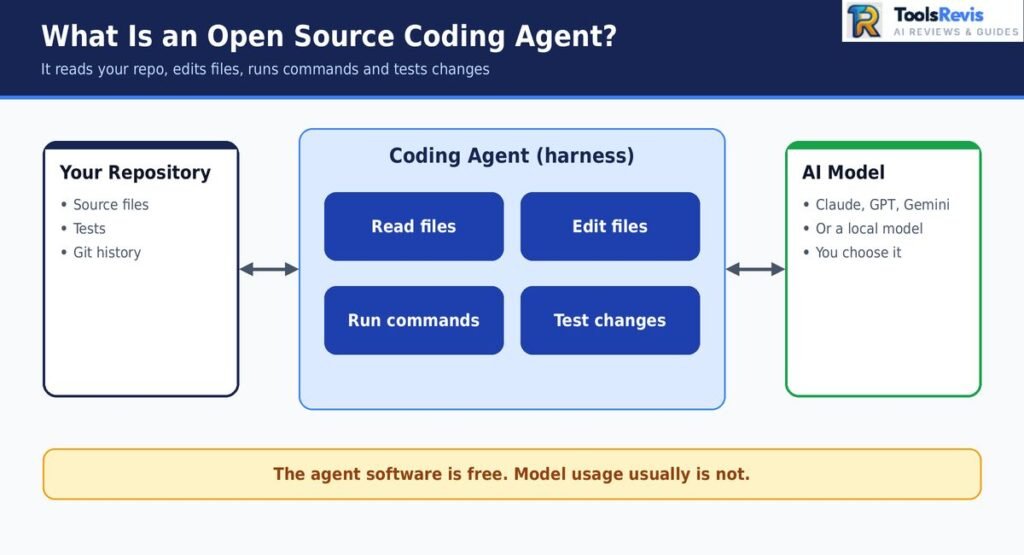
The term gets stretched in practice. Some projects are fully open source. Others publish code under licenses with restrictions, or keep key features in a paid layer. Two distinctions clear most of that up.
Coding Agent vs Assistant vs Harness
These three terms are often used interchangeably, but they describe different layers.
- Coding assistant: Embedded directly within the code editor, it answers queries and offers code recommendations, leaving the final implementation up to you. Common formats include inline autocompletion and chat interfaces.
- Coding agent: Works toward a goal across multiple steps. It decides which files to read, edits several of them, runs commands, checks the output, and adjusts. You review the result, and often approve actions along the way.
- Harness: The software layer around the model that makes an agent possible. It manages the tool-calling loop, file access, permissions, context, and how results are fed back to the model.
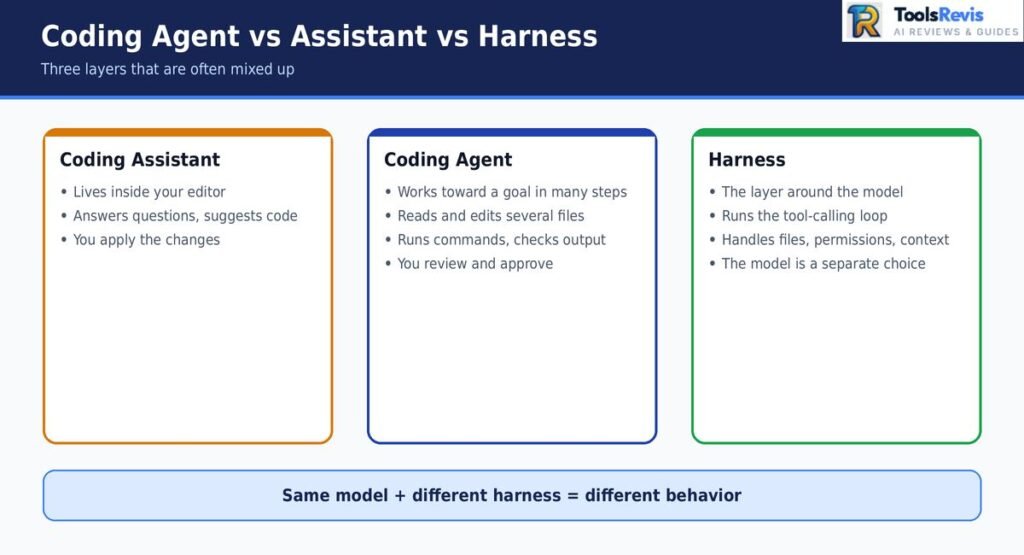
Most tools in this guide are harnesses. The model, such as Claude, GPT, Gemini, or a local model, is a separate choice you plug in. That is why two agents using the same model can behave differently: context handling, permission prompts, and editing strategy all live in the harness.
For a deeper dive into fully independent system behavior, take a look at our detailed guide to autonomous agents. This article stays focused on choosing and running open source tools.
What “Open Source” Really Means: License Check
“Open source” on a GitHub README doesn’t guarantee the license lets you use the tool however you want. Review the licensing terms prior to integrating any tool into your workflow—particularly if you intend to customize it, offer it as a hosted service, or use it for commercial development.
| Tool | License | What to know |
|---|---|---|
| Cline | Apache 2.0 | Permissive; allows commercial use and modification |
| OpenCode | MIT | Permissive and minimal restrictions |
| Aider | Apache 2.0 | Permissive; allows commercial use and modification |
| OpenHands | Open source core + separate enterprise offering | The core project is open source; enterprise components have separate licensing and availability |
| Claude Squad | AGPL-3.0 | Strong copyleft; Distributing or serving a modified version over a network may require you to make the underlying source code publicly available. |
| Agent Kanban | Elastic License 2.0 | Source-available, not OSI-approved; restricts offering the software as a managed service |
License details reflect each project’s repository at the time of research. Confirm them in the repo before you rely on them.
Permissive licenses such as MIT and Apache 2.0 offer friendly conditions, making them the preferred choice for developers and companies alike.
While AGPL is a valid open-source option, its specific requirements become critical if you deploy a customized version as a hosted service. Elastic License 2.0 is source-available: you can read and use the code, but it isn’t open source by the standard definition. Open-core projects like OpenHands are open where you’d expect, but some team and enterprise capabilities sit behind a different license or a paid plan.
None of this makes a tool bad. It changes which tools fit a given use. An individual developer operating an agent locally seldom needs to worry about this distinction. A company embedding an agent in an internal platform should read the license first.
Best Open Source Coding Agents at a Glance
This table compares the main open source coding agents by interface, license, GitHub activity, and best fit. It is a quick way to shortlist before the detailed reviews in the next section.
A comparison of open-source coding agents on GitHub (as of October 2026).
Star counts come from GitHub for OpenCode and Aider, and from the vendors’ own pages for Cline and OpenHands, so treat the latter two as approximate. Stars measure attention, not quality or maintenance health. Confirm license and status in each repository before adopting a tool.
A few things the table doesn’t show:
- Stars don’t reflect fit. OpenCode’s count is the highest here, but that says little about whether it suits your editor or workflow. Use the table to shortlist, not to rank.
- “Local models” means the agent can talk to one, not that it works well with one. Smaller local models often struggle with tool calling and long context, which we cover in the cost section.
- Interface decides daily experience more than license. If you live in VS Code, a terminal-first tool adds friction. The reverse is also true.
- Status needs rechecking. Aider is still active, but its README mentioning older models is a small signal worth watching. Roo Code’s archive is the reason it appears here as a warning rather than a pick.
Goose, Kilo Code, Codex CLI, and Gemini CLI are left out of the table because their licenses and status need primary-source verification first. They are covered in the reviews below.
Improve Your Code with Our Free Tool
Choosing the right coding agent is only one part of your workflow. Use our Advanced Code Optimizer to review and improve your code before moving on to your next project.
Try Advanced Code Optimizer →The Best Open Source Coding Agents, Reviewed
Each review below covers what the tool is, who it suits, its main trade-off, and when to skip it. The details come from project documentation and repositories, not from first-hand testing.
Cline
Cline is an agent that runs mainly as a VS Code extension, with a CLI, desktop app, and SDK also available. Its defining feature is a Plan/Act workflow. In Plan mode it reads your code and proposes an approach without changing anything. In Act mode it edits files and runs commands, usually asking for your approval along the way.
Best for: Developers who want an agent inside VS Code and prefer to review each step before it runs.
What stands out: The approval-based flow keeps you in control. You see proposed diffs and commands before they run, which helps when you’re working in an unfamiliar repository.
Trade-off: Cost is variable. Cline uses your own API key, so a large task on a premium model can use many tokens. There is no flat fee to fall back on.
License and cost: Apache 2.0, free to use. You pay your model provider directly, or use a local model.
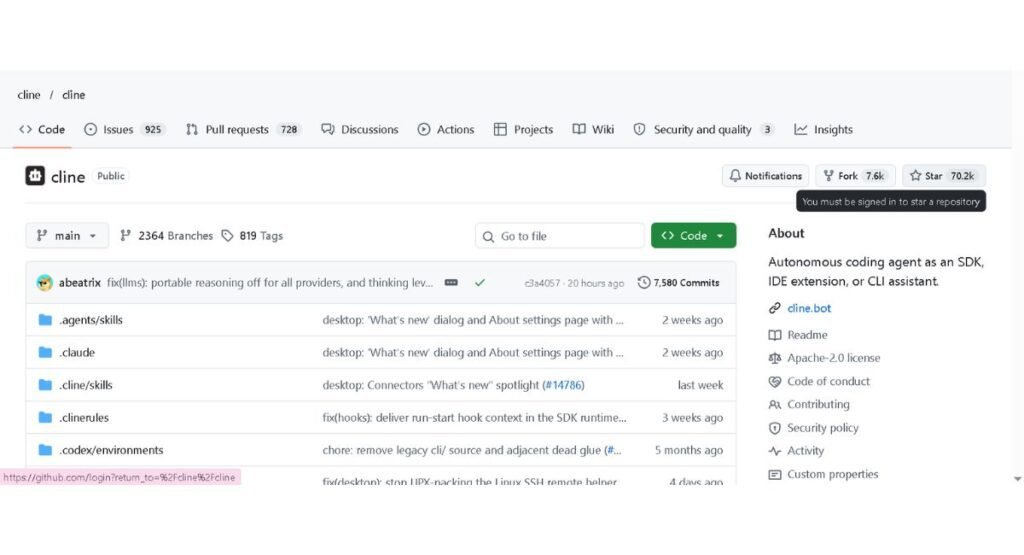
Link: https://github.com/cline/cline
Skip it if: You work mostly in the terminal or in an editor other than VS Code.
For a head-to-head with Anthropic’s tool, see this detailed comparison.
OpenCode
OpenCode is a terminal-first agent released under the MIT license. It works with many model providers, so you can switch between a hosted model and a local one without changing tools. At the time of research it had the highest star count of the tools in this guide.
Best for: Terminal users who want a model-agnostic agent and a workflow similar to other CLI agents.
What stands out: Model freedom and a permissive license. You aren’t tied to a single vendor’s models or pricing.
Trade-off: There is an ongoing community debate about privacy. Users on Hacker News have discussed whether OpenCode makes background model calls, such as generating session titles, that send some data to a provider you didn’t expect. These are community reports, and the behavior is contested. Check the official documentation and the configuration options, and watch network traffic if this matters for your code. See the privacy section for how to check.
License and cost: MIT, free to use. Model costs depend on your provider. OpenCode also offers managed plans, covered in the cost section.
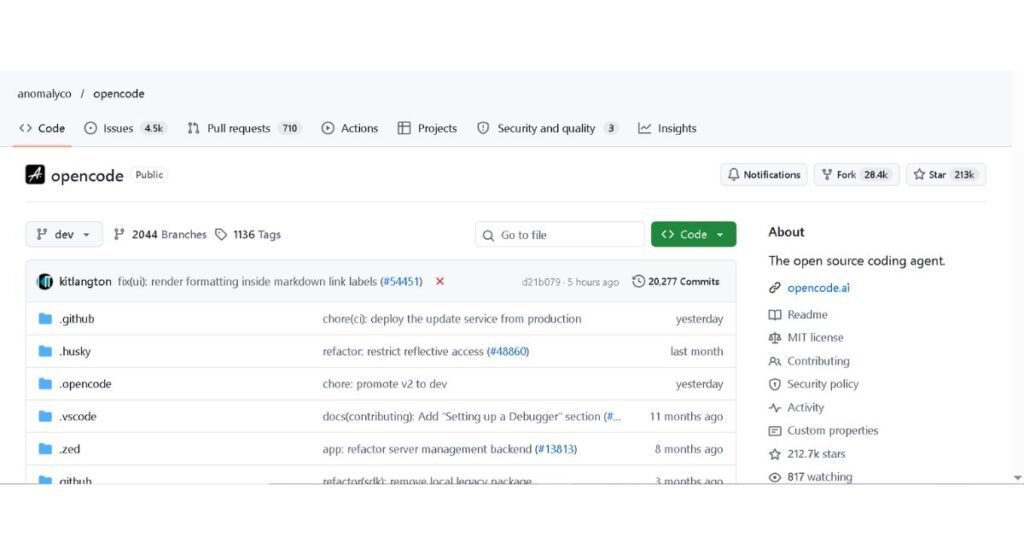
Link: https://github.com/anomalyco/opencode
Skip it if: You want a graphical, in-editor review experience.
Aider
Aider is a terminal tool built around git. It edits files in your repository and commits each change, so every step of an AI-assisted session can be inspected and reverted like any other commit.
Best for: Developers who want small, reviewable changes and a clean git history.
What stands out: The git-native workflow. Because changes land as commits, you can use ordinary tools like git diff and git revert to review or undo them.
Trade-off: Aider is less of an open-ended autonomous agent than some newer tools. It is designed around you directing the edits. Its documentation may not always reflect every recent model change, so check recent commits and releases rather than judging maintenance from the README alone.
License and cost: Apache 2.0, free to use. You pay for whichever model you connect.
Skip it if: You want an agent that plans and executes long multi-step tasks with minimal direction.
OpenHands
OpenHands is built for more autonomous work. It runs agents in a sandboxed, containerized environment using Docker, so the agent can execute commands and edit code without direct access to your main system.
Best for: Teams and developers who want agents working on larger tasks in an isolated environment.
What stands out: The sandbox. Isolation reduces the risk of an agent running something destructive on your machine, and it suits shared or self-hosted setups.
Trade-off: It is heavier to set up than a VS Code extension or a single CLI command. The core project is open source, while some enterprise capabilities are provided separately.
License and cost: MIT for the core project. OpenHands also has a separate enterprise offering with additional capabilities. Check the current repository and enterprise documentation for feature and licensing differences.
Skip it if: You want a lightweight tool you can install and use in minutes.
Goose and Kilo Code
Goose is an open source agent that started at Block. It is designed to extend through tool integrations. Block donated it to the Agentic AI Foundation under the Linux Foundation in December 2025, and the repository has since moved, so use the official repository link for its current status.
Kilo Code is a VS Code-focused agent that overlaps with Cline in how it works. Kilo describes its pricing as passing model costs through without markup. Check Kilo’s current official pricing page before relying on that pricing model, and compare it with using your own API key directly.
Skip them if: You already have a tool that fits. Both are worth a look mainly as alternatives to Cline, or as destinations for Roo Code users.
Codex CLI and Gemini CLI (Vendor-Made Open CLIs)
OpenAI and Google both publish command-line coding agents with public source code: Codex CLI and Gemini CLI. They are built by model vendors, so they are tuned for their own models first.
Best for: Developers already using OpenAI or Google models who want a vendor-supported terminal agent.
Trade-off: Open code doesn’t mean model freedom. These tools are designed around their maker’s models and accounts, and their usage terms follow those vendors’ plans. Check each repository for the current license, supported providers, and status, since these are active, fast-moving projects.
Skip them if: Your main reason for choosing an open source agent is independence from a single model vendor.
Roo Code: Archived, What to Use Instead
Roo Code was a popular VS Code agent. Its owner archived the GitHub repository on May 15, 2026, and it is now read-only. An archived project receives no updates or security fixes, so it is a poor choice for new work.
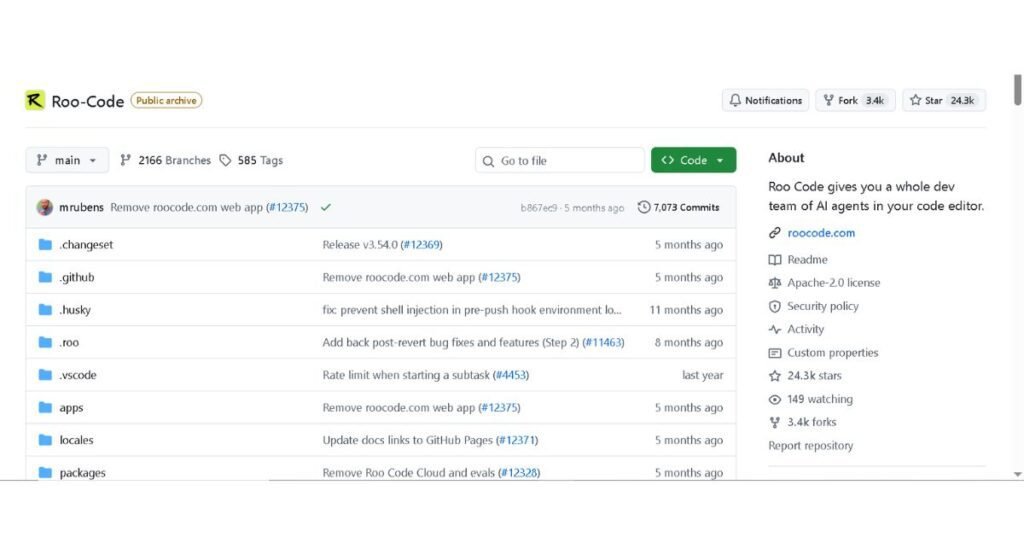
Link: https://github.com/RooCodeInc/Roo-Code
If you still searched for a Roo Code alternative, these are the closest options:
- Cline is the most direct VS Code replacement and has an active project.
- Kilo Code is another VS Code agent worth testing. Users on the Roo Code issue thread have suggested it as a migration path.
Export your custom instructions and mode settings before you switch, since configuration formats may not carry over directly.
Honorable mentions: Pi, dcode (from LangChain), and Claude Squad (an orchestrator for running multiple agents). Tabby is also worth knowing, but it is a self-hosted completion server, not an autonomous agent.
How to Choose the Right Open Source Coding Agent
Pick by four factors, in this order: where you work (interface), how much independence you want the agent to have (autonomy), where your code can go (privacy), and what you can spend (budget). Interface usually narrows the list fastest, so start there.
A quick way to apply the framework:
- Interface: If you live in VS Code, start with an extension. If you live in the terminal, start with a CLI tool.
- Autonomy: Decide whether you want to approve each step or hand off a task and review the result.
- Privacy: Decide whether your code can reach a hosted model provider at all.
- Budget: Decide whether you’ll pay per token, run local models, or use a managed plan. The cost section covers these in detail.
Many of these agents can connect to external tools through the Model Context Protocol (MCP), which matters if you want an agent to reach databases, issue trackers, or documentation. Support and setup differ by tool, so check each project’s docs. Our guide to MCP servers explains what they add.
VS Code Users
If you want a free AI coding agent for VS Code, Cline is the most direct starting point. Its Plan/Act flow and approval prompts fit developers who want to see each diff before it lands. Kilo Code is the other VS Code option in this guide and is worth testing if you want a similar workflow with different pricing and defaults.
Two practical points apply to both. They are free to install, but the model behind them isn’t free unless you run one locally. Set a spending limit with your API provider before your first long task, because an agent working through a large repository can use more tokens than you expect.
Terminal Users
For an open source agent CLI, the choice is mostly between OpenCode and Aider, and the difference is workflow.
- OpenCode suits you if you want an interactive, agent-style session and the freedom to switch between model providers.
- Aider suits you if you want tight git integration, where every change is a commit you can inspect or revert.
If you’re coming from Anthropic’s tool, the Claude Code terminal experience is a useful reference point for what to expect. Codex CLI and Gemini CLI also belong in this group if you already use OpenAI or Google models, though they are designed around those vendors.
Teams and Self-Hosted Setups
OpenHands is the clearest fit for teams. It runs agents inside a sandboxed container, which limits what a task can touch, and it can be hosted on your own infrastructure. The trade-off is setup effort: Docker, configuration, and someone who owns maintenance.
Self-hosting the agent doesn’t automatically keep your code private. If the agent sends prompts to a hosted model API, your code context still leaves your network. A truly air-gapped setup needs a locally hosted model as well, with the hardware and quality trade-offs that come with it. Also check which OpenHands features sit in the enterprise layer before you plan around them.
Beginners
If you’re new to coding agents, choose a tool that asks before it acts. Cline’s approval-based flow is a reasonable place to learn, because you see what the agent wants to do before it does it.
A few habits make early sessions safer and cheaper:
- Work on a separate git branch so you can discard changes easily.
- Start with a small, well-scoped task, such as a single bug or a test.
- Set a spending cap with your model provider.
- Read every command the agent proposes before approving it.
Final Verdict
Match the tool to the person, not to a ranking:
- Work mainly in VS Code: Cline, or Kilo Code as an alternative.
- Work mainly in the terminal: OpenCode for model flexibility, Aider for a git-first workflow.
- Run an agent for a team or need isolation: OpenHands.
- Just starting out: Cline, with approvals on and a spending cap set.
Are They Really Free? Costs, Limits, and Subscriptions
The agent software is free, but the model behind it usually isn’t. You pay for model usage in one of three ways: your own API key, a local model on your hardware, or a managed plan from the agent’s maker. So a free AI code agent can still produce a real bill, and which path you pick decides how large it is.
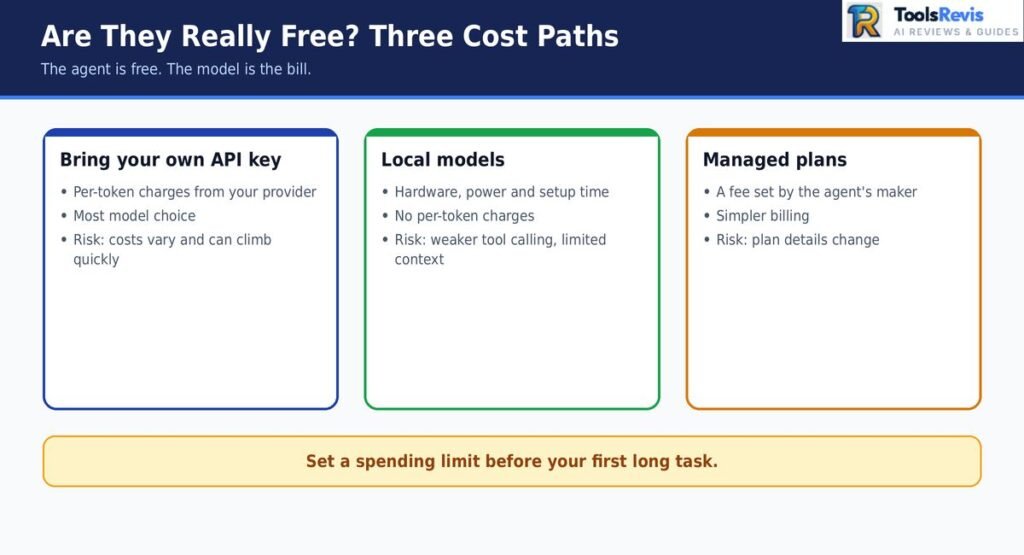
BYOK API Costs
With BYOK, you paste an API key from a provider such as Anthropic, OpenAI, or Google, and the agent bills you per token. This gives you the most model choice, and it is where surprises happen.
An agent doesn’t send only your prompt. Each step usually carries file contents, tool definitions, and conversation history, so context grows as a session continues. One blogger reported that OpenCode sessions often sent around 50,000 tokens of context, and that a change touching six files cost about 18 cents. That is one person’s measurement on one setup, not a benchmark, but it shows the pattern: small edits can carry large context.
Ways to keep BYOK costs predictable:
- Set a monthly spending limit in your provider’s dashboard before the first long task.
- Start with narrow tasks and avoid pointing the agent at a whole repository.
- Use a cheaper model for routine edits and a stronger one for hard problems.
- Check your provider’s usage page after your first few sessions to see what a typical task costs.
Local Models With Ollama
Running a model locally removes per-token charges and keeps code on your machine. That makes it the usual route to a local AI coding agent that works offline. Tools like Ollama let you run open-weight models and connect them to agents that support compatible providers.
The costs are hardware and quality. Larger models need substantial memory, and smaller ones often handle multi-step tool use poorly. Context length is a common trap. A thread on r/LocalLLaMA described Ollama’s low default context length pushing an agent’s tool-calling instructions out of the window, so the model stopped using tools correctly. That is a community report rather than official guidance, but the lesson applies broadly: if you run local models, raise the context length and confirm the agent’s instructions still fit.
Test a local setup on a small task first. If the model loses track of instructions or produces malformed tool calls, the cause is more often context settings or model size than the agent itself.
Managed Plans
Some projects offer paid plans so you don’t have to manage API keys. OpenCode, for example, has managed offerings such as Go and Zen. These plans trade some model flexibility for simpler billing.
Pricing and plan details change, and secondary sources often list different numbers, so use the official page for current figures. Compare a managed plan against your own expected BYOK usage before committing, since the better deal depends on how much you use the agent.
Can You Run Them on a Claude Pro or Max Subscription?
Generally, you should not assume that a Claude Pro or Max subscription covers usage through a third-party coding agent. Anthropic’s current documentation is the authority on which subscription limits and third-party usage rules apply, so check the latest terms before planning your workflow around a subscription.
In practice, if you want to use Claude models inside Cline, OpenCode, or Aider, plan on API billing instead. Our breakdown of Pro vs Max explains what each plan includes. If you’re weighing closed tools with free tiers, see Copilot pricing for how that model works.
Privacy and Security: What Actually Leaves Your Machine
Open source does not automatically mean private. You can read the code, but that doesn’t change where the agent sends your prompts. What leaves your machine depends on three things: which model you connect, what the agent sends along with each request, and whether any background calls or telemetry are enabled.
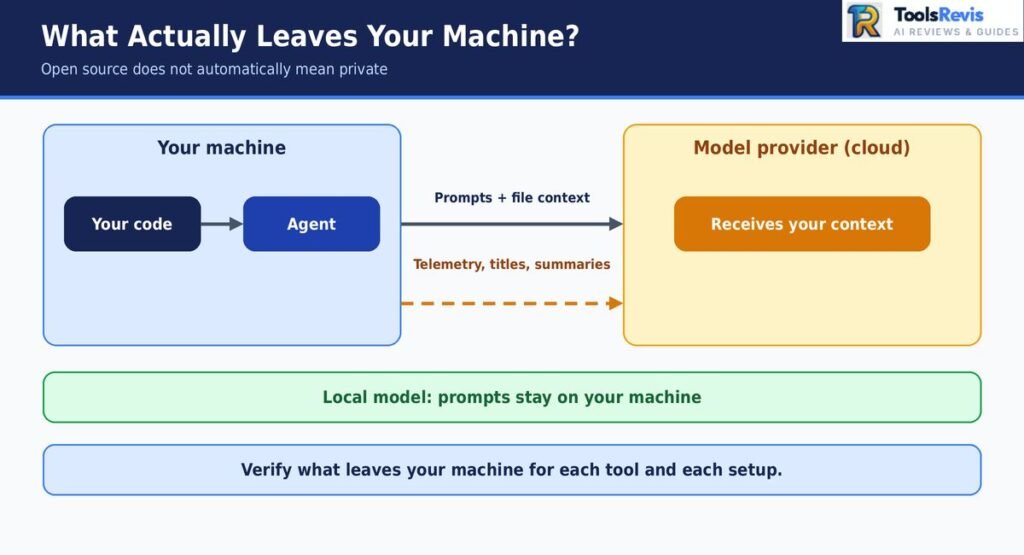
Treat privacy as something you verify for each tool and each setup, not something the license promises.
Telemetry and Hidden Model Calls
Telemetry is usage data a tool sends back to its developers. A hidden model call is a separate request the agent makes to a model for a secondary task, such as naming a session, summarizing history, or compressing context. Either can send some of your content to a provider you didn’t expect.
OpenCode has also been the subject of community discussion about privacy and background model calls. Users discussed whether background calls, such as generating session titles, were being routed to a hosted provider even when they intended to use a local model. The behavior is contested, and I’m not treating it as a verdict. It is worth knowing about because it shows how a “local” setup can still make outbound requests.
You can check any agent yourself:
- Read the documentation and configuration options for telemetry and analytics settings.
- Look for settings that control which model handles secondary tasks, not just the main one.
- Monitor outbound network traffic during a short session, using a tool such as a firewall log or network monitor.
- Search the project’s issue tracker for privacy-related reports and see how maintainers responded.
Because projects change quickly, recheck after major updates.
Permissions and Sandboxing
An agent that can run commands can also run the wrong ones. The safer approach is to limit what it can reach instead of trusting it to behave.
- Run it in a container or sandbox when working with untrusted code or sensitive projects. OpenHands is built around this model, and you can run other agents inside Docker or a virtual machine yourself.
- Keep approvals on. Auto-approve modes are convenient, but they remove the checkpoint that catches a bad command.
- Use a separate branch or working copy so a mistake can’t touch your main code.
- Keep secrets out of reach. Environment files, SSH keys, and cloud credentials in the working directory can end up in the model’s context or be read by a command.
- Review commands before approving them, especially anything that deletes files, changes permissions, installs packages, or makes network requests.
The principle is to give the agent the least access it needs for the task, and to treat its output like code from a new contributor: useful, but reviewed.
Self-Hosted and Air-Gapped Reality
Hosting the agent on your own servers controls where the agent software runs. It doesn’t control where inference happens. If that self-hosted agent calls a cloud model API, your code context still travels to that provider.
For code that must stay inside your network, you need both parts local: the agent and the model. That setup has real costs:
- Hardware: Capable models need significant GPU memory.
- Quality: Local open-weight models can lag behind the best hosted ones on complex, multi-step tasks.
- Context limits: Long contexts need more memory, and tool calling can degrade on smaller models.
- Maintenance: Someone has to update the models, the runtime, and the agent.
Some organizations accept those trade-offs for regulated or sensitive code. Others use a hosted provider under an agreement that covers data handling and retention. Either can be reasonable. What matters is knowing which one you actually have.
Privacy Checklist
Before using an open source coding agent on real work:
- Confirm which model provider receives your code, and read its data retention and training policy.
- Check the agent’s docs for telemetry and turn off anything you don’t want.
- Find out whether secondary tasks, like titles or summaries, use a different model than your main one.
- Run the agent in a container or on a separate branch.
- Keep credentials and environment files out of the working directory.
- Watch network traffic during a test session if the code is sensitive.
Which Projects Are Risky Bets? Project Health Check
A project is a risky bet when it has no one maintaining it, no clear owner, or no path to updates and security fixes. Stars and features don’t show that. Ownership changes, archived repositories, and slowed releases do, and they can happen quickly in this category.
The table below covers the projects from this research that carry a clear maintenance signal. Statuses are as of October 3, 2026.
Statuses come from this article’s research notes and should be confirmed against each project’s repository or announcement before you rely on them.
Archived and deprecated are different situations. An archived repository is read-only, so no issues, pull requests, or fixes land. A deprecated project may still accept changes but has told users to move on. A community-maintained project can be perfectly healthy, but it depends on volunteers who can leave, so it carries more risk than one backed by a funded team.
Signals to Check Before You Adopt a Tool
You can judge maintenance risk yourself in a few minutes:
- Last commit and release dates: Regular commits and tagged releases suggest active work. Long gaps are a warning, though some stable tools change slowly by design.
- Release cadence: Frequent releases show momentum. Check whether the project keeps pace with new models and APIs, since agents break when provider interfaces change.
- Funding and ownership: A company, foundation, or funded team behind a project lowers abandonment risk. A single maintainer raises it. Ownership changes, like acquisitions, can also end a project’s free or hosted offering.
- Governance and issue handling: Look at how maintainers respond to issues and pull requests. Unanswered issues and stale pull requests suggest a team that is stretched or gone.
No single signal settles it. Look at all four together, and recheck before you build workflows on a tool.
For context on how acquisitions reshape this market, see our Cursor review.
Open Source Coding Agents vs Claude Code
Open source agents and Claude Code differ mainly in who controls the model, the cost structure, and what you can inspect. Claude Code is Anthropic’s agent and is built around Anthropic’s models. Open source agents let you choose the model and read the code, but you take on more of the setup, cost control, and maintenance yourself.
Whether Claude Code itself is open source is a common question. Our explainer on open source covers it, so this section focuses on how the two approaches compare in practice.
Claude Code’s plans, terms, and availability can change. Confirm current details on Anthropic’s official pages.
The table’s last two Claude Code cells are intentionally cautious because plans, terms, and availability can change. Check Anthropic’s current documentation before relying on those details.
Best Open Source Claude Code Alternative
The right open source Claude Code alternative depends on what you want to keep from the Claude Code experience.
- OpenCode is the closest in feel if you want a terminal-first agent and the freedom to switch models. Check the privacy notes in the earlier section before using it on sensitive code.
- Aider fits if you value tight git integration, where each change is a commit you can review or revert. It is more directed than autonomous.
If you want the same kind of workflow inside an editor instead, Cline is the closest VS Code option. Our comparison of Cline vs Claude Code covers that matchup in detail.
One practical point: you can often use Claude models inside these open source agents through API billing. Do not assume that your Claude subscription covers third-party harness usage; check Anthropic’s current terms before choosing this setup.
What About Cursor and Copilot?
Cursor and GitHub Copilot are closed products, not open source agents, so they sit in a different category. Cursor also went through a major ownership change in 2026, which is worth considering if you’re evaluating its long-term independence or roadmap. Both are editor-centered, bundle model access into their own plans, and don’t give you the source-level control of the tools in this guide. They can still be reasonable choices if you prefer a managed experience and don’t need to audit or self-host the tool. The trade-off is the reverse of open source: less setup and fewer decisions, but less control over models, data paths, and cost structure.
FAQ
1. What is an open source coding agent?
An open source coding agent is a tool with publicly available source code that works on a codebase instead of only suggesting text. It reads files, edits them, runs commands, and checks results. You connect your own model through an API key or a local runtime, so the software is free but model usage usually is not.
2. What is the best open source coding agent in 2026?
It depends on where you work. Cline fits VS Code, OpenCode suits terminal users who want model freedom, Aider fits git-first workflows, and OpenHands fits teams that need sandboxing. Check each project’s maintenance status before you commit, since this category changes quickly.
3. Is OpenCode really free and open source?
The code is released under the MIT license, so the software is free to use and modify. You still pay for the models behind it unless you run them locally. It also offers optional managed plans, so confirm current terms on the official site. Its privacy behavior is a separate question, covered in the privacy section above.
4. What is the best free AI coding agent for VS Code?
Cline is the most direct choice, with Kilo Code as the other VS Code option in this guide. Both are free to install, but you pay your model provider unless you connect a local model. Set a spending limit before your first long task.
5. Can I run an open source coding agent locally or offline?
Yes, if the agent supports a local model provider, such as one served through Ollama. Expect trade-offs. Smaller models can handle tool calling poorly, and a low default context length can push the agent’s instructions out of the window. Test a small task first and raise the context setting if the model loses track.
6. Can I use my Claude Pro or Max subscription with open source agents?
Do not assume that your Claude Pro or Max subscription covers usage through third-party harnesses. For Claude models in Cline, OpenCode, or Aider, check Anthropic’s current documentation to determine whether subscription access or separate API billing applies to your setup.
7. What is the best open source alternative to Claude Code?
OpenCode is the closest in terminal feel, with the added benefit of choosing your own model. Aider is the better fit if you want every change committed to git. In an editor, Cline is the nearest equivalent.
8. Roo Code is archived. What should I use instead?
Roo Code’s repository was archived on May 15, 2026, so it no longer receives updates or fixes. Cline is the most direct replacement, and Kilo Code is another VS Code option worth testing. Export your custom instructions and settings before you switch.
9. Can I build my own coding agent?
Yes. You can start from an open source agent and, license permitting, modify it, or build on a model provider’s SDK. Some agents, including Cline, also offer an SDK. Building from scratch means owning the tool loop, permissions, and context handling, so most developers start by customizing an existing agent.
10. What is the best alternative to OpenClaw?
It depends on what you want from it. According to this article’s research, OpenClaw is a personal agent, not a coding agent. If you want coding help specifically, start with the agents above. If you want a personal agent, compare tools in that category instead.
For a wider view beyond open source tools, see our guide to developer tools.

I’m Umair Ahmad, founder of ToolsRevis. I personally test every AI tool we cover — signing up, running real workflows, checking pricing tiers, and comparing outputs — before writing a single word. My goal: cut through AI marketing hype with honest, hands-on verdicts.
Let’s achieve more together!