
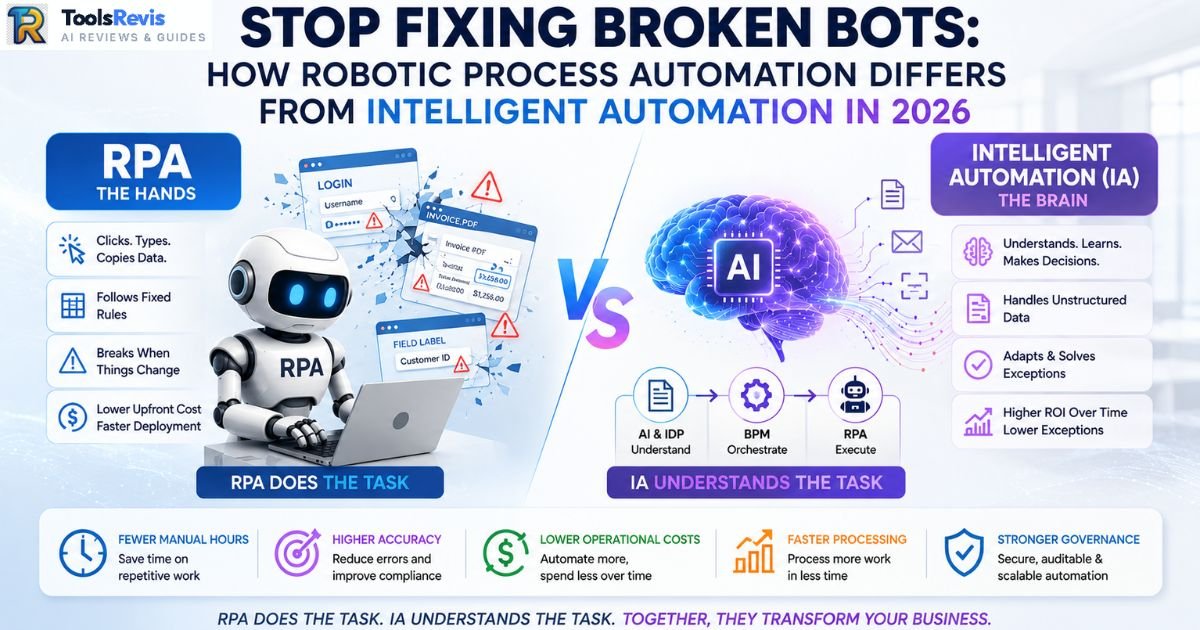
Your RPA bot broke again. Not because the process changed, but because a vendor tweaked a login screen, a PDF invoice arrived slightly skewed, or a field label shifted three pixels to the left. Your IT team is now spending more time babysitting bots than the bots ever saved in labor hours.
This is the single biggest frustration enterprise automation teams run into in 2026: they bought “automation,” but nobody explained that RPA and Intelligent Automation solve two completely different problems. One executes. The other decides. Confusing them is why so many automation programs stall after the first year, buried under exception queues and maintenance tickets.
This guide breaks down exactly how robotic process automation differs from intelligent automation, where the line between traditional automation and modern RPA actually sits, and why your next automation decision should start with the process, not the platform.
Quick Answer: How Does Robotic Process Automation Differ from Intelligent Automation?
RPA is the hands — it clicks, types, and copies data by following fixed rules, and it breaks the moment something unexpected shows up. Intelligent Automation adds the brain — AI, machine learning, and NLP that read unstructured data, make judgment calls, and handle exceptions RPA can’t. In short: RPA does the task, IA understands the task.
The Resume Confusion: Robotics vs. RPA
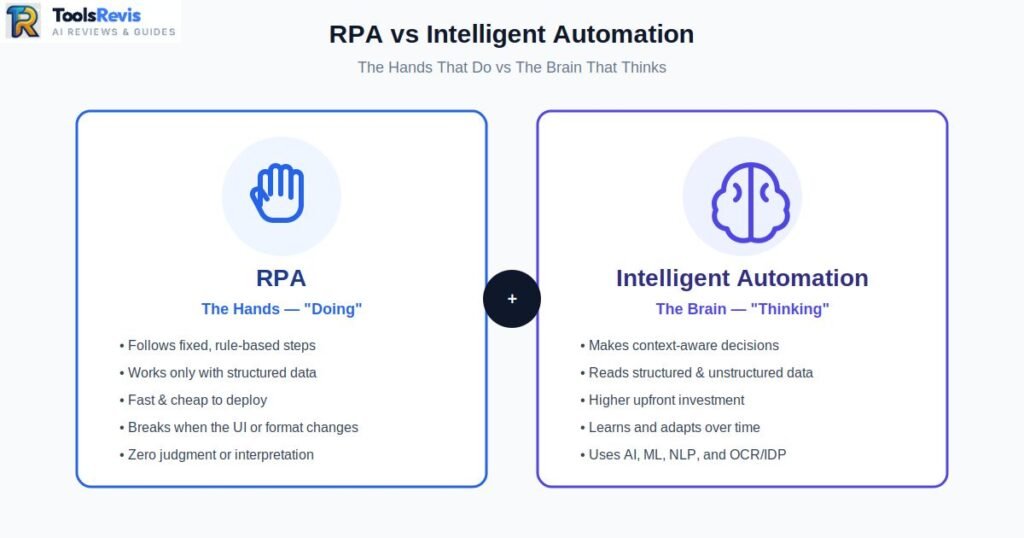
Robotics controls physical machines, while Robotic Process Automation (RPA) automates repetitive digital tasks inside software applications. Despite the similar names, they solve entirely different business problems. Robotic Process Automation has nothing to do with mechanical robots, and this mix-up shows up constantly on Reddit threads and job boards. Physical robotics involves motion control, actuators, and mechanical arms that manipulate objects in the real world — think a warehouse arm palletizing boxes or a manufacturing robot welding car frames. RPA is pure software. There’s no hardware, no physical movement, no factory floor involvement at all.
An RPA bot lives entirely inside your existing applications. It logs into your ERP, copies a value from one screen, pastes it into another, and does it exactly the same way every single time. If you want a deeper breakdown of the fundamentals of RPA before going further into this comparison, that’s covered in detail separately.The confusion usually comes from the word “robotic.” Many people assume it refers to physical machines, but in Robotic Process Automation, it describes software that performs digital tasks the way a human would interact with applications. No mechanical equipment or factory robots are involved.
This distinction also explains why Robotics Engineers and RPA Developers follow completely different career paths. Robotics engineers design and program systems that control physical machines, while RPA developers create software bots using platforms such as UiPath or Automation Anywhere to automate repetitive business processes across digital systems.
This is also where the broader difference between automation and RPA gets murky for a lot of teams. “Automation” is the umbrella term — it covers everything from a simple Excel macro to a full manufacturing assembly line. RPA is one specific type of automation: software bots mimicking human interactions with digital interfaces. And RPA vs traditional automation isn’t really a fight either — traditional automation (like batch scripts or system-level integrations) usually requires custom code and API access, while RPA works on top of the UI itself, which is exactly why it’s faster to deploy but more fragile when that UI changes.
The Core Breakdown: RPA vs Intelligent Automation (IA)
The difference between RPA and Intelligent Automation comes down to five areas: data handling, adaptability, decision-making, technology stack, and long-term maintenance. Intelligent automation vs robotic process automation comes down to five practical differences: what data each can handle, how well they adapt to change, who makes the decisions, what they cost to run, and what’s actually under the hood.
| Attribute | Robotic Process Automation (RPA) | Intelligent Automation (IA) |
| Data Type | Structured, predictable data only (fixed-format spreadsheets, template-based forms, defined fields) | Structured and unstructured data (scanned PDFs, emails, handwritten notes, free-text fields) |
| Adaptability | Static — breaks or halts when the UI, data format, or process step changes | Dynamic — learns from patterns and adjusts to variations without manual reprogramming |
| Decision Making | None. Follows fixed if-this-then-that rules with zero judgement | Makes probabilistic, context-aware decisions using AI models trained on historical data |
| Cost | Lower upfront cost, faster deployment, cheaper licensing per bot | Higher upfront investment (AI models, training data, integration), but lower long-term exception-handling cost |
| Technology Stack | Screen scraping, workflow scripting, basic macros | RPA + AI/ML + NLP + Computer Vision + BPM orchestration |
The Technology Stack Behind IA
Intelligent Automation consists of three core layers: RPA for execution, AI for decision-making, and BPM for workflow orchestration. Intelligent automation isn’t a single product you buy off the shelf — it’s a stack of three distinct layers working together, a structure Gartner’s automation research has consistently reinforced as organizations move toward hyperautomation. Understanding this stack is also the fastest way to see where RPA vs AI vs ML actually fits in the bigger picture.
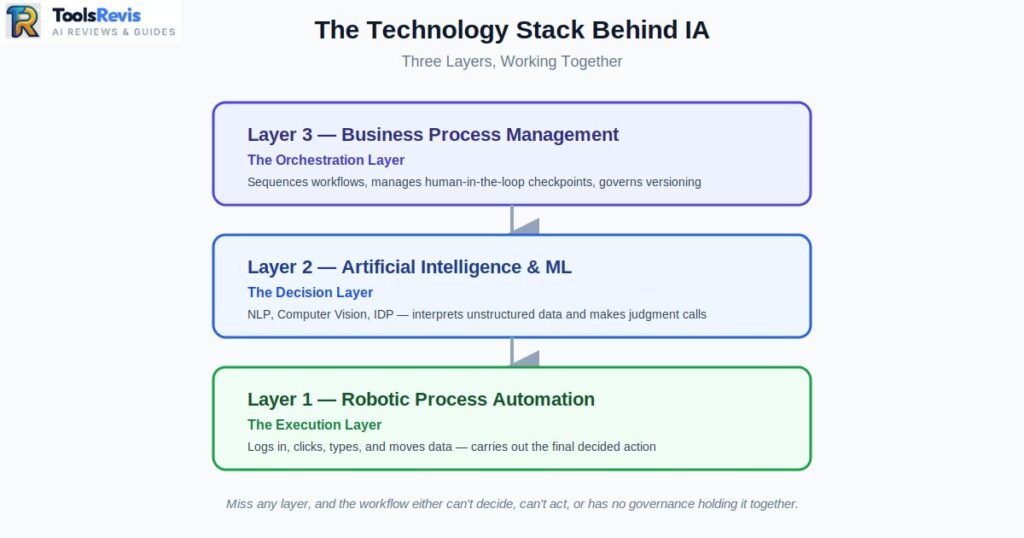
1. RPA — The Execution Layer
This is the layer that actually does the clicking, typing, and data entry. Once a decision has been made or a document has been read, RPA is what carries out the mechanical steps inside your applications:
- Logging into systems and navigating screens
- Copying values between fields
- Triggering downstream actions (submitting a form, updating a record)
- Executing the same sequence exactly, every time, with no variation
Think of RPA as the hands that never get tired — but hands still need instructions.
2. Artificial Intelligence & ML — The Decision Layer
This is where the “intelligent” in intelligent automation comes from. AI and ML models interpret information that RPA alone can’t touch, then hand a decision or a structured output down to the execution layer:
- NLP (Natural Language Processing): reads emails, contracts, and support tickets to extract intent or key clauses
- Computer Vision: interprets scanned documents, signatures, and images visually rather than relying on fixed templates
- RPA vs IDP: this is one of the most common technical mix-ups in the space. RPA moves data; Intelligent Document Processing (IDP) is the specific AI discipline (OCR + ML) that reads and classifies unstructured documents — like a skewed invoice or a handwritten PO — before RPA ever touches the data. IDP is the eyes; RPA is the hands.
- Predictive ML models: flag anomalies, score risk, or route exceptions based on historical patterns rather than fixed rules
3. Business Process Management (BPM) — The Orchestration Layer
BPM is the layer most vendors skip over in marketing, but it’s what stops IA from being a pile of disconnected bots and models. BPM sequences the entire workflow end-to-end:
- Routes tasks between AI decision points and RPA execution steps
- Manages human-in-the-loop (HITL) checkpoints when confidence scores are low
- Tracks process-level KPIs and exception rates across the full workflow
- Governs versioning so the process can be updated without breaking every bot downstream
Put together, this is really what intelligent process automation (IPA) means: RPA supplies the hands, AI/ML supplies the brain, and BPM supplies the nervous system connecting them. Miss any one layer and you either get a bot that can’t handle exceptions, an AI model with no way to act on its own decisions, or a workflow with no governance holding it together.
The Tech Enabler Framework: Demystifying AI, Analytics, and Automation
Modern enterprise automation is built on three complementary pillars: Automation, Analytics, and Artificial Intelligence, each serving a different role. Every “RPA vs AI vs ML” argument on Reddit stems from the same root problem: people are comparing tools that live on different pillars entirely, as if they’re competitors. They’re not. They’re three distinct capabilities that a mature 2026 tech stack combines, not chooses between. Here’s the framework that ends the confusion for good.
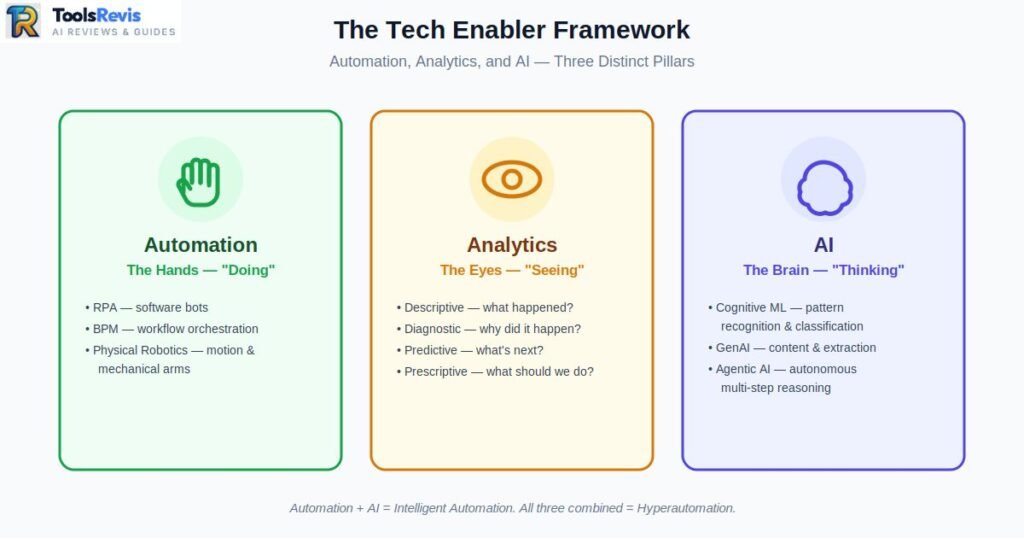
The 3-Pillar Mental Model
Pillar 1: Automation — The Hands (“Doing”)
Automation is anything that executes a predefined action without human hands on the keyboard. This is the broadest category, and it’s also the source of the persistent difference between automation and RPA — RPA is one specific type of automation, not a synonym for it.
- RPA (Robotic Process Automation): Software bots mimicking human clicks and keystrokes inside existing digital interfaces
- BPM (Business Process Management): Orchestrates the sequence and rules of an entire multi-step workflow, human and bot tasks included
- Physical Robotics: Mechanical arms and motion-controlled hardware automating tasks in the physical world (unrelated to software RPA despite the shared “robotic” label)
Micro-summary: If it’s executing a fixed action, it belongs on this pillar — regardless of whether that action happens on a screen or a factory floor.
Pillar 2: Analytics — The Eyes (“Seeing”)
Analytics is what lets an organization understand what’s happening in its data before anything gets automated or decided on. It has four distinct maturity levels:
- Descriptive: What happened? (dashboards, historical reporting)
- Diagnostic: Why did it happen? (root-cause analysis, drill-downs)
- Predictive: What’s likely to happen next? (forecasting models, risk scoring)
- Prescriptive: What should we do about it? (recommendation engines, optimization models)
Micro-summary: Analytics doesn’t act — it informs. It’s the layer that tells the brain what it’s looking at before a decision gets made.
Pillar 3: AI — The Brain (“Thinking”)
AI is the cognitive layer that interprets ambiguity and makes context-aware judgments rather than following fixed rules.
- Cognitive ML: Pattern recognition and classification (fraud detection, document classification)
- GenAI: Generates content, summaries, and structured output from unstructured input (contracts, emails, scanned forms)
- Agentic AI: Reasons through multi-step goals autonomously, deciding which tools or sub-tasks to invoke without a human pre-scripting every branch
Micro-summary: This is the only pillar capable of genuine judgment — everything else on the stack either executes or informs.
Where the Pillars Intersect
This is the part CTOs actually need for stack planning — the pillars aren’t meant to operate in isolation:
- Automation + AI = Intelligent Automation. The hands get a brain. RPA executes what the AI layer decides, which is the entire foundation of intelligent process automation.
- Analytics + AI = Predictive Intelligence. The eyes feed the brain, letting decisions get made proactively instead of reactively (this is where “smart RPA” self-healing and predictive maintenance models live).
- Automation + Analytics + AI = Hyperautomation. All three pillars running together across an entire organization — this is the end state most enterprise intelligent automation roadmaps are actually building toward.
The real benefit of intelligent process automation isn’t any single pillar — it’s the combination. A bot without AI is fragile. AI without a way to act is just an insight sitting in a dashboard. Analytics without either is just a report nobody used. Real intelligent automation digital transformation happens when a business deliberately builds all three pillars into one connected stack, rather than buying tools for each in isolation and hoping they integrate later.
Moving Beyond the Hype: RPA vs IA vs Agentic AI (The New Era)
Enterprise automation has evolved through three stages: traditional RPA, Intelligent Automation, and the newest generation of Agentic AI. Automation didn’t stop evolving once intelligent automation showed up. There’s a third stage now, and it’s the one dominating every enterprise automation roadmap in 2026: Agentic AI.
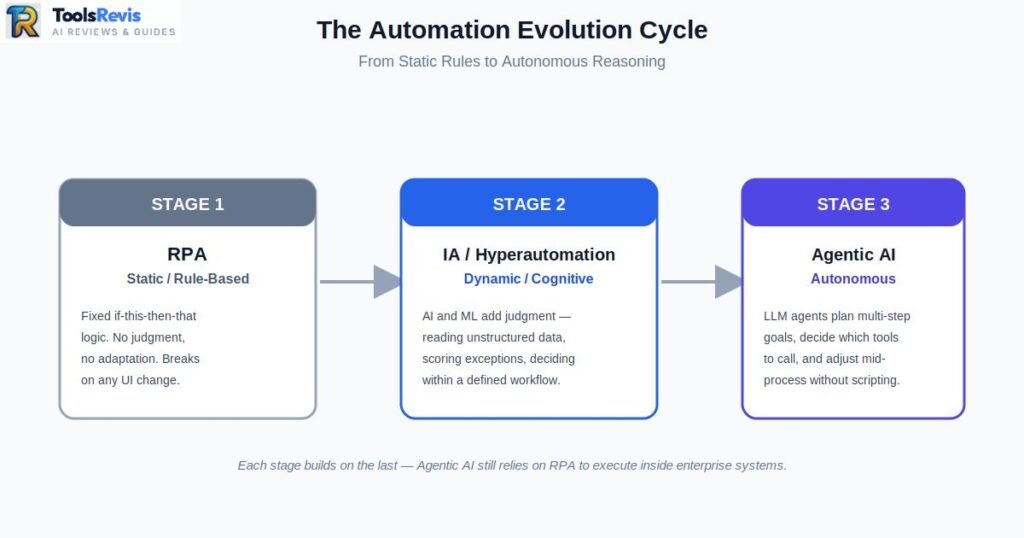
The evolutionary cycle looks like this:
- RPA (Static/Rules): Bots follow fixed if-this-then-that logic. No judgement, no adaptation.
- IA / Hyperautomation (Dynamic/Cognitive): AI and ML add judgement — reading unstructured data, scoring exceptions, making bounded decisions within a defined workflow.
- Agentic AI (Autonomous): LLM-based agents plan multi-step goals on their own, decide which tools or bots to call, and adjust their approach mid-process without a human pre-scripting every branch.
This is also where hyperautomation vs intelligent automation stops being just semantics. Hyperautomation is IA scaled across an entire organization — dozens of processes, orchestrated end-to-end, with process mining constantly feeding back into what gets automated next. Agentic AI is a different animal entirely: instead of a pre-built workflow with decision points baked in, an agent reasons through the goal itself and constructs its own path to get there.
What Is Agentic Process Automation (APA)?
Agentic Process Automation is what happens when you put an LLM-based reasoning agent in charge of a business process instead of a fixed workflow diagram.”Frameworks like LangGraph and CrewAI let you define autonomous agents that can plan, delegate sub-tasks, and call tools dynamically based on the situation in front of them.
A useful contrast here is autonomous AI platform order automation vs RPA bots. A traditional RPA bot handling order processing follows one fixed path: read the order field, enter it in the ERP, done — and it fails the moment an order arrives in an unexpected format. An agentic system handling the same order can reason through ambiguity: it might notice a mismatched SKU, decide to check inventory across three systems, flag a pricing exception to a human, and only then hand the finalized data to an execution bot. The agent is doing the thinking a person used to do; it’s not just following steps faster.
The Reddit Debate: “Will AI Agents Kill RPA?”
This question shows up constantly in automation communities, and the honest answer is: it’s the wrong question. It’s not agents vs RPA — it’s agents plus RPA, and here’s why that distinction actually matters for anyone building enterprise systems.
Agents need RPA as a tool, not a replacement. An LLM agent is excellent at reasoning, but it has no native way to click into SAP, navigate a legacy mainframe screen, or fill out a form in a system with no public API. RPA is the “paintbrush” — the reliable, deterministic hand that the agent picks up when it needs to actually act inside software that was never built for AI to touch directly. The agent decides what needs to happen; the RPA bot executes how it gets done inside the existing interface.
Security and governance is the other half of the answer. No serious enterprise security team is handing an autonomous AI agent raw, unrestricted credentials to production ERP or financial systems — that’s an audit nightmare and a compliance risk nobody signs off on. RPA bots operate under strict, pre-approved, signed-off rules: specific credentials, scoped permissions, logged actions, and a fixed set of allowed operations. Agentic systems get the reasoning and flexibility; RPA keeps the execution inside guardrails that satisfy security, compliance, and audit requirements.
So the future isn’t agents replacing RPA bots — it’s agents sitting on top of them, using RPA as the safe, governed hands that carry out whatever the reasoning layer decides.
Why Do RPA Bots Break? (And How IA Fixes the Maintenance Nightmare)
RPA bots fail when user interfaces, data formats, or business processes change because traditional bots rely on fixed rules rather than understanding context. RPA bots break because they don’t actually “see” the interface — they memorize it. A standard bot is trained to find a button at a specific screen coordinate, or an element with a specific ID in the page’s underlying code. Change that button’s position by ten pixels, rename the field ID during a system update, or swap out a vendor portal’s layout, and the bot has no way to figure out what happened. It just stops, throws an error, and sits in your exception queue until someone manually rebuilds the workflow.
This is the exact frustration you’ll find all over Reddit and Quora automation threads: teams describe spending more hours patching broken bots than the bots ever saved them. It’s also where the distinction between Robotic Desktop Automation (RDA) and Robotic Process Automation (RPA) matters more than most vendors admit. RDA runs on a single desktop, attended by a human who kicks it off — smaller blast radius when something breaks. RPA runs unattended across servers at scale, which means one UI change can silently break hundreds of bot instances overnight before anyone notices.
“Smart RPA” fixes this by adding perception instead of memorization. Rather than hard-coding a bot to click “the button at coordinates X,Y,” smart RPA platforms use:
- Fuzzy selectors: the bot identifies an element by a cluster of attributes (label text, relative position, icon shape) rather than one brittle identifier, so it can still find “Submit” even if the button moved or got restyled
- Computer vision matching: the bot visually recognizes UI elements the way a human would, so it survives cosmetic redesigns that would crash a traditional bot
- Predictive Intelligence RPA: ML models trained on historical failure patterns flag a process as “likely to break soon” before it actually fails — based on drift in response times, error rates, or upstream system changes — letting a team fix it proactively instead of finding out from an exception log
This self-healing capability is the practical dividing line between a bot that survives a vendor’s next UI update and one that needs a developer on standby every release cycle.
Real-World Use Cases: From Simple ‘Doing’ to Smart ‘Thinking’
The easiest way to understand RPA versus Intelligent Automation is by comparing structured-rule tasks with AI-driven decision-making workflows. The clearest way to see digital process automation vs robotic process automation in action is to put a standard RPA task next to an intelligent process automation task side by side.
Case Study 1: Standard RPA — Excel-to-CRM Data Transfer
The scenario: A sales ops team receives a weekly Excel export of leads from a trade show. Every file uses the exact same template — same column headers, same order, same format — and it needs to land in the CRM as new contact records.
Why RPA is the right call here:
- Data is fully structured and arrives in a fixed, predictable format
- There’s no interpretation required — just move value from field A to field B
- Volume is high and repetitive, which is exactly where RPA delivers fast ROI
- No exceptions to reason through; if the format ever does change, that’s a one-time bot update, not a daily judgement call
A standard, rules-based bot handles this end-to-end with zero AI involved — and there’s no reason to over-engineer it with a heavier IA stack.
Case Study 2: Intelligent Process Automation — Chaotic Multi-Format Invoice Processing
The scenario: Accounts payable automation is one of the clearest examples of this — invoices arrive in dozens of different layouts: some scanned PDFs, some with handwritten annotations, some skewed from a bad scan, some emailed as images. No two vendors format their invoice the same way.
Why this needs IA, not RPA:
- Data is unstructured and inconsistent — there’s no fixed template a rules-based bot could anchor to
- Intelligent capture (GenAI-driven IDP) reads the document regardless of layout, extracting PO number, vendor, line items, and totals using OCR plus a language model trained to interpret invoice context, not just scan for keywords
- The system runs a three-way match against the PO and GRN automatically, flags mismatches for human review, and routes clean invoices straight into the ERP with zero manual keying
- Exceptions — a skewed scan, a missing PO reference, a handwritten total — get handled by the cognitive layer instead of stalling the entire batch
This is intelligent capture and RPA working as a pair: GenAI reads and makes sense of the chaos, then RPA executes the clean, structured hand-off into the ERP. This same intelligent capture approach is exactly what powers manufacturing and procurement use cases — matching POs, GRNs, and vendor invoices across complex supply chains. Try to force this through standard RPA alone and you’d need a separate bot exception path for every single invoice layout variation — which is precisely the maintenance nightmare IA was built to eliminate.
Try to force this through standard RPA alone and you’d need a separate bot exception path for every single invoice layout variation — which is precisely the maintenance nightmare IA was built to eliminate.
The Cost & ROI Dilemma: Is IA Worth the Expensive Investment?
RPA usually delivers faster and lower-cost ROI, while Intelligent Automation requires a larger investment but provides greater long-term value. Not every business needs to start with a full AI stack, and the fear of a six-figure implementation bill is exactly what stops most SMEs from automating at all — a hesitation reflected in Deloitte’s automation survey findings on why smaller firms delay adoption. Not every business needs to start with a full AI stack, and the fear of a six-figure implementation bill is exactly what stops most SMEs from automating at all. The good news: low cost intelligent automation is a realistic starting point, not just a marketing phrase.
A practical cost roadmap looks like this:
- Stage 1 — No-code RPA: Start with off-the-shelf, no-code RPA tools for a single high-volume, structured task (invoice data entry, report generation, form-filling). Low licensing cost, fast deployment, immediate hours-saved ROI you can point to.
- Stage 2 — Targeted AI add-ons: Once RPA is stable, layer in a single cognitive capability where it hurts most — usually OCR/IDP for document-heavy processes — instead of buying a full enterprise IA platform upfront.
- Stage 3 — Enterprise intelligent automation: Once multiple processes are automated and ROI is proven, scale into a governed IA platform with BPM orchestration, cross-department bots, and centralized exception handling.
This staged approach is also the realistic path to intelligent automation digital transformation — it’s rarely one big-bang platform purchase. It’s usually years of stacking small, provable wins until the AI layer earns its budget line.
The core benefits of intelligent process automation that justify the eventual spend:
- Fewer human hours spent on exception handling and manual document review
- Faster processing of unstructured data that used to require a person to read and interpret
- Lower error rates on judgement-heavy tasks (invoice matching, compliance checks)
- Compounding ROI — every process added to the platform gets cheaper to maintain than a one-off RPA bot would be
Conclusion & Next Steps: Deploy Bots or Go Intelligent?
Choosing between RPA and Intelligent Automation depends on the complexity, variability, and decision-making requirements of each business process. Most businesses don’t need to choose once and stick with it forever — they need to match the tool to the task, process by process. Use this checklist before your next automation decision:
- Is the data structured and format-consistent? → RPA is sufficient.
- Does the process ever require judgement, interpretation, or exception handling? → You need IA.
- Is volume high but variation low? → RPA delivers fast ROI here.
- Are you processing unstructured documents (scans, emails, handwritten forms)? → IA with IDP is non-negotiable.
- Do you need bots to eventually act semi-autonomously across systems? → Start planning for an agentic layer on top of your RPA foundation.
The businesses getting this wrong in 2026 aren’t choosing the wrong technology — they’re picking one platform and forcing every process through it. Map your processes first, then assign the right tool to each one.
What to Read Next
Now that you know how RPA differs from Intelligent Automation, the natural next question is: which specific platform should you actually deploy?
- Comparing vendors? Read our UiPath vs WorkFusion vs Kofax Enterprise Comparison to see how leading platforms handle IA capabilities like IDP and cognitive decisioning.
- Ready to deploy at scale? Our Enterprise RPA Implementation Guide walks through the rollout roadmap, from pilot to hyperautomation.
- New to the basics? Start with What Is Robotic Process Automation? for the foundational concepts this article builds on.
Frequently Asked Questions (FAQ)
Q1: Is Robotic Process Automation (RPA) an advantage to the IT Sector? Does it threaten jobs?
RPA is a net advantage for IT — it frees up bandwidth by handling repetitive tickets and data tasks, cutting manual errors significantly. It doesn’t eliminate IT roles so much as shift them toward monitoring, exception handling, and process design. Pushing automation too far without human oversight creates fragility — a fully unattended system with no human checkpoint fails catastrophically when it hits an edge case nobody accounted for.
Q2: Can small businesses afford intelligent automation, or is it only for large enterprises?
Yes — start with low-cost, no-code RPA tools for a single process, then add AI capabilities like OCR only where the ROI justifies it. Full enterprise intelligent automation platforms are usually a later-stage investment, not a starting point.
Q3: Will AI agents eventually replace RPA bots entirely?
Unlikely — agents handle reasoning and planning, but they still need RPA bots to execute actions inside legacy systems and secure enterprise software. Enterprise security teams also require RPA’s strict, scoped credentials rather than giving agents unrestricted system access.
Q4: How long does it take to see ROI from RPA versus IA?
RPA typically shows measurable time savings within weeks since it’s fast to deploy on a single defined task. IA takes longer to implement but delivers larger, compounding returns once it’s handling multiple unstructured, judgement-heavy processes.
Q5: Is RPA only for large enterprises, or can SMEs use it too?
RPA scales both ways — no-code RPA tools give SMEs an affordable entry point, while large enterprises build on that same foundation by adding AI and BPM layers for a full IA stack.
Q6: How long does it take to implement RPA versus Intelligent Automation?
Simple RPA bots typically deploy within weeks since they handle structured, fixed-rule tasks. IA implementation can take months because AI models need training data and unstructured data handling requires more setup.
Q7: Are RPA bots a security risk for enterprise systems?
Not if properly governed — RPA bots run on scoped, pre-approved credentials rather than unrestricted access. This is exactly why agentic AI systems also rely on RPA for execution instead of raw system access.
Q8: Are Hyperautomation and Intelligent Automation the same thing?
No — IA adds cognitive capabilities (AI + RPA) to a single process. Hyperautomation is IA scaled across the entire organization, orchestrating multiple processes together with analytics and process mining.
Q9: What’s the most common mistake companies make before implementing RPA?
The biggest mistake is deploying RPA on a complex, exception-heavy process that actually needed IA. This causes bots to break repeatedly, and maintenance costs end up outweighing the hours automation was supposed to save.
Q10: Can a small company start with just RPA before moving to IA?
Yes — this is the recommended path. Start with RPA on a single high-volume, structured task, prove the ROI, then gradually add AI capabilities like OCR/IDP where they’re actually needed.
Free Automation Tools
Free RPA & Business Automation Tools
Planning an automation project? Use our free calculators and utilities to estimate ROI, reduce manual work, and evaluate automation opportunities before investing in enterprise software.
- RPA ROI Calculator
Estimate implementation costs, expected savings, payback period, and long-term return on investment. - P2P Savings Calculator
Measure potential savings by automating procure-to-pay workflows, supplier management, approvals, and invoice processing. - PDF Invoice Data Extractor
Extract invoice data from PDF files instantly and eliminate manual data entry for finance and accounts payable teams. - Support Bot ROI Calculator
Estimate how much your business could save by automating customer support with AI-powered bots.

I’m Umair Ahmad, founder of ToolsRevis. I personally test every AI tool we cover — signing up, running real workflows, checking pricing tiers, and comparing outputs — before writing a single word. My goal: cut through AI marketing hype with honest, hands-on verdicts.
Let’s achieve more together!