
For over a decade, the conversation around intelligent automation was dominated by a single, recurring question: workflow automation vs RPA — which one should an enterprise actually invest in? That debate is now largely academic. In 2026, the market has moved decisively past simple screen-scraping bots and rigid workflow engines, and into the era of Agentic AI, where autonomous digital workers reason, plan, and execute multi-step business processes with minimal human scripting.
For CTOs, IT Architects, and Heads of Automation, the strategic question is no longer “should we automate?” but”Which cognitive automation platform delivers the robust governance, enterprise-grade scale, and industry-specific specialization that our organization requires?”
While the classic enterprise debates often focus on uipath vs automation anywhere vs blue prism (or its variations like blue prism vs uipath vs automation anywhere), the 2026 market demands a look at more specialised systems.
This is precisely why we have built this guide around three platforms that represent distinct philosophies of automation maturity: UiPath, the agentic orchestration leader; WorkFusion, the deep process-mining and financial-crime specialist (now under the UiPath umbrella, a development we unpack below); and Kofax, the unstructured data and document-intelligence powerhouse. Understanding how these three systems differ — and where their roadmaps now intersect — is essential due diligence before committing enterprise budget to any single RPA platform.
Quick Answer
UiPath is best for enterprise-wide automation and AI orchestration.
WorkFusion is ideal for AML and KYC compliance.
Kofax excels at intelligent document processing and ERP integration.
Choose the platform based on your industry, automation goals, and budget.
The 2026 Market Shakeup: Why Niche Cognitive Automation Wins
The 2026 RPA market is shifting from general-purpose automation platforms toward specialized AI-powered solutions that combine robotic process automation, intelligent document processing, and agentic AI for industry-specific workflows.
Over the last year and a half, rapid consolidation has reshaped the RPA market, making it crucial for prospective buyers to understand the drivers behind this trend. Rather than one platform trying to be everything to everyone, the winning strategy has become acquiring specialised cognitive capability and folding it into a broader agentic layer. This is the core of the 2026 RPA updates that every enterprise architect should have on their radar.
The Impact of UiPath’s Strategic Acquisition of WorkFusion on Enterprise Buyers
In February 2026, UiPath completed its acquisition of WorkFusion, a specialist in AI agents purpose-built for financial crime compliance, in a deal aimed at strengthening UiPath’s agentic AI portfolio for the financial services and banking sectors. The rationale was explicit: rather than building deep AML and KYC capability organically, UiPath opted to absorb a vendor whose pre-trained AI Digital Workers already had years of production tuning inside regulated banking environments.
For enterprise buyers, this has three concrete implications:
- Consolidation risk becomes a due-diligence item. Any organisation currently running WorkFusion in production for compliance workflows should now be planning its migration path onto the UiPath Platform, including how existing AI Digital Worker models, audit trails, and regulatory documentation will be preserved during integration.
- The “best RPA platform” question is converging. Where buyers once had to choose between a generalist orchestrator and a compliance specialist, UiPath’s roadmap now points towards a single platform offering both. This is materially reshaping how analysts and buyers define the best rpa platform for regulated industries specifically.
- Community and mid-market banks retain leverage — for now. WorkFusion’s pre-built compliance agents were historically positioned as affordable rpa solutions for smaller financial institutions that could not justify a full custom build. Whether that pricing philosophy survives integration into a larger, publicly listed vendor’s commercial structure is the single biggest open question for this segment, and one procurement teams should press vendors on directly during contract renewal.
Which RPA Tool Is in Demand? Market Share vs Global Developer Talent Pools
Which rpa tool is in demand depends heavily on which lens you use — deployment share or the depth of the talent pool available to support it.
By deployment footprint, UiPath continues to hold the largest overall installed base among Fortune 500 and large public-sector organisations, driven by its low-code studio and the breadth of its connector marketplace. This scale advantage is self-reinforcing: a larger installed base produces a larger trained developer community, university partnerships, and certification pipeline, which in turn lowers the hiring risk for CTOs building out an internal Centre of Excellence.
Kofax, by contrast, tends to dominate demand within specific verticals — insurance, logistics, and public sector records management — where document-heavy, high-volume capture workloads are the norm. Its talent pool is smaller in absolute terms but deep in intelligent document processing expertise, which matters more than headcount when the automation in question is extraction-critical.
WorkFusion’s talent footprint has historically been the narrowest of the three, concentrated among compliance engineers and financial-crime analysts rather than general RPA developers. Post-acquisition, this specialist pool is being absorbed into UiPath’s considerably larger developer ecosystem — a trend architects should factor into any long-term staffing plan, since sourcing standalone WorkFusion expertise on the open market will likely become progressively harder.
UiPath: What Does It Do and Why Is It the Market Leader?
UiPath is an enterprise automation platform that combines robotic process automation, AI, and agentic orchestration to automate business processes across departments at scale.
UiPath’s position as the default answer to “what is the best rpa platform for enterprise automation” rests on three pillars that have matured considerably by 2026.
Low-code Studio. For organizations starting with enterprise automation, UiPath Studio serves as the most user-friendly platform. It features a visual, drag-and-drop interface that enables both IT specialists and business-side citizen developers to build, test, and deploy workflows. This lowers the barrier for a Head of Automation trying to scale a Centre of Excellence beyond a small central IT team, distributing build capacity across the organisation without sacrificing governance.
AI Computer Vision.Instead of relying solely on selector-based automation—which often fails when underlying application IDs are updated—UiPath’s Computer Vision technology detects buttons, text fields, and menus visually, just like a human operator would. This is a critical resilience feature for enterprises running automations against legacy Citrix environments, virtual desktops, or applications that lack a stable API, since it dramatically reduces the maintenance overhead that historically made classic RPA fragile.
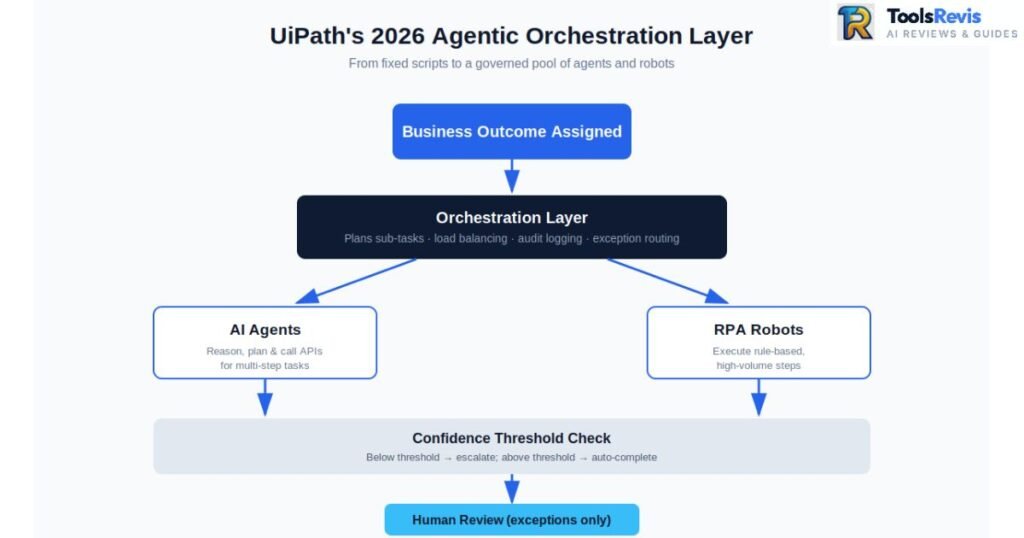
2026 Agentic Orchestration Layer. This is the platform’s most significant evolution. Practically, agentic orchestration means the platform can now assign a business outcome — not just a fixed script — to a fleet of AI agents and traditional robots, which then plan the sequence of sub-tasks required, call the appropriate tools or APIs, and escalate to a human only where confidence thresholds are not met. For an infrastructure team, this shifts the architecture from “one automation, one process” towards a managed marketplace of agents and robots that can be recombined dynamically, with the orchestration layer handling load balancing, audit logging, and exception routing centrally.
This is a meaningful departure from the older workflow automation vs rpa framing, where automations were static and process-specific; agentic orchestration treats automation capacity as a flexible, governed resource pool.
Healthcare Revenue Cycle: A Case Study in Agentic Depth
A prime example of this is the adventhealth rpa uipath automation anywhere blue prism revenue cycle automation initiative, which has moved well beyond simple claims-status scraping. What began as a narrow use case — bots logging into payer portals to check claim status — has evolved into an end-to-end agentic workflow spanning eligibility verification, prior-authorisation submission, denial-reason classification, and appeals drafting, with human billing specialists reviewing only the exceptions the system itself flags as low-confidence.
The architectural lesson for other healthcare CTOs is that revenue cycle automation delivers materially more value once it is treated as a connected agentic pipeline rather than a series of disconnected point bots, each maintained in isolation and each vulnerable to breaking independently when a payer portal changes its layout.
WorkFusion: Deep Process Mining and Financial Compliance Automation
WorkFusion is an AI-powered automation platform focused on AML, KYC, sanctions screening, and financial compliance using pre-trained digital workers. Where UiPath positions itself as the horizontal orchestration layer, WorkFusion’s enduring value — even inside its new ownership structure — lies in its depth within a single, high-stakes vertical: financial crime compliance.
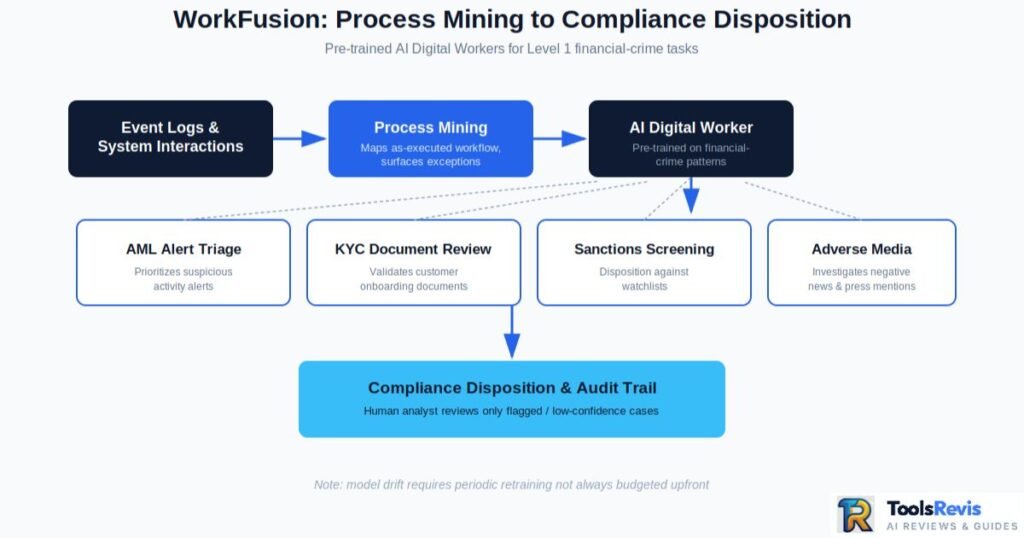
Deep RPA process assessment and built-in process mining. Before WorkFusion deploys a single AI Digital Worker, its process mining tooling ingests event logs and system interaction data to map the actual as-executed workflow, rather than the idealised version documented in a process manual.
This distinction matters enormously to an IT Architect scoping a compliance automation project: a rpa process assessment grounded in mined event data surfaces the exception paths, rework loops, and manual workarounds that staff have quietly built into the “official” process over years — precisely the bottlenecks that a naive, requirements-document-based automation build would miss entirely, and precisely where automation ROI is concentrated.
The financial compliance edge. WorkFusion’s core differentiator is its library of pre-built AI Digital Workers, trained specifically for the repetitive, judgement-light Level 1 analyst tasks that dominate financial crime operations: alert triage in anti-money laundering (AML) monitoring, Know Your Customer (KYC) document review, sanctions screening disposition, and adverse media investigation. Because these models arrive pre-trained on the patterns common to these workflows, deployment timelines are considerably shorter than building equivalent classification logic from a blank canvas.
This has historically made WorkFusion one of the more genuinely affordable rpa solutions for community banking workflows specifically — smaller institutions that cannot justify the multi-year, multi-million-pound automation programmes common at global banks, but that face identical regulatory obligations under AML and KYC frameworks.
For a community bank’s Head of Automation, WorkFusion’s pre-built model library has offered a way to meet compliance automation requirements without the build cost of a bespoke solution. Whether that cost advantage persists as WorkFusion’s technology is folded into UiPath’s broader commercial packaging is, as noted above, an open and important question for this buyer segment to press on during renewal negotiations.
Kofax RPA: The Advanced Data Integration & Extraction Specialist
Kofax specializes in intelligent document processing (IDP), OCR, and ERP integration, making it ideal for document-heavy automation workflows. Kofax occupies a distinct niche from both UiPath and WorkFusion: it is fundamentally a data capture and extraction specialist first, with process automation built around that core competency, rather than the reverse.
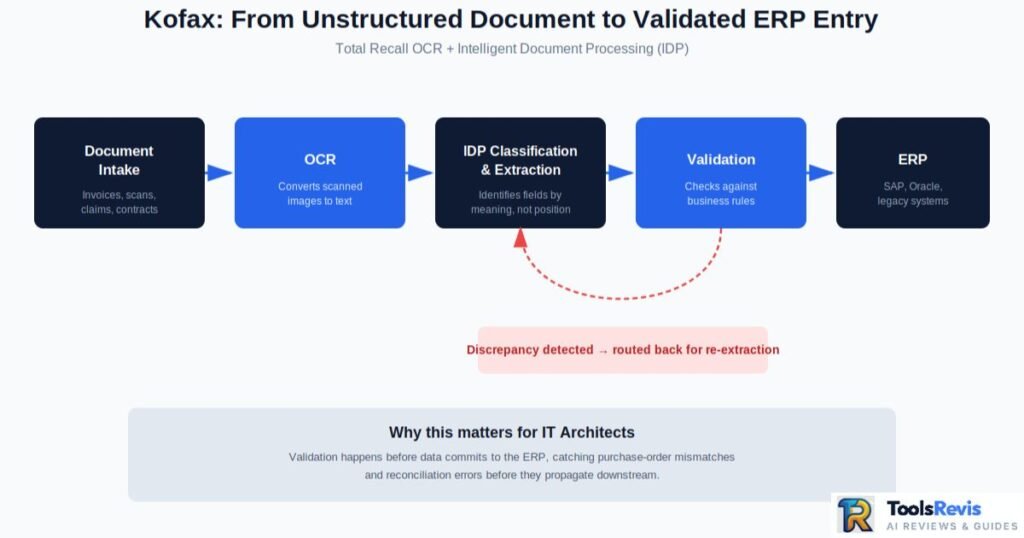
Total Recall OCR and Intelligent Document Processing (IDP). In practical terms, Intelligent Document Processing is the layer that allows software to reliably extract meaning from documents that have no fixed layout — an invoice from one supplier looks nothing like an invoice from another, a scanned contract may be skewed or low-resolution, and a claims form might be handwritten.
Kofax’s IDP engine combines OCR with machine learning classification and validation logic, so that instead of writing brittle template-matching rules for every document variant an organisation receives, the system learns to identify the field, not the position — a policy number is recognised as a policy number regardless of where it sits on the page.
This is precisely why Kofax is frequently deployed as an elite rpa for records system management: scanning and classifying unstructured PDFs, scanned mail, and legacy microfiche exports without the constant script failures that plague simpler template-based extraction tools whenever a document format changes even slightly.
Bridging RPA-ERP integration gaps. Extraction alone is only half the problem; the extracted data must then land cleanly inside downstream systems of record — SAP, Oracle, or a bespoke ERP — without manual re-keying. Kofax’s integration layer is purpose-built to validate extracted fields against business rules (a purchase order number that must match an existing record, a total that must reconcile against line items) before committing data to the ERP, catching discrepancies before they propagate downstream.
For IT Architects managing legacy ERP environments with limited native API surface area, this validation-then-integration approach closes a gap that generalist RPA platforms often handle less natively, since Kofax was engineered around document-heavy, integration-critical workflows from the outset rather than having integration bolted on as a secondary feature.
Direct Head-to-Head Breakdown & Comparison Matrix
This comparison highlights the differences between UiPath, WorkFusion, and Kofax based on deployment speed, licensing costs, maintenance, and ideal business use cases. Having established what each platform does, the next stage of any serious rpa platform comparison is a disciplined, side-by-side breakdown of the factors that actually determine project success or failure post-signature: deployment speed, real-world cost, and operational resilience. The table below consolidates our analysis into a single reference view.
| Feature | Deployment Speed & Timelines | Financial Breakdown (TCO & Hidden Overheads) | System Health & Exception Handling | Best For |
| UiPath | Fast initial deployment via low-code Studio; agentic orchestration layer adds configuration complexity for multi-agent workflows, typically extending enterprise-wide rollouts to 3–6 months for the first major wave. | Licensing is transparent, but the cost of robotic process automation rises sharply once orchestration, AI Computer Vision, and additional attended/unattended robot licences are layered in; infrastructure overhead for on-premises orchestrator hosting is a frequently underestimated hidden cost. | Strong self-healing capability via Computer Vision reduces selector-based breakage; centralised orchestrator dashboards give architects real-time visibility into failed transactions and exception queues. | Enterprises needing a single, horizontal automation fabric across multiple departments and use cases. |
| WorkFusion | Rapid time-to-value for AML/KYC use cases owing to pre-trained AI Digital Workers; timelines lengthen considerably for any use case outside its financial-crime training data, since custom model training is required. | Historically positioned as one of the more affordable rpa solutions for compliance workloads; TCO is now less predictable following its absorption into UiPath’s commercial structure, and buyers should model licensing under the new packaging before committing. | Built-in process mining surfaces exceptions before go-live rather than after; ongoing model drift in AML pattern detection requires periodic retraining, an overhead often missing from initial budget models. | Banks and financial institutions with concentrated AML, KYC, and sanctions-screening workloads. |
| Kofax | Moderate deployment speed; IDP model training on an organisation’s specific document types (invoices, claims forms, contracts) adds upfront time but pays back in reduced long-term maintenance. | Licensing tends to be volume/document-based rather than per-robot, which can materially shift the cost of robotic process automation for document-heavy operations; infrastructure overhead is concentrated in OCR/IDP processing capacity rather than orchestration servers. | Validation-before-integration design catches data-quality exceptions before they reach the ERP; extraction accuracy on genuinely poor-quality scans remains the most common source of ongoing exception volume (see Reddit insights below). | Organisations with high-volume unstructured document capture feeding into ERP or records systems. |
TCO vs Upfront Licensing: The Analysis Enterprise Buyers Actually Need
Total Cost of Ownership (TCO) measures the complete long-term cost of an automation platform, including licensing, infrastructure, maintenance, and support.
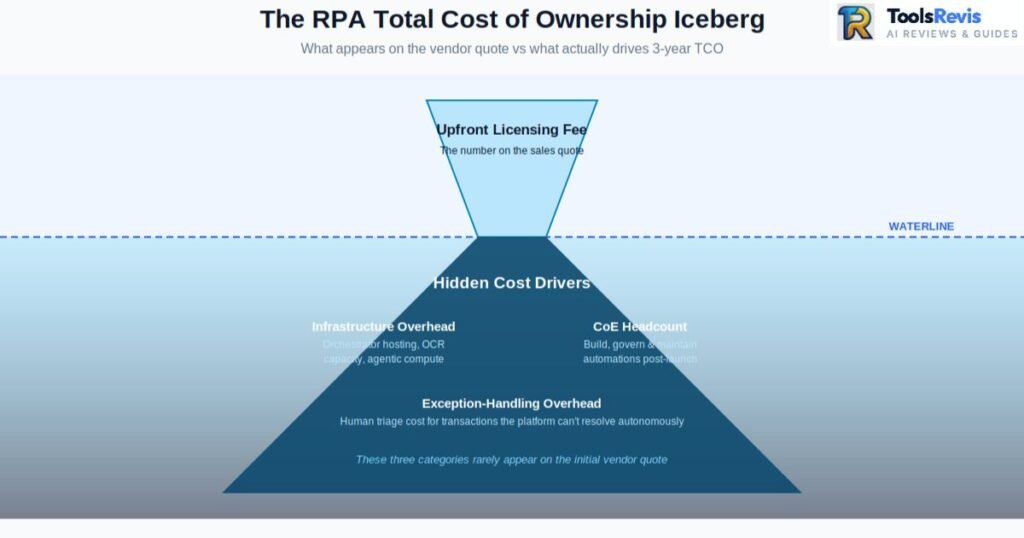
The single most common procurement error we observe in enterprise rpa vendor comparison exercises is anchoring the entire budget decision on the headline licensing quote, rather than modelling Total Cost of Ownership across a genuine three-to-five-year horizon. Upfront licensing fees are, by design, the most visible and most easily benchmarked figure across vendors — which is precisely why they are also the easiest figure for a vendor’s commercial team to make look favourable in isolation.
The real cost of robotic process automation is dominated by three categories that rarely appear on the initial quote: infrastructure overhead (orchestrator hosting, OCR processing capacity, and the compute required for agentic reasoning at scale, all of which grow non-linearly as automation volume increases); the Centre of Excellence headcount required to build, govern, and maintain automations once the initial vendor-led implementation phase ends; and exception-handling overhead, meaning the ongoing human effort required to triage the transactions each platform cannot resolve autonomously.
A platform with a lower headline licence fee but a higher exception rate — because its OCR struggles with genuinely poor-quality documents, or because its selectors break every time a legacy application is patched — will frequently produce a higher three-year TCO than a nominally more expensive platform with stronger self-healing and extraction accuracy. CTOs should insist that any vendor proposal include a modelled exception rate and an associated fully loaded cost-per-exception, rather than accepting a bare per-robot or per-licence figure as the basis for a build-vs-buy decision.
Estimate Your Automation ROI Before Choosing a Platform
Choosing an RPA platform isn’t just about features—it’s about long-term financial impact. Before investing in UiPath, WorkFusion, or Kofax, estimate your expected ROI, payback period, and projected savings using our free calculator.
Beyond the Big 3: Alternative Delivery Models
Many organizations choose managed automation services or RPA-as-a-Service instead of maintaining an in-house automation team.
Not every enterprise wants — or can justify — an in-house Centre of Excellence running any of the three platforms above directly. A parallel ecosystem of delivery models has matured considerably by 2026, and no comprehensive robotic process automation tools comparison is complete without addressing it.
Cloud & Scaling: RPA as a Service and Managed Services
RPA as a service (RPAaaS) has emerged as the default entry point for mid-market organisations without the internal capacity to run their own orchestrator infrastructure or maintain a dedicated automation engineering team. Under this model, the underlying platform — whether UiPath, WorkFusion’s compliance agents, or Kofax’s IDP engine — is hosted and maintained by a third party, with the enterprise consuming automation capacity on a subscription or transaction-volume basis rather than owning the infrastructure outright. This shifts the cost profile from capital expenditure towards predictable operating expenditure, and meaningfully lowers the barrier to entry for organisations that want the benefits of cognitive automation without building a standing engineering function.
Closely related, rpa managed services providers have proliferated to serve companies that own a platform licence but lack the in-house expertise to build, monitor, and continually optimise automations against it. A managed services arrangement typically covers day-to-day bot monitoring, exception triage, incremental automation development, and platform upgrade management — effectively outsourcing the operational half of the Centre of Excellence function while the enterprise retains strategic ownership of which processes get automated. For CTOs evaluating build-versus-outsource, the calculus generally favours managed services where automation is important to the business but not a core differentiating competency worth building in-house at scale.
Quality Assurance: Why RPA Testing Cannot Be an Afterthought
The single most under-resourced discipline in large-scale enterprise rollouts is rpa testing. Because bots interact with production systems exactly as a human user would, a change anywhere in that interaction chain — a UI update, a new mandatory field, a shifted button — can silently break an automation that was functioning correctly the day before, often without triggering any obvious error until downstream data quality degrades.
Dedicated rpa testing services, run either internally or through a specialist third party, apply structured regression testing to automations before every platform upgrade or connected application change, validating that selectors, extraction logic, and exception-handling paths still behave as expected under real production conditions rather than only against a clean test dataset. Enterprises that treat rpa testing as a one-off implementation-phase activity, rather than an ongoing discipline embedded into every subsequent change cycle, are disproportionately represented among the organisations later reporting silent automation failures — precisely the scenario explored in the community insights below.
The Enterprise Reality Check: Reddit & Quora Community Insights
Enterprise users consistently report that OCR accuracy and ongoing bot maintenance are the biggest challenges after deploying RPA at scale. Vendor documentation and analyst reports describe automation in its best light. Practitioner communities — IT forums, Reddit’s automation and RPA subreddits, and Quora threads from engineers who have actually run these platforms in production — tell a rather more candid story. Two pain points recur with striking consistency.
Pain Point 1: The “Cognitive OCR” Lie vs Reality
Every vendor in this space markets its OCR and IDP capability using language that implies near-human comprehension of any document, regardless of quality. The lived experience of practitioners handling genuinely messy, real-world customer support documents tells a different story. Customer-submitted scans — photographed on a mobile phone at an angle, creased, partially obscured by a coffee ring, or simply photocopied for the third time until the text has degraded — routinely defeat extraction models trained predominantly on clean, corporate-quality sample documents.
Practitioners consistently report that accuracy figures quoted in vendor sales decks are achieved under laboratory conditions using well-scanned, well-lit test sets, and that production accuracy on genuinely poor-quality customer-submitted documents can fall meaningfully short of those headline numbers. The practical consequence is that IDP deployments for customer-facing document intake — insurance claims, loan applications, customer support attachments — require a far more generous human-in-the-loop exception-review allowance than initial vendor projections typically suggest, and enterprises that budget exception-handling headcount based on vendor-quoted accuracy alone are consistently disappointed within the first two quarters of go-live.
Pain Point 2: UI Fragility and the Soaring Cost of RPA Support Services
The second recurring theme is the operational fragility introduced whenever underlying legacy enterprise applications are silently updated — a Windows patch that shifts a dialog box by a few pixels, a browser version update that changes how a web element renders, or a vendor pushing an unannounced UI refresh to a SaaS tool the enterprise has no control over. Even platforms with strong Computer Vision resilience are not immune: practitioners describe automations that ran flawlessly for months suddenly failing en masse overnight, with no warning and no corresponding entry in any change log the automation team controls.
The downstream effect is a steady, often underestimated escalation in rpa support services costs, as organisations are forced to retain either an expanded internal maintenance team or an external support contract sized for reactive firefighting rather than planned development. The clearest lesson from these community accounts is that any enterprise automation budget should explicitly separate “build” cost from “sustain” cost, and should size the sustain budget based on the volatility of the underlying application landscape being automated — not on the platform vendor’s own maintenance estimates, which consistently understate this category.
Conclusion & Final Verdict: What’s the Best RPA Software for Large Enterprises?
The best RPA platform depends on your business requirements, document complexity, compliance needs, and long-term automation strategy. There is no single winner in this rpa vendor comparison — only a correct answer for a given organisation’s process portfolio, industry, and risk tolerance. UiPath earns its market-leader position through the breadth of its agentic orchestration layer and the depth of its developer ecosystem, making it the strongest default choice for large enterprises automating across multiple departments and use cases simultaneously.
WorkFusion, even as its independent identity is absorbed into UiPath’s broader platform, remains the sharpest tool available for concentrated AML and KYC compliance workloads specifically, and should still be the first evaluation point for any financial institution with that narrow but high-stakes need.
Kofax remains unmatched where the core bottleneck is genuinely unstructured document extraction feeding into ERP or records systems, and its validation-first integration philosophy earns particular consideration from architects managing legacy ERP environments with limited native API surface area.
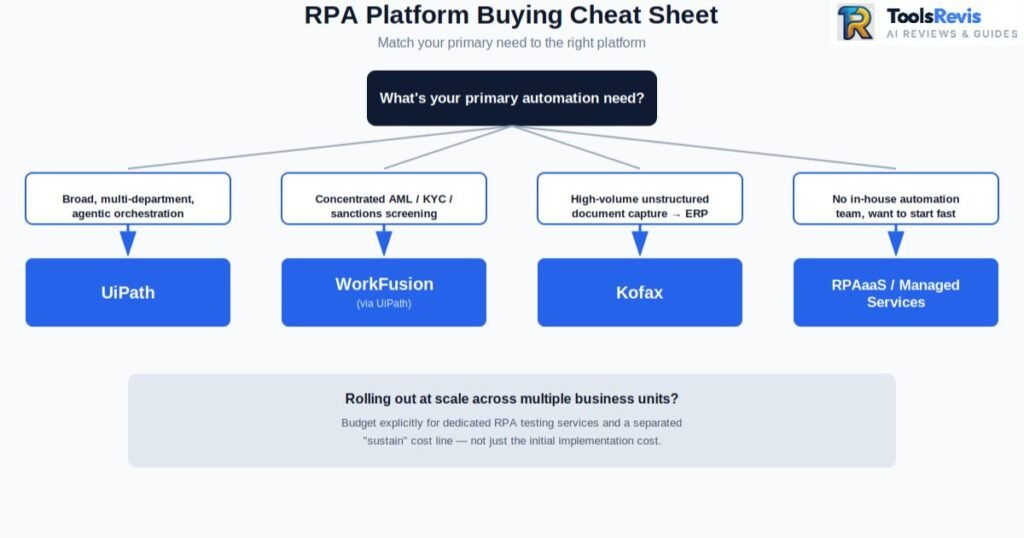
A quick buying cheat-sheet for procurement teams:
- Automating broadly across the enterprise, multiple departments, need agentic orchestration → UiPath.
- Concentrated AML/KYC/sanctions-screening workload at a bank or credit union → WorkFusion (via UiPath).
- High-volume unstructured document capture feeding a legacy ERP → Kofax.
- No in-house automation team, want to start fast → RPAaaS or a managed services partner layered atop any of the above three.
- Rolling out at scale across multiple business units → budget explicitly for dedicated rpa testing services and a separated “sustain” line item, not just implementation cost.
Read Next Section
Continue Learning About Robotic Process Automation
Want to explore enterprise automation in more depth? These guides will help you understand RPA fundamentals, industry-specific use cases, and where automation delivers the highest business value.
- What Is Robotic Process Automation? Complete 2026 Guide
Learn how RPA works, its core components, real-world business use cases, and how it has evolved into Agentic AI. - Robotic Process Automation for Accounts Payable
Discover how businesses automate invoice processing, three-way matching, approvals, and payment workflows to reduce manual effort and improve accuracy. - RPA in Manufacturing & Procurement (2026 Guide)
Explore how manufacturers automate procurement, supplier onboarding, inventory management, purchase orders, and supply chain operations.
Frequently Asked Questions
1. What is the main difference between workflow automation vs RPA?
Workflow automation orchestrates tasks via APIs and suits stable, unchanging processes. RPA automates at the UI level, mimicking clicks and typing, so it works on legacy systems without accessible APIs. Both are now converging under agentic automation platforms.
2.How does UiPath vs Blue Prism or Automation Anywhere compare in pricing structure?
Blue Prism uses premium per-digital-worker licensing with no free tier, though 20–30% volume discounts are common. UiPath and Automation Anywhere offer more flexible subscription/usage-based pricing, with AA typically 10–20% cheaper than UiPath once fully negotiated.
3. Which tool provides the most reliable RPA tools for automating customer interactions without maintenance fatigue?
No platform fully avoids UI-fragility maintenance. UiPath’s AI Computer Vision handles interface changes best due to visual recognition over brittle selectors. Still, budget dedicated RPA support services regardless of platform — maintenance fatigue is structural, not vendor-specific.
4. Which RPA platform is best for small and medium-sized businesses?
Small and medium-sized businesses should choose an RPA platform based on their primary use case. UiPath offers an accessible low-code environment, Kofax is ideal for document-heavy operations, and managed RPA services or RPA-as-a-Service can reduce upfront investment for organizations without dedicated automation teams.
5. Can RPA integrate with SAP, Oracle, and Microsoft Dynamics?
Yes. Modern RPA platforms support integration with major ERP systems such as SAP, Oracle, Microsoft Dynamics 365, and many legacy applications. Integration can be achieved through APIs, user interface automation, or intelligent document processing, depending on the capabilities of the target system.
6. How long does it take to implement an enterprise RPA platform?
Implementation timelines vary by project complexity. Small automation projects may be completed within a few weeks, while enterprise-wide deployments involving multiple departments, governance, and AI capabilities often require three to twelve months, including testing and user adoption.
7. What factors should enterprises consider before choosing an RPA platform?
Organizations should evaluate scalability, AI capabilities, document processing, ERP integration, security, compliance requirements, licensing costs, developer availability, vendor support, and long-term total cost of ownership before selecting an RPA solution.
8. Is investing in RPA still worth it in 2026?
Yes. RPA continues to deliver significant value by reducing repetitive work, improving accuracy, lowering operational costs, and increasing productivity. Modern platforms now combine traditional automation with AI and agentic workflows, allowing businesses to automate more complex end-to-end processes than ever before.
Free Automation Tools
Free RPA & Business Automation Tools
Planning an automation project? Use our free calculators and utilities to estimate ROI, reduce manual work, and evaluate automation opportunities before investing in enterprise software.
- RPA ROI Calculator
Estimate implementation costs, expected savings, payback period, and long-term return on investment. - P2P Savings Calculator
Measure potential savings by automating procure-to-pay workflows, supplier management, approvals, and invoice processing. - PDF Invoice Data Extractor
Extract invoice data from PDF files instantly and eliminate manual data entry for finance and accounts payable teams. - Support Bot ROI Calculator
Estimate how much your business could save by automating customer support with AI-powered bots.

I’m Umair Ahmad, founder of ToolsRevis. I personally test every AI tool we cover — signing up, running real workflows, checking pricing tiers, and comparing outputs — before writing a single word. My goal: cut through AI marketing hype with honest, hands-on verdicts.
Let’s achieve more together!