
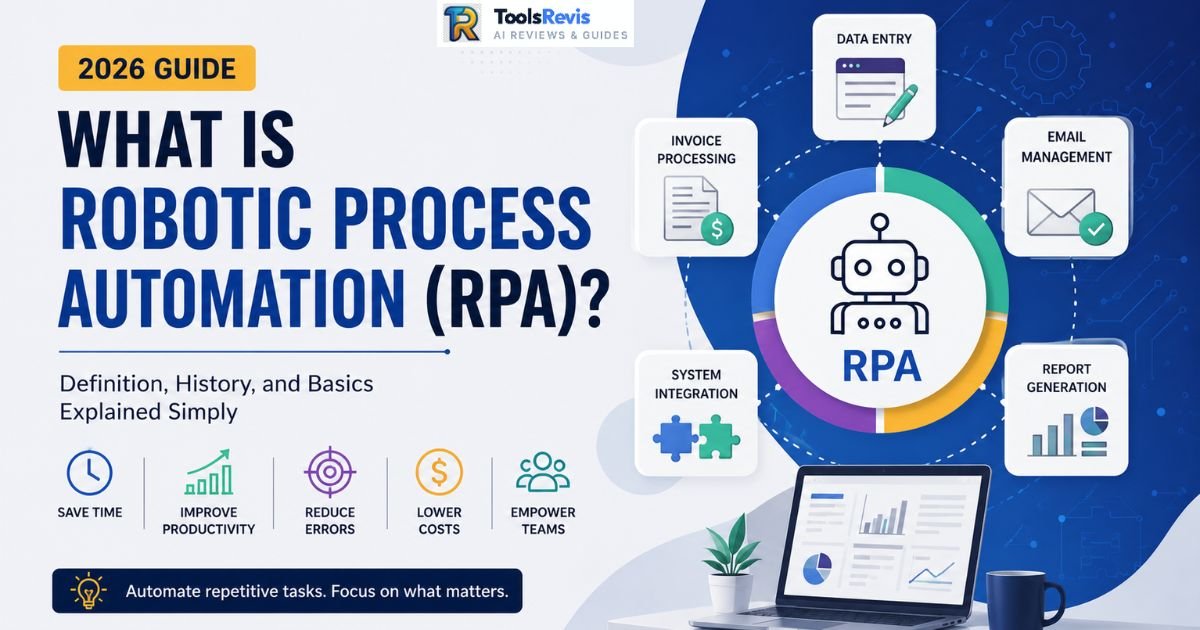
Quick Answer: What is RPA?
Robotic Process Automation (RPA) is software that mimics human actions — clicking, typing, copying, reading screens — to automate repetitive digital tasks. Unlike traditional integrations, RPA bots work directly on an application’s user interface (UI), meaning they don’t need APIs or backend access to connect old, disconnected, or legacy systems.
What is RPA in One Sentence?
Robotic Process Automation (RPA) is software technology that automates repetitive digital tasks by mimicking human interactions with computer applications.
Introduction: The Billion-Dollar “Copy-Paste” Problem
Meet Sarah. She’s an Accounts Payable clerk at a mid-sized manufacturing firm, and by 10 AM on a Tuesday, she’s already done this forty times: open the invoice PDF, copy the vendor name, switch to the ERP tab, paste it, tab over, copy the amount, paste it again, check the PO number against a spreadsheet, flag mismatches, save, close, open the next PDF. Repeat. By the end of the day she’s clicked somewhere around 2,000 times and copy-pasted the same handful of data points nearly 200 times across three different systems that, for whatever reason, still refuse to talk to each other.
Sarah isn’t bad at her job. Her job is bad. It’s the digital equivalent of moving bricks by hand when there’s a forklift parked ten feet away.
This is the problem RPA was built to solve. Not “innovation” in the abstract, not some sci-fi vision of robots taking over the office — just the very boring, very expensive reality that most enterprise software still doesn’t connect to other enterprise software, and someone has to be the human glue in between. McKinsey and Deloitte have both pegged the average knowledge worker as spending somewhere between 20-40% of their day on repetitive, rules-based digital tasks.
Multiply Sarah’s salary by that percentage, multiply that by every AP clerk, HR coordinator, and claims processor in the world, and you get a genuinely billion-dollar inefficiency — one that runs quietly in the background of nearly every mid-to-large company, invisible on the P&L but very real in headcount and burnout.
RPA didn’t emerge from a research lab chasing AGI. It emerged from finance and operations teams asking a much simpler question: “Why am I paying a human $25/hour to move data from Box A to Box B when a script could do it in two seconds?”
Robotic Process Automation (RPA) is software that automates repetitive computer tasks by mimicking human actions like clicking, typing, and copying data. It works through the application’s user interface instead of APIs, making it ideal for legacy systems, ERP software, and repetitive business processes.
RPA 101: Understanding the Fundamentals of Digital Labor
Robotic Process Automation (RPA) fundamentals refer to the core principles that allow software bots to imitate repetitive human actions across digital systems without changing the underlying applications. Before going further, let’s strip away the marketing language. At its core, bots automation in the RPA sense means creating a piece of software — a “bot” — that performs the exact same digital actions a human would, in the exact same order, on the exact same screens. No magic, no true “intelligence” in the classic RPA sense — just extremely reliable repetition.
This is what people mean when they call RPA a form of robotics and automated systems for the back office. It’s not physical robotics — there’s no arm, no conveyor belt. It’s digital labor: software that operates your existing applications the way a very fast, very patient employee would.
How RPA Mimics Human Actions
RPA mimics human actions by interacting with software applications through the user interface (UI), performing clicks, typing, copying, and screen reading just as a human employee would. This is the part that actually separates RPA from every other kind of automation, so it’s worth slowing down on.
Most software integrations work through an API — a backend connection where two systems exchange data directly, invisibly, without ever touching a screen. That’s clean, but it requires both systems to actually have an API, and to have one that supports what you’re trying to do. A lot of enterprise software — especially older ERPs, legacy banking platforms, or niche industry tools — either has no API, a limited one, or one that’s locked behind an expensive enterprise tier.
RPA sidesteps this entirely by operating at the UI layer — the same layer a human sees and clicks. A bot built in a tool like UiPath or Automation Anywhere doesn’t ask the invoicing system for data through a backend call. Instead of relying on backend integrations, the bot launches the application, identifies on-screen elements using UI selectors, OCR, or screen recognition, enters the required information into the correct fields, and completes the process automatically—following the same sequence a human employee would.
That’s how RPA mimics human actions: it’s not smarter than a human, it’s just faster and doesn’t get tired doing the same 200 clicks on a loop.
This UI-layer approach is also RPA’s biggest strength and its biggest limitation in one breath. Strength: RPA can automate nearly any repetitive task performed on a computer screen, including workflows inside outdated legacy systems that organizations still rely on but rarely upgrade. Limitation: if someone redesigns that screen — moves a button, renames a field — the bot can break, because it was trained to recognize that specific layout.
RPA vs. Other Technologies
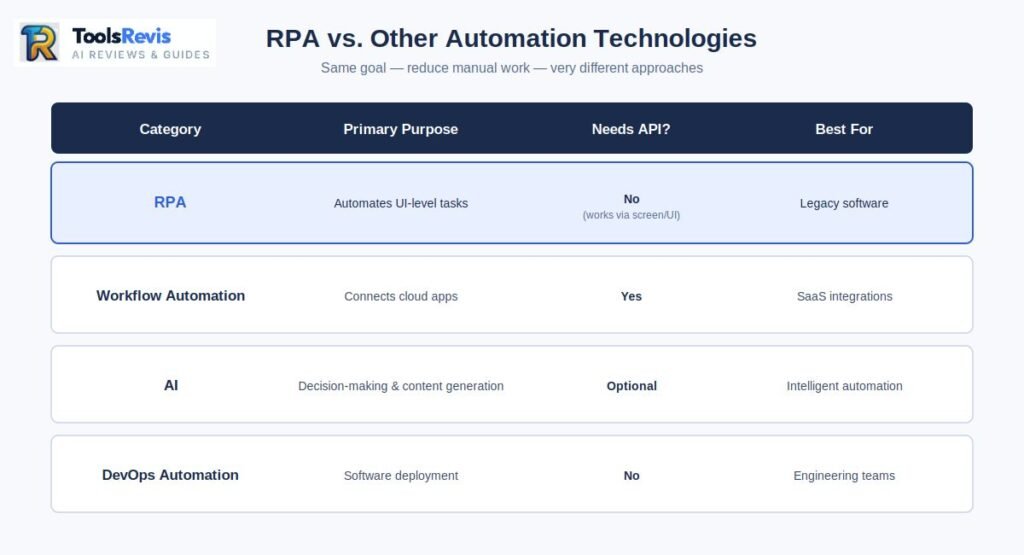
RPA differs from workflow automation and DevOps automation because it operates on application interfaces rather than relying solely on APIs or software deployment pipelines. People often lump RPA in with “workflow automation” and “DevOps automation,” and while they’re cousins, they solve different problems.
Workflow automation vs. RPA: Tools like Zapier, Make, or Power Automate’s cloud flows are workflow automation — they connect apps that already have APIs and pass data between them based on triggers (“when a new row is added to this sheet, send a Slack message”). RPA, by contrast, is built for situations where there’s no clean API to hook into. Concrete example: if your CRM and your email tool both have modern APIs, workflow automation is the right, lighter-weight tool. If your CRM needs to pull data from a 15-year-old desktop accounting application with zero API, that’s an RPA job — the bot has to physically “look” at that old software’s screen to get the data out.
Difference between RPA and DevOps automation: DevOps automation (think Jenkins, Ansible, Terraform) exists to automate the software delivery pipeline itself — building code, testing it, deploying infrastructure. It’s automation for engineers, about engineering systems. RPA automates business processes for non-technical operations staff — invoice processing, claims intake, payroll reconciliation. Concrete example: a DevOps engineer uses Ansible to auto-provision 50 servers when traffic spikes; an operations manager uses an RPA bot to auto-reconcile 500 vendor invoices against purchase orders every night. Same underlying philosophy — reduce manual repetitive work — completely different users, tools, and business layer.
Try our free tool:
Under the Hood: The Three Core Pillars of an RPA Architecture
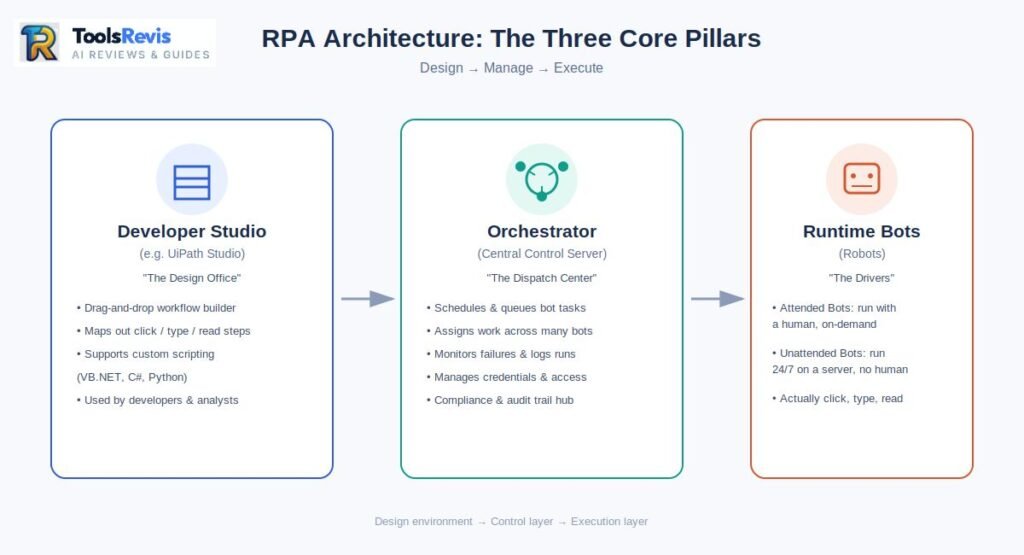
Every enterprise RPA platform is built around three core components: a development environment, a centralized orchestration platform, and software bots that execute automated tasks. Every serious RPA platform, whether it’s UiPath, Automation Anywhere, or Power Automate, is built on the same three-part RPA architecture. Think of it like running a small delivery company:
- Developer Studio is the design office, where routes get planned.
- Orchestrator is the dispatch center, deciding who drives where and when.
- Runtime Bots are the actual delivery drivers, doing the physical work.
Let’s ground this with UiPath, since it’s the platform most enterprises encounter first when they ask “UiPath, what does it do, exactly?”
1. Developer Studio (UiPath Studio): This is where a bot is actually built — a visual, drag-and-drop canvas where a developer (often not even a hardcore programmer, sometimes a business analyst) maps out the sequence: open this app, click this field, read this value, apply this rule, write to that spreadsheet. It’s closer to building a flowchart than writing raw code, though it does support custom scripting (VB.NET, C#, or Python integrations) for complex logic.
2. Orchestrator: This is the control tower. Once a bot is built in Studio, Orchestrator is the centralized server that manages it — scheduling when it runs, queuing up work items (like “247 invoices waiting to be processed tonight”), assigning tasks across multiple bots, monitoring for failures, and logging everything for audit purposes. This is also where governance lives: which bots have access to which credentials, which processes are approved for production, and full run-history for compliance teams who need to prove exactly what a bot did and when.
3. Runtime / Execution Bots (Robots): These are the workers actually executing the automation — either Attended Bots, which sit on an employee’s machine and run alongside them, kicked off manually as help for a specific task, or Unattended Bots, which run independently on a server, 24/7, with zero human involvement, typically for high-volume, back-office processes like Sarah’s invoice matching.
Put together, this is the answer to “what is Robotic Process Automation” at the architecture level: a design environment to build the automation, a control layer to manage and govern it at scale, and an execution layer that actually does the clicking, typing, and reading — all working together so that Sarah’s 200 daily copy-pastes become a queue item that gets fully processed by 6 AM, before she’s even logged in.
The History of RPA: From Screen Scraping to AI Agents
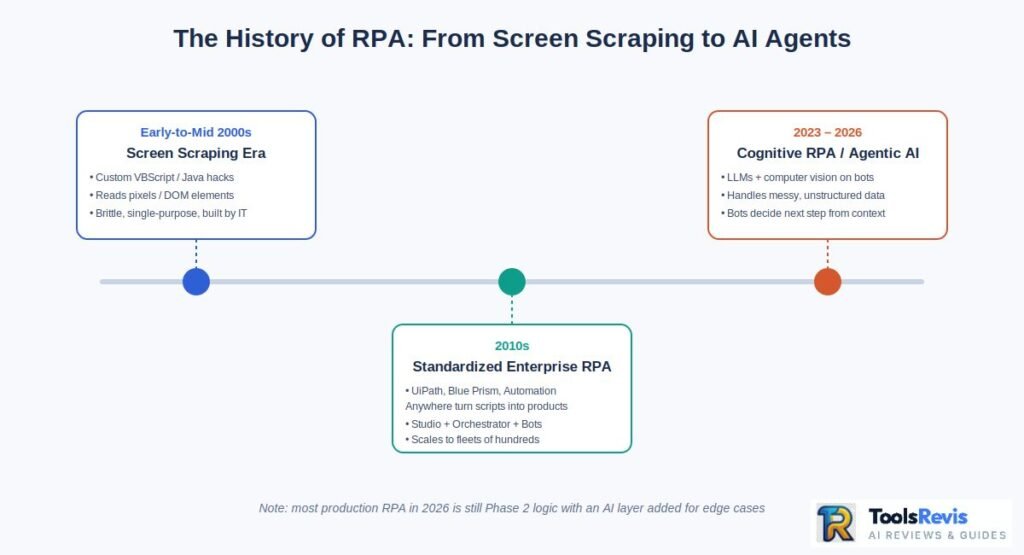
The history of Robotic Process Automation spans three major phases: early screen scraping, enterprise RPA platforms, and modern AI-powered automation. If you’re wondering “what is the history of RPA,” the short version is: it’s older than most people assume, and it didn’t start with a fancy platform — it started with a hack.
The history of Robotic Process Automation breaks cleanly into three phases, and understanding them explains why RPA looks the way it does today.
| Era | Phase | What Was Actually Happening |
| Early-to-mid 2000s | Screen Scraping Era | “Automation” meant custom scripts (often VBScript or Java-based) that literally read pixel coordinates or HTML DOM elements off a screen and mimicked clicks. Brittle, single-purpose, built in-house by IT for one specific task. No orchestration, no governance, no scale. |
| 2010s | Standardized Enterprise RPA | UiPath, Blue Prism, and Automation Anywhere turned scripts into products. This is when “RPA” became a category with its own name, its own conferences, and its own budget line in the enterprise. Studio + Orchestrator + Bots became the standard three-pillar architecture. Deployments scaled from one bot to fleets of hundreds, with governance, audit logs, and IT security sign-off built in. |
| 2023–2026 | Cognitive RPA / Agentic AI Era | This is where we are now. Cognitive Robotic Process Automation layers LLMs and computer vision on top of the classic bot engine. Instead of a bot needing an exact, unchanging UI layout, it can now read messy, unstructured data — a handwritten note on an invoice, a PDF with no consistent template, an email with no fixed format — and make a judgment call the way a person would. Bots are increasingly “agentic,” meaning they can decide which sub-task to run next based on context, rather than following a rigid, pre-scripted path. |
The big shift from phase two to phase three isn’t cosmetic. Classic RPA was deterministic — it could only handle exactly what it was told to expect. Cognitive RPA can handle variation. That’s the difference between a bot that breaks the moment an invoice format changes, and one that reads the invoice the way Sarah would, regardless of layout.
That said — and this matters for expectations — most RPA in production today, even in 2026, is still phase-two logic with an AI layer bolted on for the messy edge cases. Full autonomous “agentic” RPA is real but still maturing, not yet the default.
Business Value: Key Benefits of RPA Automation for Modern Enterprises
The primary benefits of RPA include lower operating costs, higher productivity, fewer human errors, and faster execution of repetitive business processes. Why RPA, when you could just hire more people or wait for a full IT overhaul? Three answers, in order of how often they show up in an actual ROI deck:
24/7 capacity without 24/7 headcount. A bot doesn’t take a lunch break, doesn’t need a night shift differential, and doesn’t call in sick. An unattended bot processing invoices can run at 3 AM and have Sarah’s queue cleared before she’s logged in. This is capacity you’re not currently paying for, sitting idle every night.
Error rates that approach zero — for the right tasks. Humans doing 2,000 repetitive clicks a day will eventually fat-finger a digit or miss a mismatch. A bot executing the same rule 10,000 times makes the same decision 10,000 times. This matters enormously for RPA compliance — audit trails, SOX controls, and regulatory reporting all benefit from a process that behaves identically every single time and logs every action automatically.
Digital transformation without ripping out legacy IT. This is the benefit that gets undersold. Most RPA digital transformation conversations aren’t about replacing your ERP or core banking system — they’re about making a 15-year-old system behave like a modern one, without a multi-year, multi-million-dollar re-platforming project. RPA sits on top of legacy infrastructure instead of requiring you to touch it. For a mid-sized company that can’t justify ripping out its core system, this is often the only realistic path to automation.
Real-World Applications: RPA in Action Across Industries
Robotic Process Automation is widely used across finance, healthcare, manufacturing, telecommunications, customer service, and enterprise resource planning (ERP) systems. RPA isn’t industry-specific — it goes wherever there’s high-volume, rules-based, screen-based work. Here’s where it actually shows up:
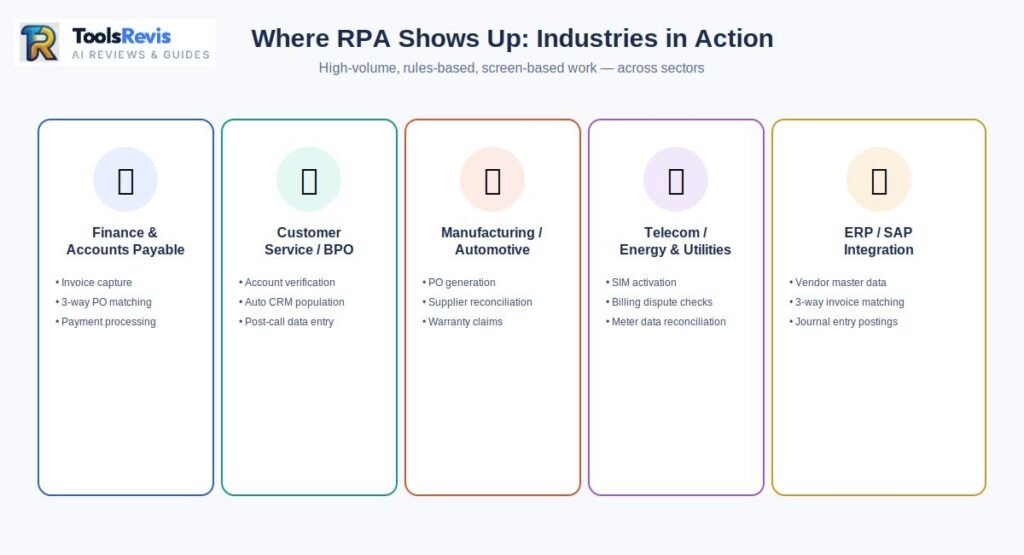
Finance & Accounts Payable Automation
Definitively speaking, the finance and corporate sectors are where RPA drives its deepest operational impact. Software bots actively capture incoming invoices from emails, run automated three-way matching against existing purchase orders, and seamlessly process payments without human hands touching the data. If you want to see exactly how this financial workflow operates step-by-step, you can check out our detailed guide on Robotic Process Automation Accounts Payable.
Customer Service / BPO
- Robotic Process Automation in call centers is one of the biggest adoption categories globally. BPO RPA deployments handle account verification, pulling customer history across multiple legacy systems while an agent is still on the call, and post-call data entry — cutting average handle time significantly.
- RPA customer service use case: a bot auto-populates a CRM ticket with customer order history, billing status, and prior complaints the second a call connects, so the agent isn’t toggling between five tabs while the customer waits.
Manufacturing / Automotive
- Robotic Process Automation in the manufacturing industry focuses heavily on the back-office side of the factory floor: purchase order generation when inventory hits a threshold, supplier invoice reconciliation, and quality control report compilation pulled from multiple plant systems.
- RPA automotive specifically: bots reconcile parts inventory across supplier portals and internal ERPs, and automate warranty claim processing — matching VINs, claim codes, and dealer submissions across systems that were never designed to talk to each other.
Telecom / Energy & Utilities
- Robotic Process Automation in telecom handles SIM activation workflows, billing dispute resolution (cross-referencing usage logs against customer complaints), and network fault ticket routing.
- RPA in energy & utilities is used for meter-reading data reconciliation, regulatory compliance reporting (a heavily audited, rules-based process that’s a near-perfect RPA fit), and outage-related customer notification workflows.
ERP / SAP Integration
- RPA in ERP systems, especially SAP, is one of the highest-value and most common enterprise use cases because SAP’s native APIs are expensive to license and complex to configure for every module. Bots instead operate SAP’s GUI directly to handle vendor master data creation, three-way invoice matching, and journal entry postings.
- For the best RPA tools for SAP integration, UiPath and Automation Anywhere both offer purpose-built SAP activity packages that recognize SAP GUI elements natively, which materially reduces the “brittle bot” problem discussed in the next section. Blue Prism also has strong SAP connectors and is popular in banking and insurance environments running SAP-based core systems.
The Reality Check: What RPA Vendors Won’t Tell You (Why Bots “Break”)
Although RPA delivers significant efficiency gains, bots can fail when application interfaces change or poorly designed business processes are automated without optimization. Here’s what sales decks don’t lead with, and what you’ll find if you spend any time in r/RPA or r/UiPath instead of a vendor’s case study page.
The UI Fragility Trap. This is the single most common complaint from actual practitioners. A bot built against a specific UI layout — button positions, field IDs, window titles — can break the moment that application gets a minor update. A vendor pushes a UI refresh, moves a “Submit” button 10 pixels to the left, and a bot that ran flawlessly for eight months suddenly fails at 2 AM with no one watching. Reddit threads on this are full of developers describing bots that “worked perfectly in testing” and then quietly broke in production because IT pushed a Windows update or a SaaS vendor changed their login page.
The “Band-Aid,” not the cure. A recurring, blunt observation from practitioners: RPA automates a bad process just as reliably as it automates a good one. If your invoice approval workflow is broken — too many hand-offs, unclear ownership, redundant checks — a bot will faithfully execute that broken workflow at scale, just faster. Several experienced RPA developers describe their job less as “innovation” and more as “automating dysfunction,” and warn that companies skip the process-redesign step and go straight to bot-building, which locks in inefficiency instead of removing it.
Maintenance costs vendors don’t lead with. The license fee is the visible cost. The invisible cost — the one that surprises small and mid-sized businesses — is the ongoing developer time needed to fix broken selectors, update bots after every software patch, and monitor failed runs. Community estimates from people running production RPA environments commonly put maintenance effort at 15-25% of the original build time, recurring, indefinitely, for as long as the bot exists. For a small business without a dedicated RPA developer on staff, this is often the line item that kills the ROI case a year in.
The honest takeaway: RPA works exceptionally well for stable, well-defined, high-volume processes on interfaces that don’t change often. It works poorly as a fix for chaotic processes or fast-changing software environments — and any vendor telling you otherwise is selling, not advising.
When to Use RPA & How to Choose the Right Tool
RPA should be used for repetitive, rule-based tasks performed on stable software interfaces that require little or no human judgment. When to use RPA — quick checklist. A task is a good RPA candidate if it’s:
- High-volume and repetitive (daily or near-daily, not a once-a-quarter task)
- Rules-based, with clear if/then logic — not requiring judgment calls
- Performed on a stable UI that doesn’t change frequently
- Currently done by copying/re-keying data between systems with no API connection
- Prone to human error specifically because it’s tedious, not because it’s complex
If a task requires genuine judgment, changes structure constantly, or touches an interface that gets redesigned every few months, it’s a poor RPA fit — or at minimum needs a cognitive/AI layer on top.
Comparison of RPA tools. Among the top robotic process automation companies, four names dominate almost every shortlist:
| Tool | Best For | Learning Curve | Notable Strength |
| UiPath | Large enterprises, complex multi-system workflows | Moderate | Largest ecosystem, strongest SAP/ERP activity packages, biggest community |
| Automation Anywhere | Cloud-native enterprise deployments | Moderate | Strong cloud-first architecture, solid AI/document processing add-ons |
| Blue Prism | Highly regulated industries (banking, insurance) | Steeper | Built for strict governance and security-first environments |
| Microsoft Power Automate | SMBs, teams already on Microsoft 365 | Low | Best entry-level option — tightly integrated with Excel, Outlook, Teams, and priced accessibly for smaller budgets |
For a small or mid-sized business testing whether RPA is even worth the investment, Power Automate is the practical starting point — lower cost, shorter ramp-up time, and no need for a dedicated RPA development team just to get a first bot into production. Enterprises with SAP-heavy environments or strict compliance requirements tend to graduate to UiPath or Blue Prism once they’ve proven the concept.
FAQs
1. Is RPA difficult to learn?
Learning the basics of RPA is relatively easy, especially with platforms like Microsoft Power Automate and UiPath Studio, which use drag-and-drop workflows instead of traditional programming. While advanced automation requires technical knowledge, beginners can build simple bots after completing free online training.
2. Is coding required for RPA?
No, most modern RPA platforms are designed as low-code or no-code tools. Business users can automate common workflows using visual designers, while developers can add custom code only for advanced logic or integrations.
3. Can ChatGPT replace RPA?
No. ChatGPT and RPA solve different problems. ChatGPT generates and understands language, while RPA automates repetitive software tasks such as data entry, invoice processing, and report generation. Many organizations now combine AI with RPA to build intelligent automation workflows.
4. Does RPA use APIs?
RPA does not require APIs because it works directly through an application’s user interface. However, many modern RPA platforms can also integrate with APIs when available to improve speed, reliability, and scalability.
5. Is RPA still in demand in 2026?
Yes. RPA remains in high demand because organizations continue to automate repetitive business processes. In 2026, the biggest trend is combining traditional RPA with AI agents, OCR, and large language models to handle more complex workflows.
6. What is RPA in simple terms?
RPA is software that does repetitive computer tasks the way a human would — clicking, typing, copying data. It runs the same steps every time, just faster and without breaks.
7. What does RPA mean in robotics — is it a physical robot?
No. RPA is purely software — there’s no arm, no machine, no physical hardware involved. The “robot” just refers to a program that mimics human clicks on a screen.
8. Is AI replacing RPA in 2026?
Not replacing — merging with it. Cognitive RPA now pairs classic bots with AI to handle messy, unstructured data, while standalone RPA still runs fine for stable, narrow tasks.
9. Where can I find RPA learning materials or templates?
UiPath Academy offers free self-paced courses covering both the tool and general RPA concepts. Microsoft Learn’s Power Automate modules are also a fast, free starting point.
10. What is an example of RPA?
A common example of RPA is invoice processing, where software bots automatically extract invoice data, validate purchase orders, and enter information into an ERP system without manual data entry.
11. Which industries use RPA the most?
Finance, banking, insurance, healthcare, manufacturing, telecommunications, retail, and customer service are among the largest adopters of Robotic Process Automation.
12. Is RPA a good career in 2026?
Yes. Demand for RPA developers, automation analysts, and intelligent automation specialists continues to grow as organizations combine AI with business process automation.
13. What programming languages are used in RPA?
Most RPA platforms are low-code, but developers commonly use C#, VB.NET, Python, JavaScript, and SQL for advanced automation.
14. What are the limitations of RPA?
RPA performs best with stable, rule-based tasks. Frequent interface changes, poor business processes, and tasks requiring human judgment can reduce automation effectiveness.
15. Is RPA the same as AI?
No. RPA follows predefined rules to automate repetitive tasks, whereas AI learns from data and makes decisions. Many modern automation solutions combine both technologies.
16. Can small businesses use RPA?
Yes. Affordable platforms like Microsoft Power Automate allow small businesses to automate invoices, emails, Excel reports, and repetitive office tasks without enterprise-level budgets.
17. What is the future of RPA?
The future of RPA lies in intelligent automation, where AI, OCR, machine learning, and software bots work together to automate increasingly complex business processes.
Read Next: Want to see how this works in finance? Check out our deep-dive guide on Robotic Process Automation Accounts Payable to learn how AI-powered bots automate invoice capturing, three-way matching, and eliminate manual data entry.
Ready to Take Action? Try Our Free AI & Business Utilities
If you want to scale your workflow and automate your digital growth, check out our suite of free advanced tools. No sign-ups, no credit cards required:
1. Enterprise & Strategy Boosters
- Enterprise Knowledge Strategy & ROI Calculator: Optimize your organization’s knowledge base and see exactly how much time and budget you can save with AI implementation.
- Jasper AI ROI & Pricing Calculator: Compare Jasper AI’s premium plans and find out how profitable this tool can be for your business.
2. Smart AI Copywriting & Text Analysis
- AI-Powered PAS Framework Copy Generator: Use the proven Problem-Agitation-Solution (PAS) formula to generate high-converting sales copy that drives immediate action.
- AI Text Tone Adjuster & Analyzer: Instantly analyze your content’s voice and convert it into a professional, casual, or persuasive tone.
3. Workflow Automation & Operations (Our RPA Suite)
- RPA ROI Calculator: Instantly run a comprehensive process automation roi calculation to measure baseline financial yields and net returns.
- Support Bot ROI Calculator: Learn how to calculate cost savings from automating support calls using our interactive deployment simulator.
- P2P Savings Calculator: Execute a procure to pay automation solutions real-time savings calculation for your back-office financial accounting.
- Best Free PDF Invoice Data Extractor Tool Online: Say goodbye to manual data entry! Upload your PDF invoices and extract all crucial data into clean formats within seconds.

I’m Umair Ahmad, founder of ToolsRevis. I personally test every AI tool we cover — signing up, running real workflows, checking pricing tiers, and comparing outputs — before writing a single word. My goal: cut through AI marketing hype with honest, hands-on verdicts.
Let’s achieve more together!