
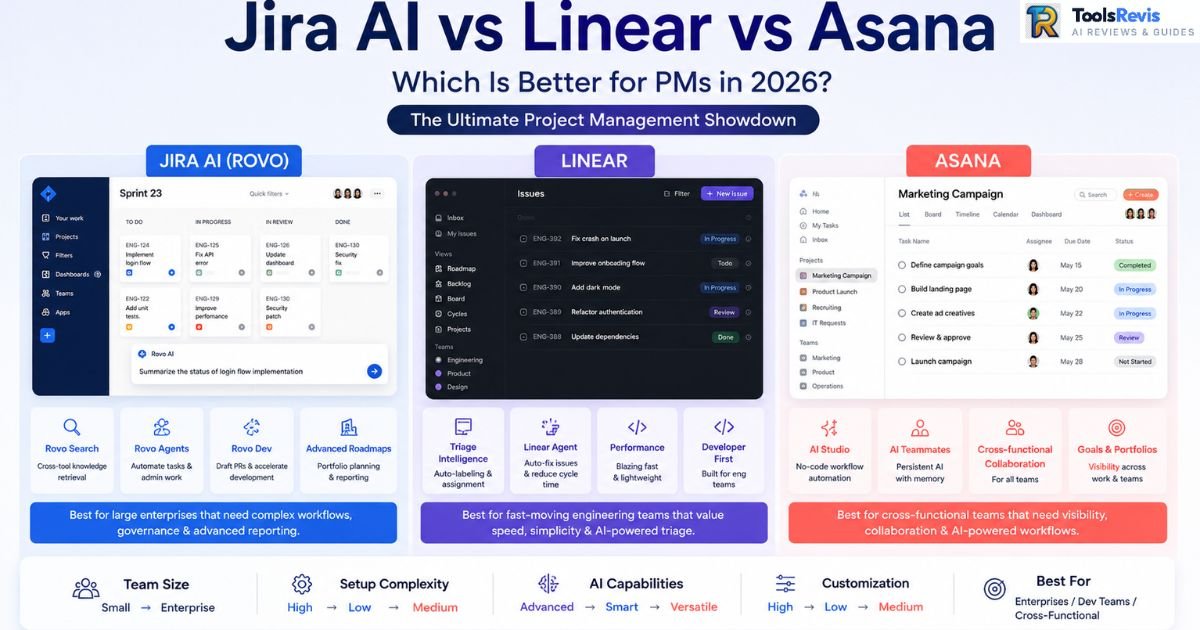
Every PM has lived this cycle: migrate the team to a shiny new tool, spend two quarters fighting configuration debt, then quietly start a spreadsheet on the side because nobody trusts the dashboards anymore. In 2026, the AI layer each platform bolts on makes the decision matter even more — pick wrong and you’re not just fighting a rigid state machine, you’re paying for automation nobody uses.
Answer Box
Comparing Linear vs Jira vs Asana in 2026? Here is how to choose:
Jira AI (Rovo): Best for complex, enterprise-scale Scrum and deep cross-project reporting.
Linear: Best for fast-moving, developer-heavy startups prioritizing keyboard-driven speed over custom fields.
Asana: Best for managing cross-functional projects like marketing and design under one single roof.
Quick Comparison Table: Jira AI vs Linear vs Asana
| Tool | Core Focus | AI Capabilities | Setup Complexity | Best For |
| Jira AI (Rovo) | Enterprise software delivery & issue tracking | Rovo Search, Rovo Agents, Rovo Dev — cross-tool knowledge retrieval and autonomous work items | High — admin-heavy, steep JQL/workflow learning curve | Large engineering orgs already inside the Atlassian ecosystem |
| Linear | Fast, opinionated software project management | Linear Agent, Triage Intelligence — auto-labeling, auto-assignment, first-pass bug fixes | Low — minimal config by design | Startups and product-eng teams that prize cycle velocity over flexibility |
| Asana | Cross-functional team management system | Asana AI Studio — smart summaries, workflow builders, status auto-generation | Medium — flexible but can sprawl without governance | Marketing, ops, and mixed technical/non-technical teams |
Introduction: Why This Comparison Actually Matters in 2026
Jira AI, Linear, and Asana solve different project management challenges, and their biggest difference lies in how they use AI for planning, automation, and collaboration. AI is no longer just an assistant—it now helps triage work, automate tasks, and improve team productivity.
Jira AI (Rovo) focuses on enterprise governance, deep customization, and cross-tool knowledge retrieval. Linear prioritizes speed and AI-powered issue triage for engineering teams, while Asana emphasizes cross-functional collaboration and workflow automation.
There is no universal winner. The right platform depends on your team size, workflow complexity, governance requirements, and AI use cases. This guide compares their AI capabilities, pricing, integrations, migration effort, and real-world trade-offs to help you choose the best fit.
If your team is also evaluating AI software for engineering and product workflows, explore our Best AI Tools for Product Managers and Best AI Tools for Developers guides for a broader comparison.
Who This Comparison Is For
This comparison is designed for:
– Product Managers evaluating AI-powered project management platforms
– Engineering leaders choosing a long-term issue tracking system
– Startup founders comparing implementation costs
– Enterprise IT teams assessing governance, compliance, and AI capabilities
– Cross-functional teams looking for collaboration beyond software development
If you’re comparing Jira AI, Linear, and Asana before migrating your team, this guide focuses on real implementation trade-offs rather than marketing claims.
What Is Jira AI (Rovo)?
Rovo is Atlassian’s AI layer, and as of the Team ’26 rollout it’s stopped being a search box bolted onto Jira and started acting as connective tissue across the entire Atlassian stack. The pitch: instead of an engineer manually digging through Confluence pages, Slack threads, and old Jira comments to find why a decision was made, Rovo indexes all of it through what Atlassian calls the Teamwork Graph, then surfaces a synthesized answer with links back to source.
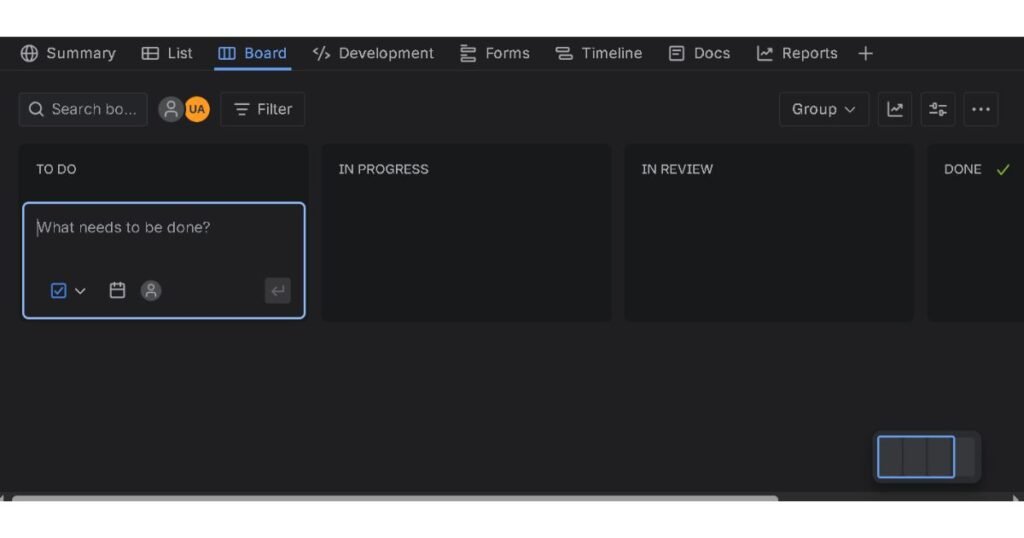
Concretely, Rovo in Jira breaks down into three distinct capabilities that PMs actually interact with:
- Rovo Search — natural-language queries across Jira, Confluence, and 50+ connected apps (Slack, GitHub, Google Drive, Salesforce) that return a summarized answer instead of a list of links teams have to click through one by one.
- Rovo Agents — these reached general availability in 2026 and can be assigned tickets, mentioned in comments, and embedded directly into workflows, with every action logged for audit purposes. Admin-focused skills also let Rovo merge duplicate issues, clean up stale feature flags, and generate status rollups without a human touching the backlog.
- Rovo Dev — turns a work item with clear acceptance criteria into a merge-ready pull request in the background; Atlassian’s own figures claim a meaningful cut in PR cycle time for issues that are Jira-resident with well-defined specs.
That last qualifier — “Jira-resident with well-defined specs” — is doing a lot of work, and it’s the crux of the most common complaint from engineers who’ve actually used it day to day. On developer forums, the consistent pattern is that Rovo Dev performs well when a ticket already has clean acceptance criteria and linked specs, but feels constraining next to standalone coding agents that support custom hooks, sub-agents, and skill chains. In other words: Rovo is excellent glue for teams that already run a disciplined Jira instance, and noticeably less useful for engineers who want to bolt arbitrary automation onto their own workflow.
The other recurring theme — and this predates Rovo entirely — is that Jira Cloud’s baseline performance still frustrates a huge slice of its user base. Search this on any engineering forum and you’ll find nearly identical complaints: boards that take seconds to render once a project accumulates a few thousand tickets, dashboards that time out, and an admin surface so deep that “configuration debt” isn’t a metaphor, it’s a literal line item someone eventually has to clean up.
Atlassian’s own community has published guidance specifically on diagnosing “Jira bloat” — unused custom fields, orphaned workflows, and permission schemes nobody remembers creating — which tells you how common the problem is. Review aggregators back this up at scale: independent analysis of over 15,000 verified Jira reviews found recurring bugs and reliability concerns cited in a majority of negative feedback, with slowdowns at scale as the single most repeated pain point.
None of this means Rovo isn’t useful — the Teamwork Graph approach genuinely solves a real problem (context scattered across five tools), and auto-triage skills save real admin hours. But it inherits Jira’s underlying performance ceiling, and no AI layer fixes a instance that’s accumulated years of unmanaged custom fields.
Jira AI (Rovo): Pros & Cons
Pros:
- Cross-tool context retrieval (Rovo Search) genuinely reduces time spent hunting for “why did we decide this” across Confluence, Slack, and Jira
- Rovo Agents are fully auditable — every action is logged, which matters for regulated industries and enterprise compliance
- Admin skills (merging duplicates, cleaning stale flags, auto-generating status updates) chip away at real configuration debt
- Deepest reporting and JQL query flexibility of the three tools, useful for portfolio-level visibility across dozens of teams
Cons:
- Performance degrades noticeably as ticket volume and custom field count grow — a long-standing complaint independent of the AI layer
- Rovo Dev is optimized for Jira-native workflows with clean specs; less flexible than dedicated coding agents for engineers who want custom automation
- Steep admin learning curve; workflow, permission, and screen scheme configuration still requires a semi-dedicated Jira admin
- AI credits are metered per plan tier, so heavy Rovo Dev usage (especially code review) can burn through included allotments faster than expected
Expert Insight
In enterprise environments, Jira AI delivers the most value when workflows are already standardized. Teams with inconsistent issue structures or poorly maintained projects usually see limited AI benefits until their Jira instance is cleaned up.
What Is Linear?
Linear built its reputation before AI was part of the pitch: a fast, keyboard-driven issue tracker with a deliberately narrow feature set, aimed squarely at product-engineering teams who found Jira’s flexibility to be a liability rather than an asset. The core object model — Teams, Cycles, Projects, Issues — is intentionally rigid. There’s no equivalent of Jira’s custom workflow schemes or arbitrary field builder; you work inside Linear’s state machine, not around it.
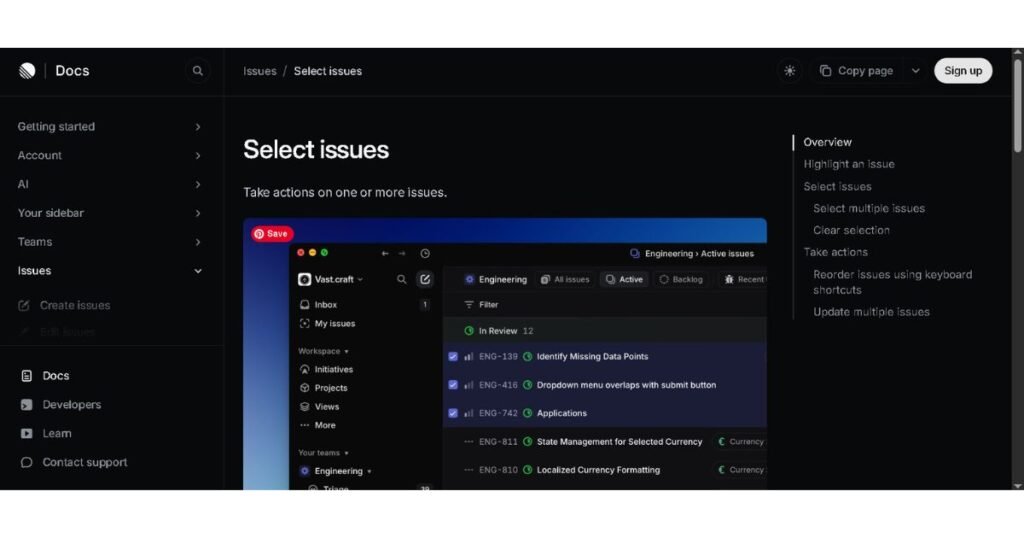
What’s changed for 2026 is the addition of a genuine agentic layer on top of that rigid structure, branded as Linear Agent, working alongside a system called Triage Intelligence:
- Triage Intelligence analyzes incoming issues — bug reports, feature requests, Slack-originated tickets via Linear Asks — and suggests (or auto-applies, depending on configuration) the right team, assignee, project, and labels based on historical patterns. This sits alongside deterministic Triage Rules for conditions that don’t need AI judgment at all.
- Linear Agent goes further: it can be assigned issues directly, mentioned in comments, and — with a GitHub connection and Code Intelligence enabled — actually attempt fixes. Linear’s own engineering team has published detail on using this internally to auto-resolve roughly 30% of incoming bug reports on the first pass, primarily narrow, well-scoped categories like dead feature flags and failing background tasks caught through monitoring integrations.
That 30% figure is a useful anchor because it’s honest about scope: Linear Agent isn’t a general-purpose triage-and-fix machine. It’s strongest on bugs with clear, repeatable signatures where context is already available through an integration (Datadog catching a failing job, a monitor flagging a dead flag). Ask it to one-shot a fix on a poorly-specified, context-thin bug report and it performs the same way any coding agent does in that situation — badly. Linear’s team has been candid about this in their own postmortems, noting they had to narrow the agent’s scope after an unfiltered first attempt at “triage everything” underperformed.
For PMs, the practical upside of Linear’s rigidity plus AI triage is speed: cycle velocity tracking, sprint planning, and roadmap views load instantly and stay legible even as issue volume grows, because there’s no accumulated field/scheme sprawl to slow rendering down. This is the single most consistent praise pattern across developer communities — people who’ve migrated from Jira describe Linear as feeling “instant” by comparison, with the keyboard-first interaction model cited repeatedly as a genuine productivity gain, not just an aesthetic preference.
The tradeoff is exactly what you’d expect from an opinionated tool: teams that need heavy custom fields, multi-stage approval chains, or reporting structures outside Linear’s native model hit a wall fast. This is the most common regret voiced by teams evaluating Linear for cross-functional use — it’s excellent for the engineering org that lives inside it, but painful the moment legal, finance, or a non-technical stakeholder group needs a workflow Linear’s object model wasn’t designed to express. Several PMs on community forums describe ending up with a second tool for anything Linear can’t flex to accommodate, which quietly reintroduces the tool-sprawl problem Linear was supposed to solve.
Linear: Pros & Cons
Pros:
- Genuinely fast — boards, cycles, and search stay responsive even at high issue volume, a stark contrast to Jira’s well-documented slowdowns at scale
- Triage Intelligence meaningfully cuts manual routing work; auto-applied labels and assignees are usually correct out of the box
- Linear Agent’s auto-fix workflow, while narrow in scope, delivers real engineering hours back on repeatable bug categories
- Keyboard-driven UX reduces context-switching friction that PMs and engineers both cite as a top frustration in heavier tools
Cons:
- Rigid state machine and lack of true custom fields make it a poor fit for teams needing complex approval chains or non-engineering workflows
- Linear Agent’s auto-fix success rate drops sharply outside narrow, well-instrumented bug categories — it is not a general-purpose fix-it button
- Reporting and cross-team portfolio views are shallower than Jira’s, which matters once an org scales past a handful of product-eng teams
- Teams with mixed technical/non-technical stakeholders often end up bolting on a second tool for anything outside Linear’s native model
Expert Insight
Linear performs best for engineering-first organizations that value speed over customization. Before adopting it company-wide, verify that departments such as HR, Finance, and Legal won’t require workflow capabilities beyond Linear’s native model.
What Is Asana?
Asana approaches this category from a different starting point than the other two. Where Jira and Linear were both born inside engineering workflows, Asana was built as a general-purpose team management system — the tool marketing, ops, IT, and (sometimes) engineering all land on when the org needs one shared source of truth that doesn’t assume everyone speaks JQL. Its object model — Tasks, Projects, Portfolios, Goals — is deliberately more permissive than Linear’s rigid state machine, which is exactly why it survives in cross-functional environments where Linear would buckle.
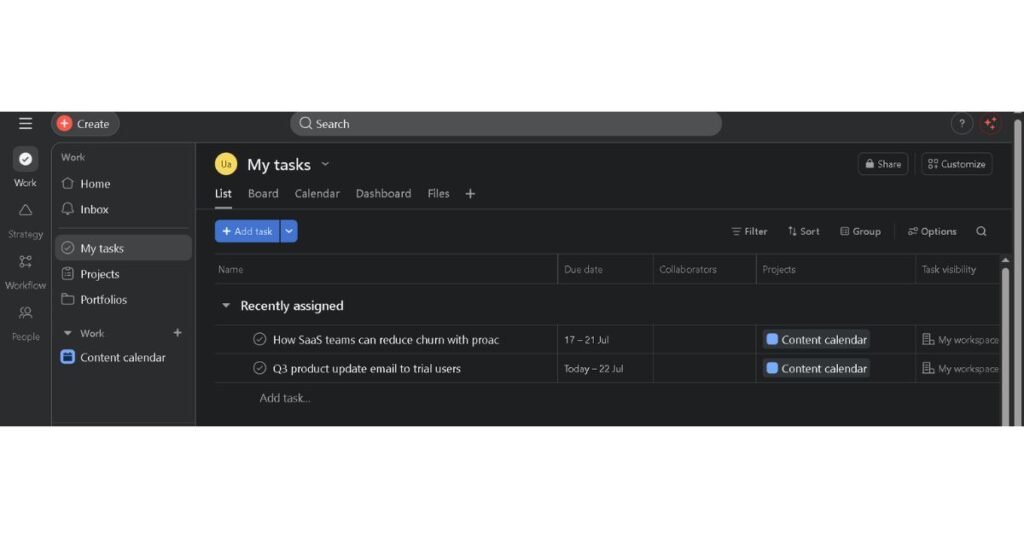
For 2026, Asana’s AI story is split across two distinct products that PMs need to understand separately, because they solve different problems and are priced differently:
- AI Studio is the no-code rule builder. It extends Asana’s existing automation engine with an AI step — think “when a form is submitted, have AI classify the request, extract key fields, and route it to the right project,” without a developer writing a script. Pre-built rules from a template gallery cover common cases (auto-triaging intake requests, summarizing thread activity, generating status updates), and admins can see credit consumption per rule directly in the rule builder.
- AI Teammates are a categorically different thing — persistent agents that hold context across a workspace, can be directly assigned tasks, and operate with memory that compounds over time rather than resetting per-run. Atlassian’s Rovo Agents and Asana’s AI Teammates are conceptually similar (assignable, auditable, embedded in workflow) but Asana’s version leans harder into cross-functional use cases: a Workflow Optimizer that finds and patches process gaps, a Compliance Specialist that checks work against regulatory standards, a Campaign Brief Writer that turns strategy docs into structured marketing briefs. The pitch, explicitly, is to “treat your AI Teammate like a new hire” — give it onboarding instructions and let it accumulate institutional knowledge rather than re-explaining context every session.
The practical distinction matters for procurement: AI Studio rules run on a metered credit system included at a basic tier across paid plans, with Plus and Pro tiers for heavier usage. AI Teammates, by contrast, don’t consume the same credit pool — they’re licensed as an add-on available from the Starter tier upward, priced more like adding a seat than metering usage. Teams evaluating Asana AI need to budget for both lines separately, because a team that’s fine on AI Studio’s included credits can still get an unpleasant surprise from AI Teammates add-on costs once they roll out multiple specialized agents across departments.
Where this plays out in practice, according to teams who’ve piloted AI Teammates, is workflows heavy on interpretation and multi-step reasoning — procurement compliance reviews, SOW drafting, video production coordination — where a deterministic rule can’t capture the judgment calls involved but a fully autonomous agent (like Rovo Dev or Linear Agent) would be over-engineered for what’s fundamentally a cross-functional coordination problem, not a code-shipping one. The tradeoff users report: current AI Teammate implementations work best against clear decision trees, and struggle in genuinely ambiguous situations — the standard advice is to pair them with human review checkpoints rather than let them run fully unsupervised on judgment-heavy work.
The recurring pain point for PMs evaluating Asana isn’t the AI layer itself — it’s the pricing cliff underneath it. Portfolios, Goals, workload management, and advanced reporting — the features that make Asana genuinely useful at a program-management level rather than just a task list — are gated behind the Advanced tier (the plan formerly branded “Business”), which lists at $24.99 per user/month annually, more than double the $10.99 Starter tier. Teams that onboard on Starter because it “has AI features” often discover mid-rollout that the portfolio-level visibility a PM actually needs for cross-team reporting isn’t available until that jump, which can catch budget owners off guard if it wasn’t scoped upfront.
Asana: Pros & Cons
Pros:
- Most flexible object model of the three for genuinely cross-functional teams — marketing, ops, and IT can all work inside it without forcing an engineering-shaped workflow onto non-engineering work
- AI Teammates persist context and memory across sessions, reducing the re-prompting overhead common with stateless AI assistants
- AI Studio’s no-code rule builder puts workflow automation in reach of non-technical team leads, not just admins
- Every AI Teammate action is auditable and reversible, with permission boundaries inherited from existing Asana access controls — a real consideration for IT/Legal sign-off
Cons:
- Meaningful features (Portfolios, Goals, workload management, advanced reporting) are locked behind the $24.99/user/month Advanced tier — a steep jump from the $10.99 Starter tier that catches teams off guard
- Two separate AI cost lines (AI Studio credits vs. AI Teammates add-on) complicate budgeting compared to Jira’s and Linear’s simpler per-seat AI inclusion
- Less rigorous for pure software development — no native sprint velocity tracking or JQL-equivalent query language for engineering-specific reporting
- AI Teammates still require human review checkpoints on ambiguous, judgment-heavy work; not a fire-and-forget solution despite the “new hire” framing
Expert Insight
Many organizations underestimate the cost of scaling Asana. Budget planning should include AI add-ons, reporting features, and portfolio management requirements—not just the base subscription price.
Task AI in Jira AI vs Linear vs Asana — How the Three AI Layers Actually Compare
It’s worth stepping back and comparing the AI layers head-to-head, because “AI-powered” means something different in each product and the differences drive real operational outcomes.
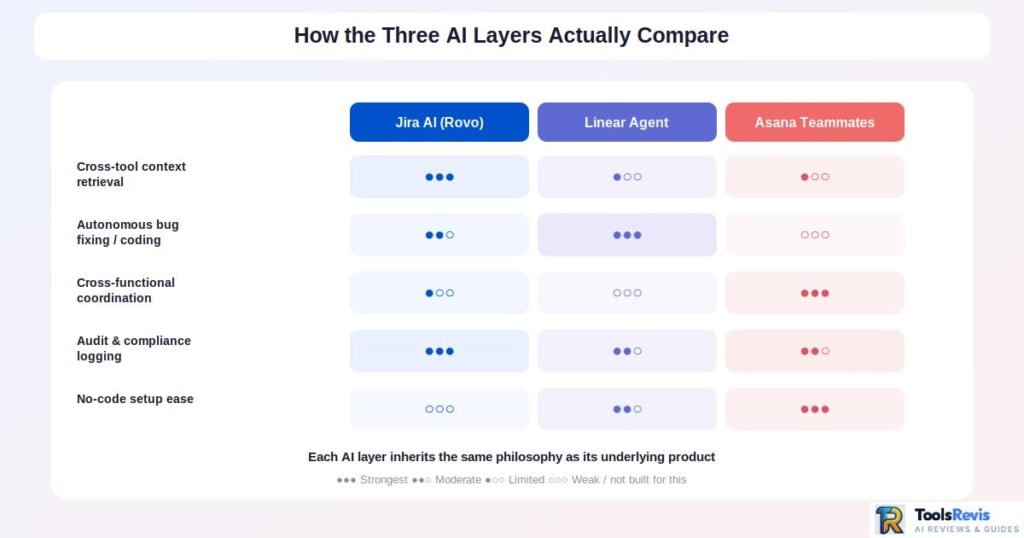
Jira AI (Rovo) is fundamentally a knowledge-graph play. Its strongest capability is cross-app retrieval — pulling context scattered across Jira, Confluence, Slack, GitHub, and 50+ connected tools into a single synthesized answer via the Teamwork Graph. Rovo Agents extend that into action (assigning work, running admin skills, drafting PRs through Rovo Dev), but the underlying value proposition is context assembly at enterprise scale. This is the right tool when the problem is “our knowledge is scattered across five systems and nobody can find why a decision was made.”
Linear Agent is a developer-triage and backlog-hygiene play. Triage Intelligence auto-labels and auto-assigns incoming issues based on historical patterns; Linear Agent goes further and auto-resolves a real (if narrow) slice of bug reports — dead feature flags, failing background jobs — using tight integrations like Datadog to catch problems before a human even opens the ticket. This is the right tool when the problem is “our engineers are drowning in routine triage and low-complexity bug fixes that shouldn’t need a human in the loop.”
Asana AI Teammates are a cross-functional rule-creation and status-reporting play. They’re weakest on pure engineering concerns (no equivalent to Rovo Dev or Linear Agent’s code-fixing capability) and strongest on coordinating judgment-heavy, multi-department work — turning a strategy doc into a structured campaign brief, auto-generating status rollups across a portfolio, flagging compliance gaps in a workflow that spans legal and ops. This is the right tool when the problem is “our biggest time sink is manually translating between how marketing, ops, and leadership each want to see status.”
None of these are direct substitutes for each other. A team trying to use Rovo Dev to coordinate a cross-functional marketing launch, or trying to use an Asana AI Teammate to auto-fix a failing background job, is using the wrong tool for the job — the AI layer inherits the same philosophical split as the underlying product.
Jira AI vs Linear vs Asana — Feature, Pricing & Hidden Cost Comparison
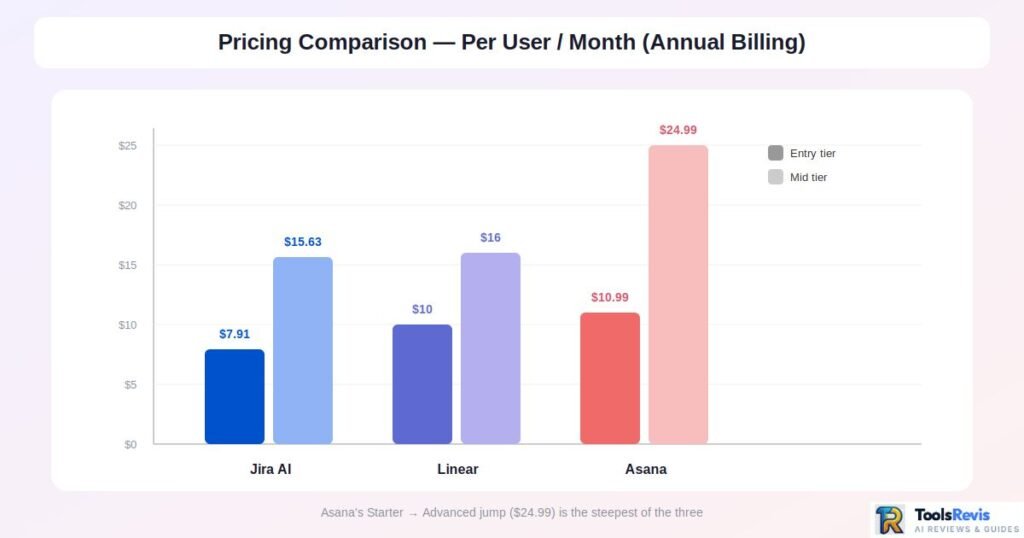
| Category | Jira AI (Rovo) | Linear | Asana |
| Entry price (annual, per user/mo) | Free (≤10 users); Standard ~$7.91 | Free (≤250 issues, 2 teams); Basic $10 | Free (≤2 users); Starter $10.99 |
| Mid-tier price | Premium ~$14.54–$15.63 | Business $16 | Advanced (formerly Business) $24.99 |
| Enterprise pricing | Custom; Data Center from ~$51K–59K/yr | Custom; SAML/SCIM gated here | Custom (Enterprise/Enterprise+) |
| Where AI features live | Included across Cloud plans; heavy Rovo Dev usage consumes metered credit pools that scale with Confluence/Jira tier | Linear Agent & Triage Intelligence included on every paid plan at no extra cost | AI Studio credits included at Basic tier (Plus/Pro cost more); AI Teammates sold as separate add-on from Starter up |
| Portfolio/cross-project reporting | Advanced Roadmaps native from Premium up | Native but limited to Linear’s own hierarchy; no true portfolio rollups across unrelated workflows | Gated behind Advanced tier ($24.99) — Portfolios, Goals, Workload not available on Starter |
| Admin overhead / hidden cost | Frequently requires a semi-dedicated Jira admin for workflow/permission schemes; Confluence often a required add-on ($6+/user/mo) | Minimal — near-zero implementation and onboarding fees on Basic/Business; Enterprise professional services $5K–$15K if needed | Moderate — no-code AI Studio reduces admin need, but the Starter→Advanced jump is the single most common budget surprise |
| Integration depth | Deepest — 50+ apps through Rovo connectors (Slack, GitHub, Salesforce, Google Drive), plus the entire Atlassian Marketplace | Narrower but tight — GitHub/GitLab, Slack, Datadog, Zendesk/Intercom (Business tier only) | Broad cross-functional integrations (Slack, Google Drive, SharePoint, Gemini, Claude), better suited to non-dev tool stacks than deep code tooling |
| SSO / SCIM / compliance | Available from Premium/Enterprise | Enterprise-only | Enterprise/Enterprise+ only |
| Realistic total cost of ownership | Typically 2–3× base license once Marketplace apps, Confluence, and admin overhead are included | Closest to sticker price of the three; few hidden line items | Sticker price plus AI Teammates add-on and likely Advanced-tier upgrade for any team needing portfolios |
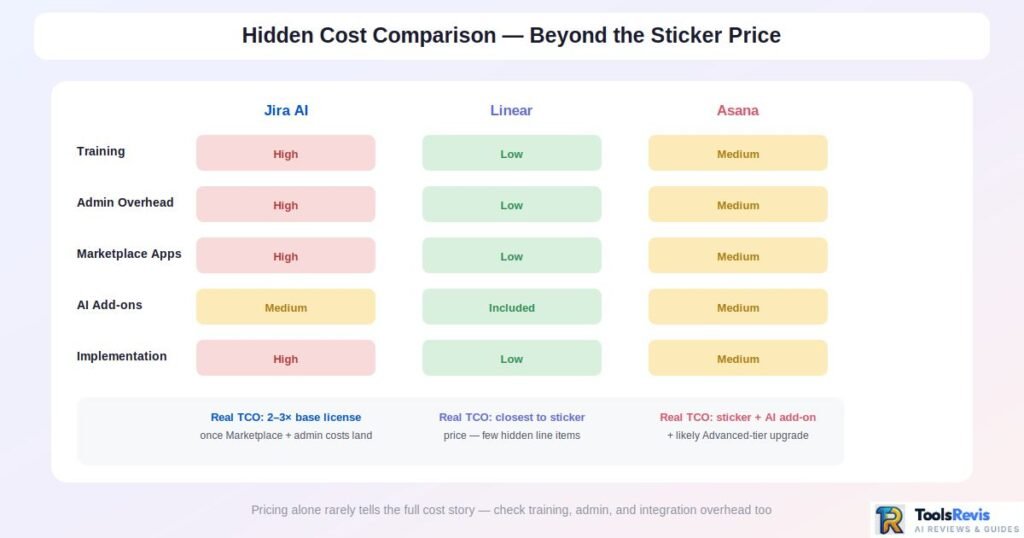
Hidden Cost Table
| Cost Category | Jira | Linear | Asana |
| Training | High | Low | Medium |
| Admin | High | Low | Medium |
| Marketplace Apps | High | Low | Medium |
| AI Add-ons | Medium | Included | Medium |
| Implementation | High | Low | Medium |
Which Tool Should You Actually Choose? (Decision Framework)
There’s no universally “best” tool here — only a best fit for your team’s shape, workflow discipline, and tolerance for configuration overhead. Use this as a scannable gut-check:
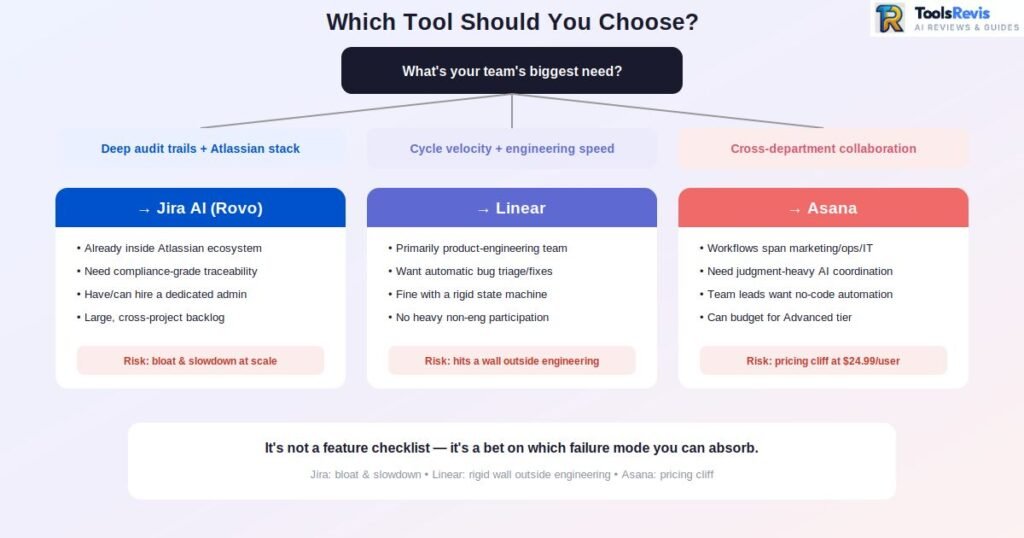
Choose Jira AI (Rovo) if:
- You’re already inside the Atlassian ecosystem (Confluence, Bitbucket, Jira Service Management) and want AI that unifies context across all of it
- Your org needs deep audit trails, granular permissions, and compliance-grade traceability for every AI action
- You have (or can justify hiring) a semi-dedicated Jira admin to manage configuration debt before it compounds
- Your engineering backlog is large and cross-project enough that JQL-level query flexibility and Advanced Roadmaps genuinely earn their complexity
Choose Linear if:
- Your team is primarily product engineering and values cycle velocity and interface speed over configurability
- You want AI triage that resolves a real slice of routine bugs automatically, not just suggests labels
- You’re comfortable working inside a rigid, opinionated state machine rather than customizing your own workflow
- You don’t need heavy cross-functional participation from non-engineering stakeholders inside the same tool
Choose Asana if:
- Your workflows span multiple non-technical departments (marketing, ops, IT, legal) that need one shared team management system
- You want AI that handles judgment-heavy coordination — status rollups, compliance checks, campaign briefs — rather than code-level automation
- You’re prepared to budget for the Starter-to-Advanced jump the moment you need portfolios, goals, or workload management
- No-code workflow building matters more to your team leads than deep engineering-specific reporting
Still Not Sure Which Tool Fits Your Team?
Comparing features is helpful, but every team has different workflows, budgets, and AI requirements. Instead of guessing, use our free AI Tool Finder to get personalized recommendations based on your team size, industry, and project management needs.
Then continue reading our detailed reviews of Jira AI, Linear, and Asana below.
Conclusion: Jira AI vs Linear vs Asana in 2026
The honest takeaway for 2026 is that these three tools have diverged rather than converged, even as each has layered on an AI assistant. Jira AI (Rovo) is betting that enterprise teams will keep tolerating configuration overhead in exchange for the deepest cross-tool context retrieval and audit trail on the market. Linear is betting that speed and a narrow, opinionated feature set — now paired with agentic triage that quietly resolves a meaningful share of routine bugs — beats configurability for product-engineering teams. Asana is betting that the real bottleneck in most organizations isn’t code velocity at all, but the translation tax between departments that don’t share a workflow vocabulary, and that persistent AI Teammates can absorb some of that tax.
Picking between them isn’t really a feature-checklist exercise — it’s a bet on which failure mode you’d rather manage. Jira’s failure mode is bloat and slowdown at scale. Linear’s is hitting a wall the moment your workflow needs something its state machine wasn’t built to express. Asana’s is a pricing cliff that catches teams who under-scoped what “portfolio visibility” would actually cost. Know which of those three you’re more equipped to absorb, and the decision gets a lot easier.
Still deciding? If you’re evaluating your broader AI stack—not just project management software—our guides on Best AI Tools for Product Managers and Best AI Tools for Developers can help you compare the leading AI solutions for planning, collaboration, coding, and productivity before making a long-term investment.
Read Next
Want to explore more AI tools before choosing your workflow stack? These guides can help:
- Best AI Tools for Product Managers – Compare the most useful AI platforms for planning, roadmaps, sprint management, and product strategy.
- Best AI Tools for Developers – Discover coding assistants, debugging tools, and AI platforms that improve software delivery.
- Enterprise Knowledge Management Systems – Learn how enterprise teams centralize documentation, search, and organizational knowledge at scale.
- Claude Sonnet 5 vs GPT-5 – Compare two leading AI models to understand which performs better for coding, writing, and business workflows.
Common Buying Mistakes
Many teams evaluate only pricing and AI features.
In practice, implementation effort, training requirements, governance, reporting, and long-term maintenance often have a much greater impact on ROI than subscription costs alone.
Before selecting a platform, assess:
– Team size
– Workflow complexity
– Required integrations
– Compliance needs
– Internal technical expertise
FAQs
1. Is “GetLiner AI” the same as Linear, the project management tool?
No. GetLiner (aka Liner) is an AI research/search assistant with no relation to Linear, the issue tracker covered here — different products, similar-sounding name.
2. Do I need a dedicated admin to run Jira AI effectively?
Not at small scale, but yes once you pass a handful of projects — unmanaged custom fields and permission schemes are Jira’s biggest recurring complaint.
3. Can Linear handle non-engineering workflows like marketing or HR?
Not well. Its rigid Team/Cycle/Issue model lacks the custom fields and approval chains those teams usually need, so most end up on a second tool.
4. Is Asana’s free plan usable for a real team, or is it a toy tier?
Only for 1-2 people doing basic task tracking. Anything needing portfolios or automations means budgeting for Starter or Advanced.
5. Which of the three has the most mature AI feature set right now?
Depends on use case: Rovo wins on breadth, Linear Agent on measurable outcomes (real bugs auto-fixed), Asana AI Teammates on cross-functional coordination but still needs human review.
6. Can I migrate from Jira to Linear?
Yes. Linear provides a built-in Jira importer that transfers issues, projects, labels, comments, and users. However, highly customized Jira workflows, automation rules, and complex permission schemes usually require manual adjustments after migration.
7. How long does it take to migrate from Jira to Linear?
For small teams, migration often takes a few hours. Mid-sized organizations typically need several days to validate workflows, permissions, and integrations, while large enterprises may spend several weeks planning and testing before switching completely.
8. Does Linear support importing Jira projects?
Yes. Linear includes an official Jira import tool that helps migrate issues, comments, attachments, labels, and project history. Teams should still verify custom fields and automation after the import is complete.
9. Which project management platform has the best API?
Jira offers the most comprehensive API ecosystem and Marketplace integrations for enterprise organizations. Linear provides a modern, developer-friendly GraphQL API, while Asana focuses on automation and cross-functional workflow integrations.
10. Can AI replace Scrum Masters or Project Managers?
No. AI can automate repetitive tasks such as ticket triage, status reporting, backlog organization, and documentation, but human project managers remain essential for stakeholder communication, prioritization, leadership, and strategic decision-making.
Ready to Take Action? Try Our Free AI & Business Utilities
If you want to scale your workflow and automate your digital growth, check out our suite of free advanced tools. No sign-ups, no credit cards required:
1. Calculate Your Cloud Storage Costs
Managing cloud expenses can be challenging, especially when storage usage, requests, and data transfers continue to grow. Our Amazon S3 Cost Calculator helps you estimate your expected AWS S3 monthly and yearly costs based on storage size, S3 storage class, region, requests, and data transfer requirements.
2. Find the Right AI Tool
Not sure which AI solution fits your needs? Simply describe your goal, and our AI-powered recommendation tool will identify the most suitable option for your specific task in just a few seconds. It’s completely free and requires no sign-up.
3. Analyze Your AI Search Visibility
Want to know how AI search platforms may present your brand? Use our AI Overview Preview tool to see how your content could appear in Google’s AI-generated summaries. This gives you a clear starting point before investing in advanced GEO solutions.
4. Estimate Your Claude API Bills
Claude Sonnet 5’s new tokenizer inflation and variable effort tiers make manual API budgeting extremely difficult. Our Claude API Pricing Calculator helps you instantly compare costs between Sonnet 5 (Intro & Standard rates), Sonnet 4.6, and Opus 4.8 based on your custom token or word volume.

I’m Umair Ahmad, founder of ToolsRevis. I personally test every AI tool we cover — signing up, running real workflows, checking pricing tiers, and comparing outputs — before writing a single word. My goal: cut through AI marketing hype with honest, hands-on verdicts.
Let’s achieve more together!