
If you’re a CIO, CKO, or IT Director reading this, you already know the problem in your gut before you see it in a report. Your engineers re-solve tickets that were already solved eighteen months ago. Your new hires spend their first ninety days reverse-engineering tribal knowledge that lives in someone’s head, not in a system. Your sales team rebuilds the same competitive battlecard from scratch every quarter because nobody can find the last one.
This isn’t a training problem or a discipline problem. It’s an infrastructure problem, and it compounds every time you add headcount, acquire a company, or launch a new product line.
Google Featured Snippet / Quick Answer Box
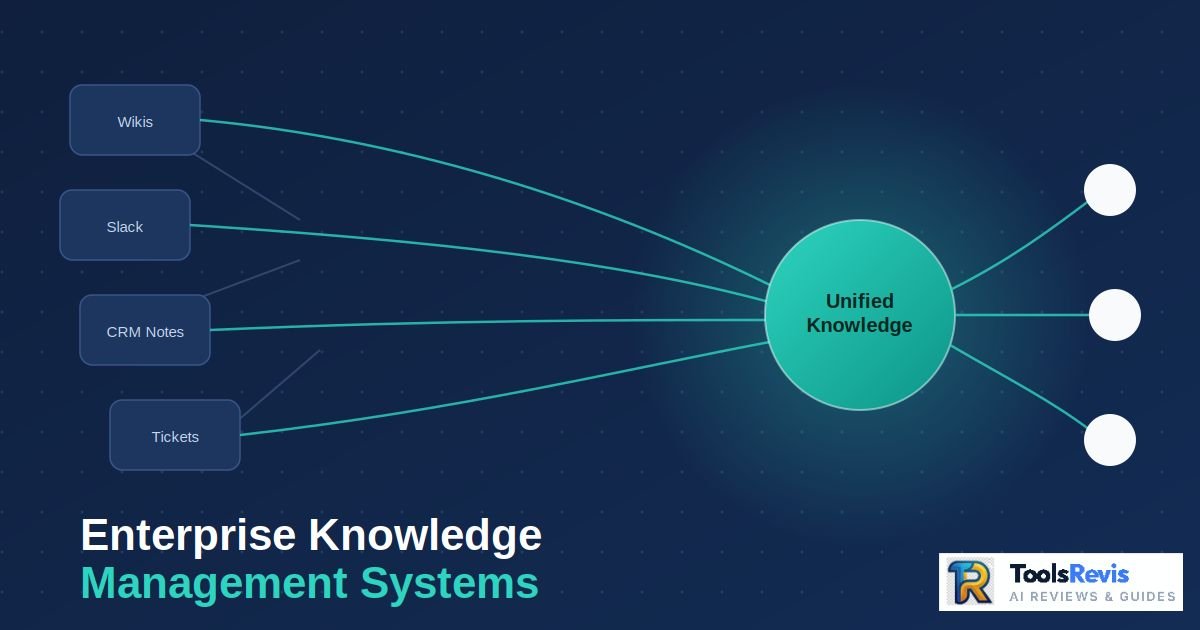
What is an Enterprise Knowledge Management System (EKMS)? An Enterprise Knowledge Management System (EKMS) is a centralized digital platform that captures, organizes, stores, and activates an organization’s collective knowledge assets. Unlike traditional point solutions, a modern EKMS acts as an intelligent, secure coordination layer that integrates unstructured data (SharePoint, Slack, Wikis) into a single source of truth, leveraging AI-powered semantic search to deliver role-based, real-time insights to employees across the entire organization.
The Cost of Chaos: How Data Silos Impact Corporate Performance
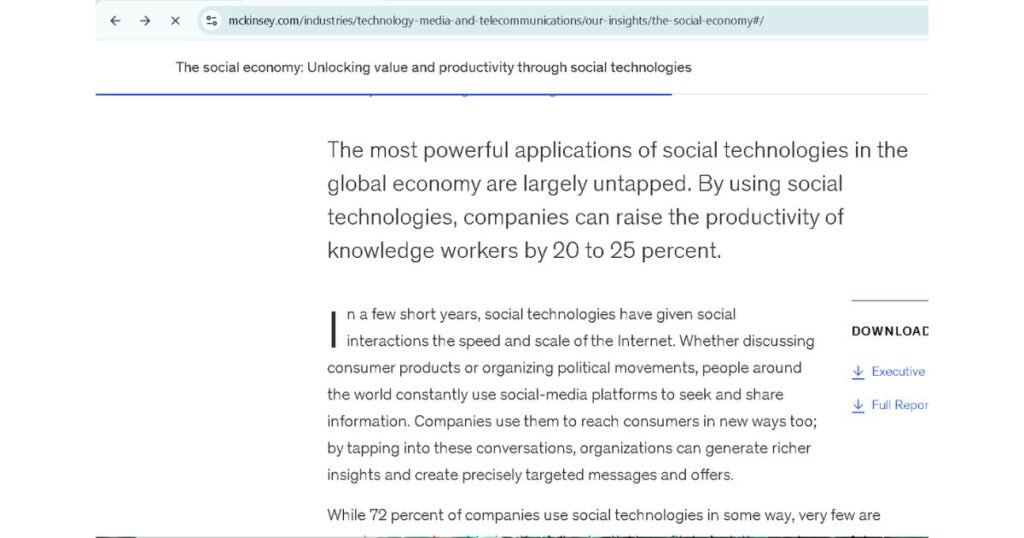
A data silo is any pool of enterprise information that exists but stays undiscoverable, unindexed, or disconnected from the workflow where a decision actually needs it. The cost is measurable: McKinsey Global Institute research found that employees spend roughly 1.8 hours every day — about 9.3 hours per week — searching for and gathering information. Let’s start with the number that should be on every CIO’s dashboard: McKinsey Global Institute research found that employees spend roughly 1.8 hours every day — about 9.3 hours per week — searching for and gathering information.
Frame that in headcount terms, because that’s how the board will hear it:
If you employ five people, the productivity output you’re actually getting is closer to four — the fifth is functionally spent searching for answers rather than producing value.
Now multiply that by your actual org chart. A 2,000-person knowledge-worker organization, at a blended fully-loaded cost of $90,000/year, is burning approximately $41.8 million annually in pure search friction. This happens before you factor in:
- The cost of decisions made on stale or incomplete information.
- The compliance exposure of undocumented processes.
- The onboarding drag of every new hire relearning what a departed employee already knew.
The Real Cost of Data Silos in Everyday Business Operations. It’s not an abstract architecture complaint — it has real bottom-line impact:
| Silo Type | Where It Lives | Real-World Business Impact |
| Departmental Silos | Legal’s SharePoint, Sales’ Salesforce notes, Engineering’s Confluence | Contract terms renegotiated because Legal’s precedent wasn’t visible to Procurement. |
| Tool Silos | Slack threads, email chains, unindexed PDFs on desktops | Institutional decisions (“why did we choose Vendor X over Vendor Y”) vanish when the Slack channel gets archived. |
| Geographic/M&A Silos | Acquired subsidiary’s legacy wiki, regional file servers | Post-merger integration stalls for 6–18 months because nobody can map “what exists where.” |
| Tacit Silos | The senior engineer’s head, the account manager’s inbox | A single resignation erases years of undocumented troubleshooting logic overnight. |
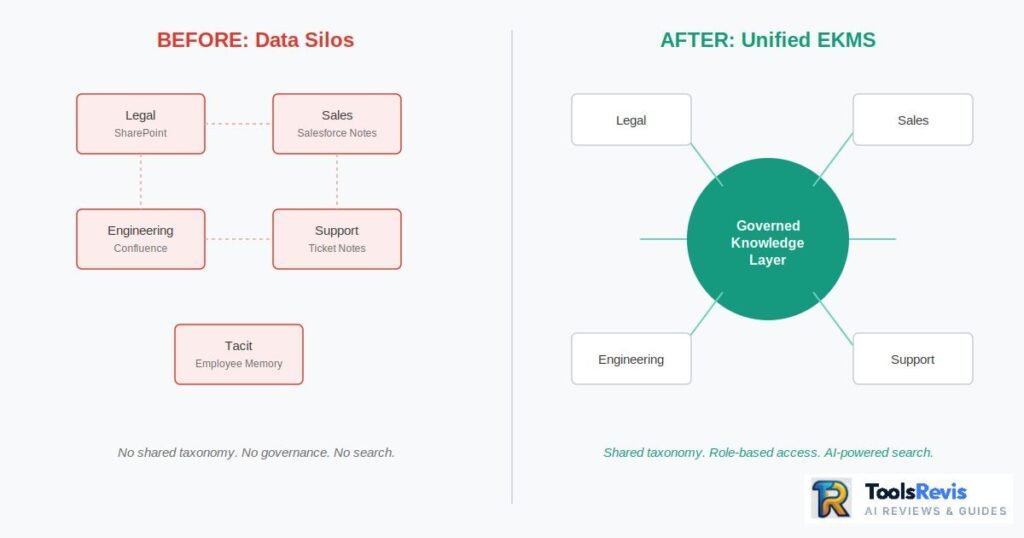
A data silo isn’t a storage problem. It’s a retrieval and context problem — the information technically exists somewhere in the enterprise, but it isn’t discoverable, isn’t trusted, and isn’t connected to the workflow where a decision actually needs to be made. That distinction is the entire reason EKMS exists as a category separate from file storage.
Understanding Enterprise-Wide Knowledge Management Systems
An Enterprise Knowledge Management System (EKMS) is a centralized, governed technology infrastructure that captures, structures, indexes, and delivers an organization’s collective knowledge — explicit documentation, tacit employee expertise, and operational process data — to the right person, in the right workflow, at the point of decision.
Unlike departmental tools built for a single team’s file storage, an EKMS operates as an enterprise-wide semantic layer: it connects disparate repositories (wikis, CRMs, ticketing systems, cloud drives, chat platforms) through a unified taxonomy, applies access governance and version control at scale, and increasingly uses AI-driven retrieval (vector search, natural language query, automated tagging) to surface knowledge contextually rather than requiring employees to know exactly where to look and what to call it.
The core functional pillars of any legitimate EKMS are:
- Capture: Ingesting knowledge from documents, conversations, tickets, and workflows, including undocumented tacit expertise.
- Structure: Applying metadata, taxonomy, and ontology so knowledge is classified consistently across departments.
- Governance: Version control, access permissions, content lifecycle (review/retire/archive), and audit trails.
- Retrieval: Search, AI-assisted Q&A, and recommendation engines that surface the right knowledge inside the tool where work happens.
- Feedback loop: Usage analytics and content ratings that flag outdated or low-trust knowledge for revision.
The Golden Rule: If a platform only does storage and folder hierarchies, it is not an EKMS — it’s a file repository wearing an enterprise label.
Beyond Team Folders: Defining the Modern Knowledge Management Platform Definition
Here’s where most organizations get the category wrong, and it costs them years of stalled ROI: a shared drive is not knowledge management. A disorganized Google Drive or Dropbox instance is a container. It holds files. It does not understand what those files mean, how they relate to one another, which version is authoritative, or who should be shown what based on role, project, or need-to-know.
| Capability | Basic Cloud Storage (Drive/Dropbox) | Enterprise-Grade EKMS |
| Organization | Folder hierarchy, manual naming conventions | Metadata-driven taxonomy + semantic tagging |
| Search | Keyword/filename matching | Natural language, vector-based semantic search across content meaning |
| Version Control | Manual, prone to duplicate “final_v3_FINAL” files | Automated versioning with full audit trail |
| Access Governance | Folder-level sharing permissions | Role-based, attribute-based access control tied to identity provider |
| Context Delivery | Passive — user must know where to look | Active — knowledge surfaces inside CRM, ITSM, or chat tool at point of need |
| Knowledge Type Captured | Explicit documents only | Explicit + tacit + operational (workflows, decisions, process logic) |
| Lifecycle Management | None — content never expires or gets flagged | Review cycles, staleness detection, deprecation workflows |
| Scalability Ceiling | Breaks down past a few hundred users/departments | Built for tens of thousands of users across business units |
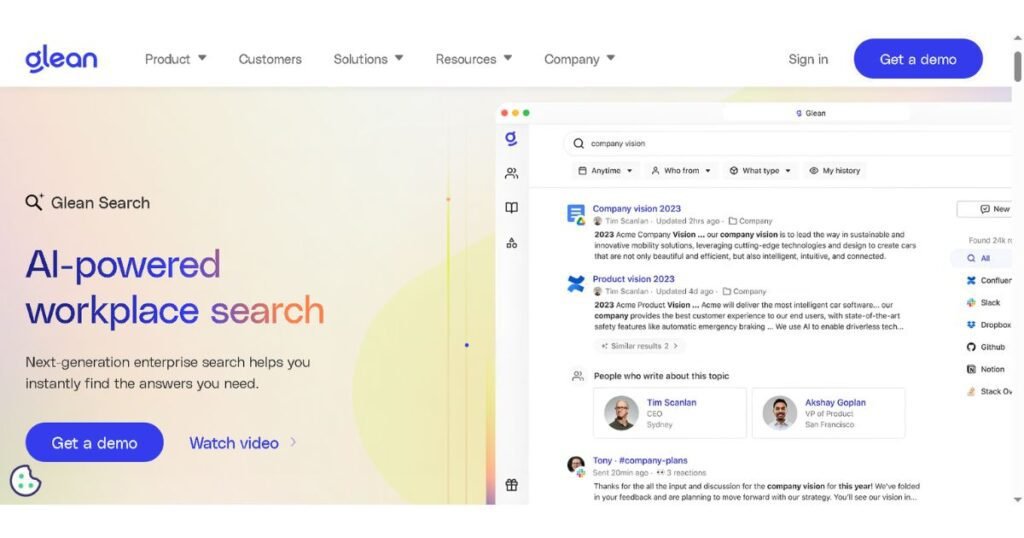
Analytical Callout: The tell-tale sign your organization is still running “storage” instead of “knowledge management” is this — if finding the right document depends on knowing who created it or what they probably named it, you don’t have a knowledge system. You have a filing cabinet with better internet access. True EKMS platforms decouple retrieval from institutional memory of file-naming habits.
The modern knowledge management platform definition, then, isn’t about where files sit — it’s about whether the system actively reduces the cognitive and time burden of finding trustworthy, current information, regardless of which department produced it or which tool it originated in.
Understanding the Types of Knowledge & Systems
Every knowledge management rollout must classify three distinct knowledge types — explicit, tacit, and operational — before it can capture any of them effectively. Most failed EKMS projects fail here first, building a system that only stores explicit documents while ignoring the two types that actually drive daily operations.
Mapping Corporate Intel: Types of Knowledge in Knowledge Management
Before you can architect a system, you need to correctly classify what you’re actually trying to manage. Most failed EKMS rollouts fail here first — they build a system designed only to store documents (explicit knowledge) while ignoring the two knowledge types that actually drive operational performance: tacit and operational knowledge.
Explicit vs. Tacit vs. Operational Knowledge: Capturing Human Insights
- Explicit knowledge is anything that’s already written down, structured, and codified — policy manuals, SOPs, technical documentation, contracts, training decks. This is the easy 20% of the knowledge management problem.
- Tacit knowledge is the knowledge a person holds that has never been written down because it lives in judgment, pattern recognition, and experience — the senior support engineer who knows within thirty seconds that a particular error code usually means a firmware mismatch, not what the ticketing system suggests. This is at the center of the engineering community’s biggest pain point: how do you extract tacit knowledge from a senior engineer or top-performing agent before they resign or retire?
There is no shortcut — tacit knowledge cannot be “backed up” the way a file can. But it can be systematically surfaced through:
- Structured exit and pre-exit interviews conducted specifically to extract decision logic, not just task lists.
- Shadowing and screen-recording during real troubleshooting sessions, then having the EKMS auto-transcribe and tag the recording against the relevant knowledge base article.
- Decision-log capture at the point of action — prompting engineers to log the “why” behind non-standard fixes directly inside the ticketing tool, which then feeds the EKMS automatically.
- Communities of practice where senior staff answer recurring questions in a monitored channel that the EKMS indexes and converts into searchable knowledge articles over time.
- Operational knowledge sits between the two — it’s the knowledge of how the business actually runs day-to-day: the real escalation path (not the org chart’s official one), the informal workaround for a legacy system’s known bug, the sequence of approvals that actually gets a purchase order through versus the documented process. Operational knowledge is process-embedded and often only visible when something breaks. Capturing it requires process-mining tools and workflow analytics layered into the EKMS, not just a document repository.
Classifying Knowledge Management Systems: Different Types of Knowledge Management Systems
Knowledge management systems generally split into two architectural philosophies, and most enterprises need elements of both:
1. Repository-Centric Systems (Codification Strategy)
These treat knowledge as an object to be stored, categorized, and retrieved — wikis, document management systems, structured knowledge bases. They excel at explicit knowledge and are the backbone of compliance-heavy industries (healthcare, finance, legal) where an auditable, version-controlled record is non-negotiable.
2. Communication-Centric Systems (Personalization Strategy)
These treat knowledge as something that flows through people and conversation — expert-locator tools, enterprise social platforms, Q&A communities, and AI copilots that route a question to the right human or synthesize an answer from recent conversations. These are built for tacit and operational knowledge.
| System Type | Best For | Weakness |
| Repository-Centric (wikis, DMS) | Compliance, SOPs, onboarding materials | Goes stale fast; doesn’t capture judgment or context. |
| Communication-Centric (forums, AI Q&A) | Fast-moving technical/operational answers, tacit knowledge | Harder to audit; knowledge quality depends on participation. |
| Hybrid/Semantic EKMS | Enterprise-wide, cross-departmental scale | Higher implementation complexity and cost. |
Most mature enterprises are converging on the third category — a hybrid semantic layer that indexes repository content and captures conversational/expert-routing signals, then presents both through a single AI-assisted search interface.
The Line in the Sand: Information Management and Knowledge Management
This distinction gets blurred constantly in vendor marketing, so it’s worth drawing precisely:
- Information management is about the lifecycle of records and data — where a file lives, how long it’s retained, who can access it, and whether it complies with regulatory requirements. It answers: “Where is this document, and is it secure and compliant?”
- Knowledge management is about human context and executable insight — not just where the contract sits, but what precedent it sets, why a particular clause was negotiated that way, and what an employee should do differently next time based on that history.It helps answer two critical questions: Where is this document stored, and does it meet security and compliance requirements?
A records management system can tell you a file exists. A knowledge management system tells you what that file means for the decision in front of you. Enterprises that only invest in information management infrastructure often mistake that for knowledge management maturity — and then wonder why employees still can’t find answers despite having “everything documented.”
How to Build an Enterprise Knowledge Management Strategy
Building an EKMS strategy starts with a current-state infrastructure assessment and knowledge gap audit — not tool selection. Picking a platform before mapping what already exists is the single most common failure point in enterprise KM rollouts.
The First Step to Building an Effective Knowledge Management System
…a current-state infrastructure assessment and knowledge gap audit — not tool selection.
This is the single most common failure point in enterprise KM rollouts: leadership picks a platform first and tries to retrofit strategy around it. The correct sequence starts with mapping what already exists:
- Inventory every existing repository: Wikis, shared drives, CRM notes fields, ticketing system resolution notes, Slack/Teams channels used as de facto documentation.
- Data mapping: Trace how information actually flows between departments today, including the informal, undocumented handoffs (the email forward, the Slack DM, the “just ask Dave”).
- Gap audit: Identify where knowledge is missing entirely versus where it exists but is undiscoverable, duplicated, or contradictory across systems.
- Usage and search-log analysis: Pull query logs from existing search tools to see what employees are actually looking for and failing to find; this is often the most underused diagnostic step available.
- Stakeholder interviews across functions: Legal, Support, Engineering, and Sales all define “critical knowledge” differently; the audit needs input from each, not just IT.
Only after this audit exists should tool evaluation begin — because now you’re procuring against a documented gap, not a vendor’s demo script.
Blueprinting Success: Core Components of Knowledge Management Strategy
Every durable knowledge management strategy is built from the same structural elements, regardless of industry:
- Taxonomy and Ontology: A shared classification language across departments, so “customer onboarding” means the same thing in Sales and in Support.
- Governance Model: Clear ownership of who authors, approves, and retires content, with defined review cadences per content type.
- Technology Architecture: The integration layer connecting existing tools (CRM, ITSM, cloud storage, chat) into a unified retrieval experience, rather than forcing a rip-and-replace.
- Capture Mechanisms: Workflows that make documentation a byproduct of work (ticket resolution notes, meeting transcription, decision logs) rather than a separate task.
- Metrics and Success Criteria: Measurable targets like reduction in average time-to-resolution, decrease in duplicate ticket creation, onboarding time reduction, or search success rate.
- Change Management and Culture Plan: The human adoption layer, without which every other component is theoretical.
- Security and Compliance Layer: Access control, data residency, and audit logging mapped to regulatory obligations (SOC 2, HIPAA, GDPR).
Importance of Knowledge Management Strategy: Why Implementations Fail Without Direction
Organizations that skip strategy and go straight to platform deployment tend to fail in one of three predictable ways:
- The Empty Library Problem: The platform launches with a clean interface and zero meaningful content because no one defined capture workflows. Employees check it once, find nothing useful, and never return.
- The Duplicate Truth Problem: Without governance and taxonomy defined upfront, three departments upload three conflicting versions of “the same” process document, and trust in the entire system collapses the first time someone acts on the wrong one.
- The Ghost Town Problem: The system launches well but has no review cadence. Within twelve months, half the content is outdated, search results return stale answers, and employees quietly revert to asking colleagues directly.
A defined strategy is what prevents these failure modes because it forces decisions about ownership, content lifecycle, and success metrics before launch — when it’s cheap to fix — rather than after adoption has already stalled.
Driving Adoption: Fostering a Proactive Knowledge Management Culture
The most consistent complaint from employees about knowledge management initiatives is some version of: “documentation feels like extra homework on top of my actual job.” This is a legitimate structural complaint, not a discipline failure — and it means the fix is architectural, not motivational.
1. Make Capture Passive, Not Additive
- Auto-generate draft knowledge articles from ticket resolutions, meeting transcripts, and Slack thread resolutions using AI summarization. Employees should review and approve rather than write from scratch.
- Embed documentation prompts directly inside the tool where work already happens (the ticketing system, the CRM) instead of requiring a separate trip to a wiki.
- Reward the last step (a two-minute review/approve) rather than the first step (writing an article from a blank page) — the effort delta between those two asks is the entire adoption gap.
2. Reinforce Contribution, Not Just Consumption
- Tie knowledge contribution visibly to performance reviews and recognition programs — not as a vague “team player” note, but as a tracked metric alongside other KPIs.
- Publicly surface which articles get reused and cited most, giving contributors visible credit the same way code contribution is credited in engineering teams.
- Have leadership model the behavior — a CIO or CKO who visibly references and updates the knowledge base in meetings signals it’s infrastructure, not busywork.
3. Remove the Trust Tax
- Every piece of content should show a last-reviewed date and an owner, so employees aren’t gambling on whether an article is still accurate.
- Flag and route stale content for review automatically based on usage analytics and age, rather than relying on someone remembering to check.
Adoption failure is rarely about employees not understanding why knowledge management matters. It’s about the system asking for effort disproportionate to the perceived personal benefit. Fix that ratio — make contribution nearly free and consumption obviously valuable — and the “extra homework” objection disappears.
The Lifecycle In Motion: Core Knowledge Management Processes
Every enterprise knowledge management process, regardless of vendor or industry, reduces to four operational pillars. Skip or under-resource any one of them and the system degrades in a predictable, diagnosable way.
The mistake most architecture teams make is treating these as a linear pipeline. In a mature EKMS, they operate as a closed loop: retrieval analytics (what users search for and fail to find) feed back into creation priorities, and curation flags feed back into storage lifecycle rules (archive, retire, escalate for rewrite).
The Publishing Fallacy: If your architecture diagram shows a straight line from creation to retrieval with no feedback path, you’ve built a publishing system, not a knowledge management system.
| Pillar | What It Does | What Happens If You Skip It |
| Creation | Knowledge is authored, captured, or auto-generated from source workflows (tickets, transcripts, code commits). | Empty library — nothing worth searching for. |
| Curation | Content is reviewed, tagged, deduplicated, and approved against a governance standard. | Duplicate/conflicting truth — trust collapses. |
| Storage | Content is indexed, versioned, and access-controlled in the knowledge layer. | Retrieval failures, compliance exposure, orphaned content. |
| Retrieval | Content surfaces to the right user, in the right tool, at the point of need. | Low adoption — users route around the system. |
From Draft to Verified Corporate Asset: Designing the Knowledge Management Workflow
The single highest-leverage design decision in an EKMS is the verification cycle — the state machine that governs how a piece of content moves from raw draft to trusted, citable corporate asset. Without an explicit state machine, content either never gets published (bottlenecked in review) or gets published without review (trust collapses the first time it’s wrong).
A production-grade workflow needs defined states, defined reviewers per state, and — critically for 2026-era stacks — automated triggers that move content between states without requiring a human to remember to do it.
| Content State | Description | Responsible Reviewer | Automated Trigger |
| Draft | Raw capture — auto-generated from ticket resolution, transcript, or manual entry | Author / Subject Matter Expert (SME) | Created on ticket close, meeting end, or manual save |
| In Review | Submitted for accuracy and taxonomy compliance check | Content Curator | Auto-routed after author marks “ready for review” |
| Verified / Published | Approved, tagged, indexed into the retrieval layer | Subject Matter Expert or Domain Owner (sign-off) | Auto-published to search index on approval; version snapshot logged |
| Flagged for Update | Usage analytics or a newer conflicting document suggest staleness | Content Curator + original SME | Auto-flagged when a newer verified doc contradicts it, or after $N$ months without review |
| Deprecated / Archived | Superseded or no longer accurate; retained for audit trail, removed from active retrieval | Domain Owner | Auto-archived on replacement publication or expiration date |
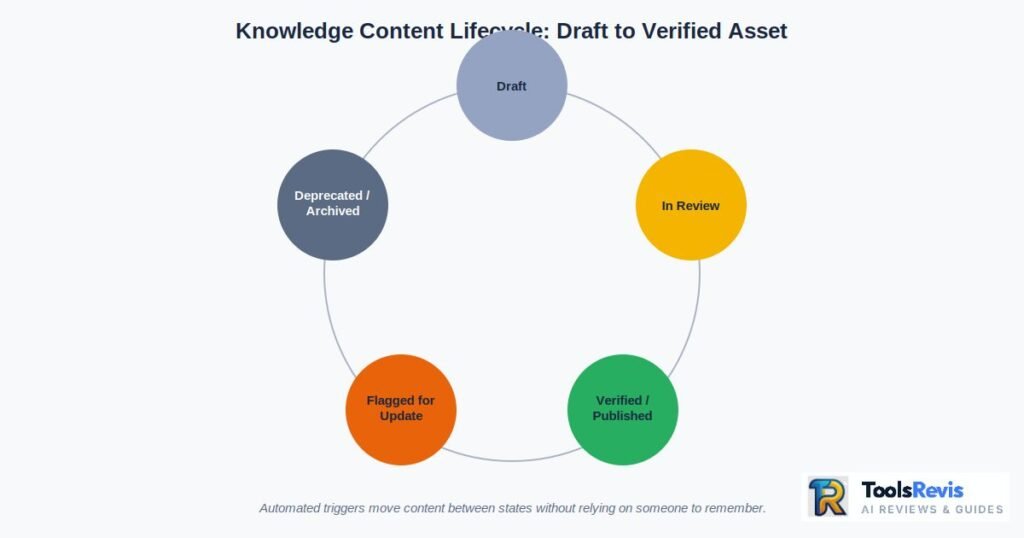
AI Hallucination Alert: The state most enterprises get wrong is “Flagged for Update.” Most legacy KM platforms have no mechanism to detect staleness at all. This is the single largest source of AI hallucination risk once you connect an LLM to your knowledge base: a confidently outdated document is worse than no document, because the system will retrieve it and state it as fact.
Governing the Engine: Knowledge Management Team Structure
Technology doesn’t run a verification cycle by itself — it needs owners with defined authority. The enterprise roles that make a knowledge management workflow actually function are:
- Chief Knowledge Officer (CKO): Owns the enterprise-wide KM strategy, budget, and cross-departmental governance model; reports outcomes (search success rate, time-to-resolution, onboarding velocity) to the C-suite. In organizations without a dedicated CKO, this accountability typically sits with the CIO or a VP of Enterprise Operations, but the authority needs to be explicit.
- Subject Matter Experts (SMEs): The domain authority responsible for factual accuracy within their area (e.g., a senior engineer verifying a troubleshooting article, a compliance officer verifying a policy document). SMEs are the sign-off gate before content reaches “Verified” status.
- Content Curators / Knowledge Managers: The operational layer that enforces taxonomy consistency, flags duplicates, manages the review queue, and monitors staleness triggers. This role is what separates a functioning EKMS from a wiki nobody maintains.
- Knowledge Engineers: Own the technical retrieval layer itself: chunking strategy, embedding model selection, knowledge graph schema, and integration health. This role didn’t widely exist five years ago; it exists now because AI-assisted retrieval requires ongoing technical tuning.
- Domain Owners: Department-level leads (Head of Support, VP Engineering, General Counsel) who have final authority to approve, deprecate, or reassign content ownership within their function.
Failure Pattern to Watch: Designing curation responsibility as an unstaffed “extra duty” on top of someone’s existing job. Curation at enterprise scale is a real workload — treating it as a side task is functionally the same as not staffing it at all.
Connecting the Ecosystem: Essential Knowledge Management Integrations
An EKMS that doesn’t ingest from where work actually happens will always lag behind reality. The integration layer is the mechanism that keeps Creation passive rather than an extra task employees resent. The essential ingestion hooks for a 2026 enterprise stack include:
- Slack / Microsoft Teams: Knowledge Ops platforms monitor designated channels for recurring Q&A patterns, auto-summarizing resolved threads into draft knowledge articles.
- Jira / ITSM Tools: Ticket resolution notes document real troubleshooting logic under time pressure. Ingestion hooks should trigger draft-article generation on ticket closure, tagged automatically against the affected product taxonomy.
- Enterprise CRMs (Salesforce, HubSpot): Account notes and negotiated contract terms are operational knowledge that typically never leaves the CRM. Proper integration extracts this into the shared knowledge layer while respecting deal confidentiality.
- Cloud Storage & Document Platforms (SharePoint, Google Drive, Confluence): These remain the explicit-knowledge backbone; the requirement here is less about capture and more about de-duplication and canonical-version resolution.
- Code Repositories (GitHub / GitLab): Commit messages, PR discussions, and README files capture the “why” behind architectural decisions that would otherwise live only in a departed engineer’s memory.
The AI Revolution in Knowledge Management
The baseline for enterprise knowledge management has shifted from a static, passive wiki to an active AI retrieval layer that interprets natural-language questions and generates cited answers inside the tools employees already use.
From Static Knowledge Base Software Wiki to Active AI Agents
The category has fundamentally shifted. A static knowledge base wiki is a passive container — a human has to know the system exists, know roughly what to search for, and manually parse a results list.
The baseline for enterprise knowledge management is an active retrieval layer: AI agents that sit inside the tools employees already use, interpret a natural-language question, retrieve the relevant grounded content, and generate a direct answer with citations back to the source document.
Enterprise Search and Knowledge Management: The Power of Retrieval-Augmented Generation (RAG)
Retrieval-Augmented Generation (RAG) is the architecture pattern that grounds an LLM’s output in your organization’s actual indexed content rather than the model’s static training data.
Here is the critical architectural decision most vendor pitches skip past entirely: the centralized Knowledge Layer (embeddings, metadata, taxonomy, access controls) must remain architecturally separate from the LLM model doing the generation.
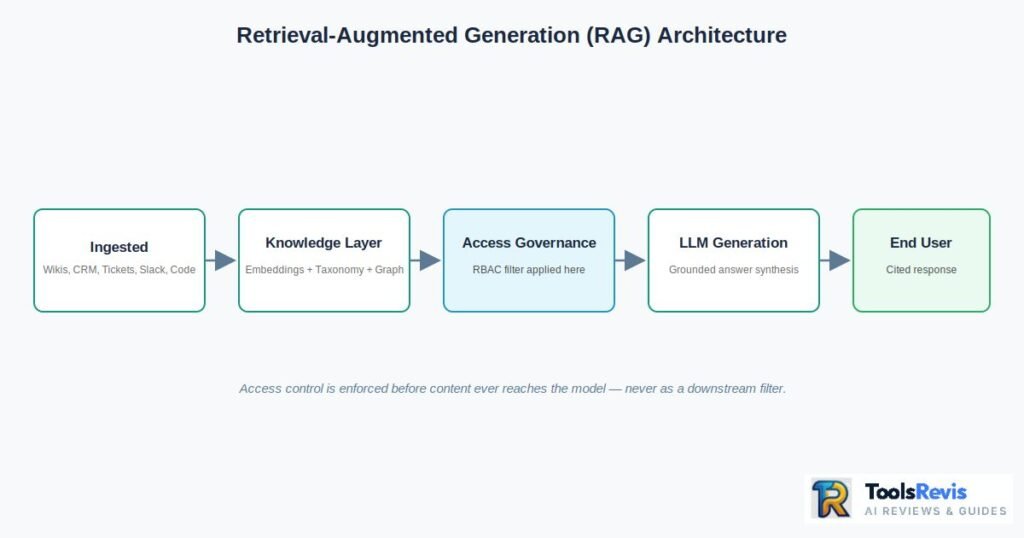
Why this separation is non-negotiable at enterprise scale:
- Model Portability & Vendor Independence: LLM models are replaced on a rapid cycle. If your knowledge base is entangled with a specific model’s fine-tuning, migrating to a better or cheaper model later means rebuilding your entire knowledge infrastructure.
- Currency Without Retraining: Fine-tuning a model on your knowledge is expensive and slow. A properly separated architecture means you update the knowledge base — a document, a chunk, an embedding — and every future query reflects that change instantly.
- Governance and Access Control Enforcement: Access permissions (who can see what) need to be enforced at the retrieval layer, before content ever reaches the model.
- Auditability: Regulated industries need to prove exactly which source document informed a given AI-generated answer. That’s only possible when retrieval is a distinct, logged step separate from generation.
Core Architectural Principle: Always update the knowledge base, never the model. If a vendor’s pitch is built around fine-tuning their model on your data as the primary mechanism for personalization, that’s a lock-in signal, not a feature.
Top Enterprise Knowledge Search Tools: The Search Architecture Framework
Rather than focusing on volatile vendor lists, enterprise architects rely on a multi-layered retrieval framework that separates production-grade platforms from earlier-generation “AI search” bolt-ons:
- Semantic Vector Search: Retrieves content based on meaning rather than exact keyword match, using embedding models to represent both queries and documents as vectors in the same space.
- Hybrid Retrieval: Combines dense vector search with sparse keyword (BM25) matching and a reranking model. Pure vector search alone tends to miss exact-match queries (like a specific error code or contract clause number) that keyword search catches natively.
- Semantic Chunking: Splits documents along meaningful boundaries (sections, logical units) typically in the 256–1024 token range with overlap, ensuring retrieved chunks remain coherent and complete.
- Knowledge Graphs (GraphRAG): Represent entities and the relationships between them (a vendor, a contract, a regulation) so the system can answer multi-hop questions that pure semantic similarity cannot (e.g., “Which of our vendor contracts expose us to the same compliance risk flagged in last month’s audit?”).
- Reranking Pipelines: Production deployments commonly see massive gains in top-result relevance once a cross-encoder reranking model is added after initial retrieval, rather than trusting raw vector similarity scores.
Automation at Scale: Knowledge Automation and Knowledge Ops (KnowledgeOps)
KnowledgeOps is the operational discipline of running knowledge management the way DevOps runs infrastructure — treating knowledge quality, freshness, and pipeline health as measurable, monitored, continuously-improved systems.
- Automated Draft Generation: Pulls directly from resolved tickets, closed PRs, and transcribed meetings into the curation queue.
- Automated Taxonomy Tagging: Uses classification models that assign metadata consistently, removing human inconsistency.
- Automated Deduplication Detection: Flags near-identical content across repositories before it gets published as a second, conflicting source of truth.
- Automated Access-Control Inheritance: Content ingested from a permissioned source (e.g., a confidential CRM note) automatically retains its access restrictions in the unified knowledge layer.
- Pipeline Health Monitoring: Dashboards tracking ingestion latency, embedding freshness, index size growth, and retrieval accuracy over time.
Stopping Data Decay: Trend-Based Content Updates
The most technically demanding capability in an EKMS is automated staleness detection. Modern platforms address this through a combination of automated triggers:
- Conflict Detection: When a newly published, verified document contains claims that contradict an existing published document (detected via semantic similarity comparison), the older document is automatically flagged for review.
- Citation Verification: Documents that make factual claims without a traceable source citation are flagged at a lower trust tier.
- Usage-Decay Scoring: Content that hasn’t been accessed, cited, or positively rated in a defined window gets automatically surfaced to the curation queue for a freshness check.
- Time-Based Expiration Triggers: Automated expiration dates trigger mandatory re-verification for content types with a known shelf life (pricing sheets, product specs).
- Source-of-Truth Escalation: When the system detects two documents addressing the same topic with different answers, it escalates to the relevant Domain Owner or SME rather than arbitrarily surfacing whichever one ranks higher in the retrieval score.
The Enterprise Divider: Any AI search layer can retrieve and summarize existing content. Very few platforms can tell you which of the documents it just retrieved you should no longer trust — and that distinction is exactly where hallucination risk and compliance exposure actually originate.
Building the Business Case & Measuring ROI
A knowledge management business case needs three components to survive executive scrutiny: a quantified current-state cost baseline, a conservative savings model tied to metrics finance already tracks, and a realistic payback timeline.
The Executive Pitch: How to Build a Business Case for Knowledge Management
A KM initiative frequently gets pitched with strong anecdotal evidence — agents juggling five browser tabs, customers getting inconsistent answers, new hires taking a month to become productive — and finance stalls it anyway, because anecdotes do not survive a budget review. The single most common failure mode in getting a knowledge management platform funded isn’t a bad product or a lack of interest. It’s a business case with no numbers attached to it.
A business case for a knowledge management system needs three components to survive executive scrutiny: a quantified current-state cost baseline, a conservative savings model tied to metrics finance already tracks, and a realistic payback timeline. Skip any of these and you’re presenting a vision, not a business case.
Calculating Value: Business Case for Knowledge Management System
The financial case starts with three core metrics that map directly onto costs your CFO already monitors:
1. Average Handle Time (AHT) Reduction
When agents have to search scattered systems, validate answers, or escalate to a colleague, that friction shows up directly in handle time. Enterprises that deploy AI-assisted knowledge retrieval into their support workflow commonly see handle time drop in the 20–40% range.
$$\text{AHT Savings} = (\text{Old AHT} – \text{New AHT}) \times \text{Ticket Volume} \times \text{Agent Hourly Cost}$$
2. Ticket Deflection (Support Cost Deflection)
Deflection measures the percentage of potential support interactions resolved through self-service before they ever become a ticket.
$$\text{Annual Deflection Savings} = \text{Monthly Ticket Volume} \times \text{Deflection Rate} \times 12 \times \text{Average Cost per Ticket}$$
3. Reduction in Ticket Duplication
Duplicate tickets inflate both ticket volume and agent workload simultaneously. Tracking knowledge reuse rate gives you a direct proxy for how much duplicated diagnostic work the system is eliminating.
…Skip any of these and you’re presenting a vision, not a business case. If you want to skip manual math, use our live tool to calculate your numbers in real-time:
| Metric | Formula | Typical Enterprise Range |
| AHT Reduction | $(\text{Old AHT} – \text{New AHT}) \times \text{Volume} \times \text{Hourly Cost}$ | 20–40% reduction |
| Ticket Deflection Savings | $\text{Monthly Volume} \times \text{Deflection Rate} \times 12 \times \text{Cost/Ticket}$ | 15–30% deflection at maturity |
| Onboarding Time Reduction | $\text{Ramp Days Saved} \times \text{Daily Cost} \times \text{New Hires/Year}$ | Days-to-weeks of ramp time recovered |
| First Contact Resolution Lift | $\text{Tickets Resolved on First Contact} / \text{Total Tickets}$ | Measurable lift across channels |
Analytical Callout: Build your first-year model conservatively using direct labor savings only (AHT and deflection). Layer in escalation reduction, CSAT improvement, and talent retention effects as secondary benefits. Presenting a conservative model that survives deep scrutiny builds far more executive trust than an aggressive model finance immediately discounts.
Strategic Alignment: The Impact of Knowledge Management on Decision Making
The AHT and deflection numbers get budgets approved. What sustains the budget in year two and beyond is proving the strategic impact — that knowledge management decision making isn’t just a cost-center efficiency play but a direct input into how the business scales.
- Faster Strategic Calls: Centralized competitive intelligence, past negotiation outcomes, and post-mortem lessons mean leadership decisions get made with complete context and zero redundant analysis.
- Reduced Decision Reversal: A documented rationale for why a prior decision was made prevents an organization from re-litigating the same debate every time there’s a leadership change or team reshuffle.
- Cross-Functional Alignment: When Legal, Sales, and Product draw from the same governed knowledge layer, the friction of “is this the current version?” disappears from cross-departmental operations.
- Measurable Innovation Impact: Knowledge reuse metrics and cross-team sharing activity are legitimate leading indicators of innovation output, allowing teams to actively build on what other business units have already optimized.
Risk Management: Setting a Bulletproof Corporate Knowledge Management Policy
Once you connect an AI retrieval layer across your enterprise’s knowledge, you’ve built a system that can technically surface any indexed content to any user who asks the right question — including HR compensation data, legal settlement terms, or financial forecasts that should never reach unauthorized eyes.
Role-Based Access Control (RBAC) is the non-negotiable governance layer that prevents this. The critical architectural requirement: access control must be enforced at the retrieval layer, before content reaches the AI model — not as a downstream filter on the generated answer.
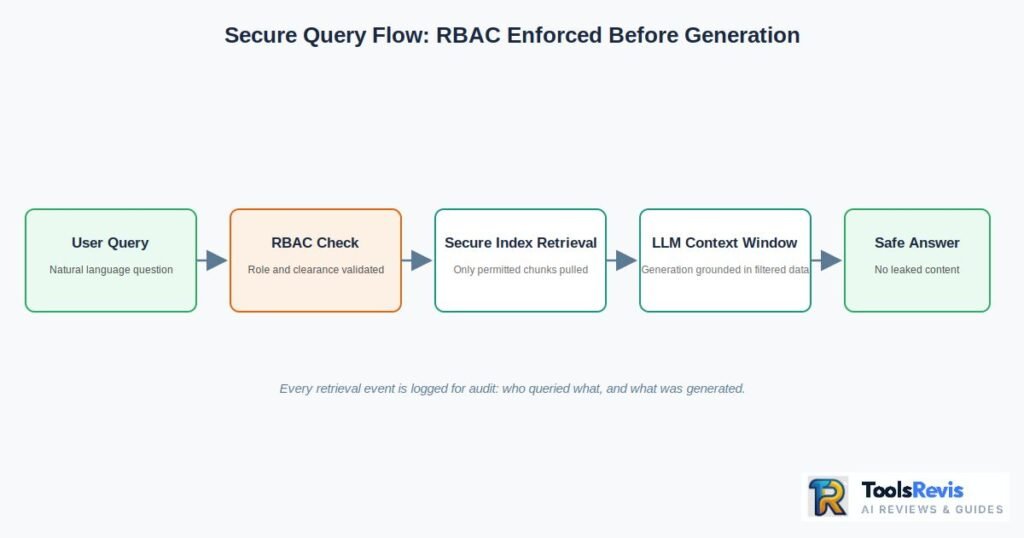
A bulletproof corporate knowledge management policy must explicitly enforce:
- Document and Field-Level Access: An HR policy document might be broadly readable while the compensation bands embedded in the same repository are strictly restricted.
- Inherited Source Permissions: Content ingested from a restricted CRM field or a legal-only Confluence space must retain those strict permissions natively within the unified knowledge layer.
- Query-Time Permission Enforcement: The retrieval system validates the user’s explicit role and clearance before pulling candidate documents into the context window, preventing leakages.
- Immutable Audit Logging: Every retrieval event must log who queried what, what chunks were retrieved, and what was ultimately generated for end-to-end compliance tracking.
- Data Residency Controls: Explicit boundaries mapping where embeddings, vector indexes, and system caches physically live to satisfy regional regulatory frameworks (GDPR, HIPAA, SOC 2).
Inference Leakage Warning: Watch out for an AI copilot that is permission-aware for direct document access but vulnerable to inference. Models can sometimes reconstruct restricted information indirectly by combining several individually-permitted documents. Enterprise-grade RBAC implementations need automated penetration testing specifically designed to catch indirect-inference leaks.
Continuous Auditing: Importance of Knowledge Management Assessment
A knowledge management system is not a “launch and done” project — it’s ongoing infrastructure, and unmonitored infrastructure degrades silently. A systematic assessment program must evaluate:
- Content Accuracy: Regular automated and manual sampling of published articles against current production ground truth to catch information drift before users do.
- Search Failure Analysis: Tracking abandoned searches to pinpoint content gaps where employees search repeatedly and find nothing, feeding directly into the content creation queue.
- Access Sprawl Audits: Verifying that permission grants still map tightly to current operational roles, pruning users who have changed departments but retained old clearance levels.
- Governance Compliance Checks: Confirming content review SLAs are actively met (compliance docs reviewed quarterly, technical specs at each major release, general reference content annually).
Best Practices & Long-Term Implementation
The organizations that extract durable value from knowledge management treat it as an operational discipline with owners, SLAs, and metrics — not a one-time IT deployment.
Operational Excellence: A Proven Knowledge Management Methodology and Best Practice
The organizations that extract durable value from knowledge management treat it as an operational discipline with owners, SLAs, and metrics — not a one-time IT deployment. The best-practice methodology follows a rigorous loop:
[Baseline Current Friction] ➔ [Pilot Single Domain] ➔ [Measure Defensible Wins] ➔ [Scale Governance & Tooling]
The single most consistent lesson from mature enterprise deployments: the technology is rarely the bottleneck. The knowledge base being unmaintained — old articles, missing owners, and a total lack of retirement processes — is what kills adoption. An AI layer merely amplifies whatever quality exists underneath it; it cannot fix a broken foundation.
Blueprints in Action: Enterprise Knowledge Management Program Examples
Example 1: International Customer Support Operations Overhaul
A global SaaS company running support across four regions in six languages maintained separate, localized troubleshooting wikis. Customers received conflicting resolutions, AHT varied by 2x between regions, and senior engineers were chronically interrupted to act as human knowledge centers.
The program addressed this by:
- Consolidating all regional documents into a single governed knowledge layer with a unified semantic taxonomy.
- Appointing dedicated Content Curators per region reporting to a central Knowledge Manager to preserve local nuance while enforcing structural consistency.
- Deploying an AI copilot inside the ticketing system that automatically surfaced the three most relevant verified articles alongside every incoming ticket.
The Outcome: Meaningful AHT reduction within the first 90 days, a sharp rise in First Contact Resolution (FCR), and complete alignment in global resolution quality.
Example 2: Agile Engineering Team Context Capture
A fast-moving engineering organization running two-week sprints across a dozen squads suffered from “tribal knowledge.” Architectural decisions were made in Slack and standups, meaning new hires spent weeks reverse-engineering codebases and departing engineers took critical infrastructure context with them.
The program addressed this through an engineering-native approach:
- Integrating directly with GitHub/GitLab pull requests, making Architectural Decision Records (ADRs) a required field before code merge.
- Auto-summarizing resolved Slack engineering threads into draft knowledge articles routed directly to a tech lead’s triage queue.
- Tagging captured knowledge automatically against the specific service or repository module taxonomy.
The Outcome: A dramatic drop in developer onboarding ramp times and the elimination of redundant architecture alignment meetings.
The Feedback Loop: Lessons Learned Systems Knowledge Management
A lessons-learned system converts a project’s or incident’s outcome into reusable organizational assets rather than letting that intelligence vanish when the project team disbands.
- Capture at Moment of Closure: Post-incident reviews and project retrospectives must feed into the knowledge layer as a mandatory step in the workflow closure checklist, never as an optional follow-up.
- Consistent Structural Schemas: Enforce strict semantic structures (e.g., What Happened, Root Cause, Mitigation, Future Structural Change) so lessons are highly indexable and queryable across parallel business units.
- Cross-Pollinating SOPs: If a project retro identifies a recurring vendor risk, that insight should automatically trigger an update flag on the central vendor evaluation SOP rather than sitting isolated in a generic folder.
Scaling Adoption: Running Impactful Knowledge Management Training Sessions
Training is where many enterprise KM rollouts quietly fail because a single all-hands launch webinar rarely shifts daily habits. Highly impactful training sessions leverage these traits:
- Role-Specific Tracks: Design customized pathways for support agents (consumption-heavy), SMEs (authoring/verification workflow), and team leads (governance and metrics).
- Workflow-Embedded Onboarding: Deliver micro-training the exact moment an employee encounters a need (e.g., triggering guidance when an agent handles their first complex ticket category).
- Focus on Contribution Mechanics: Over-indexing on search while under-training on how to log a quick resolution creates a unidirectional system that starves over time. Equalize the split.
Future Trends & Conclusion
Enterprise knowledge management through the rest of this decade is being rewritten by two shifts: agentic workflows and multimodal knowledge processing.
The Road Ahead: Future Trends of Knowledge Management
The trajectory of enterprise knowledge management through the rest of this decade is being fundamentally rewritten by two massive architectural shifts: agentic workflows and multimodal knowledge processing.
┌── 1. Agentic Workflows (Autonomous task execution)
Future of EKMS (2026-2030) ┤
└── 2. Multimodal Ingestion (Screen, audio, and visual parsing)
- Agentic Workflows: Systems are shifting from passive search tools into active operational entities. Instead of a human querying an index and reading an answer, specialized AI agents handle multi-step tasks autonomously. For example, compliance agents continuously cross-reference new legal contracts against a corporate knowledge graph of changing regulatory obligations, flagging conflicts without waiting to be asked. This means your knowledge layer must be optimized for machine-to-machine querying, requiring flawless access controls since autonomous agents will execute decisions directly based on the data retrieved.
- Multimodal Knowledge Processing: Corporate data lives far beyond text files. It is locked in call recordings, technical screen-shares, workflow diagrams, and design sketches. Modern knowledge infrastructure ingests, transcribes, and semantically indexes these visual and auditory formats alongside traditional text. This solves the tacit-knowledge extraction bottleneck — screen-capturing a senior engineer fixing a complex production outage can now automatically generate an audited, searchable troubleshooting article.
Staying Competitive: Benefits of Knowledge Management Present and Future Trends
The organizations that hold a durable competitive advantage over the next decade are not the ones buying the largest external AI models — they are the ones that treat their internal data as governed, continuously maintained, clean infrastructure.
The present-day benefits (slashed handle times, faster onboarding, sharper decisions) compound directly into future capabilities. An enterprise whose knowledge layer is clean, partitioned, and semantically mapped today can seamlessly deploy agentic and multimodal workflows tomorrow without a costly infrastructure retrofit.
Read Next: Curious how this connects to content automation? See how our guide on “How Automated Content Creation Works” uses a clean knowledge layer to avoid AI hallucination in published content.
Ready to Take Action? Try Our Free Tools
If you made it this far, here is how you can put these strategies into practice with our free utilities:
1. Find the Right AI Tool
Not sure which AI solution fits your needs? Simply describe your goal, and our AI-powered recommendation tool will identify the most suitable option for your specific task in just a few seconds. It’s completely free and requires no sign-up.
2. Analyze Your AI Search Visibility
Want to know how AI search platforms may present your brand? Use our AI Overview Preview tool to see how your content could appear in Google’s AI-generated summaries. This gives you a clear starting point before investing in advanced GEO solutions.
3. Estimate Your AI Software Budget
Planning your AI toolkit doesn’t have to be complicated. Our AI Tool Stack Calculator estimates the tools and budget your team may need based on your business size, goals, and workflow—delivering a personalized recommendation in just a few minutes.
4. Estimate Your Content Automation ROI
Not sure if automation is worth the investment? Our AI Content ROI & Automation Cost Calculator shows you exactly how much time and money you could save by switching from manual content creation to an automated pipeline — based on your team size and publishing volume.

I’m Umair Ahmad, founder of ToolsRevis. I personally test every AI tool we cover — signing up, running real workflows, checking pricing tiers, and comparing outputs — before writing a single word. My goal: cut through AI marketing hype with honest, hands-on verdicts.
Let’s achieve more together!