
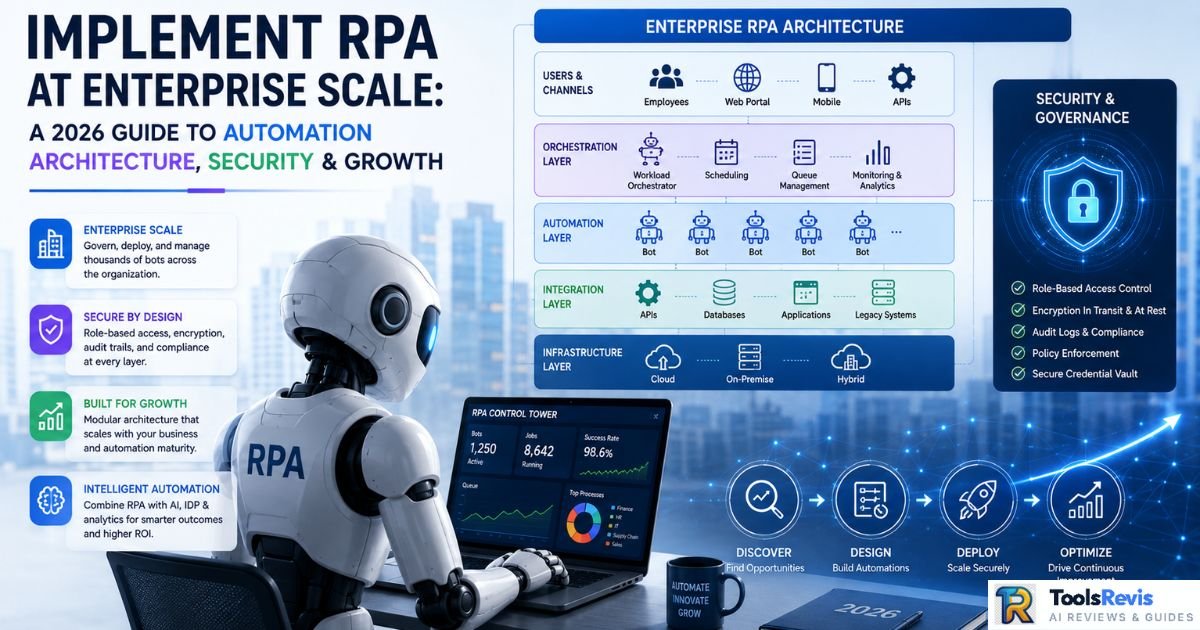
Let’s be direct: over 50% of initial automation projects stall or fail, and this isn’t a surprising statistic to anyone who’s worked inside enterprise IT. Low-code platforms have created the perception that RPA is a drag-and-drop exercise — a few clicks, a recorder, and the bot is ready. The reality is the opposite. To implement RPA successfully, organizations must treat automation as a software engineering discipline where version control, exception handling, credential management, and environment segregation matter just as much as they would in any production-grade application.
Teams that jump in chasing the hype end up with siloed, desktop-level bots — a script running on one analyst’s laptop that only they know how to maintain. This approach delivers short-term wins but is completely unsustainable for long-term RPA digital transformation. To implement RPA at enterprise scale, organizations need a deliberate journey—from assessment and Center of Excellence (CoE) planning to security, governance, and ROI measurement.
Before you implement RPA, experienced practitioners agree that technology is rarely the primary reason automation succeeds or fails. The biggest challenges usually appear before development even begins — poor process documentation, unclear business requirements, inconsistent data, and unrealistic stakeholder expectations.
Quick Answer Box: When Should You Implement RPA in an Enterprise?
RPA delivers value by eliminating repetitive, rule-based manual work across high-volume, structured processes — reducing errors and cycle time dramatically. Implement RPA only when a process has stable inputs, clear business rules, and measurable transaction volume. Successful implementations depend on thorough process analysis, accurate documentation, and ongoing maintenance.
Strategic Planning: The Pre-Implementation Phase
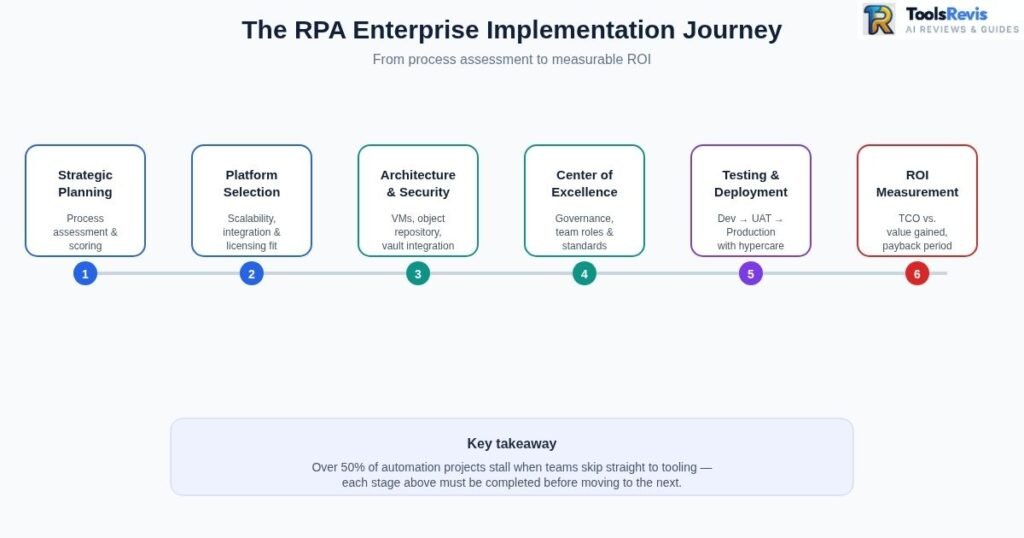
Organizations that implement RPA successfully begin with strategic planning rather than selecting automation software first. Strategic planning is the first stage of RPA implementation where organizations evaluate processes, define automation goals, and prepare the technical and business requirements before building bots.
Initial Discovery: Rigorous Process Assessment
The first mistake most teams make when they implement RPA is selecting an automation tool before properly understanding what actually needs to be automated. A proper robotic process automation assessment systematically evaluates every candidate process, rather than relying on anecdotal feedback like “this process takes a lot of time.”
Before you implement RPA, design a dynamic robotic process automation questionnaire that scores candidate processes against these criteria:
- Volume: Is the transaction count high enough to justify automation ROI? (A reasonable baseline is typically 500+ transactions/month.)
- Structured Data: Do inputs arrive in a consistent format, or does the format vary each time?
- Rule-Based Logic: Is decision-making deterministic, or does it still involve judgment calls that require human cognition?
- Stability: Are the underlying applications and workflows stable, or do they change frequently?
Every process should receive a weighted score — processes with high volume, high structure, and high rule clarity go to the top of the priority list.
Reddit Insights: The “Tribal Knowledge” Trap
Experienced RPA teams on Reddit repeatedly share that process owners rarely document every step of their own workflow. Manual workarounds, undocumented exceptions, and “tribal knowledge” often remain hidden until automation begins.
The Fix: Before teams implement RPA, Business Analysts should observe users performing the work live instead of relying solely on interviews. Validate every exception scenario and produce detailed process documentation before development starts.
Platform Selection: Defining RPA Requirements at Scale
Organizations that implement RPA at enterprise scale should select an automation platform based on scalability, integration requirements, security needs, licensing costs, and internal technical capability rather than brand popularity alone. Until you define enterprise-level RPA requirements, no tool is objectively “best” — everything is context-dependent. Platform decisions depend on factors like:
- Scalability: How many concurrent bots do you need to run — 10 or 1,000?
- Integration Depth: Do you need to support mainframe systems, legacy Citrix apps, or modern SaaS APIs?
- Licensing Model: Attended vs. unattended bot licensing costs differ significantly.
- Internal Skillset: What existing experience does your team have with each platform?
When comparing robotic process automation tools like UiPath vs. Automation Anywhere, get a realistic estimate of implementation timelines. UiPath generally allows faster proof-of-concept deployment thanks to its mature Studio tooling, while Automation Anywhere is strong in centralized bot management due to its cloud-native architecture. Both typically see pilot-to-production timelines in the 8–16 week range, depending on process complexity.
For small and medium-sized businesses, Microsoft Power Automate is often easier to justify due to its lower licensing costs and native integration with Microsoft 365, while large enterprises frequently choose UiPath because of its mature governance, orchestration, and scalability capabilities.
RPA Platform Comparison: UiPath vs Automation Anywhere vs Power Automate
| Feature | UiPath | Automation Anywhere | Microsoft Power Automate |
| Best For | Large enterprises | Enterprise automation | SMB & Microsoft users |
| Learning Curve | Medium | Medium | Easy |
| Scalability | Excellent | Excellent | Good |
| Governance | Advanced | Advanced | Good |
| Microsoft 365 Integration | Medium | Medium | Excellent |
| Cost Efficiency | Medium | Medium | High for Microsoft users |
| AI Capabilities | Strong | Strong | Growing |
Designing a Scalable and Secure RPA Architecture
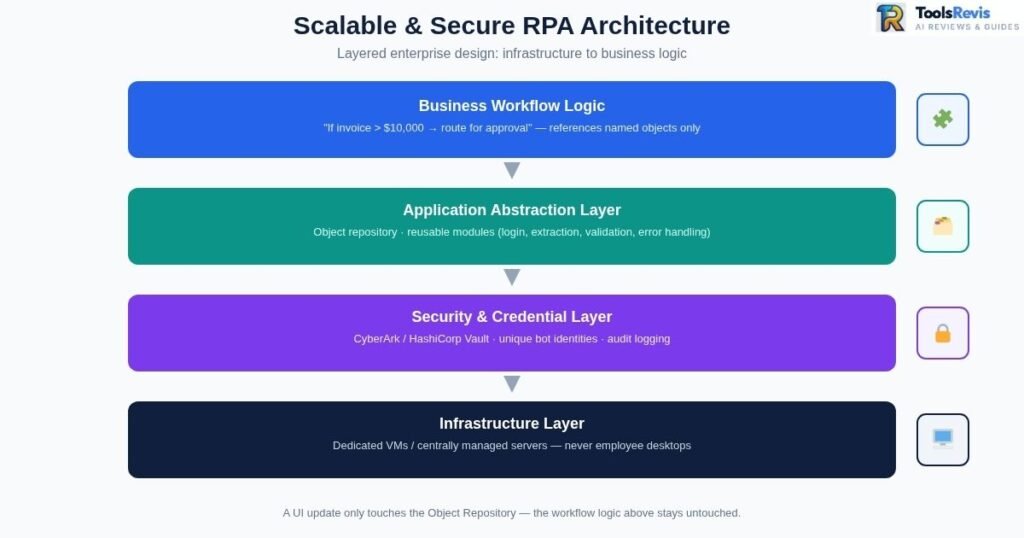
A scalable RPA architecture is a structured framework that connects bots, infrastructure, applications, security controls, and governance processes to support reliable enterprise automation.
Infrastructure Layer & Server Setup
This is a non-negotiable rule: bots should run on dedicated Virtual Machines (VMs) or centrally managed servers, never on employee desktops.
Desktop-based execution frequently introduces severe issues:
- Screen resolution mismatches that break UI selectors.
- Abrupt session drops when a machine goes into sleep mode or locks automatically.
- Resource contention when an employee is using the machine simultaneously.
- Windows updates interrupting unattended bots mid-transaction.
Dedicated VMs guarantee consistent screen resolution, dedicated compute resources, and 24/7 availability — a foundational requirement for unattended automation.
In enterprise environments, developers typically connect remotely through secure VPN connections or Remote Desktop Services to manage and test these systems safely.
Application Abstraction Layer
A core principle of mature RPA architecture is decoupling business logic from the UI object repository. Your bot’s core workflow logic (“if the invoice amount exceeds $10,000, route for approval”) shouldn’t depend on the exact location of any specific button or field.
To implement this successfully:
- Build a separate Object Repository layer that centrally stores all UI elements (buttons, fields, dropdowns).
- Reference named objects only in business workflow scripts, never hardcoded screen coordinates or brittle selectors.
- Isolate reusable modules such as login/authentication, data extraction, validation rules, and error handling.
When an application’s interface gets a minor update, only the object repository needs updating — the workflow logic itself remains untouched.
Security, Compliance, and Cyber Security
RPA security is the practice of protecting bots, credentials, data, and automated workflows from unauthorized access, compliance violations, and operational risks.
Robotic process automation cyber security is arguably the most under-discussed topic when teams plan RPA pilots. Bots often use privileged credentials to access banking systems, ERPs, and HR databases. Without proper governance, they create a massive attack surface.
For robust technical integration:
- Enterprise Vault Integration: CyberArk or HashiCorp Vault integration should be mandatory. Bot credentials must never be stored in plaintext or hardcoded into a script.
- Individual Bot Identities: Assign each bot a unique, non-human service identity. Avoid shared service accounts.
- RPA Compliance Protocols: Enforce protocols that periodically audit access rights — which bot has access to which system, and whether that access is still necessary.
- Audit Logging: Enable session recording and complete audit logging so every bot action remains traceable, especially in regulated industries like finance, insurance, and healthcare.
The Core Pillar: Establishing an RPA Center of Excellence (CoE)
What is an RPA CoE?
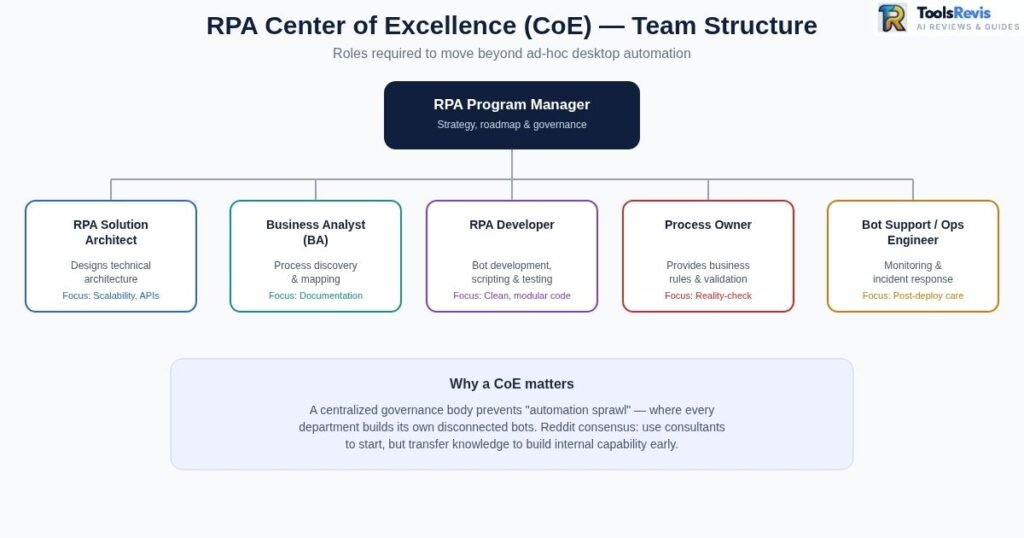
If an organization wants to move beyond ad-hoc, unmanaged desktop automation, building a structured RPA Center of Excellence is the only path forward. A CoE is a centralized governance body that defines standards, tooling, and best practices so that every department doesn’t end up building its own disconnected automation approach (preventing “automation sprawl”).
Building the Internal Core Team
A proper RPA CoE setup requires a clear team structure with specialized roles:
| Role | Main Responsibility | Key Focus Area |
| RPA Program Manager | Strategy, roadmap, and governance | Business alignment & ROI |
| RPA Solution Architect | Designs overall solution and technical architecture | Scalability, APIs vs. UI selectors |
| Business Analyst (BA) | Process discovery, mapping, and requirements | Pre-development documentation |
| RPA Developer | Bot development, scripting, and unit testing | Clean, modular code |
| Process Owner | Provides business rules and validation data | Reality-check on actual workflows |
| Bot Support/Ops Engineer | Handles production monitoring and incident response | Post-deployment maintenance |
Reddit Consensus: “Don’t Depend on Consultants Forever”
Reddit’s RPA developer community heavily emphasizes that external consultants are great for starting the journey, but you must build internal capability. Without structured knowledge transfer to your own team, you will face high maintenance costs and struggle to update bots when your external partners leave.
Industry-Proven Robotic Process Automation Best Practices
RPA best practices are proven methods that help organizations build reliable, secure, and scalable automation workflows while avoiding common implementation failures.
1. Process Optimization First (Never Automate a Broken Process)
Clean up the process before you automate it. If your manual process is already broken, automation will only break it faster. Automating a broken process means generating errors exponentially faster — the bot will make the same mistakes, just now at scale. Remove redundant approvals and streamline data fields first.
2. Prioritize High-ROI Over Convenience
Don’t choose processes because they are easy to automate. Choose them based on business value.
| Avoid This Metric | Prioritize This Metric (High-ROI) |
| Arbitrary targets like “saving 100 hours” | High transaction volume (>500/month) |
| High bot count (deploying bots for the sake of it) | Stable processes with low exception rates |
| Automating complex cognitive workflows first | Clear, measurable ROI and cost reduction |
3. Prefer APIs Over Screen Scraping
Whenever possible, avoid screen scraping or UI-based automation. If the target system provides APIs or database access, use those first. Backend integrations are faster, highly reliable, and virtually unaffected by user interface changes.
4. Advanced RPA: Cognitive Automation
Traditional rule-based bots can only handle structured data. Cognitive robotic process automation combines RPA with AI/ML to process unstructured data (scanned PDFs, emails, free-text documents).
Intelligent Process Automation best practices suggest keeping human-review checkpoints (Human-in-the-Loop) in place whenever AI confidence scores fall below a set threshold.
Identifying and Mitigating Key Robotic Process Automation Risks
RPA risks are the technical, operational, and security challenges that can cause automation failures, increased maintenance costs, or compliance issues.
The “Maintenance Trap” (Brittle Selectors)
The most common and costly robotic process automation risk is minor UI updates breaking UI selectors. A button shifts five pixels, and the entire bot fails.
Mitigation Strategies:
- Fuzzy Matching: Let selectors use similarity-based matching instead of exact matches.
- Anchor-Based Targeting: Locate elements relative to stable surrounding elements rather than absolute coordinates.
- AI Computer Vision Selectors: Use visual recognition to identify elements by appearance, independent of the underlying code structure.
Quantifying Success: Using an RPA ROI Calculator
A realistic RPA ROI calculator doesn’t just measure “time saved” — it must account for the full Total Cost of Ownership (TCO).
- TCO (Total Cost of Ownership) includes: Upfront development and setup costs, recurring software license fees (such as UiPath, Automation Anywhere, or Power Automate), and infrastructure/VM hosting.
- Value includes: Reduced manual handling errors, processing speed velocity gains, and employee hours reallocated to high-value tasks.
To accurately calculate these complex variables, you must look at real numbers rather than generic industry averages. You need to analyze:
- The exact size of your team currently executing the manual task.
- Their average hourly wage and hours spent per week on repetitive work.
- The expected automation coverage percentage.
- One-time implementation setup costs paired with ongoing monthly maintenance.
Instead of doing this complex math manually, you can use our free interactive tool to simulate your enterprise savings instantly.
Try It Now: Interactive RPA ROI Calculator
Estimate your potential savings, payback period, and 5-year automation return with our quick enterprise tool. Input your team size, hourly wages, and license costs to get a customized, downloadable PDF report instantly.
Real-World Use Cases: RPA Across Major Industries
- Healthcare: Automated claims processing, billing validation, and patient data compliance (like HIPAA-aligned controls).
- Energy & Utilities: Smart meter data management, automated meter-reading reconciliation, and consumption anomaly detection.
- Telecom: Customer onboarding and automated network provisioning (coordinating account setup and SIM activation across legacy systems).
- Manufacturing: Real-time floor management, automated supply chain syncs, and updating inventory logs inside ERP systems.
- Call Centers: Pulling customer data instantly from multiple legacy databases to present a unified view on the agent’s screen during a call.
RPA Testing, Deployment, and Maintenance
RPA testing and deployment is the controlled process of validating bots, approving workflows, and moving automation from development environments into production safely.
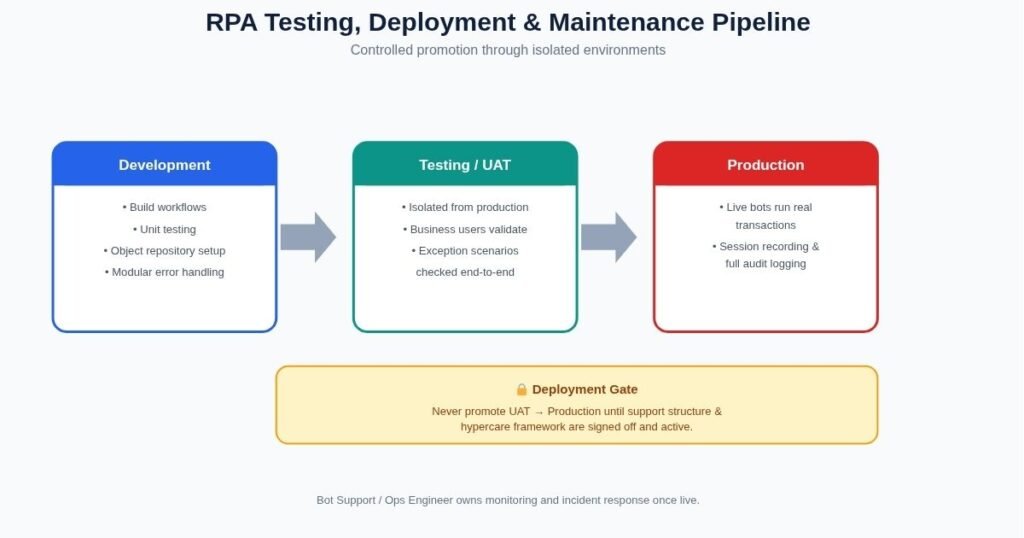
Enterprise RPA should follow a strictly controlled deployment process through isolated environments:
- Development Environment: Where workflows are built and unit tested.
- Testing/UAT Environment: Isolated from production, where business users validate that exceptions are handled correctly.
- Production Environment: Where live bots execute real transactions.
Crucial Deployment Rule: Never promote an RPA script from UAT to Production until a dedicated support structure and a hypercare framework (intensive post-deployment support) are signed off and active.
Read Next Section
Continue Learning About Robotic Process Automation
Want to explore enterprise automation in more depth? These guides will help you understand RPA fundamentals, industry-specific use cases, and where automation delivers the highest business value.
- RPA Tools Comparison: Finding the Best Software for Your Business
An in-depth review and comparison of leading enterprise automation platforms, helping you choose the right technology based on your scale, budget, and infrastructure. - What Is Robotic Process Automation? Complete 2026 Guide
Learn how RPA works, its core components, real-world business use cases, and how it has evolved into Agentic AI.
- Robotic Process Automation for Accounts Payable
Discover how businesses automate invoice processing, three-way matching, approvals, and payment workflows to reduce manual effort and improve accuracy. - RPA in Manufacturing & Procurement (2026 Guide)
Explore how manufacturers automate procurement, supplier onboarding, inventory management, purchase orders, and supply chain operations.
Deep-Dive FAQs (Reddit Insights & People Also Ask)
Q1: Why do over 50% of RPA implementations fail?
According to RPA practitioners on Reddit, projects fail primarily due to poor process selection and dirty data rather than software issues. Teams often try to automate complex processes with too many exceptions or assume that RPA can “fix” an inherently broken manual workflow. If the underlying data is unstructured and the rules change constantly, the bot will fail.
Q2: Is UiPath better than Microsoft Power Automate for enterprise use?
For large enterprises requiring strict security, OCR document understanding, and complex orchestration across 100+ virtual machines, UiPath is generally superior due to its advanced Orchestrator features. However, for SMBs with simple workflows who already use the Microsoft 365 ecosystem, Power Automate is far more cost-effective and easier to implement.
Q3: What is the “Maintenance Trap” in RPA, and how do you avoid it?
The Maintenance Trap occurs when an organization spends more time and money fixing broken bots than they save through automation. This happens when bots are built using rigid, hardcoded UI selectors. If the application updates or the screen resolution changes, the bot breaks. You can avoid this by using API-based automation, anchor-based targeting, and modular design.
Q4: What is the role of a Business Analyst (BA) in an RPA project?
An RPA BA is the bridge between the business team and the technical developers. Unlike traditional BAs, an RPA BA must document every micro-step of a process, identify undocumented manual workarounds (which users often do automatically without realizing), capture all possible exceptions, and create the Process Definition Document (PDD) before coding starts.
Q5: How do you handle passwords and credentials securely in RPA?
Under no circumstances should passwords be hardcoded or written in configuration files. Enterprise setups require integration with credential vaults like CyberArk, HashiCorp Vault, or Windows Credential Manager. Bots should retrieve encrypted credentials dynamically at runtime, and each bot should have its own non-human service identity with audited permissions.
Q6: What is “Human-in-the-Loop” (HITL) in RPA?
HITL is a hybrid automation model. Instead of aiming for 100% unattended automation (which often fails on complex processes), the bot handles 80-90% of structured data processing, and then automatically queues any exceptions (such as blurry document scans or unusual high-value approvals) for a human subject matter expert to review via a dashboard.
Q7: Can RPA automate legacy applications with no APIs?
Yes, this is RPA’s primary strength. Using Object Cloning, Image Recognition, and Computer Vision, bots can interact with legacy ERPs, mainframe terminals, and Citrix environments by mimicking human keystrokes and mouse clicks on the user interface when modern backend APIs are unavailable.
Q8: What is the difference between Attended and Unattended RPA?
- Attended Bots run on a user’s workstation and are triggered manually by an employee to assist with real-time tasks (like a call center agent pulling up customer data).
- Unattended Bots run on dedicated servers/VMs in the background on a schedule or queue-basis, requiring zero human intervention.
Q9: How long does it typically take to deploy an enterprise-grade bot?
While basic desktop scripts can be built in a few days, an enterprise-grade unattended bot typically takes 8 to 16 weeks to go from initial process discovery and documentation, through security approvals, UAT testing, and final production deployment.
Q10: How do you calculate a realistic payback period for RPA?
A realistic payback period is calculated by comparing the Total Cost of Ownership (TCO) — including developer salaries, infrastructure VMs, CoE management, and software licensing — against the unlocked value (FTE hours saved, error rate reductions, and faster cycle times). Most well-scoped enterprise processes see a payback period within 12 to 18 months.
Free Automation Tools
Free RPA & Business Automation Tools
Planning an automation project? Use our free calculators and utilities to estimate ROI, reduce manual work, and evaluate automation opportunities before investing in enterprise software.
- RPA ROI Calculator
Estimate implementation costs, expected savings, payback period, and long-term return on investment. - P2P Savings Calculator
Measure potential savings by automating procure-to-pay workflows, supplier management, approvals, and invoice processing. - PDF Invoice Data Extractor
Extract invoice data from PDF files instantly and eliminate manual data entry for finance and accounts payable teams. - Support Bot ROI Calculator
Estimate how much your business could save by automating customer support with AI-powered bots.

I’m Umair Ahmad, founder of ToolsRevis. I personally test every AI tool we cover — signing up, running real workflows, checking pricing tiers, and comparing outputs — before writing a single word. My goal: cut through AI marketing hype with honest, hands-on verdicts.
Let’s achieve more together!